


Description
Give logged-in customers time to decide with a temporary product hold. Spectral Dot Reservations lets them reserve one unit of an eligible WooCommerce product or selected variation, review it in My Account, and add an active reservation to the cart when ready to buy.
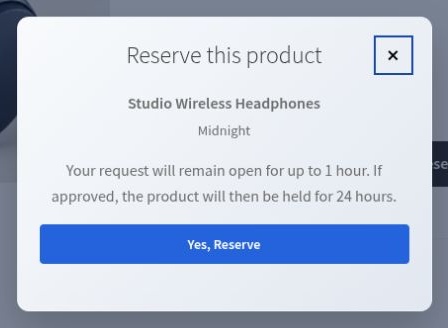
Choose an immediate stock hold or require merchant approval first. Pending requests do not hold stock. Approval starts the active hold and its duration.
Is Free a fit for your store?
- Customers must be logged in; guest reservations are not included.
- Products must be published, purchasable and have positive WooCommerce-managed stock.
- Simple products and selected variations are supported. Variations can manage their own stock or share stock with the variable parent.
- Each reservation holds one unit. Open-reservation limits apply across all products and variations for the customer.
- Active holds and pending requests have separate configurable durations from 1 to 168 hours.
Grouped, external, composite and bundled products, multi-unit reservations and out-of-stock waitlists are not part of Free.
Customer features
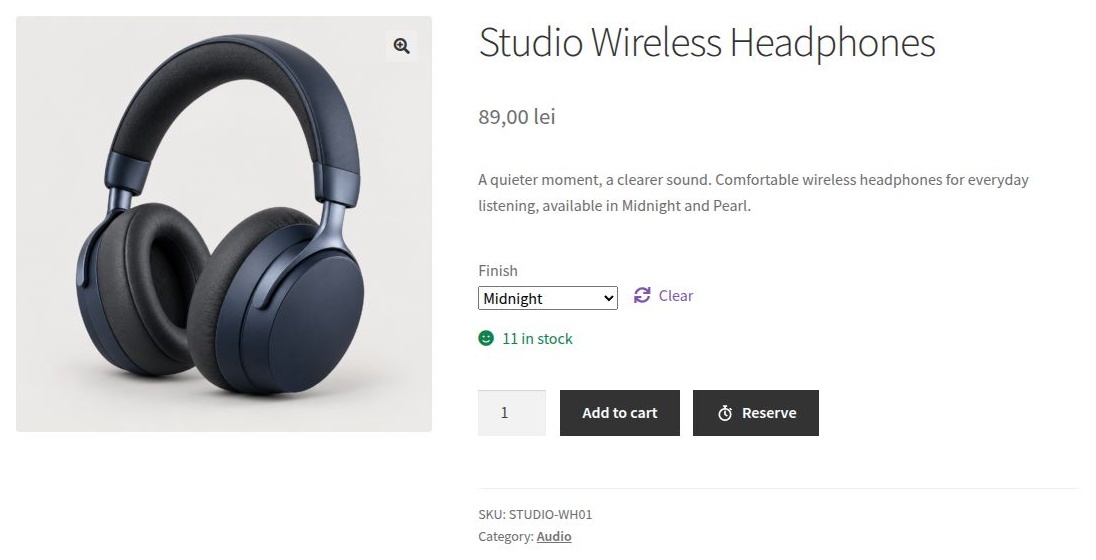
- Reserve an eligible product from its product page
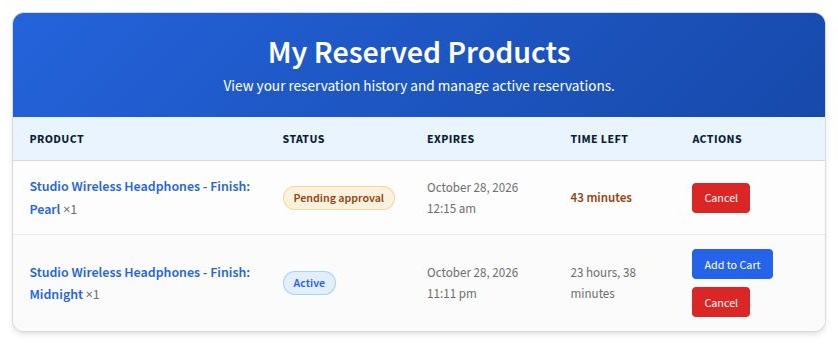
- View active and historical reservations in My Account
- Add an active reservation to the cart and complete checkout
- Cancel an eligible reservation
- Receive reservation, approval, denial, and expiration emails when notifications are enabled
Merchant features
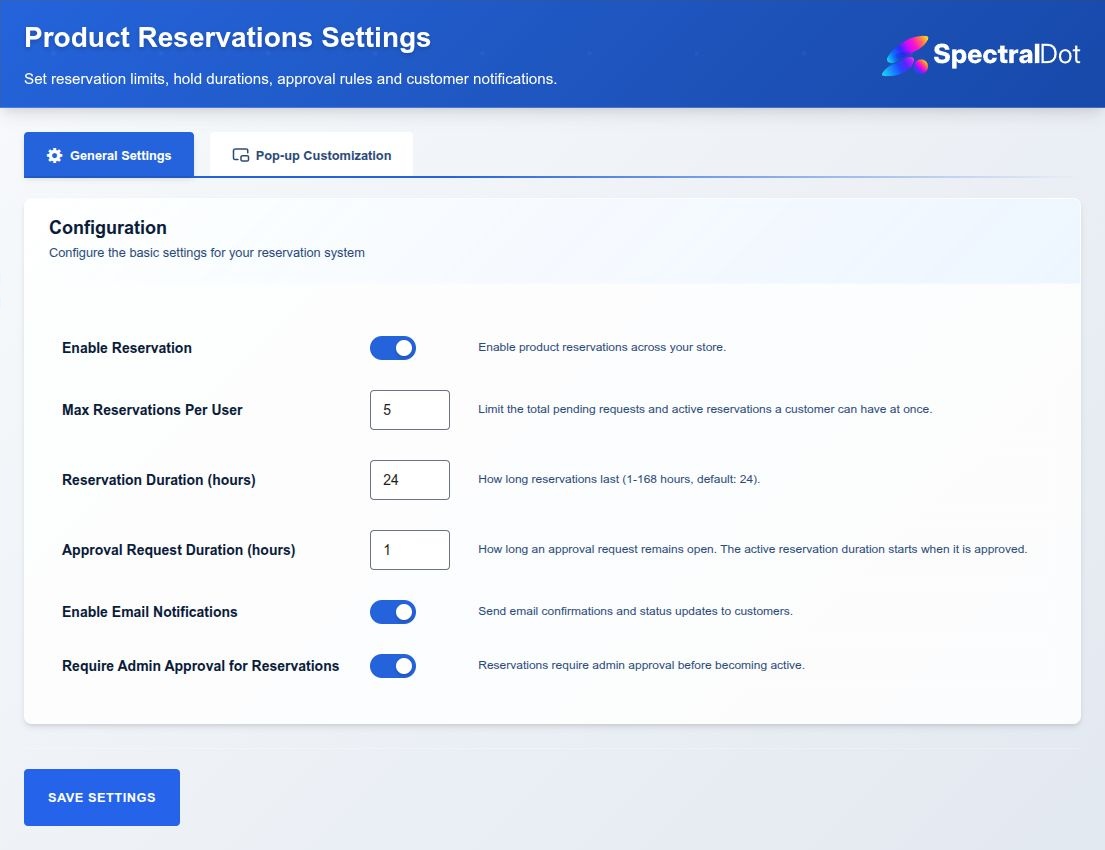
- Configure reservation and pending-approval durations from 1 to 168 hours
- Limit concurrent open reservations per customer
- Require merchant approval before stock is held
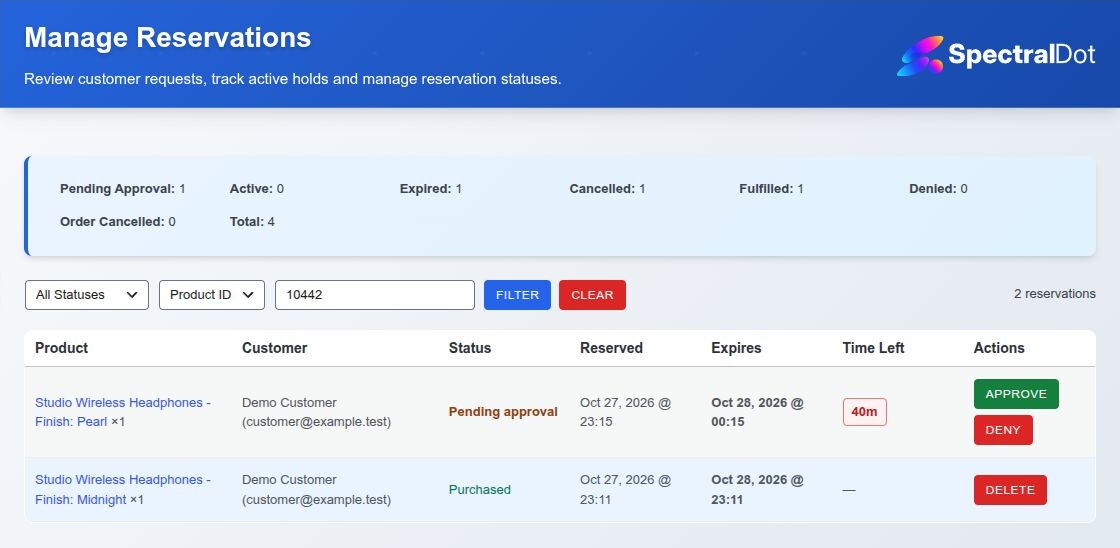
- Search, filter, approve, deny, cancel, or delete reservations
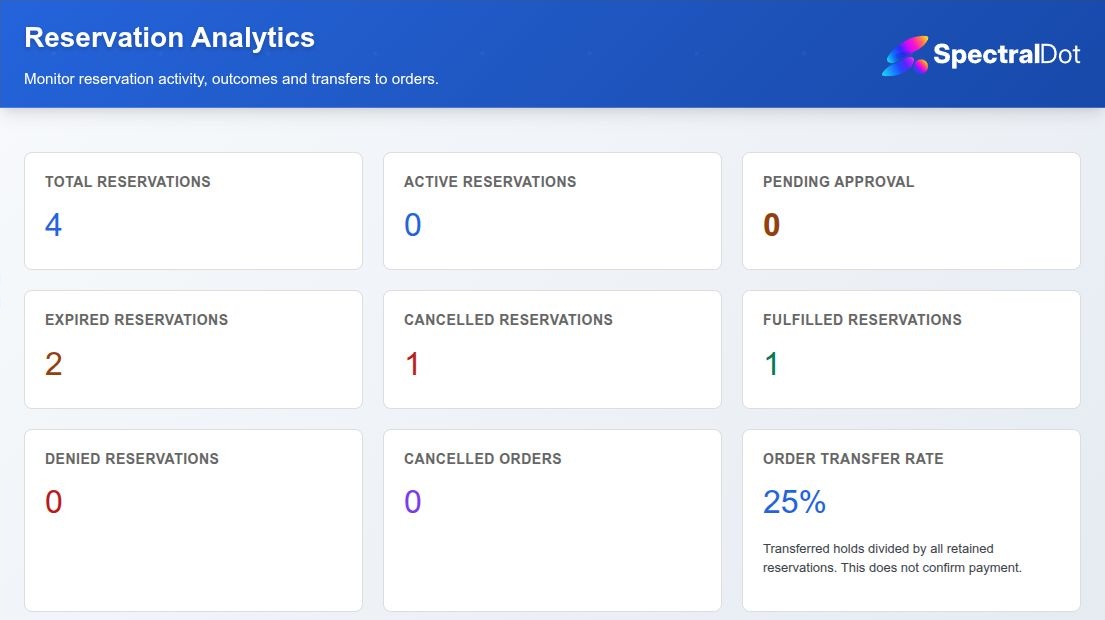
- View product-level active reservations and local reservation-to-order transfer analytics
- Customize reservation modal colors, typography, and border radius
- Allow Administrators and WooCommerce Shop Managers to operate reservations
Inventory behavior
An immediate reservation reduces stock once. When approval is required, the request remains pending without changing stock; approval starts the active hold and its duration. Cancellation or expiration releases held stock once. Checkout transfers the held unit to the order without a second stock decrement. Qualifying cancelled orders restore the unit once.
For a variable product, customers choose the required options before reserving. The hold retains that exact variation and selection, including selections from an “Any…” variation. Checkout cannot transfer the hold to different options. Duplicate blocking applies to the concrete variation; the customer quota counts all open requests and active holds.
Expiry and email timing
The plugin schedules expiration processing every five minutes. Execution depends on WordPress cron and can occur after the displayed deadline; stock restoration and expiration messages are not guaranteed at that exact second.
Notifications are optional. Messages cover creation, pending approval, approval, denial and expiration. Free does not include pre-expiry reminders, cancellation emails or automatic merchant notification emails. Passing a message to WordPress does not guarantee inbox delivery.
Privacy and external services
Reservation records are stored only in this website’s WordPress database. Spectral Dot Reservations does not send reservation data, telemetry, or usage analytics to the plugin authors or any service selected by the plugin.
If email notifications are enabled, reservation details are passed to the mail delivery system configured by the site owner. That system may be the web host, an SMTP plugin, or another third-party provider and is governed by the site owner’s provider terms.
Records remain until a merchant deletes an eligible record or uninstalls the plugin. WordPress erasure anonymizes closed reservations’ customer identity and free-text denial details while retaining operational product, variation-selection, order and inventory data. Open reservations remain identifiable until their inventory obligation ends; another erasure request can be submitted after closure.
Support
Use the plugin’s WordPress.org support forum.
Installation
- Install and activate WooCommerce.
- Install Spectral Dot Reservations from WordPress.org, or upload the release ZIP through Plugins > Add New > Upload Plugin.
- Activate the plugin.
- Open Reservations > Settings and enable reservations. Find Reservations directly below Products in the WordPress sidebar.
- Configure durations, limits, notifications, and approval behavior.
- Prepare a published, purchasable simple or variable product. Enable stock management on the simple product, each reservable variation, or the variable parent, and enter positive stock. Give each variation a price and enable it.
- Sign in as a customer, choose any required variation options, select Reserve, and check the status in My Account > Reserved products. Test approval and checkout on a staging site with test payment methods before going live.
FAQ
Do customers need an account?
Yes. The current Free workflow requires a logged-in WordPress customer.
Does a pending approval request reduce stock?
No. Stock is held only when the request is approved. A pending request has its own deadline; the active reservation duration starts at approval.
What happens when an active reservation expires?
When scheduled expiration processing runs, the reservation becomes expired and its held stock is restored once. Processing is scheduled every five minutes but depends on WordPress cron. If notifications are enabled, an expiration email is handed to the configured mail system; delivery is not guaranteed.
Which products are supported?
Published, purchasable simple products and selected variations with positive WooCommerce-managed stock are supported. Variation stock can be independent or managed by the variable parent. Required options must be chosen before reserving. Grouped, external, composite and bundled products are not supported.
Does checkout reduce stock twice?
No. The reservation owns the held unit until checkout transfers that inventory obligation to the order.
Does it work with Cart and Checkout Blocks and HPOS?
The plugin declares compatibility with WooCommerce Cart/Checkout Blocks and High-Performance Order Storage. Test your theme, payment methods, checkout and other extensions on staging before enabling the workflow on a live store.
Do I need an SMTP plugin?
Not necessarily. Spectral Dot Reservations uses the standard WordPress mail pipeline. Each merchant should decide whether their host delivers mail reliably or whether an SMTP service/plugin is appropriate.
Can Shop Managers operate reservations?
Yes. Reservation settings and operations use WooCommerce’s management capability, which is available to Administrators and Shop Managers.
What data does the plugin store?
Reservation records can contain the customer user ID, first and last name, email address, concrete product or variation ID, parent product ID, selected variation options, quantity, status, creation and expiry times, inventory state, denial details and a related order ID. The plugin integrates with WordPress personal-data export and erasure tools.
Does the plugin use an external service or track usage?
No. The plugin has no author-operated service, telemetry, tracking, advertisements, or remote account requirement. Email is handed to the mail system selected and configured by the site owner.
Can a customer reserve more than one unit at a time?
Each Free reservation holds one unit. A customer may have multiple open reservations up to the merchant’s configured limit. A pending or active reservation blocks another request for the same concrete product or variation, including a different choice on the same wildcard variation.
Why is Reserve unavailable?
Check that reservations are enabled, the customer is logged in, and the product is published, purchasable and stock-managed with positive stock. For a variable product, select every required option and ensure the variation is enabled and priced. A held unit is available to its owner for purchase, not for another reservation.
Where can I ask for help?
Use the WordPress.org support forum. Include plugin, WordPress, WooCommerce, PHP and theme versions, product type and stock-management mode. Never post passwords or customer data.
What does Order Transfer Rate measure?
Fulfilled reservations divided by all currently retained reservations in counted statuses, including open reservations, multiplied by 100 and rounded to one decimal place. Internal initializing records are excluded. Changes to statuses or deleted records can change the result. Purchased means the hold transferred to an order, not independently verified payment, delivery or extra sales. Analytics stay local to the store.
Screenshots
Changelog
1.1.0
- Add reservations for selected variations with independent or parent-managed stock.
- Retain selected options in reservation views, notifications, cart links and order validation.
- Coordinate sibling-variation requests through a common stock-owner lock.
- Validate physical stock independently of customer-facing hold allowances.
- Expand variation, shared-stock, concurrency, cart and order regression coverage.
- Translate remaining admin action errors and clarify order-transfer analytics.
- Show the product name above the selected variation in reservation confirmations.
- Preserve outstanding holds when uninstall is attempted without WooCommerce active.
- Refresh setup guidance, Free limits, privacy information and directory presentation.
1.0.0
- Initial public release under the Spectral Dot branding
- Transactional, idempotent reservation lifecycle and inventory ownership
- Added safe cart-before-reservation linkage and checkout fulfillment without double stock reduction
- Added concurrency locking, cron self-healing, inventory diagnostics, and upgrade reconciliation
- Preserved cross-request lock exclusivity on current WordPress versions
- Corrected pending quotas, privacy erasure pagination, order-cancelled handling, and Shop Manager access
- Added stable service, rule, lifecycle, and notification extension contracts
- Added HPOS, classic checkout, block checkout, accessibility, role, lifecycle, and exact-artifact verification
- Completed translatable interface coverage and refreshed the translation catalog
- Added deterministic release packaging, WordPress coding standards, Plugin Check, and CI quality gates
- Expanded privacy exports and removed customer names and free-text denial details during erasure
- Prepared canonical licensing, repository links, and WordPress.org submission documentation
- Added directory artwork, release screenshots, explicit control labels, keyboard-operable settings tabs, and dialog descriptions
- Removed an unnecessary analytics metadata join and corrected single-page reservation pagination on PHP 8.4
- Responsive reservation management with refreshed counts, filters, deadlines and dismissible action notices
- Separate confirmation and result states in the reservation dialog, with accessible headings and keyboard focus handling