

Description
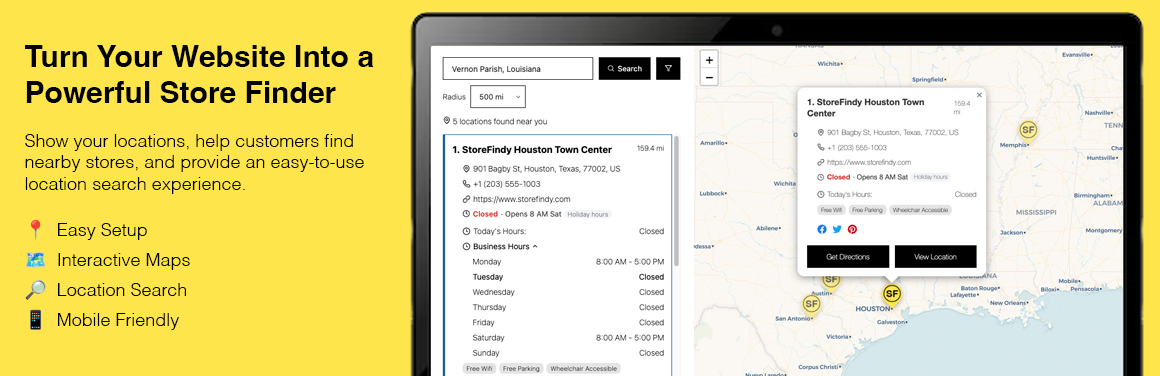
Storefindy Store Locator is a WordPress store locator plugin that helps businesses create a searchable store finder and display their locations on an interactive map.
Help customers quickly find nearby stores, branches, dealers, offices, and other business locations directly from your WordPress website.
Storefindy uses centralized management for locations and store locators. Your Storefindy account allows you to manage your locations and locators through the Storefindy platform and publish them to your WordPress website through the Storefindy plugin.
The Storefindy platform also provides additional features such as custom subdomains, API access, and other location management tools.
Create a customizable store locator with:
- Search by location with auto complete
- Interactive maps
- Store listings
- Location filters
- Store details
- Business hours
- Get directions
- Bulk CSV location import
- Supports 12 languages on the store locator
- Multiple map styles
- Analytics and heatmaps
- Responsive design
- WCAG-friendly interface
- No Google Maps API key required
Whether you need a store locator, store finder, dealer locator, or location finder, Storefindy helps your customers find the right location quickly.
Demo Links
View Demo Locator
View Customize Demo
External services
This plugin is a connector to the Storefindy service and cannot work without it. It makes the following external requests:
Storefindy (https://www.storefindy.com)
- What: The plugin sends your Storefindy API key and the locator/location data you create or edit (names, addresses, coordinates, hours, photos, CSV imports, locator settings) to the Storefindy REST API (
/api/v1). Bug reports you submit from the plugin are also sent here. On any page that contains a Store Locator block or[storefindy_locator]shortcode, the visitor’s browser loadshttps://www.storefindy.com/widgets.js, which renders the locator and requests location data from Storefindy. Visitors’ search terms and, if they allow it, their location are processed by this service to return nearby stores. - When: In the admin, whenever you use the Store Locator screens; on the front end, when a page with a locator is viewed.
- Provider: Storefindy — Terms of Service | Privacy Policy
OpenStreetMap tiles and Nominatim (https://www.openstreetmap.org)
- What: The location editor’s map picker loads map tiles from
tile.openstreetmap.organd, when you click “find on map”, sends the address you typed tonominatim.openstreetmap.orgfor geocoding. Your IP address is visible to these servers. - When: Only in the admin, when editing a location.
- Provider: OpenStreetMap Foundation — Tile Usage Policy | Privacy Policy
Esri ArcGIS World Street Map tiles (https://server.arcgisonline.com)
- What: The Analytics heatmap loads map tiles from Esri’s public tile server. Your IP address is visible to this server.
- When: Only in the admin, when viewing Analytics.
- Provider: Esri — Terms of Use | Privacy Policy
Third-party libraries
- Leaflet 1.9.4 (BSD-2-Clause), bundled in
assets/vendor/leaflet/— https://leafletjs.com/
Credits
Developed by Kevin Ralph Iglesias. Developer website: https://www.civilserviceexamreviewer.ph
Installation
- Upload the
storefindy-store-locatorfolder to/wp-content/plugins/. - Activate the plugin through the Plugins screen.
- Go to https://www.storefindy.com/ and sign up for a Storefindy account.
- In Storefindy, go to Account → API Access and generate your API key.
- In your WordPress dashboard, go to Store Locator → Settings, paste your API key, and click Save.
- Create a locator under Store Locator → Locators.
- In the block editor, add the Store Locator block to any page or post using Add Block → Store Locator.
- In the Classic Editor, Elementor, or any page-builder text widget, place the
[storefindy_locator id="YOUR-LOCATOR-ID"]shortcode on any page or post to display your interactive Store Locator.
FAQ
Is this a WordPress store locator plugin?
Yes. Storefindy Store Locator lets you add a searchable store locator
and interactive store map to your WordPress website using the Store
Locator block or the [storefindy_locator] shortcode.
How do I add a store locator to WordPress?
Install and activate Storefindy Store Locator,
connect your Storefindy account using an API key,
create a locator, and add it to your WordPress page using the Store Locator block or shortcode.
Is there a shortcode?
Yes: [storefindy_locator id="YOUR_LOCATOR_ID"]. It renders the same
store locator as the block, so it works in the Classic Editor,
Elementor, page-builder text widgets, and in theme templates via
do_shortcode(). Copy a ready-made shortcode for each of your locators
from Store Locator → How to Use.
Can I use Storefindy with Elementor?
Yes. You can add the Storefindy locator shortcode to Elementor and other page builders that support shortcode content.
Can I add multiple store locations?
Yes. You can create and manage multiple locations and organize them
with Storefindy locators.
Can I import store locations from CSV?
Yes. Storefindy supports bulk CSV location import, making it easier to add and manage multiple store locations.
Can visitors search for nearby stores?
Yes. Visitors can search by location and find nearby stores using the
interactive map and location listings.
Does it require a Google Maps API key?
No. Storefindy uses OpenStreetMap for its maps and does not require
a Google Maps API key.
Can I create a store locator without Google Maps?
Yes. Storefindy Store Locator uses OpenStreetMap and does not require
a Google Maps API key.
Does it support business hours?
Yes. Store locations can display business hours so customers can check when a location is open.
Can customers get directions to a location?
Yes. Storefindy provides directions for store and business locations.
Is the store locator mobile-friendly?
Yes. Storefindy is designed to provide a responsive store locator experience across desktop, tablet, and mobile devices.
Is Storefindy accessible?
Storefindy is designed with a WCAG-friendly interface to provide a more accessible experience for customers using different devices and assistive technologies.
Screenshots


Changelog
1.2.1
- Removed daily request limit to any user plan
1.3.0
- Added help & support page
- Added report bug page
- Update menus parent and child
- Renamed How to use to Documentation
1.4.0
- Supports photo for store or location
- Supports mapbox for subscription plan
1.4.1
- Improve CSV import available fields
- Change dummy content CSV download template
1.4.2
- Added scrollbar width, track color and thumb color to Customize UI → Result Items