

Description
Stream is a complete activity log and audit trail for your WordPress site: see what changed, who changed it, and when. From plugin activations to post edits, login attempts to new user creation, every user and system action is recorded in an audit log built for debugging, security monitoring, and compliance.
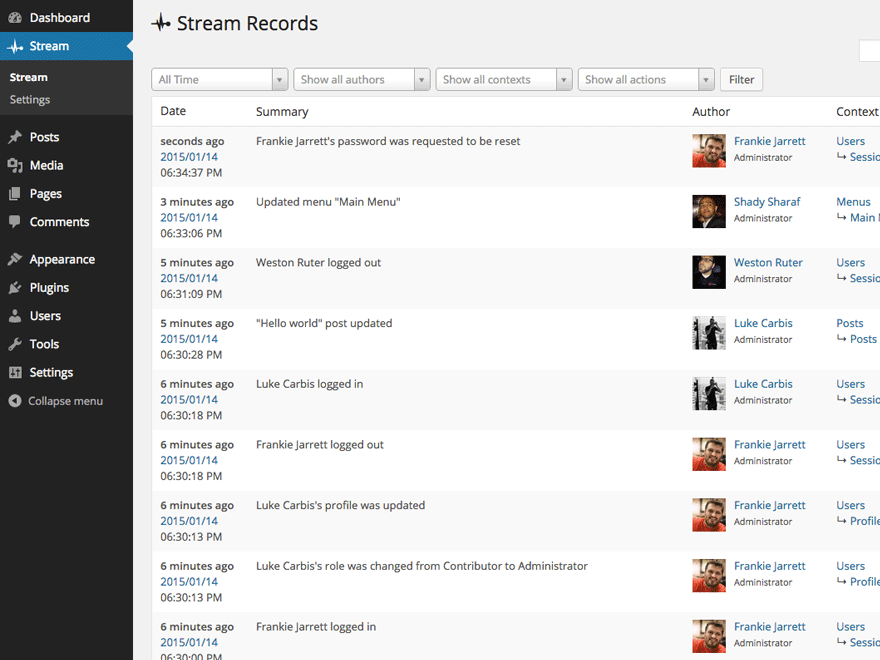
Every logged action is displayed in an activity stream and organized for easy filtering by User, Role, Context, Action or IP address. Admins can highlight entries in the activity log—such as suspicious user activity—to investigate what’s happening in real time. Stream also lets you configure email alerts and webhooks for integrations like Slack and IFTTT, so your team knows the moment something goes wrong.
Stream keeps its own logs healthy too: records are automatically purged on the retention schedule you choose, with batched deletion and orphaned-data cleanup that stay reliable even on very large sites.
Stream is also AI-ready: its abilities are exposed through the WordPress Abilities API and MCP Adapter, so AI assistants and other tools can securely query your site’s activity records.
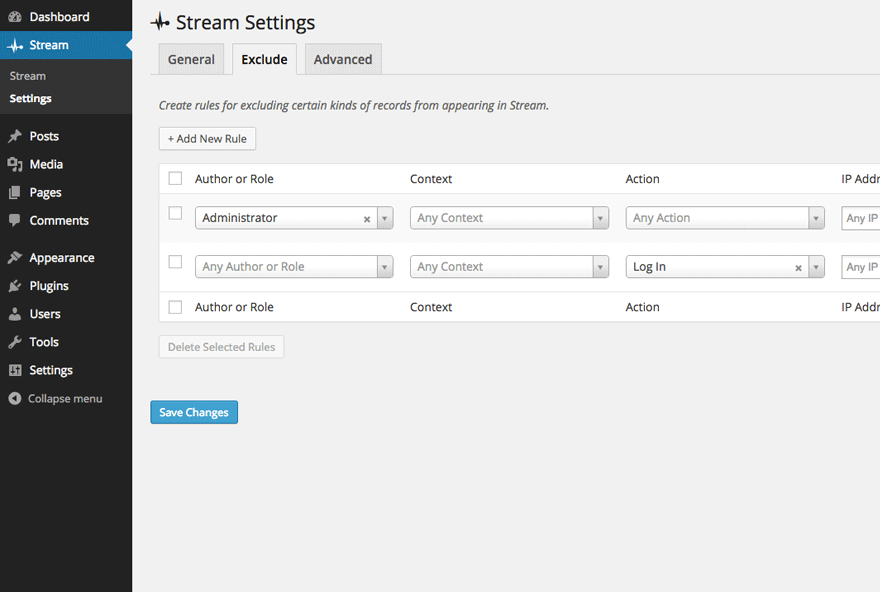
For advanced users, Stream supports a network view of all activity records on your Multisite, exclude rules to ignore certain kinds of user activity, and a WP-CLI command for querying records.
Stream is free and fully open source — development happens in the open on GitHub, maintained by XWP.
With Stream’s powerful activity logging, you’ll have the information you need to responsibly manage your WordPress sites.
Built-In Tracking Integrations For Popular Plugins:
- Advanced Custom Fields
- bbPress
- BuddyPress
- Easy Digital Downloads
- Gravity Forms
- Jetpack
- Two Factor
- User Switching
- WooCommerce
- Yoast SEO
Built-In Tracking For Core Actions:
- WordPress AI Client (WP 7.0+)
- Posts
- Pages
- Custom Post Types
- Users
- Themes
- Plugins
- Tags
- Categories
- Custom Taxonomies
- Settings
- Custom Backgrounds
- Custom Headers
- Menus
- Media Library
- Widgets
- Comments
- Theme Editor
- WordPress Core Updates
Other Noteworthy Features:
- Multisite view of all activity records on a network
- Limit who can view user activity records by user role
- Set exclude rules to ignore certain kinds of user activity
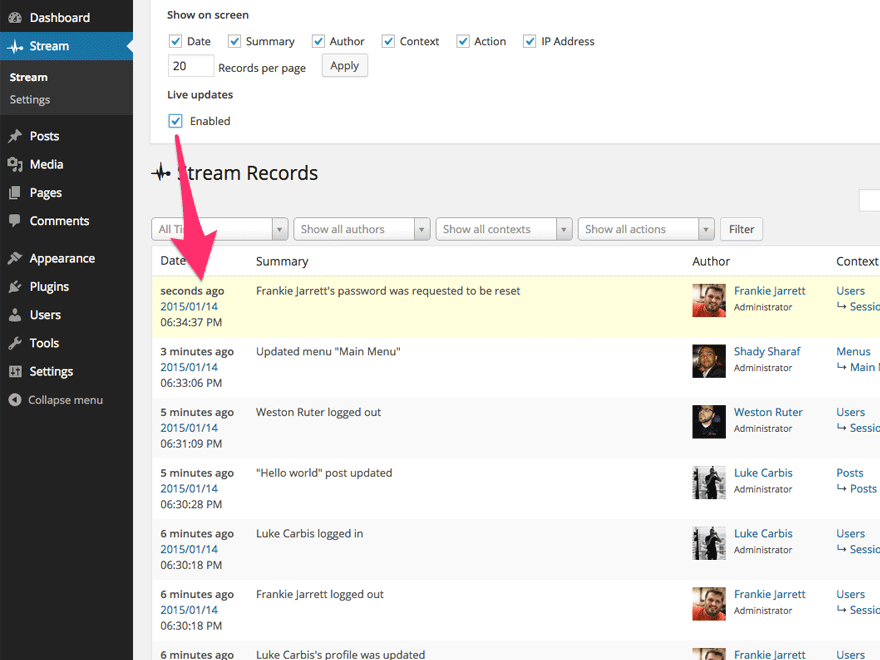
- Live updates of user activity records in the Stream
- Export your Activity Stream as a CSV or JSON file
- WP-CLI command for querying records
Configuration
Most of the plugin configuration is available under the “Stream” → “Settings” page in the WordPress dashboard.
Request IP Address
The plugin expects the $_SERVER['REMOTE_ADDR'] variable to contain the verified IP address of the current request. On hosting environments with PHP processing behind reverse proxies or CDNs the actual client IP is passed to PHP through request HTTP headers such as X-Forwarded-For and True-Client-IP which can’t be trusted without an additional layer of validation. Update your server configuration to set the $_SERVER['REMOTE_ADDR'] variable to the verified client IP address.
As a workaround, you can use the wp_stream_client_ip_address filter to adapt the IP address:
add_filter(
    'wp_stream_client_ip_address',
    function( $client_ip ) {
        // Trust the first IP in the X-Forwarded-For header.
        // ⚠️ Note: This is inherently insecure and can easily be spoofed!
        if ( ! empty( $_SERVER['HTTP_X_FORWARDED_FOR'] ) ) {
            $forwarded_ips = explode( ',' $_SERVER['HTTP_X_FORWARDED_FOR'] );

            if ( filter_var( $forwarded_ips[0], FILTER_VALIDATE_IP ) ) {
                return $forwarded_ips[0];
            }
        }

        return $client_ip;
    }
);
⚠️ WARNING: The above is an insecure workaround that you should only use when you fully understand what this implies. Relying on any variable with the HTTP_* prefix is prone to spoofing and cannot be trusted!
AI Client (WordPress 7.0+)
When WordPress 7.0+ provides the AI Client event dispatcher (WP_AI_Client_Event_Dispatcher), Stream logs each AI generation as an activity record under AI Client → Prompts → Generated. If the dispatcher is not available, the connector registers no hooks and has no effect.
By default, Stream stores metadata for every generation: operation, provider, model, input/thought/output token counts, duration, finish reason, and other extended fields when present. The activity summary shows a one-line preview (for example, chat via openai/gpt-4o (tokens: 120/0/45) in 842ms); the three numbers are input, thought, then output. Multiline summaries display only the first line in the list table; open a record to see the full text.
Prompt and response text are not logged by default. To opt in, enable Log Prompt and Response text under Stream → Settings → AI Client. When enabled, prompt and response text are appended to the activity summary (not stored in meta, which is size-limited) and may be forwarded to any configured Stream alerts or webhooks (e.g. Slack, IFTTT). HTML is stripped on insert, so stored and forwarded text is not a byte-for-byte copy of the generation. Privacy Warning: This content may include personally identifiable information (PII). Ensure your privacy policy covers AI data collection before enabling. Use the wp_stream_ai_client_log_prompt and wp_stream_ai_client_log_response filters below to redact or omit text before it is stored.
Developers can filter stored text when the setting is enabled:
wp_stream_ai_client_log_prompt— filter prompt text before it is stored; return an empty string to omit it.wp_stream_ai_client_log_response— filter response text before it is stored; return an empty string to omit it.
Known Issues
- We have temporarily disabled the data removal feature through plugin uninstallation, starting with version 3.9.3. We identified a few edge cases that did not behave as expected and we decided that a temporary removal is preferable at this time for such an impactful and irreversible operation. Our team is actively working on refining this feature to ensure it performs optimally and securely. We plan to reintroduce it in a future update with enhanced safeguards.
Contribute
There are several ways you can get involved to help make Stream better:
-
Report Bugs: If you find a bug, error or other problem, please report it! You can do this by creating a new topic in the plugin forum. Once a developer can verify the bug by reproducing it, they will create an official bug report in GitHub where the bug will be worked on.
-
Translate into Your Language: Use the official plugin translation tool to translate Stream into your language.
-
Suggest New Features: Have an awesome idea? Please share it! Simply create a new topic in the plugin forum to express your thoughts on why the feature should be included and get a discussion going around your idea.
-
Issue Pull Requests: If you’re a developer, the easiest way to get involved is to help out on issues already reported in GitHub. Be sure to check out the contributing guide for developers.
Thank you for wanting to make Stream better for everyone!
FAQ
How do I use a custom translation?
Stream no longer ships translation files inside the plugin. WordPress loads translations from language packs installed in wp-content/languages/plugins/ (for example stream-fr_FR.mo). Files in that directory survive plugin updates.
To override a language pack, place your compiled stream-{locale}.mo in wp-content/languages/plugins/. To load a file from another location, use the load_textdomain_mofile filter.
Contributions belong on translate.wordpress.org.
Screenshots
Changelog
4.5.1 – November 16, 2026
Security:
- Escape record summaries on the records screen. Custom connectors that put HTML in record summaries now show that HTML as text.
Bug Fixes:
- Show BuddyPress group and profile field names that contain
%or<as literal text, and stop errors during logging. - Stop BuddyPress component changes from causing a fatal error outside wp-admin.
- Log new BuddyPress profile fields as created instead of updated.
View the full release notes on GitHub.
4.5.0 – November 12, 2026
Security:
- Fix a stored cross-site scripting vulnerability (CVE-2026-119216) in the records screen user filter. Reported by Mohamed Amgad Khater (
mamgad) via Wordfence.
Breaking Changes:
- Raise the minimum PHP version from 7.2 to 7.4.
- Custom connectors, alert types, alert triggers, and exporters must declare typed public properties, for example
public string $slug. An untyped declaration now causes a fatal error.
Enhancements:
- Replace Select2 with native select controls across the admin, with an accessible Ajax user combobox on sites above the preload cap.
- Add an Outgoing Webhook alert and an AI Client connector for WordPress 7.0+.
View the full release notes on GitHub.
4.4.0 – August 31, 2026
Security:
- Keep multisite record reads inside the current site, and make a network capability necessary for changes to network-wide settings.
- Remove integration credentials from option-change records. Secret values now show as
[redacted]. - Withhold alert destination credentials, such as Slack webhook URLs, from the
stream/get-alertsability.
Bug Fixes:
- Correct a false “SITE IS DISCONNECTED” error from
wp stream queryon a site with no records. - Correct a fatal error when a Stream capability check runs before
init. - Correct a PHP warning for a password reset request that gives an unknown user.
View the full release notes on GitHub.
4.3.0 – July 18, 2026
Enhancements:
- Make Action Scheduler usage optional at runtime: deferred purge / reset work now runs through a scheduler abstraction that defaults to Action Scheduler but can fall back to WP-Cron via the
wp_stream_use_action_schedulerfilter. - Add the
wp_stream_enable_auto_purgefilter (defaulttrue) to disable all TTL record auto-purge scheduling regardless of backend. - Surface a warning on the WP-Cron fallback when a large-table purge or reset is queued.
Bug Fixes:
- Log the WooCommerce order ID instead of the order object in order event records.
- Fix PHP 8.4 deprecation warnings.
View the full release notes on GitHub.
4.2.2 – July 6, 2026
Security:
- Harden authorization for the live update preference: enforce the Stream view capability and always target the current user in the
stream_enable_live_updateAJAX handler so a user can only change their own live update preference.
View the full release notes on GitHub.
4.2.1 – July 2, 2026
Bug Fixes:
- Fix authorization checks for Stream activity access and harden related AJAX, export, and query paths.
- Fix inverted
isset()check silently ignoring user search input inget_users(). - Create missing database tables when resetting the database.
- Avoid generating rewrite rules for the alerts post type.
View the full release notes on GitHub.