


Description
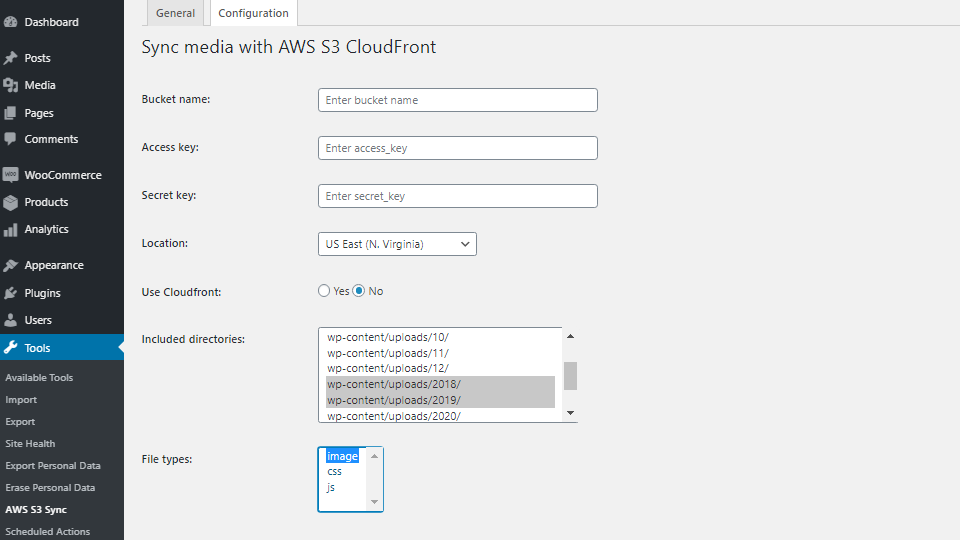
Upload images, CSS and JavaScript from WordPress uploads to Amazon S3 and serve registered files through S3 or CloudFront. Local copies are retained, and stored post content is not changed.
- Full or incremental batch uploads with progress reporting.
- Searchable folder tree with a vertically resizable list.
- Remote URLs for registered files, including responsive images and common lazy-load markup.
- Confirmed deletion of tracked S3 files, with options to skip, restore or permanently delete files missing locally.
- Recovery of supported images into the Media Library, including a separate local-only repair tool. Recovered attachments receive new IDs; deleted captions, alt text and post associations cannot be reconstructed.
Clear your page cache after updates, configuration changes, uploads or deletion; the plugin does not purge it automatically. Existing unregistered S3 objects must be uploaded again to enter the registry.
Deactivation preserves settings and registry records. Uninstall removes local bookkeeping without deleting S3 objects.
Installation
- Log in to your WordPress dashboard, navigate to the Plugins menu, click on \”Add New\”
- Click on \”Upload Plugin\” and upload the archive \”Add-To-Cart-redirect-for-WooCommerce.zip\” then click on \”Install\”.
- Activate the plugin through the \”Plugins\” menu in WordPress.
FAQ
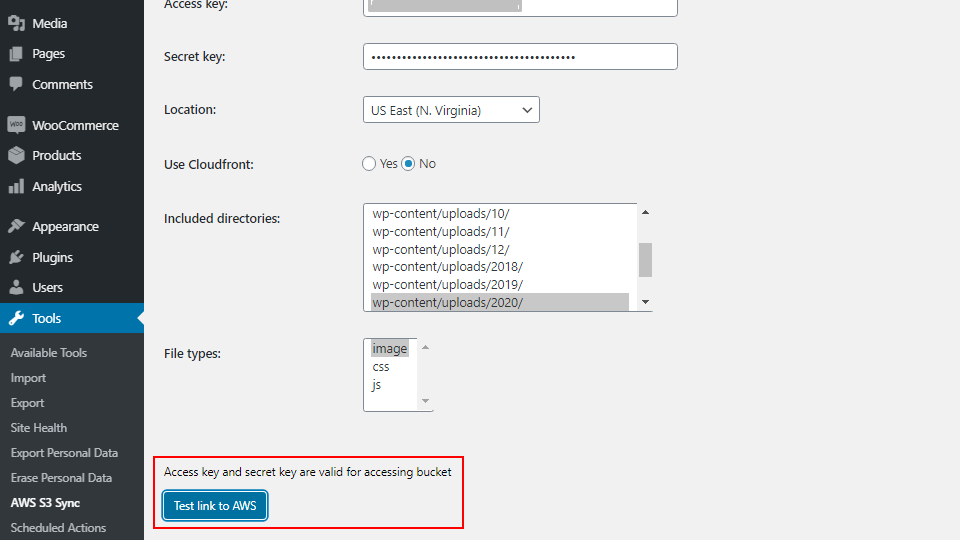
How can I know that my AWS bucket credentials and keys are valid?
“Test link to AWS” checks the configured bucket with GetBucketLocation and verifies that its region matches Location. It requires s3:GetBucketLocation on that bucket (for example, arn:aws:s3:::your-bucket), not s3:ListAllMyBuckets. When CloudFront is enabled, it also requires cloudfront:GetDistribution for the configured distribution. The test does not upload or delete objects and does not check upload/delete permissions or public access to file URLs. Other plugin operations require their own permissions. The test works without the PHP gettext extension.
Which images will change their source URLs if CloudFront option is used?
Only files registered for the current bucket and S3 prefix receive remote URLs. WordPress attachment, image src/srcset and rendered img/picture HTML are supported, including common lazy-load attributes in posts and templates. Each thumbnail is checked separately. Stored post content is not modified. Existing page caches must be cleared separately; images inserted by JavaScript after the response require a separate integration.
Can I disable CloudFront with a private S3 bucket?
CloudFront No uses direct S3 URLs for registered files. The plugin does not generate signed URLs or change bucket access policies. If the bucket permits access only through CloudFront, keep CloudFront enabled; anonymous direct S3 URLs will not be accessible.
Can another AWS plugin conflict with this plugin?
Another plugin that loads different versions of the same AWS SDK or its dependencies can cause class conflicts. This plugin includes its SDK and loads it once; avoid replacing individual SDK files.
Which file types does the plugin support?
Supported image extensions are gif, png, jpg, jpeg, svg and webp. The uploader also supports CSS and JavaScript when those file types are included in the saved configuration. PDF, video and ZIP files are not upload candidates and do not receive remote URLs without a registry entry.
Screenshots



Changelog
1.0.6
- Add an upload registry, incremental uploads, and safe deletion of tracked files with local and Media Library restoration.
- Introduce batch uploads with clearer progress reporting.
- Serve registered files through S3 or CloudFront, including responsive images and common lazy-load markup.
- Redesign settings with a searchable folder tree and a resizable directory list.
- Improve credential protection, configuration saving and AWS connection checks.
- Bundle AWS SDK for PHP 3.401.2 through Composer with official unused-service removal; retain S3, CloudFront and required SDK dependencies. Require WordPress 6.2+ and PHP 8.1+.
1.0
- Stable tested version with the latest WordPress