


Description
SyncNet Patch Radar collects security alerts automatically and shows only what really matters: critical vulnerabilities in widely used products such as Windows, Exchange, NetScaler, FortiGate, Cisco, VMware, Java, Chrome or PHP.
An alert is shown when it
- is rated critical by the German Federal Office for Information Security (BSI / CERT-Bund), or
- is listed by the US agency CISA as actively exploited (Known Exploited Vulnerabilities), or
- is rated CVSS 9.0 or higher (adjustable), exploitable over the network without authentication, and was reported by the vendor itself (NVD),
and concerns one of the products in your list (fully editable).
Features
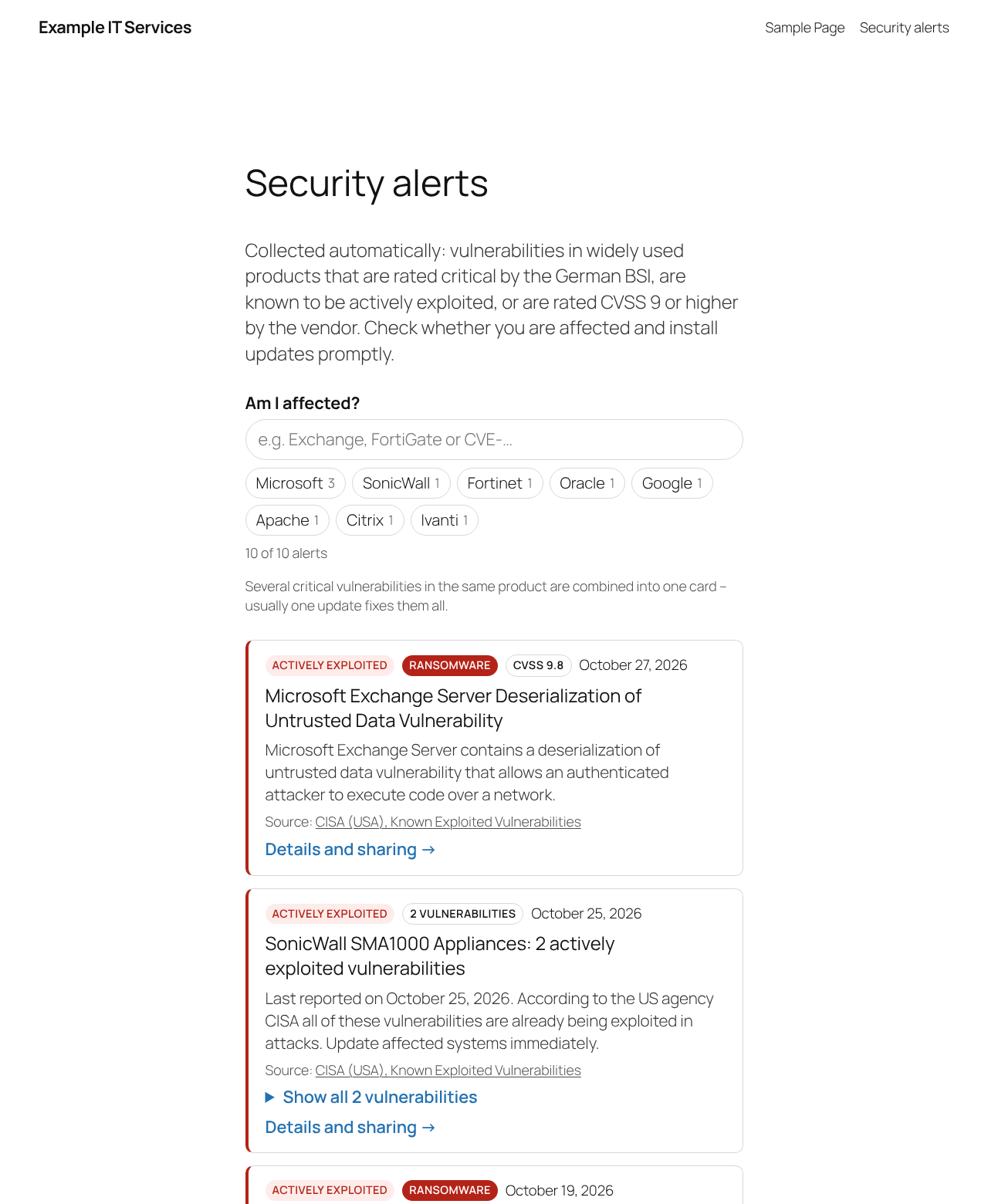
- Clean list with search (“Am I affected?”) and vendor filters
- Several critical vulnerabilities in the same product are combined into one card (“Google Chrome: 12 critical vulnerabilities”) – one update usually fixes them all
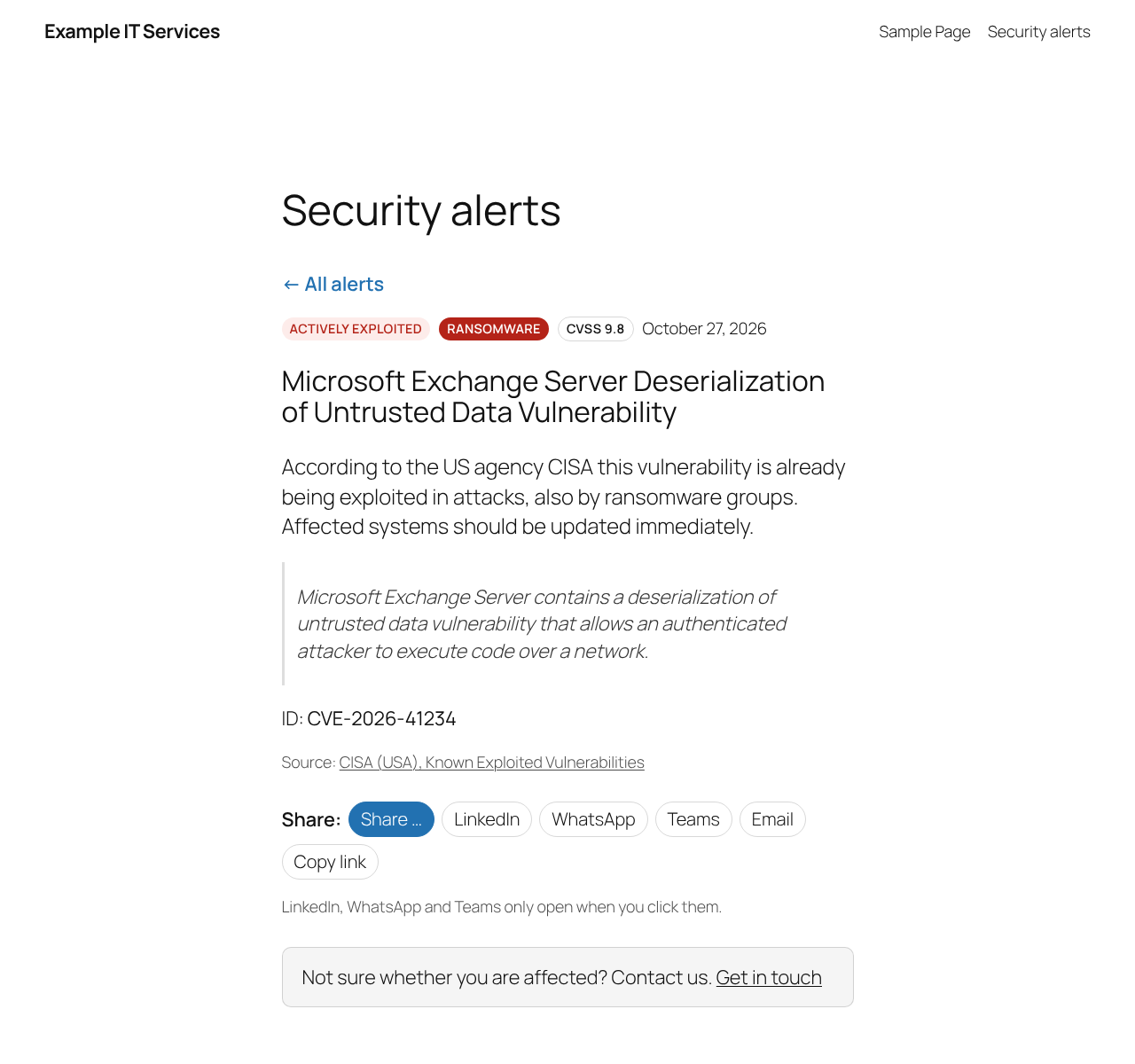
- Every alert and product group has its own page to share (LinkedIn, WhatsApp, Teams, email, copy link, native share on phones) – shared links always point to your site
- RSS feed for all alerts and one feed per vendor
- You choose where the subscription box and the share buttons appear: above, below or both
- Source and link to the original record on every card
- Optional small red dot on your menu item for the alerts page while a fresh, actively exploited vulnerability is listed (off by default)
- Optional one-line “latest critical alert” for your front page and a compact box for any page
- Optional call to action (“Not sure whether you are affected? Contact us”)
- Check tool in the settings: enter a CVE ID and see which condition is met
- No tracking, no cookies, no external scripts or fonts – visitors never connect to third parties
- Nothing is fetched until you switch fetching on in the settings
- Translation ready
Shortcodes
[syncnet_patch_radar]– the list (a draft page with it is created on activation)[syncnet_patch_radar_latest]– one discreet line with the newest alert[syncnet_patch_radar_box count="3"]– compact cards with a link to the list
Disclaimer
The list is compiled automatically from public sources. It is no substitute for your own vulnerability management and comes without any guarantee of completeness or correctness.
External services
This plugin relies on the following third-party services. Nothing is sent on activation. Your server only connects to them after an administrator has ticked “Fetch alerts” in Settings → SyncNet Patch Radar and saved; it can be switched off there at any time.
Vulnerability data (retrieved by your server)
Once fetching is switched on, your server downloads public vulnerability data hourly via WP-Cron, after saving the settings and when you click “Fetch now” – only from the sources you have selected. The requests contain no data about your visitors, users or site; the user agent only names the plugin and its version. Requests to the NVD contain your NVD API key if you have entered one.
- BSI / CERT-Bund Warn- und Informationsdienst (WID), Federal Office for Information Security, Germany. Used to show security advisories rated “critical”. Endpoints:
https://wid.cert-bund.de/content/public/securityAdvisory/rssand, for each critical advisory once per version, its public CSAF document underhttps://wid.cert-bund.de/.well-known/csaf/white/(CVE numbers, fixed versions, vendor advisory) – only if the BSI source is selected. Service: https://wid.cert-bund.de/ – Privacy policy: https://www.bsi.bund.de/EN/Service/Datenschutz/datenschutz_node.html - CISA Known Exploited Vulnerabilities Catalog, Cybersecurity and Infrastructure Security Agency, USA. Used to show vulnerabilities known to be exploited. Endpoint:
https://www.cisa.gov/sites/default/files/feeds/known_exploited_vulnerabilities.json(only if the CISA source is selected). Privacy policy: https://www.cisa.gov/privacy-policy - CVE List (CVE Program / CVE.org), release files on GitHub, USA. Used to show critical vulnerabilities reported by the vendor itself (description, CVSS score, vendor advisory). Your server downloads one ZIP file per day (and the current day’s file hourly) from
https://github.com/CVEProject/cvelistV5/releases/download/and evaluates it locally (only if the CVE list / NVD source is selected; needs the PHP ZipArchive extension, otherwise the NVD is used instead). Terms of use: https://www.cve.org/Legal/TermsOfUse – GitHub privacy statement: https://docs.github.com/site-policy/privacy-policies/github-general-privacy-statement - NIST National Vulnerability Database (NVD) API 2.0, USA. Used for vulnerabilities the NVD itself has rated critical (and for vendor reports if the CVE list cannot be used), and by the CVE check tool on the settings page (only when you click “Check”). Endpoint:
https://services.nvd.nist.gov/rest/json/cves/2.0(only if the NVD source is selected). Terms of use: https://nvd.nist.gov/developers/terms-of-use – Privacy policy: https://www.nist.gov/privacy-policy
This product uses data from the NVD API but is not endorsed or certified by the NVD.
Share buttons (opened by the visitor)
Alert pages show share buttons. They are plain links; nothing is loaded from these services when the page is displayed. Only when a visitor clicks a button does their browser open the respective service, sending the title and address of the alert page so it can be shared:
- LinkedIn (LinkedIn Corporation / LinkedIn Ireland) –
https://www.linkedin.com/sharing/share-offsite/. User agreement: https://www.linkedin.com/legal/user-agreement – Privacy policy: https://www.linkedin.com/legal/privacy-policy - WhatsApp (WhatsApp LLC / WhatsApp Ireland) –
https://api.whatsapp.com/send. Terms of service: https://www.whatsapp.com/legal/terms-of-service – Privacy policy: https://www.whatsapp.com/legal/privacy-policy - Microsoft Teams (Microsoft Corporation) –
https://teams.microsoft.com/share. Services agreement: https://www.microsoft.com/servicesagreement – Privacy statement: https://privacy.microsoft.com/privacystatement
E-mail and “copy link” use the visitor’s own mail program and clipboard; no service is contacted.
Installation
- Install and activate the plugin. A draft page “Security alerts” with the shortcode
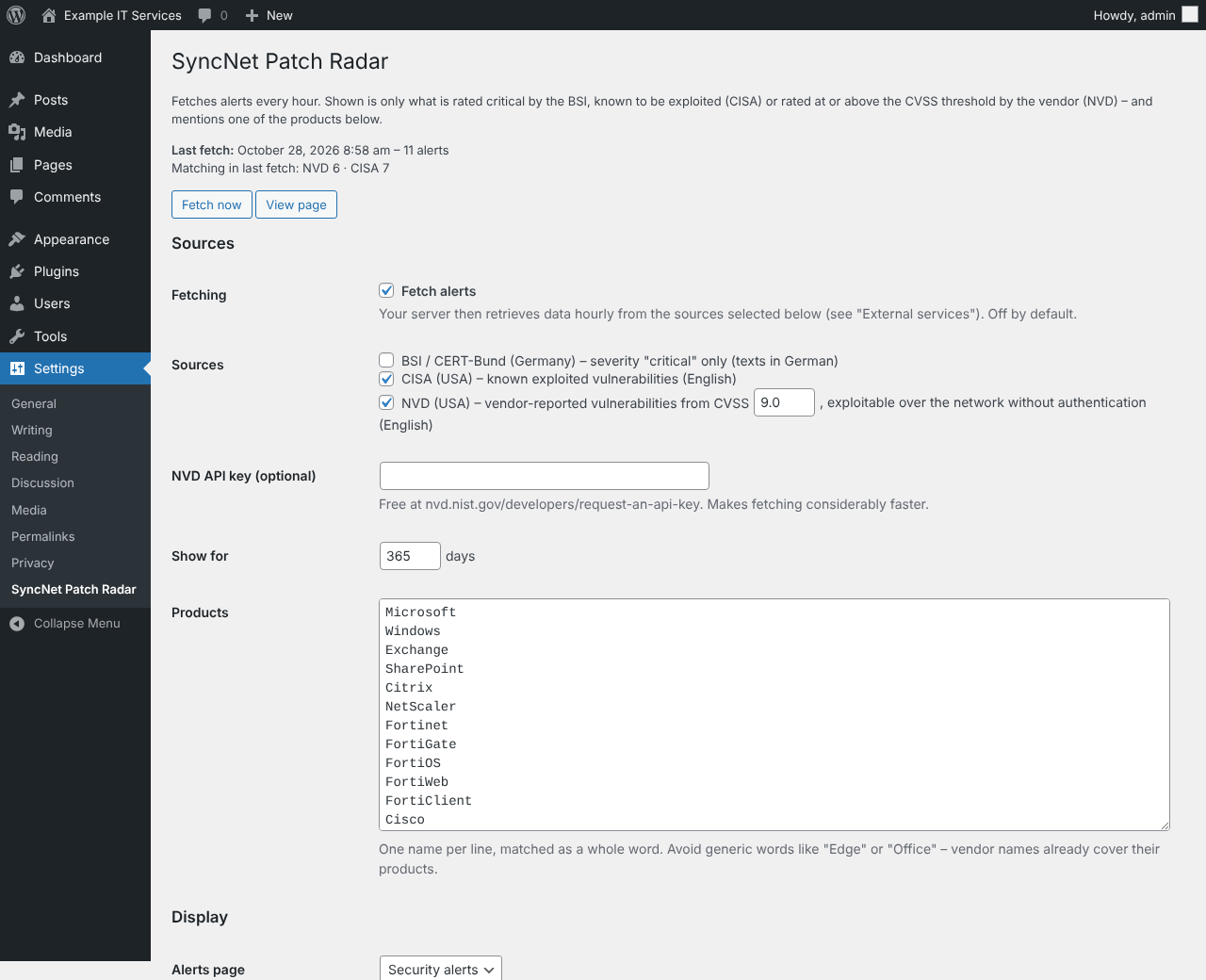
[syncnet_patch_radar]is created. Nothing is fetched yet and the plugin never adds menu items itself. - Go to Settings → SyncNet Patch Radar, choose sources, CVSS threshold and product list, tick Fetch alerts and save. The first fetch starts.
- Rename and publish the page when you are ready.
- Optional but recommended: request a free NVD API key and enter it – fetching becomes much faster.
- Recommended: set up a real cron job calling
https://your-site.example/wp-cron.php?doing_wp_cronevery hour, so fetching runs reliably even with page caching.
The first NVD load covers the last 30 days and runs in several passes (progress is shown in the settings).
FAQ
Why is the list empty after activation?
Nothing is fetched until you switch fetching on: go to Settings → SyncNet Patch Radar, tick “Fetch alerts” and save.
Why are some vulnerabilities missing?
Only critical ones in products from your list are shown – this is intentional. Use the check tool in the settings to see why a specific CVE is not listed.
Why are some texts in English or German?
BSI advisories are published in German, CISA and NVD descriptions in English. The plugin’s own texts follow your site language.
Does the plugin slow down my site?
No. Data is fetched in the background and stored; pages only read the stored list. Search and filters run in the visitor’s browser.
Can I show a credit for the author?
Yes, there is an option in the settings. It is off by default.
Screenshots
Changelog
2.0.13
- The extra note below the hits line from 2.0.11 is removed again – the page stays calmer. The setting “Show for … days” now explains what it does.
- The hits line (“… of … alerts · Last updated”) now sits closer to the list than to the filters.
2.0.12
- New setting “Heading above the search”: replace “Am I affected?” with your own text, or hide it with a single hyphen.
2.0.11
- With “Show only actively exploited vulnerabilities at first”, a short note below the hits line says so, with a link to all alerts.
2.0.10
- The introduction above the list keeps its line breaks; an empty line starts a new paragraph.
2.0.9
- Fix: with “Actively exploited” and a selected area, vendors of that area without such an alert stayed visible with 0. Now only vendors chosen on their own stay visible. Switching off one of two selected areas keeps the vendors they share.
2.0.8
- Fix: page caches (e.g. Surge, LiteSpeed) could keep an empty copy of the settings page after saving or “Fetch now” – the page then stayed white. The settings page and these requests are now marked as not cacheable, and the page is sent completely before fetching continues in the background.
2.0.7
- New setting “When the page opens”: show only actively exploited vulnerabilities at first, with a button “Show all … alerts” below the list. Off by default; does not apply to shared links with a selection or when nothing is actively exploited.
2.0.6
- Every name in the product list shows its areas when clicked – default names with the areas of the default list ticked. They can be changed; changed names are marked with a pencil and can be reset to the default. Your choice is kept when new plugin versions change the defaults.
2.0.5
- While “Actively exploited” is on, areas and vendors without such an alert move behind “+ N more” and the others are sorted by their number; selected ones stay visible. Switched off, everything returns to its place.
2.0.4
- While “Actively exploited” is on, the numbers next to areas and vendors count only actively exploited alerts; areas and vendors without such an alert are shown faded.
2.0.3
- Calmer filters: “Actively exploited” is now the main filter in front of the search field; with areas and vendors both lines have a label (“Area”, “Vendors”) and start at the same edge.
2.0.2
- Own names in the product list (shown in yellow) can be assigned to one or more areas: click the name in the settings and tick the areas. Without an area they appear under “Other”.
2.0.1
- devolo added to the default product list (switches, routers & Wi-Fi).
2.0.0
- Areas on the page: optionally, visitors filter by area (“Firewalls & VPN”, “Telephony & phone systems”, “Servers, virtualisation & storage” …) instead of or in addition to vendors. A click on an area selects all its vendors; areas with alerts come first, the others behind “+ N more”. On small screens the areas appear as one selection field. Setting “Filters on the page”: vendors (default, as before), areas and vendors, or areas only.
- Feeds per area (/feed/patch-radar/?area=fw) – they include vendors added to the product list later. Links to a selected area can be shared (?area=fw).
1.9.1
- Product groups name what they concern: below the title the affected products from the vendor’s data (e.g. “EdgeConnect SD-WAN, ArubaOS”), and on the group page next to each update.
- Product families count for their name in the list: “ArubaOS”, “AOS-10” or “ClearPass” for Aruba, “Junos” for Juniper, “SonicOS” for SonicWall, “QTS” for QNAP and a few more (extendable via the filter cpradar_product_aliases). The CVE list is read again once after the update.
1.9.0
- Default product list extended: UPS (APC/PowerChute, Eaton, CyberPower, Vertiv), cameras (Hikvision, Dahua), switches and routers (Extreme Networks, Arista, Huawei, Ruckus, Allied Telesis, Omada), VPN (OpenVPN, WireGuard, NCP, GlobalProtect, AnyConnect, Pulse Secure, genua, Zscaler) and remote access (BeyondTrust, SimpleHelp, RustDesk, Splashtop, LogMeIn/GoTo, VNC, Devolutions, N-able, Atera, Datto, Dameware, Parallels). Many of these vendors are now also recognised in the CVE list.
- New second group of suggestions in the settings: “Industry, plants & building services” (Siemens, Schneider Electric, Rockwell, ABB, Honeywell, Mitsubishi Electric, Phoenix Contact, WAGO, Beckhoff, Moxa, Hirschmann, Rittal, Riello, Socomec, Johnson Controls, Bosch) – only added on request, because these vendors publish many critical vulnerabilities in special software.
- Suggestions in the settings are now sorted by category (firewalls & VPN, switches & routers, remote access, servers, telephony & phone systems …), each with its own “Add all” link. “Add all suggestions” leaves out the optional industry group. New: telephony and phone systems (3CX, Mitel, Avaya, Unify, Auerswald, innovaphone, STARFACE, Asterisk/FreePBX, Yealink, Snom, Grandstream, Swyx, Agfeo, Gigaset) and Univention.
- APC and PowerChute are grouped under Schneider Electric; GlobalProtect under Palo Alto, AnyConnect under Cisco, Pulse Secure under Ivanti, Omada under TP-Link, Bomgar under BeyondTrust, LogMeIn under GoTo, Dameware under SolarWinds.
1.8.8
- Certificate and TLS software added to the default product list: GnuTLS, wolfSSL, Certbot, acme.sh, win-acme, EJBCA (grouped under Keyfactor) and Bouncy Castle.
1.8.7
- Product names are matched regardless of capitalisation everywhere, also in vendor reports from the CVE list (“putty” finds “PuTTY”). The CVE list is read again once after the update.
- Logitech, Netgear, TP-Link, ASUS, D-Link, Linksys and Digi recognised as reporting vendors; these, Tenda and Digi AnywhereUSB added to the default product list.
1.8.6
- Broadcom, Symantec and Brocade added to the default product list (grouped under Broadcom; VMware stays its own vendor).
1.8.5
- Under the filters everything is in one line: hits, last update and info on the left; copy link, subscribe and reset on the right (only while filtering), independent of the theme’s button styles.
1.8.4
- All actively exploited vulnerabilities within the display period are listed first – not only those of the last 14 days – so the list matches the number on the filter.
1.8.3
- “Subscribe to single vendors only” lists all watched vendors, also those without a current alert (shown lighter), so they can be subscribed to in advance.
- The sources note under the list names the CVE list (CVE.org).
1.8.2
- The info icon under the filters is a clean circle, level with the text, independent of the theme’s button styles.
- Meraki added to the default product list (grouped under Cisco).
1.8.1
- Placeholder records without description and product (e.g. “No description provided”, “Unknown product”) are no longer shown; they appear once the vendor fills them in. Placeholders are never shown as a product name.
- Aruba added to the default product list (grouped under HPE).
1.8.0
- Settings: the product list is shown as chips – add a name with Enter, remove it with ×; your own names are marked. Below, names from the default list you do not use yet appear as suggestions (one click or “Add all”); new plugin versions bring further suggestions. Without JavaScript the plain text field remains.
1.7.9
- Server vendors recognised in the CVE list: HPE (iLO), Dell (iDRAC), Lenovo (XClarity), Supermicro and AMI (MegaRAC) – their remote management controllers are reachable over the network and often critical. The CVE list is read again once after the update.
- Default product list extended accordingly.
1.7.8
- More vendors that report their own vulnerabilities are recognised in the CVE list: Progress (MOVEit), Fortra (GoAnywhere), Zoho (ManageEngine), ConnectWise (ScreenConnect), Zyxel, SolarWinds, GitLab, JetBrains (TeamCity), Trend Micro, ESET, Acronis, Axis, SentinelOne, Grafana, Jenkins, PostgreSQL, MariaDB, Joomla, Drupal, LibreOffice, Kaseya, Nextcloud, ownCloud and HP. The CVE list is read again once after the update.
- The default product list for new installations is longer and sorted alphabetically (existing settings stay as they are).
- Product names no longer pick up another vendor mentioned in the description (e.g. “PHP” in a Joomla extension).
- The info icon under the filters sits level with the text.
1.7.7
- Vendor filter: vendors with the same number of alerts are sorted alphabetically.
1.7.6
- Red menu dot: now follows the same rule as the chip “actively exploited” – BSI advisories with a CVE on the CISA list count as well, not only CISA entries.
1.7.5
- Fix: in a marked table row the date cell had a lighter background.
1.7.4
- Fix: with more than 20 vendors, the rest were listed as “currently no alerts” although they had alerts. All vendors with alerts are now shown with their number.
1.7.3
- “+ N more” vendors can be closed again (“show fewer”); selected vendors stay visible while closed.
1.7.2
- In a group card the CVE links lead to the group page and jump to that vulnerability, which is marked.
- Sharing is shown as a clear box (“Warn colleagues – share this alert”) before the call to action.
1.7.1
- Calmer single pages: all facts (what to do, CVE numbers, ID, source) in one box, further information as plain text links, the call to action as the only highlighted element, sharing as a quiet text line.
- Filters as quiet words instead of capsules; several vendors can be combined (and with “actively exploited”). A second line starts behind the separator.
- Watched vendors without a current alert are selectable behind “+ N more”, e.g. to subscribe in advance.
- A selection can be shared as a link and subscribed to as its own feed (feed parameters vendor=A,B and kev=1).
- One quiet line under the filters: hits, last update and an info icon.
1.7.0
- Single pages of a vulnerability that belongs to a group card get a second way back: “← Citrix NetScaler: 10 critical vulnerabilities”.
- “← All alerts” returns to exactly where the reader came from (filters, search, position) when that was the list.
- BSI advisories: CVE numbers with their own page in the radar come first and are linked; the summary names how many.
1.6.9
- “Update / download” button under “More information”: the vendor’s release notes or update page from the record (links into source code are skipped), else the official download page of common software (Chrome, Firefox, Thunderbird, Java, VirtualBox, Acrobat Reader; extendable via the filter cpradar_update_pages).
- The call to action is now a clearly visible box with a button and appears on single pages before the sharing buttons.
- The vendor advisory prefers links tagged “vendor advisory” over “patch”.
1.6.8
- Fix: the main button under “More information” was unreadable when the theme colours all links.
- Single page of a product group: what to update yourself and what the vendor secures in its cloud, one row per vulnerability with product, affected versions, score, date and advisory link; for Microsoft a link to the monthly update overview.
- Groups that only know the vendor keep a short title (“Microsoft: 7 critical vulnerabilities”) with the products in a line below.
- Cloud services (Azure, Entra) are recognised more reliably; installable parts such as servers, agents and connectors stay “update yourself”. The CVE list is read again once.
1.6.7
- Fix: vendor reports whose CVSS data only contains the vector string (e.g. Microsoft) were skipped when reading the CVE list. The CVE list is read again once after the update.
- Each vulnerability now names the affected component (e.g. “Windows DNS”, “SQL Server”); group lists show it in every line, single titles use it.
- Groups that only know the vendor are titled with the components (“Microsoft SQL Server, Azure OpenAI and others”).
- Single pages show a fact box (affected products and versions, what to do, reported, ID) and a “More information” section with the vendor advisory, CVE.org and NVD.
- Cloud services the vendor secures itself are marked as such, but only when this is clear from the record.
- Order: on the same day the higher score comes first.
1.6.6
- Calmer links: links to your own explanation pages have no arrow and are underlined only on hover; links to vendors, CVE.org, NVD, BSI and CISA are grey with an arrow and open in a new tab.
- Split group lists show “Update of ” as a heading with the vendor advisory link beside it.
1.6.5
- Links to sources, advisories and external sites open in a new tab, so visitors stay on your page.
1.6.4
- NVD entries without tagged references take the vendor’s own first link as advisory.
- In a split list, vulnerabilities without an advisory are listed last as “Further vulnerabilities” and no longer start a split on their own.
1.6.3
- The highest score in a grouped card is shown in bold and at full size.
- In a grouped card, vulnerabilities fixed by different vendor advisories (updates) are listed in separate parts, each linking to its advisory.
1.6.2
- The filter chip “Actively exploited” is lightly tinted and set apart from the vendor chips by a thin divider.
1.6.1
- “Last updated” uses the site’s date and time format.
- Grouped cards from the CVE list link to CVE.org and to the vendor advisory.
- The list in a grouped card shows the highest score first (in bold when the scores differ), then the newest.
1.6.0
- Vendor-reported vulnerabilities now come straight from the official CVE list (CVE.org, hourly release files on GitHub) instead of the often overloaded NVD API: earlier, more reliable, no API key needed. One file per day, newest days first. Scores also include CISA’s additions (“Vulnrichment”).
- The NVD is still used for vulnerabilities it has rated critical itself; if it is unavailable, only that supplement is missing.
- Settings page shows how many CVE list files and records the last fetch handled.
1.5.9
- “Fetch now” and “Save and fetch again” return at once and fetch in the background (where the server supports it); the settings page refreshes itself meanwhile. “Save and fetch again” now also fetches when nothing was changed.
- The settings page shows the plugin version and how many NVD requests and vulnerabilities the last fetch handled.
1.5.8
- NVD requests may take up to 45 seconds (the NVD is often slow), and the NVD part of a run gets more time.
1.5.7
- NVD initial load now works backwards one day at a time, newest first: current vulnerabilities appear with the first fetch instead of after the whole period. Small daily requests also time out far less often.
1.5.6
- More robust NVD fetch: one automatic retry when the NVD is briefly overloaded (timeout, 502/503), and smaller result pages when an API key is set.
1.5.5
- The list shows when the alerts were last updated (below the number of alerts).
1.5.4
- Fix: the NVD now often names the reporting vendor by an ID instead of an e-mail address (e.g. Microsoft, Cisco, Fortinet, Ivanti, Citrix/NetScaler). Such entries were ignored. The plugin now knows these IDs (filter
cpradar_nvd_vendor_uuids); after the update the last 30 days are checked once more.
1.5.3
- Fix: NVD entries that only carry a CVSS 4.0 score (e.g. Citrix NetScaler) were ignored. CVSS 4.0 is now evaluated as well; after the update the last 30 days are checked once more.
1.5.2
- Cleaner, brighter red for critical alerts (border, badge and light tint).
1.5.1
- New filter chip “Actively exploited” in front of the vendor chips: one click shows only what needs action right away. Can be combined with the search and a vendor.
1.5.0
- Alerts are colour-coded by severity: critical (CVSS 9+, actively exploited, BSI critical) red with a light tint, high (CVSS 7–8.9) orange, with the title “high-severity vulnerability”. “Actively exploited” is now a dark badge. Colours are CSS variables (–cpr-crit, –cpr-high, –cpr-kev …) that themes can override.
- More useful information on each card: vendor, link to the vendor’s advisory, CVE numbers and – for BSI advisories – the versions that fix the problem. BSI advisories are marked “actively exploited” when one of their CVEs is on the CISA list.
- More compact cards: badges, vendor and date in one line, source, vendor advisory, CVEs and “Details” in one line, slightly smaller description with up to three lines.
- New setting: the red dot in the menu can send out subtle waves (on by default, off for visitors who prefer reduced motion).
1.4.1
- Fix: on servers with a short PHP time limit the first fetch could be cut off, so no alerts appeared. The fetch now respects the time limit and continues on the next run.
1.4.0
- New settings: show the RSS subscription box above and/or below the list (or not at all), and the share buttons above and/or below a single alert.
1.3.0
- First public release.