

Description
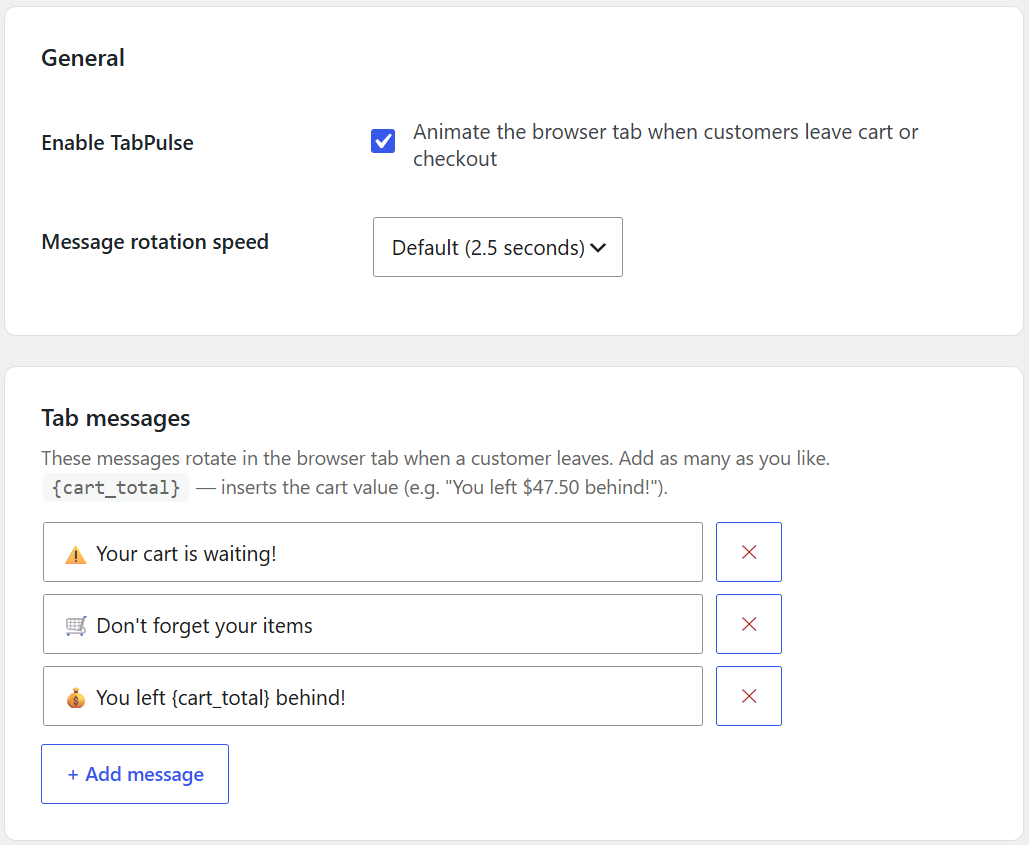
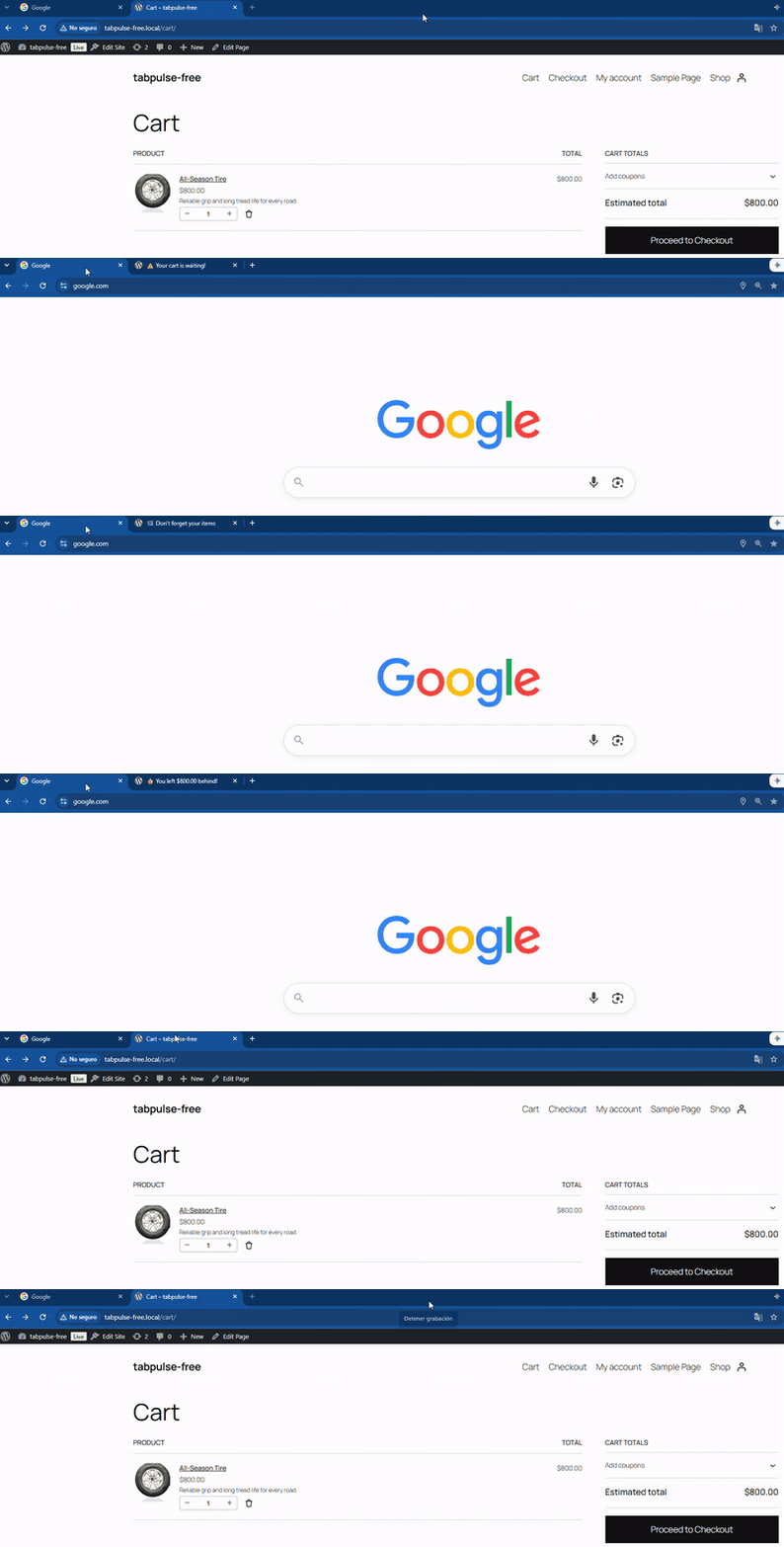
TabPulse is a WooCommerce abandoned cart recovery plugin that catches customers the moment they switch away from your cart or checkout page — by animating the browser tab title with custom messages like “⚠️ Your cart is waiting!” or “💰 You left $47.50 behind!”.
No intrusive pop-ups. No email capture. Minimal server impact. Just a subtle, effective cart recovery nudge right in the tab bar — invisible until the customer actually leaves.
Most abandoned cart plugins are heavy, require email opt-ins, or fire on every page. TabPulse is different: it activates only when a customer switches tabs during checkout, adds minimal server impact, and works silently in the background.
Free features (this plugin)
- ✅ Unlimited custom tab messages for abandoned cart recovery
- ✅
{cart_total}placeholder — show the customer their real cart value (e.g. “You left $47.50 behind!”) - ✅ Configurable rotation speed (1 to 5 seconds)
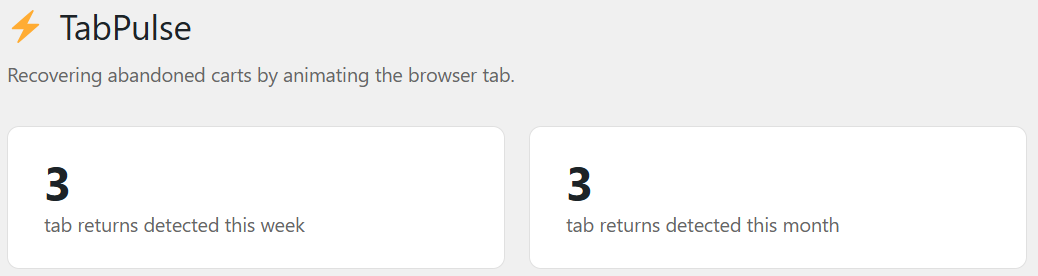
- ✅ Returns counter — see how many customers came back to your cart this week and this month
- ✅ Works on cart and checkout pages only — zero footprint everywhere else
- ✅ No jQuery. No third-party requests. One small AJAX call to your own server records each return. About 5 KB of vanilla JS (about 1.5 KB compressed).
- ✅ Privacy-friendly: no cookies, no personal data stored (only an aggregate return counter)
TabPulse Pro (separate plugin at tabpulse.net)
TabPulse Pro builds on the free version with:
- 💸 Auto-coupons — when a customer comes back to the tab, Pro creates a unique single-use coupon (fixed discount, expires in 24 hours) and applies it to their cart
- 📊 Recovered revenue report — see revenue recovered in two separate ways: orders that used a TabPulse coupon, and orders placed within 24 hours of a return (never double-counted)
- 🛡️ Coupon abuse protections — daily coupon limit, per-email discount limit, optional one-coupon-per-connection limit, and abuse alerts
- 🔴 Favicon badge — a red notification dot on your store’s favicon
- ⚡ More rotation speeds — up to 10 seconds between messages (the free version offers 1 to 5)
14-day free trial, no credit card required.
Installation
- Upload the
tabpulse-tab-recovery-for-woocommercefolder to/wp-content/plugins/. - Activate the plugin through the Plugins menu in WordPress.
- Make sure WooCommerce is active.
- Go to Settings → TabPulse to configure your messages.
FAQ
Does this work without WooCommerce?
No. TabPulse is designed specifically for WooCommerce cart and checkout pages.
Will this slow down my store?
No. The JS file is loaded only on cart and checkout pages, weighs about 5 KB (about 1.5 KB compressed), has zero external dependencies, and makes only one small AJAX call to your own server when a customer returns.
Can I use {cart_total} in my messages?
Yes. Add {cart_total} anywhere in a message and TabPulse will replace it with the customer’s actual cart value (e.g. $47.50).
Where does the return counter data come from?
Every time a customer returns to your cart or checkout tab (after switching away), TabPulse records that event. The counter in your admin panel shows how many returns were detected this week and this month. It does not store any personal data, cookies, or individual customer information.
How is TabPulse Pro different?
The free version animates the tab and counts returns. Pro gives returning customers an automatic single-use coupon, shows how much revenue was recovered, protects the coupons against abuse, and adds a red favicon badge and more rotation speeds (up to 10 seconds between messages). Start your 14-day free trial.
Is TabPulse GDPR compliant?
TabPulse does not use cookies or store personal data. It only keeps an aggregate count of returns. This makes it privacy-friendly, but we recommend consulting a legal professional for your specific compliance needs.
Does it work with WooCommerce blocks?
Yes, TabPulse is compatible with the WooCommerce Cart and Checkout blocks.
Does it work with multi-step checkouts?
Yes. The author of LWN Multi-Step Checkout tested TabPulse with version 1.1.6 of that plugin, on both the classic checkout and the Checkout block: the tab title changes while the shopper is away, returns to normal when they come back, and the checkout stays on the same step.
Does it contact any external servers?
No. TabPulse makes only one AJAX request to your own WordPress admin-ajax.php to record a return. It does not contact third-party services.
Screenshots


Changelog
1.0.4
- Plugins screen: new “Settings” link.
- Settings page: the Pro note now describes the recovered revenue report first.
- If TabPulse Pro is active, the free version now steps aside instead of loading twice (no more “constant already defined” PHP warnings) and suggests deleting it.
1.0.3
- Settings page: the Pro mention no longer shows an estimated number of recoveries; it now describes the Pro feature plainly.
- Settings page: the footer now lists only the features Pro actually includes (favicon badge and auto-coupons).
- Plugin description: “No server load” replaced with “Minimal server impact” (TabPulse makes one small request when a customer returns).
- Readme: the rotation speed is configurable from 1 to 5 seconds (it said 1–10).
1.0.2
- Compatibility: tested with WordPress 7.1 and WooCommerce 11.2.
- Compatibility: declared support for the WooCommerce Cart and Checkout blocks.
1.0.1
- Pro upgrade links now go straight to checkout (with the 14-day trial preselected) instead of the marketing homepage. No functional changes to any free feature.
1.0.0
- Initial release.