

Description
Taseli is an AI campaigner. It plans, builds and runs your ads on Google, Meta (Facebook and Instagram) and TikTok, makes the creatives, and reports back in plain language.
An ad report says “clicks”. Your store says “orders”. This free plugin connects the two, so Taseli spends where the money comes from.
Taseli works with Google Ads, Meta and TikTok accounts you connect. It is not affiliated with, endorsed by or sponsored by Google, Meta or TikTok.
What you get in Taseli
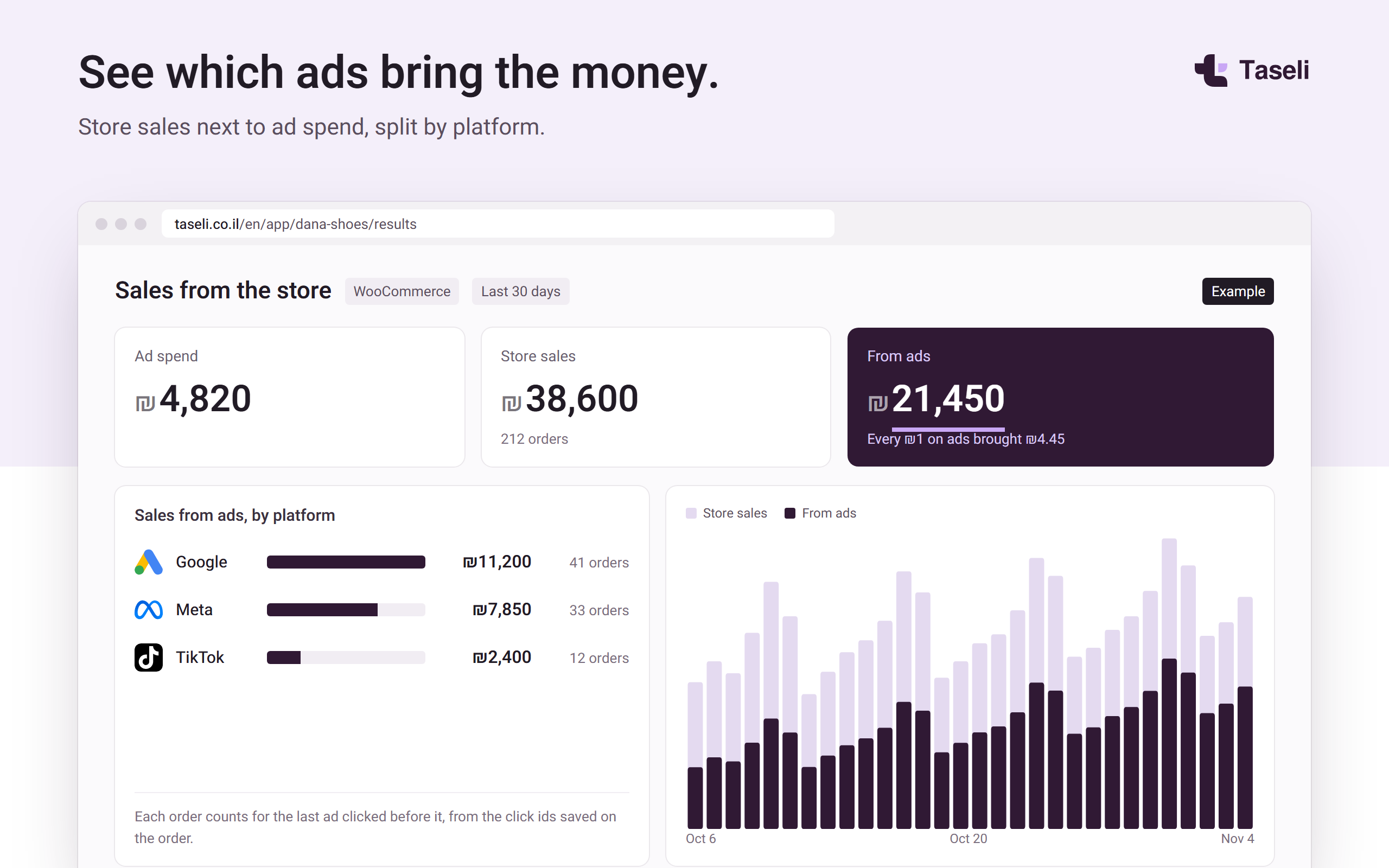
- Sales next to ad spend. Your store’s orders and revenue, and the part that came from Google, Meta and TikTok ads.
- Ads that know your store. Taseli reads your published products and prices when it plans and builds ads.
- Fresh numbers. Taseli reads once a day, and again soon after a new order or a product change.
What the plugin does on your site
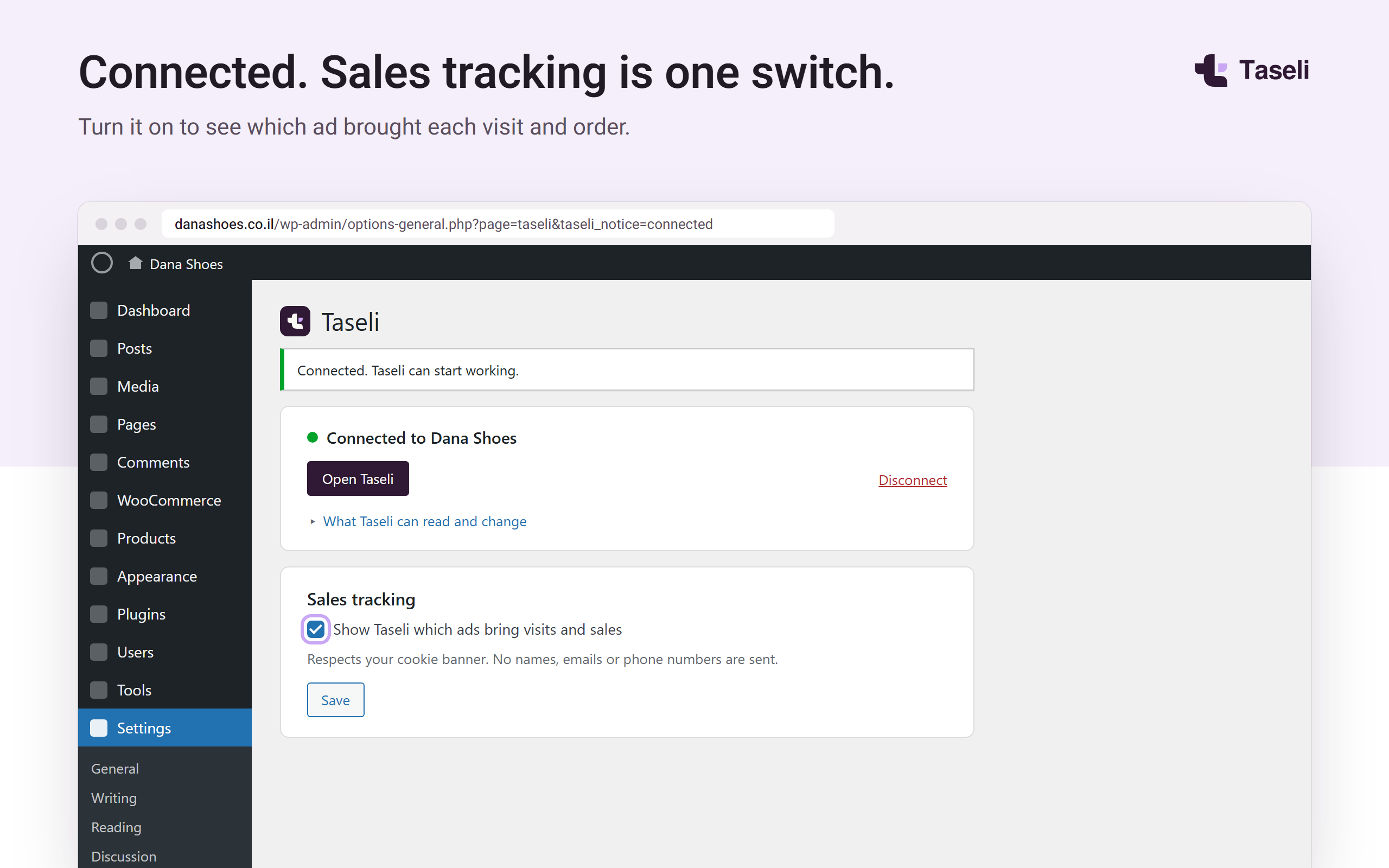
- Connects in one click. Click “Connect to Taseli”, sign in to Taseli and pick your business. No WordPress password or Application Password is created or shared.
- Gives read-only access. Taseli reads basic site details and, with WooCommerce, orders and published products, through the plugin’s own signed endpoints. It never sees customers’ names, emails, phone numbers or addresses.
- Allows no remote administration. Taseli cannot log in, manage users, install or change plugins or themes, edit code, or publish or edit your content. It can change only this plugin’s own settings: sales tracking on or off, its tracking key, and the business name shown in Settings › Taseli.
- Tracks sales (optional). A small script records which ad brought each visit and order (UTM values and ad click ids such as gclid, fbclid and ttclid). Click ids are also saved on each WooCommerce order.
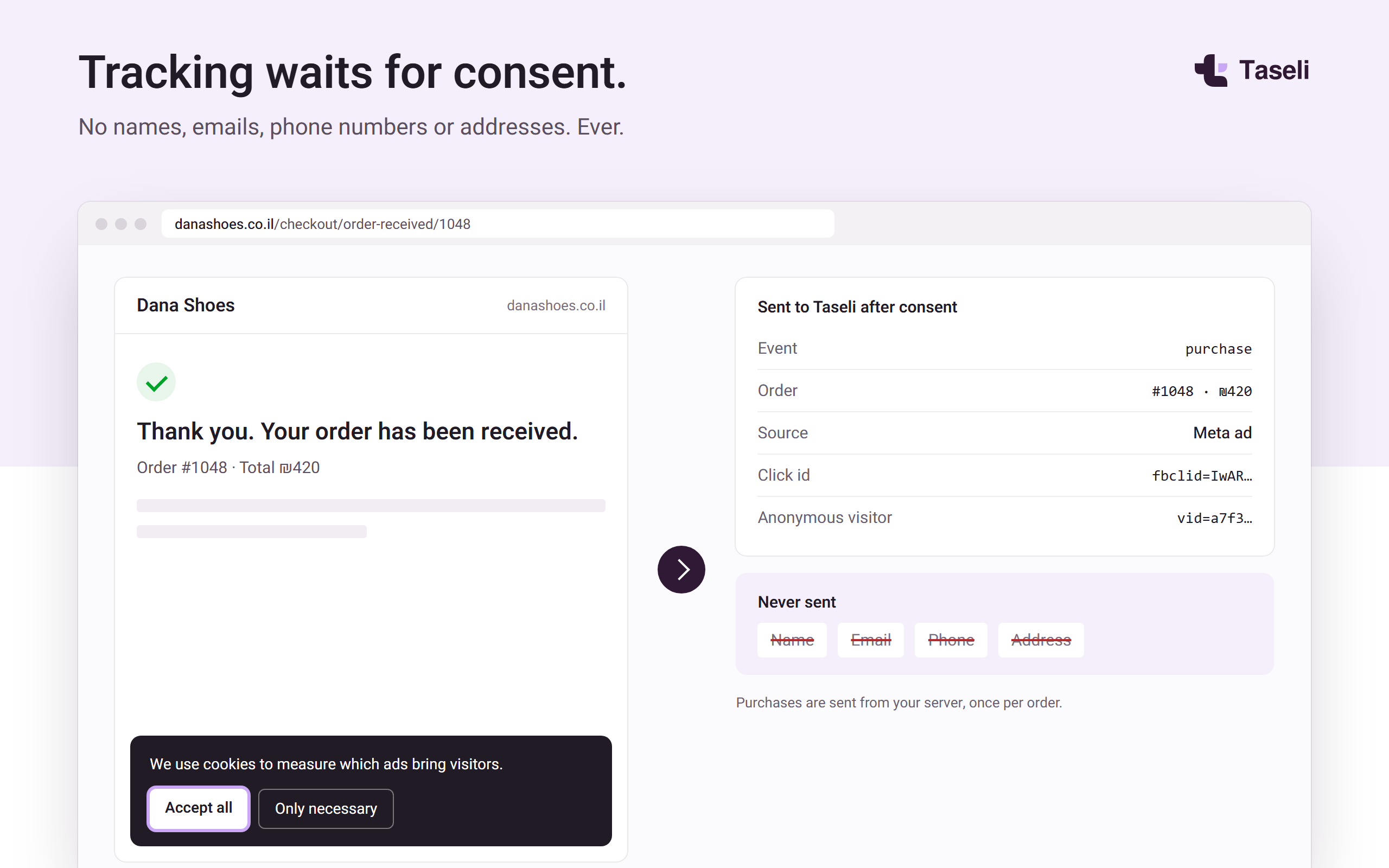
- Waits for consent. Nothing runs until you connect. Tracking follows the WP Consent API and common cookie banners (Complianz, CookieYes, Cookiebot, Cookie Notice). With no consent tool on the site, no marketing cookies are set and no visitor events are sent.
Works on plain WordPress and on WooCommerce, including the Cart and Checkout blocks and High-Performance Order Storage (HPOS).
The plugin is free. A Taseli account is needed to use it; plans and billing are handled only on taseli.co.il. The plugin has no paid features, license keys or upsells.
External services
This plugin connects to Taseli (https://taseli.co.il), a service run by Taseli. It is needed for the plugin’s only purpose: letting your Taseli account measure and manage your ads for this site. Nothing is sent before an administrator clicks “Connect to Taseli”.
- Connecting. When an administrator clicks “Connect to Taseli”, the browser opens
https://taseli.co.il/connect/wordpresswith this site’s address, its REST API address, the plugin version, whether WooCommerce is active, and two one-time values for this connection (a random state and a hash of a random verifier). After the administrator signs in to Taseli and picks a business, Taseli sends the browser back to this site with a one-time code. The site then sends that code, the verifier and its address tohttps://taseli.co.il/api/wordpress/exchangeand receives a key made for this site only. The key is stored in this site’s options and never shown or sent anywhere. - Reading. Taseli calls this site’s
/wp-json/taseli/v1/endpoints, each request signed with that key (HMAC-SHA256 with a timestamp and a one-time nonce, so a request cannot be replayed). They answer with: site name, address, language, time zone, currency, the WordPress, WooCommerce and plugin versions and the SEO plugin in use; with WooCommerce, orders (date, status, totals, tax, shipping, refunds, products bought, customer id number, and the Taseli and WooCommerce attribution fields saved on the order) and published products (name, price, SKU, link, main image, stock status). Order billing and shipping details are never included. Taseli reads once a day and soon after a change (see 3). - Change notices (WooCommerce). When an order or a product is created or changed, the plugin sends
https://taseli.co.il/api/wordpress/nudgea signed request containing only the word “orders” or “products” (at most once every 10 minutes each), so Taseli reads the new totals soon. On Disconnect it sends “disconnect” the same way. - Sales tracking (optional, off until you or Taseli switch it on; you can switch it off in Settings › Taseli). On the public site, only after the visitor gives marketing consent (through the WP Consent API or a supported cookie banner; with no consent tool on the site nothing is sent unless the site owner turns that default on), the plugin’s script sends small events to
https://taseli.co.il/api/wordpress/pixel: page views, product views, add to cart, checkout start and purchases. Each event contains: the site’s tracking key, event name, time, page address with only marketing parameters (UTM values and ad click ids), referring site’s domain, page type, an anonymous random visitor id and session id, the ad click ids and UTM values, Meta’s_fbp/_fbcand TikTok’s_ttpbrowser ids when present, and for store events the product ids, quantities, prices, order id, order value and currency. Purchases are sent from your server, once per order. No names, emails, phone numbers, addresses or IP-based profiles are created by the plugin. - WhatsApp leads (optional, off by default; an administrator turns it on in Settings › Taseli, Taseli cannot). Only after marketing consent, when a visitor who came from a Google ad taps a WhatsApp link (wa.me, api.whatsapp.com), the script changes that link: it adds a random 8-character reference, written as invisible characters, to the end of the prefilled message, and sends one
whatsapp_tapevent tohttps://taseli.co.il/api/wordpress/pixelwith that reference and the ad click id. The business receives the reference together with the visitor’s message, and Taseli matches it to the ad click to count the lead. The reference is kept in_taseli_attrfor 30 days. Taseli never reads your WhatsApp account or messages. Leave the switch off and the links are never changed. - Cookies set on visitors’ browsers (first-party, set only after marketing consent):
_taseli_attr(UTM values and click ids, 90 days),_taseli_vid(anonymous visitor id, 90 days),_taseli_sid(session, 30 minutes),_fbpand_fbc(Meta browser and click ids, 90 days).
Taseli terms of service: https://taseli.co.il/en/legal/terms
Taseli privacy policy: https://taseli.co.il/en/legal/privacy
Installation
- In WordPress, go to Plugins › Add New, search for “Taseli”, then install and activate. Or upload the plugin zip under Plugins › Add New › Upload Plugin.
- Go to Settings › Taseli. The screen lists exactly what Taseli can read and change. Click Connect to Taseli.
- Sign in to Taseli (or create an account) and pick your business.
- You’re back on Settings › Taseli and it says “Connected to” your business. Switch sales tracking on there if you want it.
FAQ
Is the plugin free?
Yes. The plugin is free and has no paid features. Taseli plans are bought only on taseli.co.il.
Do I need WooCommerce?
No. On a regular WordPress site Taseli measures visits and leads. With WooCommerce it also reads order totals and products and measures sales.
What access does Taseli get?
Read-only access to basic site details and, with WooCommerce, order totals and published products, through the plugin’s own endpoints. Every request must be signed with the key made for your site. Taseli has no WordPress user, password or Application Password, and cannot change anything on your site except this plugin’s own settings. Click Disconnect in Settings › Taseli and the key is deleted.
I connected with version 1.0.0. What changes?
Version 1.0.0 connected with a WordPress Application Password. Version 1.0.1 no longer uses one. Click Connect again in Settings › Taseli: Taseli switches to the new read-only access and deletes its old application password. You can also delete it yourself under Users › Profile › Application Passwords (it is named “Taseli”).
Does the tracking need cookie consent?
The script checks the WP Consent API and the common cookie banners (Complianz, CookieYes, Cookiebot, Cookie Notice, CookieLawInfo). Nothing is stored or sent until the visitor allows marketing cookies. With no consent tool on the site, the script sets no cookies and sends nothing. Site owners who do not need opt-in consent in their region can switch tracking on without a banner with add_filter( 'taseli_consent_default', '__return_true' );.
Does it slow down my site?
No. The script is small, loads deferred in the footer, and sends events in the background. It loads no third-party scripts.
What happens when I uninstall?
The plugin’s settings and its key are deleted. Click ids saved on past orders stay, because they are part of your store’s sales history.
Screenshots


Changelog
1.0.4
- WhatsApp lead counting is now a separate switch in Settings › Taseli, off by default, and is described under External services.
- Orders read by Taseli return only the attribution fields it uses (not the visitor’s user agent or session pages), and landing addresses keep only UTM values and ad click ids.
- Settings › Taseli shows when Taseli last read the site, the tracking state, and a note when no cookie banner is found.
- Clearer messages when connecting fails (expired link, or a server that blocks outgoing connections).
- Security: one error for every bad signature, an atomic replay check on sites with an object cache, and a limit on repeated bad signatures.
- Requires WordPress 6.3. Uninstall also removes the legacy SEO post meta.
1.0.3
- WhatsApp leads: after marketing consent, when a visitor who came from a Google ad taps a WhatsApp link, the tracking script sends one
whatsapp_tapevent and adds a random 8-character reference, written in invisible characters, to the end of the prefilled message. See External services.
1.0.2
- Consent: with no consent tool on the site, the tracking script no longer sets cookies (
_taseli_vid,_taseli_attr,_taseli_sid,_fbp,_fbc) or sends events, and click ids are not saved on orders. It starts only after a marketing consent signal (WP Consent API or a supported cookie banner). Thetaseli_consent_defaultfilter now defaults to false. - Readme legal links point to the English pages.
1.0.1
- Connecting no longer uses WordPress Application Passwords. Taseli now reads only through the plugin’s own signed, read-only endpoints (per-site key, HMAC signature, timestamp and nonce) and can change only the plugin’s own settings.
- Removed the SEO title and description editing endpoint.
- The settings screen lists exactly what Taseli can read and change.
- Translations now come from translate.wordpress.org (bundled .po/.mo files removed).
1.0.0
- First release.