

Description
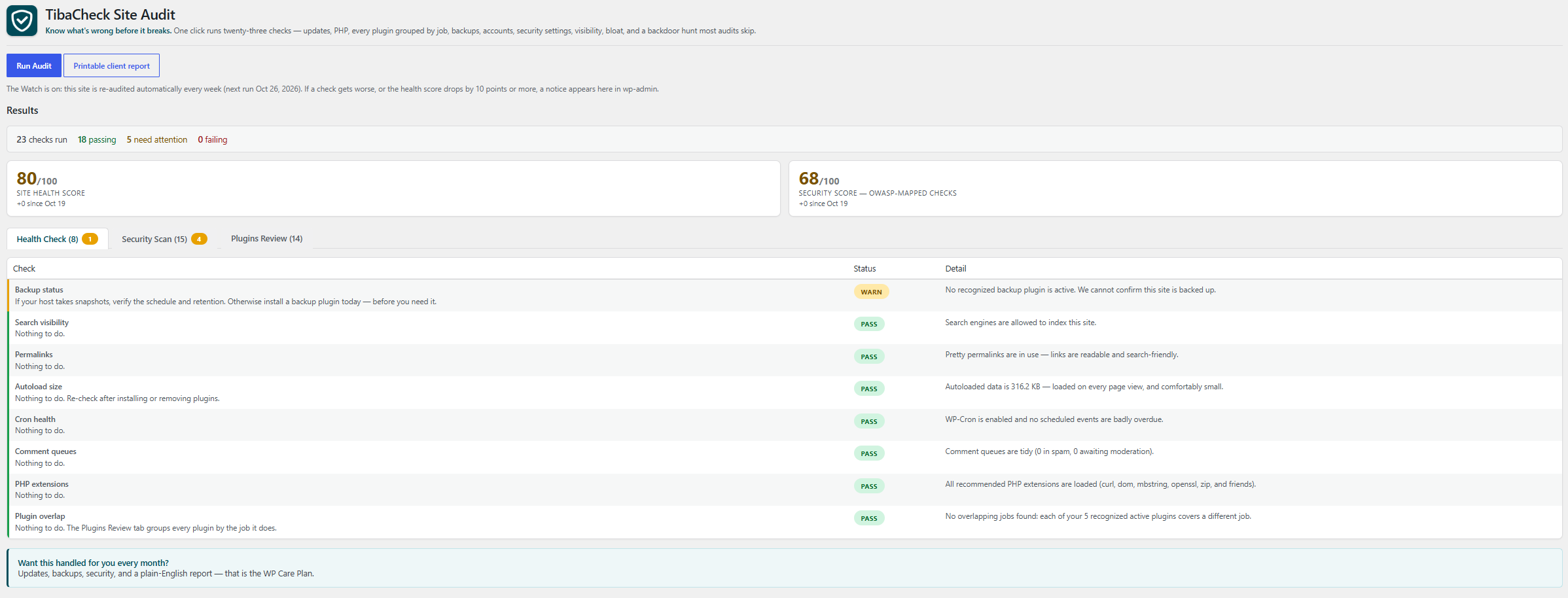
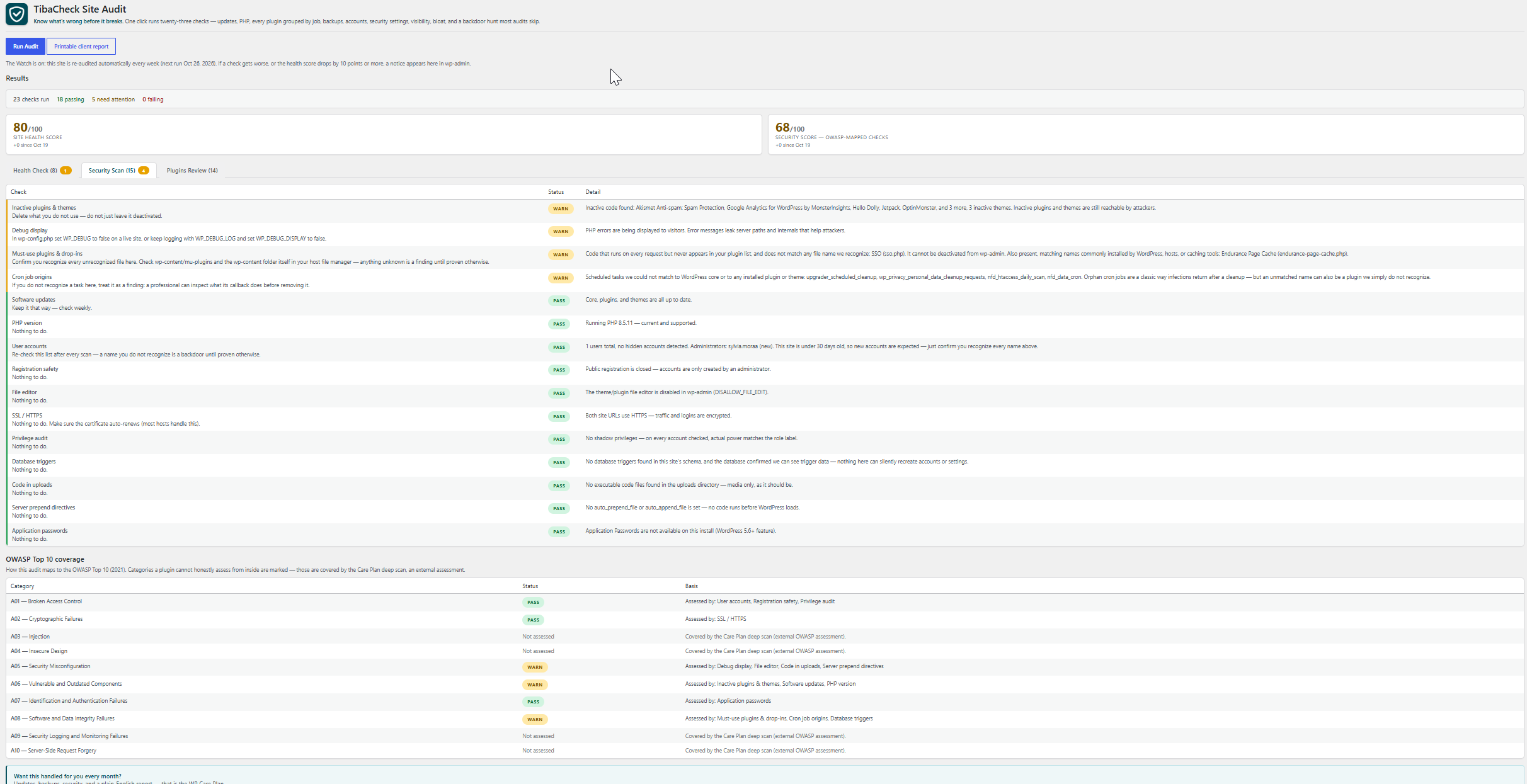
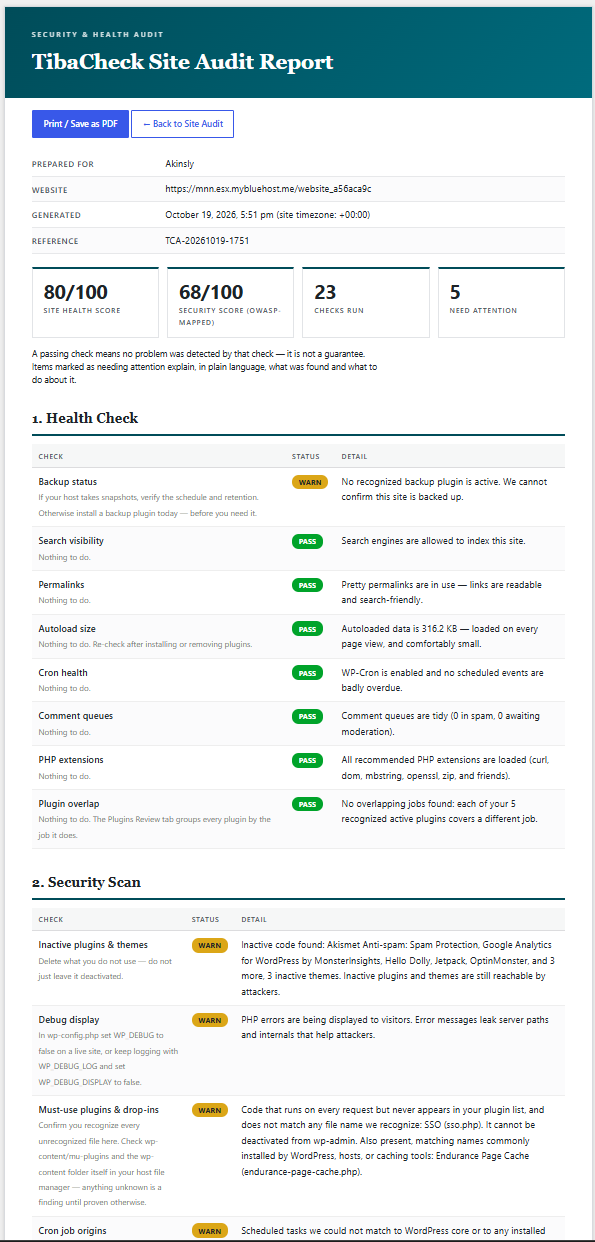
TibaCheck runs a read-only audit of your site’s configuration and shows you, in plain language, what needs attention. Every report leads with two scores — a Site Health Score and a Security Score built from checks mapped to the OWASP Top 10 (2025) — with a full OWASP coverage table showing what was assessed and what needs an external deep scan:
- Software updates — pending WordPress core, plugin, and theme updates (outdated software is the #1 way sites get hacked)
- PHP version — whether your PHP is supported, outdated, or end-of-life
- PHP critical security update — whether the PHP version actually running the site is affected by the October 2026 PHP security advisory (CVE-2026-109618 and CVE-2026-109619, critical unauthenticated remote code execution vulnerabilities with active exploitation reported), naming the patched release for your PHP branch (8.2.35, 8.3.36, 8.4.27 or 8.5.12)
- Inactive plugins & themes — unused code sitting on your site is a favorite hiding spot for malware
- Backup status — whether we can confirm this site is backed up at all
- Site email delivery — whether we can confirm this site’s email is set up to be delivered at all: a dedicated mail plugin (one of the mail plugins the plugin catalog already lists as sending site email through SMTP or a mail service — WP Mail SMTP, WP Mail SMTP Pro, Easy WP SMTP, Post SMTP, FluentSMTP — matched by its exact folder name, or by its exact file name for a single-file plugin) is active and named, or the report warns that no recognized dedicated mail plugin is active and says plainly that this does not prove mail is broken — mail may be handled by the host, by a must-use plugin, or by a mail plugin the check does not recognize — only that WordPress’s built-in mail, which hands password resets, account and comment notices, form alerts, and store order emails to the web server’s own mail setup, is the only setup we can see. The check never sends a test message: sending mail would break the plugin’s read-only, no-external-requests rule, so the report tells the owner to prove delivery with a test message themselves
- User accounts — every administrator listed by name after each scan, plus a hidden-account test that catches backdoor users invisible to WordPress
- Registration safety — open registration paired with a powerful default role is an open door; we flag it
- File editor — whether the wp-admin theme/plugin editor (one stolen password away from code execution) is disabled
- Debug display — whether PHP errors are being shown to visitors, leaking server internals
- Exposed debug log — whether a debug log file sits in a web-accessible folder (WordPress’s own debug log defaults to a file named debug.log inside wp-content, a folder reachable by web address), or WordPress debug logging is switched on and directed into the wp-content or site root folder, where the first error logged will create it there; a log found there warns and is named — it can hold error messages with server paths and request details — while logging directed to a path outside both folders passes. No log file is ever opened or read, and the report says plainly that whether the server blocks the file cannot be tested from inside WordPress
- Exposed PHP error log — whether a PHP error log file sits in a web-accessible folder, or PHP’s own error log setting directs one into one. PHP keeps a separate error log from WordPress’s debug log, configured in php.ini, a .user.ini file, or a host control panel — switching WordPress debug off does not change it — and its classic file name is error_log, which turns up in the site root, wp-admin, and wp-content folders, all reachable by web address; a log found there warns and is named — it can hold error messages with server paths and request details — while logging directed to a path outside those folders, or to the system log, passes. No log file is ever opened or read, and the report says plainly that whether the server blocks the file cannot be tested from inside WordPress
- Exposed PHP configuration files — whether a PHP configuration file (php.ini, .user.ini, or the per-folder file name this site’s PHP is set to look for) sits in the site root, wp-admin, or wp-content folder, all reachable by web address; a file found there warns and is named — it can hold PHP settings in plain text, and on hosts that read per-folder configuration a .user.ini file can also set PHP directives for the scripts in its folder — while a host may have placed it deliberately, which the report says plainly. No configuration file is ever opened or read, and the report says that whether the server blocks the file, and whether this server’s PHP loads configuration from a web folder at all, cannot be tested from inside WordPress
- Search visibility — whether the site is accidentally telling Google to stay away
- SSL / HTTPS — whether both site URLs are actually configured for encrypted traffic
- Permalinks — whether links are readable and search-friendly, or the plain
?p=123default - Autoload size — how much data loads on every page view, with the biggest offenders named; bloat here is the #1 silent slowdown
- Cron health — whether scheduled tasks (updates, backups, posts) are actually firing, or silently stalled
- Comment queues — spam and unmoderated comments piling up in the database
- PHP extensions — whether the extensions WordPress relies on for updates, images, and encryption are present
Plus the Persistence Pack — the backdoor hunt most audits skip entirely:
- Privilege audit — accounts whose real power exceeds their role label (a “Subscriber” who can actually run the site)
- Must-use plugins & drop-ins — code that runs on every request but never appears in your plugin list, listed by name; files matching names commonly installed by WordPress, hosts, or caching tools are called out separately from names we cannot recognize
- Database triggers — triggers on account tables can silently recreate a deleted backdoor; we inspect the schema
- Cron job origins — scheduled tasks that trace to neither core nor any installed plugin or theme are how cleaned infections return
- Code in uploads — executable files inside the media folder, where only images and documents belong
- Server config in uploads — .htaccess, web.config, and .user.ini files inside the media folder that can redefine how uploaded files are treated: a config file whose rules enable code execution fails (it turns the media folder into a code folder, and can survive a cleanup that only removes the payload), config files whose active rules are all recognized and none enables execution pass and are named, and a config file with rules the check does not recognize — or that cannot be read in full — warns instead of being assumed safe
- Stray code in wp-content — code files sitting loose in the top level of the wp-content folder, outside any plugin, theme, or WordPress drop-in: directly reachable by web address, invisible in your plugin list (the drop-in list WordPress exposes only ever returns the filenames WordPress itself defines, so a file with any other name never shows up there), and able to survive a cleanup that only removes plugins and themes; any such file warns and is named for a human eyeball
- Stray code in site root — code files sitting loose in the top level of the folder WordPress is installed in, beyond the files WordPress itself ships there and your wp-config.php: directly reachable by web address, invisible in your plugin list and in every update list, and able to survive a cleanup that only removes plugins and themes; the files WordPress expects are matched by their exact file name (a file whose name differs only in letter case is a different file on most servers and is named, not excused), any other file with a code extension warns and is named for a human eyeball, and matching by name is stated plainly as not proof that an expected file’s contents are genuine
- Exposed backup files in site root — the non-code leftovers sitting loose in the top level of the folder WordPress is installed in, where a web server hands a file to anyone who asks for its address: copies of your configuration or environment file (wp-config.php.bak, .env, .envrc and the like) fail, because they can hand out secrets such as your database password or API keys as plain text; database dumps (db.sql, backup.sql.gz, and the same dumps renamed with a backup, text, or editor suffix — db.sql.bak, db.sql.txt, db.sql~) fail for the same reason — your users and password hashes in readable form; environment templates (.env.example, .env.sample, .env.template, .env.dist, and the direnv forms .envrc.example, .envrc.sample, .envrc.template, .envrc.dist) warn instead of failing — those names claim placeholder values, not real secrets — and site archives, backup copies of other files (index.php.bak), and version-control folders (.git) warn and are named for a human eyeball. Files are matched by name only and none is ever opened — the report says so plainly — and only the top level is listed, because backup tools that keep archives inside subfolders are a different row’s scope
- Exposed backup files in wp-content — the same non-code leftovers, one folder the site-root row never lists: the top level of the wp-content folder, which that row skips as a folder and the stray-code row only grades for code files. Copies of your configuration or environment file (wp-config.php.bak, .env, .envrc and the like) and database dumps (db.sql, backup.sql.gz, and the same dumps renamed with a backup, text, or editor suffix) fail and are named, because wp-content is reachable by web address and a file there is handed to anyone who asks for it; environment templates (.env.example and the direnv forms), site archives, backup copies of other files (index.php.bak), and version-control folders (.git) warn and are named for a human eyeball. Files are matched by name only and none is ever opened — the report says so plainly — and only the top level is listed, because the subfolders hold the site’s plugins, themes, and uploads rather than loose leftovers
- Server prepend directives — auto_prepend_file / auto_append_file run code before WordPress even loads; we show you if they’re set
- File permissions — wp-config.php and the code folders (site root, wp-includes, wp-content, plugins, themes) fail the check if any account on the server can rewrite them; a world-writable uploads folder warns, and a code folder that cannot be found at all is reported as “could not confirm” rather than silently skipped. Only the world-writable setting is graded — owner and group permissions differ legitimately between hosts, so they are not judged
- Application passwords — an inventory of the standing credentials that bypass your login screen, with the oldest one’s age
- Login keys and salts — the eight secret values WordPress signs login cookies with, read from the constants the site runs with (values themselves are never displayed — only the names of the settings): a setting that is not set, still holds the sample placeholder text that ships in wp-config-sample.php, or holds the same value as another setting warns and is named, because WordPress itself refuses to use such a value and covers it — with one it generates and stores in the database, or, on a site still carrying the older SECRET_KEY setting, with that setting’s value — so logins are not left unprotected, but the keys actually in force are then not the ones in the configuration file where a care team expects to find and rotate them, and a database-stored covering value lives in the same database as the user password hashes
Plus the WooCommerce store pack — four more checks that appear only when WooCommerce is active, so they never clutter a non-store report. A store that cannot take payment is down in the only way that matters, and these are what a care plan watches on a store every month:
- Store pages — the Checkout page must be assigned and published or customers cannot buy at all (the check fails when it is not); the Cart, Shop, and My Account pages are checked too and warn when broken
- Payment gateways — at least one gateway must be switched on, read from WooCommerce’s own gateway registry so extension gateways count exactly like built-in ones; up to four enabled ones are named
- Store details — store currency, base country, and street address, the details taxes, shipping, and invoices are calculated from (a currency or country that was never set is flagged with the default WooCommerce silently uses instead)
- Checkout posture — the silent sales leak: guest checkout off, no account creation during checkout, and registration closed on the My Account page too, so only existing account holders can buy. Checkout encryption itself is graded once, by the SSL / HTTPS check, and cross-referenced here — never double-counted
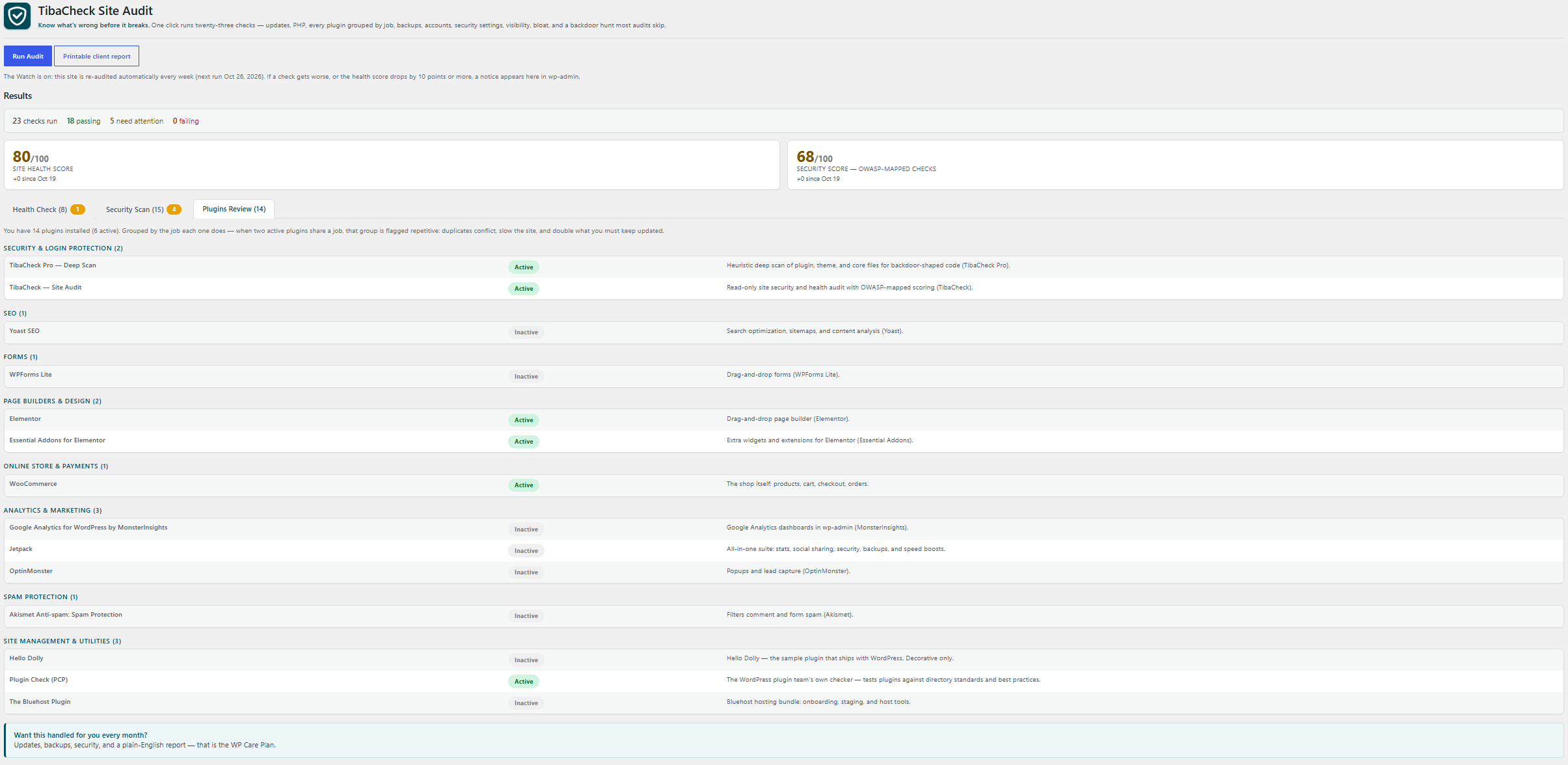
Every report also carries a Plugins Review section: every installed plugin grouped by the job it does — backups, security, SEO, speed, forms, builders, store, analytics, spam, media, email, languages, utilities — each with a one-line purpose and its active/inactive state. When two or more active plugins share a job, the group is flagged repetitive and a Plugin Overlap check warns: duplicates conflict, slow the site, and double what you must keep updated. Plugins we don’t recognize are listed honestly as “not yet categorized” — we never guess what a plugin does.
Every report can also be opened as a printable client report: a branded document with the score cards, every check and its detail, and the plugin and OWASP coverage summaries — ready to print or save as a PDF for a client. It is generated fresh when opened; the plugin stores no full report (only scores, statuses, and time).
The Watch keeps an eye on the site between visits: once a week, TibaCheck quietly re-runs the same read-only audit on its own (using WordPress’s built-in scheduler — no external calls, nothing phones home). If a check gets worse than the last audit, or the health score drops by 10 points or more, a notice appears in wp-admin naming what changed. A manual audit run answers the notice; improving checks never raise one, and each weekly run reconciles an unanswered notice — problems that recovered drop off it, problems still active stay on it. Deactivating the plugin stops the Watch and discards any pending notice (on a multisite network, deactivate on the site itself to clear that site’s Watch).
A note on honesty: TibaCheck does not claim to “scan for malware” the way signature scanners do — signatures miss modern, per-site malware, and a scanner runs inside the very environment an infection can hide from. What it does is audit the places …
Installation
- Upload the plugin files to
/wp-content/plugins/tibacheck-site-audit, or install through the WordPress plugins screen. - Activate the plugin.
- Go to Tools → Site Audit and click Run Audit.
FAQ
Does the audit change anything on my site?
No. Every check is read-only — TibaCheck never updates, deletes, or modifies your site. It stores only its own last report (scores and check statuses), any pending Watch change alert, and the time of the last automatic Watch run, so it can show your trend on the next run.
Is the OWASP score a certification?
No. The Security check score maps this plugin’s checks to the OWASP Top 10 (2025) categories they assess, and the coverage table labels every mapped category as partial. A passing check does not establish category-wide security. Injection, insecure design and logging/alerting remain unassessed. The score is a TibaCheck heuristic, not an OWASP certification, and is withheld when mapped evidence is incomplete. Separate code, architecture or dynamic assessment is required.
What do the statuses mean?
Pass — healthy. Warn — should be fixed soon. Fail — fix now; this is how sites get hacked or break.
Screenshots
Changelog
0.25.1
- FIX: Software updates names what it counts. The check reported pending updates as a count only (“10 plugins, 1 theme”), leaving the owner to hunt through wp-admin for the list behind the numbers. It now names the plugins and themes with updates available, resolving each display name from the copy installed on the site — the same name resolution the Inactive plugins check uses — and falling back to the plugin file or theme slug when a name cannot be resolved, never an invented name. At most five are named, with the rest summarised (“and N more”), the same cap the inactive check uses. Grading is unchanged: the check still fails only when a core update is pending, warns otherwise, and update data WordPress has not provided is still reported as unknown, never as up to date.
- FIX: Plugins Review marks updates. Each plugin row in the Plugins Review now carries an “Update available” marker when WordPress has an update waiting for that plugin, read from the same update data the Software updates check uses; the printable client report states how many installed plugins have an update available. Grouping by job and the repetitive-plugin grading are unchanged.
- FIX: The results summary explains itself. The score cards now carry plain-English captions: the Site health score comes from every check in the audit, and the Security check score from the security checks only, with a note that coverage is partial and that the score cannot prove a site is secure. A first audit now reads “First audit — baseline set today” instead of showing no comparison or a zero change against a run that does not exist; real changes against the previous audit are shown exactly as before. The counts line now states that passing, need attention, and failing together add up to every check that ran. No check, threshold, or score calculation changed in this release.
0.25.0
- NEW: Site email delivery check — the mail companion to Backup status. That check asks whether we can confirm a site is backed up at all; no check asked the same question about the mail every site depends on. WordPress sends password resets, new-account and comment notices, contact form alerts — and, on a store, order emails — through its built-in mail, which hands messages to the web server’s own mail setup and does not itself connect to a mail service as the site; when that mail lands in spam or never arrives, the site shows no warning, and the owner usually hears about it from a locked-out user or a customer. A dedicated mail plugin that is active PASSES and is named: the recognized plugins are the ones the plugin catalog in this plugin lists as sending site email through SMTP or a mail service (WP Mail SMTP, WP Mail SMTP Pro — the Pro plugin installs under its own folder name — Easy WP SMTP, Post SMTP, FluentSMTP), matched by exact folder name, or by exact file name for a single-file plugin — the same name matching the plugin catalog uses — so a plugin whose name merely contains one of these names cannot produce a pass. The pass claims only that a setup of this kind is installed, never that it is configured or delivering, and its fix line tells the owner to prove delivery with a test message. With no recognized plugin active the check WARNS — it never fails, and it never claims mail is broken: absence proves nothing, because mail may be handled by the host, by a must-use plugin (which never appears in the active plugin list the check reads), or by a dedicated mail plugin this check does not recognize, and the message names those setups plainly. The check only reads the active plugin list; it never sends a test message, because sending mail would be a write and an external request. This check is not mapped to an OWASP category — mail delivery is a reliability question, not one of the Top 10 security risks — so it counts toward the Site Health Score only, exactly like Backup status. The audit now runs thirty-five checks, thirty-nine on a WooCommerce store.
0.24.0
- NEW: Login keys and salts check (OWASP A07) — the credential companion to Application passwords. That check inventories the standing credentials that bypass the login screen; no check read the secret values the login screen itself relies on. WordPress signs login cookies using eight keys and salts defined as constants, normally in wp-config.php (AUTH_KEY through NONCE_SALT), and WordPress itself refuses to use a value that still holds the sample placeholder text “put your unique phrase here” — it treats that text as unusable even when it appears only once — or that repeats a value carried by another of the constants it scans (the eight, plus the legacy SECRET_KEY and SECRET_SALT), covering any value it cannot use, and any setting that is missing, with a value it generates itself and stores in the database — or, on a site still carrying the older SECRET_KEY setting, with that single setting’s value. A setting that is not set with a usable text value, still holds the placeholder text, or shares its value with another setting WARNS and is named. It never fails, and the report says why: the covering value means logins are not left unprotected. The warning rests on the configuration values not being the ones in force — a database-stored covering value lives in the same database as the user password hashes, so a leaked database copy hands out both together — and on wp-config.php being where a care team expects to find, and to rotate after an incident, the keys actually in force. Only the names of the settings are ever reported: no key or salt value is ever placed in the report, and the check’s only reads are whether the constants are defined and what they hold, in this PHP process — it never calls the WordPress function that resolves the salts, because on a site whose constants cannot be used that function itself writes the generated fallbacks into the options table, which would break the plugin’s read-only rule. A legacy SECRET_KEY or SECRET_SALT is never graded on its own; it counts only as a carrier when it shares a value with one of the eight, exactly as WordPress counts it. The audit now runs thirty-four checks, thirty-eight on a WooCommerce store.
0.23.0
- NEW: Exposed PHP configuration files check (OWASP A02) — the configuration-file companion to the two log checks. Those grade where PHP and WordPress write error output; the Server prepend directives check grades the prepend values this PHP process runs with; no check looked at the configuration files themselves in the folders a visitor can address. A PHP configuration file found in the site root, the wp-admin folder, or the wp-content folder WARNS and is named: the names tested are php.ini (PHP’s main configuration file, which some hosts read from, or leave copies in, the site’s folders) and .user.ini (the per-folder configuration file PHP reads, on CGI/FastCGI-style setups, for the scripts in the folder that holds it), plus the different plain file name the site’s own user_ini.filename setting names when it names one, since that is the per-folder file this site’s PHP is set to look for. It never fails, for two reasons the report states plainly: a name and a location cannot prove a server hands the file out — many servers block configuration file names and dotfiles, and that blocking cannot be tested from inside WordPress — and a host may have placed the file deliberately and may still be reading it (host control panels store a site’s PHP settings in a root .user.ini as their normal way of working). The warning rests on what such a file can hold: PHP settings in plain text — such as server paths, log locations, and which functions and extensions are switched off — and, on hosts that read per-folder configuration, a .user.ini file can set PHP directives, the per-folder ones including the prepend settings, for the scripts in its folder. The report also states that whether this server’s PHP loads a configuration file from a web folder depends on the host’s setup and cannot be tested from inside WordPress either, and its fix tells the owner to confirm placement with the host before removing anything, because settings the site relies on may be stored in the file. The check only tests whether the named files exist — no configuration file is ever opened or read, and no folder is listed. Server configuration files inside uploads remain the Server config in uploads check’s row, graded there by content. The audit now runs thirty-three checks, thirty-seven on a WooCommerce store.
0.22.0
- NEW: Exposed PHP error log check (OWASP A02) — the PHP-side companion to Exposed debug log. That check grades the log WordPress’s own debug settings name; PHP itself keeps a separate error log, set in php.ini, a .user.ini file, or a host control panel, that WordPress constants neither set nor switch off — turning WP_DEBUG off does nothing to it. Its classic file name is error_log (no extension), and on hosts that set PHP’s error_log to that bare name, PHP can write the file into the folder of whichever script raised the error (a bare name resolves against the running process’s working folder, which on many hosts is the script’s folder), which is how error_log files turn up in the site root, in wp-admin, and in wp-content — all reachable by web address. A PHP error log found in any of those three folders, or at the location PHP’s error_log setting names when that path falls inside the site root or wp-content folder, WARNS and is named: it can hold error messages with server paths and request details that help an attacker map a site. It never fails, because a name and a location cannot prove a server hands the file out — many servers block such files — and the report says that blocking cannot be tested from inside WordPress. When no log file exists yet but PHP error logging is on and directed into one of those folders — by a path inside them, or by a bare file name, which on hosts that write the log per script folder PHP creates in each script’s folder as it runs — the check warns on the configuration and says plainly that no file with that name was found in the three folders it examines: the first error logged in one of those folders will create it there. Logging directed to a path outside those folders passes, as does the system-log setting (syslog) and a site with no error log file in the three folders and none directed into them (an error_log setting is inert while PHP’s log_errors is off). A stale log file warns even after logging is switched off, because the file stays in place at its web address. The setting itself is read from the PHP configuration this site is running with (ini_get) — however it was set — and the check only tests whether the known and configured files exist: no log file is ever opened or read, and no folder is listed. The audit now runs thirty-two checks, thirty-six on a WooCommerce store.
0.21.0
- NEW: Exposed debug log check (OWASP A02) — the log-file companion to Debug display. That check grades errors shown to visitors; no check graded the log file itself. WordPress’s debug log defaults to a file named debug.log inside the wp-content folder (that is where WP_DEBUG_LOG = true writes), in a folder reachable by web address whose guard file stops a folder listing, not a request for a known file name — and debug.log is the best-known log name there is. A debug log found in the wp-content folder or the site root folder (the same name is checked in both), or at the location WP_DEBUG_LOG names when that path falls inside either folder, WARNS and is named: it can hold error messages with server paths and request details that help an attacker map a site. It never fails, because a name and a location cannot prove a server hands the file out — many servers block it — and the report says that blocking cannot be tested from inside WordPress. When no log file exists yet but debug logging is on and directed into one of those folders, the check warns on the configuration and says plainly that no file was found: the first error logged will create it there. Logging directed to a path outside both folders passes, as does a site with no log file in either folder and no logging directed into them (a WP_DEBUG_LOG setting is inert while WP_DEBUG is off, exactly as WordPress handles it). The check only tests whether the known and configured files exist — no log file is ever opened or read, and no folder is listed. The audit now runs thirty-one checks, thirty-five on a WooCommerce store.
0.20.0
- NEW: Exposed backup files in wp-content check (Persistence Pack, OWASP A02) — the wp-content companion to Exposed backup files in site root. The site-root check lists only the top level of the folder WordPress is installed in and skips folders, and the Stray code in wp-content check grades only code files, so the non-code leftovers an editor, a migration, or a manual backup leaves loose in the top level of wp-content were listed by no check — in a folder that is reachable by web address, where a file is handed to anyone who asks for it on a server that does not block it. The categories and grading mirror the site-root check, because the exposure is the same and only the folder differs: copies of the configuration or environment file (wp-config.php.bak, .env, .envrc, .envrc.bak, .envrc~ and the like) FAIL, including the direnv-only wording that names API keys and tokens instead of a database password; database dumps FAIL, including dumps renamed with a backup, text, or editor suffix (db.sql.bak, db.sql.txt, db.sql~); environment templates (.env.example, .envrc.example and the other placeholder-claiming forms) WARN in their own category instead of failing; and site archives, backup copies of other files, and version-control entries (.git, .svn, .hg) WARN and are named. A file named exactly wp-config.php or wp-config-sample.php is not graded here — it is a code file, and the Stray code in wp-content check names it. Matching is by file name only: no file is ever opened, the report states that plainly, and only the top level of wp-content is listed (its subfolders hold the site’s plugins, themes, and uploads, not loose leftovers). A wp-content folder that cannot be found or listed warns as “could not confirm” instead of passing on no evidence. The audit now runs thirty checks, thirty-four on a WooCommerce store.
0.19.4
- Fixed: the Exposed backup files in site root check’s credential wording now fits a direnv-only finding. When every credential copy in a result is a direnv file (.envrc, .envrc.bak, .envrc~ and the like), the report now says that file can hold secrets such as API keys and tokens and tells the owner to remove the copies and change any API key, token or other secret they name — it no longer tells the owner to change a database password that no named file in that result claims to hold, exactly as a dump-only result stopped receiving that instruction in 0.19.2. A result that mixes a direnv file with a wp-config or .env copy keeps the existing wording, because at least one named file in that result does claim the database password. Detection, grading, check count, and the name-only matching are unchanged (twenty-nine checks, thirty-three on a WooCommerce store).
0.19.3
- Fixed: the Exposed backup files in site root check missed the direnv file. A top-level .envrc — the file the direnv tool loads to export a project’s environment values, which can hold real secrets such as API keys and tokens — now fails as a credential copy and is named, and a backup-named copy of it (.envrc.bak) or the editor backup form (.envrc~) fails in the same category instead of only warning as a backup copy of another file, exactly as .env.bak already did. The template exception applies to it exactly as to .env: .envrc.example, .envrc.sample, .envrc.template and .envrc.dist warn as environment templates instead of failing, because those names claim placeholder values — the direnv project itself documents the .envrc.example convention — while .envrc.bak still fails. A word continuation makes no direnv claim (.envrc-notes is a notes file, not a finding), and a code-extension variant (.envrc.php) remains the Stray code in site root check’s row. Detection is still by file name only, no file is opened, and the check count is unchanged (twenty-nine checks, thirty-three on a WooCommerce store).
0.19.2
- Fixed: the Exposed backup files in site root check’s advice now matches the finding. The fix text is assembled per category present, in the same order as the report’s findings, so each kind of leftover gets the remedy that fits what it holds: credential copies are told to be removed with the database password and any other named secret changed; database dumps are told to be removed with the password hashes they hold treated as exposed (site users change their passwords) — a dump-only result is no longer told to change a database password no named file holds; environment templates are told to be checked for placeholder-only values; site archives to be moved out of the site root; backup copies of other files to be removed or moved; and version-control entries to be removed or blocked by the host. Detection, grading, check count, and the name-only matching are unchanged (twenty-nine checks, thirty-three on a WooCommerce store).
0.19.1
- Fixed: the Exposed backup files in site root check could be dodged by renaming a database dump. A name ending in .sql or .dump now fails as a dump even when trailing suffixes that merely repackage it are added — backup-copy suffixes (.bak, .old, .orig, .save, .swp, .swo, .backup), a plain-text extension (.txt), an editor trailing “~”, a trailing dot, or any mix of those with the archive extensions already stripped (so db.sql.bak, db.sql.txt, export.dump.old, and backup.sql.gz.bak all fail as dumps). Previously db.sql.txt passed silently and db.sql.bak only warned as a backup copy of another file, although a renamed dump holds the same users, password hashes, and content — and served as plain text it is if anything easier to read. A code extension is never stripped (db.sql.php remains the Stray code in site root check’s row), and any other unlisted trailing extension (db.sql.json) is not stripped either. Check count, grading of every other category, and the name-only matching are unchanged (twenty-nine checks, thirty-three on a WooCommerce store).
0.19.0
- NEW: Exposed backup files in site root check (OWASP A02) — the non-code companion to Stray code in site root. The stray-code checks catch code files loose in the site root; this one catches the leftovers an editor, a migration, or a manual backup leaves next to them, which a web server hands to anyone who asks for their address because nothing executes or protects them. A file named as a copy of the configuration or environment file (wp-config followed by a dot, a “~”, or the end of the name — wp-config.php.bak, wp-config.bak, wp-config.txt, the hidden editor swap form .wp-config.php.swp — or a text .env file) FAILS and is named — with the template exception that mirrors the sample: .env.example, .env.sample, .env.template and .env.dist WARN in their own category instead, because those names claim placeholder values rather than real secrets, while .env.bak still fails: under a backup-style name, a server that does not block it serves it as plain text, database password and security keys included. The working wp-config.php and core’s placeholder wp-config-sample.php are not findings, and a word continuation makes no copy claim (wp-config-notes.txt is a notes file; a code-file variant such as wp-config-old.php stays the Stray code check’s row). A database dump (a name ending in .sql or .dump after stripping trailing archive extensions, so backup.sql.gz counts) FAILS and is named. Site archives, backup copies of other files (.bak, .old, .orig, .save, .swp, .swo, .backup, or a trailing “~”), and version-control folders (.git, .svn, .hg) WARN and are named — an archive’s contents and a server’s folder blocking cannot be proven from inside WordPress, so neither is graded as more than an eyeball finding. Matching is by file name only: no file is ever opened, the report states that plainly, and only the top level of the site root is listed (subfolders are out of scope). A site root folder that cannot be found or listed warns as “could not confirm” instead of passing on no evidence. The audit now runs twenty-nine checks, thirty-three on a WooCommerce store.
0.18.0
- NEW: Stray code in site root check (Persistence Pack, OWASP A08) — the site-root companion to Stray code in wp-content. Code files sitting loose in the top level of the folder WordPress is installed in, beyond the PHP files the WordPress core distribution ships there and the site’s own wp-config.php, are directly reachable by web address, never appear in the plugin list or any update list, and can survive a cleanup that only removes plugins and themes. The expected files are excused by exact file name only — a name that differs only in letter case is a different file on a case-sensitive server and is named, not excused — and the report states plainly that name matching is not proof an expected file’s contents are genuine. Any other top-level file with a code extension (php, phtml, phar, cgi, and the rest of the Code in uploads list) WARNS and is named for a human eyeball — a name and location alone cannot prove a file is malicious, and an owner or host may place a tool in the root deliberately, so it never fails on sight. Subfolders are not scanned: WordPress, plugins, and themes live there and other checks cover their own folders. A site root folder that cannot be found or listed warns as “could not confirm” instead of passing on no evidence. The check reads a single directory listing and opens no file at all. The audit now runs twenty-eight checks, thirty-two on a WooCommerce store.
0.17.0
- NEW: Stray code in wp-content check (Persistence Pack, OWASP A08) — code files sitting loose in the top level of the wp-content folder, outside any plugin, theme, or WordPress drop-in. The Must-use plugins & drop-ins check lists the drop-ins WordPress exposes, but that list only ever returns the filenames WordPress itself defines — a PHP file dropped into wp-content under any other name never appears there, is directly reachable by its web address, and can survive a cleanup that only removes plugins and themes. This check lists only the top level of wp-content (subfolders belong to plugins, themes, and uploads, and other checks cover their own folders): the core drop-in filenames and a genuine “silence” guard file are not findings (the guard exception is verified by content — the file’s whole content must be the silence pattern — never by size alone, because a functional payload fits easily under any size threshold), and any other file with a code extension (php, phtml, phar, cgi, and the rest of the Code in uploads list) WARNS and is named for a human eyeball — a name and location alone cannot prove a file is malicious, and a rare host or security tool may place a loader here deliberately, so it never fails on sight. A wp-content folder that cannot be found or listed warns as “could not confirm” instead of passing on no evidence. The audit now runs twenty-seven checks, thirty-one on a WooCommerce store.
0.16.0
- NEW: Server config in uploads check (Persistence Pack, OWASP A02) — the other half of the uploads hunt. The Code in uploads check finds executable files in the media folder; this one finds the server config files (.htaccess, web.config, .user.ini) that can make the server execute them, or run a chosen file before every request. A config file whose active rules enable code execution (a handler or type mapped to PHP/CGI, the PHP engine or ExecCGI switched on, a prepend/append file set, a script processor registered) FAILS and is named. Config files whose active rules are all recognized and none enables execution — the protective kind security plugins and download stores deliberately place there — PASS and are named. A config file containing rules the check does not recognize WARNS (it was read in full, so the evidence is complete; the classification is what is open), and a config file that cannot be read in full WARNS with incomplete evidence — neither is ever assumed safe. Handler and type rules are judged by the handler or type they assign, never by the file extensions they are assigned to, and grants and denies are judged inside their own block only. The scan keeps the Code in uploads bounds (depth and entry caps, with partial scans reported honestly), resolves the uploads path without creating it, and reads only the config files themselves. The audit now runs twenty-six checks, thirty on a WooCommerce store.
0.15.4
- Fixed: the File permissions check silently skipped a code folder that could not be found — a folder deleted or renamed, or a link whose target is gone — and could still report a pass over the folders that remained. A missing code folder (site root, wp-includes, wp-content, plugins, or themes) is now named as “could not be confirmed” (warning, incomplete evidence), alongside any other finding instead of being dropped by it — the same treatment a wp-config.php that cannot be located already received. A missing uploads folder is still not a finding: a site that has never accepted an upload legitimately has none. Grading of every folder that is present is unchanged, and the check count is unchanged (twenty-five, twenty-nine on a WooCommerce store).
0.15.3
- The PHP critical security update check now gives the threat its name — php2shell (CVE-2026-109618 / CVE-2026-109619) — in both its passing and failing results, and spells out what staying unpatched means: an unauthenticated attacker executing code as the web-server user before WordPress loads, leading to webshell installation, full site takeover, and theft of database credentials and site data, with attack attempts already observed in the wild. PHP 8.1 and older results add CISA’s guidance (patch immediately, or take the system offline / move to a supported branch); results on Apache mod_php carry a highest-risk note, because the demonstrated exploit path runs pre-authentication on that setup; and the fix text lists interim mitigations — disable session upload progress, apply WAF rules — labelled honestly as exposure reduction, not a fix, plus a reminder to check for existing compromise after patching. Detection and grading are unchanged.
0.15.2
- Fixed: the File permissions check could lose part of its message — when a code-folder failure coincided with a wp-config.php that could not be located and paths that could not be read, only one of the two cautions was reported. Both cautions are now always shown; grading and evidence-completeness behaviour are unchanged.
- The File permissions check is now covered by a committed test harness that runs both the free and bundled copies of the check against real filesystem fixtures, including the combined-caution case above.
0.15.1
- Fixed: the Code in uploads check could create the uploads folder on a site that did not have one yet (or the current year/month subfolder inside an existing one) — resolving the uploads path used WordPress’s default, which creates the directory as a side effect. The check is read-only; it now resolves the path without creating anything, exactly as the File permissions check already did. No results change on sites that already have an uploads folder. (This closes the deferral recorded in the 0.14.0 review.)
- Fixed: the audit page header and the printable client report’s scope paragraph said the audit runs twenty-four checks; since 0.15.0 it runs twenty-five (twenty-nine on a WooCommerce store). Both texts now agree with the readme and the check registry.
0.15.0
- NEW: PHP critical security update check (Security Scan, OWASP A03) — grades the PHP version actually running the site against the October 2026 PHP security advisory: CVE-2026-109618 and CVE-2026-109619, two critical (CVSS v4.0 9.2) unauthenticated remote code execution vulnerabilities with active exploitation reported. It fails below the patched release for the site’s branch (PHP 8.5.12, 8.4.27, 8.3.36, 8.2.35) and on PHP 8.1 and older, which receive no fixes from the PHP project (the check explains how to confirm a host/distribution backport, and that a version string alone cannot prove one). The PHP 8.2 pass carries the branch’s 31 Dec 2026 end-of-life note, and every outcome reminds the owner that updating PHP packages without restarting PHP-FPM/Apache leaves the old version serving requests.
- NEW: File permissions check — wp-config.php and the
code folders (site root, wp-includes, wp-content, plugins,
themes) FAIL when they are world-writable (any account on
the server can rewrite them, including the file holding the
database password); a world-writable uploads folder warns.
Only the world-writable setting is graded: owner and group
permissions are not judged, because legitimate hosting
models differ. A wp-config.php that cannot be located in
either place WordPress looks reports “could not confirm”
instead of passing. The audit now runs twenty-five checks,
twenty-nine on a WooCommerce store.
0.13.2
- Coverage correction: the debug display check now maps to OWASP A10:2025 — Mishandling of Exceptional Conditions (error output shown to visitors is an error-handling failure). Assessed coverage is now 7 …