


Description
TrackFree turns “where is my order?” into a tracking page on your own store. Add a tracking number to an order, and TrackFree follows the parcel with the carrier, shows the status to your customer and emails them as it moves. You manage every shipment from one screen in your WordPress admin.
Get started in one click
When you activate the plugin on its own in wp-admin and the store is not yet connected, TrackFree takes you to a short first-run screen (bulk and network activation skip it). Click Connect my store and TrackFree creates your free account using your WordPress admin email (you can use a different email if you prefer). See “What data is sent to TrackFree?” below for exactly what is shared.
What you can do
- Add tracking to any order. Use the TrackFree box on the order screen, or add an order note in the format
SHIPMENT NUMBER | Carrier: <carrier name> | <link or text ending in /<tracking number>>and TrackFree picks it up. Split an order into several shipments, or ship only part of it. - See every shipment in one place. A dashboard with an in-transit badge in the menu, a shipments list, and analytics on shipments and transit times.
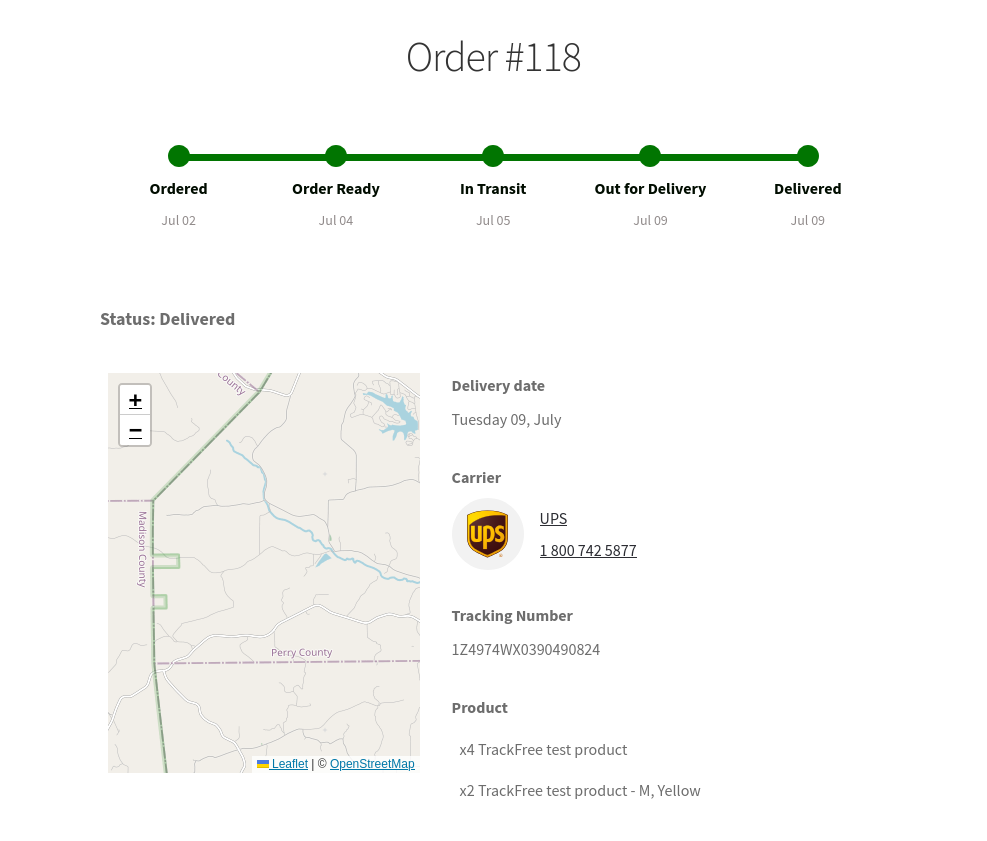
- A tracking page on your store. Customers follow their parcel on your own site, styled to match your theme: TrackFree captures your storefront’s colors, fonts, logo and favicon. Customise the page further from the Tracking settings.
- Order look-up page. Customers can look up their order on the tracking page; add your own text above and below the look-up in the Tracking settings.
- Delivery emails. Customers get shipment emails (in transit, out for delivery, delivered and more). Set your own “Track your shipment” button link, send yourself a test email, and edit the email templates in the TrackFree dashboard.
- Recommended products. Optionally show products on the tracking page, based on what the customer ordered.
- Orders update themselves. Optionally move the WooCommerce order status when a shipment is delivered.
- Sync on demand. Refresh shipment statuses for the orders on the current page of the WooCommerce Orders list.
- Works with HPOS. Compatible with WooCommerce High-Performance Order Storage, with it on or off.
- Speaks your language. English, Deutsch, Español, Français and Italiano.
- Hundreds of couriers in the courier list, updated regularly.
How it works
- Connect your store (one click).
- Add a tracking number to an order.
- Customers follow their parcel on your store and get delivery emails.
TrackFree is a service: your plugin talks to TrackFree to create your account, follow shipments and send emails. See “What data is sent to TrackFree?” in the FAQ. See the TrackFree website for plans and pricing.
Supported carriers
TrackFree supports hundreds of carriers across the world.
1. North America
• ABF • AmazonMws • APC postal logistics • Aramex • Asendia • Associated Global Systems • AxleHire • CANADA-POST • Canpar • CDL Last Mile Solutions • Deliv • DHL Active Tracing • DHL Express • DHL Express (Piece ID) • DHL Global Forwarding • DHL Global Mail • DHL GM International • Dicom • Doorman • Estafeta • Estes • FedEx • FedEx Mailview • FedEx SameDay City • FedEx SmartPost • Globegistics • GSO • IMEX • INTERNATIONAL-BRIDGE • LaserShip • Loomis Express • LSO • Newgistics • Norco • OnTrac • OnTrac DirectPost • ORANGE-DS • Pilot • Postmates • Purolator • R+L Carriers • RR Donnelley • Seko • SPEEDEE • SprintShip • TForce • UDS • UPS • UPS Freight • UPS i-parcel • UPS Mail Innovations • USPS • Cuba Post • Serpost • Blivia Post
2. UK & Ireland
• ARROWXL • Asendia UK • Asendia UK Premium • DPD Interlink Express Reference • DPD UK • Fastway Ireland • FedEx UK • Hermesworld • INTERLINK-EXPRESS • myHermes UK • Network4 • Parcelforce • UK RoyalMail • WN-DIRECT • Yodel • AnPost • 13ten • Collect+ • Whistl • Wiseloads • Nightline • DX Delivery • Deltec Courier • Tuffnells • TNT UK • Skynet Worldwide Express UK • Jersey Post • Bluecare Express • Palletways • UBX Express • DPD Ireland
3. Europe
• Asendia Germany • Chronopost • Chronopost France • COLIS-PRIVE’
• Colissimo • Deutsche Post • DHL 2-Mann-Handling • DHL Benelux • DHL Freight • DHL Germany • DHL Netherlands • DHL Parcel NL • DHL Parcel Spain • DHL Poland Domestic • DHL Spain Domestic • Direct Link • DPD • GLS • GLS Czech Republic • GLS Italy • GLS Netherlands • Hermes Germany • Hermes Italy • LA-POSTE • LATVIJAS-PASTS • Liefery • NOVA-POSHTA • Post NL International • Post NL3S • Posten • PostNL • PostNord • Ukrposhta • Swiss Post • Netherlands Post • Bpost • Magyar Posta • TNT France • TNT Italy • Ukraine EMS • Romania Post • Ukraine Post • Russia Post • Turkey Post • TNT Click • Czech Post • ACS Courier • Envialia • Andorra Post
4. Asia & China
• Asendia HK • Asendia HK premium service • Bluedart • Delhivery • DHL Ecommerce Asia • DHL Hong Kong • Ecom Express • HONG-KONG POST • India Post International • INDIA-POST • JPPOST • KURONEKO-YAMATO • Ninja Van • POS-MALAYSIA • Singapore Post • Taiwan Post • Cainiao • CHINA-POST • EC Firstclass • EMS • FLYT-EXPRESS • NANJING-WOYUAN • Yanwen • Yun Express • Korea Post • iMile • Syria Post • RaidereX • RZY Express • Sagawa Global • Thailand Post • Bombino Express • V-Express • Srilanka Post • Chunghwa Post • Airpak Express • Yemen Express • JT Express TH • Bee Express • Vietnam Post • TCS Express • Armenia Post • XPost
5. Australia & New Zealand
• AUSTRALIA-POST • Fastway • Fastway New Zealand • Star Track Courier • Star Track Express • StarTrack • Toll IPEC • Toll Priority • Australia EMS • New Zealand Post • Flyway Express • EFS Post • Auspost • Fastway Australia • Courier Post • ADSOne • Beebird Logistics • FTD Express • Fastgo • UBI Smart Parcel • Cnpex
6. Latam & Others
• Correios • Correos Chile • CORREOS COSTARICA • BOXBERRRY • Fastway South Africa • Israel Post • Israel Post Domestic • SMSA-EXPRESS • Greenland Post • ABF Freight • Fiji Post • Redpack Mexico • Tongo Post • New Calendonia Post • Tuvalu Post
Installation
- In WordPress, go to Plugins > Add New, search for “TrackFree” and click Install, then Activate. (Or upload the plugin folder to
/wp-content/plugins/.) - If you activated the plugin on its own and the store is not yet connected, you land on the TrackFree first-run screen (bulk and network activation skip it). Click Connect my store. To use a different email than your admin email, open “Use a different email” first.
- Open an order in WooCommerce, add a tracking number in the TrackFree box and save.
- Open the TrackFree menu to see your shipments and adjust the tracking page and emails.
TrackFree needs WooCommerce to be installed and active.
FAQ
Do I need a TrackFree account?
Yes. TrackFree creates one for you when you click Connect my store, using your WordPress admin email by default. There is no separate sign-up form.
What data is sent to TrackFree?
TrackFree is a hosted service at trackfree.io, so the plugin sends data to it. When you click Connect my store, the plugin sends:
- your admin email, and the admin user’s nickname (as your name);
- store name, web address, and store address (both address lines, city, postcode and country);
- currency, locale, time zone and GMT offset;
- your site icon and logo URLs;
- the TrackFree plugin version and your WordPress and WooCommerce versions;
- the IP address of the request.
After that, the orders and shipments you track are sent so TrackFree can follow them with the carrier, show the tracking page and email your customers. Customer data in those orders is used for that purpose.
Does it work with High-Performance Order Storage (HPOS)?
Yes. Since 3.3.0 TrackFree declares HPOS compatibility and reads and saves shipment details through the WooCommerce order API, so it works with HPOS on or off. Shipments saved by earlier versions keep showing.
How do I add a tracking number?
Open the order, use the TrackFree box, pick the carrier, enter the tracking number and save. You can also add an order note that starts with SHIPMENT NUMBER and has three parts separated by |: the second as Carrier: <carrier name>, the third ending in /<tracking number>. Ordinary notes are ignored. To split an order, add more than one shipment.
Where do customers see tracking?
On a tracking page on your own store (added with the [tfree-track-page] shortcode), and in the delivery emails. The page is styled to match your theme and you can customise it in the Tracking settings.
Can I change the emails?
Yes. The TrackFree dashboard has an email template editor. In WordPress you can set a custom “Track your shipment” button link for all email templates and send a test email.
Can it update the WooCommerce order status when a parcel is delivered?
Yes, turn on the automatic order status update in the General settings. It is off until you enable it.
Why does the plugin ask for a review?
Once TrackFree has seen 20 shipments delivered for your store, it shows one notice in wp-admin to store managers (users who can manage WooCommerce), on the Dashboard, Plugins and Orders screens, and only while your account is connected and verified. It asks whether you would leave a review on WordPress.org. Any answer, including closing it, hides it for good.
Which carriers are supported?
Hundreds of carriers worldwide. See the list below. If your carrier is missing, the TrackFree dashboard has email support and live chat.
Which languages are included?
English, Deutsch, Español, Français and Italiano. The admin follows your WordPress site language.
Screenshots


Changelog
3.3.1
- Fix: On the tracking page, the Order details for an order that has no shipment yet showed the tax line as “Subtotal”. It now reads “Tax”.
- Fix: The order Total on that page now shows the currency symbol, like the other lines.
- New: InPost Italy and TFMXpress added to the courier list.
- Improved: Clearer plugin description on WordPress.org.
3.3.0
- New: Compatible with WooCommerce High-Performance Order Storage (HPOS). TrackFree now reads and saves shipment details through the WooCommerce order API, so it works with HPOS on or off. Shipments saved by earlier versions keep showing.
- New: One-click connect. A new first-run screen explains what happens and connects your store with your admin email in one click (you can still use a different email). After activating the plugin you are taken straight to it.
- New: After 20 shipments are delivered, TrackFree asks once, in wp-admin, whether you would leave a review. Any answer hides it for good.
- Fix: Connecting or verifying your account no longer leaves a half-loaded page; the redirect to the TrackFree dashboard now works.
- Fix: “Open order” links from the TrackFree dashboard go to the right screen when HPOS is on.
- Fix: The “Connect with TrackFree” link in the order screen box pointed to the wrong page.
- Compatibility: Tested up to WordPress 7.1 and WooCommerce 11.2.
3.2.8
- Fix: Automatic theme capture works again for new stores. It no longer fails when you are logged in to WordPress or when your pages are served from a cache.
- Security: Only TrackFree (using a secret key unique to your site) or a logged-in store manager can save captured theme styles. The secret key is created automatically and is never shown on your store’s pages.
- Security: Removed an unused way to save theme styles with your TrackFree API key in the web address.
- Improvement: Regular store visitors’ browsers no longer collect and send theme styles, so storefront pages do slightly less work.
3.2.7
- Security: Opening the TrackFree dashboard from WordPress now uses a short-lived, single-use link, so your TrackFree API key no longer appears in the browser address bar or history.
- Security: The plugin now sends your TrackFree API key in a request header instead of the URL for all calls to TrackFree.
- Improvement: Faster TrackFree admin pages in WordPress (data loads in parallel and pages load on demand).
- Fix: The plugin now finds its admin app files from the build manifest, preventing a blank TrackFree admin screen after updates.
3.2.6
- Fix: TrackFree WooCommerce admin pages now correctly follow the WordPress site language in the React app.
- Fix: Localized TrackFree submenu labels in the WordPress admin so plugin navigation matches the selected site language.
3.2.5
- Improvement: Enhanced automatic storefront theme capture for more accurate header, footer, button, and color matching on TrackFree tracking pages.
- Improvement: Improved theme capture reliability during onboarding so new stores can receive branded tracking page styles more consistently.
3.2.4
- New: Added automatic WooCommerce storefront theme capture to automatically match the TrackFree tracking page with your store’s colors, fonts, logo, and favicon.
3.2.3
- Fix: Hidden third-party WordPress admin notices on TrackFree pages so the plugin dashboard and getting-started screens stay focused.
- Fix: Restored TrackFree inline validation and status messages on getting-started and settings flows after restricting global admin notices.
- Improvement: Hardened TrackFree admin AJAX request and response handling to avoid empty messages and unexpected PHP notices.
3.2.2
- Fix: Tracking page progress bar color now saves correctly from the WooCommerce admin and is reflected on the storefront tracking page.
- Fix: “View Order Look-up Page” now opens the local WooCommerce tracking page reliably, avoiding empty-page behavior caused by stale tracking domain values.
- Update: Removed the duplicate Manual Sync action from the Settings page while keeping manual sync available on the WooCommerce Orders list page.
3.2.1
- New: Added “Sync Shipment Statuses (This Page)” button on WooCommerce Orders list for manual page-level batch sync from TrackFree API.
3.2.0
- Updates: React dashboard bundle refresh and production stability improvements.
- Fixes: Improved product image URL scheme handling on HTTPS sites.
- Fixes: General UI polish and shipment activity layout improvements.
3.1.6
- New: Email Settings option to set a custom “Track your shipment” button link for all email templates.
- Updates: Courier list refreshed with the latest services.
- Fixes: Improved reliability of admin error messages when updating or adding shipments
3.1.5
- Fixes: General stability and compatibility improvements.
- Updates: Courier list refreshed with the latest services.
- New: In-Transit Shipments badge in the navigation menu (toggle available in settings).
3.1.4
- Updates: Expanded courier list with the latest additions.
- Enhancements: Enhanced product recommendation engine for more accurate suggestions.
- Enhancements: Added advanced analytics features for deeper insights.
- Fixes: Addressed minor issues to improve overall functionality.
3.1.3
- Enhancements: Auto order status update after shipment delivery.
- Fixes: Resolved minor issues.
3.1.2
- Added New Feature: In-depth analysis of Shipments and Transit Time on the Analytics page.
- Fixes: Resolved minor issues.
3.1.1
- Refactored and optimized the entire code base.
- Adopted new libraries and improved performance significantly.
- Implemented new architecture for enhanced efficiency.
3.0
- New Feature: Product fulfillment option for full or partial shipments.
- Added: Quick setup guide to enhance user experience.
- Compatibility: Tested up to WordPress 6.5.5
- Enhancements: Minor UI improvements.
- Fixes: Resolved minor issues.
- Updates: Courier list updated.
2.1.0
- Tested up to WP 6.4.2
- Minor UI enhancement
2.0.9
- Tested up to WP 6.3.1
- Updated courier list
2.0.8
- Minor UI enhancement
- Updated courier list
2.0.7
- Added new feature to display existing order details
- Updated courier list
2.0.6
- Tested up to WP 6.2
- Updated courier list
2.0.5
- Updated courier list
2.0.4
- Added 4 native features
- Added embedded theme page customization options
- Carrier meta information update
2.0.3
- Minor UI fixes
2.0.2
- UI enhancement
2.0.1
- Minor UI enhancement
2.0
- UI enhancement
- Courier list updated
1.35.0
- Minor UI fixes
1.34.0
- Branded order tracking page for customers
- Courier list updated
1.33.0
- UI fixes and code cleanup
- Added new auto-coupon feature
1.32.0
- Minor issues fixed
- Courier list updated
1.31.0
- Onboarding UI fixes
- Performance improvements
- Tested up to WP 5.8
1.30.0
- Minor issues fixed
1.29.0
- Tested up to WordPress 5.7.2 and WooCommerce 5.3.0
- Minor issues fixed
1.28.0
- Minor issues fixed
1.27.0
- Auto order status update after shipment delivery
1.26.0
- Minor issues fixed
1.25.0
- Tested up to WordPress 5.4
1.24.0
- Courier logo url changed
1.23.0
- Courier list updated
1.22.0
- Courier list updated
1.21.0
- New couriers added
1.19.0
- Fixed: Minor performance issues.
1.11.0
- Fixed: Minor performance issues.
1.10.0
Local language updated – German, Spanish, Italian and French
1.7.0
- Minor UI fixes
1.6.0
- Style issues fixed
1.5.0
- Courier list updated
1.4.0
- Minor content change
1.3.0
- Upload site logo and banner for track details page
1.2.0
- App verification logic added for existing user
1.1.0
- Show all track details in order details page
1.0.0
- Initial version