


Description
★ What Makes TrackSure Different
TrackSure combines server-side conversion tracking (Meta Conversions API + GA4 Measurement Protocol) with a complete first-party analytics dashboard — user journeys, funnels and attribution — inside WordPress. No GTM, no server container, no external cloud and no monthly fees.
Ad blockers and browser privacy limits stop many pixel events from reaching the ad platforms. TrackSure also sends each event from your WordPress server, under the same event ID as the browser pixel, so the platforms receive it once even when the browser copy is blocked. Paste your Meta Pixel ID (and optionally an Access Token) or your GA4 Measurement ID, and TrackSure handles the browser pixel, the server copy, deduplication and Advanced Matching for a higher Event Match Quality (EMQ).
For WooCommerce and FluentCart Store Owners
If you sell with WooCommerce or FluentCart and advertise on Meta or Google, TrackSure sends your real orders to the ad platforms from your server as well as from the browser, so sales stopped by ad blockers and browser limits still count. Both shops are tracked automatically — product views, add to cart, checkout, payment info and purchase — with no setup beyond your Pixel ID or Measurement ID.
For Marketers & Agencies
Get user journey tracking, funnel visualization, multi-touch attribution and traffic source analysis without a separate analytics subscription. Five attribution models and an assisted conversions report show which channels drive revenue.
For Developers
TrackSure exposes a JavaScript API (window.TrackSure.track()), a PHP API, and WordPress hooks (tracksure_filter_event_data, tracksure_conversion_recorded) for custom event tracking with full server-side control — no dependency on browser JavaScript.
window.TrackSure.track('button_click', { button_name: 'Download PDF' });
Documentation | Support | GitHub | Get Pro
What TrackSure Does
Server-Side Conversion Tracking (CAPI)
- Meta Conversion API — send purchase, view content, add to cart, checkout, and page view events server-to-server
- Google Analytics 4 Measurement Protocol — server-side GA4 event forwarding
- TikTok Events API and Pinterest Conversion API (Pro)
- Automatic browser + server event deduplication — each event gets a unique ID shared between client and server so platforms count it once
First-Party Analytics Dashboard
- All analytics data stored in your WordPress database — you own every byte
- Automatic traffic source detection — organic search (Google, Bing, DuckDuckGo), social media (Facebook, Instagram, LinkedIn, TikTok), email, referrals, AI chatbots (ChatGPT, Claude, Perplexity), and direct — identified without UTM tags
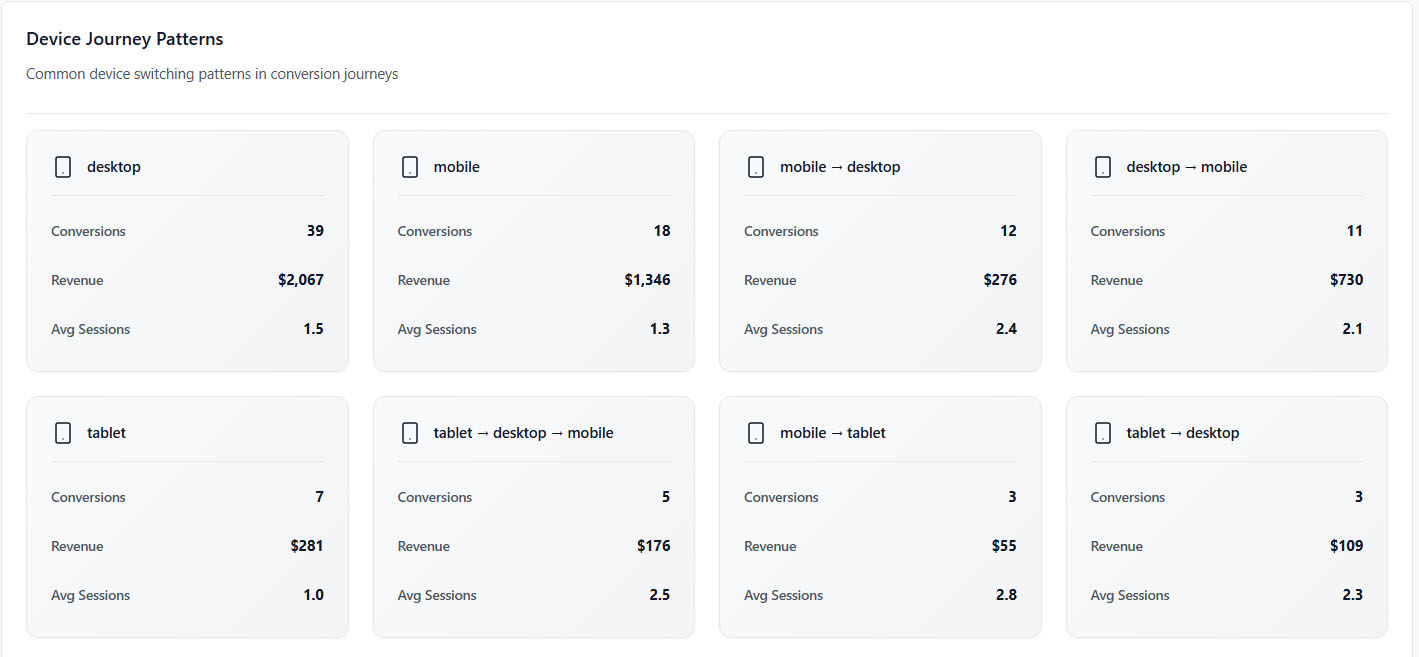
- Session-based user journeys with 30-day attribution window (configurable) — complete path from first visit to conversion, including every touchpoint across multiple sessions
- Five attribution models: first-touch, last-touch, linear, time-decay, position-based
- Assisted conversion reporting — see which channels helped even without getting final credit
- Real-time visitors — see who is on your site now and what pages they’re viewing
Goals, Funnels & Conversion Tracking
- Custom conversion goals for form submissions, purchases, downloads, video views, or any event
- Funnel visualization — see where visitors drop off in your checkout or signup flow
- Goal completion rates with trend analysis
- Revenue attribution — connect each sale to its traffic source, campaign, and touchpoint
eCommerce Conversion Tracking
- Auto-tracks the full purchase funnel: product view → add to cart → checkout → purchase
- Works with WooCommerce and FluentCart (Free), Easy Digital Downloads, SureCart and CartFlows (Pro)
- Revenue attribution — connect each sale to its traffic source and campaign
- Checkout funnel visualization with drop-off rates at each step
Privacy & Compliance
- Consent plugin support (Cookiebot, CookieYes, OneTrust and more) and Google Consent Mode v2
- Cookieless tracking option (uses localStorage instead of cookies)
- IP anonymization, Do Not Track (DNT) support, and WordPress privacy tools integration
- No data leaves your server unless you enable an ad platform destination — with the single exception of the optional IP geolocation lookup, which can be switched off in Settings → Privacy
Free vs Pro
Free includes everything you need for analytics and conversion tracking:
- First-party analytics dashboard with user journeys, funnels, goals, and attribution
- Real-time visitor tracking
- Meta Pixel (formerly Facebook Pixel) + Conversions API (CAPI) server-side tracking
- Google Analytics 4 + Measurement Protocol server-side tracking
- WooCommerce and FluentCart automatic ecommerce tracking
- All form plugins (Contact Form 7, Gravity Forms, WPForms, Fluent Forms, Elementor Forms)
- All page builders (Elementor, Divi, Beaver Builder, Gutenberg, WPBakery, Oxygen, Bricks)
- Five attribution models with assisted conversion reports
- Consent management integration
- Unlimited events and sessions
Pro adds more ad platforms and integrations:
- More ad platform destinations, including TikTok, Reddit, Google Ads, Pinterest, LinkedIn and Snapchat
- More eCommerce integrations: Easy Digital Downloads, SureCart and CartFlows
- Priority support
Getting Started
- Install and activate TrackSure from the WordPress plugin directory
- Visit TrackSure → Settings to review tracking and privacy options
- (Optional) Add your Meta Pixel ID + Access Token or GA4 Measurement ID for server-side conversion tracking
- Go to TrackSure → Overview — analytics data starts appearing after 1 hour
External services
This plugin connects to external third-party services to provide its functionality. Below is a complete list of all external services used, when they are called, what data is transmitted, and links to their terms of service and privacy policies.
When You Enable Meta Pixel / Conversion API:
- Service: Meta (Facebook) Graph API
- Purpose: Send conversion events (purchases, add-to-cart, page views) to Facebook for ad optimization
- What data is sent: Event name, timestamp, hashed user email/phone (if available), product SKU, revenue, IP address, user agent, pixel ID
- When it’s sent: Automatically when a tracked event occurs (product view, purchase, etc.) and Meta destination is enabled in settings
- Service provider: Meta Platforms, Inc.
- Terms of Service: https://www.facebook.com/legal/terms
- Privacy Policy: https://www.facebook.com/privacy/policy
- Data Processing Agreement: https://www.facebook.com/legal/terms/dataprocessing
When You Enable Google Analytics 4:
- Service: Google Analytics 4 Measurement Protocol
- Purpose: Send analytics events to Google Analytics for website traffic analysis
- What data is sent: Event name, page URL, referrer, session ID, client ID, IP address, user agent, device information
- When it’s sent: Automatically when page views or custom events occur and GA4 destination is enabled in settings
- Service provider: Google LLC
- Terms of Service: https://marketingplatform.google.com/about/analytics/terms/us/
- Privacy Policy: https://policies.google.com/privacy
When Loading Google Tag Manager Script (If Enabled):
- Service: Google Tag Manager CDN
- Purpose: Load gtag.js library for browser-side Google Analytics tracking
- What data is sent: Standard HTTP request data (IP address, user agent, referrer) when loading the script
- When it’s sent: On every page load when GA4 browser tracking is enabled
- Service provider: Google LLC
- Script URL: https://www.googletagmanager.com/gtag/js
- Terms of Service: https://marketingplatform.google.com/about/analytics/terms/us/
- Privacy Policy: https://policies.google.com/privacy
When Loading Facebook Pixel Script (If Enabled):
- Service: Facebook Connect CDN
- Purpose: Load fbevents.js library for browser-side Facebook Pixel tracking
- What data is sent: Standard HTTP request data (IP address, user agent, referrer) when loading the script
- When it’s sent: On every page load when Meta Pixel browser tracking is enabled
- Service provider: Meta Platforms, Inc.
- Script URL: https://connect.facebook.net/en_US/fbevents.js
- Terms of Service: https://www.facebook.com/legal/terms
- Privacy Policy: https://www.facebook.com/privacy/policy
IP Geolocation (When Tracking Is Enabled):
- Service: ipapi.co (primary), ip-api.com (secondary fallback), WordPress.com Geo API (tertiary fallback)
- Purpose: Determine the country, region, and city of visitors based on their IP address for geographic analytics reporting
- What data is sent: The visitor’s IP address is sent to one of the geolocation providers. No other user data is transmitted.
- When it’s sent: When a new visitor session is recorded and the IP has not been looked up recently. Results are cached for 24 hours per IP.
- Service providers and policies:
- ipapi.co (primary) – https://ipapi.co/privacy/ and https://ipapi.co/terms/
- ip-api.com (fallback) – https://ip-api.com/docs/legal
- WordPress.com Geo API (fallback) – https://automattic.com/privacy/ and https://wordpress.com/tos/
- Local sources are tried first: if your site is behind Cloudflare, has the PHP GeoIP extension, or has a local MaxMind database, the country is read from those and no address leaves your server.
- Transport: ipapi.co and the WordPress.com Geo API are contacted over HTTPS. ip-api.com does not offer HTTPS on its free tier, so that fallback is contacted over plain HTTP — it is only reached if ipapi.co has already failed.
- Turning it off: Settings → Privacy → “Look up visitor location remotely”. Turning it off keeps the local sources above and stops any address being sent to a third party. Developers can also decide per request with the
tracksure_remote_geolocation_enabledfilter.
Microsoft Clarity (Only If You Enable It):
- Service: Microsoft Clarity, session recordings and heatmaps
- Purpose: Let you watch how visitors use your site, and open the recording of any session TrackSure shows you
- When it’s used: Only after you switch on the Microsoft Clarity integration and enter your own Clarity Project ID. It loads only on pages TrackSure tracks, so excluded visitors (administrators if you exclude them, Do Not Track, excluded IPs) are never recorded. Where your site asks visitors for consent, Clarity loads only after analytics consent is given, and later changes are passed on to it.
- What data is sent: Clarity’s script collects page interactions (clicks, scrolling, mouse movement) and device information as described by Microsoft. TrackSure adds its own random session ID as a custom tag, and marks your own visits as internal. TrackSure sends no names, emails or order details to Clarity.
- Script loaded from: https://www.clarity.ms/
- Service provider: Microsoft Corporation
- Terms of Use: https://clarity.microsoft.com/terms
- Privacy Policy: https://privacy.microsoft.com/privacystatement
Deactivation Feedback (Only If You Choose to Send It):
- Service: TrackSure feedback collector at tracksure.cloud
- Purpose: Learn why people stop using TrackSure, so we can fix it
- When it’s sent: Only when an administrator deactivates TrackSure and clicks “Send & deactivate” in the optional form. “Skip & deactivate” sends nothing, and nothing is ever sent otherwise.
- What data is sent: The chosen reason and any comment typed, the TrackSure, WordPress and PHP versions, the site language, how many days TrackSure was installed, whether WooCommerce and TrackSure Pro are active, and whether the Meta and Google Analytics destinations were switched on. Your site’s address is not sent. Your email address is sent only if you tick “You may email me about this”.
- Retention: Answers are deleted after two years.
- Service provider: TrackSure (tracksure.cloud)
- Privacy Policy: https://tracksure.cloud/privacy-policy
- Turning it off: Use “Skip & deactivate”. Developers can disable the form’s sending entirely with
add_filter( 'tracksure_deactivation_feedback_endpoint', '__return_empty_string' );
Destinations are opt-in: nothing is sent to Meta, Google Analytics or any other platform unless you enable and configure it under TrackSure → Connections. IP geolocation, described above, is the one exception, and it can be switched off in Settings → Privacy. Where a consent plugin is installed, TrackSure follows the visitor’s choices.
Source Code & Build Instructions
The admin interface is built with React 18 and TypeScript, compiled with Webpack 5. The compiled files in admin/dist/ are generated from the source code in admin/src/.
Full source code is available on GitHub:
https://github.com/tracksure-cloud/tracksure
To build from source:
- Navigate to the
admin/directory - Run
npm installto install dependencies - Run
npm run buildfor a production build, ornpm run devfor development mode with watch
Build tools used:
- Node.js (v20.19+)
- npm
- Webpack 5 (config:
admin/webpack.config.js) - TypeScript 5 (config:
admin/tsconfig.json) - ts-loader for TypeScript compilation
Key source directories:
admin/src/— React/TypeScript source code (pages, components, contexts, hooks)admin/dist/— Compiled production JavaScript (generated by Webpack)assets/js/— Frontend tracking scripts (non-compiled, human-readable)includes/— PHP backend (non-compiled, human-readable)
Privacy Policy
TrackSure stores the following in your WordPress database:
- Visits: pages viewed, referrers, campaign (UTM) parameters, device, browser and operating system, IP address (can be anonymised), session duration and engagement.
- eCommerce (WooCommerce, FluentCart and, in Pro, EDD and SureCart): product views, cart actions and orders (order ID, total, items). A customer’s email and phone number are stored only as SHA-256 hashes.
Privacy controls: IP anonymisation (Settings → Privacy; off by default for accurate location reports), cookieless mode, consent plugin integration (Cookiebot, CookieYes, OneTrust and others), Do Not Track support, configurable data retention, and WordPress’s personal data export and erasure tools.
Data sharing: see “External services” above. Nothing is sent to an advertising or analytics platform unless you enable it.
Your responsibilities: disclose TrackSure’s tracking in your site’s privacy policy, obtain consent where the law requires it, and set data retention to suit your obligations.
Support
Free Support:
Pro Support:
- Priority email support
Trademarks & Third-Party Services
Meta, Facebook, Instagram and Facebook Pixel are trademarks of Meta Platforms, Inc. Google, Google Analytics, Google Ads and GA4 are trademarks of Google LLC. Microsoft Clarity and LinkedIn are trademarks of Microsoft Corporation. TikTok, Pinterest, Snapchat, Reddit and X are trademarks of their respective owners.
TrackSure is an independent plugin and is not affiliated with, endorsed by or sponsored by any of these companies. Using an integration requires your own account with that platform and compliance with its terms.
Installation
From WordPress Admin
- Go to Plugins → Add New
- Search for “TrackSure”
- Click Install Now, then Activate
Manual Upload
- Download the ZIP from WordPress.org
- Go to Plugins → Add New → Upload Plugin
- Upload the ZIP, install, and activate
After Activation
- Go to TrackSure → Settings
- Tracking is enabled by default — data appears in your dashboard immediately
- (Optional) Add Meta Pixel ID + Access Token or GA4 Measurement ID under Destinations for server-side ad tracking
- If WooCommerce or FluentCart is active, eCommerce events are tracked automatically (Easy Digital Downloads, SureCart and CartFlows in Pro)
FAQ
How does TrackSure improve ROAS and lower CPA?
When browser-side pixels miss conversions (due to iOS 14+, ad blockers, or cookie restrictions), ad platforms optimize on incomplete data and your cost-per-acquisition rises. TrackSure fixes this by sending conversion events server-to-server via Meta Conversion API and GA4 Measurement Protocol. Browser and server events are deduplicated automatically, so platforms see more of your real conversions without double-counting. More complete data means better optimization and improved Return on Ad Spend.
How do I set up the Meta Pixel with server-side tracking?
Meta Pixel setup in TrackSure takes under 5 minutes:
- Install and activate TrackSure
- Go to TrackSure → Settings → Destinations → Meta
- Enter your Pixel ID (from Meta Events Manager)
- Generate and paste a Conversion API Access Token (Events Manager → Pixel → Settings → Conversions API)
- Enable “Server-Side Tracking (CAPI)” and save
TrackSure automatically fires both the browser Meta Pixel and Meta Conversion API (CAPI) events server-to-server. Browser and server events are deduplicated using a shared event_id, so Meta counts each conversion once. User data (email, phone, name, address) is hashed and sent as Advanced Matching parameters for maximum Event Match Quality (EMQ). No Google Tag Manager server container required.
What is server-side tracking and why do I need it?
Server-side tracking sends conversion events directly from your WordPress server to ad platforms like Meta, Google Analytics, TikTok, and Pinterest — instead of relying only on browser JavaScript pixels. This matters because:
- Ad blockers block ~40% of browser tracking pixels
- iOS App Tracking Transparency stops many Meta Pixel conversions from being reported
- Safari ITP limits first-party cookies to 7 days, causing session data loss
- Browser privacy features increasingly restrict third-party tracking
With server-side tracking, your conversion data bypasses all browser restrictions. Ad platforms see your real sales, optimize better, and your ROAS improves. TrackSure sends server-side events directly from WordPress — no GTM server container, no external cloud, no third-party services.
Do I need to run ads to use TrackSure?
No. TrackSure is a standalone first-party analytics platform that works without any ad platform. You get traffic source tracking, user journeys, content performance, goal tracking, funnel visualization, revenue attribution, and real-time monitoring — all stored in your WordPress database. The ad platform integrations (Meta, Google, TikTok) are optional.
What is the Meta Conversions API (CAPI), formerly the Facebook Conversion API?
Meta CAPI (Conversion API) sends conversion events directly from your server to Meta, bypassing browser restrictions. TrackSure handles both the browser Meta Pixel and server-side CAPI automatically. Events are deduplicated using a shared event_id so conversions are never double-counted. See the “How do I set up the Meta Pixel with server-side tracking?” FAQ above for setup steps.
Does TrackSure support Google Analytics 4 (GA4)?
Yes. TrackSure supports GA4 with both browser-side tracking (gtag.js) and server-side event forwarding via the GA4 Measurement Protocol. This dual approach ensures your GA4 data is accurate even when browsers block tracking scripts.
Does TrackSure detect traffic sources without UTM parameters?
Yes. TrackSure automatically identifies organic search (Google, Bing, DuckDuckGo etc.), social media (Facebook, Instagram, LinkedIn, TikTok), email clients (Gmail, Outlook), AI chatbots (ChatGPT, Claude, Perplexity), referral sites, and direct traffic. UTM parameters are also captured when present.
What eCommerce platforms does TrackSure support?
TrackSure auto-tracks the full purchase funnel (product view → add to cart → checkout → purchase) for WooCommerce and FluentCart in the free version. No manual event setup required. Pro adds Easy Digital Downloads, SureCart and CartFlows.
Does TrackSure work with WooCommerce?
Yes. TrackSure automatically tracks all WooCommerce ecommerce events: product view, add to cart, remove from cart, initiate checkout, and purchase — including order value, SKU, and product categories. Server-side tracking via Meta CAPI and GA4 Measurement Protocol ensures conversions are captured even when browser tracking is blocked.
How do user journeys and funnel tracking work?
TrackSure records every page a visitor views across sessions. Go to TrackSure → Visitor Journeys to see the complete path from first visit to conversion, including all touchpoints, time between visits, and how many sessions it took to convert. The funnel view shows drop-off rates at each step of your checkout or signup flow.
What attribution models are available?
Five models are included: First-Touch (credits the channel that first brought the visitor), Last-Touch (credits the final interaction before conversion), Linear (equal credit to all touchpoints), Time-Decay (more credit to recent interactions), and Position-Based (40% first, 40% last, 20% middle). The attribution window defaults to 30 days and is configurable. Assisted conversion reports show which channels helped without getting final credit.
Does TrackSure work with FluentCart?
Yes, in the free version. TrackSure tracks FluentCart’s product views, add to cart, cart, checkout, payment info and purchases — including offline payments such as Cash on Delivery — and sends them to the Meta Pixel, the Conversions API and GA4 under one event ID, so each is counted once. The shopper’s details from the checkout form are used for Meta’s Advanced Matching.
Does TrackSure support Google Consent Mode v2?
Yes. TrackSure reads visitors’ choices from consent plugins including Cookiebot, CookieYes and OneTrust, and — with “GA4 Consent Mode V2” switched on in the GA4 settings — passes them to Google as Consent Mode v2 signals. When a visitor refuses, their events are still counted but sent to the ad platforms without personal identifiers such as email, phone or ad cookies.
Does TrackSure help with GDPR and CCPA?
TrackSure gives you the tools: consent plugin integration, IP anonymisation, Do Not Track support, cookieless mode, data retention settings, and WordPress’s personal data export and erasure tools. Whether your site complies depends on how you configure it and on your own privacy policy — no plugin can guarantee that. Analytics data stays in your WordPress database; what is sent to other services, and when, is listed under “External services”.
Will TrackSure slow down my website?
No. The tracking script loads asynchronously (non-blocking), events are batched to reduce HTTP requests, database queries use indexed tables, and dashboard metrics are pre-computed. Compatible with WP Rocket, LiteSpeed, W3 Total Cache, Cloudflare, and other caching/CDN solutions.
Does TrackSure work with High-Performance Order Storage (HPOS)?
Yes. TrackSure is fully compatible with WooCommerce HPOS (High-Performance Order Storage) and uses its own database tables for analytics, so it doesn’t affect your store’s order processing performance.
Health says events are “blocked before reaching your site”. What do I do?
A firewall, CDN or security plugin is turning away the requests the tracker sends to /wp-json/ts/v1/collect. TrackSure keeps those events in the visitor’s browser and sends them again on the next page, but they keep failing until the block is lifted. Allow POST requests to /wp-json/ts/v1/collect in your firewall (for Cloudflare: a WAF custom rule that skips managed rules and bot checks for that path), or add it to your security plugin’s allow-list.
Visitors all show the same IP address or country. Why?
Your site is behind a proxy (a firewall such as Sucuri, a CDN, or your host’s edge) that TrackSure does not know. TrackSure only believes the “forwarded for” headers from proxies it can trust, because anyone can write those headers. Cloudflare and proxies on a private network are recognised automatically. For any other, add its addresses to wp-config.php, for example define( 'TRACKSURE_TRUSTED_PROXIES', '192.0.2.0/24, 198.51.100.7' );.
Health says delivery “is not keeping up”. What do I do?
WordPress runs scheduled tasks only when someone visits the site, and some hosts block the request that starts them. Ask your host to call wp-cron.php every minute from a server cron job (for example * * * * * wget -q -O - https://your-site.com/wp-cron.php?doing_wp_cron >/dev/null 2>&1), and add define( 'DISABLE_WP_CRON', true ); to wp-config.php once it is running.
Should I use Meta’s Conversions API Gateway as well as TrackSure?
You don’t need to. TrackSure already sends every event to Meta from your own server, including sales confirmed by payment webhooks and visitors whose browser blocks the pixel, which the Gateway cannot see because it only relays what the pixel sends. If you run both, every copy carries the same event ID, which is what Meta uses to recognise one event reported several ways; check Events Manager shows the events as deduplicated. Either way you are paying to host the Gateway for little extra.
Do I need a GTM server container?
No. TrackSure sends server-side events directly from your WordPress server to ad platform APIs. No Google Tag Manager server container, no external cloud hosting, and no custom subdomain setup required.
Can I track custom events and goals?
Yes. TrackSure provides a JavaScript API and a PHP API for custom events, plus a goal system for tracking form submissions, downloads, video views, purchases, or any custom action.
JavaScript: window.TrackSure.track('button_click', { button_name: 'Download PDF' });
WordPress hooks for developers:
– tracksure_filter_event_data — modify any event before storage
– tracksure_session_started — run custom logic on new sessions
– tracksure_conversion_recorded — sync conversions to CRM, email, or external systems
What’s the difference between Free and Pro?
Free includes: first-party analytics, user journeys, funnel tracking, goals, real-time tracking, Meta Pixel + CAPI, GA4 + Measurement Protocol, WooCommerce and FluentCart auto-tracking, all form plugins, all page builders, all 5 attribution models, assisted conversions, consent management, and unlimited events.
Pro adds more ad platforms (including TikTok, Reddit, Google Ads, Pinterest, LinkedIn and Snapchat), more eCommerce integrations (Easy Digital Downloads, SureCart and CartFlows) and priority support.
Where is my data stored?
All tracking data is stored in your WordPress database — not on TrackSure servers or any third party. Raw events are retained for 90 days (configurable: 30/60/90/180 days), and aggregated metrics (no PII) are kept indefinitely. Automatic daily cleanup removes expired data via WP-Cron.
Can I export analytics data?
Yes. Every report page has a CSV export button. All data is also accessible directly in your WordPress database (wp_tracksure_events, wp_tracksure_sessions, wp_tracksure_analytics_daily). Pro adds REST API endpoints for programmatic access.
Does TrackSure work with page builders?
Yes — Elementor, Divi, Beaver Builder, Gutenberg, WPBakery, Oxygen, and Bricks are all supported. Page views, button clicks, form submissions, and popup interactions are tracked automatically.
Can I use TrackSure on client sites?
Yes. The free version can be installed on as many sites as you like.
Screenshots




Changelog
1.3.2 – 2026-11-15
- New: Settings → Tracking → Sales asks when an order counts as a sale: when payment is received (default), as soon as it is placed, or only when you mark it Completed. Applies to WooCommerce and FluentCart, to TrackSure’s reports, and to what Meta, GA4 and your other ad platforms are told.
- Fix: unpaid orders were counted as sales: FluentCart orders whose card payment never arrived, cash on delivery before delivery, and WooCommerce bank-transfer orders on the thank-you page. By default they now count once they are paid, sent from the server with the same event id.
- Fix: a FluentCart customer reopening the thank-you page more than an hour later fired the purchase again, and Meta counted a second sale. Each order now counts once, for good.
- Fix: bots and link scanners that open the checkout page were counted as shoppers starting a checkout (InitiateCheckout in Meta, “Unassigned” sessions in GA4). Checkout and cart views are now tracked by the visitor’s browser, as product views already were.
- Fix: the Meta pixel was set up again before each event and given its own cookies as customer details, which Meta reported as warnings. It is now set up once, at its first event.
- Fix: Smart Insights gave every site an urgent “Tracking quality needs improvement” (about 50/100) because scrolls and clicks, which are never sent to Meta, counted against it. New shops were told to create a goal for sales, which are tracked without one.
- New: the Overview names orders that are placed but not yet counted, such as a cash-on-delivery test order, and says when each will count.
- Fix: a FluentCart thank-you page without FluentCart’s own receipt block never fired the purchase in the browser.
- Improvement: Time Intelligence shows the dates it covers, and it, like Smart Insights, waits for enough data before calling anything a pattern.
- Fix: sales and other events GA4 received from the server (a payment confirmed later, a visitor whose ad blocker stopped the GA4 tag) had no country, city or device, so GA4 showed “(not set)”. GA4 is now told the visitor’s country, city and device type, browser and system. Their IP address is still never sent.
- Fix: Safari deletes cookies set by scripts after 7 days, so a visitor returning after a week was counted as new and the ad or post that first brought them was lost. TrackSure’s own server now renews the visitor’s existing cookie, so Safari keeps it.
1.3.1 – 2026-11-11
- Fix: on sites with “Plain” permalinks every report said “No route was found matching the URL and request method”. Reports now work with every permalink setting.
- Fix: a sale or lead could take up to five minutes to appear on the Overview, so a first test order looked untracked. Reports covering today now show a new sale or lead at once, reload when you come back to the tab, and have a “Refresh now” button. Ranges that ended earlier are still cached, so busy sites are not slowed down.
- New: a notice explains that your own visits and test orders are recorded and fire your pixels, but are not sent from the server to Meta or other ad platforms. “Send my activity for 1 hour” lets you test server-side tracking and switches itself off.
- New: after TrackSure has been tracking your sales for a week, administrators see a short request for a review on WordPress.org. “Maybe later” brings it back after a month; “I already did” or leaving a review hides it for good.
- Improvement: readme wording for people searching by the Facebook Pixel and Facebook Conversion API names.
1.3.0 – 2026-11-03
Meta and GA4 receive every event once, under the right id
- Fix: product views from different visitors could share one event id, so Meta counted them as a single ViewContent and TrackSure stored them as one. Cached product pages made it worse — every visitor was handed the same id. Product views are now tracked by each visitor’s browser, with the server copy for the Conversions API sent under the same id.
- Fix: in “browser + server” mode GA4 could count a sale or an add-to-cart twice. When the shop recorded the event before the browser reported it, the browser’s confirmation was lost and the server sent its own copy as well. Each event now reaches GA4 once, from one side.
- Fix: GA4 was sent every TrackSure event, including scroll milestones, every button click and page exits. GA4’s own Enhanced Measurement already sends scroll and outbound clicks, so a page could show six scrolls. GA4 now receives only the events it has a meaning for — page views, shop events, leads, sign-ups, searches — under GA4’s names (form submissions are left to Enhanced Measurement; enquiries still arrive as generate_lead).
- Fix: Meta answers that were not an acceptance (a 503 page, a proxy error) were recorded as delivered and never retried. Only Meta’s own confirmation counts now.
- Fix: Meta match quality — city, state, postcode and country are normalised exactly as Meta’s pixel does (“New York” never matched before), and phone numbers gain the billing country’s calling code.
- Fix: with GA4 debug mode on, server events went to Google’s validation endpoint and were never recorded. They now reach GA4 and show in DebugView.
- Fix: GA4 no longer receives a hashed email as a user property (against Google’s policy), or values TrackSure did not record (item list name, shipping tier).
- New: choose which product id the ad platforms receive — product/variation id, product id only, or SKU — to match your Meta catalogue. The browser pixel and the server follow the same choice.
- Fix (FluentCart): add-to-cart events were missing, and a first-time visitor’s events could fire in another first-time visitor’s browser.
- Fix: when a blocker stopped Google’s tag, GA4 heard about that visitor’s page views and product views from neither the browser nor the server. The browser now reports a tag as sent only once Google’s or Meta’s own library has loaded, and the server sends whatever the tag did not.
- Fix: GA4 could count checkout steps twice — the browser’s confirmation for a step often arrived before the step was saved, and was discarded. It is now kept until the step is saved.
- Fix: the product id sent to Meta from the server could differ from the one the Meta Pixel sent for the same product view. Each platform now works on its own copy of the event.
Higher Meta match quality (EMQ)
- Improvement: a visitor who gave their email or phone once — at checkout or in a form — is matched by it (hashed) on their later page views, product views, carts and checkouts. Visitors who refused consent are never matched by it.
- Improvement (FluentCart): Add Payment Info is sent when the order is placed, with the details the shopper typed, instead of before anything had been typed.
- Improvement: a checkout or form with a single “Full name” box (FluentCart’s default) now gives Meta a first and last name.
- Fix: when the checkout was the first page of a visit — reached straight from an ad or an email — the shop’s record of it belonged to a different visitor than the browser’s, and two shoppers on one network could be merged. The site now gives the browser its visitor id on that first page, and marks that page uncacheable for caching plugins, hosts and CDNs.
- Fix: a state stored as an ISO code with digits (“BD-13”, as FluentCart and WooCommerce store many countries’ states) reached Meta as the country code. It is now sent as “bd13”, as Meta’s own pixel reads it.
- Improvement: the Meta Test Event Code setting explains how to use it, and warns that it must be cleared after testing — while it is saved, Meta does not count server events for ads.
Events that get through
- Improvement: the tracker sends with fetch while the page is open and a beacon when it closes, to the site’s own address (www and non-www alike). A batch blocked by a firewall or CDN is kept and sent again on the next page, and Health says when this is happening and what to allow.
- Fix: events sent while a form was submitting were sent a second time from the next page.
- Improvement: no ad-platform calls, remote geolocation lookups or Action Scheduler queries inside a visitor’s request any more; delivery runs in the background and keeps going until the queue is empty. Health warns when delivery falls behind, with advice for sites that turned off WP-Cron.
- Security: a visitor can no longer choose their own IP address — and with it their country, consent rules and rate limit — by sending a forwarding header. Headers are believed only from Cloudflare, the server’s own network, or proxies you list in
TRACKSURE_TRUSTED_PROXIES. - Improvement: the rate limiter no longer writes to the database on every request, and uses the object cache when there is one.
Goals and attribution
- New: “Last non-direct click” attribution, now the default — a customer who clicks an ad and later comes back by typing your address is credited to the ad. Existing conversions are credited during the upgrade.
- Improvement: scroll, time-on-page and video goals no longer run attribution, which cut a large share of database work on busy sites; they also no longer count as conversions in the Attribution report. Goals are looked up from a compiled list rather than the database on every event.
- Fix: a goal’s Sources breakdown under linear, time-decay and position-based showed amounts instead of completions.
Getting started
- New: a setup checklist that waits live for your first event, and Connections at the top of the menu.
- New: the Meta Pixel can be switched on with just a Pixel ID; the Conversions API token can be added later.
- New: your own visits are tracked on new installs and marked “Internal (you)”, without being sent to the ad platforms.
- New: Microsoft Clarity — add your Project ID; recordings are tagged with the TrackSure session.
- New: an optional, anonymous reason form when the plugin is deactivated.
- Fix: high-contrast styles in the admin never applied (they used a media query value browsers do not recognise).
Database
- Automatic migration (DB 1.0.7): two redundant indexes removed from the events table, last non-direct credit added to existing conversions, and columns added for the hashed phone number of returning visitors. No action needed.
Older versions: full changelog (also changelog.txt in the plugin folder).