


Description
TranslateRocket makes your site multilingual, and everything it does is free. No word limits, no charge per language, and nothing switched off to push you towards an upgrade — it is not a trimmed-down version of a paid plugin.
Already using WPML, Polylang, TranslatePress or Weglot? Try TranslateRocket next to it — your site does not change. Activate it alongside your current translation plugin: visitors keep seeing exactly the same site, while you import your translations, complete them and preview any page in any language as an administrator. When you are convinced, deactivate the old plugin and put TranslateRocket online with one click. Nothing of the other plugin is deleted, and switching it back on takes you straight back to where you started.
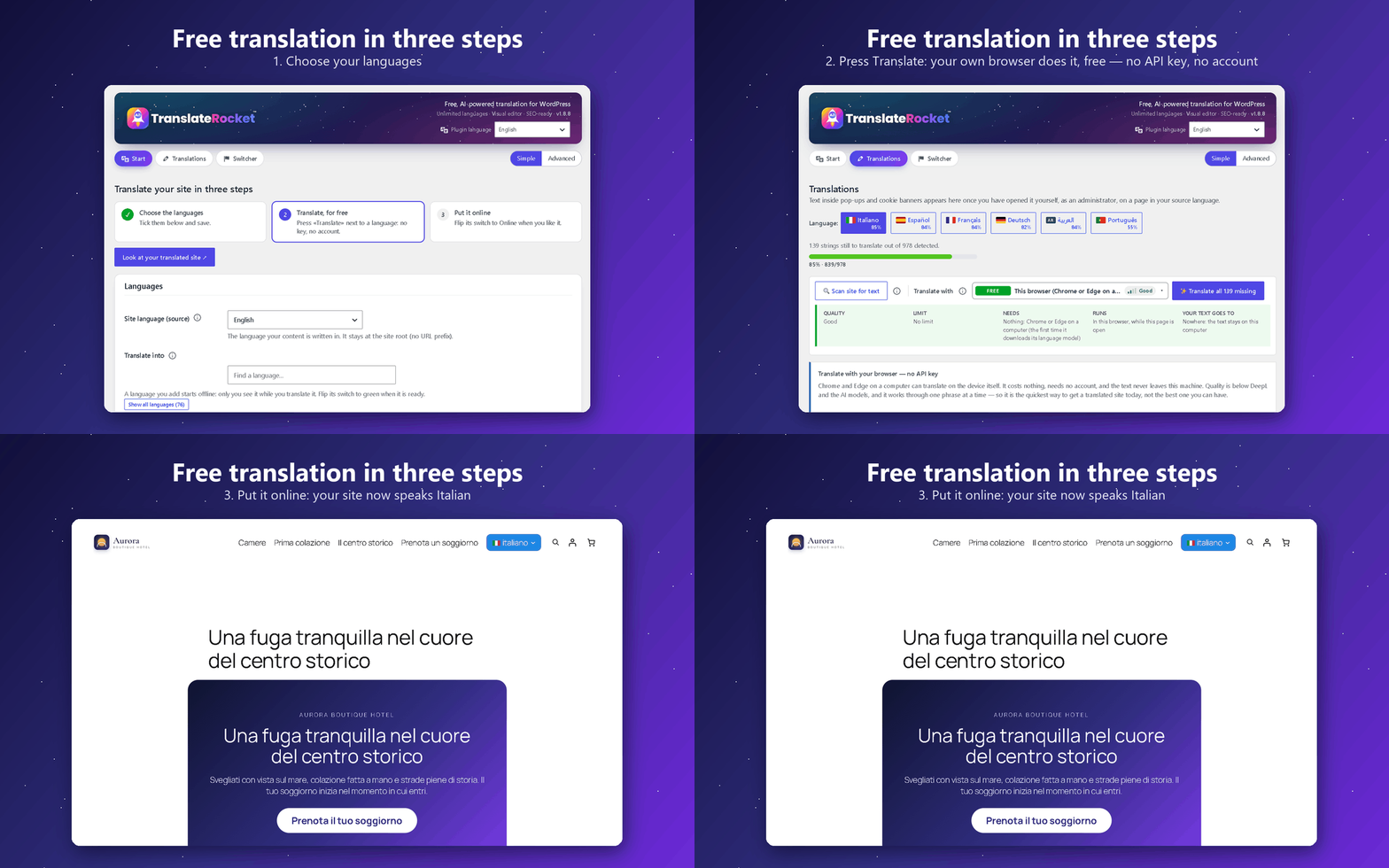
You do not need an API key at all, and any browser will do. Install the plugin, pick your languages and press «Translate my site»: every page is read and translated, and the languages go online. With no key, TranslateRocket uses the translator built into Chrome and Edge on a computer (it runs on the device itself, so the text never leaves your machine), and from Firefox, Safari or a phone it uses MyMemory, the free public translation service of Translated. It costs nothing and needs no account. It is the fastest way to a translated site. When you want fluent, idiomatic copy, the same pages can go through DeepL or an AI model with your own key (OpenAI, Anthropic, Gemini — you pay the provider directly), through ChatGPT or Gemini with a ready-made prompt at no cost, or through your own hands, line by line — and everything already translated is kept, so nothing is ever done twice.
Switching from another translation plugin? Your existing translations come with you. One click imports everything you have already paid for or typed by hand — from TranslatePress, Polylang, WPML, Weglot, qTranslate (X and XT), WPGlobus, WP Multilang, Bogo, Multilanguage by BestWebSoft, Falang, Sublanguage, Loco Translate and Autoglot, plus CSV and TMX for anything else. Most are read straight from the tables, the posts or the files, so the import still works after the other plugin has been deactivated or even deleted — which is the usual state of a site that is moving on. Pages built with Elementor or Bricks come across too, widget by widget — their words live in a meta field, not in the page content, and most importers never look there.
It detects translatable text as you browse — visible text, link titles, image alt, placeholders, ARIA labels, page titles, meta descriptions and the social preview tags a SEO plugin adds (Open Graph, X) — and serves each language under its own clean URL prefix (/it/, /de/), friendly to SEO and to page caches.
You translate however you like:
- 🆓 No key, any browser — one button translates the whole site. Chrome and Edge do it on the device itself (nothing sent anywhere); Firefox, Safari and phones use MyMemory, free and official, about 5,000 characters a day (about 50,000 if you choose to give it your e-mail). Nothing to sign up for, nothing to pay.
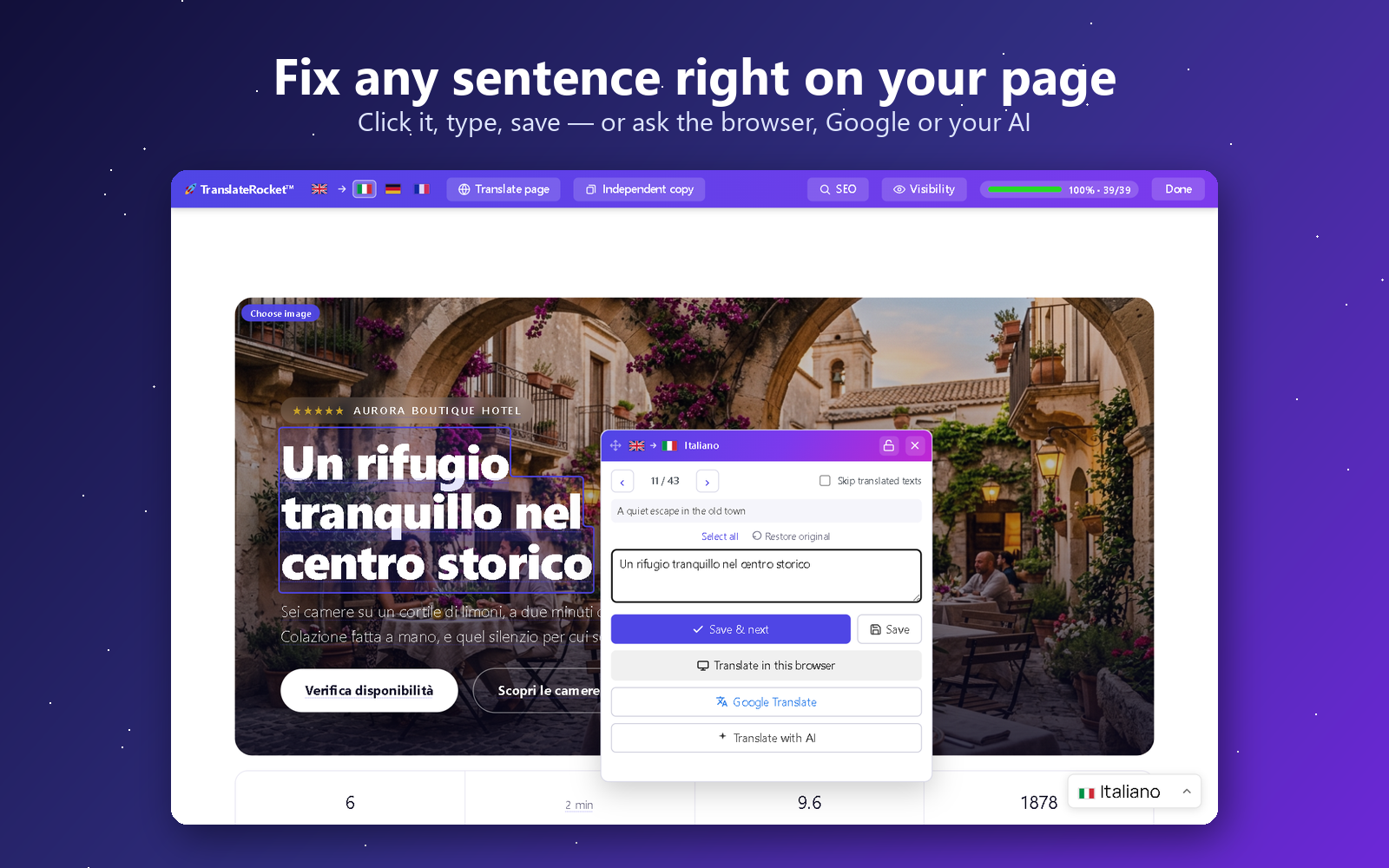
- 🖱️ On the live page — switch on the visual editor and click any text to translate it in a small, draggable popup, with Previous/Next, a progress bar and a “skip already-translated” mode.
- 🆓 Free with Google Translate (no key) — every field has a link that opens Google Translate prefilled, so you translate for free on Google’s own site and paste the result back.
- ✍️ By hand, in a clear per-page editor (also inside the post/page screen) with red highlighting for what’s still missing — plus a copy & paste box for bulk Google translation.
- 💬 With ChatGPT or Gemini, no key — one button copies the whole page with a translation prompt written for your site; paste the answer back and every line goes to its place.
- 🆓 With free AI, on your own free account — Cloudflare Workers AI (about 1,900 sentences a day with Llama 3.3 70B, or 11,000 with a plain translation model), Groq (gpt-oss-120b) or OpenRouter’s free models. A two-minute guide gets you the key, no card needed; a counter shows today’s free share, and when it runs out the next provider in your chain carries on.
- 🤖 With AI — bring your own key for DeepL, OpenAI, Google Gemini, Anthropic (Claude), Google Cloud Translate, DeepSeek or Qwen (Alibaba Cloud). Text is sent only to the provider you choose, only when you ask.
Highlights
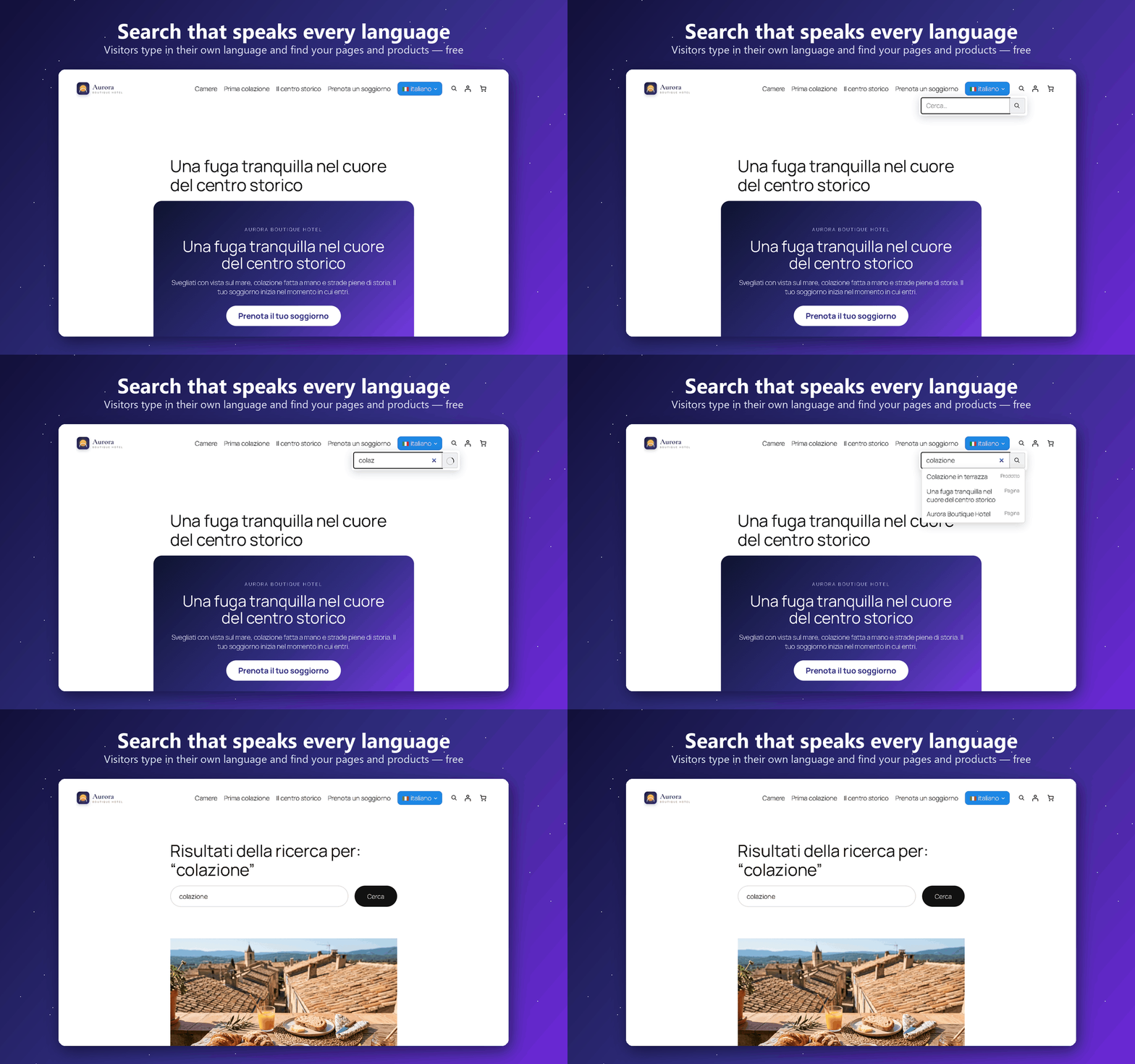
- 🔎 Search in every language, free — a search box that always searches in the language of the page: a visitor on
/it/types in Italian and finds your pages, posts and WooCommerce products by their translated title and text, with suggestions as they type. Make one profile for the header, one for the footer and one for the phone menu, each with its own look and a live preview; add it as a block, with the[translaterocket_search]shortcode or as an item of your menu. The site’s own search box, Ajax Search Lite and FiboSearch find translated text too. - 🟢 Simple view: one click — choose the languages, press «Translate my site». The plugin picks the engine by itself, translates every page and puts the languages online. Nothing to configure and no key. Everything else stays one click away under «Advanced», and nothing is ever removed.
- 🧠 Sentences an engine cannot translate are kept — a brand name, an address or a line already in another language stays as it is and the page still counts as complete, with a «translate again» button if you want to try another engine.
- 📊 Visits per language, without cookies — how many visits each language gets, its most read pages and the languages your visitors’ browsers ask for, so you know which language to translate next.
- 🍪 Cookie banners in the visitor’s language — Complianz, CookieYes, iubenda, Cookiebot and Usercentrics show their banner in the language of the page, and their legal texts are never machine-translated.
- 💳 Checkout and e-mails in the customer’s language — the WooCommerce checkout (Stripe tested), the order e-mails and the e-mails of form plugins (WPForms, Contact Form 7, Fluent Forms, Ninja Forms, Gravity Forms) reach each visitor in the language they used. WooCommerce lists TranslateRocket as compatible with High-Performance Order Storage and with the Cart and Checkout blocks.
- 🆓 Free AI on your own free account — Groq, Cloudflare Workers AI or OpenRouter’s free models, with a two-minute guide to the key and no card; and MyMemory with no key at all, built in (about 5,000 characters a day, about 50,000 with an e-mail address).
- 🔑 No API key required — and not just “by hand”. The whole site is translated automatically, for free, from any browser: Chrome and Edge on your own computer, MyMemory everywhere else. Or do it by hand in the visual editor, or free with Google Translate, and edit any translation later. There is no signup, no account and no key to create — AI providers are optional and only used if you add one yourself.
- 🌍 Unlimited languages (36 built in), 100% free. Donations welcome, never required.
- ⚡ Built for huge sites: past ~20,000 strings the engine switches by itself to indexed per-page lookups — flat memory and the same render time at 500 or 500,000 strings (load-tested), where map-loading translation plugins hit the PHP memory limit.
- 🖱️ On-page visual editor: click text to translate it in a draggable popup — no admin round-trips.
- 🧩 Interface too: translates theme & plugin interface strings, not just page content.
- 🔗 SEO-ready URLs: translated slugs (e.g.
/it/chi-siamo/) andhreflangtags. - 🔍 One SEO panel with everything in it: open a page in the visual editor and the SEO panel lists, in order, the translated address, the page title, the meta description, the social preview (Open Graph and X), the keywords, then every image on the page and every translatable attribute — titles, placeholders, ARIA labels. Each line takes you straight to that element on the page and opens the right editor, so nothing search engines read is left in the source language by accident.
- 🚦 Per-page visibility: if a page has no equivalent in a language, redirect it, show a custom message, or 404 — per page, per language.
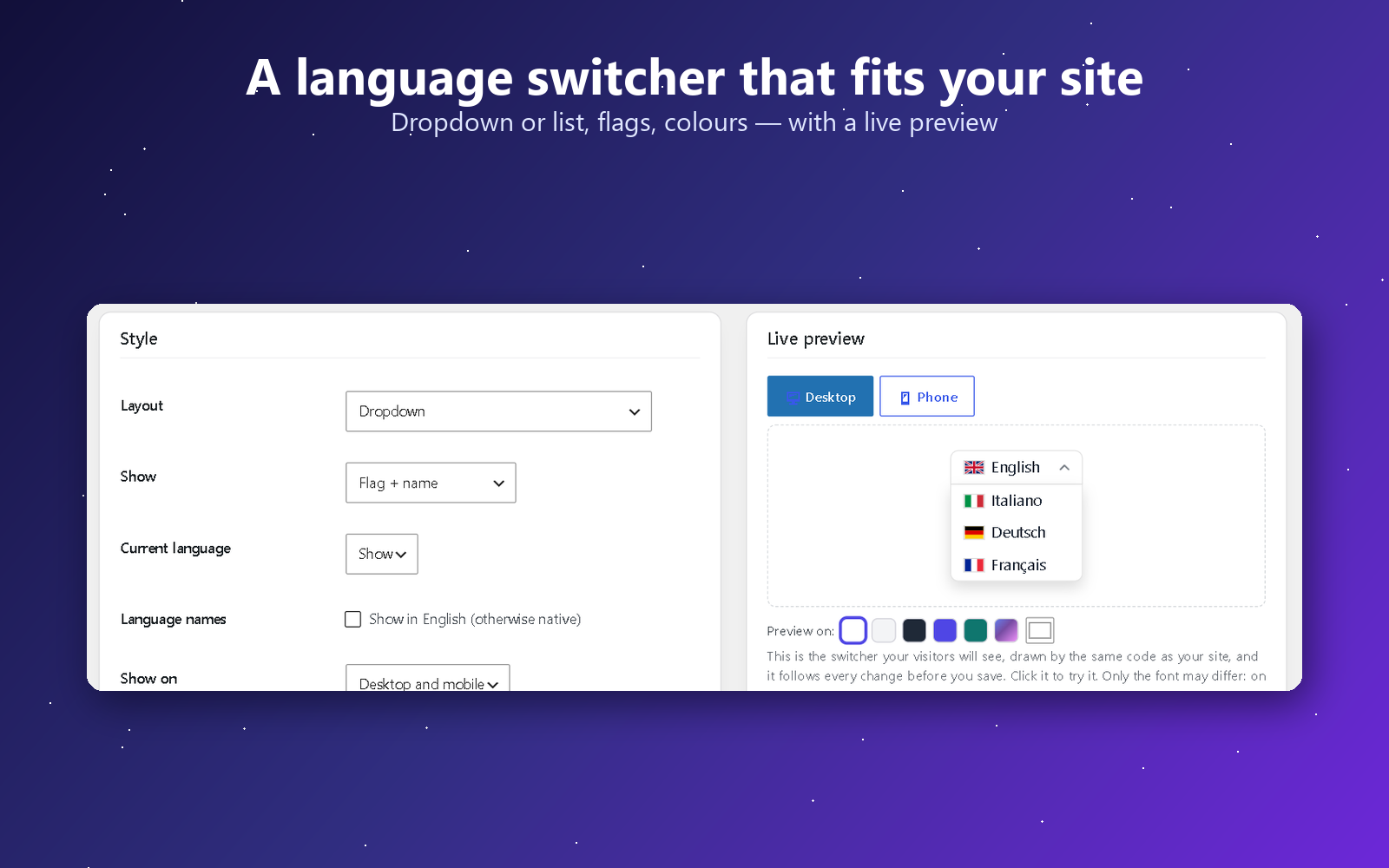
- 🎌 Flexible language switcher as a shortcode
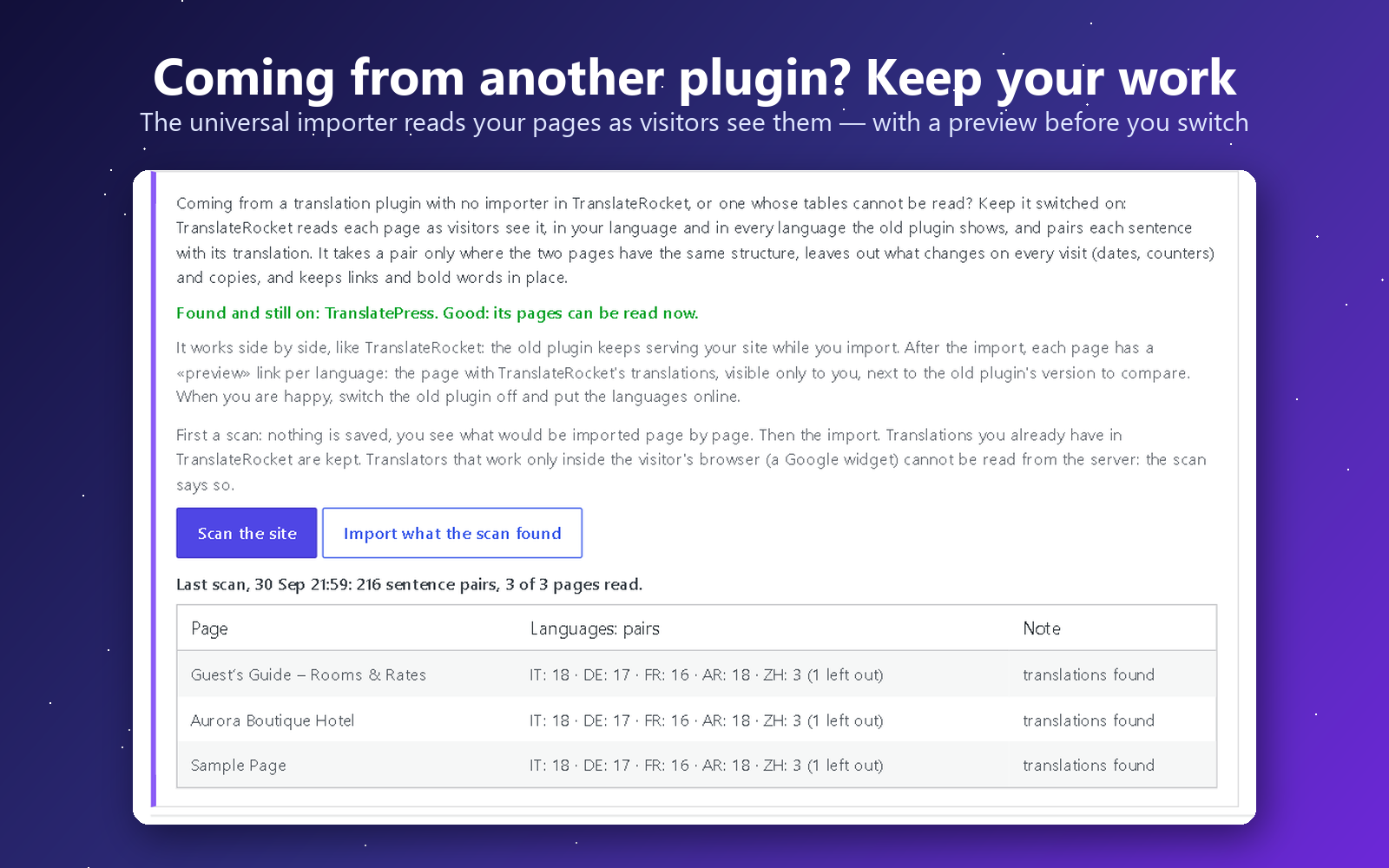
[translaterocket_switcher], a Gutenberg block, or a widget — inline, dropdown, or a scrollable bar with ‹ › arrows for many languages — with original SVG flags that render everywhere (including Windows). Show a switcher on desktop only, on mobile only, or both, to style a different menu for each. - 📥 One-click import from thirteen other plugins — TranslatePress, Polylang, WPML, Weglot, qTranslate (X and XT), WPGlobus, WP Multilang, Bogo, Multilanguage by BestWebSoft, Falang, Sublanguage, Loco Translate and Autoglot — plus a universal importer for any other plugin: it reads your pages as visitors see them, in every language, pairs each sentence with its translation only where the pages match, and lets you preview every page side by side before you switch the old plugin off — plus CSV and TMX for everything else. Read straight from the tables, the posts or the
.pofiles, so it works even when the other plugin is gone. Pages built with Elementor or Bricks come across too, widget by widget. - 🖼️ A different image for each language — swap any picture for a translated one: switch on the visual editor, click the button on the image and pick another from your media library. For text baked into a picture, a screenshot of your own interface, or a photo that only makes sense in one country.
- 🎯 Different content and menus per language — show a paragraph, a block or a menu item only in some languages: with a shortcode, a class on any block, or a checkbox in Appearance → Menus.
- 🛒 WooCommerce aware: product and category slugs per language, the AJAX mini-cart and JS strings translated too, and customer emails rendered in the language the order was placed in.
- 👀 Preview mode: review new translations or a fresh import on the real pages while visitors still see the default language — publish with one click when ready.
- 🚦 Add a language now, publish it when it is ready: each language has a switch — green and your visitors see it, grey and only you do. While it is offline it stays out of the switcher, out of your sitemap and out of the
hreflangtags, and its URLs send visitors to your default language, while you keep working on the real pages. Nothing half-translated ever reaches your visitors or Google. - 📂 Built for scale: searchable, sortable page list for sites with hundreds of pages.
- ✅ You stay in charge — every machine translation can be reviewed and edited by hand. Translations live in your own database.
Languages
Translate your site into the languages your visitors actually speak: Spanish, French, German, Italian, Portuguese and Brazilian Portuguese, Dutch, Polish, Russian, Ukrainian, Turkish, Romanian, Greek, Arabic, Hindi, Indonesian, Vietnamese, Thai, Chinese, Japanese, Korean — 36 languages ship built in, and you can add unlimited custom ones (any language code works). The plugin’s own admin interface is translated into fifteen languages besides English: Arabic, Chinese, Dutch, French, German, Indonesian, Italian, Japanese, Korean, Persian, Polish, Brazilian Portuguese, Russian, Spanish and Turkish.
Works with
TranslateRocket translates the page your site actually sends to the browser, so it is not tied to a theme or a page builder. Every release is tested on a real site with the plugins below (tested means installed, configured and checked from the visitor’s side, not only read about):
- Page builders: Elementor and Elementor Pro (theme builder headers and footers included), the block editor. While a builder is editing a page – Elementor, Beaver Builder, Divi, Bricks, Oxygen, Breakdance, Brizy, WPBakery, Thrive Architect, the Customizer – TranslateRocket stays out of its way.
- Shops: WooCommerce – product pages, cart, checkout and the order e-mails, in the customer’s language.
- Forms: Forminator, Contact Form 7, WPForms, Gravity Forms, SureForms, Formidable, Ninja Forms.
- Cookie and consent banners: Complianz, CookieYes, GDPR Cookie Compliance, Cookie Notice – the banner text is collected, can be clicked in the visual editor and reaches visitors translated; iubenda, Cookiebot and Usercentrics are told the language of each page.
- Payments: WooCommerce checkout with Stripe, in the visitor’s language.
- Search: WordPress search, Ajax Search Lite, FiboSearch.
- SEO: Yoast SEO, Rank Math – translated titles, descriptions and social tags.
- Caching and optimisation: Cache Enabler, Autoptimize, WP Fastest Cache.
- Side by side with, and importing from: WPML, Polylang, TranslatePress, Weglot, Bogo and others.
The full list, with what was checked and the date of the last test: https://translaterocket.com/compatibility/
Something missing, or not behaving? Tell me from https://translaterocket.com/support/ and I will test it.
Need a hand with your site?
I can do it for you. I am the developer of TranslateRocket, and I also build and translate WordPress sites for a living: a new multilingual site from scratch, an existing site taken from one language to ten, a migration away from a paid plugin, or a stubborn theme that will not translate. You get the person who wrote the engine, not a support queue.
The plugin stays free either way — nothing here is locked behind that. Write to me from the “Help & Feedback” screen inside the plugin, or from https://translaterocket.com/support/ .
External services
This plugin can connect to third-party services, but only with your involvement:
- AI translation providers (optional). If you add an API key and ask to translate, the relevant text is sent to the provider you selected so it can return a translation. No text is sent until you configure a provider and trigger a translation. When you open the AI Translation screen, your server asks each provider’s address one small question with no key and no text, to tell you whether your hosting can reach it. You choose the translation engines and accept their terms directly with them. Some engines (for example DeepL or Google Cloud Translation) ask you to tell visitors that a page was machine-translated, or to credit them: check your engine’s terms. TranslateRocket does not add these notices for you. Providers and policies:
- DeepL — service: https://www.deepl.com/en/pro , privacy: https://www.deepl.com/en/privacy
- OpenAI — service: https://platform.openai.com , privacy: https://openai.com/policies/privacy-policy/
- Google Cloud Translation / Gemini — service: https://cloud.google.com/translate , privacy: https://policies.google.com/privacy
- Anthropic (Claude) — service: https://www.anthropic.com , privacy: https://www.anthropic.com/legal/privacy
- Cloudflare Workers AI — service: https://developers.cloudflare.com/workers-ai/ , privacy: https://www.cloudflare.com/privacypolicy/
- Groq — service: https://console.groq.com , privacy: https://groq.com/privacy-policy/
- OpenRouter (and the provider of the model you pick there) — service: https://openrouter.ai , privacy: https://openrouter.ai/privacy
- DeepSeek — service: https://platform.deepseek.com …
Installation
- Install TranslateRocket from Plugins → Add New (search for “TranslateRocket”) and activate it.
- Open TranslateRocket and tick the languages you want (the quick setup asks for them).
- Press Translate my site: every page is translated, free and with no key, from any browser — Chrome or Edge on your computer, MyMemory anywhere else. Add a free AI account, or your own key, whenever you like.
- The languages go online at the end, and a link opens your translated site. In the Advanced view you can keep a language offline until you are happy with it.
- Add the language switcher and the search box where you want them — block, shortcode or menu — from the Switcher and Search screens.
First steps, filmed from installation to the first translated page:
FAQ
Is it really free?
Yes. All translation features and unlimited languages are free, with no paid tier inside the plugin. You only ever pay your own AI provider, directly, if you choose to use AI.
How do you keep it free with no income from it?
I build websites for a living, and I use TranslateRocket on every multilingual site I make. Every fix reaches those sites the day I release it, so the plugin gets maintained because I need it maintained — publishing it for everyone costs me nothing on top of that. What comes back is worth more to me than a licence fee would be: bug reports from setups I could never reproduce on my own, which end up improving my own clients’ sites too. Donations are welcome and change nothing about what the plugin does.
And if you want that work done on your own site, you can hire me. Building and fixing WordPress sites is the day job: a site built from scratch, a design put right, a multilingual setup done properly, custom development, a migration off a plugin that charges you every month. That is where the money comes from — not from crippling this plugin. Ask me from the “Help & Feedback” screen inside the plugin, or at https://translaterocket.com/support/ .
Do I need an AI key?
No — and without one you are not limited to typing by hand. One button, «Translate my site», translates the whole site with no key, from any browser. On a computer with Chrome or Edge it uses the translator built into the browser, which runs on the device itself, so the text never leaves your machine; in Firefox, Safari or on a phone it uses MyMemory (Translated), free and official. It costs nothing, needs no account and no signup. Quality sits below DeepL and the AI models, so it is the quickest way to a translated site rather than the finest one — but everything it translates is kept, so adding a provider later never repeats the work.
It needs Chrome, or Edge 148 or later, on a computer that can run the built-in model: Windows 10 or 11, macOS 13 or later, Linux or ChromeOS (not Windows Server), 16 GB of RAM or a graphics card with more than 4 GB, and 22 GB of free disk space, with the admin on https. Anywhere else MyMemory takes over by itself, still with no key.
Beyond that you can click any text on the live page and type its translation, edit it again later, and publish it. Every field also offers a free Google Translate link you can paste back from. AI keys are optional and only used at the moment you ask for one.
Two minutes, filmed on a real site: translating a page with no key at all.
Do my translations stay on my site?
Yes. Translations are stored in your own WordPress database. Text is only sent to the AI provider you configure, at the moment you ask for a translation.
Does it work with caching plugins?
Yes. Each language lives under its own URL (e.g. /it/), so page caches store each language separately and automatically.
Does it work with WooCommerce?
Yes. Product pages, categories and attributes are translated like any other content, and slugs are translated per language. It also covers the parts WooCommerce renders outside the page HTML, which a page-only engine misses: the AJAX mini-cart fragments, strings passed to JavaScript (such as the “View cart” link), and transactional emails — the order’s language is recorded at checkout (classic and block/Store API) and the customer email is rendered in that language. Wording that only ever appears inside an email (WooCommerce’s own “Thank you for your order”, “Quantity”, “Price”) is picked up automatically the first time such an email is sent and filed under “WooCommerce emails” in the translation screens, so you can translate it like anything else. Multi-currency is out of scope: TranslateRocket translates, it does not convert prices.
The whole shop translated, from the product page to the order e-mail:
Does it translate forms (Forminator, Contact Form 7, WPForms…)?
Yes. Labels, placeholders, options and buttons are translated with the rest of the page, whether the form is added with a shortcode, a block, a widget or a page builder such as Elementor. The messages the form plugin adds with JavaScript — validation errors, “message sent” — are translated too, on Forminator, Contact Form 7, WPForms, Gravity Forms, SureForms, Formidable and Ninja Forms. With Forminator, the thank-you message, forms loaded with “Load form using AJAX” and the e-mail notifications follow the language of the page the form was sent from; the wording of the form settings and e-mails appears under “Forms: messages and e-mails” in the translation screens once an administrator has viewed the form or a notification has been sent. To keep a notification (for example the copy for the site owner) in the source language, return false from the trrocket_forminator_translate_notification filter.
Is there a PHP function that returns the current language?
Yes, for theme and plugin code that needs it (the equivalent of Polylang’s pll_current_language()): trrocket_current_language() returns the code of the language of the current request, such as en, fr or pt-br — also in AJAX requests sent from a translated page — and trrocket_default_language() returns the site’s source language. Wrap calls in function_exists() so your code keeps working if the plugin is deactivated.
Which plugins can I import my translations from?
Yes — use TranslateRocket → Import to bring over your existing translations. The WPML import covers both its string translations and its post-based translations (titles, slugs and matching body text), and reads directly from WPML’s tables, so it works even when WPML is already deactivated. Coming from Weglot (a hosted service)? Export your translations from the Weglot dashboard as a CSV and upload the file on the same Import screen — the columns are detected automatically and mapped to your target languages.
To review the result safely, turn on Preview mode (“Who sees the translations” in Settings): you browse the fully translated site while visitors keep seeing the default language, and one click publishes it when you are happy.
Safer still: run TranslateRocket next to your current plugin, import, and switch only when you are happy. Two minutes:
Can visitors search my site in their own language?
Yes, for free. The search box of TranslateRocket always searches in the language of the page: on /de/ a visitor types in German and finds your pages, posts and WooCommerce products by their translated title, excerpt and content, with suggestions while typing, and the results open on the German pages. You can let it look in every language at once, choose which content types it shows and add filters. The search box WordPress already has on your site, Ajax Search Lite and FiboSearch understand the translated words too.
What if a page shouldn’t exist in another language?
Open the page and use the “Language visibility” box to redirect it, show a custom message, or return a 404 — per language.
Can I show something in one language only?
Yes. Wrap it in [translaterocket_language lang="it"]…[/translaterocket_language] — several languages work too, as lang="it,de" — or use not="it" to show it everywhere except Italian. In the block editor you do not need the shortcode: add the class trrocket-only-it or trrocket-hide-it in “Advanced → Additional CSS class(es)” of any block, navigation links included. Content limited with lang= or trrocket-only- is taken to be written in that language, and is shown exactly as you wrote it.
Can a menu item appear only in some languages?
Yes. In Appearance → Menus every item has a “Show in” row with one checkbox per language; nothing ticked means every language. Hiding an item hides its sub-items too. Block themes build menus with the Navigation block instead: there, give a link the class trrocket-only-it or trrocket-hide-it.
Can I translate with ChatGPT or Gemini without an API key?
Yes. Open a page in the visual editor, click “Translate page” and use “Copy with a translation prompt” — or the ChatGPT and Gemini links, which copy the same thing. The prompt carries your languages, the words you never translate, your glossary and your house style, and asks for the reply in a code block with the line numbers intact. Paste the reply in box 2 and apply it.
And when a machine translation gets a word wrong, fixing it takes ten seconds:
My browser isn’t Chrome or Edge, or I work from a phone. Can I still translate without a key?
Yes. «Translate my site» then uses MyMemory, the free public service of Translated: no key, no account, about 5,000 characters a day, about 50,000 if you tick the optional box that gives it your e-mail. TranslateRocket Labs, a separate free add-on you can ask for at https://translaterocket.com/labs/, adds more free engines with no key that work from any browser, phones included — each one is switched on only after you read and accept its conditions. Labs is not needed: everything described on this page works without it.
Both, in one minute — a page translated in the browser with no key, then Labs translating a new page the moment it is published:
Screenshots

Changelog
1.8.50
- Fixed: in the menu of a classic theme with «Open: on click», the theme’s little arrow next to the language now turns while the list is open, and is hidden when «Arrow» is switched off (Switcher → More style options). Thanks to Tom.
1.8.49
- Fixed: in the menu of a classic theme (Astra, GeneratePress, OceanWP and others) the language list opened as soon as the mouse touched it, even with «Open: on click». It now waits for a click, stays open while the mouse moves away, and closes with a click elsewhere or Esc; on phones the theme’s own menu works as before.
- New: a flag of your choice for languages spoken in several countries (Languages → Advanced → Flags): German with the Austrian or Swiss flag, English with the American, Canadian, Australian, Irish or New Zealand one, Spanish with the Mexican, Argentinian, Colombian, Chilean or American one, French with the Belgian, Swiss or Canadian one, and more. Only the flag changes. Thanks to Tom for both.
1.8.48
- Fixed: with sentences excluded in «Words & phrases», «Translate all» stopped after about a thousand sentences as if it had finished, and had to be pressed again and again on a big site; the excluded sentences also stayed «missing» for ever, so the language never reached 100% and pages kept coming back as not finished. They are now kept as they are and counted as done, and «Translate all» goes on to the end in one run. Thanks to Matjaž for insisting.
1.8.47
- Fixed: WordPress’ own sitemap (wp-sitemap.xml) did not list the translated addresses of pages, posts and products: TranslateRocket used a hook that WordPress does not have. It now adds them, with the translated slug and leaving out pages hidden from a language, and it reads those settings for the whole sitemap at once. The TranslateRocket sitemap (translaterocket-sitemap.xml) already had them.
1.8.46
- Improved: switching a language online on the Languages page now says how many of its sentences are not translated yet, and that visitors would read them in your site language, with a «Translate them first» button. The «Go online» notice shown after deactivating another translation plugin says the same, language by language. Thanks to Alain for the honest feedback.
- Fixed: on WooCommerce products and other custom post types with a translated address, the SEO panel of the visual editor said «Not detected on this page yet» for the SEO title and meta description (Rank Math and the other SEO plugins), and the sentences of the translated product were filed under the translated address instead of the original one. Pages and posts were not affected. Thanks to Rolf for the report.
1.8.45
- New: two more AI engines with your own key, DeepSeek and Qwen (Alibaba Cloud Model Studio), for sites that cannot use OpenAI or Anthropic where they are. They work like the other engines: in «Translate all», in the fallback chain and in the editors, with your glossary, protected words and house style. For Qwen you pick the region of your key (Singapore, United States or China). Thanks to Alexey for asking.
- New: on AI Translation every engine says whether your hosting can use it. Your server asks the engine a small question, with no key and no text, and the card tells you if the engine is reached, if it does not serve the country or region where your server is, or if your host blocks the connection — before you buy any credit. «Check again» repeats it.
1.8.44
- Improved: the AI provider settings and the «External services» section say that some engines (for example DeepL or Google Cloud Translation) ask you to tell visitors a page was machine-translated, or to credit them. You choose the engine and accept its terms; TranslateRocket does not add these notices for you.
1.8.43
- Fixed: translated addresses now use the letters of their own language, whatever the language of the site. On an English or Italian site the German «Über uns» became «uber-uns» and «Größen» became «grosen»: now they are «ueber-uns» and «groessen», as German writes them (Danish «å» becomes «aa», and Catalan, Serbian and Bosnian are right too). This holds for addresses typed by hand and for the automatic addresses of categories and tags. Addresses made before stay as they are; an address that changes keeps sending visitors from the old one with a 301.
- Tested with PHP 8.5, The SEO Framework 5.2.1 (translated pages in its sitemap) and Cookiebot 4.8.1 (the banner in the language of the page).
1.8.42
- Fixed: «Scan site for text» and «Translate my site» stopped early on sites with more than 500 pages. The addresses are read in blocks of 500, first pages and products and then categories; at the point where the pages end, a group of categories was skipped and the scan said «finished» (for example 800 of 1,200). Every category, tag and product category is now read.
- Setup wizard: the language list can no longer be emptied by the browser. Chrome could fill the «Find a language» box with a saved user name on its own, so the list showed «No language matches» and no language could be picked. Text that nobody typed is taken out again, and the key fields no longer invite the browser to fill them.
- Setup wizard: the header now has the starry banner with the logo, like the other screens.
1.8.41
- Fixed: «Scan site for text» and «Translate my site» now read the categories that hold nothing yet, too. A product category, a category or a tag with no items of its own was never read, so its page (description, SEO title) stayed in the original language, although it often sits in the menu. Those with a description or in a menu are now read; the empty tags and attributes of a big shop are still skipped.
1.8.40
- Fixed: on pages whose address is written in a non-Latin alphabet (Japanese, Chinese, Korean, Arabic, Persian, Russian, Ukrainian, Thai, Hindi, Greek…), hreflang and the language switcher sent the other languages to that same address (/it/特長/), which does not exist: Google found thousands of «Not found» pages. Browsers ask for the address as %E7%89%B9 and WordPress saves it as %e7%89%b9; the two are now the same thing, for pages, child pages and categories.
1.8.39
- Fixed: no more server errors (500) during «Translate all» on large shops. Short words that are on every page («Black», «Cart») made the search for ready-made pieces read tens of thousands of pages for each sentence; it now asks the database once, and a step of 20 sentences takes seconds again.
- Fixed: setup in Safari or Firefox without a key. Who pressed «Finish» without pasting a free AI key landed on the copy-paste editor; now they get «Translate my site», which translates the whole site for free with MyMemory, in any browser, with no key.
- Improved: when no engine is set up, the visual editor now points to «Translate my site» (free, with MyMemory) or to a free AI key.
1.8.38
- Fixed: category addresses translated in full. On a shop whose categories sit one inside the other, only the last word of the address was translated (/en/k/1022/3d-printers/); now the parent categories are translated too (/en/k/nerd-lab/3d-printers/), for categories, tags, product categories and custom taxonomies. The old address moves to the new one with a 301, links typed by hand in the content follow, and page 2 and the following pages have the right hreflang.
- Fixed: «Translate all» is fast again. Since 1.8.34 every step looked for ready-made pieces among all the sentences waiting (up to 1,000) before sending anything, which made large sites slower; now it looks only at the sentences it is about to send.
- Fixed: «Another translation is running» with a single tab open. When the server cut a translation step half-way (time limit, memory), the lock stayed on for up to two minutes and the next clicks were refused; the lock is now released as soon as the step ends, however it ends.
- Fixed: the percentages no longer go down by themselves on pages with a text that changes at every visit (a counter, a clock). The values of the past visits are no longer counted as sentences to translate; nothing translated is removed.
- Fixed: Serbian alphabet. The conversion of the translations already saved could stop half-way (WP-Cron switched off, a time limit) with the screen still saying «converting»: it now starts again by itself when you open the admin area. And «Undo» of «Translate again» puts the sentences back in the alphabet you chose.
- Fixed: a correction made by hand in the visual editor (a menu item, for example) could come back wrong after a reload when the same words were also saved as a link title with an older machine translation. The hand-made translation now always wins.
- Fixed: changes made in the visual editor now reach visitors at once on servers with a cache emptied through the response (LiteSpeed and the like). The request to empty the cache used to leave after the answer of the save, too late, so the live site could keep showing the old text or the old address.
- Fixed: when you change the translated address of a page (visual editor, SEO panel), the address it had before now moves to the new one with a 301 instead of answering 404. And an address typed by hand is no longer treated as one made automatically.
- Improved: «Translate my site» — while it works the button keeps its colours and the rocket flies, and it stops when you press Pause.
1.8.37
- New: translated URL bases. The fixed first word of archive and product addresses can be translated too: /it/prodotto/leather-bag/ and /de/kategorie/reisen/ instead of /it/product/leather-bag/ and /de/category/reisen/. Links, hreflang, the language switcher and the sitemap follow, and the address with the original word moves to the translated one with a 301. The words for category, tag, product, product category and product tag are built in for 33 languages, custom post types use their translated name, and you can type your own word for any language (Settings, «Fixed words in addresses»). Off by default; switched off again, the translated addresses already visited move back with a 301.
- Fixed: a language could stay at 99% for ever. A few code snippets collected by older versions (WordPress media templates) had been “translated” in one language only; they are now kept as they are in every language, so the counter reaches 100%. Nothing is deleted and nothing has to be translated again.
- Improved: Exclusions, «Translate again the sentences that contain them». If your engine is not an AI (Google, DeepL, the browser’s translator), the screen now says before the click that it cannot follow glossary terms inside a sentence, so the sentences would come back without them. And the last run keeps its «Undo» link on the screen, also after you leave the page.
1.8.36
- New: choose the alphabet for Serbian (Settings, under your languages): Latin (latinica) or Cyrillic (ћирилица). Engines used to pick their own, so both could end up on the same page. Now the AI is told which one to use, every new translation is converted to it when it is saved (whatever engine made it), the Serbian translations already saved are converted in the background, and the theme’s and WooCommerce’s own Serbian texts follow too. Cyrillic to Latin is exact, letter by letter; from Latin to Cyrillic, brand and model names, codes and short acronyms stay in Latin. Nothing has to be translated again.
1.8.35
- Improved: translated page addresses are now made from the whole translated title, like the original WordPress address. Long product names (more than six words) used to keep the original address in every language; they now get their translated address at the next hourly pass, with a 301 from the old one. Addresses already made never change. Developers can set a limit with the
trrocket_auto_slug_max_wordsfilter. - New: reCAPTCHA and hCaptcha speak the page language on translated pages (Contact Form 7, WPForms, Elementor Pro, Gravity Forms and any plugin that loads them).
- Tested: WooCommerce e-mails sent from the admin (order status, customer note, «Send order details») reach the customer in the order language; the admin «New order» e-mail stays in the site language.
1.8.34
- New: 100% guaranteed. A sentence an engine keeps sending back unchanged is tried three times, then kept as it is and counted as done, with «translate again» if you want another engine to try. A failing engine (quota, network) never counts as a try.
- New: pieces of code (symbols with almost no letters) are kept as they are in every language and never sent to the engine.
- Fixed: with two languages of the same family on (German and Swiss German), the «flag + code» switcher showed «DE» twice; now it shows DE and DE-CH.
- Fixed: sentences that a security or admin plugin (Wordfence, for example) hands only to a signed-in administrator were collected as page text and counted as missing in every language. Now only the script texts a visitor really receives are collected.
- Fixed: a text shown elsewhere «flattened» into one line — a product’s short description in Blocksy’s compare table — now reuses the translations of its pieces instead of waiting for the engine.
- Fixed: the «Step-by-step setup guide» link is back on the Start screen.
1.8.33
- New: «Translate my site» shows what it does in three steps, your languages as flags right above the button, and a bigger button. While it works you can Pause or Stop it, and a line shows the page being read or the sentence being translated right now.
- New: «Stop» next to the hourglass. It stops every translation running now — in this tab, in other tabs and Labs in the background — and keeps what was already translated. Starting a second translation from another tab is no longer possible: it says one is already running, instead of translating the same sentences twice.
- New: the translation quality of every engine (Fair, Good, Very good, Excellent) in the «Active provider» menu and on every provider card, on the same scale as the engine menu of the Translations page.
- New: «Pause» in the «Translate with your browser» box, next to «Stop»; both are centred and easy to see, and the box explains itself in a short list.
- New: in «Translate my site», a pencil to give MyMemory another e-mail address.
- Improved: the Languages card is centred and easier to read, and «Save changes» stays visible at the bottom of the screen while you scroll the list of languages.
- Improved: on the Translations page the list of pages loads 50 at a time with «Show 50 more», so a site with thousands of pages opens quickly; the search still finds every page.
- Improved: Labs is reachable from the Simple view too.
- Fixed: during a translation the percentage on the language button moved while the bar and «N strings still to translate» under it stayed at the figure of when the page was opened. They now move together.
- Fixed: the hourglass came on when sentences were only reused, edited by hand or imported, as if a translation were running.
- Fixed: lines of code from WordPress JavaScript templates («<# if ( closeType ) { #>») were collected as sentences that no engine can translate, holding a language at 99%. They are no longer collected, and the ones already collected are removed by themselves.
- Fixed: the flag menu of «Custom language» did not close with Esc, and stayed open over the «i» of the next setting.
1.8.32
- New: «Translate my site» — one button, nothing to choose. In the Simple view the plugin reads every page, picks the engine by itself (your AI key if you have one, otherwise the free translator built into Chrome and Edge, otherwise MyMemory, free and official, for Firefox, Safari and phones), translates every language and puts it online. When it ends, a link opens your translated site.
- New: MyMemory (Translated.net) as the free engine of «Translate my site» when the browser has no translator: no key, no account, about 5,000 characters a day — ten times more if you tick the optional box that lets MyMemory know your e-mail.
- New: your site’s own address (such as «example.com») is kept as it is inside every sentence, with DeepL, Google Cloud and the AI models, without writing it in Words & phrases.
- Fixed: a text that is only an address — the site’s name such as «example.com», a web address, an e-mail — is now kept as it is in every language and never sent to the AI. On one site it was the last sentence «to translate» in 13 languages, holding them at 99%.
- Improved: on phones the floating language switcher shrinks to its flag (the names come back as soon as it opens) and steps aside while the page scrolls, so it no longer covers the button of a page’s first screen. Nothing changes on computers, and a switcher that shows names only keeps them.
- Fixed: a page explaining qTranslate or WPGlobus, with examples of their [:en]…[:] marks written in the text, was cut down to almost nothing: the examples were taken for real marks. Marks with a single language in the middle of a sentence are now left as they are written.
- Fixed: after importing from Polylang, a page whose old copy in another language had been moved to the Trash kept showing that copy (still in the original language) instead of its translation. A copy in the Trash is no longer shown.
- Fixed: OpenRouter withdrew the free model TranslateRocket tried first, so every batch began with an error before moving to the next model. Gemma 4 now comes first, and models OpenRouter no longer lists (checked once a day in its public catalogue) are skipped by themselves.
1.8.31
- New: «Still to translate» on the AI Translation page — every sentence still without a translation, with the languages it misses. Some are better left as they are (a code sample, a product code, a name): tick them and press «Keep the selected as they are», or «Keep all as they are». The original stands in those languages and the progress reaches 100%. Translations already made are never touched, and «Translate the selected again» undoes it.
- Fixed: the translation of a text that shows HTML code as an example — a
<link rel="alternate">line in an article about hreflang, or the meta description of such a page — was refused every time: the security check removed the code, which is part of the text, and an empty translation is not saved. A tag written exactly as in the original is now kept; scripts, styles and any tag the original does not have are still removed. - Fixed: on a translated page, text already shown in that language (a translation coming back from a cached piece or a widget) could be collected as a new sentence to translate — «echoes» that kept a site just below 100%. The e-mail address of the signed-in administrator is no longer collected either.
1.8.30.7
- Fixed: a site could stay at «99%» in every language for ever. A sentence with a mark that has no words of its own — a bold full stop between two sentences, which page builders such as Brizy write — came back from the AI with the two sentences joined and the mark gone, and the translation was refused every time. When a translation keeps losing its marks, the text between them is now translated piece by piece, with links and bold left where they are (the browser engine already did this).
- Fixed: guests’ reviews written in German, Italian or French on an English site stayed «to translate» in their own language: asked to translate them into the language they are already written in, every engine gives them back as they are. A text that is not in the site’s language and that the whole chain of engines leaves unchanged is now kept as it is and counted as done. An English sentence an engine sends back untranslated still waits for a real translation.
- Improved: the setup wizard shows a short list of languages — the most used, your visitors’ and the ones you picked — with «Show all languages» and a search box that finds any of them; labels on the left and choices on the right, so it fits on one screen.
- Fixed: Chrome’s translator drops the capital letter at the start of a sentence («The pools» became «le piscine»). In-browser translation now keeps it when the original starts with one.
1.8.30.6
- Fixed: a REST request made from a translated page (/fr/wp-json/…, used by other plugins to load their apps, maps and lists) loaded every translation of the language into memory to translate its answer. On a site with WooCommerce and a 128 MB PHP limit the request died with «Allowed memory size exhausted» in the translated languages only. REST and AJAX answers now look up only the sentences they contain.
- Improved: the setup wizard is one screen, in every browser: pick the languages and press «Finish & start translating» — no key, nothing else to choose. The engine and the switcher wait behind «More options». When the browser can translate every language you picked (Chrome and Edge on a computer) the homepage is translated in front of you; otherwise the wizard says how to go on without a key (copy and paste into any translator, a free AI key, or Labs). «Finish» waits until at least one language is ticked.
- Fixed: arriving from the wizard, the in-browser translation of the homepage started without a click, and Chrome downloads a language only after a real click: it could sit at «Downloading the language model… 0%». When the language still has to be downloaded, the button now lights up and asks for that one click.
- Fixed: after an error the in-browser translator was rebuilt without closing the old one; after a few errors Chrome refused them all («translation service count exceeded») and the page ended with 0 sentences translated.
- Fixed: the German label of the wizard’s «Finish» button.
1.8.30.5
- Fixed: translating the whole site in the browser, or with «Translate all», emptied every cache of the site (the plugin’s own, the cache plugin’s — WP Fastest Cache, LiteSpeed Cache, WP Rocket… — and the host’s) after every batch of 60 sentences, about every 40 seconds for as long as the run lasted: a shop with 277,000 sentences ran a whole day without its page cache and got slow. A long run now empties the caches at most once every ten minutes, and once more when it ends; a page saved in the visual editor still shows at once.
- Improved: every batch saved by the browser engine refreshes the translation maps once, not once per sentence.
- Fixed: when a free engine (Groq, Cloudflare Workers AI, OpenRouter) answered «rate limit reached, try again in a few seconds» in bursts, a step of «Translate all» could spend over a minute waiting and retrying sentence by sentence inside one request — a proxy cuts it at 60 seconds and the run looked dead. The step now ends at once, says «the free engine asked for a short pause: the translation goes on by itself in N seconds», and resumes on its own.
1.8.30.4
- Fixed: the visual editor counted as missing the texts WordPress, the theme or WooCommerce already show in the page language («Search», the 404 page, the cart: «Tu carrito», «Ver mi carrito»…), so a page translated in full could show 73%. They now count as translated; a sentence where only a name was translated still counts as missing.
1.8.30.3
- Improved: the multilingual sitemap (/translaterocket-sitemap.xml) now lists every language version of a page as its own with its own , each with the full set of hreflang alternates, as in Google’s multilingual sitemap guidelines. Before, only the original address had a and the translations were listed only as alternates. Very large sites get an index of numbered files (/translaterocket-sitemap-1.xml, -2.xml…) under the 50,000 URL / 50 MB limits; Yoast, Rank Math, SEOPress and All in One SEO list them in their own index.
- Improved: pages kept out of search engines are left out of the multilingual sitemap in every language: noindex in Yoast SEO, Rank Math, SEOPress, All in One SEO or The SEO Framework (for the page or for its whole post type), password-protected pages, and WooCommerce’s cart, checkout and account pages.
1.8.30.2
- Fixed: with Yoast SEO on a live (production) site, the canonical, og:url and schema address of a translated page still pointed to the original page (/nl/ons-verhaal/ said /our-story/). Yoast keeps each page’s address in its own table on live sites; on translated pages it now builds the address of the language being shown. Pages in the original language and canonicals typed by hand are unchanged.
- Fixed: with Yoast SEO on a live site, when the first visit to a page came in another language, Yoast could store that language’s address and then give it as the canonical of the original page too. Yoast now stores addresses only from visits in the site’s language.
1.8.30.1
- Fixed: with «Translate the addresses of pages and posts» switched off, the addresses it had made while it was on (from the translated titles) were still used in links, menus and breadcrumbs, so a link to the WooCommerce shop (/products/) became /fr/produits/ in French. Now they go back to the original address, and the old translated one sends visitors on with a 301. Addresses typed by hand in the editor are kept.
- Fixed: the WooCommerce shop page reached at its translated address (/fr/produits/) showed an empty page or a 404 instead of the products.
- Faster: on a big site that is translating, the TranslateRocket screens no longer count every language again whenever a sentence is saved. They show the last numbers at once and bring them up to date in the background, one at a time, after the page has been sent (the start screen of a 50,000-sentence, 13-language site went from about 30 seconds to under 4). Small sites still count right away.
1.8.30
- New: images, links and buttons get their own alt text, title and ARIA label in each language, even when the original has none. In the visual editor the image window shows the fields, a link or a button has «Properties» in its text window, and an icon with no text opens its own small window. They are kept apart from the sentences: never counted as «to translate», never rewritten by an engine.
- New: the search box has colours like the language switcher — 12 ready-made looks (Light, Dark, Ocean, Violet…) plus six colours and the corners of your own, with the preview following every change. Without a choice the theme decides, as before.
- Changed: suggestions while typing in the search box are off for new boxes; switch them on in TranslateRocket → Search.
- Fixed: with «search in every language», a visitor reading the site’s own language got the pages found in the other translations first, and the pages with the words in their title could be missing from the suggestions (WordPress’s own search was also ordered by date). The site’s language comes first, by relevance.
- Improved: the Labs page lists everything the free plugin includes and what Labs adds, search box and per-language properties included.
- Changed: «Write a review» now leads to Trustpilot.
- Automatic translation: under the pages read, the number that matters — «Sentences left: 12,345 in 13 languages · about 4 days at today’s pace». A page is read once but translated in every language, so «Pages read: 2867 of 4074» never meant 70% done. The pace costs no scan: one small option, reset once a day.
- Fixed: since 1.8.27 the counters (translated, to translate, per language) could stay behind after a page was taken off the list, after new sentences on a new page, or after translations were deleted outside the plugin (phpMyAdmin, another plugin). They are counted again as soon as the plugin changes something, and are never older than 10 minutes (an hour on a big site, where counting is slow).
- Faster: a translated page with many links (a menu listing every page, a long list of posts) looked up each linked page’s translated address one by one — 15,000 database queries and 14 seconds for a page linking 5,000 pages, against 4 for the original. Now all the links are resolved at once: about 200 queries.
1.8.29
- Fixed: on a big site with a page cache that also empties the object cache on every purge (LiteSpeed, Redis), the «next steps» box and the counters were rebuilt on every wp-admin screen, and again after every saved translation: CPU gone on a 4.000-page site in 13 languages. The list is now kept in an option that survives purges, good for five minutes, and a saved translation only marks it to be redone — at most once every two minutes.
1.8.28
- Improved: on the «Automatic» page an engine you tick but that cannot work yet …