

Description
Try-On shows your clothes on a real body, in every size, without a photo shoot.
A flat photo can’t show how a dress moves or how a jacket sits on the shoulders. Try-On Video for WooCommerce turns the product photo you already have into a short, looping video of your clothes worn by one of Try-On’s models, and plays it in your product gallery, in the size and colour the shopper picks.
No studio, no models to book, no theme to edit.
- Show the fit, not just the fabric. Clothes on a body, moving, show what a flat photo can’t.
- Cover every size. Women, men, girls and boys, in every size your shop sells; the video changes when the shopper changes size or colour.
- Start from the photos you have. A flat-lay or ghost-mannequin photo works best, and each colour starts from its own picture.
- Keep your theme. The video is a slide of WooCommerce’s own product gallery, muted and looping.
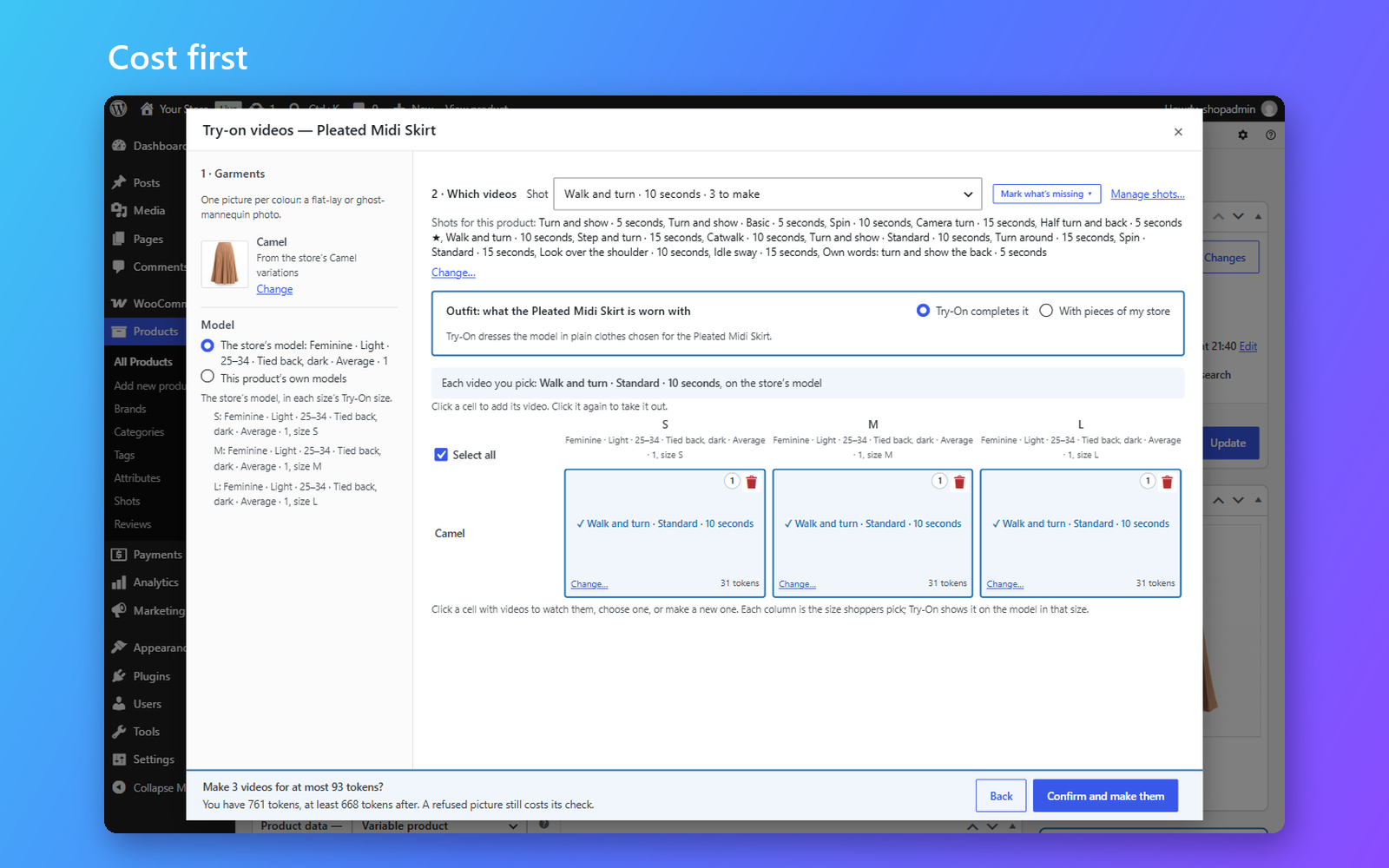
- Pay only for what you make. Every run shows its cost and your balance before anything is made.
EVERYTHING YOU NEED TO SHOW THE FIT
From one product to your whole catalogue, the work happens inside WooCommerce, on the screens you already use.
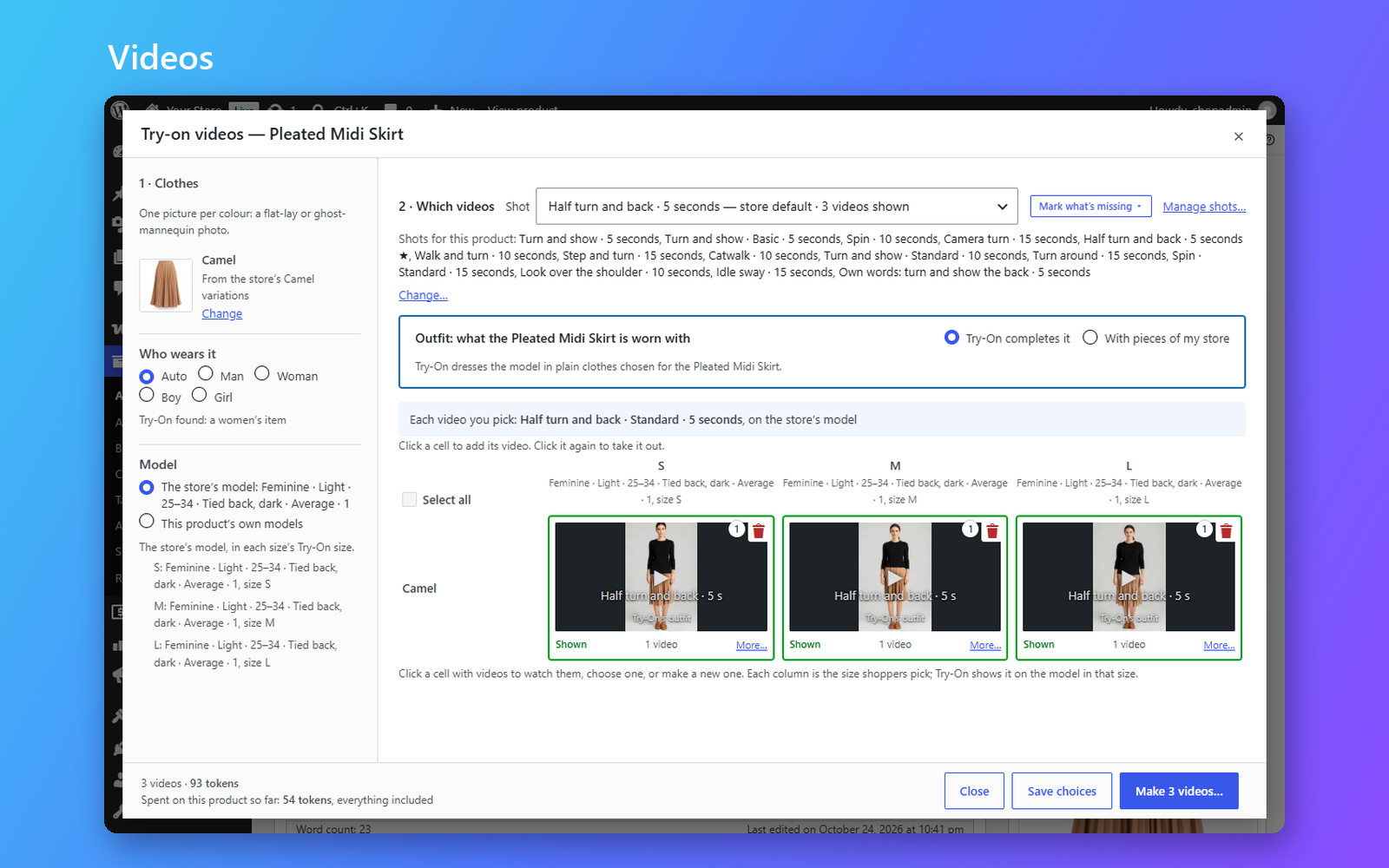
- Pick, confirm, done. Open a product, choose the clothing photo, the colours and sizes, and a shot. The video is made in the background and appears in the gallery.
- Choose the style. Use Try-On’s ready-made shots, or describe a movement, a scene and a framing in your own words and save it for next time.
- Dress the whole look. Show a product worn with other pieces from your store, with “Goes with this” links to each.
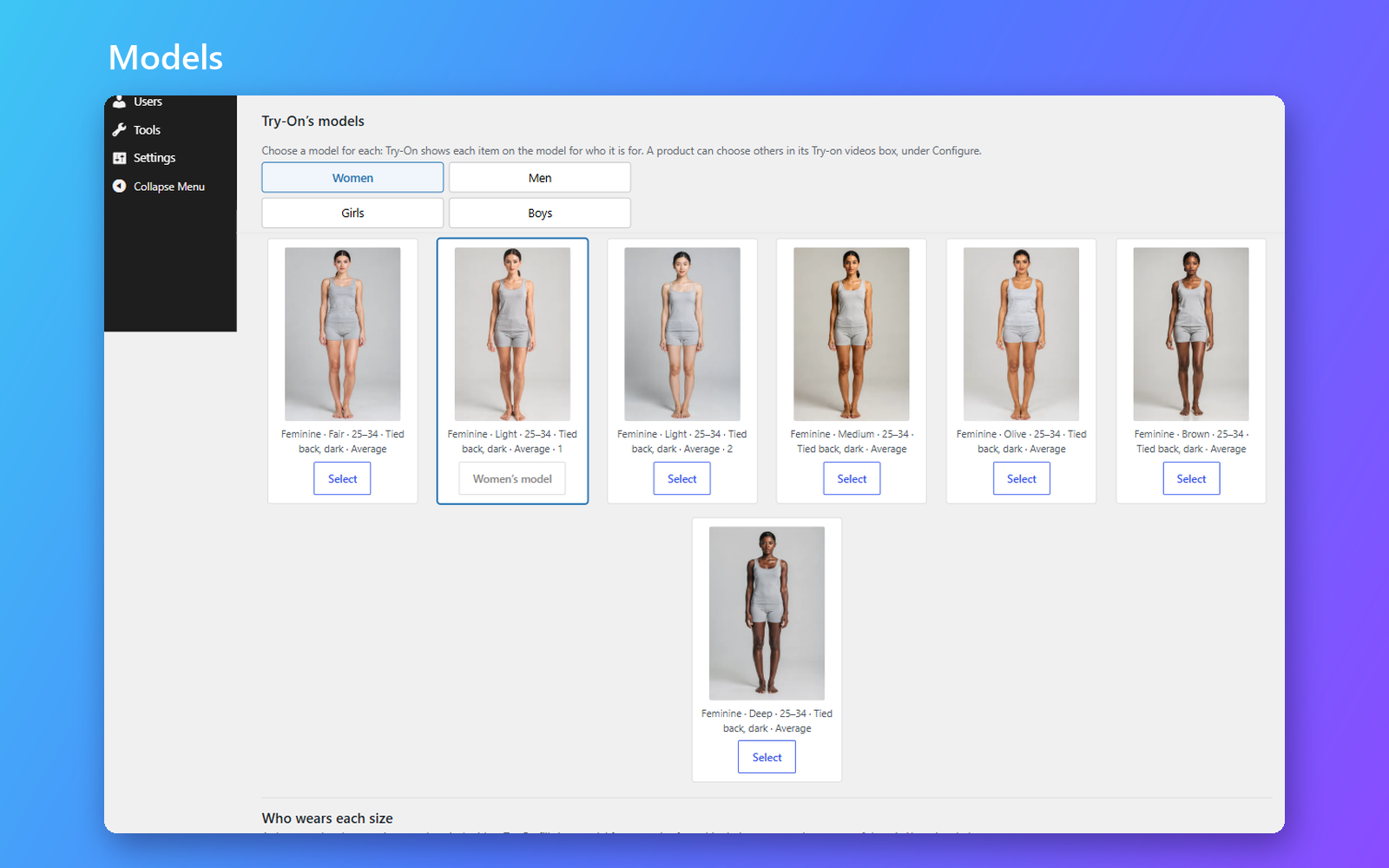
- Say who wears it. Tell Try-On who each category is for, or choose Man, Woman, Boy or Girl for one product, and the right model and cost show before anything is made. A Google feed’s gender is read too.
- Make videos in bulk. Select many products in the Products list and make their videos in one run.
- Match sizes in seconds. Tell the setup wizard which size attribute you use, and Try-On matches your sizes to its models, free.
Made for clothing
Try-On makes videos of clothes: T-shirts, shirts, blouses and tops, knitwear, hoodies and sweatshirts, trousers, jeans, shorts and skirts, dresses and jumpsuits, jackets, coats and blazers.
Not made: shoes and boots, hats and caps, bags, jewellery and other accessories, swimwear (swim shorts included), underwear that isn’t a dress or a top, anything revealing, and lingerie for children. A photo of one of these is refused, Try-On says what it read the photo as and why, and only its check is charged. Lingerie that is a dress or a top is made: a slip dress, a camisole, a bralette top or a bodysuit worn as a top.
Known limitation: the model under the clothes can come out changed. On the larger sizes, a garment can be drawn narrower than the model, who then looks slimmer than their size through the waist and hips, the arms and the legs. A wrap dress or a split skirt can show the garment’s inside over the legs, where the legs should show. Watch each new video in the product’s Try-on videos box.
Start free, pay as you grow
Videos are paid in tokens. Start on the free plan: every store gets 30 tokens a month, enough for 5 short videos, for as long as Try-On is installed, with nothing to renew. Free videos carry the Try-On logo in a corner, and they are yours to publish.
When you need more, buy tokens: you unlock more videos, and the videos you make from then on carry no logo. A photo that can’t be used costs only its check, and so does a video that fails.
Own your videos – forever
Every video is saved in your WordPress media library, exactly as it arrives. Deleting the plugin never deletes them, and your product pages go back to how they were.
Your storefront never calls Try-On: it plays the video from your own site, and nothing about your shoppers, orders or customers is ever sent. If you choose to share anonymous usage data with us, you can turn it off at any time.
Translate
Try-On Video for WooCommerce is in English for now. It is ready to be translated, and its screens work right-to-left; help bring it to your language at translate.wordpress.org.
Connection to Try-On
The videos are made by Try-On, a paid service operated by ORCA-AD LTD at https://connect.try-on.co. The plugin can’t make videos without it, and talks to it over HTTPS only. This is what it sends, and when:
- When you connect: your store’s URL and name, the plugin and WooCommerce versions, and the language you work in. That language also goes with every link to Try-On’s pages (your account, buying tokens), so they answer you in it.
- Right after connecting, and on a wp-admin page while one is missing: it reads Try-On’s prices, options, models and movements, and downloads the models’ pictures and the movements’ previews into your site’s uploads folder.
- Every request carries the plugin’s version, and every request made once connected also carries your store’s URL. Try-On’s answer about your account says when a newer version of the plugin is out, for the update notice.
- While connecting, Try-On calls your store back once at
/wp-json/tryon-video/v1/connect/ownershipto confirm the store holds the request being approved. The store answers only for a request one of its managers started. - When you set up sizes, once connected, so Try-On can suggest which attribute is your size and which your colour: for each variation attribute, its slug and name, its type, how many products use it, up to 50 of its values, and whether your pictures change with it.
- When you match sizes: the size attribute’s name and your size names.
- While you build an outfit in Configure: the product and up to 100 products you might add to its outfit, each as its product id and, when the store has them, its item type and kind, plus the ids of the pictures the outfit already wears, so Try-On can say which pieces it can make.
- When you save a shot in your own words: the words, the language they are written in, and, if you ask for one, a preview to film, at the tokens shown.
- To show the price of the videos you choose in a product’s Try-on videos box, before you confirm them: the product id and, for each video, its shot and any words you wrote for it, its quality and length, its outfit’s pieces, whether it has an outer layer, Try-On’s results for pictures it already checked, and whether the description would be read. It carries no picture and no description.
- When you confirm a run, and only then: the clothing photo you picked, the model, the size, any words you wrote, the length, a quality id fixed by Try-On, your store URL, your language, how much free disk space your site has, and an anonymous code for the staff member who started it.
- For a jacket, a coat or another outer layer, when you confirm a run: the product’s description and short description, and the pictures in them that are in your media library. Pictures hosted elsewhere are not sent.
- When you ask what goes with a product, or with the products you select in the Products list: each product’s pictures, title, categories and attributes, at the tokens shown.
- When you change two-factor in Account & spending: whether everyone on your Try-On account must use it to sign in.
- When you accept the terms for photos worn by a person, in the setup or in Account & spending, or take them back: an anonymous code for the staff member who accepted, when, and which wording they accepted. It holds for your whole Try-On account. A clothing photo that shows a person wearing it is then sent like any other: Try-On removes the person, makes the video from the clothing alone, and keeps nothing about them.
- When you send an error report, only then and after you have seen it: the error, the plugin’s recent activity, its settings’ ids and switches (never words you typed), your active plugins and theme with their versions, your store’s setup (the plugin, WordPress, WooCommerce and PHP versions, language, whether it is part of a multisite network, memory and upload limits, whether its scheduled tasks run), and the note you add.
- If you turn on failure reports in Account & spending (off by default), each time a video fails, without asking: what you chose for it (the product, its colour, the picture’s number in your media library, the model, the shot and its options, the quality and length), its ids, how many times it was tried, the tokens it cost or was quoted, what went wrong and the plugin’s activity for that video, how much free disk space your site had, and your active plugins and theme and your store’s setup as in an error report. Never your customers, orders, pictures or the words you wrote.
- The finished video is downloaded from the address the service returns.
- Anonymous usage data, only if you turn it on (off by default): once a day, the WordPress, PHP, WooCommerce and plugin versions, the site language, and whether steps such as connecting or making a video worked. No store URL, no ids, nothing about your shoppers.
This service is provided by ORCA-AD LTD: Terms of use, Privacy policy.
Installation
Minimum Requirements
- WordPress 7.0 or greater
- WooCommerce 11.0 or greater
- PHP 8.1 or greater
- A Try-On account: free to create, with tokens every month
Automatic installation
Automatic installation is the easiest option: WordPress handles the file transfer, and you won’t need to leave your web browser. Make sure WooCommerce is installed and active, then go to Plugins → Add Plugin, search for “Try-On Video for WooCommerce”, and click Install Now, then Activate.
Go to WooCommerce → Settings → Try-On and click Connect. The setup wizard then asks which size attribute your shop uses, which sizes matter and how long the videos should be; you can change every answer later.
Manual installation
Download the plugin’s zip, upload it under Plugins → Add Plugin → Upload Plugin, activate it, then connect your store in WooCommerce → Settings → Try-On.
Updating
Automatic updates should work smoothly; we still recommend you back up your site. Your videos, settings and connection are kept across updates.
FAQ
Do I need a Try-On account?
Yes. The videos are made by Try-On, so you connect your store once, from WooCommerce → Settings → Try-On. Connecting is free, and every account gets tokens each month, so you can make a finished video before paying anything.
What can I make videos of?
Clothes worn on the body: tops, shirts, knitwear and hoodies, trousers, jeans, shorts and skirts, dresses and jumpsuits, jackets, coats and blazers. Shoes and boots, hats and caps, bags, jewellery and other accessories, swimwear (swim shorts included), underwear that isn’t a dress or a top, anything revealing, and lingerie for children aren’t made: a photo of one of these is refused, the plugin says what Try-On read it as and why, and only its check is charged. Lingerie that is a dress or a top is made: a slip dress, a camisole, a bralette top or a bodysuit worn as a top. The plugin shows the full list where you choose what to make.
Where can I get help?
Ask in the plugin’s support forum. The plugin also has a guided tour of every screen.
Which photos work best?
A photo of the clothing on its own: a flat-lay or a ghost mannequin. A picture with a person in it is refused, and its check is still charged, unless you accept the terms for photos worn by a person, in the setup or in Account & spending: then a photo of the clothing worn by one person is used too. Try-On removes the person and makes the video from the clothing alone, keeps nothing about them, and each video made from such a photo costs more (10% when this was written; the price is shown before you confirm). A face or a figure printed on the clothing is part of its design and is never refused. For the back, add a photo of the back to the product’s gallery.
Does the plugin pick the clothing photo for me?
No, you always choose. A colour whose variations already have a picture starts with that picture, and you can change it. Only when you make videos for many products at once, and agree to it, does Try-On pick each product’s picture.
Will it work with my theme?
Yes, with any theme that shows WooCommerce’s standard product gallery. The video is added as one of its slides.
Can the video replace the main photo?
Yes. In Settings → Try-On → Store (or in the setup), choose where the video sits: Instead of the main photo, First (the default), Second or Last. Instead of the main photo, the product page opens on the video, playing, in the main photo’s place; when the shopper picks a size and colour with no video, the main photo comes back, with that colour’s picture.
Which video does a shopper see?
One at a time. The product page opens on the video in the product’s default size and colour. Once the shopper picks a size and a colour, it plays the video made for exactly that size and colour, or the one you chose for it with Also plays for in the product’s Try-on videos box. If there is none, no video shows and the shopper sees that colour’s photos: a video is never moved to another size by itself. A colour picked on its own plays that colour on the default size, else on another size; a size picked on its own plays that size in the default colour, else in another colour, else the default video. A size with no Try-On size plays as the default size.
Will it slow down my product pages?
No. Your storefront never calls Try-On: it plays a video file from your own media library, and only the video on show loads.
Which sizes appear?
The ones your shop already sells. Try-On matches each of your sizes to one of its own, and you can change any match under Products → Attributes.
Can I use my own model photos?
No. The videos show Try-On’s own models, in every size; you choose the clothing photo.
What happens to my videos if I delete the plugin?
They stay in your media library: deleting the plugin never deletes the videos you paid for. Installing it again brings them back to your products.
My videos are waiting. What do I do?
WordPress runs background work when someone visits your site, so on a quiet shop a video can wait. The plugin tells you when nothing has run for fifteen minutes. Ask your host to run WordPress’s scheduler every minute (a “cron job”) to fix it for good. Nothing is lost while a video waits.
Where is the source code?
In the plugin itself: every script ships with the TypeScript it is built from, and npm ci && npm run build builds them again.
Screenshots


Changelog
1.0.10
The video can now take the main photo’s place in the product gallery: choose Instead of the main photo in Settings → Try-On → Store, or in the setup. The label on a video now says simply “AI-generated”. A review of the whole plugin fixed what it found: a run whose answer was lost, or a confirmation clicked twice, never orders or charges the same videos twice; a run cancelled, interrupted or short of tokens stays as you left it and says why; the usage data you agreed to share no longer names your store; Try-On’s model pictures are seen only by your store’s staff; videos you hid stay hidden; a picture picked automatically says so until you keep it; and many screens and notices now say exactly what is so. Connecting now shows a short code in wp-admin that you type on Try-On’s page, so only someone who can see your admin screen can approve the connection. A new bulk run waits while the one before it is still collecting videos, and tells you what it would replace; disconnecting stops a bulk run cleanly; a request Try-On never answered stops being sent before it could be charged again; and erasing a person’s data now removes them from requests still on their way.
1.0.9
The AI-generated label now sits in the video’s bottom-left corner on every store, right-to-left ones included, so it never covers the Try-On logo, and it reads in its own direction without a full stop. Tested with WooCommerce 11.3.
1.0.8
Product pages with several videos open faster: only the video the shopper sees loads, it starts from its beginning each time it shows, and it stops while it is off the screen. A shopper can pause the video by clicking it, and play it on with another click. Every product page is built faster, with or without a video.
1.0.7
The try-on video now opens the product gallery: it sits first, before the main photo, unless you choose another place in Settings → Try-On → Store. The place after all the photos is now called Last, and a place you already saved is kept.
1.0.6
Choose where the try-on video sits in the product gallery: first, second or after the photos. The product page plays one video at a time, the one for the size and colour the shopper picks, or the one you set with Also plays for. The video’s thumbnail shows its first frame. Photos of clothes worn by a person can now be used, once you accept their terms (10% more per video). Fixes: a size or colour with its own photos no longer hides the video, choosing a clothing photo shows only the product’s own pictures, and stores with Plain permalinks work again.
1.0.5
Try-On 1.0.5 lets you choose the model for each video, including new blonde models: pick its heritage and hair next to its shot and length, keep the videos you made on every model, and choose which one shoppers see, at the same price. A refused picture now tells you what Try-On saw and why it can’t be made, and lingerie worn as clothing, such as a slip dress or a camisole, is now made. On the product page the video plays by itself in any theme’s gallery, and its thumbnail is a play mark. You can also let failed videos be reported to Try-On automatically so it can fix the cause; it is off unless you turn it on in Account & spending.
1.0.4
Try-On 1.0.4 hardens security on the storefront: the Goes with this row loads its next cards only from your store’s own address, a product behind a password shows no video or row until the shopper gives it, and visitors no longer see the alternative videos you kept hidden in WordPress’s media listing. The connection is better protected: a connect request’s secret part is encrypted while it waits, a key of your own in wp-config.php is used only when it is at least 32 characters long (Site Health says when it isn’t, and the line it suggests carries a ready-made key), and when the connection’s secret can no longer be read here, wp-admin and Site Health say so and how to disconnect the store on your Try-On account, rather than showing it as not connected. There is no more choice of quality: every video is made at Try-On’s one quality, and a saved shot or a video tried again is quoted at its price from now on. A product’s videos now share one check of each picture, so you pay for it once. When Try-On asks for them, a jacket’s or coat’s description and its pictures from your media library go with its videos, so Try-On can show it closer to its real length; a description is read only when Try-On asks for it. The readme and the suggested privacy policy text now say what goes to Try-On to show a video’s price, deactivating the plugin stops all of its background tasks, and saving the Try-On settings checks that you can manage the store. Known limitation: on the larger sizes the model can come out slimmer than their size under the clothes, and a wrap dress or a split skirt can show its inside over the legs, so watch each new video.
1.0.3
Try-On 1.0.3 fixes videos refused after a reinstall: a store installed again after deleting the plugin with Remove everything had its new videos refused as already asked for, and making them again failed the same way. Each install now names its requests in its own way, so a store’s new videos are made as soon as it is connected again.
1.0.2
Try-On 1.0.2 asks for a rating the way WooCommerce does: on Try-On’s own screens the footer invites you to rate the plugin on WordPress.org, and once you have clicked the stars it simply thanks you, for good. The plugin’s page on WordPress.org now reads cleanly, with no sentence broken in the middle. Every wearer’s shot examples now reach your store, so Man, Woman, Boy and Girl each show their own. When your Try-On account is suspended, parked or blocked, wp-admin now says which, in Account & spending, the product box and the run page, and what you can do about it, and Account & spending shows when the tokens you bought expire. One Try-On account can now connect several stores, which share its tokens. Switching Who wears it in the product box no longer leaves videos planned on the other wearer in the confirmation: what you confirm is what the box shows.
1.0.1
Try-On 1.0.1 dresses your models in whole outfits and makes every choice easier to see before you pay for it. A video can now show up to two pieces, such as a jacket over a shirt and trousers: Configure suggests only the pieces Try-On can make, refuses an outfit that can’t be worn together before any tokens are held, and shows any outer-layer charge in the price first. Movements are chosen from tiles that play when you hover and open large when you click, each showing the model its preview is made on, and shots in your own words are written in one window with a preview filmed for the tokens shown. There is one catwalk now, the model walking in from afar, and stores that used the near catwalk move to it while their finished videos keep playing. Videos come in Standard and Premium, with Premium the default until you choose; only the qualities your account can order are offered, and a shot Try-On no longer makes is greyed out instead of failing later. The setup opens inside wp-admin, larger, with the storefront’s AI label shown on an example picture, picks up where you left it, never holds back a store already in use, and ends on your products ready to plan videos or take the tour. A newly connected store has Try-On’s prices, movements and models straight away. Connecting explains a refusal, and a store another Try-On account still held can connect again once Try-On has checked it at its own address. Disconnecting says first what happens to videos still being made, deleting the plugin with Remove everything also disconnects the store, and Try-On tells you when a newer version is out. Every movement, scene, framing and pose is translated, alongside many smaller fixes to the setup, the product box and the shot lists.
1.0.0
- First release.