

Description
tufu answers your visitors from your website, docs and files. When it can’t help, or a visitor asks for a person, it hands the conversation to your team, and you reply from where you already work.
What you get:
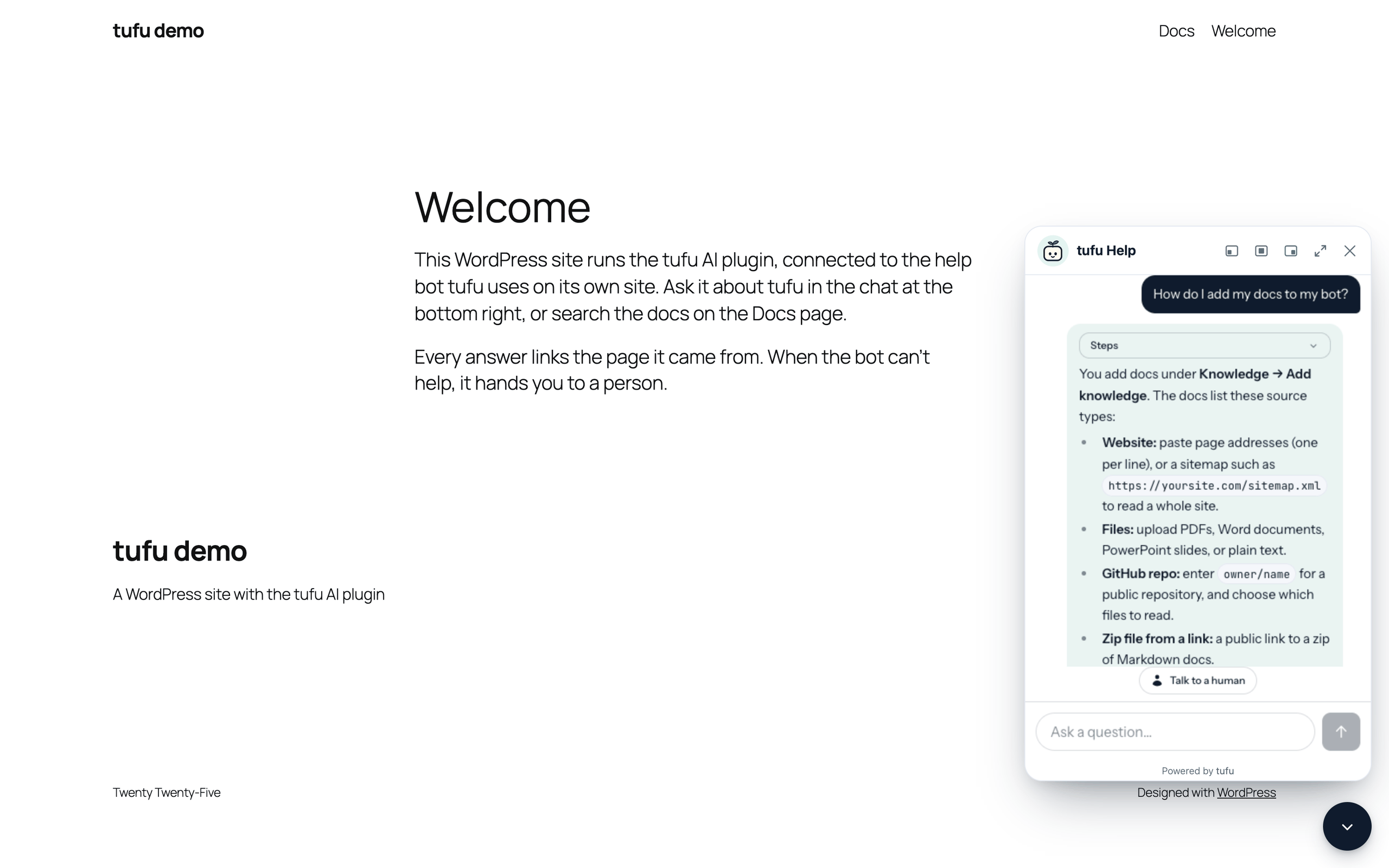
- Every answer cites its page. Answers link to the page on your site they came from, so visitors can check them, and you can see what the bot read.
- A handoff to a person. The visitor’s question reaches your team in the tufu inbox and by email (and in Slack or Discord on paid plans), and you reply from there. Your reply reaches the visitor in the chat, or by email if they left.
- “Where’s my order?” on WooCommerce. On Team and Scale, the bot looks up a customer’s own order (status, items, tracking) for logged-in customers and guest checkouts. Read-only; no addresses or payment details. How it works
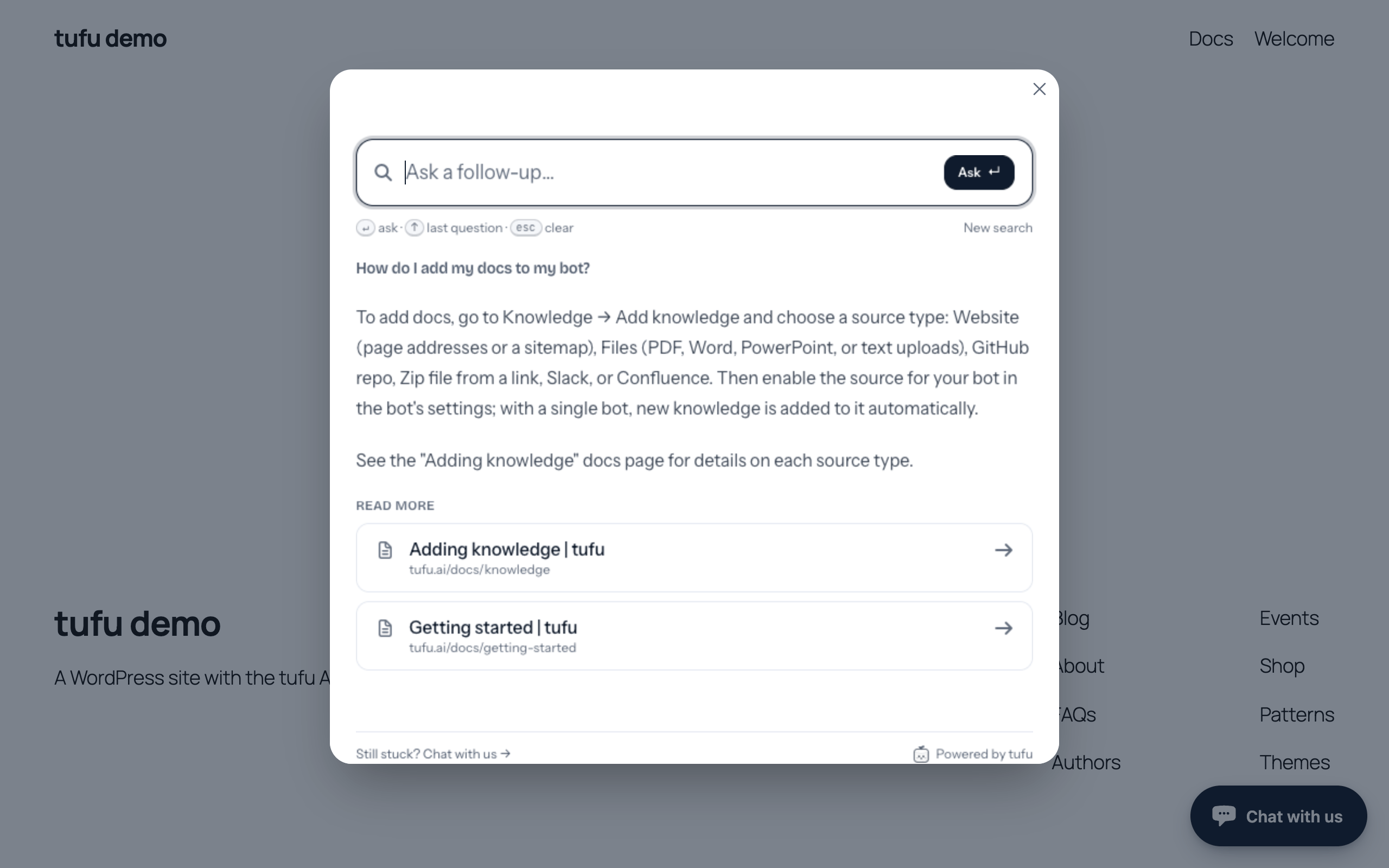
- Docs search, not only a bubble. The “tufu Ask” block (or the
[tufu_ask]shortcode) puts a search box for your docs on any page, with short answers and links to the right pages. - Works on the free plan. One bot, with the chat bubble and the Ask console, on as many pages as you like.
This plugin puts tufu on your WordPress site with no code:
- Support chat: a chat bubble on every page, or only on the pages you choose.
- Ask bar: instead of the bubble, a search box fixed at the bottom center of the page that opens the Ask console upward.
- Connect in a minute: press “Connect to tufu”, sign in or create a free account, pick a bot, and you’re back. No API key to copy, and nothing secret is stored on your site unless you choose to turn on signed-in visitors.
The look (colors, button, greeting) and what the bot knows are set in tufu, so they change on your site without touching WordPress.
Forms
The “tufu Form” block (or [tufu_form id="..."]) shows a form made in tufu: messages reach your tufu inbox, and its AI can reply first from your docs. “Move my forms” in Settings > tufu AI copies the forms of Ninja Forms, WPForms or Contact Form 7 to tufu. Tick “Show this form where the old shortcode is” and a copy replaces that plugin’s shortcode (not its block) once the plugin is off.
A plugin for a service
The plugin is free and has no locked features: everything in it works the same on every plan. It shows a service that runs on tufu.ai, and you need a tufu account. tufu has a free plan, and a paid Team plan with more bots, answers and channels (pricing). Plan limits are set and counted by tufu, not by this plugin.
On the free plan, the chat, the Ask console and forms show a small “Powered by tufu” link to https://tufu.ai. On the Scale plan, or on Starter and Team with the brand removal add-on, you can hide it on the bot’s Look tab in tufu.
External services
This plugin connects your site to tufu (https://tufu.ai), an AI support service run by tufu. Nothing is loaded or sent until you connect a bot in Settings > tufu AI or add a tufu form.
- Connecting your bot. When you press “Connect to tufu” in Settings > tufu AI, your browser goes to https://tufu.ai/connect/wordpress/ with your site’s address, the address of the settings page to come back to, and a random code that the plugin checks when you come back. You sign in to tufu there and pick a bot; tufu sends your browser back with the bot’s team and bot IDs, which are public. No password or key passes through your site.
- Signed-in visitors (optional, off by default). With the identity secret pasted and “Sign in logged-in users” on, the page gets a one-hour token from your own site naming the logged-in user (user ID, account email, display name), and the chat sends it to tufu. The token is never in the page’s HTML, so a page cache can’t share it. Logged-out visitors are never signed.
- WooCommerce orders (optional, off by default). With WooCommerce active and the signing secret pasted, the plugin answers tufu at /wp-json/tufu-ai/v1/orders, only for requests signed with that secret, and only with the signed-in customer’s own orders, or, for a visitor who isn’t signed in, the one order whose number and billing email they both give: number, status, date, total, items, shipping method and tracking. Never addresses, phone numbers, payment details, notes or order keys.
- Forms. On a page with a tufu form, your site gets the form’s public definition from https://tufu.ai/f/ (kept for 5 minutes), visitors’ browsers load https://tufu.ai/widget/v1/tufu-form.js, and what a visitor sends goes to tufu.ai. “Choose a form in tufu” works like connecting: only the form’s public ID and name come back. “Move my forms” sends the other plugin’s form definitions (fields and settings, never entries) to tufu.ai, only after you click.
- The chat bubble and the Ask console. On pages that show them, your visitors’ browsers load tufu’s script from https://tufu.ai/widget/v1/tufu-chat.esm.js and fetch the bot’s public settings from https://tufu.ai. When a visitor opens the chat or the Ask console, what they type is sent to tufu so the bot can answer. With these requests tufu receives the page address, the usual request data (IP address, browser user agent), and the plugin’s name and version (
wordpress/0.6.2), so tufu can tell WordPress installs apart. tufu keeps the address of the page a conversation started on (the web address without anything after a “?” or “#”) with the conversation, so you can see it in your inbox. If a visitor asks for a person and leaves an email address, tufu uses it to send your reply.
The plugin itself stores only its settings (team, bot, where the chat shows), its list of tufu forms, the two secrets if you paste them (kept on your site, used only to sign and check requests, and shown back only as their last four characters), and, for 30 minutes while you connect, the random code; it sets no cookies. The chat remembers a visitor’s conversation in their browser’s storage for tufu.ai.
- Terms of Service: https://tufu.ai/terms/
- Privacy Policy: https://tufu.ai/privacy/
Installation
- In WordPress, go to Plugins > Add New Plugin, search for “tufu AI”, then press Install Now and Activate.
- Go to Settings > tufu AI and press “Connect to tufu”.
- Sign in to tufu, or create a free account, and pick your bot (or make one). You come back to WordPress with it saved, and the chat bubble shows on your site.
- For a docs search box, add the “tufu Ask” block to a page, or the
[tufu_ask]shortcode.
Prefer to type it in? Under “Enter IDs instead”, fill in the team and bot IDs from the snippet on your bot’s “Put it on your site” page in tufu. Full guide.
FAQ
How is tufu different from AI Engine?
AI Engine, by Meow Apps, is a toolkit you run inside WordPress with your own AI keys: chatbots, AI forms, writing and image tools, and an MCP server. tufu is a service that does one job, support: it answers your visitors from your site and docs, links each answer to its page, and hands the conversation to your team when it can’t help. There’s no AI key to set up. If you want AI tools across your site, AI Engine fits that; if you want a person behind the bot, that’s what tufu is for.
Does it slow my site down?
The script loads only on pages that show the chat or the Ask console, as a small module after the page, and visitors’ browsers cache it. The chat itself loads only when a visitor opens it.
The chat bubble doesn’t show
Check that “Show the chat bubble” is ticked and that the page isn’t ruled out by the bot’s page rules in tufu. If you use a caching plugin, clear its cache after connecting. “Check it’s live on tufu” in Settings > tufu AI opens the bot’s page in tufu, which says whether the bubble has loaded on your site.
I use Cloudflare Rocket Loader
The plugin asks Rocket Loader to skip tufu’s script. If the bubble still doesn’t show, add a Page Rule that turns Rocket Loader off for your site, or exclude the script in your optimization plugin.
Does it work with Divi or Elementor?
Yes, and the bubble stays out of their editors. Without blocks, use [tufu_ask]. Divi guide
Shortcode options
[tufu_ask placeholder=”Search the help” hotkey=”k” bot=”docs”]. placeholder is the text in the box; hotkey is the letter that opens it with Cmd or Ctrl (hotkey="" turns the shortcut off); bot uses another bot of the same team (the block has a Bot ID setting too).
Can the bot answer “where’s my order?”
Yes, for logged-in customers and guest checkouts, on tufu’s Team and Scale plans. Paste both secrets from your bot’s Look it up tab in tufu under Settings > tufu AI > “Signed-in visitors and orders”, then add “WooCommerce orders” on that tab with the order lookup address shown here. Setup guide
What happens when I delete the plugin?
Deleting it removes its settings and secrets from your site (every site, on a multisite network). Your bot and its conversations stay in tufu.
Screenshots


Changelog
0.6.2
- The bubble stays out of page builder editors, such as Divi’s.
Older versions: changelog.txt in the plugin.