


Description
TW Replace Cart Button with Learn More for WooCommerce replaces the default WooCommerce Add to Cart button on product listing pages. You can also enable replacement on product detail pages.
This plugin is useful for store owners who want customers to view product information or visit a custom link instead of adding items to the cart.
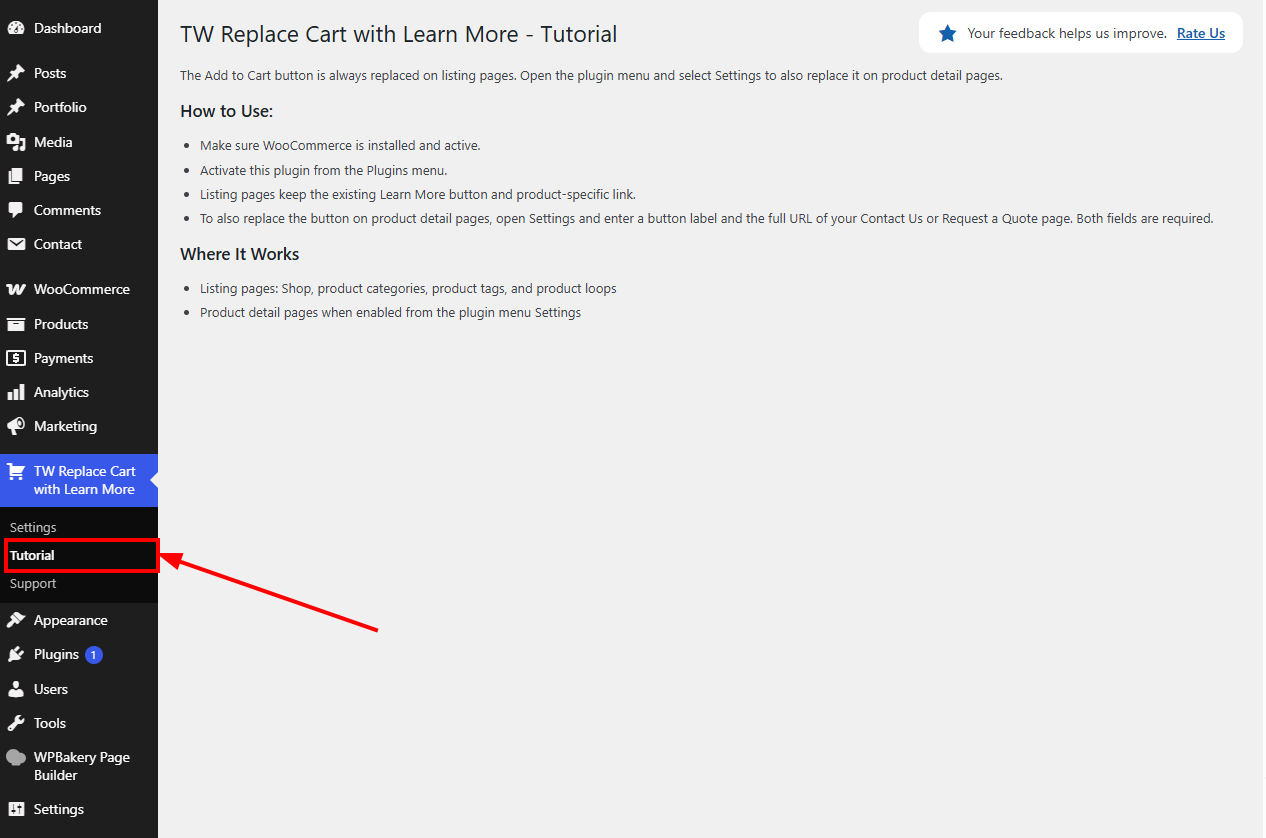
The detail-page button label and link can be configured from Settings in the plugin’s main menu. Both fields are required when product detail-page replacement is enabled.
Lightweight and performance friendly.
Key Features
- Always replaces Add to Cart on listing pages using the existing Learn More label and product link
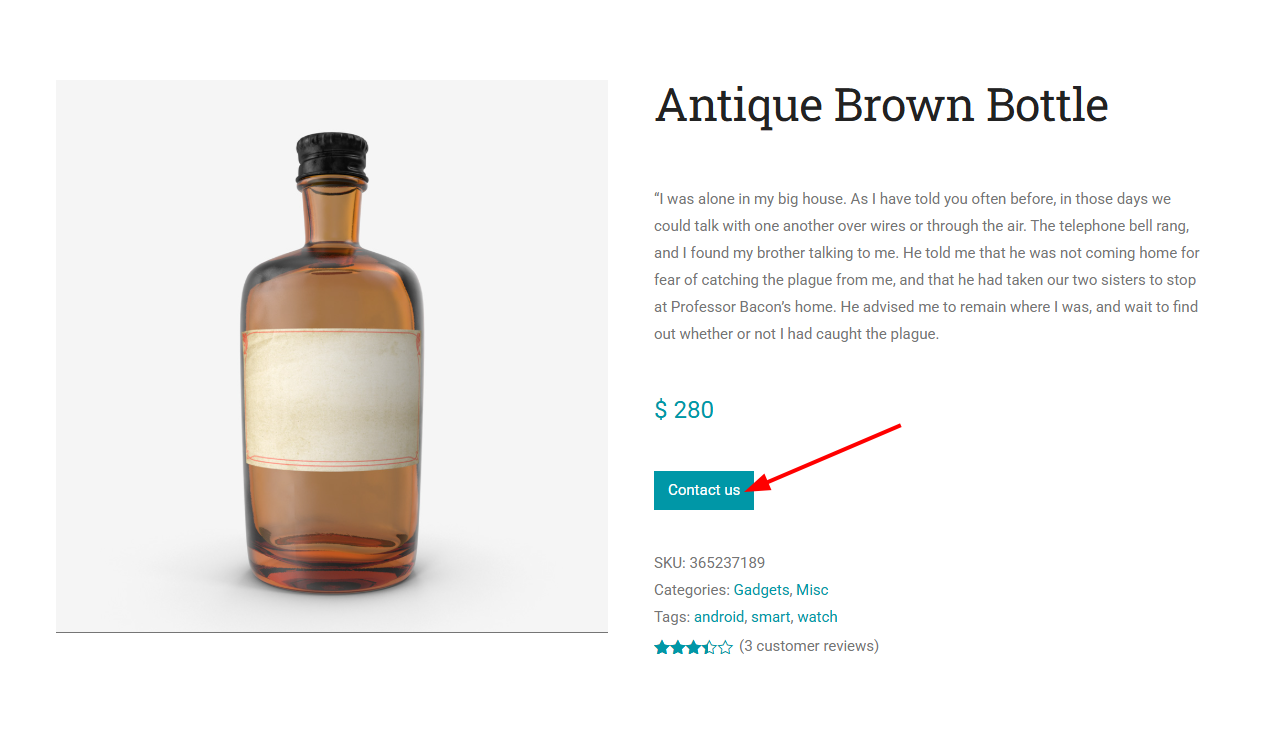
- Optionally replaces Add to Cart on product detail pages
- Works with simple, variable, grouped, and external products
- Configure the detail-page button label and link
- Listing-page Learn More buttons link directly to the product detail page
- No cart or checkout interference
- Lightweight and fast
How It Works
- Open Settings from the plugin’s main menu to configure product detail-page behavior.
- Listing-page buttons keep the existing Learn More label and link directly to each product’s detail page.
-
When enabled, product detail buttons use the configured label and link. Enter the full URL of a Contact Us or Request a Quote page.
-
This behavior applies to:
- Shop page
- Product category pages
- Product tag pages
- WooCommerce product loops
- Product detail pages when enabled in Settings
-
Cart page cross sell buttons are not modified to preserve checkout experience.
Upgrade to TW WooCommerce B2B Toolkit
Need more advanced WooCommerce catalog, quote, and B2B pricing features?
TW Replace Cart Button with Learn More for WooCommerce is also available as part of the premium TW WooCommerce B2B Toolkit. The B2B Toolkit transforms your WooCommerce store into a practical B2B system with powerful visibility controls, Quote-Based Selling, pricing management tools, and purchasing restrictions — all without custom development.
Premium Features Include
- Request a Quote workflows on product pages
- Hide prices for guests or specific user roles
- Restrict Add to Cart functionality
- Country-based and scheduled visibility rules
- Hide prices by product, category, tag, or brand
- Disable purchasing globally across the store
- Bulk pricing tools with preview, CSV, schedule, and rollback
- Wholesale quantity price tiers
- Minimum order rules for products, categories, and cart
- Wholesale registration, approval, and Wholesale Customer role
- Advanced custom messaging
Whether you’re running a wholesale store, private catalog, distributor portal, or B2B marketplace, TW WooCommerce B2B Toolkit provides the tools needed to control product visibility, pricing access, and purchasing behavior from a single plugin.
Upgrade to TW WooCommerce B2B Toolkit and unlock a complete set of WooCommerce B2B features designed for growing businesses.
For full Premium details, pricing, and feature comparison, visit the TW WooCommerce B2B Toolkit.
Privacy / External Service
This plugin can optionally connect to an external support service operated by Technology Wisdom.
Service: https://pluginsupport.technologywisdom.com
Terms of Use: https://pluginsupport.technologywisdom.com/terms-of-use/
Privacy Policy: https://pluginsupport.technologywisdom.com/privacy-policy/
The service is used to provide in-plugin support messaging, feedback forwarding, announcements, and connection status for opted-in sites.
Opt-in consent (required before any connection):
When you activate the plugin, an admin notice asks whether you want to allow the support connection. You can choose Allow Support Connection or No Thanks.
- If you allow the connection, the plugin may send: site URL, site name, admin email, plugin name/version, WordPress version, and PHP version. Support requests and review/feedback details are sent only when you submit those forms. The plugin may also check weekly for announcements from Technology Wisdom.
- While the connection is enabled, the plugin may also report a connection status to the portal so we can tell whether the site is Active, Deactivated, Disconnected, or Deleted. Status is only sent after you opt in.
- If you decline (or never accept), that data is not sent to the support portal. The plugin’s core feature continues to work normally without the connection.
- You are never required to allow the connection to use the plugin.
- You can disconnect the support connection at any time from the plugin’s Support page by choosing Disable priority support. After you disconnect, the plugin stops sending status updates, support traffic, and announcement checks.
Support and rating forms also include their own consent checkboxes before site information is included with a submission.
Please review the service Terms of Use and Privacy Policy before enabling the connection.
License
This plugin is licensed under the GPL-2.0+ License. You can freely use, modify, and distribute it under the terms of this license. See the full license at: https://opensource.org/licenses/GPL-2.0
Installation
- Upload the plugin folder to
/wp-content/plugins/ - Activate the plugin through the Plugins menu in WordPress
- Open the plugin’s main menu, which opens Settings, to optionally enable replacement on product detail pages
- For product detail pages, enter a button label and the full URL of a Contact Us or Request a Quote page. Both fields are required; listing buttons remain unchanged.
FAQ
Can I replace the Add to Cart button on product detail pages?
Yes. Open the plugin’s main menu, which takes you to Settings, and enable product detail-page replacement. Enter a button label and the full URL of your Contact Us or Request a Quote page; both fields are required and apply only to product detail buttons. Listing buttons retain their existing Learn More label and product-specific link.
Does it work with variable products?
Yes. It works with all WooCommerce product types including variable products.
Does it change cart page recommendations?
No. Cart page cross sells are not modified to avoid interfering with checkout behavior.
Is WooCommerce required?
Yes. This plugin only works when WooCommerce is active.
Is there a Pro version?
Yes. Upgrade to TW WooCommerce B2B Toolkit for Request a Quote, role/country visibility, bulk pricing, minimum order rules, and wholesale access.
Screenshots


Changelog
2.0.0
- Added Upgrade to Pro page for TW WooCommerce B2B Toolkit
- Added General Features and Advanced Features tabs with locked Pro teasers
- Added Free vs Premium comparison including Learn More free features
- Included this plugin as a free companion of TW WooCommerce B2B Toolkit
1.3.0
- Added feature to replace Add to Cart on product detail pages.
1.2.0
- Major Plugin Support Portal enhancement: more reliable connection.
1.1.1
- WordPress 7.1 compatibility check
- Bug Fixes
1.1.0
- Plugin support system is integrated with consent.
1.0.4
- Improved security by adding permission checks and enforcing server-side consent validation.
1.0.3
- Fixed Bugs
1.0.2
- Added review/feedback options
- Added Support page
1.0.1
- WordPress 7.0 compatibility check
1.0.0
- Initial release
- Replace Add to Cart button with Learn More on WooCommerce product listings