

Description
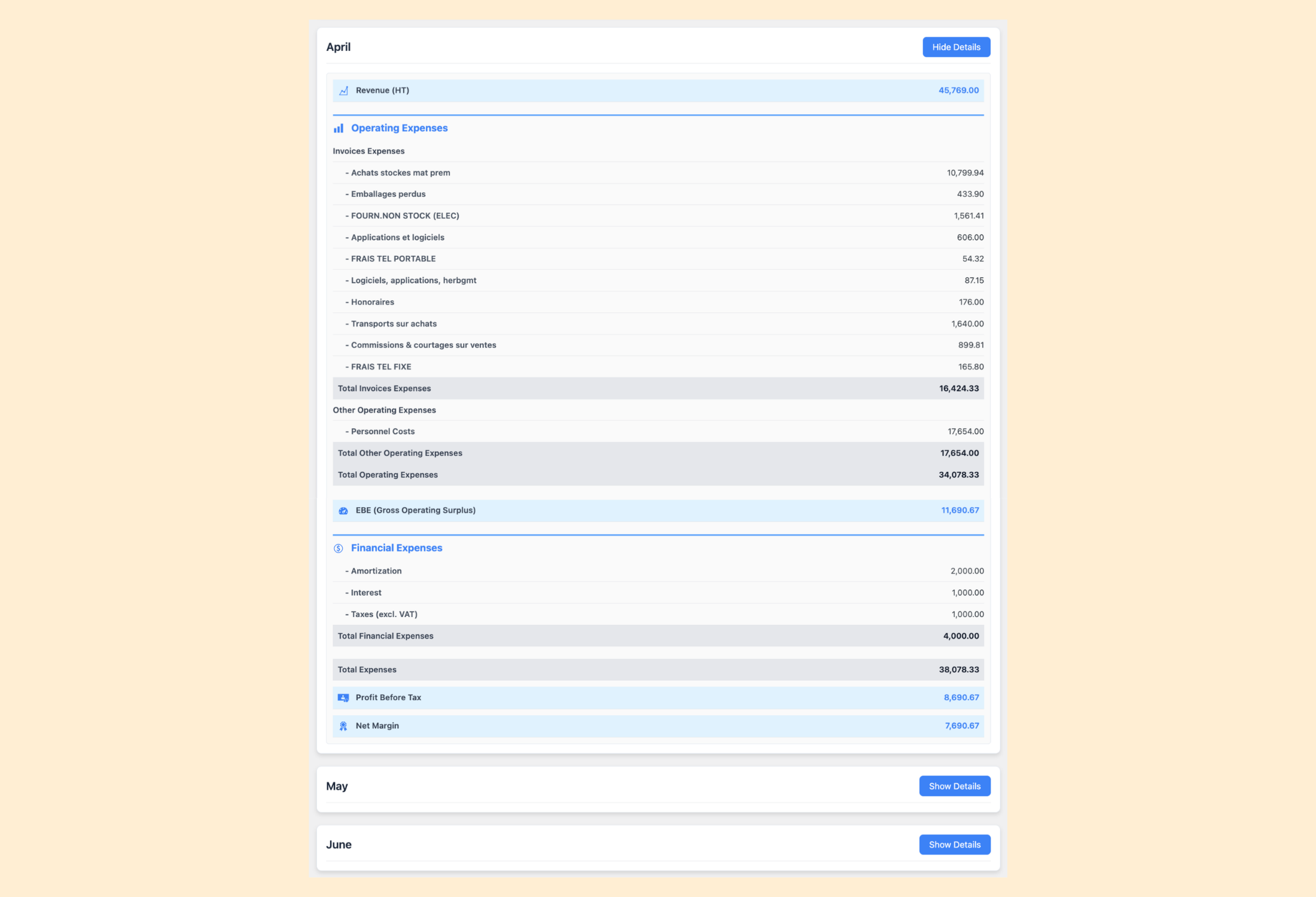
🚀 Ultimate Business Dashboard turns your WordPress admin into a real‑time profit cockpit. Stop flying your company blind. Instead of waiting for your accountant’s annual report, you get a clear, month‑by‑month income statement—updated the instant an invoice is issued or an expense is recorded.
🛠️ Integrate with Dext and QuickBooks for automatic invoice imports, or manually upload invoices from any source using flexible CSV files. Track revenues, expenses, and key financial ratios with ease, and visualize your performance with interactive pie charts.
With Ultimate Business Dashboard, take control of your finances like never before:
- Real‑time P&L: Know your net profit and margins for the current month and year at a glance. Say goodbye to the trap of relying on cash flow alone, which misleads many entrepreneurs until it’s too late.
- Flexible data sources: Connect Dext or QuickBooks for automatic imports, or upload any CSV you like.
- Turn invoices into insights: Pie charts and KPIs translate raw figures into insights everyone can grasp.
Empower your business with simple, smart financial tools—start today in your WordPress dashboard!
Learn more at Tulipe Media.
Features
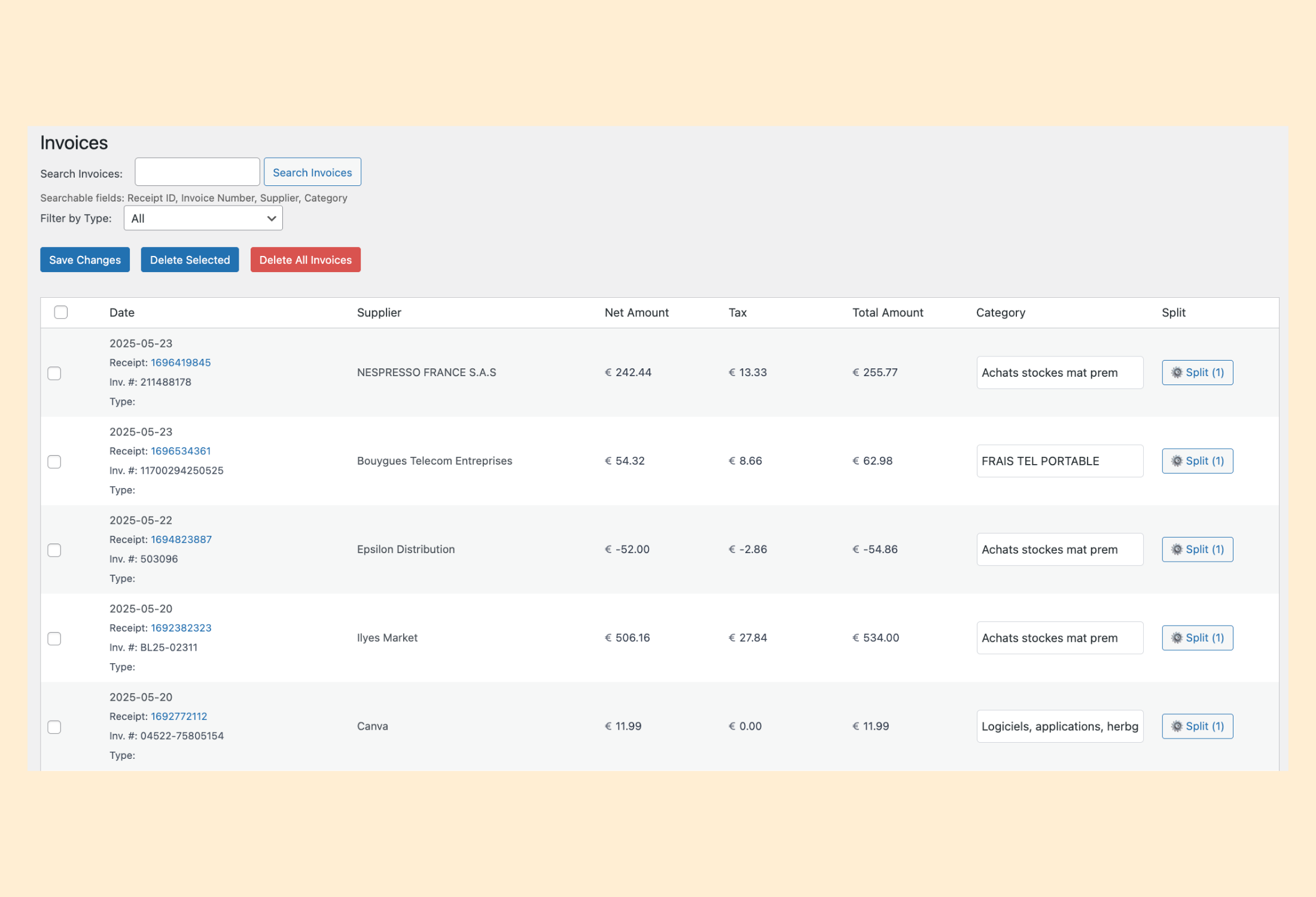
- Invoice Management: Import, view, categorize, edit and manage invoices from Dext, QuickBooks or custom CSV files for streamlined bookkeeping.
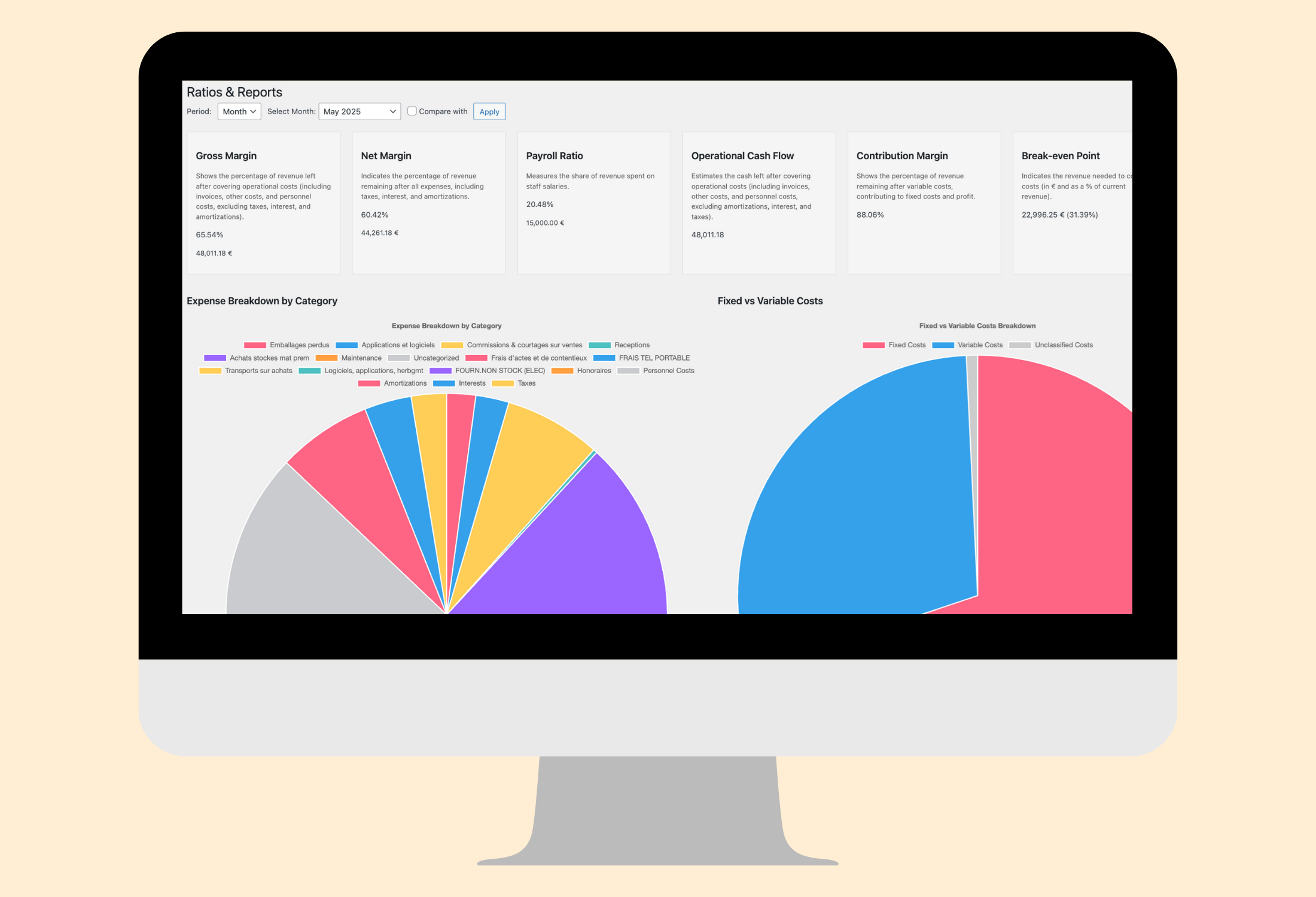
- Ratios & Reports: Generate detailed financial reports with metrics like gross margin, net margin, payroll ratio, and break-even point, visualized with pie charts for actionable insights.
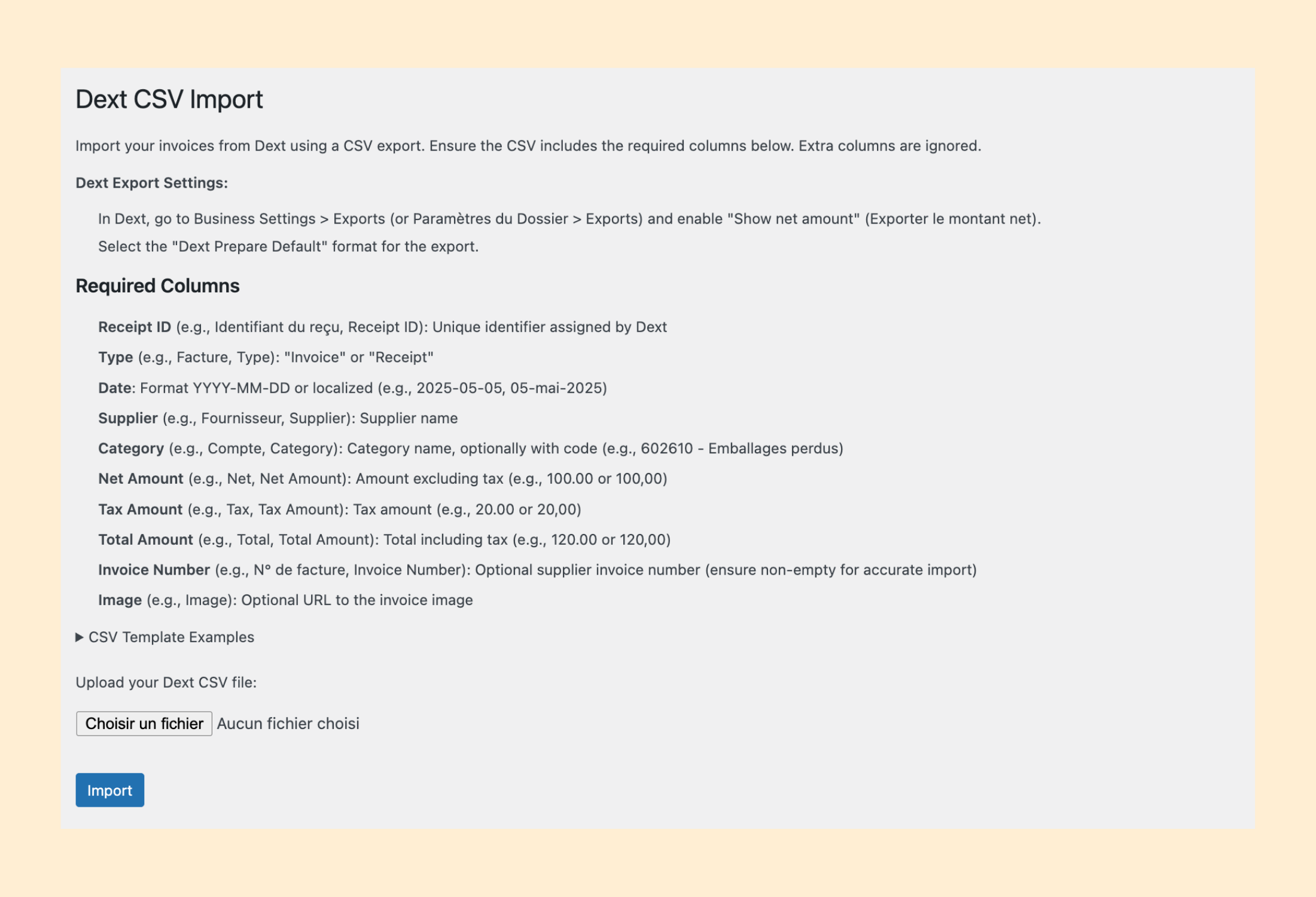
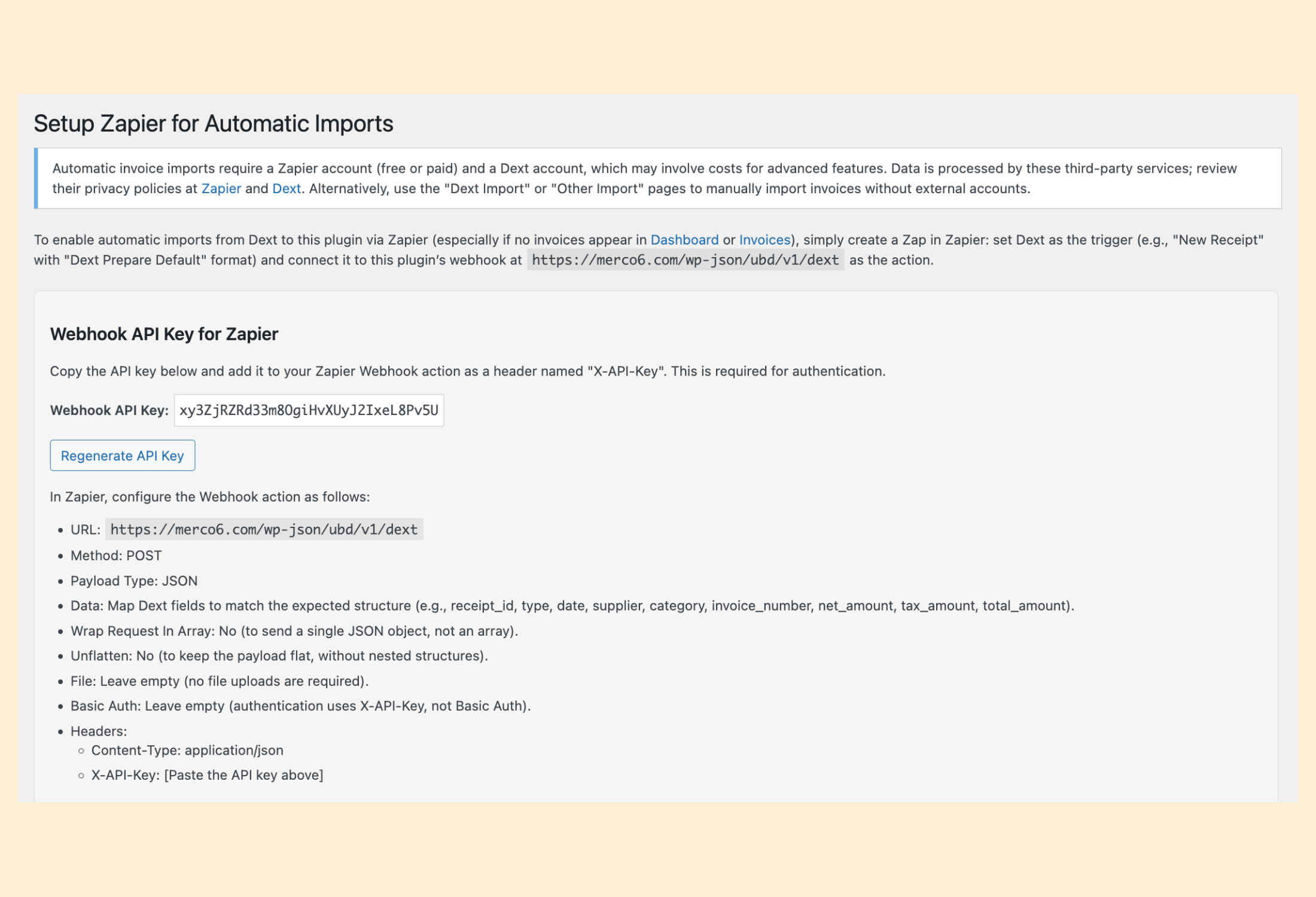
- Dext Integration: Seamlessly import invoices from Dext using Zapier webhooks or CSV exports to save time.
- QuickBooks Integration: Seamlessly import invoices directly from your QuickBooks account.
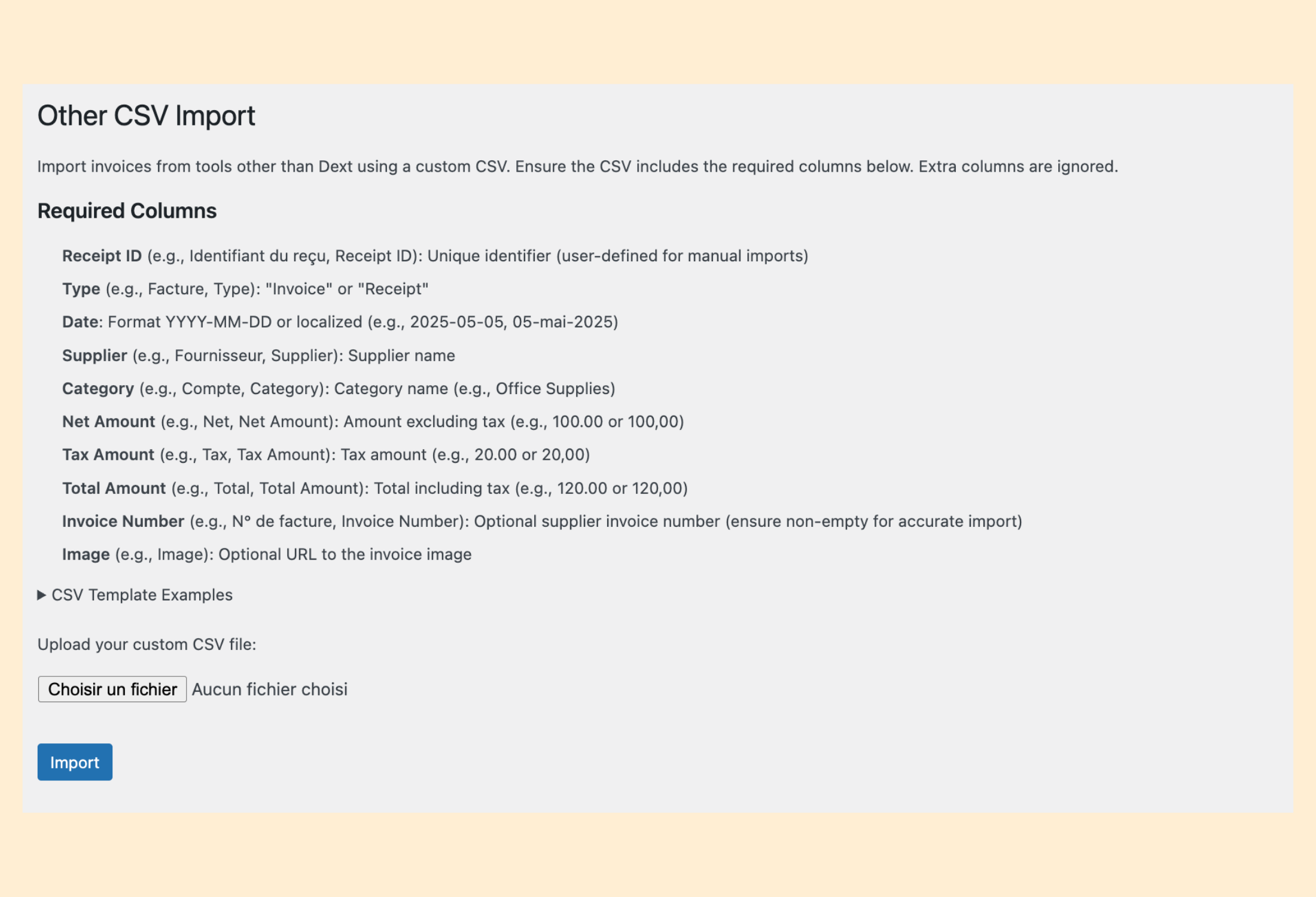
- Custom CSV Imports: Import invoices from any source with a flexible CSV format for maximum compatibility.
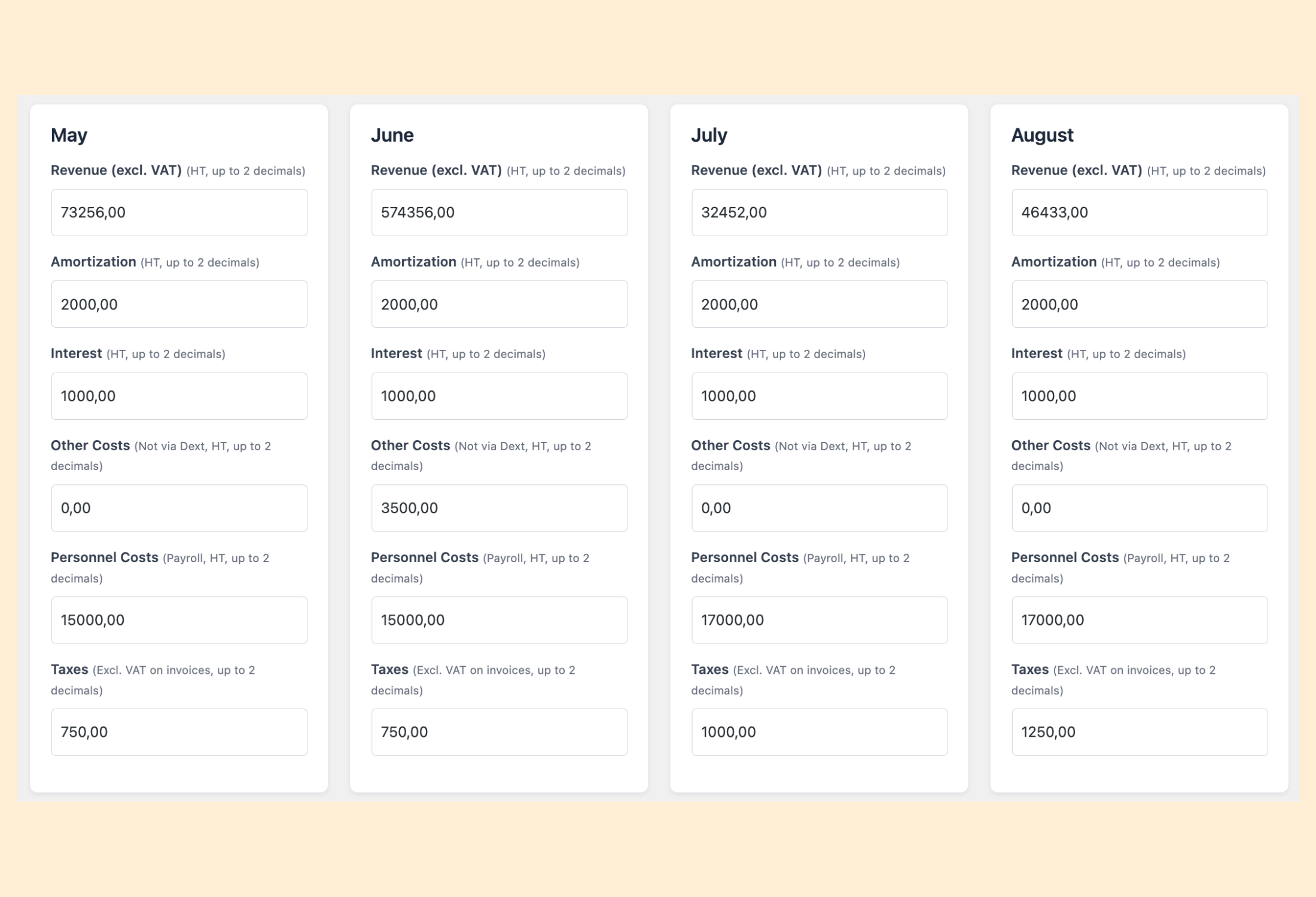
- Financial Tracking: Enter monthly revenues, costs, taxes, and amortizations to monitor your business performance effortlessly.
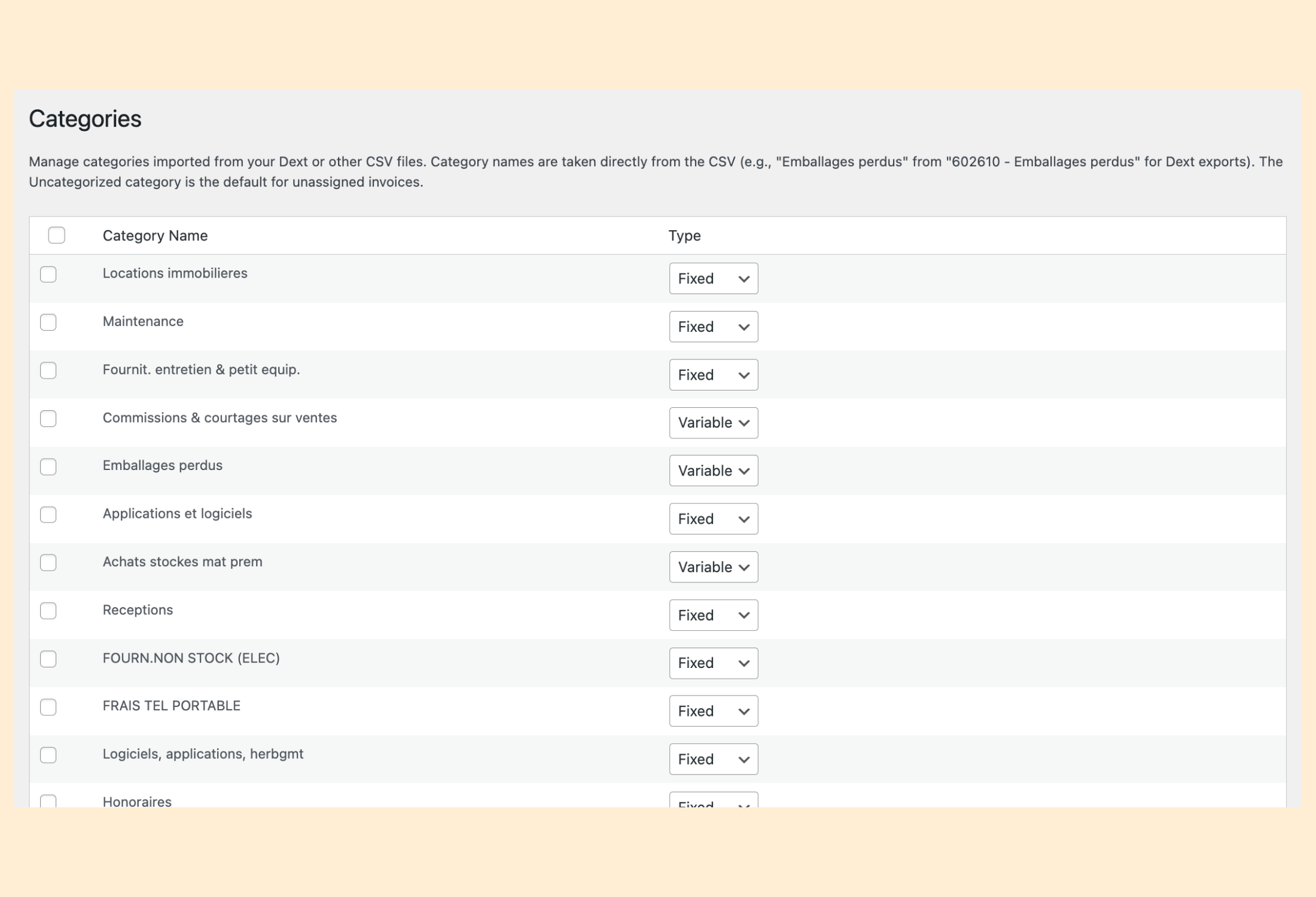
- Category Management: Place each category in an income statement line (purchases, rent, energy, other external charges, taxes, personnel, depreciation, financial or exceptional expenses) and tag it as Fixed, Variable, or None for precise cost analysis and better budgeting.
- Two Presentations: French income statement (gross margin, value added, EBE, current result) or international (gross profit, operating expenses, EBITDA, EBIT).
- Spread Functionality: Spread invoice costs over multiple months or amortize investments for accurate financial planning and forecasting.
- Several Establishments: Restaurants, shops or companies in one dashboard: each one has its invoices, its data and its own Dext import address; view each establishment or the whole group (consolidated), with the exchanges between your establishments removed.
- Recurring Charges: Rent, insurance or direct debits whose invoices arrive late or all at once are counted every month (expected amount), then replaced by the real invoice once it is counted in its month, with a received / expected view.
- Current Profit: Mark an invoice as non-recurring to keep it out of EBITDA and of the current profit before tax.
- User Management: Assign custom roles (Viewer, Editor, Manager) to control access and permissions for dashboard features, ensuring secure and tailored user experiences.
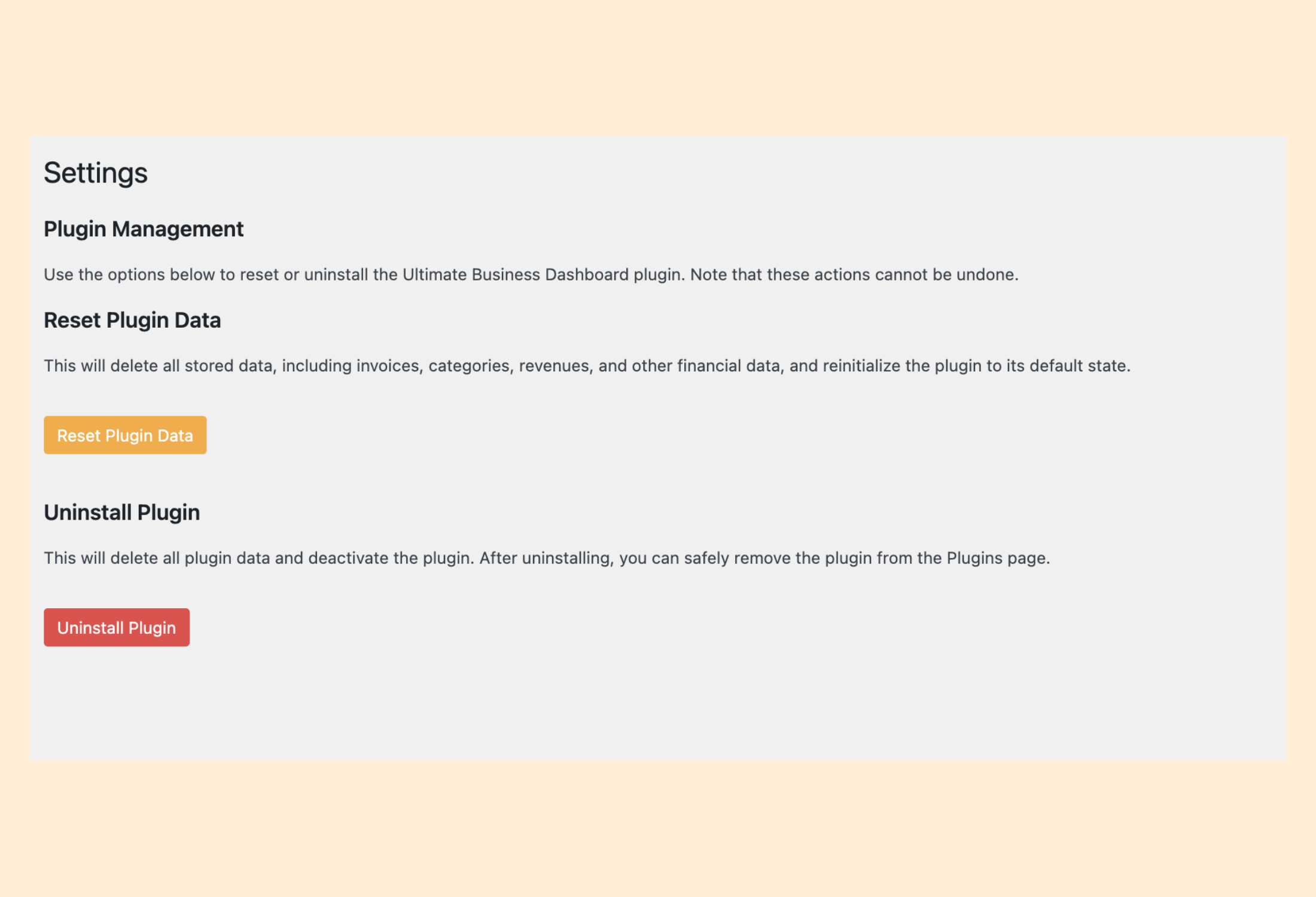
- Settings Management: Easily reset or uninstall the plugin with full control over data retention for a worry-free experience.
- Responsive Design: Fully responsive interface for desktop and mobile devices, ensuring accessibility anywhere.
Who’s This For?
- Business Owners looking to streamline financial management, such as bakeries, coffee shops, restaurants, retail shops and associations.
- Freelancers needing a simple tool to track invoices and expenses.
- Firms seeking actionable financial insights without complex software.
Contribute
- 🌐 Translate: Help make the plugin accessible worldwide! Contribute translations at WordPress Translate.
- Donate: Support ongoing development with a coffee! ☕ Donate now.
- Rate Me: Love the plugin? Share a 5-star review on WordPress.org to help others discover it.
- Follow Me: Stay updated on Instagram, LinkedIn, X, Facebook, or YouTube.
GDPR Compliance
Ultimate Business Dashboard stores invoice data locally in your WordPress database. When using Zapier or Dext for automatic imports, data is processed by these third-party services. Ensure your Zapier and Dext accounts comply with GDPR by reviewing their privacy policies at Zapier and Dext. The plugin provides “Delete Data on Uninstall” and “Reset Data” options in the “Settings” page to remove all locally stored data (e.g., invoices, categories) from your WordPress database, supporting GDPR’s right to erasure. For data processed by third-party services like Zapier or Dext, you must manage deletion directly through their platforms.
Credits
Developed with ❤️ by Ziyad Bachalany and contributors.
Support
Need help? Visit our support page for documentation and FAQs, or ask the community on WordPress.org.
License
This plugin is licensed under GPLv2 or later.
Installation
- Ensure your site runs WordPress 5.5+ and PHP 7.4+.
- Upload the
ultimate-business-dashboardfolder to/wp-content/plugins/or install via the WordPress Plugins dashboard. - Activate the plugin through the Plugins menu in WordPress.
- Navigate to Business Dashboard from the WordPress menu.
- Go to “Imports”, and choose your preferred import method.
- Enter financial data in the “Data” page for revenues, costs, taxes, and amortizations.
- Explore financial metrics and charts in the “Ratios & Reports” page to gain insights into your business performance.
FAQ
Can I set up automatic invoice imports?
Yes! Simply choose your accounting software (Dext or QuickBooks Online) and follow the instructions in the plugin’s import settings. For Dext, integration is done via Zapier (webhook), while QuickBooks Online connects directly. Every time a new invoice is added to your accounting tool, the plugin extracts the data and automatically feeds your financial dashboards. Others accounting solutions will be added in the future.
What is the CSV format for manual imports?
Required columns: Receipt ID, Type, Date, Supplier, Category/Compte, Net Amount, Tax Amount, Total Amount, and optional Invoice Number. Check templates on the “Dext Import” or “Other Import” pages.
How can I manage my business finances without automatic import?
Manually import your invoices each month using the “Other Import” feature with a custom CSV format. This allows you to track your profitability month by month and make informed decisions about your business performance.
Can I spread invoice costs over multiple months?
Yes, in the “Invoices” page, select “Spread Charges” or “Investment (Amortized)” for any invoice, specify the number of months, and set a start date.
Is the plugin mobile-friendly?
Yes, the plugin features a responsive design, ensuring all pages (dashboard, invoices, reports) are usable on mobile devices.
Can I delete my data?
Yes, in the “Settings” page, enable “Delete Data on Uninstall” to remove all plugin data when deactivating the plugin. You can also use the “Reset Data” option to clear all data without uninstalling, giving you full control over your information.
Screenshots
Changelog
3.1.0 – 18 November 2026
- New: Invoices between your establishments are deposited on one side only: when the other side is missing (the purchase of the buying establishment, or the sale of the selling one), it is counted automatically with the same amount and date, then replaced by the real invoice as soon as it arrives (same number, or same amount within 60 days). The Group view still removes both sides
- New: “Exchange with” on each invoice (Invoices page, with several establishments): detected from the company name, can be corrected by hand (“None” if it is not an exchange between your establishments); the choice is remembered for the next invoices of the same supplier or customer
- New: Checks: “Between establishments” tab, with the exchanges whose two sides do not have the same amount and the sides counted automatically
- New: Establishments page: category of the purchases counted automatically (e.g. purchases of goods)
3.0.1 – 18 November 2026
- Improved: A sales invoice can be counted in another month than its date with the “Split” button, like an expense (e.g. a September service invoiced on 4 October, or spread over several months)
3.0.0 – 18 November 2026
- New: Establishments page: several restaurants, shops or companies in one dashboard. Each establishment has its own invoices, its own data (revenue, personnel, inventory…), its own recurring charges and its own Dext import address (one Zap per Dext account). With a single establishment nothing changes
- New: Establishment selector at the top of the Dashboard, Ratios & Reports, Invoices, Recurring charges and Data pages, remembered for each user: one establishment, or the Group (consolidated) view that adds everything up and removes the purchases and sales between your establishments (shown apart, so nothing is counted twice)
- New: “Company name on its invoices” for each establishment: recognizes the invoices it issued that arrive with the purchases (sales, never expenses) and the invoices between your establishments. Replaces the “This company” and “Other companies of the group” settings of 2.9.8, taken over automatically
- New: Dext CSV and other CSV imports: choice of the establishment, and an option to attach the invoices of the file that are already imported to it (recognized by their Receipt ID, no Zapier task used): the way to sort the invoices received before the establishments were created
- New: Invoices page: establishment shown in the Group view, selected invoices attached to an establishment in one click. QuickBooks imports attached to the establishment of your choice
- Improved: Zapier guide: one webhook address per establishment, with copy buttons; the “Customer” field also recognizes sales to your other establishments
2.9.8 – 18 November 2026
- New: Sales invoices: the documents of the Sales space of Dext, sent by the usual Zap with the type “Sales invoice”, are recognized automatically (the customer is read from the “Customer” field), and any invoice can be given the type “Sales invoice” on the Invoices page. Sales invoices are never counted as expenses; an option adds them to the revenue of their month (with an “of which sales invoices” line)
- New: “This company” setting: an invoice whose supplier is the company of this dashboard is an invoice you issued that came in with the purchases; it is treated as a sales invoice, never as an expense
- New: “Other companies of the group” setting: invoices exchanged with a sister company count normally (purchase or sale of this company) and are marked as intragroup, shown in an “Intragroup exchanges” section, ready to be removed in a consolidated view of the group
- New: Delivery notes followed by an invoice from the same supplier within 60 days are no longer counted (only the invoice is); a delivery note without an invoice yet is counted meanwhile. Checks shows them with a one-click deletion
- Improved: Sales invoices and delivery notes left out of the expense checks and of the recurring charges
- Improved: Zapier setup page rewritten as a step-by-step guide: the right Dext trigger (“Export New Processed Receipt Data”), the exact keys to type in “Data” with the matching Dext fields (including “Customer” for sales), copy buttons, test and troubleshooting tips
2.9.7 – 17 November 2026
- Fixed: Statements (Dext “Statement” type) are counted again as expenses: a premium notice or a bank fee statement is often the only document of a real expense. A statement is left out only when an invoice with the same number from the same supplier exists (payment statement of a delivery platform next to its invoice), so that the expense is not counted twice
- Changed: Checks: the statements box lists only those statements left out because of their invoice, with a one-click deletion; the “statements without a matching invoice” list is removed (such statements now count)
2.9.6 – 17 November 2026
- New: Checks: the same invoice (same number, amount and date) imported under two similar supplier names (“Sodimo” / “Sodimo France”, “Uber” / “Uber Eats”) is detected as a certain copy, without having to merge the names first
- New: Checks: statements without a matching invoice (same number) are listed “to check”, with “Count as an invoice” (an invoice wrongly classed as a statement) or “It is a statement”
2.9.5 – 17 November 2026
- Fixed: Statements (document type “Statement”: payment statements of delivery platforms, account statements) are no longer counted as expenses, nor in the checks and recurring charges; only the matching invoice is counted. Checks shows how many were imported, with a link to them and a one-click deletion
- Improved: Checks: “Delete this one”, “Not a duplicate”, “This is normal” and “Different suppliers” act without reloading the page (the line disappears, the tab counter goes down)
- Improved: Checks, “Same number, other amount”: “This is normal” for each number, and “All normal for this supplier” for the whole supplier
- Improved: Checks, “Similar suppliers”: the name to keep is chosen in a single “Keep the name” menu instead of one radio button per name
2.9.4 – 17 November 2026
- Improved: Invoices page: the invoice number is shown in full (wrapped if needed)
- Improved: Checks, “Same number, other amount”: the invoices concerned are listed number by number (document, date, amount, delete), each number linking to the Invoices page filtered on it
- Improved: Checks, “Similar suppliers”: each name links to its invoices (new tab)
- Improved: Checks, “Unusual amounts”: amounts that come back regularly (at least twice within 10 % over 24 months: subscriptions, second contract with the same supplier) are no longer reported; the rule is explained on the tab
- Changed: Recurring charges: the invoices of the supplier are listed under each charge with the same “Split” button as on the Invoices page (an invoice concerning another month is spread over 1 month from that month), replacing the previous drop-down
2.9.3 – 17 November 2026
- Improved: Checks: the “Similar suppliers” tab presents its groups as suggestions; each name can be ticked or unticked, so that only the names of the same supplier are merged (e.g. Deliveroo and Deliveroo France SAS, but not Deliverect)
- Improved: Checks: the “Same number, other amount” tab explains how it differs from duplicates
2.9.2 – 17 November 2026
- Improved: Checks: two invoices of the same supplier with the same invoice number, amount and date are a certain copy even when their documents differ (the same invoice uploaded twice to the scanning tool), and can be deleted in one click; same number and amount with different dates stay “to check”
2.9.1 – 15 November 2026
- Fixed: The automatic presentation and the accounting code suggestions followed the site language only: on a multisite network whose sites stay in English, French users got the international presentation and no suggestion. They now follow the language of each user
- Fixed: The Checks counter in the menu is recalculated after each plugin update
2.9 – 15 November 2026
- New: Income statement lines for categories: besides purchases, rent and other expenses, a category can now be energy and water, taxes and duties, personnel costs, depreciation or financial expenses, each with examples
- New: Suggested line from the accounting code (French chart of accounts, French sites only), applied only with your approval (“Apply N suggestions”) and only to categories still in “Other operating expenses”
- New: Choice of presentation in Settings: French (gross margin, other external charges, value added, taxes, personnel, EBE, operating profit, current result) or international (gross profit, operating expenses, EBITDA, EBIT); automatic by default according to the site language
- Improved: Month and year details rebuilt from a single model: empty sections are hidden, each category appears once in its line
- Improved: Invoices classed as taxes, personnel or financial expenses count in those lines (payroll ratio, prime cost), financial expenses below EBITDA
2.8.3 – 15 November 2026
- Improved: Checks page organized in tabs (duplicates, same number, expected invoices, uncategorized, supplier names, unusual amounts), each showing its number of alerts; the first tab with alerts opens by default
- Improved: Checks lists paginated by 50 (all alerts are reachable, not only the first 50)
2.8.2 – 15 November 2026
- Fixed: Checks: two invoices of the same supplier with different invoice numbers are no longer reported as duplicates because of the same amount (e.g. several subscriptions at the same price on the same day)
- Improved: Checks: the one-click deletion only removes the same document imported twice (same document link, or the same receipt imported with an extra “0” at the end of its ID); same number with different documents is shown as “to check”
- Improved: Checks: certain copies are listed first; zero-amount invoices are ignored
2.8.1 – 15 November 2026
- Fixed: In the month and year details, expected amounts of recurring charges (“Rent · expected”) and non-recurring invoices were also listed under “Other Invoices” (display only, totals were right)
2.8 – 15 November 2026
- New: Recurring charges page (rent, insurance, subscriptions, direct debits): enter the monthly amount once; each past month without an invoice from the supplier counts the expected amount, shown as “Rent · expected”
- New: Received / expected view over the last 12 months, and invoices received late or all at once can be counted in their month in one click (the expected amount then disappears, no double count)
- New: Checks: “Expected invoices not received” lists the past months still waiting for an invoice
- New: An invoice can be marked as non-recurring (exceptional) in its Split window: it moves to exceptional expenses, out of EBITDA
- New: “Current profit before tax” line (operating profit minus financial expenses, before exceptional items) in the month and year details
- Improved: An invoice spread over a single month shows “Counted in “
2.7.4 – 15 November 2026
- Fixed: Invoices page: the invoice type field is vertically aligned with the other fields of the line
- Improved: Invoices page: shorter tax field
- Fixed: Checks on mobile: the duplicate cards use the full width of the screen
2.7.3 – 15 November 2026
- Fixed: Invoices page: the tax and total fields were too narrow to show their amount on some screens
- Fixed: Checks: the “Delete this one” buttons were cut off next to long invoice numbers
- Fixed: The printer icon of the “Print / Save as PDF” button was shifted down with WordPress 7
- Improved: Checks: more space between the supplier name choices on mobile
2.7.2 – 15 November 2026
- New: Checks: exact copies (same supplier, invoice number, amount and date) can be deleted in one click, keeping the invoice imported first
- Improved: Checks and Categories pages shown as cards on mobile, readable month details on mobile (no more sideways scrolling)
- Improved: Invoices page: invoice type translated (“Invoice” now shows in your language) and aligned whatever the length of the invoice number
- Improved: Full invoice number shown on hover in the duplicates list
2.7.1 – 15 November 2026
- Fixed: The EBITDA line of the dashboard chart was hidden behind the net result line when both were close
- Fixed: The currency symbol follows the user’s language when its position is automatic (100 € in French, €100 in English), whatever the site language
- Fixed: Variations above 1,000 % (very small comparison base) are shown as “n/m”
- Improved: Checks: invoices with the same number but different amounts are no longer listed one pair at a time among duplicates, but in a separate “Same number, different amounts” section, one line per supplier (a payment statement imported next to its invoice would be counted twice)
- Improved: Icons and text centered in the buttons, wider category column on the Invoices page, aligned duplicate lines on the Checks page
- Improved: Imports page shows Dext & Zapier as configured and the date of the last invoice added
2.7 – 15 November 2026
- Improved: Ratios & Reports redesigned: key figures as tiles compared with the same period of the previous year, ratios with the previous year, expense breakdown as sorted bars (top 8 + others) instead of a pie chart, fixed vs variable costs as a single bar with amounts and the break-even point, cleaner print / PDF
- Improved: Invoices page redesigned: one compact line per invoice (twice as many invoices per screen), readable dates, link to the document, “Spread · 12 months” / “Amortized · 60 months” badges, filters on one line, and invoice cards on mobile (amounts are no longer hidden)
- Improved: Data page as a spreadsheet: months in columns, items in rows, totals updated while typing, annual data grouped together
- Improved: Imports page with one card per method showing its status (last import, QuickBooks connection) and native WordPress tabs
- Improved: Settings grouped into sections, with a separate “Danger Zone” for deleting invoices or resetting data
- Improved: Categories page shows the number of invoices of each category (link to the invoices), with a clearer help
- Fixed: The split window showed the invoice type next to the supplier name
2.6 – 15 November 2026
- Improved: Numbers follow the language of each user (21 075,00 in French, 21,075.00 in English) and amounts show a currency
- Added: Currency setting (symbol and position) in Settings; by default it follows the site language (€, $, £, CHF)
- Improved: Each month of the dashboard now shows its revenue, EBE and profit before tax with their change, without opening the details; months without revenue are greyed out
- Improved: Clearer changes: “+9.7%” in green or red depending on whether it is good news, unchanged values in grey
- Improved: Native WordPress buttons and colors, actions shown as discreet icons, same alignment on every page
- Improved: Menu in a logical order (Dashboard, Reports, Invoices, Checks…) with a counter of points to check on “Checks”
- Fixed: Missing browser tab title on the import pages
2.5.1 – 14 November 2026
- Improved: In the “Possible duplicates” section of the Checks page, the receipt number now opens the invoice document itself (Dext scan or QuickBooks attachment) in a new tab, to compare both invoices side by side
2.5 – 14 November 2026
- Added: “Checks” page to clean your data: possible duplicates (same invoice number, or same amount a few days apart), uncategorized invoices, supplier names written in several ways (with one-click renaming), unusual amounts compared with the supplier’s usual amount. Each alert can be ignored, and a reminder appears on the dashboard
- Added: Direct links to a month or a year of the Ratios & Reports page and of the dashboard, and a “Report” button on each month of the dashboard
- Added: Category filter and number of results on the Invoices page
- Improved: The Invoices page now searches and paginates in the database: it stays fast with thousands of invoices
2.4 – 12 November 2026
- Added: Dashboard overview with key indicators for the last month and year-to-date, compared with the same period of the previous year: revenue, gross margin, EBE, profit before tax, food cost, payroll ratio and prime cost
- Added: Targets for food cost, payroll and prime cost in Settings, with color coding (green on target, orange up to 5 points above, red beyond)
- Added: 12-month chart on the dashboard (revenue vs previous year, EBE, profit before tax)
- Added: Monthly cards can be compared with the same month of the previous year (default) or with the previous month; the choice is remembered for each user
- Improved: When the current year has no data yet, the dashboard opens on the latest year with data
2.3.2 – 12 November 2026
- Added: Settings page button to delete the backup of old invoices kept when moving to the invoice table (version 2.3), once you have checked your figures
2.3.1 – 12 November 2026
- Fixed: “Receipt” links of invoices imported from QuickBooks stopped working after a few minutes. They now ask QuickBooks for a fresh link when clicked, including for invoices imported before this version
- Improved: The QuickBooks access token is reused while it is valid instead of being renewed at every import
2.3 – 11 November 2026
- Improved: Invoices are now stored in a dedicated database table (one row per invoice) instead of a single WordPress option. Pages stay fast with thousands of invoices
- Fixed: Two imports running at the same time (e.g. a Zapier webhook during a CSV import) could overwrite each other and lose invoices
- Fixed: The same receipt appearing twice in one CSV file was imported twice
- Fixed: CSV files separated by tabs caused a fatal error on PHP 8
- Improved: Existing invoices are moved to the new table automatically on update, with a check of the number of invoices; the previous data is kept as a backup. If the table cannot be created, the plugin keeps working as before
- Improved: When a network site is deleted, its invoice table is deleted too
2.2 – 11 November 2026
- Fixed: Depreciation from invoices (amortized investments and depreciation-type invoices) is now deducted from operating profit, monthly and yearly
- Fixed: Local taxes were deducted twice (in EBE and again before tax); profit before tax is now correct
- Fixed: Yearly variable costs, contribution margin and break-even point (cost of goods sold was counted twelve times)
- Fixed: “Other Costs” were counted twice in fixed costs, distorting the break-even point
- Fixed: With yearly inventory tracking, saving the “Dashboard Data” page no longer erases January–November revenues and costs; all months are now shown
- Fixed: With yearly inventory tracking, the inventory change is spread over the year instead of adding the previous year’s stock to every month
- Fixed: The “Depreciation Expenses (from Invoices)” line now appears in every language
- Fixed: Monthly and yearly results now use exactly the same formulas (the sum of the months equals the year)
- Fixed: Monthly CSV exports now include the per-category details; local taxes are no longer counted twice in the export
- Fixed: The Depreciation Expenses category keeps its “Fixed” type when categories are saved
- Added: QuickBooks Production environment (previously only Sandbox test companies could connect); existing connections stay on Sandbox
- Improved: The QuickBooks Client Secret is no longer displayed in the settings page, and access tokens are no longer written to logs
- Improved: The hourly QuickBooks import only runs when QuickBooks is enabled and connected, and stops when the plugin is deactivated
- Improved: Expense breakdown chart now includes the costs entered in the “Dashboard Data” page
- Improved: Removed debug logging and possible conflicts with other plugins (function names); reset and uninstall now remove all plugin data
2.1 – 28 February 2026
- Fixed: Saving annual provisions or manual amortizations for one year no longer erases values from previous years in the “Dashboard Data” page
- Improved: Data persistence for annual fields (provisions and manual amortizations) across multiple years
2.0 – 19 January 2026
- Added: Occupancy Costs section in annual table
- Improved: Right-alignment of amounts in all tables (screen + PDF/print)
1.9 – 17 December 2025
- Fixed: proper variation calculations for manual data entries (Personnel Costs, Other Costs, Interest).
1.8 – 23 November 2025
- Added: Print / Save as PDF button on the Ratios & Reports page
- Added: New section “Depreciation, Amortisation & Provisions” in the dashboard grouping Manual Amortisation and Depreciation Expenses from invoices
- Fixed: Amortised investment amounts from invoices are now properly calculated and displayed in the relevant dashboard sections
- Fixed: “Depreciation Expenses (from Invoices)” now correctly displayed in French (instead of English only)
- Improved: In “Data” page, renamed “Taxes” → “Local Taxes (excl. VAT)” and moved this item under “Other Operating Expenses” in the dashboard
1.7 – 23 October 2025
- Added: New CSV export functionality for the dashboard, including the complete table structure with all sections, sub-rows, percentages, and variations, matching the dashboard display.
- Added: Support for exporting CSV in the active WordPress language (e.g., French when WordPress is set to French), ensuring consistent translations for all metric labels.
1.6 – 22 October 2025
- Improved: Complete overhaul of the Dashboard page, now including Gross Margin, Occupancy Costs, EBITDA, Operating Profit, Depreciation and Provisions, Exceptional Charges, and Pre-Tax and Post-Tax Results for enhanced financial insights.
- Added: New feature allowing invoices to be marked as amortizable investments.
- Added: Support for Corporate Tax calculation options.
- Improved: Optimized the Financial Dashboard for better readability and usability on smartphones.
- Fixed: Corrected calculations for fixed and variable costs to ensure accuracy.
- Improved: Comprehensive redesign of the Reports page for improved functionality and user experience.
- Improved: Expense categories are now displayed in alphabetical order for better organization.
1.5 – 18 October 2025
- Removed: Migration code for version 1.3.
- Added: Full French translation support for the plugin interface.
- Improved: Moved “Delete All Invoices” action from its standalone button to the Settings page for a more streamlined user experience.
- Added: New “Year” section at the bottom of the Dashboard.
- Added: “Print” button to the Dashboard, allowing users to print the financial tables for reporting purposes.
- Improved: Enhanced the Dashboard with a new “Previous Month” column and a “Variation” column to show changes in financial metrics, along with the percentage weight of each expense category relative to the monthly revenue.
1.4 – 18 July 2025
- Added: Direct integration with QuickBooks Online for automatic invoice imports, enabling seamless synchronization.
- Improved: Plugin menu reorganized in the WordPress admin sidebar for clearer navigation and faster access to key features.
1.3 – 4 June 2025
- Added: New option to group categories by accounting code in Settings, ensuring invoices from the same expense account are assigned to a single category, regardless of the category name, facilitating standardized accounting plans.
- Added: A new dropdown to edit the type field for invoices.
- Added: Merge multiple categories to consolidate invoices.
- Improved: Manual (Dext/Other CSV) and automatic (Dext via Zapier) imports to support accounting code grouping, ensuring new invoices use existing categories with matching codes when the option is enabled.
- Improved: Categories in the financial dashboard for monthly and annual tables are now sorted alphabetically by name, enhancing readability.
1.2 – 29 May 2025
- Added: Editable fields for “Tax” and “Total Amount” on the Invoices page, with automatic calculation of “Net Amount”.
- Added: Support for negative values to handle credits.
1.1 – 27 May 2025
- New: Added an option in Settings > Uninstall Settings to choose whether plugin data is deleted when uninstalling from the Plugins page.
- New: Added a warning message on the Plugins page when data deletion is enabled, with a link to change the setting.
- New: Added a new admin page to manage user access to Ultimate Business Dashboard features and assign custom roles (Viewer, Editor, Manager).
1.0 – 20 May 2025
- Initial release.
- Added invoice management with categorization and spread functionality.
- Integrated Dext via Zapier webhooks and CSV imports.
- Supported custom CSV imports for any source.
- Introduced financial tracking for revenues, costs, and taxes.
- Implemented detailed financial reports with Chart.js pie charts.
- Enabled responsive design for mobile and desktop.
Stay tuned for future updates with new integrations and enhanced analytics!