


Description
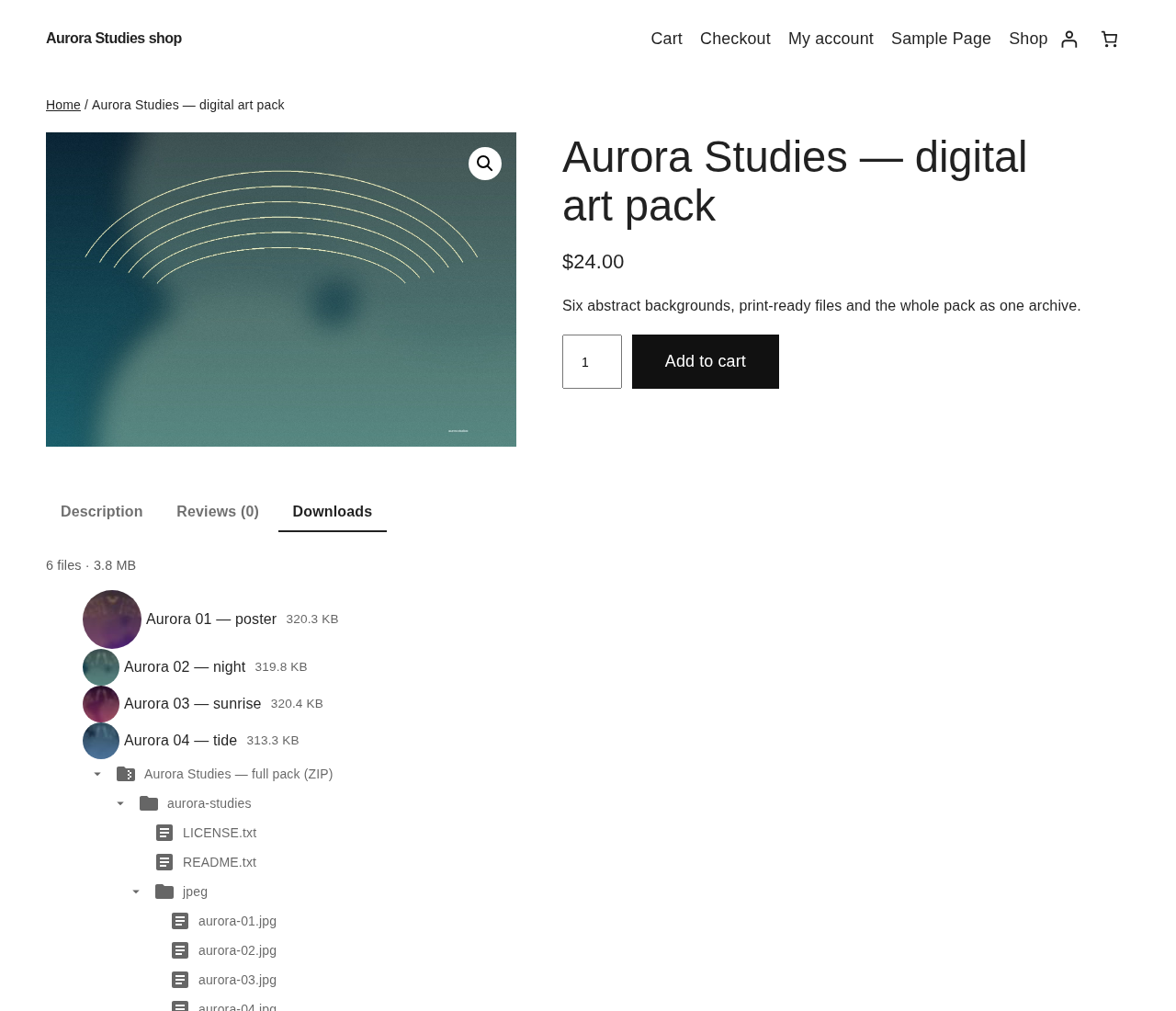
Ultimate Downloadable Products shows the files inside a downloadable product before the buyer pays: the list of what is in the download, with the file type, the size and a count, on the product page itself.
It works on WooCommerce or Easy Digital Downloads. The name still says WooCommerce because that is where the plugin started and its wordpress.org history lives under this slug, but the platform is a runtime choice, not a requirement: activate the plugin on a shop running either of the two and the download list appears on its product pages. When both are active, WooCommerce is used.
This plugin is ideal to sell digital products to show customers what they will get after a purchase.
It can be a valuable addition to your NFT selling store with the NFT WordPress Plugin Kit!
FREE Features
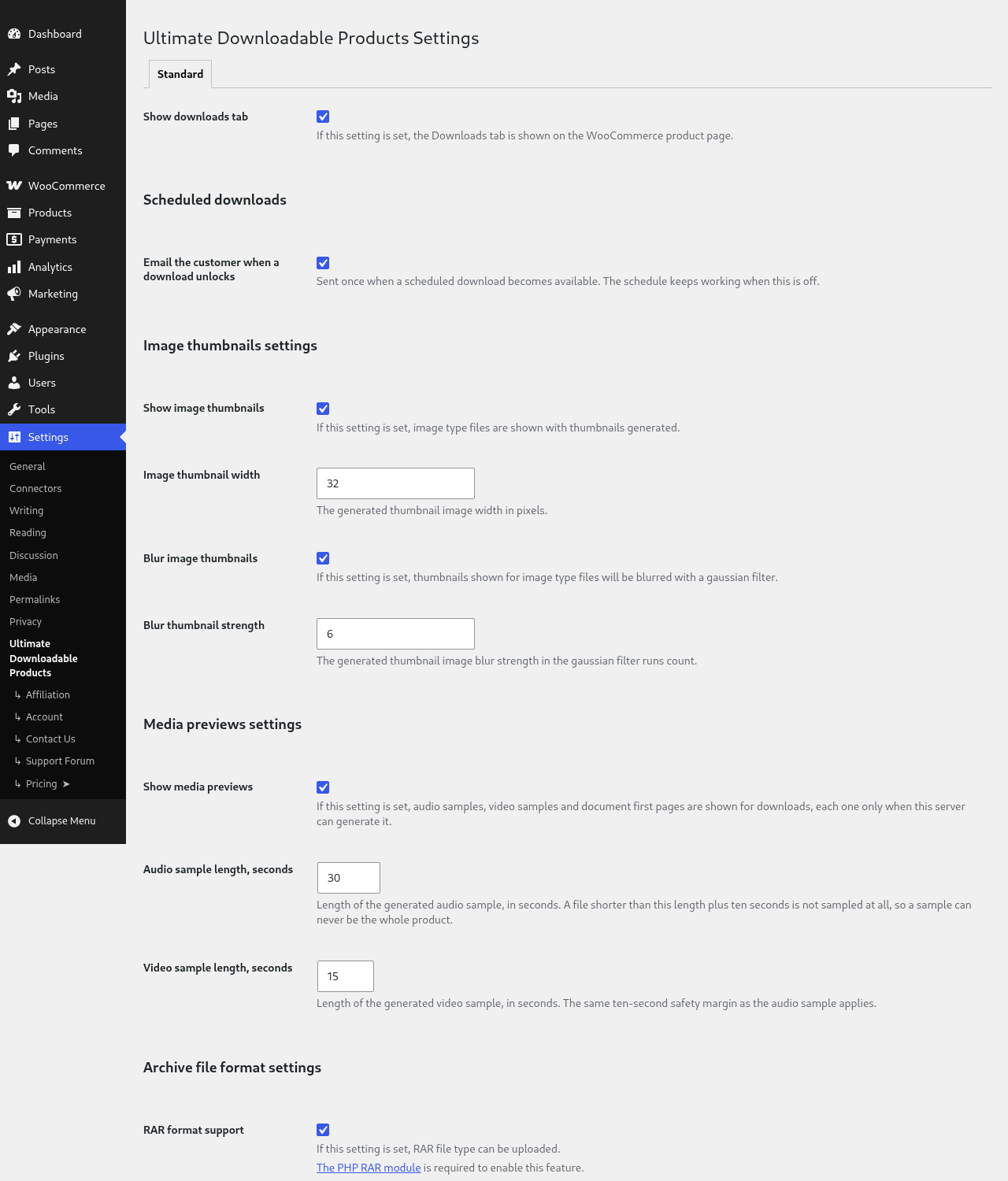
- Option to show a
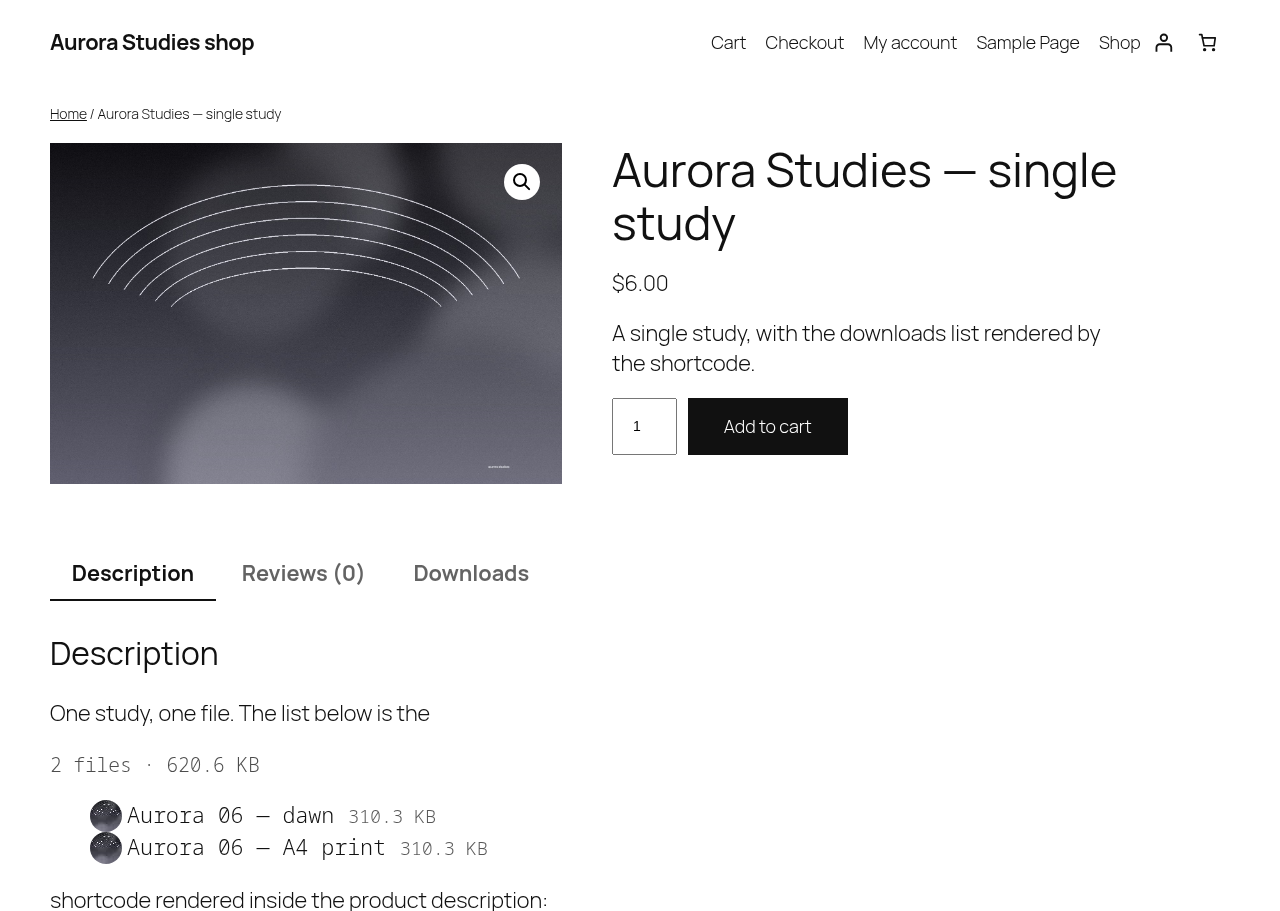
Downloadstab with downloads list on the product page - Shortcode [ultimate-downloadable-list] to display downloadable files on a product page (with no ability to download)
- Option to show image thumbnails for downloads of type image
- File type icon, file size and file count in the list
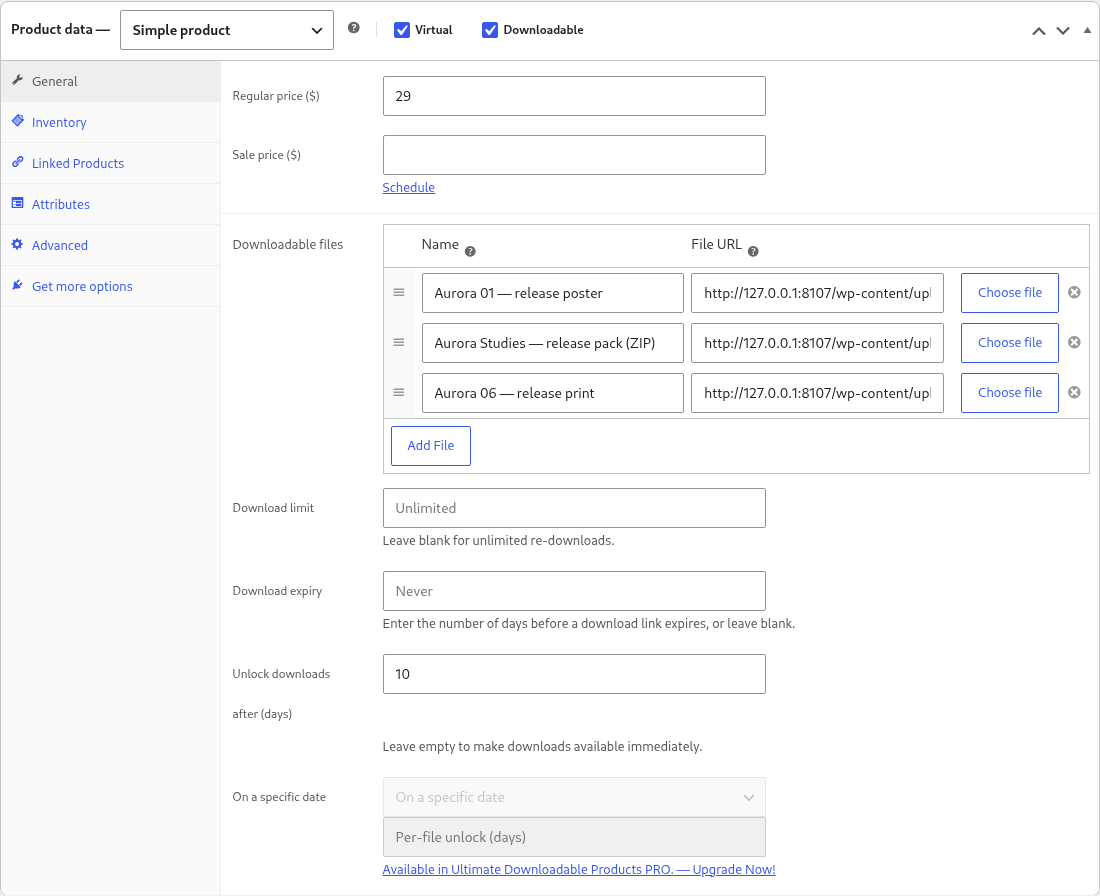
- Scheduled downloads: unlock N days after purchase, set in WooCommerce’s own
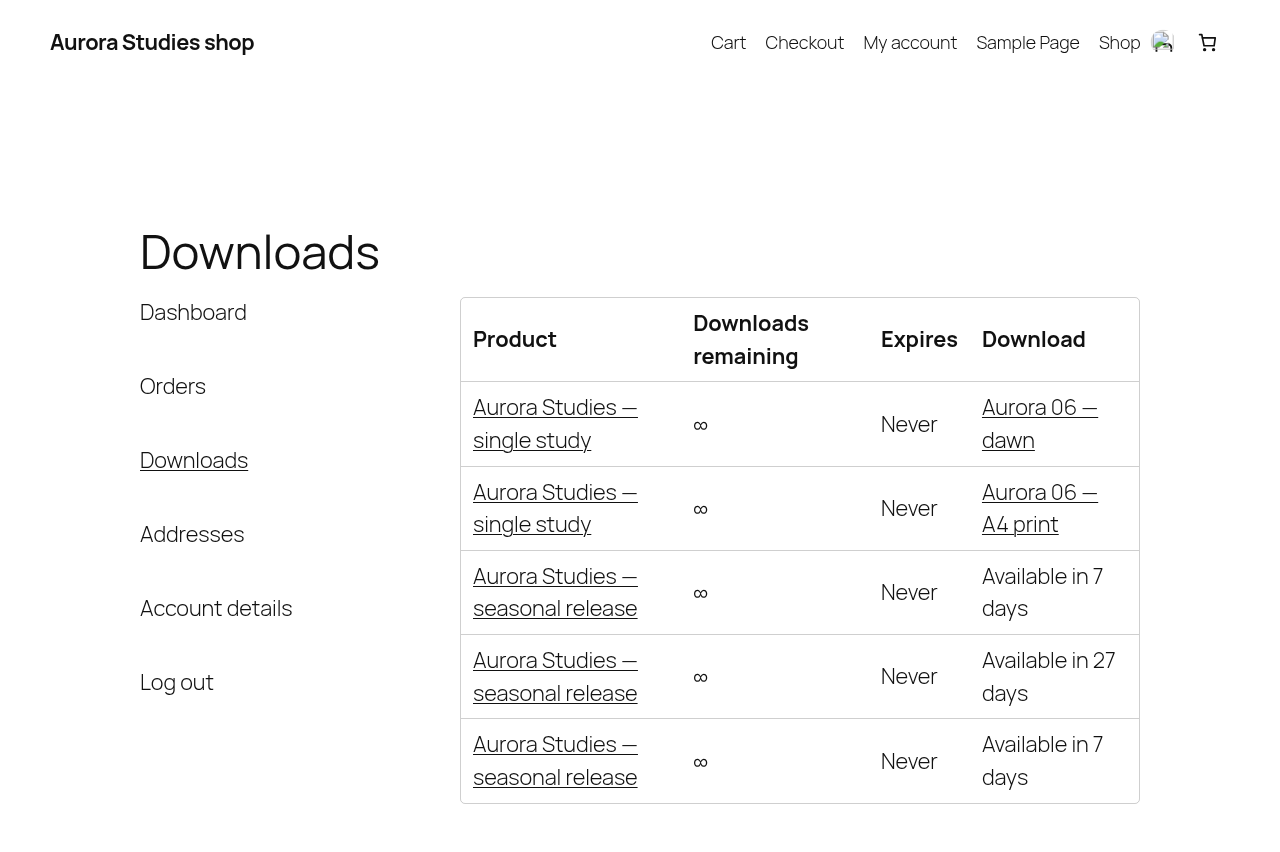
Downloadsblock on the product - Until then the My Account downloads list shows “Available in N days” as text instead of a link, the product page says when the files unlock, and a refused download explains itself without using up the customer’s download
- An unlock email when a scheduled file opens — a WooCommerce email under WooCommerce → Settings → Emails, switchable in the plugin settings
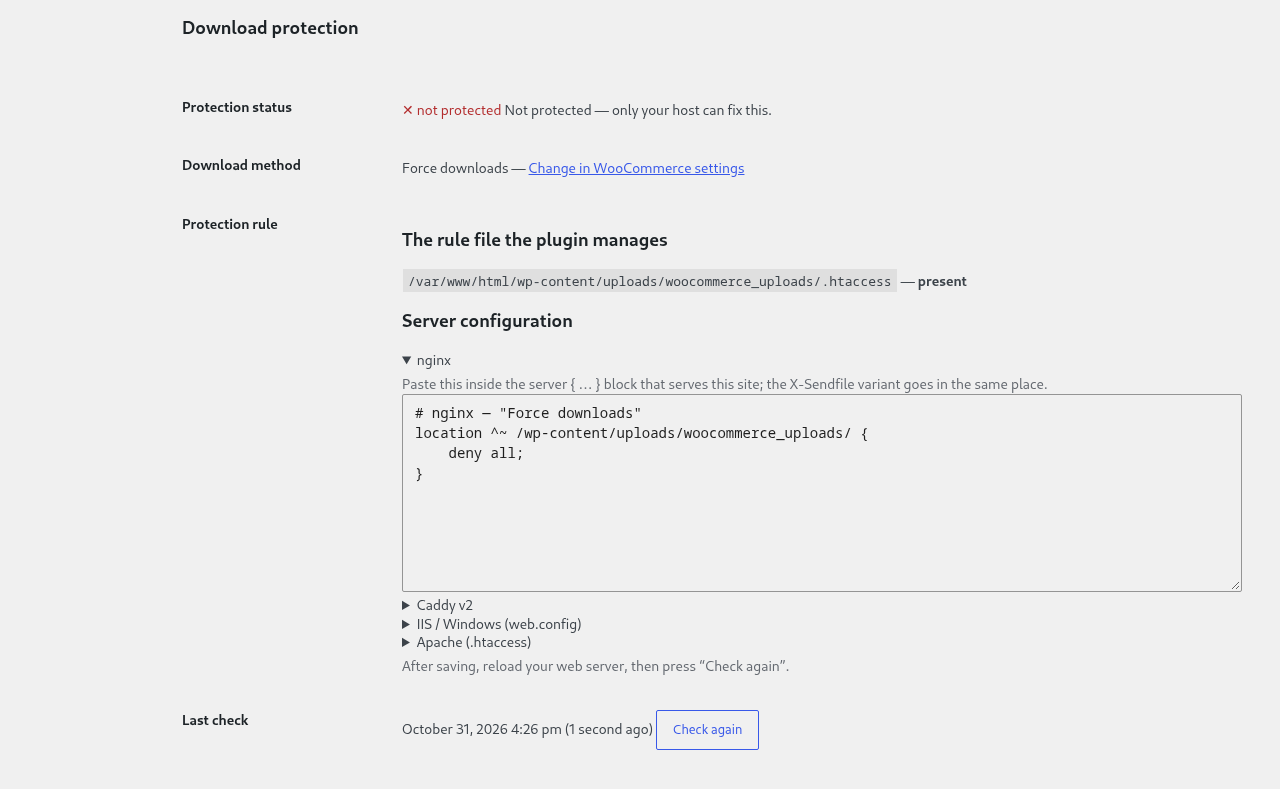
- Download protection: direct requests to
wp-content/uploads/woocommerce_uploads/are blocked on Apache-compatible servers, the rule is re-verified once a day, and the settings screen says whether it is in force — with the exact snippet to paste when the plugin is not allowed to write it - A native block,
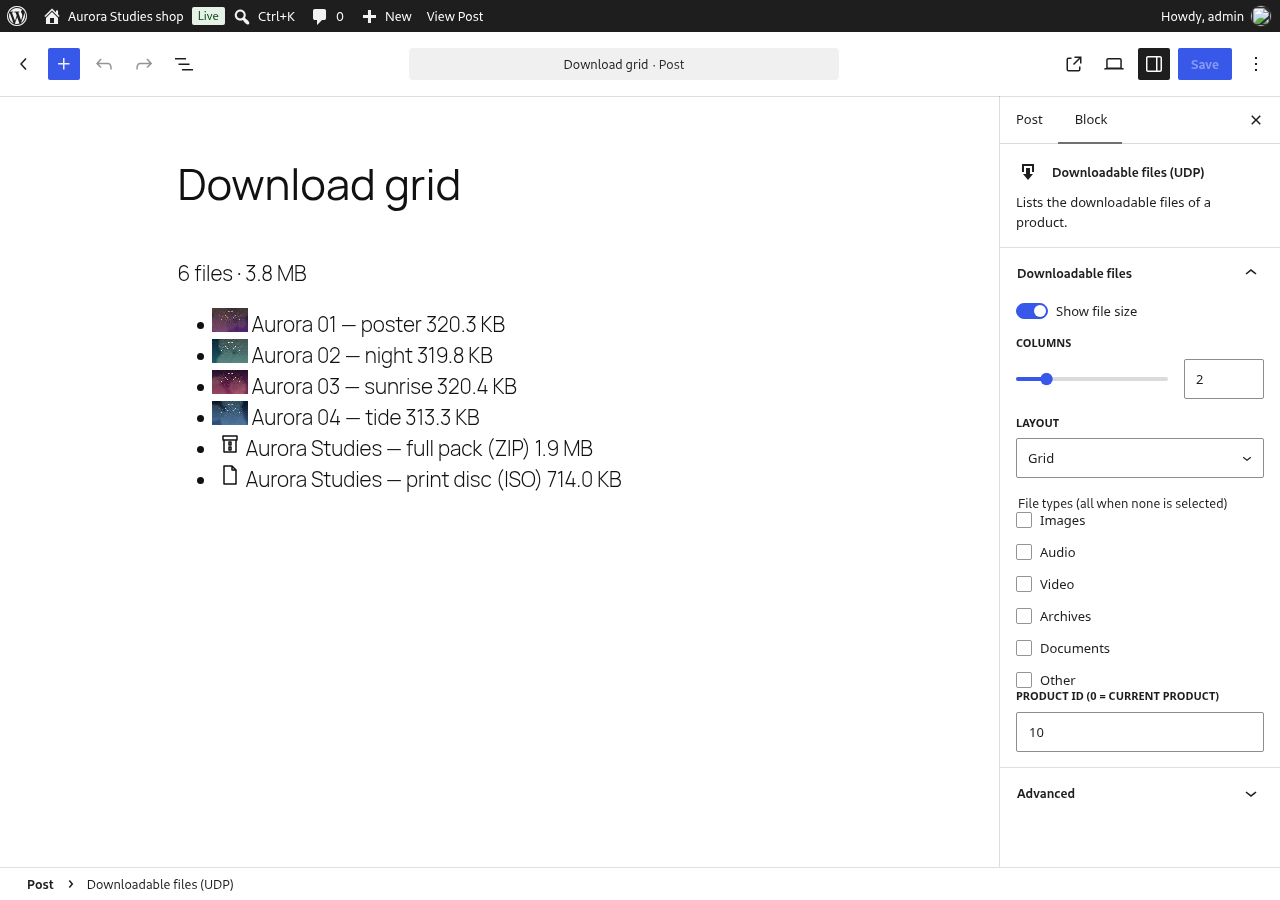
Downloadable files (UDP), for block themes and the site editor: it renders the list of the product being viewed with no shortcode in the template, and its inspector carries the same five options as the shortcode - Shortcode attributes on
[ultimate-downloadable-list]:product_id,show_size,columns,typesandlayout— including a real multi-column grid built from a CSS custom property. Called with no attribute, the shortcode prints exactly what it printed in 3.2.1 - A REST route for headless storefronts,
GET /wc/v3/products/{id}/downloads: the public part of a product’s files (id, name, type, MIME, size) and nothing else — the file URL of a scheduled file is withheld until it unlocks - Easy Digital Downloads support: the same list on an EDD download page, inserted through EDD’s own
edd_after_download_contenthook (no template edit), and through the shortcode - EDD price options: an EDD download with variable prices shows one group per price option, the same way a WooCommerce variable product shows one group per variation
- On EDD each price option group carries its own label, so a buyer sees which licence or package a file belongs to
- No platform is required at activation: with neither WooCommerce nor Easy Digital Downloads active the plugin still activates, does nothing on the front end, and prints one admin notice naming what to install
PRO Features
The PRO version includes all FREE features, plus:
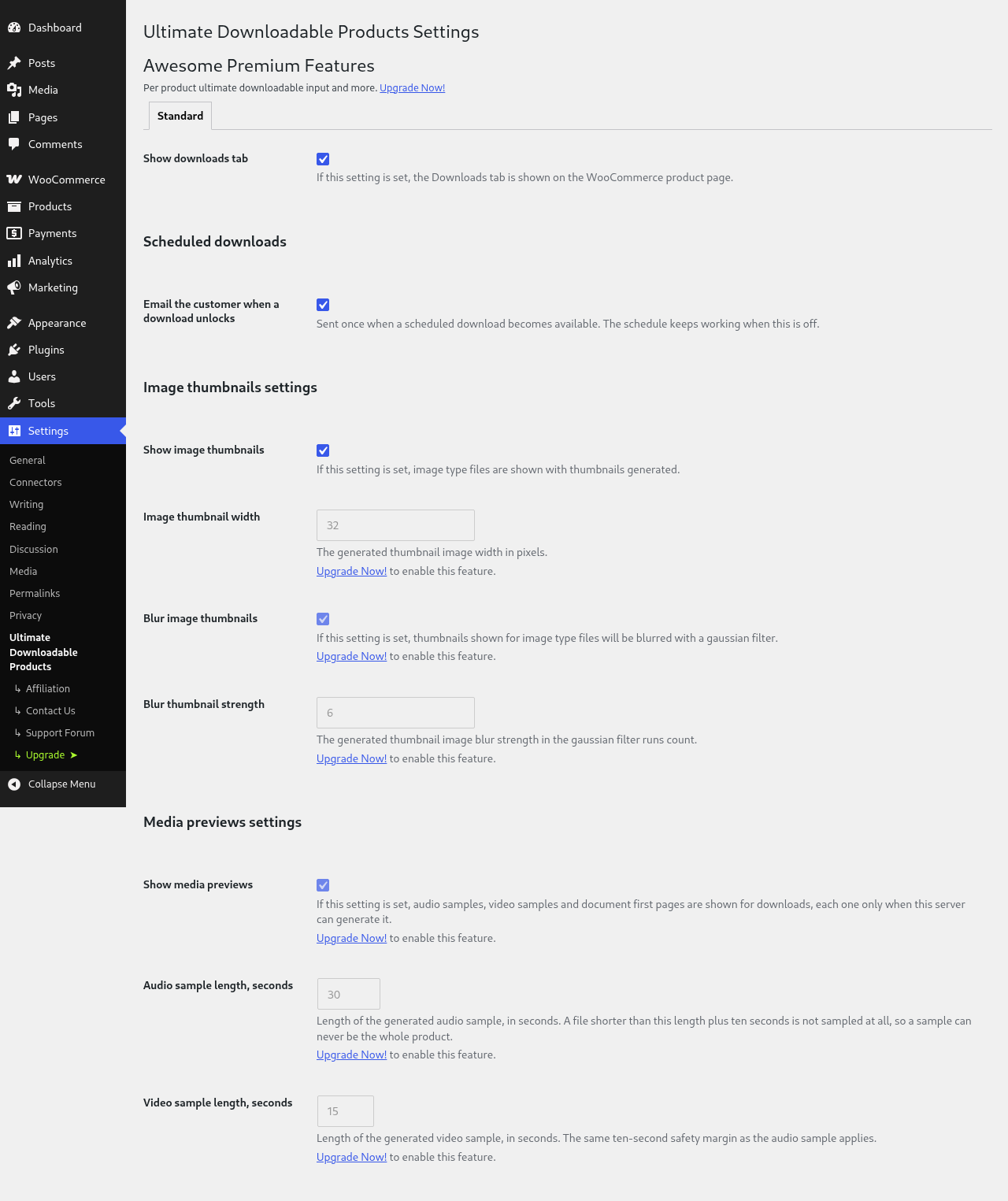
- Option to specify the thumbnail width for downloads of type image
- Option to show blurred thumbnails for downloads of type image
- Option to specify the thumbnails blur strength for downloads of type image
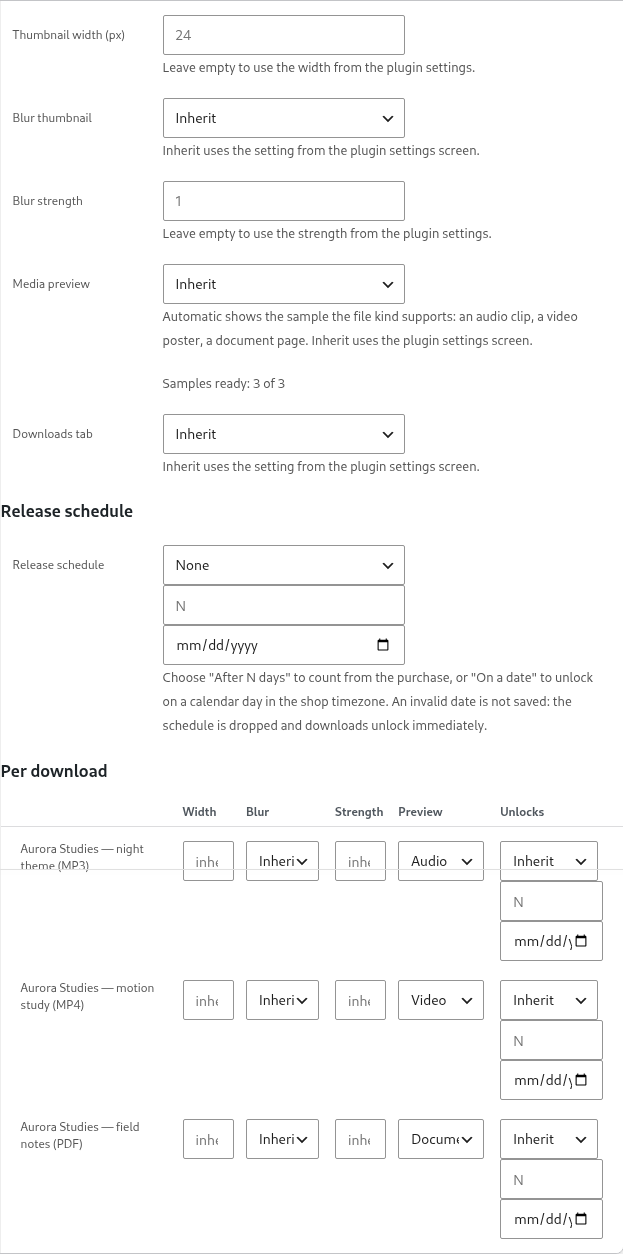
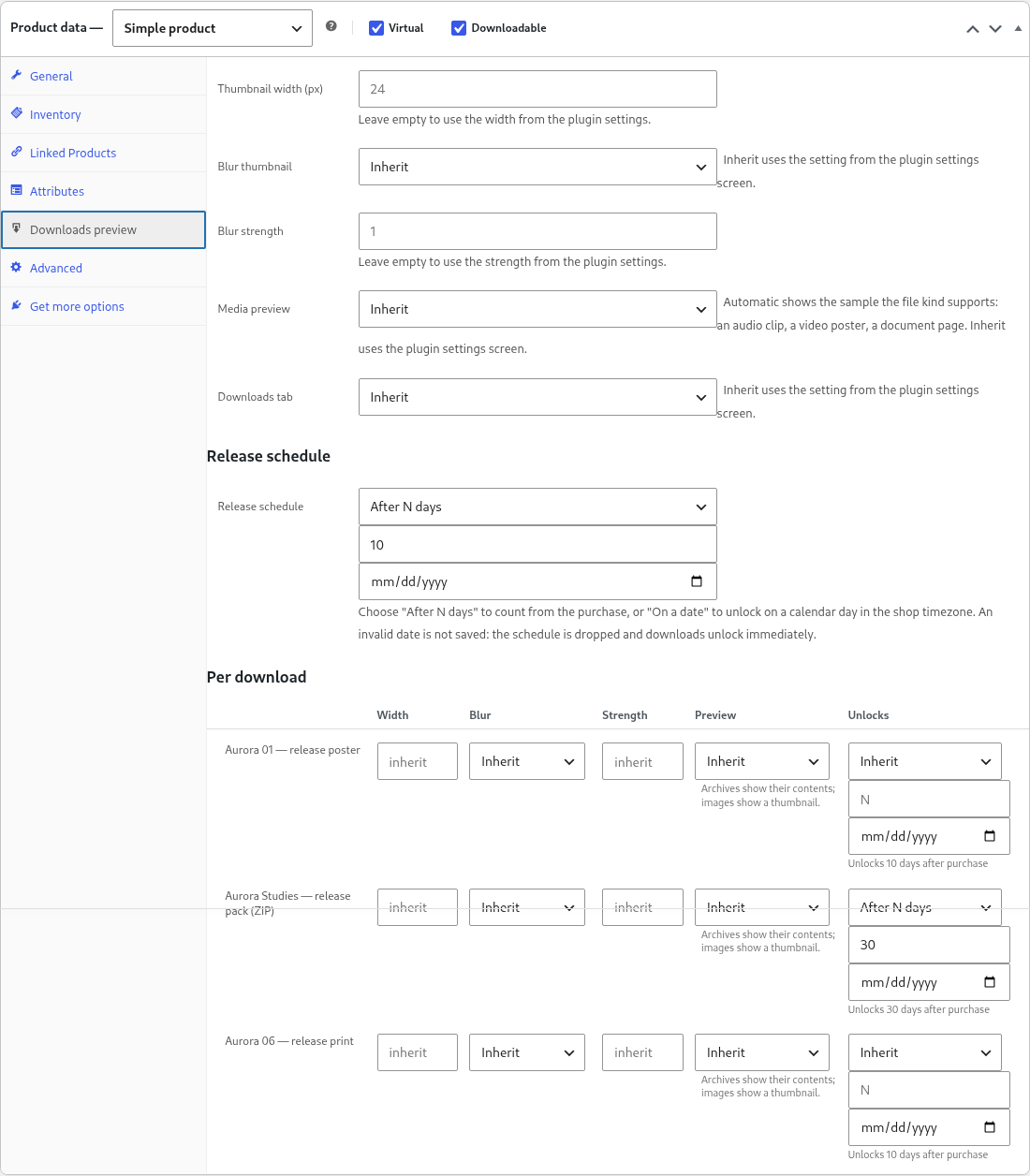
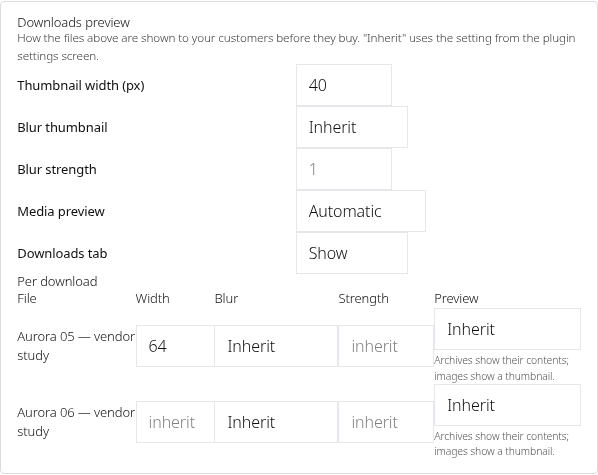
- Per product preview settings: width, blur and strength, each of them inherited from the plugin options until the product overrides it
- Per file preview settings: a different width, blur or strength for one download
- Per product
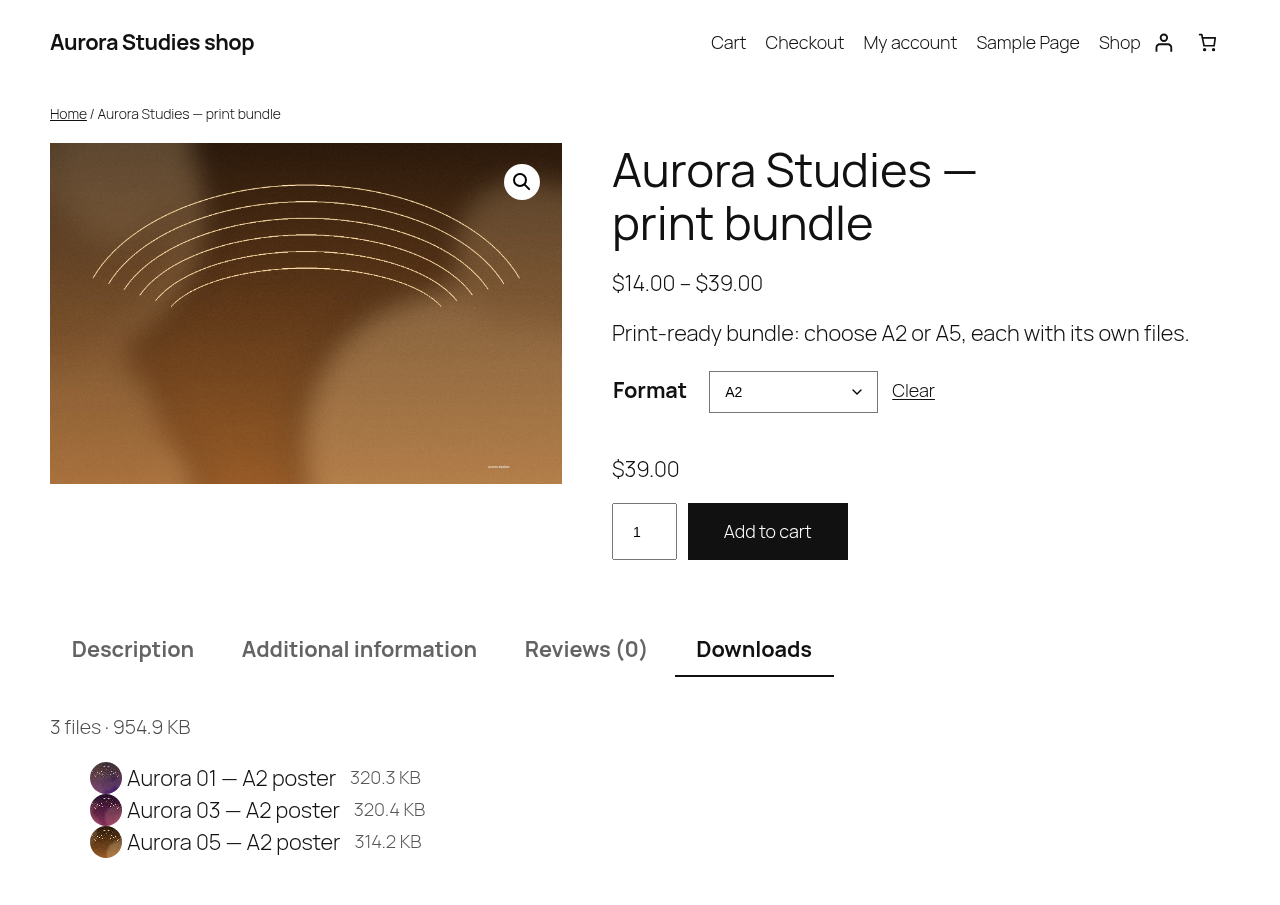
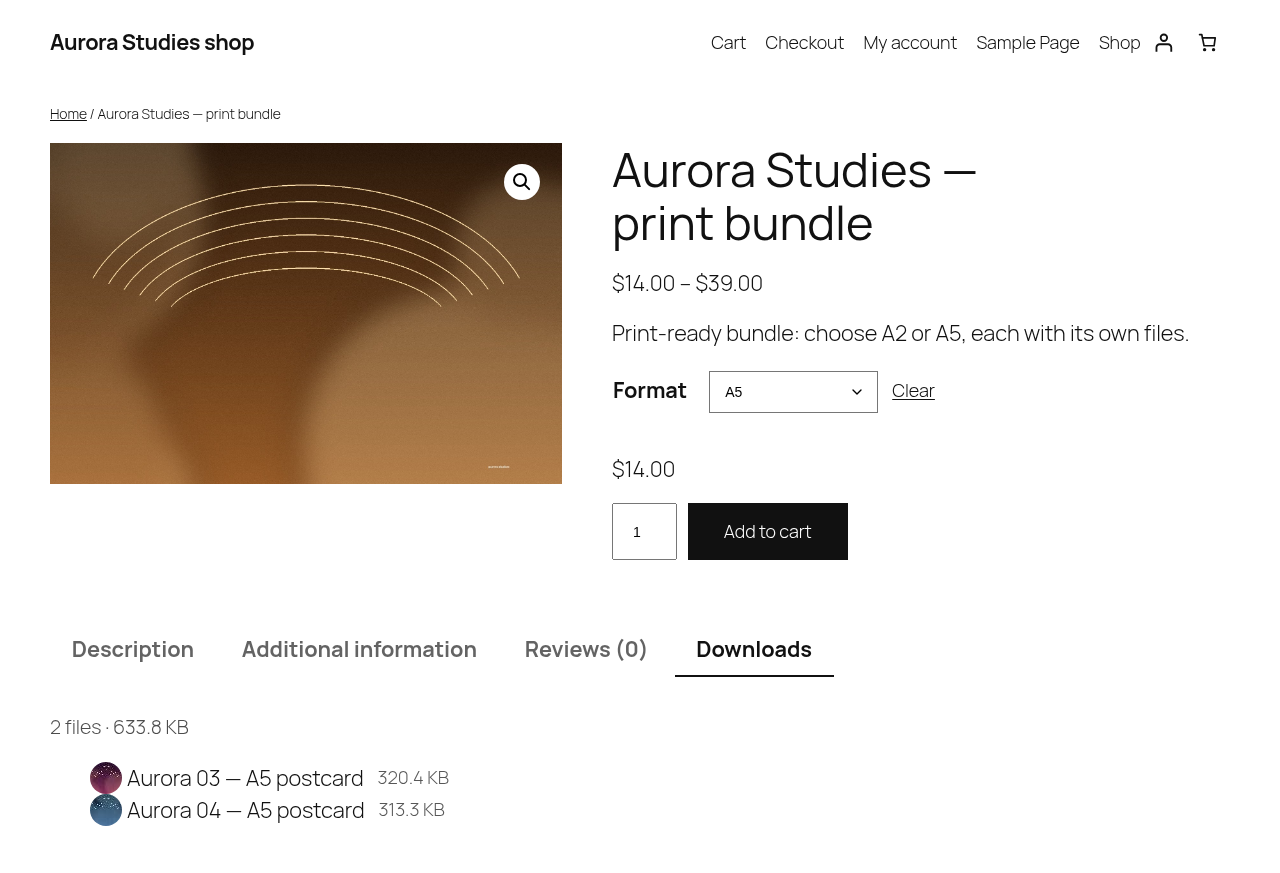
Downloadstab setting: show or hide the tab on a product without changing the global option - Variable Downloadable products support
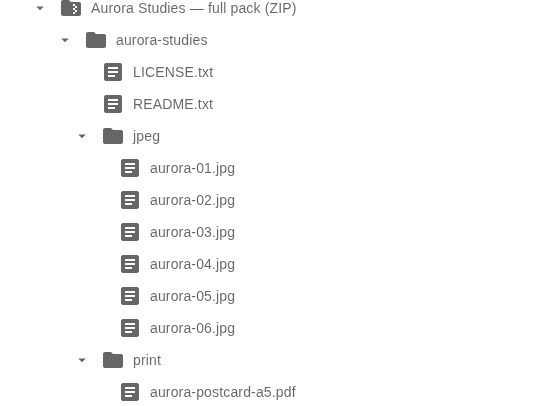
- Archive file contents display
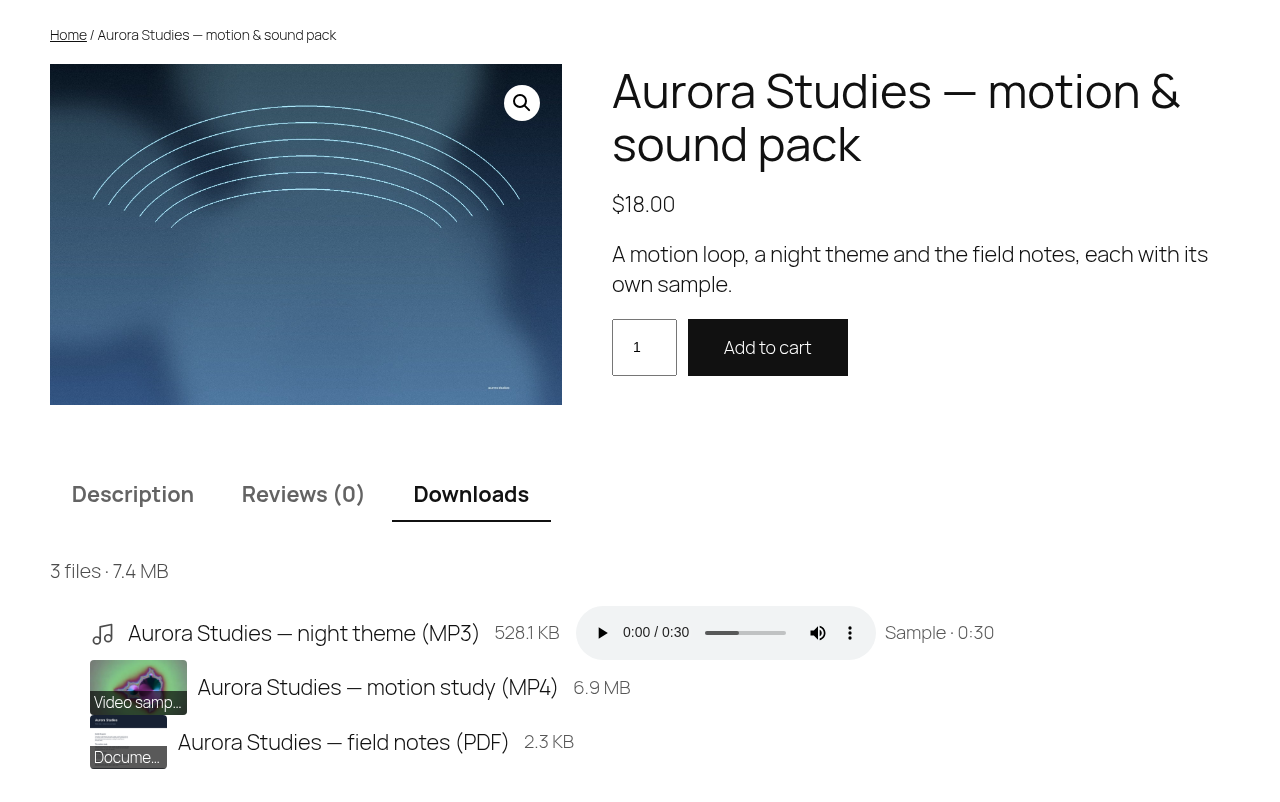
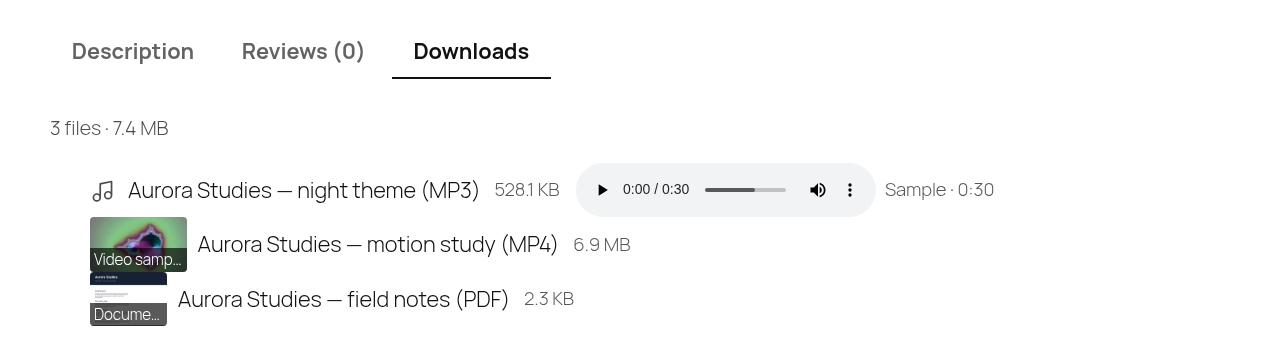
- Audio sample: a download of type audio plays a short generated clip (30 seconds by default) in the list, from its own file rather than from the product file
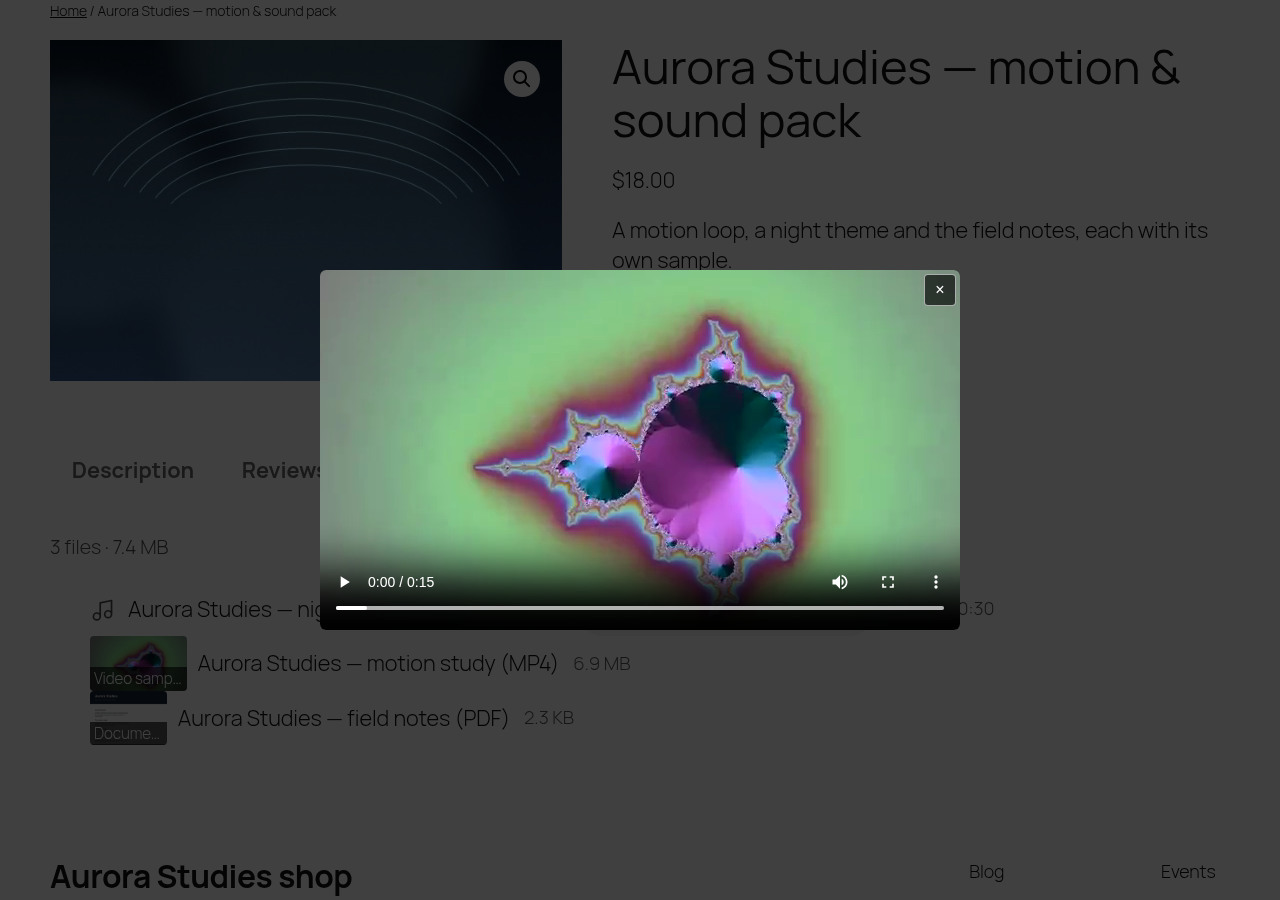
- Video sample: a download of type video shows a blurred poster and plays a short clip in a modal window
- Document preview: the first page of a PDF is shown as an image, or its opening lines as a text excerpt when the server has no page renderer
- RAR and ISO archive type upload support
- Scheduled & drip release — files unlock N days after purchase, or on a date you choose; Professional adds a separate schedule per file. Until then the shop does not hand out a working download link, and the plugin blocks direct access to your downloads folder on Apache-compatible servers and shows you exactly what to paste on the others. This is access control plus server-side file protection — not encryption: a file that was already downloaded stays downloaded.
- An unlock date for one customer: the order screen and
wp udp schedule unlock|statusoverride a single permission without touching the product - Subscription-aware schedules: a file stays locked while the WooCommerce Subscription is not active, and a renewal never restarts the schedule
- Marketplace vendor forms — a WCFM, WC Vendors or Dokan vendor sets the preview options of their own product from the front-end product form: the same width, blur, strength, media preview,
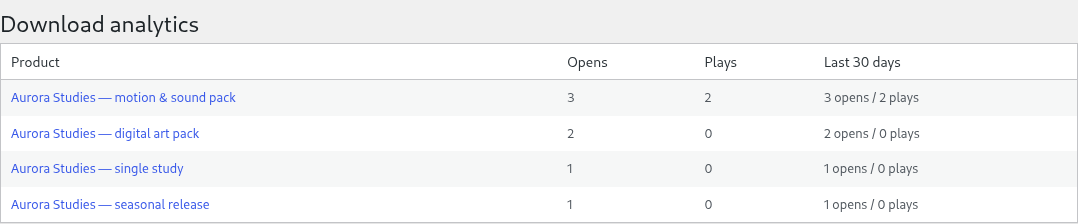
Downloadstab and per-file overrides the shop owner sets on the product screen. No admin access needed, and the settings a vendor saves are the settings the storefront uses - Preview analytics — every preview opened and every sample played is counted per product, so you can see which sample a customer actually looked at. The counts are on a
Download analyticsscreen under WooCommerce, inwp udp stats(with the product id), and as one line ofwp udp status; nobody withoutmanage_woocommercesees them - The previews work on Easy Digital Downloads too — thumbnails, archive contents and the audio, video and document samples are not WooCommerce-specific: EDD stores its files locally, so the same pipeline reads them unchanged. On EDD a file size is measured from the file, because EDD stores no size of its own
- Per-file preview settings on EDD are keyed to the file’s
conditionplus the file itself, not to its row number — reordering the files in the EDD download does not move a setting to a different file
Roadmap
4.0.0 was the platform port and 4.2.0 finished the release schedule on Easy Digital
Downloads, so the platform work is what this list now carries. Nothing below is committed by
this release:
- FluentCart support — a maybe, not a plan: it would be 4.3.0, and only if that platform’s file model turns out to fit the same list
- A conversion report — 3.3.0 counts previews and sample plays; comparing them with the orders they produced, per product, is not built
- Analytics for the Free build — the counters are Professional only
- A block that edits the list in the editor rather than rendering it on the server (today’s block lists the files; the product screen still owns them)
- Marketplaces beyond WCFM, WC Vendors and Dokan
Nothing above is promised or dated.
l10n
This plugin is localization ready.
Languages this plugin is available now:
- English
- Arabic (عرب)
- Czech (čeština)
- Danish (Dansk)
- German (Deutsche)
- Greek (Ελληνικά)
- Spanish (Español)
- Persian (فارسی)
- French (Français)
- Hebrew (עִברִית)
- Hindi (हिन्दी)
- Indonesian (Bahasa Indonesia)
- Italian (Italiano)
- Japanese (日本)
- Korean (한국인)
- Malay (Melayu)
- Norwegian (Norsk)
- Netherlandish (Nederlands)
- Polish (Polski)
- Portuguese (Português)
- Russian (Русский)
- Slovak (Slovenský)
- Finnish (Suomalainen)
- Swedish (Svenska)
- Thai (ไทย)
- Philippine (Pilipinas)
- Turkish (Türk)
- Vietnamese (Tiếng Việt)
- Chinese (中国人)
Feel free to translate this plugin to your language.
Shortcode
[ultimate-downloadable-list] prints the downloadable files of a product. With no attribute it prints the product being displayed, exactly as it did in 3.2.1 — the shortcode is backward compatible in both directions.
Attribute
Default
What it does
product_id
0 — the product being displayed
Prints the list of another product, so the shortcode works outside the loop, in a page or a widget
show_size
true
show_size="0" drops every file size and the byte total from the summary line; the file count stays
columns
1
1–6; values outside the range are clamped. Above 1 the list becomes a real CSS grid (--udp-columns), not a table
types
empty — all files
A comma-separated subset of image,audio,video,archive,document,other. Files of another type are removed before counting, so the summary matches what is shown
layout
list
list or grid; grid adds the card styling. Anything else falls back to list
[ultimate-downloadable-list product_id="42" columns="3" layout="grid" show_size="0" types="audio,video"] prints the audio and video files of product 42 in three cards, without sizes.<h3>Block</h3>
The block is called Downloadable files (UDP) and its name is ultimate-downloadable-products/downloadable-list. It renders the same list as the shortcode — same markup, same CSS — for the product a single-product template is showing, so a block theme needs no shortcode at all.
Its inspector panel carries the same five options as the shortcode attributes above (product id, show size, columns, types, layout), and the editor shows the server-rendered list as a live preview. apiVersion is 2, so the block works on WordPress 6.0 as well as on the current release. The block is in both the Free and the PRO build.
REST API
Headless storefronts get one public route:
GET /wp-json/wc/v3/products/{id}/downloads

`
curl https://example.com/wp-json/wc/v3/products/42/downloads
`
The route lives inside wc/v3 on purpose: that is the only namespace where a WooCommerce consumer key authenticates, so a storefront authenticates the same way it does for the rest of the store. No capability is needed to read it — everything it returns is already on the product page.
Each file carries five public fields and nothing more:
id— the download idname— the file name as the shop shows ittype—image,audio,video,archive,documentorothermime— the detected MIME type, ornullsize— bytes, ornullwhen the file is remote or its size is unknown
Two fields are about what the route withholds. download_url is null, with locked: true, for any file a release schedule has not unlocked yet — unless the caller has manage_woocommerce, who always sees the file. unlock_at is the instant of a fixed-date schedule, and it is published to that caller only: for everybody else it is null, because a delay schedule counts from a purchase this route knows nothing about. No order id, user id, email, IP, download key or counter is read on this route at all.
An unknown product and a product that is not downloadable both answer 404 (udp_product_not_found, udp_product_not_downloadable); a downloadable product with no files answers 200 with an empty downloads array. The response is Cache-Control: private, no-store — it is per-caller data and must not be cached by a proxy.
The full note — every field, every refusal, the redaction table and the reason wc/v3 is borrowed — is docs/work/rest-downloads.md in the plugin repository.
Installation
- Install and activate it as you would any other plugin.
- Have either WooCommerce or Easy Digital Downloads installed and active — one of the two is enough, and WooCommerce is used when both are.
- Make a new downloadable product (WooCommerce) or a new download (Easy Digital Downloads) and add its files.
FAQ
Does it work with Easy Digital Downloads?
Yes. Since 4.0.0 the plugin shows the download list on Easy Digital Downloads’ own download pages as well as on WooCommerce product pages, and the Professional previews (thumbnails, archive contents, audio/video/document samples) work on both. What changed is the activation rule: the plugin no longer declares a hard WooCommerce dependency and no longer refuses to activate without it, because the platform is now picked at runtime — WooCommerce when it is active, Easy Digital Downloads when it is the one that is active.
Can I run WooCommerce and Easy Digital Downloads on the same site?
Please don’t: the plugin works with one shop platform per site. On a site where both are active it uses WooCommerce and leaves Easy Digital Downloads alone, which means EDD downloads get no file list, no previews, no per-product settings and no release schedule. The plugin does not break anything in that state — it prints one admin notice naming the platform it is using and what the other one loses, so the situation is visible instead of silent. Deactivate the platform you are not selling with.
What happens if neither WooCommerce nor Easy Digital Downloads is active?
The plugin activates, does nothing on the front end, and prints one admin notice in the dashboard naming the platforms it can work with and linking to the plugins screen. The settings and diagnostics screens keep working, so the notice is not the only place to read the state: wp udp status says Platform: none.
Why do EDD price options appear as several lists?
Because that is how Easy Digital Downloads stores files. A download with variable prices has files attached to a price option, and a file whose condition is all belongs to every option — so EDD itself considers it part of each price, and the plugin prints it under each one, exactly as EDD would hand it out. WooCommerce variable products behave the same way: one list per variation.
Are per-file preview settings kept when I reorder EDD files?
Yes. On Easy Digital Downloads a file has no id of its own, so a per-file setting is attached to the file’s condition plus the file itself, never to its row number. Adding, removing or reordering files in the EDD download keeps every setting with the file it was made for.
What is the shortcode?
[ultimate-downloadable-list] prints the download list of the product being displayed. The Downloads tab renders the same list, so the tab and the shortcode never disagree.
Does it work with variable products?
Yes, in the PRO version: each downloadable variation is listed under its own name.
Can I use the shortcode or the block in a block theme?
Yes, both. The block needs no shortcode at all in a single-product template and is the expected way in the site editor; the shortcode still works inside a block template, and outside the loop with product_id. Both render the same list.
Is there an API for a headless storefront?
Yes: GET /wp-json/wc/v3/products/{id}/downloads returns the five public fields of each file. See the REST section above — a scheduled file comes back without its download_url, exactly as it would be hidden on the product page.
How do I see which previews customers actually open?
In the PRO version every preview opened and every sample played is counted per product. WooCommerce → Download analytics lists them with the last 30 days per product, wp udp stats (with the product id) prints one product’s counters, and wp udp status prints one summary line. The counts are a plain product meta row, so they survive an update of the plugin, and a preview being opened is never a download: the counters say what was looked at, not what was bought.
Does this stop a customer from downloading before the date?
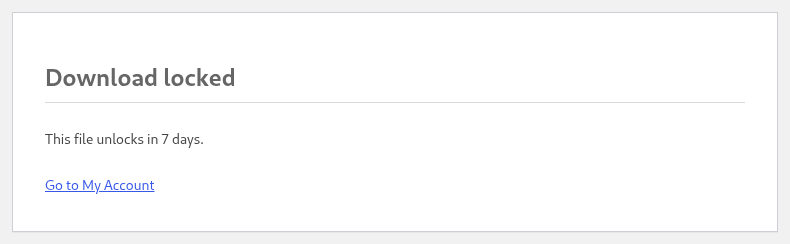
Yes, for the shop’s own download link. Until the unlock instant WooCommerce’s download URL answers 403 with a page that says when the file opens and links back to My Account, and the My Account list shows “Available in N days” as text instead of a link. A refused attempt costs the customer nothing: it does not consume a download, does not appear in the download log, does not change the remaining count, and a media or range request (Range: bytes=...) is refused the same way instead of being served in slices. What the plugin controls is the link WooCommerce hands out — the file itself is the next question.
Can a customer download a file before the date?
Not through the shop; and on a protected server, not by copying the file URL either. The plugin writes a rule that blocks direct requests to wp-content/uploads/woocommerce_uploads/, checks once a day that the rule really works, and shows the result on its settings screen. On servers that ignore .htaccess (nginx, most CDNs) the plugin cannot write the rule: it shows you the exact snippet to paste and keeps a warning in your dashboard until the check passes. Use “Force downloads” rather than “Redirect only” — the redirect method hands the file URL to the browser by design, so no rule can protect it. This is not encryption: a file that was already downloaded stays downloaded.
Why did the unlock email arrive late?
The unlock email is a WP-Cron event scheduled for the unlock instant, and WP-Cron runs when somebody visits the site. If DISABLE_WP_CRON is set in wp-config.php and no system cron calls wp-cron.php, the event stays pending in the cron option — it is late, never lost, and it goes out with the next cron run whenever that happens. So that a waiting customer is not made to wait for a cron run, the same check also runs on the My Account downloads page: the mail leaves the first time the customer looks there, at most once an hour per site. Two switches have to be on: “Email the customer when a download unlocks” in the plugin settings, and the “Download ready” email in WooCommerce → Settings → Emails. Turn either off and the schedule still works, silently.
Do I need WooCommerce Subscriptions?
Only for the subscription-aware lock, which is a Professional feature. Without WooCommerce Subscriptions the plugin never looks at subscriptions and a schedule counts from the order. With it, a file stays locked while the subscription is on hold, cancelled or expired, and a renewal does not restart the schedule: the delay counts from the subscription’s start, not from the last payment. Verified against WooCommerce Subscriptions 7.6.0.
Why are my image thumbnails missing?
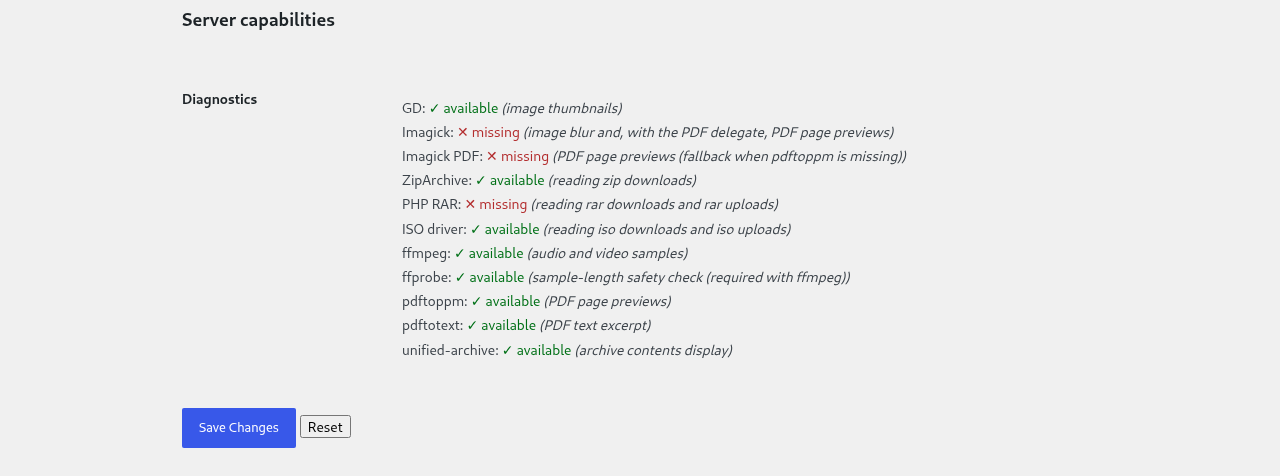
The GD PHP module is required to generate them. The settings screen ends with a Server capabilities report, and wp udp status prints the same matrix from WP-CLI — both are the first thing to check.
What do the audio, video and document previews need?
Audio samples need both the ffmpeg and the ffprobe commands, and video samples need them too; without both, audio and video downloads keep the file type icon, the file size and the file count. Document page images need poppler-utils (the pdftoppm command) or the Imagick PHP extension built with its PDF delegate; when only pdftotext is available the download shows a text excerpt instead of an image. Documents are PDF only — DOCX, ODT and other office formats keep the file type icon row, because rendering them would need a separate office suite on the server.
The samples are also bounded on purpose: the file must be stored under wp-content (a remote download is never sampled), and a source shorter than the sample length plus ten seconds is never sampled, because the sample would be the product. Generation runs in the background, so a freshly saved product may show icons until WP-Cron catches up; wp udp previews media generates the samples from WP-CLI, and the product panel’s readiness line says how many are still pending. The settings screen and wp udp status report which of these tools this server actually has.
What are the requirements?
PHP 8.1 or newer, WordPress 6.0 or newer, and either WooCommerce 7.0 or newer or Easy Digital Downloads 3.7.2 or newer (the version this release was tested against; 3.6 and earlier are not verified). Thumbnails need the GD module, the RAR and ISO formats need the matching PHP modules (see below). Audio, video and document previews need extra command line tools — see the preview question above.
Why does the plugin need to write a file to my uploads folder?
Because the link is not the only way to a file. WooCommerce keeps downloads in wp-content/uploads/woocommerce_uploads/, which your web server serves without PHP — no plugin hook is in that path, so a copied URL would work no matter what the schedule says. On an Apache-compatible server (Apache, LiteSpeed) the plugin therefore adds its own marked block to the .htaccess in that folder, adds an index.php there when the folder has none, and on uninstall removes exactly its own block. Lines it did not write are never touched: a php_value directive or a hotlink rule your host put there survives verbatim. Files stored on a remote host or a CDN are not in that folder and are not covered.
What if my server is nginx?
nginx ignores .htaccess, and the plugin does not write server configuration it does not own. The settings screen shows the exact snippet for nginx — location ^~ /wp-content/uploads/woocommerce_uploads/ { deny all; }, or internal; when you use X-Sendfile / X-Accel-Redirect — plus the Caddy and the IIS web.config versions, and it keeps a warning in your dashboard until the check passes. That warning is printed by Ultimate Downloadable Products for WooCommerce itself, because it is this plugin’s own daily check that produced it — it is not a WordPress or WooCommerce notice. After saving the snippet, reload the web server and press “Check again”.
Why is the warning still there after I added the rule?
Because the plugin believes a measurement, not the file it wrote. Once a day — and every time you press “Check again” — it puts a small temporary .txt file into the downloads folder and requests it over HTTP. 403 or 404 means protected; a 200 or a redirect means a browser can still fetch the file; a timeout, a 401 or a server error means it could not verify, and “could not verify” is never shown as protected. So if the warning survives, one of three things is true: the web server was not reloaded, it is not reading that file, or the site cannot reach itself over HTTP. The same state is written to the WooCommerce log and printed by wp udp status.
Are the downloads protected behind a CDN?
Partly, and the plugin says so where it matters. The rule protects the origin folder. A copy a CDN has already cached keeps being served from the CDN’s own URL until that cache is purged — the rule cannot purge it. A file stored on a remote host (a CDN URL in the product’s download row) was never in the uploads folder, so no rule on your server applies to it at all; the settings screen names such a file when your shop has one.
How to configure server to support RAR, 7z or ISO?
Follow recommendations from this guide please.
Contact the PRO version support for help.
Screenshots







Changelog
4.2.0
- New: the release schedule works on Easy Digital Downloads — the Free half of 3.1.0 (“files unlock N days after purchase”) now applies to EDD downloads as well, and a Professional per-file schedule and absolute date work there too. The merchant sets it on the download exactly as on a WooCommerce product
- New: the buyer is told before clicking. On the receipt EDD prints after payment, and in the purchase history, the plugin adds its own line under each file —
Available in 5 days/Available from 12 March— because EDD prints those links itself and offers no way to replace them. A click still explains itself: the file is refused with a403naming the exact date, and the refusal does not use up the buyer’s download count - New: a per-order release override (
wp udp schedule unlock <order> <product> <file> <date>) works on both platforms, so support can open or hold one file of one order without touching the product schedule - Fix: with Easy Digital Downloads the Professional build could answer a blank page — the analytics beacon asked WooCommerce where it was on every page. Fixed, and the same class of defect in
wp udp schedule(which called a WooCommerce function to load the order) is gone too - Changed: the plugin works with one shop platform per site. When both WooCommerce and Easy Digital Downloads are active it uses WooCommerce and prints one admin notice saying which platform is in use and what the other one loses
- Changed: download protection is unchanged and still applies to local files; a file stored as a media-library attachment has a public URL of its own, which no rule can close — the product panel says so
- Requires WooCommerce 7.0 or Easy Digital Downloads 3.7.2, WordPress 6.0 and PHP 8.1
4.0.0
- New: the plugin is no longer WooCommerce-only — the public layer was ported onto a platform seam, and Easy Digital Downloads is the second supported platform. The same download list now appears on an EDD download page, through EDD’s own
edd_after_download_contenthook and through the shortcode - New: EDD price options are listed as separate groups, one list per price option, with the group’s own label above it. A file whose
conditionisallappears under every option, because that is EDD’s own rule - New: the Professional previews work on EDD too — thumbnails, archive contents and the audio, video and document samples. EDD stores its files locally, so the pipeline reads them unchanged; a file size on EDD is measured, because EDD stores none. Per-file preview settings are keyed to the file’s
conditionplus the file, not to its row number, so your existing per-file settings are untouched and a reordered file keeps its settings - Changed: the plugin header no longer declares
Requires Plugins: woocommerce. A runtime check now picks the platform after all plugins have loaded (WooCommerce first, Easy Digital Downloads when WooCommerce is absent), and with neither active the plugin activates, does nothing on the front end and prints one admin notice naming what to install — the settings and diagnostics screens stay usable - New:
wp udp statusprints the selected platform as aPlatform:line, so support can see which one a site is running without guessing - Uninstall now also removes the per-user banner-dismissal meta (
udp_platform_notice_dismissed,udp_protection_dismissed), so a site that deletes the plugin keeps no residue - Requires WooCommerce 7.0 or Easy Digital Downloads 3.7.2, WordPress 6.0 and PHP 8.1
3.3.0
- New: a
Downloadable files (UDP)block (ultimate-downloadable-products/downloadable-list) for block themes and the site editor — it renders the download list of the product being viewed, with the same markup as the shortcode, so a single-product template needs no shortcode. It is in both the Free and the PRO build - New:
[ultimate-downloadable-list]takes attributes —product_id,show_size,columns,typesandlayout.columns="3"is a real CSS grid built from a custom property rather than a table,types="audio,video"filters before the summary counts, and the attribute-less shortcode prints byte-for-byte what it printed in 3.2.1 - New:
GET /wp-json/wc/v3/products/{id}/downloadsfor headless storefronts —id,name,type,mimeandsizeper file, and nothing that is not already public. It withholds two things:download_urlisnull, withlocked: true, until a release schedule unlocks the file, andunlock_atis published to the shop owner only. The route reads no order, no user and no download key, and answers404for a product that does not exist or is not downloadable - New (PRO): preview analytics — preview opens and sample plays are counted per product, on a
Download analyticsscreen under WooCommerce (capabilitymanage_woocommerce), inwp udp stats(with the product id) and as one line ofwp udp status. The Free build has no counter, no route and no screen - Documented: the shortcode attribute table, the block name and the REST route, in this readme and in
docs/work/rest-downloads.md - Requires WooCommerce 7.0, WordPress 6.0 and PHP 8.1 (unchanged)
3.2.1
- Fix (PRO): the
Downloads previewblock fits the product form a marketplace vendor edits – the per-file columns no longer push the grid past the panel border, file names wrap at their spaces instead of breaking mid-word, and the block is capped at a readable width so a wide form does not stretch the labels away from their fields - Tested with Dokan 5.3.1: the block is rendered by the marketplace’s own product form (its legacy editor,
Settings -> Appearance -> Vendor Product Editor), which is the form that carries the downloadable files; Dokan’s new React editor does not render a file list at all, so there is nothing there for a per-file setting to sit on - The gallery now shows the feature: the same settings on a marketplace seller’s own product form (screenshot 22)
3.2.0
- New (PRO): marketplace vendor forms – a WCFM, WC Vendors (free or PRO) or Dokan vendor gets the
Downloads previewfields in the front-end product form and can set them for their own product: thumbnail width, blur and blur strength, the media preview, theDownloadstab, and a column per download - The vendor form writes exactly the same meta through the same writer as the product screen, so an administrator sees and can change what a vendor set, and a marketplace re-saving a product never erases it
- The
wp udp statusoutput and the log name the marketplace a save came from - Requires WooCommerce 7.0, WordPress 6.0 and PHP 8.1 (unchanged)
3.1.0
- New: scheduled downloads – a product’s files unlock a number of days after purchase, set in WooCommerce’s own
Downloadsblock on the product - New: until a file unlocks, My Account shows “Available in N days” instead of a link, the product page says when the files unlock, and a refused download explains itself and uses up nothing
- New: an unlock email when a scheduled file opens – a “Download ready” WooCommerce email under WooCommerce → Settings → Emails, switchable in the plugin settings
- New (PRO): unlock on a fixed date, a separate schedule per file, and an unlock date for one order on the order screen and from
wp udp schedule unlock|status - New (PRO): subscription-aware schedules – files stay locked while the WooCommerce Subscription is not active, and a renewal does not restart the schedule
- New: download protection – the plugin blocks direct requests to the downloads folder on Apache-compatible servers, re-checks once a day that the rule really works, and shows the state, the last check and the exact nginx / Caddy / IIS snippet on the settings screen
- New: a dashboard warning on every admin screen while downloads are not protected – it can be postponed for 7 days and comes back, and the settings row stays red until the check passes
- New:
wp udp statusprints the protection state, and the product panel warns the merchant when a file unlocks after its downloads expire
3.0.0
- New: audio downloads can play a short sample right in the downloads list
- New: video downloads show a blurred poster and play a short sample in a modal window
- New: PDF downloads show their first page as an image, or their opening lines as a text excerpt when no page renderer is available
- New: a per product
Media previewchoice and a per filePreviewcolumn in theDownloads previewpanel, with aSamples readyline for the samples still being generated - New: the settings screen and
wp udp statustell you whether this server can make the samples, andwp udp previews mediagenerates them from WP-CLI - Samples are generated in the background – a product save never starts one – and every sample is a short excerpt, never the product file
- Samples need
ffmpegandffprobe(audio and video) or poppler / Imagick with the PDF delegate (documents); without them every download keeps its icon, size and count
2.2.0
- New: per product preview settings – thumbnail width, blur and blur strength can be set on a single product and inherit the plugin options by default
- New: per file overrides – one download can use its own width, blur or strength
- New: the
Downloadstab can be shown or hidden per product - The product data panel gains a
Downloads previewtab with all of the above
2.1.0
- New: file type icons, file sizes and a file count in the downloads list
- Thumbnails are generated when a product is saved and served as files from the uploads directory, instead of being generated on the first visit and inlined as base64 in the product meta
- New:
wp udp previews regeneratefills the previews of an existing catalogue - The thumbnail cache now includes the download id, so two downloads of one product can point at the same file
2.0.0
- Restructured into layered modules (the plugin behaves exactly as 1.3.5; this release moves code)
- Requires PHP 8.1, WordPress 6.0 and WooCommerce 7.0
- New:
wp udp statusprints the plugin version, the settings and the server capabilities - New: the settings screen ends with a server capability report (GD, ZipArchive, RAR, ISO, ffmpeg)
1.3.5
- freemius library version update
- tested up to WordPress 7.1 and WooCommerce 11.2
1.3.4
- freemius library version update
1.3.3
- freemius library version update
1.3.2
- freemius library version update
1.3.1
- freemius library version update
1.3.0
- Option to show image thumbnails for downloads of type image released in a free plugin version
1.2.0
- Zip and other archive types content display added
- RAR and ISO archive type upload support
1.1.0
- Variable Downloadable products support
1.0.0
- Initial release.