


Description
Professional invoices for your WooCommerce store, ready in minutes.
Every order gets its numbered PDF invoice and every refund its credit note, on your own site. No account, no monthly fee.
Why stores choose VFWoo Invoices
- Invoices and credit notes, free. Partial or full refunds, with the lines they correct and a reference to the original invoice.
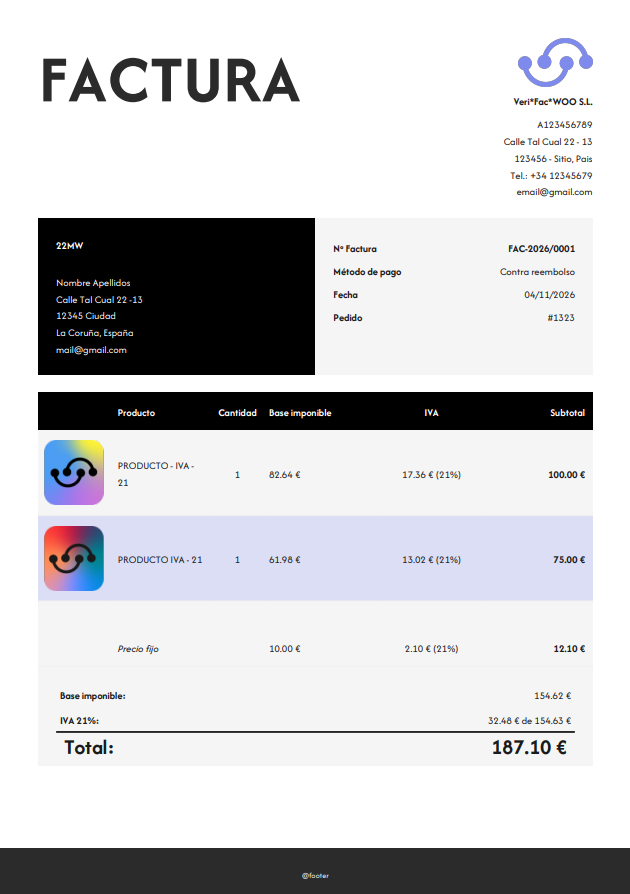
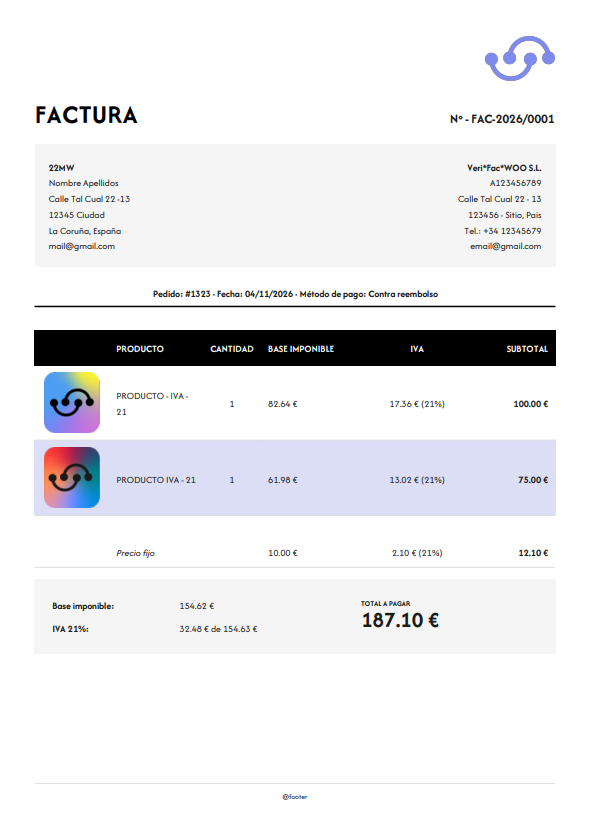
- Your brand on every PDF. Four templates (Classic, Blackwood, Modern and Minimal), your logo, colors and fonts, and an optional product image on each line.
- Tax ID field at checkout. NIF, CIF, NIE or VAT number, required, optional or hidden, in the classic and the block checkout. The format is checked as the customer types, CIF check digit included, and you can validate EU VAT numbers in VIES.
- Tax class mapping. Classify each WooCommerce tax rate once (taxable, exempt, not subject, reverse charge, export, intra-community) and the right legal mention is printed on the invoice. Suggestions included for Spain, Germany and France.
- E-invoice files (new, optional). Turn on the EU E-Invoice (UBL/CII) module to download any invoice or credit note as a UBL 2.1 or CII file (EN 16931), or attach it to the email. It is a generic file: it is not sent to any tax authority, so check with your tax advisor what your country requires.
- Clean numbering. Series, yearly reset, and no number is used up by a cancelled order.
And more
- Issue invoices when payment is complete, when the order is processing or when it is completed. You can tick more than one moment; each order is invoiced once. Or issue them by hand from the order.
- A number assigned when the invoice is issued, never when the order is created. You can change the next number or assign one by hand.
- The invoice in the customer’s language, in the store’s language or in a fixed one. If there is no translation, it comes out in English. Legal texts always stay in the language of the law.
- The PDF (and, if you choose, the e-invoice file) attached to the WooCommerce emails, once per order.
- A list of issued invoices with search, PDF download and a clear view of each invoice’s data, and a list of paid orders that still have no invoice.
- A review that checks an order before you issue its invoice and tells you what to fix.
- An activity log with the previous and the new value of each setting, and an email to your team for important notices.
- Shortcodes for invoice data and the download link, and the customer’s invoices in My Account.
Countries
You choose the fiscal country in Taxes.
- Spain (including the Canary Islands, Ceuta and Melilla), Germany and France have their own tax profile. The plugin suggests a classification for each of your rates, and for Germany and France it also offers legal texts in the country’s own language.
- Any other country: choose “Other country”. You classify each rate by hand, with a short explanation of each category. For EU rates the plugin makes a basic suggestion based on the country of the rate.
The suggestions are a starting point. Check them with your tax advisor: this plugin does not give tax advice. More countries are on the way; the list below shows which ones come next.
Example tax rate files you can import into WooCommerce are in the tax and legal mentions guide.
Languages
English by default, with Spanish, Catalan, German and French included. Other languages are delivered by translate.wordpress.org.
Add-ons
VFWoo Invoices is the free base. Two optional add-ons, sold separately at verifacwoo.com, plug into it:
- VFWoo Verifactu: sends invoices to the Spanish tax agency (AEAT) under the VERI*FACTU system (Royal Decree 1007/2023), with QR code, hash chain and a sending queue.
- VFWoo Recargo de equivalencia: applies the Spanish equivalence surcharge to flagged customers.
The base plugin works fully on its own. You turn each add-on on or off in the Modules tab. Developers can extend the plugin with the hooks documented in it.
What comes next
Planned, not included yet. No dates are promised, and the order may change.
- Country packs for Italy, Portugal, the Netherlands, Belgium and Austria, and then the rest of Europe.
- National e-invoice formats (Factur-X / ZUGFeRD, XRechnung, FatturaPA, Peppol) and sending to tax platforms, as add-ons. Today the free EU E-Invoice (UBL/CII) module creates a generic EN 16931 file only.
- More tax-authority integrations as add-ons.
Help wanted. If you know the invoicing and VAT rules of your country, inside or outside the EU, or you want to translate or test, write in the support forum or at verifacwoo.com.
Developed by 22MW. Plugin website: verifacwoo.com. Documentation: verifacwoo.com/docs/vfwoo-invoices. Support for this free plugin is in the WordPress.org support forum; support for the paid add-ons is at verifacwoo.com/soporte.
External services
VIES (EU VAT number validation). When you turn on “Validate EU VAT numbers in VIES” in the settings, the VAT number and country code that a customer types at checkout are sent to the European Commission’s public VIES service (ec.europa.eu) to check that it is registered. Nothing is sent when the option is off, and no personal data other than that number is sent. The result is cached on your site for a short time.
- Service: VIES, operated by the European Commission. VIES on Your Europe
- Legal notice and privacy statement of the European Commission.
Apart from that, the plugin does not connect to any external service and sends no data from your site. The optional VFWoo Verifactu add-on has its own services (the Verifacti API and the AEAT) and its own documentation; with it active, VIES checks can go through the Verifacti API instead.
Third-party libraries
- Dompdf — LGPL-2.1, creates the PDF files.
- php-font-lib and php-svg-lib — LGPL-2.1, used by Dompdf.
- sabberworm/php-css-parser — MIT.
- masterminds/html5 — MIT.
- Afacad and Fredoka fonts — SIL Open Font License 1.1, bundled in the plugin (nothing is loaded from Google).
Installation
- Make sure WooCommerce is installed and active.
- Upload the plugin to
/wp-content/plugins/or install it from the Plugins screen, and activate it. - Go to WooCommerce → VFWoo. In Design PDF fill in your company details. In Settings choose when invoices are issued.
- In Taxes check your fiscal country and the classification of each rate.
FAQ
Does it work without the add-ons?
Yes. Invoices and credit notes in PDF, numbering, tax classification, emails and the invoice list all work on their own.
Which countries does it support?
Spain, Germany and France have their own tax profile, with suggestions for each rate. Any other country can use “Other country” and classify the rates by hand. More countries are planned. The documentation has the details.
My country is not in the list. Can I use it?
Yes. Choose “Other country” in Taxes, then classify each rate and write the legal mention your country asks for. It is more manual than a country with its own profile, but the invoice, the numbering and the credit notes work the same.
Where can I get example tax rates?
The tax and legal mentions guide has example tax rate files you can import into WooCommerce.
Does it give tax advice?
No. The classification and the legal texts it suggests are a starting point. Your tax advisor decides what applies to your business.
Can the invoice be in my customer’s language?
Yes. In Settings, set the invoice language to the customer’s language, the store’s language or a fixed one. If there is no translation for that language, the invoice is in English. Laws and legal mentions are never translated: they stay in the language of the law.
Does it create electronic invoices (UBL, CII, Factur-X, XRechnung, Peppol)?
Partly. The optional EU E-Invoice (UBL/CII) module (Modules tab, off by default) creates a generic EN 16931 file in UBL 2.1 or CII for any invoice or credit note. You can download it or attach it to the email. It does not send anything to a tax authority or a network such as Peppol, and national formats such as Factur-X, XRechnung or FatturaPA are planned as add-ons. Ask your tax advisor what your country requires.
Do I need Verifactu?
Only if your business must report invoices to the Spanish tax agency under VERI*FACTU. The base plugin does not send anything to the AEAT.
Where are the invoices stored?
In your own database, in a table with the issued invoices. The PDFs are generated when needed. Uninstalling keeps your invoices unless you tick “Delete data on uninstall”.
What happens to my invoices when I update?
Nothing changes in the invoices you already issued or in your numbering.
Where is the documentation?
At verifacwoo.com/docs/vfwoo-invoices.
Which languages are available?
English (the default), Spanish, Catalan, German and French are included. Other languages are delivered by translate.wordpress.org.
Screenshots



Changelog
1.2.1
- New: EU E-Invoice (UBL/CII), an optional module in the Modules tab (off by default). Download any invoice or credit note as a generic EN 16931 file in UBL 2.1 or CII, or attach it to the WooCommerce emails. It does not send anything to a tax authority.
- New: “View invoice data” (eye icon) in Issued invoices and in the orders list, a readable view of everything that goes into an invoice. With the e-invoice module on, it also shows the file and lets you download it.
- Improved: pop-up windows share one design, and close with Esc or by clicking outside.
- Improved: the settings screens and notices no longer use emoji icons.
- Improved: the plugin is now called VFWoo Invoices for WooCommerce, with a new description on this page.
1.2.0
- New: fiscal country in Taxes. Spain, Germany and France have their own tax profile with a suggested classification for each rate. Other countries use “Other country” and are classified by hand.
- New: suggested legal texts for Germany and France, in each country’s own language.
- New: invoice language. Use the customer’s language, the store’s language or a fixed one; without a translation, the invoice is in English.
- New: on the order screen, a button to see the same invoice in the store’s language without saving anything.
- New: you can tick more than one moment to issue the invoice. It is still issued once per order.
- New: a “?” next to each setting explains it. The settings screens have less text on them.
- New: the Modules tab has a switch for each add-on. An add-on that only works in Spain tells you why if your fiscal country is another one.
- New: Design PDF saves the template as soon as you change it.
- Improved: the tax rates open closed, with their status badge in view, and the Taxes tab explains what the category of each rate is for.
- Improved: labels, spacing and titles are the same across the settings screens, and nothing runs off the screen on a phone.
- Improved: notices from WordPress and other plugins now appear under the plugin header instead of behind it.
- Improved: new installs start with a smaller logo and product images on the invoice.
- Fixed: several points reported by the WordPress.org plugin check.
1.0.1
- The settings side menu now stays in view while you scroll, and scrolls on its own on short screens.
- Settings pages no longer scroll sideways on phones and tablets.
1.0.0
- First stable version. English translation included: sites set to English now show the plugin in English instead of Spanish.
0.1.0
- First public version of the free base plugin, split from VeriFacWOO. Invoices and credit notes in PDF, numbering by series, tax mapping and legal mentions, PDF attached to WooCommerce emails and a list of issued invoices.