

Description
Task-based administration: compact navigation groups, matching sidebar/toolbar entries and related-screen tabs. Settings now groups access, editorial, safeguards and integrations without changing saved controls or grants.
Review draft product text with your assistant. With compatible WooCommerce native abilities, find an editable simple draft product and propose its name or descriptions. Compare exact fields in WordPress before a person applies them. Draft status, prices, stock, files, images and orders stay outside this workflow.
Review AIOSEO titles and descriptions with your assistant. Select AIOSEO in Images and SEO, read the current overrides, and save a private single-item proposal. Compare it in WordPress before applying. AIOSEO owns defaults, smart tags, caches and frontend output; canonical, indexing, social and schema settings remain in its editor. Existing tools, personal restrictions and connection permissions remain in force.
Review one page section with your assistant. Read a compact Gutenberg block list, select a supported plain-text paragraph or heading, and prepare a private before/after proposal. Review it in WordPress before applying. Other blocks keep their exact source bytes; formatting, nested, bound, locked and builder content stays with its native editor. No whole-document echo, automatic application or publication is added. Enable item reviews in Images and SEO and review the new section tools in Tool access and any restricted connection. Existing grants and personal restrictions are retained.
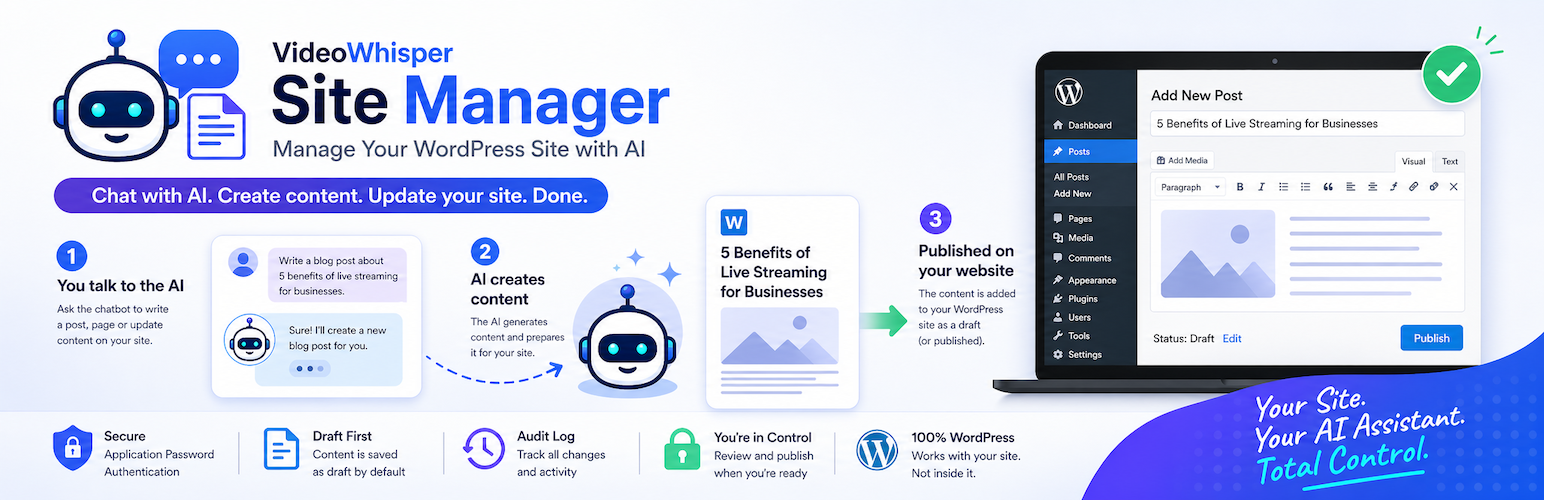
Manage WordPress with ChatGPT, Claude, Codex or Grok using your own account. Site Manager provides MCP, REST/OpenAPI, local OAuth and optional reviewed WordPress Abilities. Your AI subscription remains separate; the plugin does not call model providers directly.
Included workflows:
- Read, draft and update permitted Posts and Pages, inspect revisions and recover supported own actions.
- Compare exact content, image metadata and SEO proposals in WordPress before a human applies them.
- Discover simple WooCommerce draft products and review bounded product-name/description proposals without changing commercial fields or publishing.
- Use enabled media-library reads, reviewed image intake and metadata tools.
- Read/edit supported SEO through the selected output owner; optional Site Kit Search Console evidence helps choose one page to review.
- With the compatible Agentic Multilingual Translator, translate your own public Posts/Pages in available languages, save private drafts and publish only when all configured permissions allow. Supported WPBakery text and labels preserve builder structure and links.
- Resume own-content translation plans across small, private batches. Retrieve progress/notes, retry without duplicating work and assemble a complete draft before separately permitted publication. New tools still require the applicable native tool and connection reviews.
- Connect several separately managed sites through the optional hosted relay, retaining each site’s own permissions.
Popular uses
Prepare a blog draft, improve image descriptions, compare one SEO change, or review a multilingual page with your assistant. The optional relay lets the same agent session move between separately authorized sites.
Quick activation guides allowed roles and separate Admin/Other Roles presets through exact native review. Site Read Only, publication controls, WordPress capabilities, connection grants and personal tool exclusions remain authoritative. Draft mode keeps writes unpublished. Existing restricted/revoked policies are retained on upgrade. Optional integrations and native Abilities require their own approvals.
Start in Onboarding, review activation, then open AI/SI Agents to connect your app and try the first workflow with a read and disposable draft. Translation access and publication have separate opt-ins in Multilingual Translator > Settings. Refresh discovery after reviewing new tools.
Requires WordPress 6.9+ and PHP 8.2+. Prefer a maintained newer PHP branch. Direct local OAuth works without the hosted service. See the product page for setup and available integrations.
Extension Hooks
Developers can extend this plugin without editing core files. Common hooks include:
- Settings and admin UI:
vwsm_settings_defaults,vwsm_settings_normalized,vwsm_admin_settings_save,vwsm_rest_settings_payload,vwsm_settings_tab_label,vwsm_settings_form_publishing_rows,vwsm_settings_form_security_rows,vwsm_settings_form_rate_limits_rows,vwsm_settings_form_logs_revisions_rows,vwsm_settings_form_turnkey_oauth_rows,vwsm_settings_form_authentication_rows,vwsm_settings_form_application_passwords_rows,vwsm_settings_form_content_rows,vwsm_settings_form_admin_rows,vwsm_settings_form_attachments_rows,vwsm_settings_form_fomantic_rows,vwsm_settings_form_after_core_rows,vwsm_auth_methods_section. - Authentication and OAuth metadata:
vwsm_oauth_server_url,vwsm_authorization_server_url,vwsm_rest_401_headers,vwsm_external_oauth_onboarding_urls,vwsm_onboarding_oauth_tab_content,vwsm_handle_external_register_gpt. - OpenAPI, MCP, and tools:
vwsm_ai_actions,vwsm_ai_plugin_integrations,vwsm_ai_plugin_option_integrations,vwsm_ai_plugin_action_dispatch,vwsm_ai_action_native_openapi_tools,vwsm_mcp_server_name,vwsm_mcp_extra_tools,vwsm_mcp_dispatch_tool,vwsm_mcp_site_context,vwsm_openapi_components,vwsm_openapi_document,vwsm_write_rate_limit_mcp_tools. - Content and sanitization:
vwsm_allowed_content_types,vwsm_revision_limit,vwsm_revision_gradient,vwsm_supported_extra_allowed_html_tags,vwsm_allow_extra_allowed_html_tags. - User connection workflows:
vwsm_user_connect_handle_post,vwsm_user_connect_after_sections,vwsm_user_connect_tools_data,vwsm_user_connect_gpt_url. - Reviewed role availability:
vwsm_tool_access_feature_mapmaps fixed boolean API settings to selected tool names; semantic map changes invalidate earlier role reviews. Credentials, source hosts, role eligibility and package approvals remain separate. - Operator and environment behavior:
vwsm_default_operator_username,vwsm_use_current_user_mode.
Disclaimer
This plugin provides infrastructure for operating a WordPress site with external AI chatbots and agents. The site owner is solely responsible for the actions enabled through this functionality, including content created or changed by AI tools, credentials and access tokens, backups, privacy compliance, and any publishing or policy consequences.
AI-generated content can be inaccurate, defamatory, plagiarized, non-compliant, or otherwise unsuitable for publication. Review AI output and tool activity before publishing. Keep publishing disabled unless you fully understand and accept the risk.
Use HTTPS, protect Application Passwords and OAuth credentials, restrict access where possible, monitor logs, and maintain independent backups. Use at your own risk.
Authenticated MCP and REST context includes a bounded catalog snapshot with name/contract revisions for the current account and destination. It cannot inspect an AI app’s cached tool list. Complete every tools/list nextCursor, including empty refresh pages; keep the previous catalog on errors. A metadata refresh never grants access or retries a write. The versioned vwsm_action_catalog_diagnostics_v1 action exposes metadata stages for read-only observations, never execution or grant authority.
Frontend connection help
The [vwsm_user_connect] page provides section links, expandable app setup,
MCP URL copy buttons and a permission-aware tool list. Grok.com uses its custom
connector setup. Grok Bot has a separate Connect apps interface; custom MCP
availability depends on the product/account. Follow the linked provider guides.
Native WordPress abilities and optional MCP Adapter exposure have separate
administrator reviews. A connection can permit fewer tools than the account.
Personalized shortcode pages send no-cache headers; exclude them from any
reverse-proxy or full-page cache that ignores WordPress cache controls.
Privacy
Single-item proposals store the submitting user, selected item/operation, exact before/after fields, source permission identifiers, hash, creation/update/expiry and review result in a private review table. Bodies are escaped in native review and redacted from proposal request summaries. Native onboarding reviews use a session-bound, ten-minute transient and an expiring one-use marker; they contain selected tool metadata, never an authentication password. Disabling an optional bridge retains its existing reviewed user policies.
Native Abilities availability is stored in site options. Reviewed policies are private user metadata scoped to the site; they contain selected tool fingerprints, mode, native version, audience, user and epoch, plus the optional Adapter exposure choice. No Application Password is copied into these policies.
Local OAuth stores client names, registered callbacks, registration IP addresses, user/client IDs, granted scopes, versioned tool selections and permission mode, token expiry and last-use timestamps in this site database. Access/refresh tokens use keyed hashes and confidential client secrets use password hashes. Credentials are returned only during issuance and are not included in tool/audit payloads. Administrators can revoke tokens and remove clients from Local OAuth. Deactivating extensions does not remove the included local connection.
This plugin stores the following data on your WordPress site:
- Plugin settings in WordPress options (for example: publish, rate limit, HTTPS, IP allowlist, authentication, and provider URL settings)
- Audit log entries in a custom database table (
*_vwsm_audit_logs) - Optional dedicated operator user ID reference in WordPress options (when using onboarding helper)
- Short-lived transient for one-time Application Password display after creation (plaintext is not stored long-term)
- Short-lived transient cache for external bearer-token validation, when Turnkey OAuth is used
- Optional connected service account tokens, site keys, server URLs, and provider policy links used for remote account and Turnkey OAuth workflows
- A private
vwsm_user_contextuser-meta value (up to 2,000 characters) when a user saves My Agent Context from[vwsm_user_connect]
Audit logs may include (depending on settings):
- Authenticated WordPress user ID
- Request route and method
- Sanitized request/response summaries
- Timestamp and IP address
This plugin does not send data to third-party AI services by itself.
This plugin does not include telemetry/analytics tracking by default.
Site owners are responsible for:
- Securing the site with HTTPS
- Managing WordPress users and Application Passwords
- Configuring GPT sharing safely (recommended: Only Me)
- Reviewing the privacy implications of any external AI service connected to the site’s API
External services
Optional Site Kit Search Console evidence
Off by default. Install Site Kit by Google v1.186+ and complete its Search Console setup separately. Explicitly enabling evidence and requesting a report uses Site Kit’s selected property, Google authorization and permission checks for the current WordPress account; Google may receive the selected dates and an optional local page URL. Site Manager stores no Google credentials and schedules no reports. Bounded query/page metrics returned to an explicitly approved connected assistant can contain non-public search terms; review tool access accordingly. Top rows may omit anonymized or delayed data and are not full site totals. Review candidates are heuristic, not forecasts. Existing reports do not grant SEO writes or publication.
Service: https://sitekit.withgoogle.com/ and https://search.google.com/search-console/
Privacy: https://policies.google.com/privacy
Terms: https://policies.google.com/terms
Optional user-selected image source
Only explicitly executed approved image intake sends a WordPress HTTP GET to the administrator-approved HTTPS source supplied by the agent/user. The source receives the URL (including any query), server network address and WordPress HTTP user-agent. Host validation may resolve DNS, including during a dry run. This feature supplies no WordPress login cookie, Application Password or OAuth token. The administrator chooses the destination and must review its terms/privacy policy. Manual editing, library reads, standalone SEO and disabled intake require no external image service. Source URLs and idempotency keys are redacted from audit summaries. The optional Connection doctor probe contacts only this site’s MCP endpoint without credentials.
This plugin can optionally connect to external services only when an administrator chooses a workflow that uses them, mainly as relay for multi site management. The default external services listed below are provided for free registration-based onboarding and multi site relay functionality. They do not require payment to use with this plugin. Site administrators can also configure another compatible third-party Relay & OAuth Server URL or add custom services through the documented WordPress hooks.
Promptaur Relay & OAuth Server
Default service URL: https://server.promptaur.com
This service is used for optional multi-site relay routing (manage multiple sites from same session), shared Turnkey OAuth, shared GPT/shared MCP onboarding, and bearer-token validation on this type of setup. It makes setup simpler by allowing users to connect through one shared OAuth login and, when enabled by the service, use pre-existing shared GPT or MCP connector configuration instead of creating their own.
Data sent to this service:
- When registering a site: the WordPress site URL, site name, and optional account or server registration token entered/configured by the administrator.
- When registering a GPT/OAuth client: the site key, site secret, client name, and GPT callback URL supplied in onboarding.
- When validating OAuth bearer tokens: the bearer access token plus the site’s registered site key and site secret. The plugin caches validation briefly according to the configured token cache TTL.
- When loading Turnkey configuration, status, disconnect, or user connection data: the site key, site secret, and the specific account/site/user connection values needed for that request.
Terms of Use: https://server.promptaur.com/terms-of-use/
Privacy Policy: https://server.promptaur.com/privacy-policy/
VideoWhisper Remote Connect
Default service URL: https://consult.videowhisper.com
This optional onboarding service is used by the VideoWhisper Remote Connect wizard to register or log in a contact, import connection settings, and simplify account/site setup for multi-site relay server. It is a free registration-based service used to improve onboarding; it is not required for direct Application Password setup.
Data sent to this service from the onboarding page:
- The client plugin identifier, WordPress site URL, and normalized site domain.
- Registration/login details entered by the administrator, such as name, email address, PIN/confirmation code, website/domain, and form fields returned by the service configuration.
- Remote account tokens returned by the service when the administrator chooses to import settings or push the current site URL/account state.
Terms of Use: https://consult.videowhisper.com/terms-of-use/
Privacy Policy: https://consult.videowhisper.com/privacy-policy/
Settings and user-policy extension hooks
Installed integrations may add Settings tabs with vwsm_settings_extension_tabs using a label and callable render function. Site Manager renders an extension tab outside its own settings form. Existing vwsm_ai_plugin_integrations and vwsm_tool_access_feature_map hooks supply integration metadata and feature mappings. Personal restrictions remain an additional ceiling on the resulting catalog.
Installation
On Onboarding > Activate > Quick setup, choose and review role presets. On that same screen, optionally require an extra administrator review for every relay account/client; Native Abilities retain their own per-user exposure review. Site Manager > Tool access shows the full supported catalog for installed integrations, preset memberships and individual role-group selections. A checked tool is an availability limit; disabled integrations, account plans and connection approvals may still withhold it. Draft saves unpublished drafts and private proposals; customizing Draft retains that protection. Write adds own-action recovery where snapshots exist. Admin enables routine administration of content and site settings; Develop adds protected metadata, executable HTML and separately approved packages. Native human editing remains available. Settings > Images and SEO groups the editorial controls. Connection doctor > Troubleshooting contains advanced diagnostics. Fresh onboarding recommends Turnkey OAuth; existing architecture choices are retained.
- Upload the
videowhisper-site-managerplugin folder to/wp-content/plugins/, or install it via the WordPress Plugins screen. - Activate the plugin through the “Plugins” screen in WordPress.
- Open VideoWhisper Site Manager > Onboarding (you will also see an admin reminder notice until setup is complete).
- Create or link a dedicated WordPress user (recommended role: Editor).
- Choose included Local OAuth, optional Turnkey OAuth, or a native Application Password as supported by your client.
- For ChatGPT: open ChatGPT Builder on desktop and follow the provided step-by-step instructions. Import the OpenAPI schema from the URL shown in onboarding.
- For Claude: copy the MCP endpoint URL from the onboarding page and follow the Claude.ai, Desktop, or CLI setup instructions shown there.
- For Codex: copy the Codex MCP configuration or OAuth login command from the Codex onboarding tab, then verify the server with
/mcp.
Administrator and frontend connection screens
After configuring the connection and reviewing Onboarding > Activate, administrators can use Site Manager > AI/SI Agents directly in WordPress. Other enabled roles can use a page containing [vwsm_user_connect]; Activate offers to create that page. Both screens show the current account’s connection instructions, first workflow, personal tools and context. No permission is granted merely by opening a screen. Long setup and safety guidance is under Site Manager > Help.
Client setup
Use Site Manager > Onboarding for the current provider-specific links, exact callbacks, copy buttons and client commands. For a direct connection, choose included Local OAuth, add the exact callback shown by your client to its allowlist, then sign in and review the displayed scopes/tools. Turnkey relay and native Application Passwords are alternatives with separate authentication boundaries.
ChatGPT Custom GPT Actions can import the generated OpenAPI schema. Claude, Codex and compatible Grok custom connectors can use the MCP endpoint. Provider/client availability and subscriptions vary; instructions link their official documentation. Never paste passwords/tokens into prompts or URLs. Start with Read Only and verify a legitimate read before enabling draft writes.
Supported Authentication
Local OAuth retains existing setting keys and endpoint aliases for compatibility. Its canonical endpoints are under /wp-json/videowhisper-site-manager/v1/oauth/. Tokens authorize Site Manager APIs only, not the WordPress MCP Adapter or unrelated WordPress REST APIs. The local provider supports exact callback allowlisting and S256 PKCE with public/confidential registered clients; this is not a claim of universal client or complete current OAuth-spec support. Use HTTPS and the callback shown by your client. Native Application Passwords are a separate authentication path and are not per-tool OAuth grants.
The onboarding flow recommends using one authentication option for clarity, but development and migration setups can enable more than one.
- Local OAuth – included for direct, independent connections. Connect a compatible client directly to this site, add its exact callback URI to the allowlist, sign in and review requested scopes and individual tools. New or changed tools require renewed consent; refreshing a token never adds permissions. Writes and admin access are unchecked on the consent screen until selected.
- Turnkey OAuth – recommended and preselected on fresh installations, with site Read Only retained. The optional hosted relay connects multiple linked sites to one AI app connection and the same agent session. Link each site to the same relay account and name the target site in prompts. WordPress Multisite is not required; each site retains its own permissions and account limits apply.
- Application Passwords – direct WordPress authentication over HTTPS using WordPress core Application Passwords. Best for admin-owned custom GPT/MCP setups where credentials are managed by the site operator.
- Extension-provided authentication – developers can add custom OAuth, token validation, alternate connector metadata, or other authentication flows with the hooks listed below.
Permission modes and editorial workflow
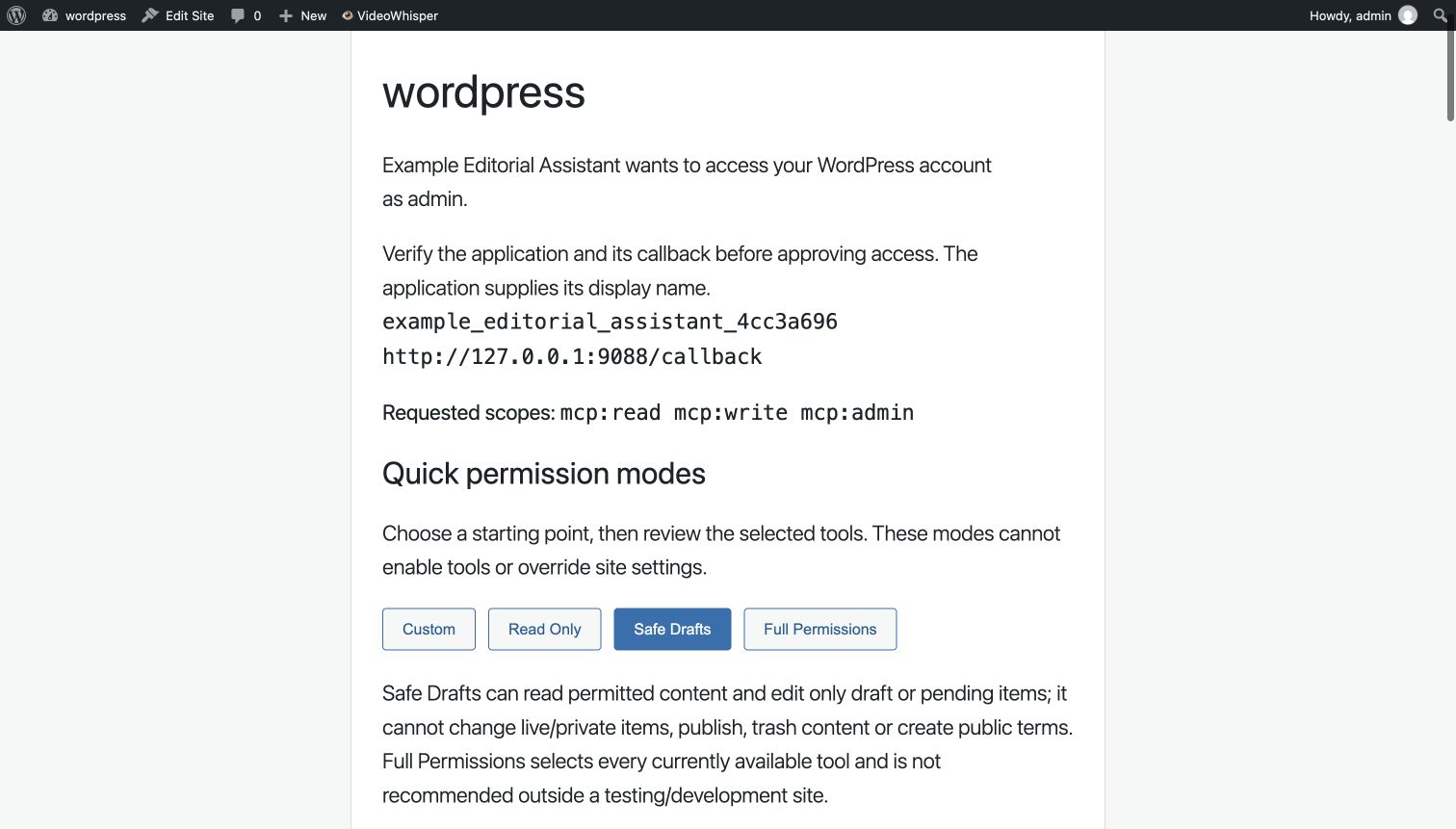
Local OAuth offers quick selection buttons before approval:
- Read Only selects available non-admin reads and the server denies write tools for this connection.
- Safe Drafts can read permitted content and create/edit only draft or pending items. It cannot touch live/private items, publish, trash content, create taxonomy terms, or implicitly create tags. Assigning existing terms and restoring revision text still require object permissions and current versions. A draft default is enforced even if the site normally publishes new content.
- Full Permissions selects every tool/scoped permission currently available in this request. It is not recommended outside a testing/development site. It cannot enable disabled site settings or bypass WordPress capabilities, and it never grants future tools automatically.
- Custom starts from read access and lets you review tools individually. Narrowing a restricted preset retains its server-side restrictions; choose Custom for a different policy.
Safe Drafts limits the plugin’s supported core operations; installed third-party save hooks may have their own effects. Test with a dedicated least-privilege account and disposable content before production use. No mode is a human publishing approval system or a general sandbox for other plugins.
Enable public custom post types under Settings > Content (off by default), then reconnect to review the changed schemas. Use list_content_types and list_terms, create a draft, read its content_version, and supply expected_version on edits/term assignments/revision restoration. get_preview_link returns a WordPress preview that requires signing into WordPress as the connected editor; the URL is not anonymous access. Revisions restore title/content/excerpt only. Trash operations require WordPress Trash to be enabled, never permanently delete, and restore to draft. Older audit snapshots without the current taxonomy version may require manual review.
Editorial tools work with direct Local OAuth, native WordPress authentication or a verified versioned relay. Under preset-based relay access, eligible clients use the tools reviewed for their role. When extra client admin review is enabled, use Site Manager > Relay permissions. Existing installations keep that review requirement until an administrator explicitly changes it; Custom, Read Only, Safe Drafts and revoked client policies stay restrictive. Native Application Passwords still use WordPress/site permissions rather than the Local OAuth modes.
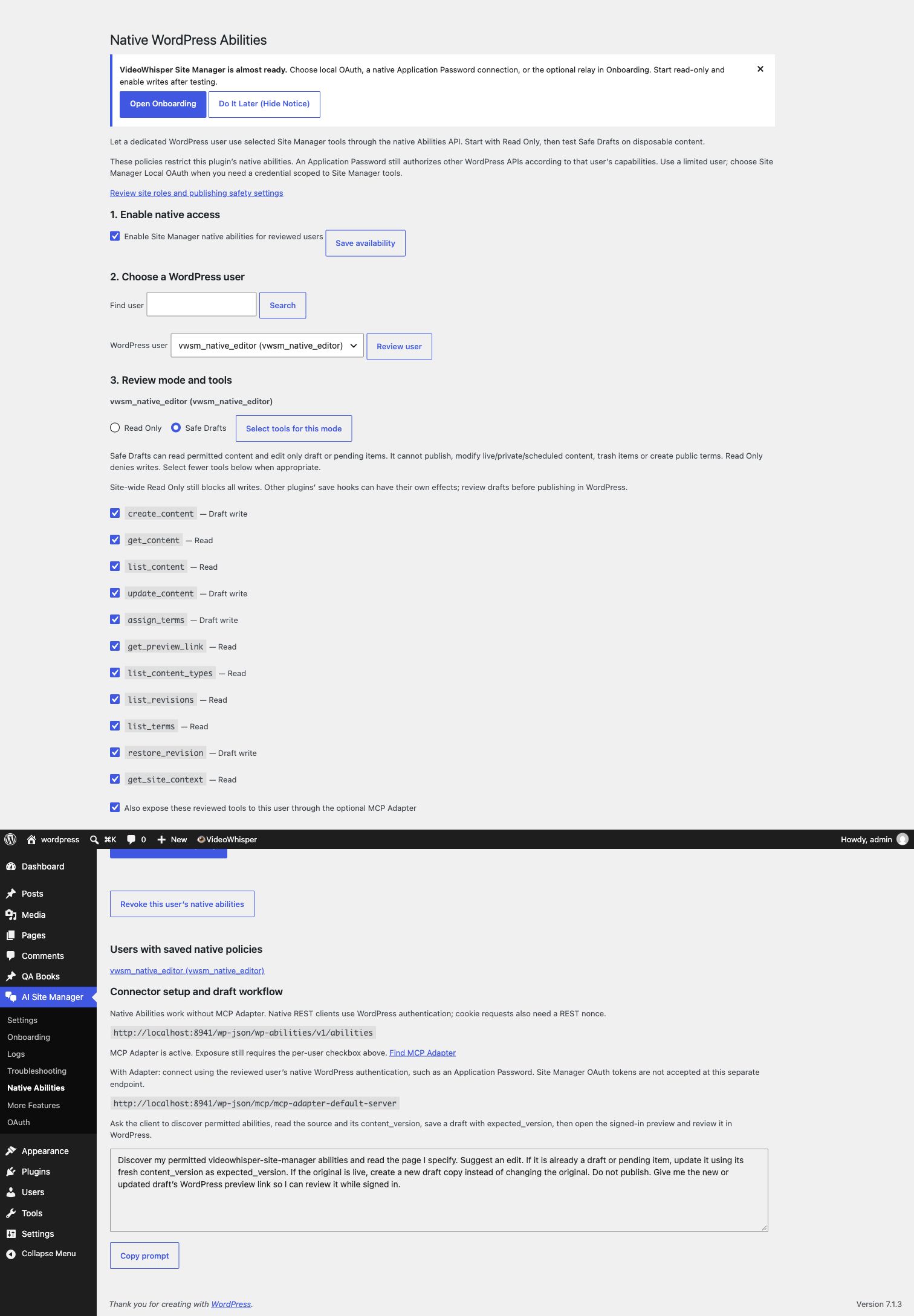
Optional native WordPress Abilities
Open Site Manager > Native Abilities. Access is off until an administrator enables it and saves a reviewed policy for a chosen site user. Start with Read Only. Safe Drafts adds permitted draft/pending operations; it cannot publish, modify live/private/scheduled content, trash items or create public terms. Site settings, WordPress capabilities, ownership, shared rate limits and audit still apply. Existing content is untrusted data, not permission to perform an operation.
Select individual tools and save the reviewed policy. New or changed contracts require review again; revocation takes effect on the next request. Policies bind the user, site, native resource, install epoch, profile version and selected canonical tool fingerprints. Uninstall revokes the epoch while retaining customer content and metadata; reinstall requires a new review.
The fixed owned namespace videowhisper-site-manager/ exports: get-site-context, list-content, get-content, list-content-types, list-terms, list-revisions, get-preview-link, create-content, update-content, assign-terms, restore-revision, plus enabled list-media, get-media, set-featured-image, get-seo, update-seo and propose-seo-changes. Owned exports remain fixed. Eligible public third-party abilities can be imported individually under Reviewed abilities, with separate source/schema review and exact connection consent; no automatic exposure occurs. Native REST discovery: /wp-json/wp-abilities/v1/abilities. Read abilities use GET; draft writes use POST. Supply the ability’s input object. Reads return content_version; updates, assignments and restoration require the matching expected_version. Review the signed-in preview and publish manually in WordPress.
Core Abilities work without MCP Adapter. For MCP, optionally install and activate the official MCP Adapter from Plugins > Add New, and select Also expose these reviewed tools in this user’s policy. Connect a compatible native-authenticated client to /wp-json/mcp/mcp-adapter-default-server. Use that reviewed user’s WordPress Application Password over HTTPS; never paste credentials into a prompt or URL. Cookie REST clients also need a REST nonce. Adapter discovery and nested execution both honor the reviewed selection. Tested with official MCP Adapter 0.7.1; individual clients may require different authentication setup.
These policies constrain this plugin’s abilities; they do not narrow the Application Password itself. Other WordPress APIs still follow that user’s capabilities. Use a dedicated limited account. Site Manager Local OAuth remains the choice for a credential scoped to Site Manager tools; those tokens are not accepted by native Abilities or the separate Adapter endpoint. Native exposure neither changes existing OAuth grants nor requires a vendor account or an AI-provider API key.
Sample prompt (also available with a Copy button in Native Abilities): “Discover my permitted videowhisper-site-manager abilities and read the page I specify. Suggest an edit. Update only a draft/pending item using its fresh content_version as expected_version; otherwise create a new draft copy. Do not publish. Give me the WordPress preview link so I can review it while signed in.”
FAQ
How do I review WooCommerce draft product text?
Activate WooCommerce 11.3 or newer with its native product abilities (WooCommerce 11.3 requires WordPress 7.0). In Tool access, review list_product_drafts, get_product_text and propose_product_text_changes for the intended roles and any restricted connection. Read permits discovery; Draft permits private proposals. New tools are never added to existing grants automatically; personal exclusions remain in force. Native WordPress Abilities need their own reviewed user policy. The separate MCP Adapter is optional.
Ask: “Find the draft product named Example, read its current text, and propose a clearer description. Keep it a draft and send me the WordPress review link.” A person compares the exact before/after fields in Review changes and applies them within ten minutes. Only existing simple draft products and name, description and short description are supported. The plugin uses WooCommerce’s fixed native update operation, not arbitrary post meta or a generic ability executor.
Names are limited to 1,000 UTF-8 bytes, descriptions to 32 KiB, short descriptions to 8 KiB and encoded proposals to 256 KiB. Safe post HTML is accepted without silent rewriting. Shortcodes, blocks, builders, variable/other product types and larger snapshots require the native WooCommerce editor. Read the fresh product version after a conflict; an interrupted application stays blocked from replay. Prices, stock, files, images, customers, orders and publication are not managed by these tools. The plugin does not call an external service for this local workflow.
Connection and workflow details
Resource safeguards are easy to review in Settings, Resources, beside Rate Limits. Request frequency and request size/time/concurrency are independent: changing a resource allowance never grants a tool or clears a user’s personal restrictions. Existing resource bookmarks continue to work. Independent extensions may add settings panels through vwsm_resource_settings_tabs_v1 without a private dependency.
Choose the connection for your users
Use a shared relay for a small administrator/editor team managing several sites in one agent session. Use the included local OAuth server when many or all site users need agents for their own content. Neither connection path changes WordPress roles, ownership, reviewed tool scopes or personal restrictions.
Start in Onboarding, review Quick setup, connect on AI/SI Agents, then use the read-first workflow. Connection doctor diagnoses one exact missing tool before you change permissions or refresh a client catalog. Help keeps longer setup and workflow explanations out of the main forms.
Compatible authenticated integrations can negotiate small verified extension flags bound to the current user, connection and issuer. Missing or malformed optional flags grant no new access; existing authentication, personal tool restrictions and native approvals remain authoritative.
Configurable local Resources safeguards bound ordinary content JSON input, parsed complexity, complete read results and active operations. The content service applies read budgets across REST, MCP and native WordPress Abilities. Media and integration upload contracts keep their existing limits. Operator ceilings and trusted extension allowances can only reduce the effective local ceiling; tool permissions and personal restrictions remain independent.
Own text translation and review queue
With a compatible current Agentic Multilingual Translator, translation_review_queue lists your own editable public page/post work. Included text tools list permitted registered sources, read bounded context, save private plain-text drafts, update private notes and separately publish when configured permissions permit. Supported comments, bios, reviews and labels require an enabled adapter that re-reads the public source and verifies ownership and operation permissions. Arbitrary options/usermeta and private content are not exposed. Native corrections remain protected, source changes conflict, and notes do not refresh stale translation text. Site-wide configured messages and other users are outside these own-content tools; integrations may add separately authorized administration through extension hooks. New tool approvals never clear existing restrictions. Native setup/review links are under Multilingual Translator > Plugin texts / Review queue.
With compatible current Translator releases, translation_plan_refresh reuses verified unchanged units and retains protected manual corrections. SEO fields travel with the complete private draft; publication remains separate. Refresh discovery and review changed field/protection tool contracts when required. Safe Drafts supports own-content refresh but cannot publish, unlock fields or select administrative scope.
Shared private editorial progress notes accompany editable content and can be read/updated with get_content_notes/update_content_notes. Agents can record review/completion work for editing, optimization and translation without changing public content. Updates require the latest notes version; notes are bounded plain text, retained on uninstall and excluded from public page output. Notes never grant tool or publication permission.
For the optional Translator integration, start with translation_status to check setup and find native settings/review links. A site administrator opts into integration access, configures languages and reviews the allowed role/client tools. Own-content draft tools and separately enabled publication keep their existing ownership and permission checks. Additional integrations may extend administration through separately approved tools and documented hooks.
With the compatible Translator, inspect private source differences and propose local language URLs for your own content. Publication separately applies a proposal and retains earlier paths. New URL publication semantics require the applicable connection review; native section protection remains under human control.
My CRM plan changed. Should I refresh credentials?
Use Settings → Turnkey OAuth → Refresh plan and status. This uses the stored site key and secret; it does not register the same URL again, rotate credentials or approve tools. Current servers can refresh CRM metadata immediately, with a one-minute repeat-request cooldown. Normal requests may show cached information while a stale plan is queued for refresh. Older servers use their normal cache interval. Do not remove registration to synchronize a plan.
When this plugin is installed on a CRM site, it also supplies an optional notification provider through vws_crm_service_notification_providers_v1. A compatible CRM integration can opt in through its native server-sync controls and reuse the existing registered HTTPS relay connection. Enable change notices on both ends. The CRM sends an event ID and the changed account/plan ID using the stored site registration credentials; customer account tokens, contact details and plan values are not sent. The receiving server reads authoritative CRM metadata. No tool permissions are granted by a notice.
Relay account approval
Open AI Site Manager > Relay permissions and choose the WordPress account. The account screen shows current site approval mode, Admin/Other Roles presets, the account override, verified clients and recommended permission-contract updates. Eligible clients and changed previously selected tools are checked. Review selected approvals or Approve all recommended tools for all clients, inspect the exact review, then Approve. Tools excluded by a client mode remain excluded; revoked or invalid clients require individual review.
Use Preset from Now selects Read Only, Draft, Write or an eligible administrator mode for current/future verified relay clients. It follows current site-approved tools inside that ceiling; it does not approve disabled site features, personal exclusions, new packages or unrelated integrations. Exact restricted clients remain restrictive unless the administrator explicitly reviews replacement for the checked active clients. Review each client is available for high-stakes accounts. The site-wide default can follow configured role presets while retaining account overrides. The configuration link opens the extra-review section in Tool access.
Every change is a native administrator POST with CSRF protection, an operator/session-bound short-lived exact review, current configuration/catalog checks and one-use apply. Bulk approval needs transactional WordPress metadata tables. Existing individual reviews also reject stale account snapshots. Upgrading does not change live approval policy.
Detailed workflows
Optional Agentic Multilingual Translator integration adds six typed tools: translation_languages, translation_sources, translation_context, translation_save_draft, translation_review and translation_publish. Users can translate only their own editable public Posts/Pages in enabled site languages. Contexts bind user, site, source hash, target version, current Translator settings and expiry. Enable access in Multilingual Translator > Settings and review the exact tools in Site Manager > Tool access and the connection. Safe Drafts permits private translation drafts; publication additionally needs both plugins’ publication controls and WordPress publishing capability. Existing restricted grants and personal exclusions remain in force.
Start with one clean Activate screen: select allowed roles, choose Admin/Other Roles presets and review exact changes before continuing directly to your first workflow. Advanced connection reviews stay separate. Extra per-relay-client administrator review is optional and off on a fresh installation; upgrades retain the existing mode until a native administrator explicitly changes it. Custom/restricted/revoked grants and personal tool exclusions remain authoritative.
Choose an SEO improvement from real search evidence. The optional read-only Search Console adapter uses your existing permitted Site Kit connection, returns bounded page/query metrics and clearly labeled review candidates, then guides your assistant to a private single-item SEO proposal. You review exact changes in WordPress before publishing them. No extra Google credentials or automatic SEO edits.
Manage multiple linked WordPress sites from one AI app connection and the same agent session with the optional hosted Turnkey relay. Install Site Manager on each site, link the intended users to the same relay account, and name the target site in each request. Separate WordPress installations are supported; a WordPress Multisite network is not required. Each site keeps its own roles, reviewed tools and connection permissions. Hosted account limits and explicit connection consent apply; direct Local OAuth remains available without the hosted service.
Let each WordPress user narrow agent access from the connection page: Read Only, Draft, Safe Write, Power Write, eligible administrator modes or Custom. Group tools by feature, keep Draft protection when customizing, and restore the site ceiling without altering connection grants. Administrators can select feature groups in Tool access. Personal limits cover Site Manager APIs and its owned native Abilities; they do not restrict unrelated WordPress APIs or manual editing.
Set separate Admin and Other Roles limits with Disabled, Read, Draft, Write, Admin, Develop or Custom presets. Review the exact tools before saving, filter the Tool access matrix and customize individual selections. Admin and Develop are administrator-only. Presets retain WordPress capabilities and separate integration approvals; upgrading does not change existing access. For the optional relay, choose whether a second administrator review is required for each account/client. Existing installations retain their review mode until explicitly changed. API feature switches follow the reviewed tools; duplicated switches are replaced by Tool access links. Site Read Only and publication controls remain authoritative; a preset does not unlock writing or establish authentication.
Prepare one content or image change for a clear native human review: compare exact before/after fields, preserve native blocks and keep the original unchanged until an authorized person applies it. Optional private proposals work under Safe Drafts, expire after ten minutes and recheck the source permission, object version and publication policy. Shared image metadata requires separate permission; no file upload or publication status is changed by a proposal.
The optional SEOPress 10.4+ adapter uses four native WordPress Abilities to read/update title, description, canonical and noindex with vendor role restrictions. SEOPress remains the rendering owner, inherited noindex stays protected, and compatible page caches are purged after an SEO write. It does not enable the vendor external REST switch or add duplicate tags.
Prepare a concrete SEO change for one item, compare before/after values in WordPress, then apply with a human review. Optional Agentic Optimization integration uses its own editor and renderer, including per-item noindex, while preserving manual editing and avoiding duplicate SEO output. Relay tools require the reviewed site role policy or an exact per-client review when that extra mode is enabled. Existing restricted or revoked policies remain authoritative. Review eligible installed WordPress abilities individually; source or schema changes withhold them until reviewed again.
Requires WordPress 6.9 or later and PHP 8.2 or later. Optional native WordPress Abilities expose reviewed Site Manager reads and draft writes; the separate MCP Adapter remains optional. Use a currently supported PHP release; PHP 8.2 security support ends December 31, 2026.
VideoWhisper Site Manager lets you manage WordPress posts and pages through external AI/SI agents such as ChatGPT (Custom GPT + Actions), Claude (MCP), Codex (MCP), and Grok custom MCP connectors, using your own account, not API keys.
It exposes authenticated WordPress endpoints and setup guidance while you keep using your own AI account and subscription.
Included features:
- Authenticated REST, MCP and generated OpenAPI interfaces for external agents.
- Direct local OAuth with S256 PKCE, exact versioned per-tool consent, scopes, client management and revocation; no relay account required.
- Optional native WordPress Abilities and separate MCP Adapter exposure, reviewed per user under Read Only or Safe Drafts.
- Optional shared Turnkey relay, frontend connection help and native Application Password setup.
- Editorial tools for enabled content types, taxonomies, revisions, guarded recovery and signed-in draft previews.
- Connection doctor, client configuration copy and credential-free diagnostics.
- Opt-in image library/intake/metadata tools and effective standalone, Agentic Optimization or Yoast SEO; details below.
- Object permissions, HTTPS, publication controls, rate limits, audit logs and extension hooks.
The plugin does not call OpenAI, Anthropic, xAI, or any AI/SI provider directly. Your WordPress site exposes authenticated endpoints and setup guidance. You connect it to ChatGPT, Claude, Codex, or Grok yourself with your own account and subscription.
Current AI actions and tools
Available tools depend on site settings, authentication, exact consent and WordPress permissions. The registry feeds MCP, OpenAPI and the dynamic agent guide; grouped OpenAPI actions use an action subaction field.
Core: get_site_context, list_content, get_content, get_logs, create_content, update_content. Conditional recovery: revert_action, reset_action.
Direct native/Local OAuth editorial tools: list_content_types, list_terms, create_term, assign_terms, list_revisions, restore_revision, get_preview_link, trash_content, restore_content.
plugins_list lists compatible integrations, their agent instructions and visible tools. `get_site_context` includes a brief permission-aware integration summary. Other plugins attach through `vwsm_ai_plugin_integrations`.
Read /wp-json/videowhisper-site-manager/v1/agent-guide (Markdown), with ?format=json, ?surface=mcp or ?surface=actions for alternate formats. The generated guide describes the current site’s permitted tools.
Try a complete workflow
After Activate, open AI/SI Agents, connect your app, then open Try your first workflow after connecting. The same guide is included below the app instructions on [vwsm_user_connect]. Copy one prompt at a time to verify a read, prepare a disposable draft, and request a private content proposal. The guide reflects the current WordPress account’s site and personal tool limits; the connected agent may have fewer grants. Nothing runs automatically, no permissions are changed, and no usage analytics are collected. Review the exact before/after in WordPress before applying, then trash the test draft.
Rank Math compatibility
Select Rank Math native ability (read only) in Settings > Images and SEO when Rank Math v1.0.272+ is active. get_seo executes only the owner’s native post SEO read, honoring its capabilities and item access. It returns resolved title, description, canonical and robots/noindex data. It does not expose all Rank Math abilities, write private vendor metadata, change indexing, or emit additional tags. Use the Rank Math editor to apply recommendations. Yoast, SEOPress, Agentic Optimization and standalone providers retain their existing supported workflows. Changing providers requires current SEO tool consent. Rank Math’s own optional services and tracking retain their separately configured consent.
How do I review one content or image change?
Enable private item proposals under AI Site Manager → Images and SEO, then review the new tools for your connection. Ask the assistant to read get_content or get_media, prepare propose_content_changes or propose_media_changes using the returned version, and open the native review URL. Compare the exact fields and apply while signed in as a permitted user. Proposals expire after ten minutes and do not change the target until applied. Public/shared changes require current publication permission.
Can I review AIOSEO title and description changes?
Yes. Select AIOSEO title and description (single-item review) in Settings > Images and SEO with AIOSEO 4.9.8+ and its native post SEO abilities available. Current AIOSEO is recommended. Enable SEO tools and review the changed get_seo / propose_seo_changes permissions in Tool access and any restricted connection. Existing approvals do not automatically acquire a new provider contract.
Ask your assistant to read get_seo, propose only title/description with that seo_version, and return the WordPress review URL. An authorized human reviews the exact before/after and applies it there. No direct AIOSEO update tool is exposed. Safe Drafts can save a private proposal without changing public output; application still requires current source, reviewer, publication and vendor permissions.
Values are stored overrides, not resolved frontend previews. Blank values restore AIOSEO defaults and smart tags resolve through AIOSEO. Older AIOSEO may require saving an item in its native editor before its abilities can read it; update AIOSEO or follow that editor step. The adapter never falls back to private-table writes. It leaves canonical, indexing, social, schema, keyphrases and publication state unchanged, adds no rendering tags, and requires neither the MCP Adapter nor a new external account. Other configured AIOSEO services keep their separate consent. Compatible local page caches are purged after application; external CDNs may need a separate purge.
Can SEOPress manage my SEO output?
Yes. Select SEOPress under Images and SEO with SEOPress 10.4+ and Titles and Metas enabled. Site Manager calls its four fixed owner abilities; vendor SEO role restrictions still apply. Inherited noindex cannot be removed here. Selecting this adapter does not enable SEOPress external REST exposure. It adds no rendering tags or second metadata store. Remote hosting/CDN caches may need their own purge.
How do I review new relay tools and installed abilities?
A relay must advertise permission contract v1. Open AI Site Manager > Onboarding > Activate > Quick setup to review Admin and Other Roles presets. Extra client admin review is optional on that same screen: when off, verified eligible connections use the reviewed role preset. Custom, Read Only, Safe Drafts and revoked client policies remain restrictive; existing Full selections follow the role policy only after this native mode-change review. Existing installations retain their previous requirement until changed. Extra review mode binds an exact allowlist to the connected WordPress account and verified issuer/client under Relay permissions. Revocation never falls back. Native WordPress Abilities retain separate per-user grants and optional MCP Adapter exposure. Context writes remain excluded from Safe Drafts.
Under Reviewed abilities, select up to 20 eligible public abilities from installed plugins. Private abilities, this suite’s exports and MCP Adapter bridge helpers are excluded. Source or schema changes require another review. Imported tools use stable identifiers and the owner’s native schema/permission checks. They require administrator access; writes also require publication enabled and are excluded from Safe Drafts. Review these new identifiers in the intended connection separately. Imported abilities do not become owned native exports. Installed plugin code remains trusted; this is not a general sandbox.
How do I review an SEO proposal?
Enable SEO tools under Images and SEO and choose a ready provider. Agentic Optimization must have its standalone editor enabled and own SEO output. Ask the assistant to read get_seo, then create propose_seo_changes using the returned seo_version. The proposal can refer to an editable live item without changing public metadata. Open its WordPress review URL, compare the exact fields and apply there. The proposal expires after ten minutes; changed content/provider/permissions require a new review. No agent approval boolean can apply it. Other SEO providers keep ownership of their own rendering.
Connection doctor, images and effective SEO
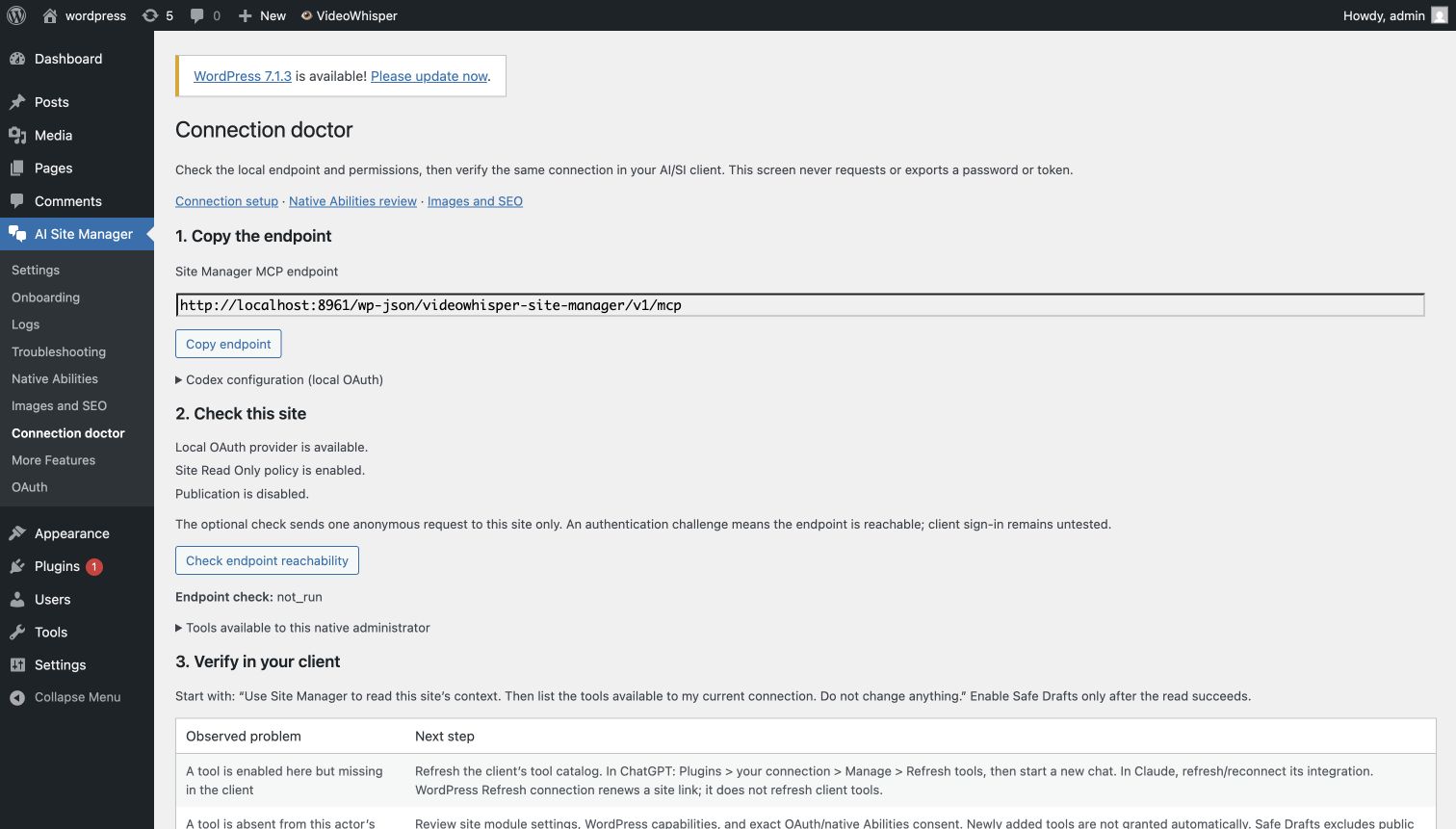
Open Site Manager > Connection doctor, choose the site account, affected verified relay connection and missing tool, then run the read-only check. It distinguishes unavailable modules, role reviews, personal restrictions, connection selections and changed definitions. Existing permissions are never saved or expanded. Optional client observations and tool fingerprints help identify stale metadata without asking for a token. Exact review links and a redacted copy/export support handoff. Endpoint/configuration and recovery help stay available in a closed section. The optional reachability check sends one anonymous request to this site’s endpoint only; it does not verify client credentials. WordPress cannot observe a client chat’s loaded catalog. Refresh tools in the client and start a new conversation when necessary; refreshing a site connection does not add tools or permissions.
Under Site Manager > Settings > Images and SEO, enable only the required modules. Existing settings and grants retain the prior storage-only SEO behavior. New tool names require exact local OAuth, native Abilities or relay permission review. New workflows are not exposed to unversioned relay grants.
list_media,get_mediaandset_featured_imageuse the enabled image module and object capabilities. Featured-image selection requires freshcontent_version. Safe Drafts can select an existing image on draft/pending content without editing shared image metadata.upload_media_from_urlrequires a separate reviewed Local OAuth tool selection or native WordPress authentication, upload capability, an editable target/current version and a 16–80 character idempotency key. Intake creates a public Media Library URL even for drafts. It is excluded from Safe Drafts. Administrators approve at most 20 exact HTTPS source hostnames. No redirects, credentials, private/reserved addresses, SVG, GIF or animated intake. JPEG/PNG/static WebP must fit 8 MiB or the lower host upload limit and the 16 MP/memory budget. Dry runs resolve/validate the hostname but perform no HTTP image download or attachment save. Identical retries reuse the attachment; conflicting reuse is rejected. Failed temporary files are cleaned.update_mediarequires explicit shared-metadata and publication settings, WordPress publication/edit capabilities and currentmedia_version. Shared alt/caption/title/description edits can affect live pages. Read Only/Safe Drafts exclude this tool.get_seoreports the provider, stored title/description/canonical andseo_version.update_seorequires the current version and changes only supplied fields; empty strings clear them. Preview withdry_runbefore applying. Draft policies remain enforced; live/private/scheduled edits require publication permission.- Storage only keeps existing
_vwsm_*metadata behavior and makes no effective-output claim. Standalone opts into public singular title/description/canonical rendering and yields to recognized Yoast, Rank Math, AIOSEO, SEOPress or The SEO Framework ownership. It is not a full sitemap/schema/redirection suite. Yoast uses only its fixed native get/update post SEO abilities and vendor permissions; tested with Yoast 28.7. Yoast must have indexables enabled/built; local/staging environments may intentionally disable those abilities. No vendor table writes, provider credential storage or unrestricted execute-any-ability wrapper is included. Other vendor write adapters remain future work.
Native Abilities adds enabled read/draft tools (list_media, get_media, set_featured_image, get_seo, update_seo) when their modules are enabled. Review them per user; public intake and shared image edits remain outside that draft-only bridge. Private SEO proposals may reference an editable published item without changing it; apply them in the native Review changes screen. Optional MCP Adapter exposure keeps the same consent checks.
Prompt: “Find my draft about [topic]. Read its version, list accessible images and preview a featured-image selection. Save only the reviewed draft. Do not upload or change shared images. Read get_seo, suggest a title/description, preview with dry_run, then apply only the approved fields with its fresh seo_version. Leave canonical and publication status unchanged.”
Image/SEO responses report supported previous values; no universal undo or transaction across third-party editors/save hooks is promised. Mutation locks serialize this workflow’s writers only. After publication, verify the actual page source and purge any independent hosting/CDN cache as needed.
Does this plugin store an OpenAI, Anthropic or xAI API key?
No. This plugin does not store or use any AI/SI provider API keys. Your agents or AI/SI apps connect to this plugin. Plugin does NOT connect directly to AI/SI services.
Can I use it with my free account or paid subscription?
Yes, you can connect agents or applications (i.e. ChatGPT, Claude, Grok Bot) that use your free account or paid subscription from their providers (i.e. OpenAI, Anthropic, xAI).
What agents or applications can use this MCP server?
Use a compatible Streamable HTTP MCP client. Client availability depends on the provider, product version and account. Release 1.3.1 was verified with the official TypeScript MCP SDK 2.3.1, including TLS, discovery, authorization, refresh and revocation. The setup tabs provide guidance for popular clients; this does not guarantee every app version or account tier.
How does authentication work?
The plugin includes site-owned Local OAuth with explicit scopes and versioned individual tool selection, plus optional Turnkey OAuth and WordPress Application Passwords. Turnkey OAuth uses a compatible Relay & OAuth Server for shared GPT/MCP workflows. Application Passwords use WordPress core HTTP Basic Authentication over HTTPS. Developers can add more authentication flows with the documented hooks.
Why must an existing local OAuth connection reconnect?
Version 1.3.1 requires an explicit, versioned selection of individual tools. Existing settings, client registrations and audit data remain, but tokens issued without these permissions require a one-time reconnection. Only selected unchanged tools remain usable; newly added tools, contract changes and expanded publication permission require another review. Token refresh cannot expand access. These per-tool grants apply to included Local OAuth, not native WordPress Application Passwords or the optional relay service.
How should an agent edit or recover content?
Read the item with get_content, review its content_version, preview the intended change with dry_run, and pass that version as expected_version when saving through Local OAuth. A stale version returns a conflict instead of overwriting a later edit. Creating content defaults to draft. Responses include a request ID and, where available, an audit log ID. Supported update snapshots can be reverted/reset only if the current owned fields match the expected snapshot and permissions still allow the operation. This is not an undo guarantee for third-party effects or unsupported fields.
What remains after uninstall?
Site content, users, settings, client registrations and audit data are retained. Local access/refresh tokens are revoked and a reinstall requires a new permission review. Plugin cleanup jobs are removed. Deactivating the plugin alone does not delete customer data.
Can the API publish posts immediately?
Not by default. Creating published content or changing an already live item is blocked unless an administrator enables Allow publish in the plugin settings. The onboarding instructions and GPT/Claude guidance also reflect whether publishing is enabled.
Why does ChatGPT, Claude, or Codex get a 403 on logs?
The /logs endpoint is restricted by the log access settings. This is intentional. A dedicated Editor account can still create/edit content, but cannot access operational audit data unless that access is enabled.
Does the plugin require HTTPS?
Yes, by default plugin REST endpoints (including the OpenAPI and MCP endpoints) require HTTPS. A development-only setting can allow HTTP if needed on a local/dev environment.
How quickly are revoked external OAuth bearer tokens rejected?
External bearer-token validation uses a short cache to reduce remote validation traffic. The cache TTL is configurable in settings (External token cache (seconds)), so revoked tokens are typically rejected after that cache window expires.
Can I set up everything from the plugin without visiting Users > Profile?
Yes. You can create the dedicated user and create the Application Password directly from the onboarding page. A profile link is still provided for later review/revocation.
Does this plugin manage CRM support tickets?
No CRM ticket-management code is bundled in this plugin. It provides generic hooks that let other plugins register their own AI tools. Live Support Tickets is a separate WordPress.org plugin; if it or another installed plugin registers tools through the documented hooks, those tools are available according to that plugin’s own settings and permissions.
What content types are supported?
Posts and pages by default (both enabled). Includes explicitly enabled public custom post types in the Content settings tab. Non-public/system types are excluded. Developers can extend tool behavior with hooks such as vwsm_allowed_content_types, vwsm_mcp_extra_tools, vwsm_mcp_dispatch_tool, vwsm_openapi_components, and vwsm_openapi_document.
Does it include an AI chat interface inside WordPress?
No. You need to use ChatGPT, Claude, Codex, or another compatible external AI application. This plugin only provides REST endpoints, an MCP endpoint, and onboarding for those external AI applications.
Does the Claude connector work on mobile?
Yes. Once you set up and authorize the connector in Claude.ai on desktop, it is automatically available in the Claude iOS and Android mobile apps — no additional setup is needed.
How to report issues, request assistance or suggest features?
Consult VideoWhisper for assistance, reports or feature suggestions.
Where do I report security bugs found in this plugin?
Please report security bugs found in the source code of the plugin through the Patchstack Vulnerability Disclosure Program. The Patchstack team will assist you with verification, CVE assignment, and notify the developers of this plugin.
Screenshots





Changelog
1.30.4
- Return structured, retryable context safety-limit feedback through MCP, REST actions and OpenAPI instead of a critical error. Keep existing resource budgets, permissions and private audit redaction.
1.30.3
- Add a versioned extension hook to exclude private CRM request/response payloads and state snapshots from shared audit logs while retaining operation outcomes.
1.30.2
- Clarify Agents and context and Editing and roles tab captions to match their controls. Saved fields, permissions and tool contracts are unchanged.
1.30.1
- Add the release upgrade notice for the new administration navigation. Tool behavior, grants and saved settings are unchanged.
1.30.0
- Task-based administration: compact navigation groups, matching sidebar/toolbar entries and related-screen tabs. Settings now groups access, editorial, safeguards and integrations without changing saved controls or grants.
1.29.0
- Add separate bounded WooCommerce simple-draft text discovery, reads and private single-item proposals with native human approval.
- Bind exact source and native-owner contracts; recheck object, source, reviewer and personal/client permissions, reject stale changes and retain commercial fields.
- Preserve existing tool definitions and grants. The optional integration needs compatible WooCommerce native abilities; no MCP Adapter, external service or direct agent application is required.
1.28.0
- Add an optional fixed AIOSEO title/description adapter using native owner abilities and private single-item human review. No direct AIOSEO write tool or duplicate rendering is added.
- Preserve canonical, indexing, social, schema, keyphrases and publication state; retain native vendor/object checks and bind proposals to owner data, defaults, content and selected provider.
- Retain existing tool approvals and personal restrictions. Selecting AIOSEO requires current SEO tool review; unsupported fields and uninitialized older owner records return actionable guidance.
1.27.0
- Read bounded Gutenberg block metadata and one supported plain-text paragraph or heading, then propose only that text for native human review.
- Preserve exact surrounding source bytes; refuse unsupported formatting, nested/bound/locked/builder blocks or incompatible save sanitization.
- Keep existing permissions and tool contracts; new section tools need applicable role, personal and connection review. Proposals return compact receipts and never publish.
1.26.1
- Replace duplicate-registration credential refresh with authenticated plan/status refresh. Keep stored credentials and tool approvals; synchronize the account summary with the connected server.
- Bound configuration responses and disable redirects while sending registered site credentials.
- Supply a generic optional CRM notification provider using the existing HTTPS relay registration; show queued stale-plan feedback.
1.26.0
- Resource safeguards are now under Settings, Resources after Rate Limits. Existing resource bookmarks redirect without changing saved ceilings or tool permissions. A versioned settings-tab hook lets independent extensions add their own bounded policies.
1.25.0
- Clarify connection choice: shared relay for small multi-site admin teams; local OAuth for many content authors. Preserve all existing approvals.
1.24.0
- Add a read-only Connection doctor inspector for selected accounts, tools and verified relay clients, with role/personal/connection review decisions and precise native review links.
- Add small actor-filtered catalog snapshots to existing MCP and REST context responses; no new tool approval or permission changes.
- Explain changed client definitions, incomplete catalog paging and custom versus published app refresh; retain credential-free export and native-only access.
1.23.0
- Bind optional verified integration flags to the authenticated user, connection and issuer, including cached validation; missing flags do not expand access.
- Preserve existing authentication and personal/tool/native permission ceilings.
1.22.0
- Add native Resources settings with recommended defaults, operator ceilings and independently bounded dimensions.
- Check ordinary content request bodies before owned JSON decoding; bound content results while building lists and across native/REST/MCP services.
- Use atomic nonblocking user/site leases with fenced expiry and release; preserve grant, personal, Safe Drafts and media contracts.
- These local guards do not replace web-server body limits, database deadlines, worker termination or fleet isolation.
1.21.1
- Match the current Translator page-unit ceiling while retaining all source, byte, role, personal and connection checks. Changed tool definitions require native review.
1.21.0
- Keep reviewed content tools available when page builders register a narrower API content inventory; new content scope still needs native review.
- Review only selected new or changed tool definitions without replacing other approvals.
- Explain translation publication prerequisites and link directly to the relevant settings.
1.20.0
- Add own-content translation review queue and registered public snippet/field context, private drafts, notes and separate publication.
- Reauthorize current actor, adapter ownership and site/personal/client/publication ceilings under translation locks; native corrections remain protected.
1.19.0
- Added own-content translation differences and private URL proposal tools, with explicitly reviewed URL publication metadata.
- Recheck current role, personal, site and connection policy under translation owner locks.
1.18.0
- Add an explicitly reviewed own-content translation refresh tool with translated SEO fields, private completion and preserved manual corrections.
- Include field/protection semantics in exact tool contracts and feed published localized values into the existing standalone SEO owner. Existing personal and connection restrictions remain intact.
1.17.0
- Keep Activate focused on Quick setup and its exact native review, followed by a connection next step.
- Add AI/SI Agents in the admin menu, reusing the frontend account-owned connection, tools and context flow. No frontend page is needed for administrator-only sites.
- Offer frontend connection-page creation when non-admin roles are enabled. Preserve existing pages and account restrictions.
- Move First workflow after the connection instructions on both screens. Existing workflow/help bookmarks reach their new locations.
- Add focused Help topics for setup, connections, permissions, workflows and safety, with links from related settings.
- Process personal connection forms before page output and return context saves to the originating frontend or admin screen.
- Support included local OAuth connection metadata and account-scoped revocation without requiring the independent Server plugin. Keep credentials out of the account list.
1.16.0
- Add typed own-content translation plan create/list/status/batch/submit/complete/cancel/remove tools for the compatible Translator.
- Allow the private planning/draft flow in Draft mode while retaining separate publication, deletion and administrator ceilings.
- Recheck current tool, role, personal and exact connection permissions after lock waits. Preserve additive integration permission context for grant fingerprints without changing older tool definitions.
1.15.0
- Private shared editorial progress notes for content, SEO and translation workflows, with owner and conflict checks.
- Approving checked client tools now preserves unchecked stale contracts for later review.
1.14.0
- Account-level relay review preselects eligible clients and changed previously selected tools; add native-reviewed bulk approval and optional account/site preset defaults, retaining restrictions and revocations.
- Typed own-content translation tools with exact source/version checks and existing role, personal, connection and draft/publication controls.
1.13.1
- Correct the remaining setup documentation to name the single Activate > Quick setup screen; account/native details remain under its advanced disclosure. Runtime permissions and behavior are unchanged.
1.13.0
- Unify Activate into a single quick setup and exact native review; remove duplicated role presets and the Tool access detour. Continue directly to First workflow after approval.
- Save reviewed role policy and the limited editing/role/publication settings together, reject stale reviews and persistence failures, and preserve connection and personal restrictions.
- Keep extra relay-client review optional on fresh installs and retain existing modes on upgrade. Advanced account/native approvals remain available separately.
- Add generic extension hooks for private draft-safe actions, explicit auth modes and opaque permitted source identity without changing existing tool contracts.
1.12.0
- Added optional, separately reviewed Search Console evidence through Site Kit: bounded page/query reports, transparent review heuristics and evidence hashes.
- Added native report/setup and onboarding example prompts leading to the existing single-item SEO review. Existing permissions and personal restrictions are retained; unrelated provider REST APIs stay outside scoped tokens.
1.11.1
- Show a read-only SEO prompt when Rank Math is selected, matching the adapter’s supported operations.
1.11.0
- Added First workflow onboarding with permission-aware copyable prompts for reading, a disposable draft and a human-reviewed content proposal.
- Added optional read-only Rank Math native SEO adapter; no metadata writes or duplicate tags. Existing personal and connection restrictions remain in force.
1.10.4
- Highlight hosted Turnkey multi-site management from one AI connection and agent session in onboarding, settings, the connection page and setup documentation.
- Clarify independent per-site permissions and that a WordPress Multisite network is not required. No connection, consent or policy defaults change.
1.10.3
- Preserve Draft protection when selecting Draft and customizing tools before the first save. Show its retained protection immediately in the form.
1.10.2
- Serialize native personal tool reviews across sites to preserve simultaneous multisite user restrictions, including an empty saved map.
1.10.1
- Group content metadata and category tools with Content in personal and administrator feature selections.
1.10.0
- Add optional per-user tool limits with role-bounded presets, feature groups and exact tool selections on the connection page. Enforce them on MCP, REST and owned native Abilities without changing existing grants.
- Add feature-group selection to Tool access and generic Settings extension tabs; move onboarding helper links below the wizard and keep companion copy in extensions.
1.9.0
- Review separate Admin and Other Roles tool presets on Activate and the new Tool access screen. Customize individual tools, inspect preset membership and retain draft-only protection.
- Native, one-use policy review preserves WordPress capabilities and unchanged upgrade settings. Optional extra relay-client admin review supports a simpler role-preset setup; upgrades retain the existing mode and explicit restrictions.
- Keep native human proposal review compatible with preset-managed features and return precise permission-review diagnostics on authenticated routes.
- Simplify Activate navigation and add standard MCP read/write and side-effect hints without changing permission fingerprints.
1.8.0
- Add optional private single-item content and existing-image metadata proposals with exact before/after native human review, stale/replay/expiry protection and source permission rechecks.
- Preserve Safe Drafts, block markup and publication status; exclude builder-owned body changes, file intake and file replacement from this workflow.
- Add a fixed SEOPress 10.4+ Abilities adapter for title, description, canonical and noindex with vendor role restrictions and inherited indexing constraints.
- Invalidate compatible item page caches after SEO writes, verify owner readback and redact private proposal bodies from audit summaries.
- Add first-step Native Abilities selection and Activate feature choices with Read Only/Safe Drafts/eligible Full Permissions preview and exact native approval. New tools remain off until enabled and reviewed.
1.7.0
- Onboarding links optional settings, connection consent, reviewed abilities and human SEO approval without enabling tools automatically.
- AO SEO adapter and native single-item change review; exact versioned relay permissions; individually reviewed native ability imports. Existing grants acquire no new tools automatically.
1.6.4
- Keep MCP discovery/read counters separate from the configured write budget. Preserve hourly limits and conservatively retain the old shared counter until its minute expires.
1.6.3
- Connection doctor explains degraded relay discovery, bounded read-only retries and safe client recovery without broadening permissions.
1.6.2
- Distinguish unavailable external validation from expired/invalid tokens. Fail closed with a retryable service error and safe log status/code; preserve genuine authentication denials.
1.6.1
- Preserve safe tool error codes/status in MCP results so permission refusals can be distinguished from invalid arguments.
1.6.0
- Add a credential-free connection doctor with endpoint/config copy, an optional anonymous reachability check, tool catalog guidance and redacted export.
- Add opt-in image library reads, draft featured-image selection, bounded public image intake and versioned shared metadata edits. Public uploads/shared edits stay outside Safe Drafts.
- Add reviewed effective SEO tools, opt-in standalone tags and a Yoast native-Abilities adapter. New tools never inherit old grants; relay exposure remains separately gated.
1.5.2
- Fixed MCP content permission checks to use the tool target instead of the JSON-RPC correlation ID. Added an explicit shared-account Refresh connection action. Clearer frontend connection index, Grok/Grok Bot guidance, copy feedback and a permission-aware Site Manager tool/native ability list. AI-first wording.
1.5.1
- Added permission-filtered CRM metadata to plugins_list and context for tools registered through legacy MCP hooks; no new actions or permissions are granted.
- Fixed an authenticated tool-discovery crash when an integration supplies JSON Schema properties as an object. Both array and object maps retain their preview metadata and permission checks.
1.5.0
- Added opt-in native WordPress Abilities for eleven owned editorial read/draft tools; no Adapter dependency or generic ability imports.
- Added administrator-reviewed, site/user-bound Read Only and Safe Drafts tool policies with versioned contract fingerprints and immediate revocation.
- Added separate per-user MCP Adapter exposure, native authentication guidance and a copyable draft workflow prompt.
- Reused shared authorization, object permissions, optimistic versions, rate limits, audit and publication safety across native REST, CLI and optional Adapter execution.
1.4.1
- Require WordPress 6.9+ and PHP 8.2+ for the modern platform baseline. Existing connection policies and retained data are unchanged.
1.4.0
- Add Local OAuth permission modes, including server-enforced Safe Drafts and read-only restrictions, preserved during refresh and protected against older-provider downgrade.
- Include public custom post types, taxonomy tools, revisions, authenticated previews, and trash/draft restoration through shared action/MCP policy.
- Validate mapped creation and taxonomy permissions, existing term ownership, payload bounds and current content versions before writes.
- Keep new editorial tools out of existing unversioned relay grants; update content tool contracts for explicit reconsent.
- Add OAuth permission-mode and Content settings screenshots.
1.3.1
- Require explicit versioned tool selection for local OAuth; prevent new or changed tools and token refresh from widening an old grant.
- Include local OAuth with read-only fresh-install defaults, exact callback/resource validation and S256 PKCE. Existing local connections need one permission review.
- Add content versions, stale-edit protection, request/audit receipts and guarded recovery of supported snapshots.
- Preserve REST code-block backslashes, reject malformed payloads and protect live edits with publication policy and WordPress capabilities.
- Initialize cold network sites safely and support standard metadata discovery for subdirectories and active same-origin subsites.
- Revoke local credentials on uninstall while retaining customer content, users, settings and audit data.
1.3.0
- Include local OAuth with legacy grant/storage/endpoint compatibility.
- Start fresh local onboarding read-only; let users explicitly select requested write/admin scopes.
- Validate OAuth resource requests, bind consent to the exact request, serialize code/refresh consumption and prevent cached token responses.
- Align grouped OpenAPI routes and direct tool dispatch with final registry availability; unknown extension names no longer imply read-only access.
1.2.14
- Clear the per-site database version during uninstall so audit tables are recreated correctly after network reinstallation.
- Preserve existing, promoted and shared network operator accounts during uninstall; reassign managed single-site operator content before cleanup.
- Security: enforce OAuth read/write scopes across REST, MCP and integrations; reject out-of-audience routes and empty-scope administrator access.
1.2.13
- Added the basic per-user agent context. Each authorized WordPress user can now maintain a short private context from
[vwsm_user_connect]; it is included in that user’s site context and is never shared with other site users. - Kept the administrator-managed shared site context bounded at 5,000 characters, reserving larger structured, on-demand workspaces for compatible advanced extensions.
1.2.12
- Added default-enabled Grok custom MCP connector support, official xAI/Grok links, and OAuth-first onboarding guidance.
- Renamed user-facing AI tool/chatbot labels to AI/SI Agents and added the free AI/SI or AI automatic-content-tag selector.
1.2.11
- Security: enforced object-level WordPress capabilities for MCP and REST action-bridge content reads and updates.
- Security: content listings now return only posts editable by the authenticated user and restrict non-editors of others’ posts to their own content.
- Security: enforced read-only mode for all content create and update paths, including MCP and the REST action bridge.
1.2.10
- Added shared
featured_mediasupport to create and update content contracts. Omit it to preserve the current image or pass0to clear it explicitly.
1.2.9
- Kept the Custom MCP safety notice provider-neutral and moved the ChatGPT Developer Mode and Claude connector documentation links into their respective enabled provider sections.
1.2.8
- Added a short, user-facing feature explanation at the start of the
[vwsm_user_connect]shortcode. It explains that users can connect ChatGPT, Claude, Codex, or another compatible AI chat app or agent to manage enabled site features, including supported content editing, through normal prompts.
1.2.7
- Added user-facing ChatGPT custom MCP connector instructions, including the direct ChatGPT Apps/Connectors link, Developer Mode guidance, OAuth/tool-scan steps, documentation links, and an elevated-risk warning.
- Clarified that Codex CLI/IDE MCP configuration is separate from adding a connector to ChatGPT Chat or Work conversations.
1.2.6
- Added enabled-by-default AI retrieved-content safety guidance for MCP and Custom GPT setup, with an administrator opt-out for intentional site-context instructions or false positives.
- Local MCP content and comment retrieval now prepend a clear trust-boundary notice telling the AI to warn the chat user and refrain from suspicious consequential actions.
1.2.5
- Removed bundled Live Support Tickets CRM implementation from the free plugin; plugin-specific tools now belong in the extending plugin or add-on that registers them through hooks.
- Added explicit REST permission callbacks for the shared MCP endpoint and OpenAPI action bridge.
- Rejected action bridge requests where a body
actionattempts to override the route tool. - Added plain-language external service disclosures with Terms of Use and Privacy Policy links.
1.2.4
- Updated the plugin display name to start with the VideoWhisper brand name.
- Moved screenshot assets to the WordPress.org SVN assets directory.
- Kept frontend and admin JavaScript/CSS loaded through WordPress enqueue APIs.
- Fixed Stable tag and version metadata for WordPress.org packaging.
- Added translator context comments and tightened review-tool findings.
1.0.8
- Added a dynamic agent guide endpoint and MCP guide resources generated from the shared AI action registry
- Site context now includes
available_toolsandavailable_action_modulesfor the current site settings and authenticated user - Maintenance release that refreshes plugin version metadata and rebuilds the installable distribution package without development files or docs
1.0.4
- Added Codex onboarding and MCP setup guidance alongside ChatGPT and Claude
- Tightened default rate limits to 10 reads/minute, 5 writes/minute, and 30 writes/hour
- Site context and rate-limit rejections now expose current rate-limit details for AI tools
- Updated FansPaysite support wording for theme-specific shortcode styling
- Maintenance release for the current Turnkey OAuth and shared GPT onboarding flow
- Refined release metadata and packaging for the latest Site Manager distribution build
1.0.2
- Turnkey OAuth now reads shared ChatGPT and shared Claude MCP details from the connected Site Manager Server instead of relying on client-side local settings
- Turnkey onboarding links and activation guidance now surface server-provided shared GPT state more consistently
1.0.1
- Added VideoWhisper top admin-bar integration with Site Manager shortcuts
- Updated shared VideoWhisper contact/admin-bar links to use consult.videowhisper.com
0.4.0
- Added: MCP GET endpoint with SSE support per MCP Streamable HTTP transport spec (2025-03-26) — required for Claude.ai, Claude Desktop, and Claude CLI to connect
- Added: Claude Desktop and Claude CLI setup instructions in the onboarding panel (Claude.ai / Desktop / CLI tabs)
- Added: Note that Claude.ai connector also works in Claude mobile apps (iOS and Android)
- Fixed: Onboarding notice now correctly detects the onboarding page using
get_current_screen()instead offilter_input()which could return null on some server configurations
0.3.1
- Fixed: Moved inline JavaScript on the onboarding page to an enqueued external file using wp_enqueue_script() and wp_localize_script()
- Fixed: REST permission callback for /content endpoint now checks the post-type-specific capability (e.g. edit_pages for pages) instead of always checking edit_posts
0.2.0
- Added admin Logs page in wp-admin
- Added configurable audit log retention with daily cleanup
- Simplified onboarding with ChatGPT/Claude tabs
- Updated ChatGPT action setup guidance and sharing safety notes
- Moved advanced options to extension hooks and add-on integration points
- Added/expanded extension hooks documentation for third-party add-ons
- Policy/readiness cleanup for WordPress.org checks
0.1.0
- Initial release
- Direct Mode REST endpoints for content, settings, logs, and OpenAPI
- ChatGPT / GPT Actions onboarding with generated OpenAPI schema URL
- One-click dedicated user + Application Password onboarding helpers
- GPT Builder step-by-step setup instructions with copy/paste values
- HTTPS enforcement for plugin endpoints (with development override)
- Draft-first workflow with optional publish gate
- Audit logging and admin settings controls