

Description
POWERFUL WORDPRESS SECURITY, FIREWALL & MALWARE SCANNER PLUGIN
Every day, 3,500 websites are hacked or infected with malware. Don’t leave your site exposed. VMP Security is a powerful WordPress security plugin that gives you 750+ firewall rules, 9 specialized malware scanners, 170,000+ threat signatures, country blocking, audit log preview, two-factor authentication, and brute force protection. Free runs the full rule set and signature corpus on your site — new additions reach Free 30 days after Premium. Everything runs on your server, ensuring full website security and data privacy. Your files and database never leave your hosting environment.
Remember, most WordPress security plugins hold back critical protection behind paywalls or delay updates for free users.
VMP Security doesn’t.
What’s Included
✅ Web Application Firewall — 750+ rules running on your site (new rule additions reach Free 30 days after Premium), zero-day detection, pre-WordPress execution mode
✅ 9 Malware Scanners — Malware, file integrity, CVE, user accounts, content, public files, server state, binary, domain reputation
✅ Country Blocking — Block by country, login-only or full-site (free — competitors charge for this)
✅ Custom Bot Allowlist — Allow trusted bots (SEO, AI, monitoring), verified by IP range, reverse DNS, or ASN — never a spoofable User-Agent
✅ Brute Force & Rate Limiting — Login limits, leaked password detection, bot throttling
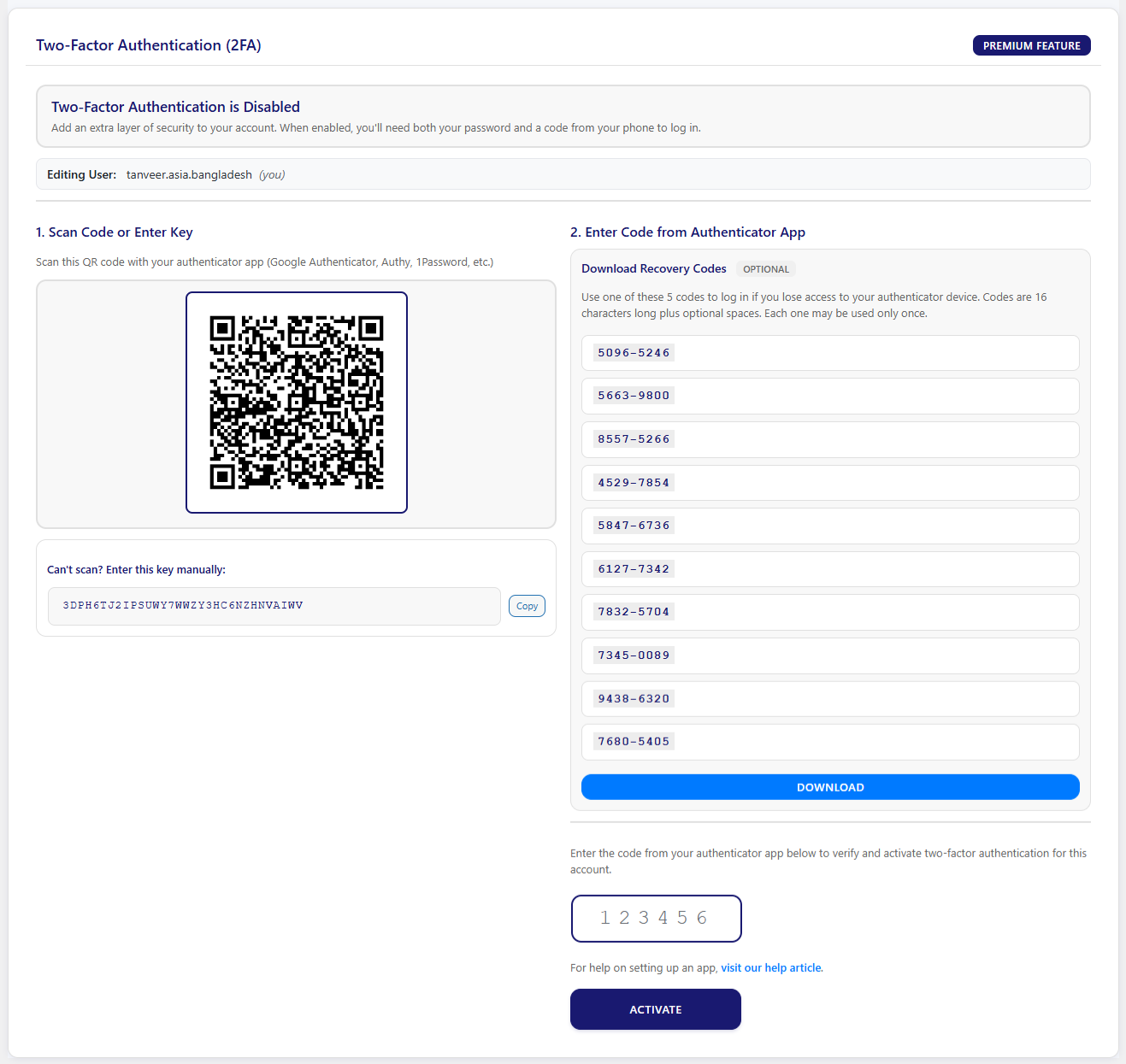
✅ Two-Factor Authentication — QR setup, backup codes, role enforcement, WooCommerce support
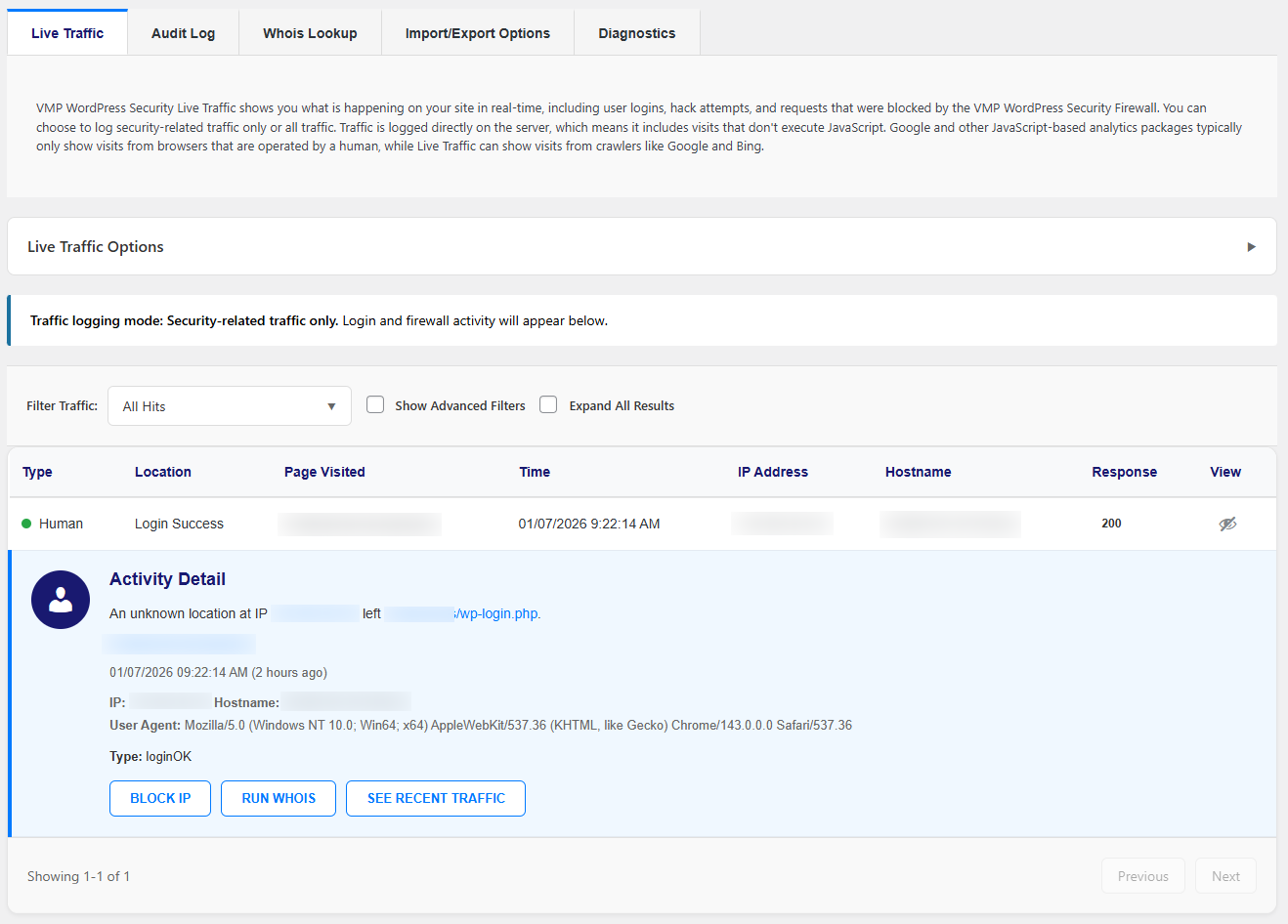
✅ Audit Log & Live Traffic — Complete security event history with real-time monitoring
✅ Privacy-First — All scanning on your server. Files and database never sent externally.
See It In Action
How VMP Security Compares
+------------------------------+-------------------+-------------------+----------------------------+
| Feature                      | VMP Security Free | Wordfence Free    | Wordfence Premium ($149/yr)|
+------------------------------+-------------------+-------------------+----------------------------+
| Firewall rules               | ✅ - 750+        | ✅                 | ✅                         |
| Real-time rule updates       | ❌ - 30-day delay| ❌ - 30-day delay | ✅                         |
| Malware signatures           | ✅ - 170,000+    | ✅ - 44,000+      | ✅ - 44,000+               |
| Real-time signature updates  | ❌ - 30-day delay| ❌ - 30-day delay | ✅                         |
| Malware scanners             | ✅ 9 specialized | ✅ 1 general      | ✅ 1 general               |
| Country blocking             | ✅               | ❌                | ✅                         |
| Audit log                    | ✅               | ❌                | ✅                         |
| IP blocklist                 | ✅               | ❌                | ✅                         |
| Two-factor authentication    | ✅               | ✅                | ✅                         |
+------------------------------+-------------------+-------------------+----------------------------+
🔥 Web Application Firewall (WAF)
Your first line of defense. Every request is inspected before it reaches WordPress. Blocks malicious traffic in real time, stopping threats before they can execute or exploit vulnerabilities. Runs before WordPress loads, reducing attack surface and protecting plugins, themes, and core files.
What It Stops:
- SQL injection, cross-site scripting, code injection, file inclusion attacks, and more — all major attack types covered
- 750+ built-in security rules — full rule set running on Free; new rule additions reach Free 30 days after Premium
- Zero-day protection — pattern-based detection catches new, unknown threats
- Custom rules — add your own blocking patterns
- Attack logging — full audit trail of every blocked request
Extended Protection (WAF Optimizer)
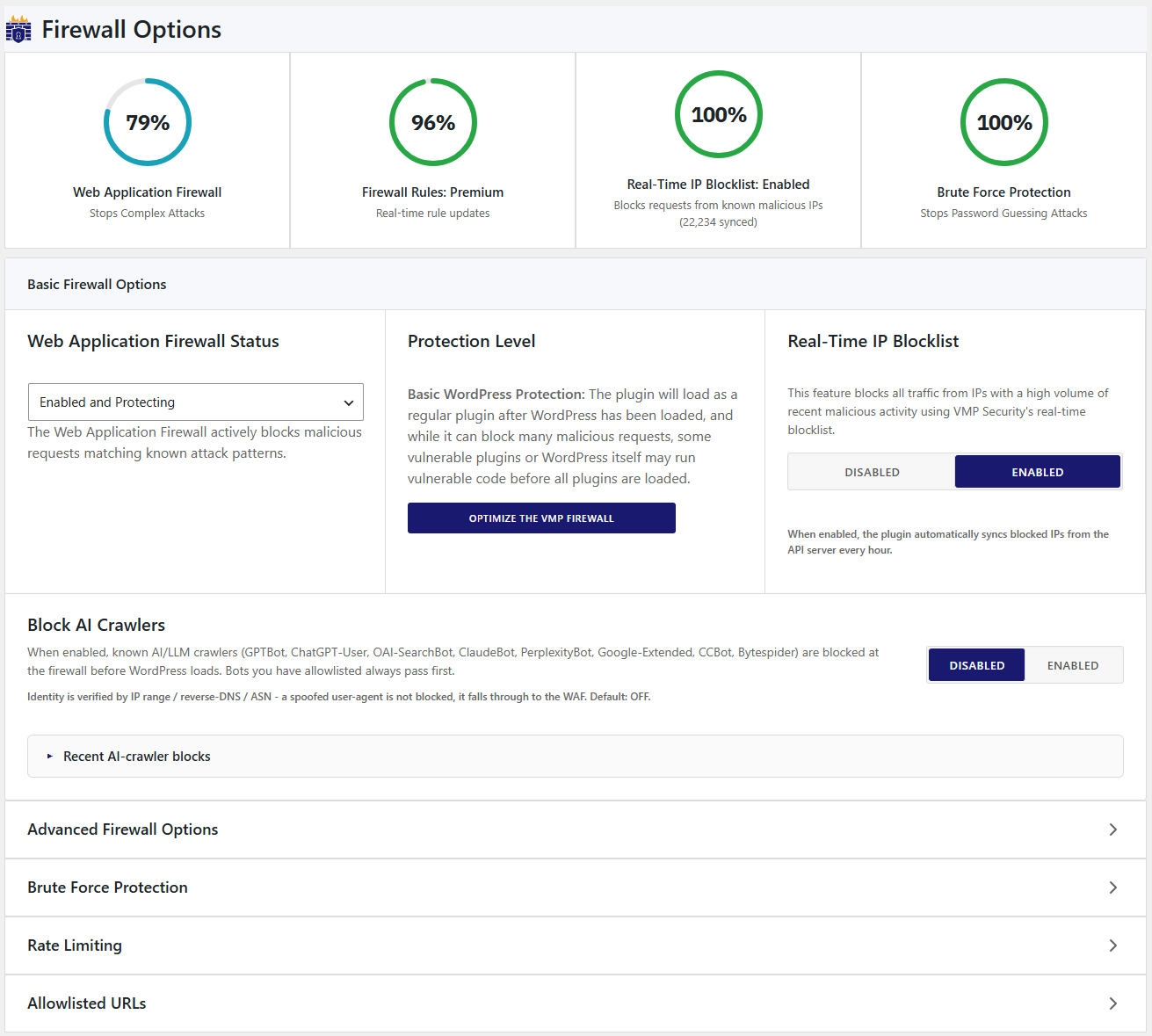
Run the firewall before WordPress loads, so malicious requests are blocked before any vulnerable plugin or theme code can execute. One-click setup with automatic server detection for Apache and LiteSpeed, and built-in backup for safe configuration. Improves WordPress security by reducing attack surface, preventing exploit execution, and strengthening overall firewall protection at the earliest entry point.
🤖 Custom Bot Allowlist (New in 2.3.2)
Let the bots you trust through — and stop the ones faking their name. Add any SEO crawler, AI agent, or monitoring service to your allowlist and VMP Security verifies it’s genuine before granting access. A copied User-Agent alone never gets in.
- Verified, not spoofable — Confirm bots by IP range, forward-confirmed reverse DNS, or network owner (ASN) — not an easily-faked user agent
- Self-updating IP lists — Vendors’ official published IP ranges (GPTBot, Perplexity, Bing, Apple, and more) are fetched and refreshed daily, so your allowlist never goes stale
- One-click presets — Ahrefs, Bing, Yandex, Baidu, Apple, Amazonbot, OpenAI (GPTBot, ChatGPT-User, OAI-SearchBot), Anthropic Claude, Perplexity, DuckDuckGo
- Add any bot — Bring your own with a custom user agent, IP ranges, DNS suffixes, or ASNs
- Safe by design — SSRF-hardened fetching with guardrails against over-broad ranges; allowlisting by user agent alone is blocked unless you explicitly accept the risk
🔍 9 Specialized Malware Scanners
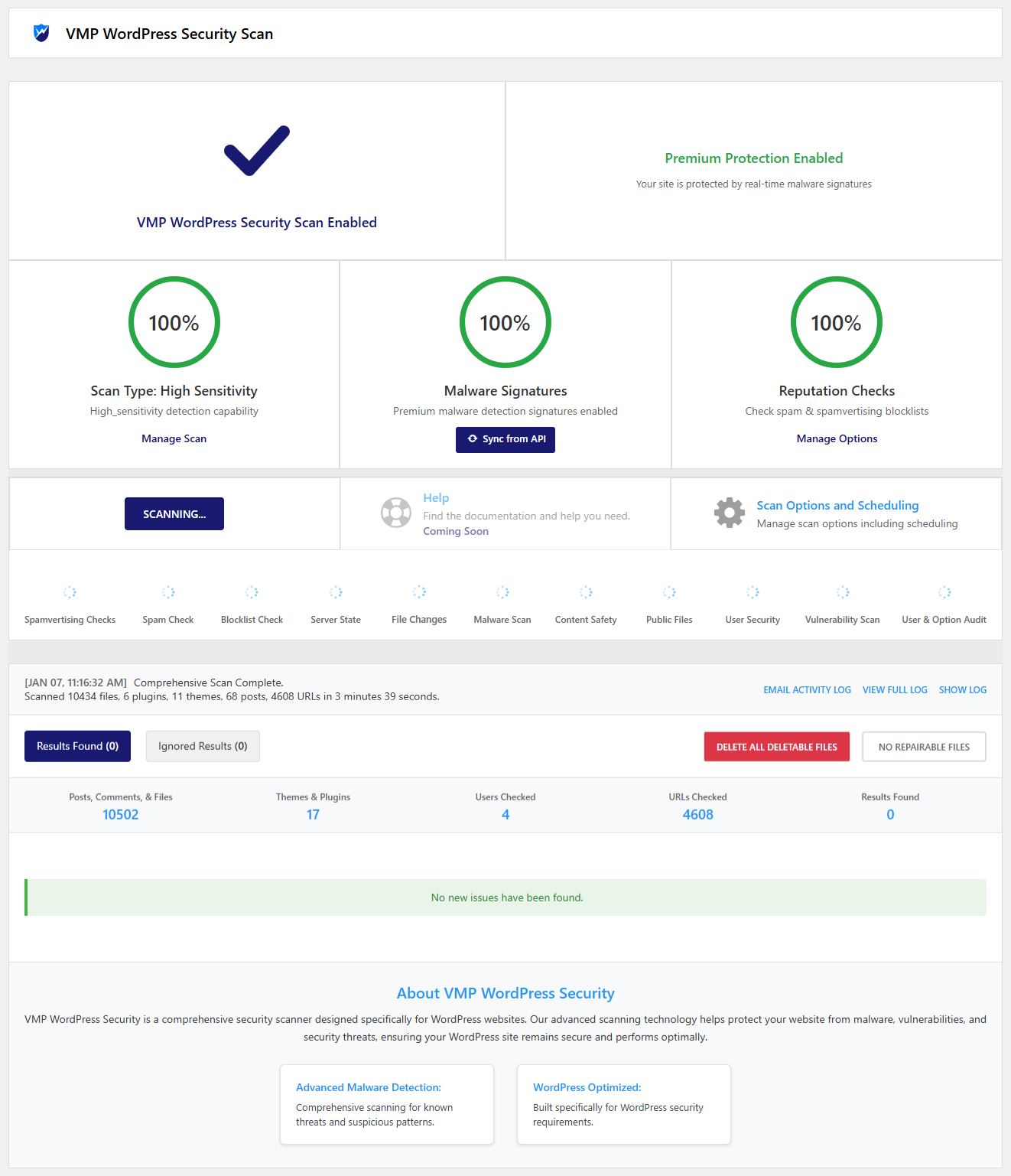
Not just a basic malware scanner. This is a complete WordPress malware scanner and website security system with 9 specialized scanners, each focused on a different threat type to ensure full protection.
Detect, analyze, and remove threats with advanced scanning built for modern WordPress security vulnerabilities and malware attacks.
- Malware Scanner — 170,000+ signatures detect backdoors, trojans, and malicious code
- File Integrity Monitor — Compares your files against official WordPress checksums
- Vulnerability Scanner — Checks plugins and themes against known CVEs
- User Security Scanner — Finds suspicious admin accounts and weak credentials
- Content Safety Scanner — Detects malicious content injected into posts and comments
- Public Files Scanner — Finds exposed configuration files (wp-config backups, .env, debug logs)
- Server State Scanner — Audits PHP settings, file permissions, and server configuration
- Binary Scanner — Detects malware embedded in images and executables
- Domain Reputation Scanner — Checks URLs against Google Safe Browsing and threat databases
Advanced detection goes beyond traditional malware scanners by using multiple analysis layers to identify both known and unknown threats. Obfuscation analysis detects encoded and hidden malware that basic security plugins often miss, while behavior analysis identifies suspicious file activity and unusual patterns that may indicate new or evolving attacks. A built-in legitimacy assessment helps reduce false positives, ensuring more accurate and reliable malware detection.
You can choose from quick scan, standard scan, high sensitivity scan, or fully custom scan modes based on your website security needs. This system is designed for complete WordPress malware removal, vulnerability detection, and full website protection, all running directly on your server without relying on external scanning services.
🌍 Country Blocking & IP Management
Block entire countries or fine-tune access with advanced pattern rules. Strengthen your WordPress security by controlling who can access your site based on location, IP address, and request behavior, helping prevent brute force attacks, spam traffic, and malicious bot activity.
- Geo-Blocking — Block any country, login-only or full site access
- IP Blocking — Block individual IPs or IP ranges, temporary or permanent
- Custom Patterns — Block by hostname, user agent, referrer, or IP range with wildcard and regex support
- Attack Analytics — See which countries attack you most with visual reports
- Allowlist — Whitelist trusted IPs and services to bypass all blocks
- GeoIP Integration — Automatic IP-to-country lookup with auto-updating database
🛡️ Brute Force Protection & Rate Limiting
Stop password guessing and resource exhaustion attacks. Strengthen your WordPress login security with advanced brute force protection, rate limiting, and bot blocking to prevent unauthorized access, credential stuffing, and automated attacks.
- Smart Login Limiting — Lock out IPs after too many failed login attempts
- Leaked Password Detection — Check passwords against known breach databases
- Strong Password Enforcement — Require secure passwords for all user roles
- Username Blacklist — Block common attack usernames instantly
- Rate Limiting — Cap requests per IP to slow scrapers and vulnerability scanners on your site’s pages (images and other files your web server sends directly are not counted)
- Human vs Bot Detection — Smart traffic classification with 404 monitoring
🔐 Two-Factor Authentication (2FA)
Even if someone steals your password, they can’t get in. Add an extra layer of WordPress login security with secure two-factor authentication to prevent unauthorized access, account takeovers, and brute force login attacks.
- QR Code Setup — Works with Google Authenticator, Authy, 1Password, and more
- Backup Codes — Never get locked out of your own site
- Role Enforcement — Require 2FA for admins or specific user roles
- Frontend Management — Users manage their own 2FA via shortcode
- WooCommerce & XML-RPC — Covers your store and API endpoints
📊 Dashboard, Monitoring & Tools
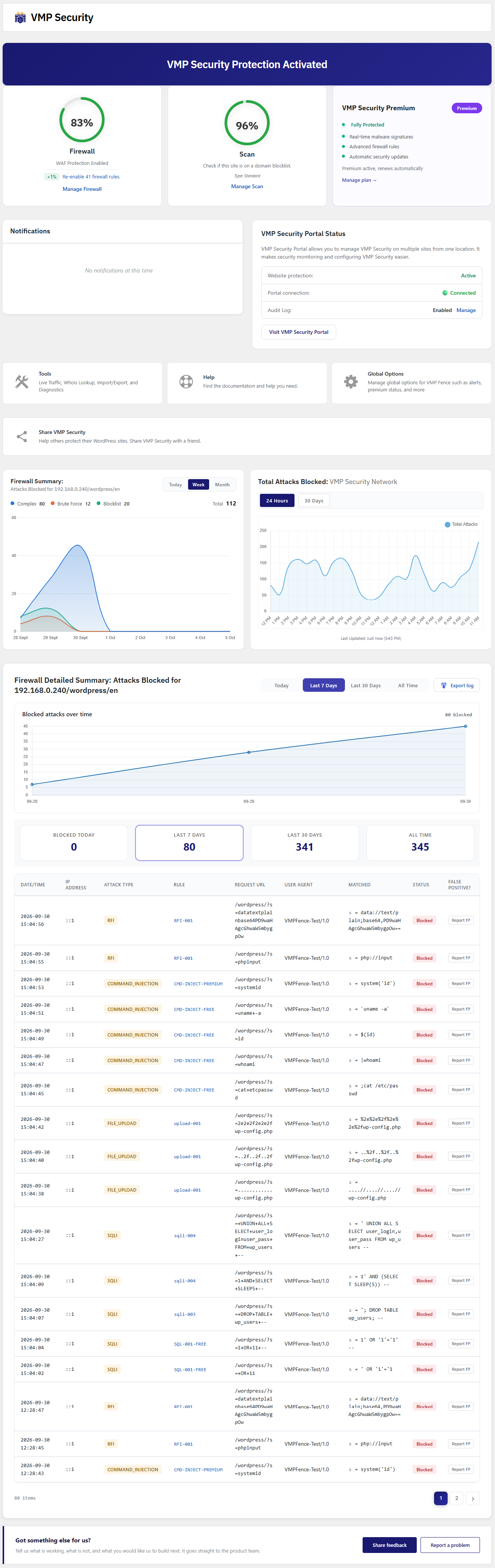
Set it up in 5 minutes. Go deep when you want to. Manage your WordPress security dashboard with real-time monitoring, detailed audit logs, and advanced security tools to track threats, analyze activity, and take instant action.
- Security Status — Green, yellow, or red — know your protection level at a glance
- Live Traffic View — Watch visitors and attacks in real-time with human vs. bot classification
- Complete Audit Log — Every security event tracked with timestamps and IP intelligence
- Scheduled Scans — Daily, weekly, or custom scan schedules
- One-Click Actions — Block IPs, ignore false positives, repair infected files
- Diagnostics — 15+ system health checks for troubleshooting
- Settings Export/Import — Backup and migrate security configuration between sites
- Multi-Site Sync — Manage security across multiple WordPress sites from one place
🔒 Privacy-First Security
All scanning happens on YOUR server. Period. Protect your WordPress website security and data privacy with local malware scanning and firewall processing, ensuring your files, database, and user data never leave your hosting environment.
What We DON’T Do:
❌ We don’t send your file content or database data to external servers
❌ We don’t track your users
❌ We don’t collect analytics about your site
❌ We don’t send data without your knowledge
🚀 Premium Features (Upgrade for Advanced Protection)
Unlock advanced WordPress security, firewall protection, and malware detection with powerful premium features designed for complete website protection:
* Real-Time Firewall Rules – Get instant protection with continuously updated WAF rules (no delays)
* Real-Time Malware Signatures – Detect the latest threats with up-to-date malware intelligence
* Advanced Malware Detection – Enhanced scanning for hidden, obfuscated, and zero-day threats
* Full Audit Log – Complete security event history with extended tracking and detailed insights
* Country Blocking (GeoIP) – Block traffic by country for better control and attack prevention
* Advanced Analytics & Reporting – Deeper insights into attacks, traffic patterns, and security events
* Priority Support – Faster assistance from our security team
* Off-Site Audit Log Sync – Tamper-proof off-site logging via VMP Security Portal
* Continuous Updates & New Features – Stay protected with the latest security improvements
External Services (Optional):
We use external services only when necessary for specific security features. You can see exactly what’s sent:
VMP Security Servers
* License activation and validation (free/premium)
* WAF rules synchronization and updates
* Malware signature database updates
* Two-Factor Authentication (2FA) system management
* Settings export/import cloud storage (optional)
* Privacy: Your site data remains on your server — only configuration and security rules are synced
Google Services (safebrowsing.googleapis.com, www.google.com/recaptcha)
* URL threat detection and reCAPTCHA spam protection
* Privacy: https://policies.google.com/privacy
WordPress.org APIs (api.wordpress.org, downloads.wordpress.org, core.svn.wordpress.org)
* Download original files for integrity checking during malware scans
* Privacy: https://wordpress.org/about/privacy/
GitHub (raw.githubusercontent.com)
* Download WordPress core files for file comparison
IP Lookup Services (api.ipify.org, ifconfig.me, icanhazip.com, ip-api.com, ipwhois.app, download.ip2location.com)
* Server IP detection, geolocation, and country blocking features
Threat Intelligence (api.urlvoid.com, www.virustotal.com, checkurl.phishtank.com)
* URL reputation checking and threat validation
Vulnerability Databases (services.nvd.nist.gov, wpscan.com, cvedetails.com, cve.mitre.org)
* Check for known security vulnerabilities during scans
All malware scanning happens on YOUR server. We do not upload your files or database content to external services.
Installation
- Install from the WordPress plugin directory or upload the plugin files
- Activate the plugin
- Go to VMP Security > Dashboard and run your first scan
- Enable 2FA for your admin account
- That’s it — the firewall and all protection features are active by default
FAQ
How is VMP Security different from Wordfence?
VMP Security includes country blocking, audit log preview, IP blocklists, and 750+ WAF rules in the free version (new rule additions reach Free 30 days after Premium, same delay model as Wordfence Free). Wordfence gates country blocking and audit logs behind the $149/year premium plan. VMP Security also runs 9 specialized malware scanners (vs. Wordfence’s 1 general scanner) and performs all scanning on your server — no file data is sent externally.
What advanced features are available in VMP Security Premium?
VMP Security Premium includes powerful premium features like real-time firewall rules and malware signatures for instant protection, along with advanced security features and a complete audit log with 1 year of history. It also offers off-site audit log sync via VMP Security Portal, advanced analytics and reporting, and priority support. With regular updates, vulnerability monitoring, and enhanced WordPress security controls, it delivers complete website protection. Premium is licensed per site.
Is VMP Security completely free?
Yes. The free version includes the full firewall (750+ rules), all 9 malware scanners (170,000+ signatures), country blocking, 50-entry audit log preview, 2FA, brute force protection, and live traffic monitoring — new rule and signature additions reach Free 30 days after Premium. Premium adds real-time WAF and signature updates, full audit log history with off-site portal sync, and YARA scanning with 1,000+ rules.
Will this slow down my website?
Nope. We’re obsessed with performance. The firewall uses efficient pattern matching, scanners run in the background, and we optimize memory usage. Your visitors won’t notice any slowdown.
Does it stop other sites from hotlinking or scraping my images?
No. Your web server sends images and other files from the uploads folder directly, without running WordPress, so the firewall never sees those requests. To stop hotlinking, turn on hotlink protection at your host or CDN (for example cPanel’s Hotlink Protection or Cloudflare’s Hotlink Protection).
Do I need to configure anything?
Not really. It works great out of the box with secure defaults. But if you want to customize, we give you full control over every feature.
What happens when an attack is blocked?
The attacker gets a 403 Forbidden page. We log the attack details (IP, type, time, violated rules) so you can see what happened. Repeat offenders get permanently banned.
Can I whitelist my own IP address?
Yes! Go to Firewall > Options and add your IP to the allowlist. You’ll bypass all firewall rules (useful for testing).
How does 2FA work?
Use any authenticator app (Google Authenticator, Authy, 1Password, etc.). Scan the QR code during setup, and you’re done. You’ll enter a 6-digit code when logging in.
Will it detect all malware?
No security tool catches 100% of threats. But our specialized scanners with pattern matching, behavior analysis, and reputation checking catch the vast majority. We’re constantly updating our detection signatures.
Can it help with malware removal?
Yes. When we find infected WordPress core files, you can restore the original clean version with one click. For plugins and themes, we guide you through reinstalling from official sources. Our 9 scanners detect the malware — you control the cleanup.
Does it work with WooCommerce?
Yes! We have special integrations for WooCommerce to protect your store and customer data.
How do I update firewall rules?
Rules are updated automatically with plugin updates. You can also add custom rules in Firewall > WAF Rules.
Can I schedule automatic scans?
Absolutely. Daily, twice daily, weekly, weekdays only, weekends only, or custom schedules. The scan monitor ensures they complete successfully.
What if I get locked out?
2FA includes backup codes that you save during setup. For firewall lockouts, you can disable the plugin via FTP or use WordPress recovery mode.
Do you offer support?
Yes! We provide support through the WordPress.org forums. Premium support options coming soon.
Screenshots
Changelog
2.4.6 – October 31, 2026
Firewall Hardening, Scan Results Overhaul & Pause Protection
- Shared office IP warning: When three or more staff accounts are close to a login lockout from one IP address, VMP Security pages now show administrators a warning with a link straight to the failed-login limit, so a team that shares one office IP can raise it before anyone is locked out. Keep watching hides it for 7 days; Dismiss hides it until it happens again. Visitors never see it, and the lockout works exactly as before.
- Login lockouts: People who are already signed in are no longer locked out of the site when someone else on the same network triggers a login lockout. Locked-out visitors can now reset a forgotten password during the lock: the lockout page links to the reset form, and the WordPress, custom login address and WooCommerce lost-password pages stay open to them. Signing in still waits until the lock ends, and a lockout caused by too many reset requests still blocks resets.
- Two-factor backup codes: Pasting a backup code with its dash (for example 1234-5678) into the login form no longer cuts off the last digit. The dash is removed and all 8 digits are kept.
- Login security: On sites behind Cloudflare or another proxy, the allowlist for skipping two-factor and reCAPTCHA now matches your own address, and the screen shows that address instead of the proxy’s.
- Country blocking: Blocking the country you are browsing from now shows a warning first, with how to get back in if you go ahead. The block page itself now tells a locked-out site owner how to get back in: it says when a private bypass link is set up, without showing the link, and otherwise that access returns from an allowed country or through an administrator who is still signed in.
- Firewall: Closed a gap where certain parameter names in a page address skipped some attack checks.
- Firewall: Requests for files inside a .git folder, such as /.git/config, are now refused. The plugin’s early protection had this check, but it never ran.
- Firewall: Requests for .env files, such as /.env or /.env.production, are now refused by the plugin’s early protection before other plugins load, so they stay blocked even when a plugin fails to load. The early protection had this check, but it never ran.
- Firewall: Requests stopped by the plugin’s early protection, such as probes for /etc/passwd or wp-config.php, now appear in the Firewall attack log. Before, they were blocked but not recorded.
- Firewall: Requests refused by suspicious-path blocking (the opt-in setting for high-confidence probes) now appear in the Firewall attack log. Before, they were blocked but never recorded.
- Firewall: Background requests from visitors who are not signed in (admin-ajax.php) and WordPress’s scheduled-task address (wp-cron.php) are now checked for attacks like any other page. Signed-in users’ background requests and normal scheduled tasks are unaffected.
- Firewall: Rules that check the page address for encoded file-path tricks, such as %c0%ae%c0%af for ../, now see the address exactly as it was sent. Before, these encoded characters were removed before the check, so the rules never matched. The attack log still shows the cleaned address.
- Firewall: Requests to /xmlrpc.php are now checked for attacks in what they send, not only in the address. Before, the firewall saw none of it. Passwords and uploaded files are not inspected or logged, and post text sent from apps is left to WordPress’s own checks, so pingbacks, app sign-ins and app publishing work as before.
- IP blocking: The site’s own addresses (127.0.0.1, ::1 and the server’s address) can no longer be blocked, and an existing block on them is ignored. A block there used to stop WordPress’s scheduled tasks, VMP Security’s own scans and updates, and WP-CLI. Commands run from the server’s command line are never IP-blocked.
- Firewall: Turning VMP Security’s main protection switch off now really stops all blocking: the early protection layer, Extended Protection (vmp-waf.php) and the firewall all let requests through until it is turned back on. Before, requests were still blocked with the switch off.
- Firewall: Commands run on the server itself (WP-CLI, system cron, deploy and backup scripts) are no longer rate-limited. Long WP-CLI runs used to stop part way with a “Too many requests” page printed into their output.
- Rate limiting: A rate-limit block now ends when its set time runs out, even if the visitor keeps loading pages. Before, every refused request restarted the timer, so a browser or phone that kept retrying stayed blocked. The block also keeps the reason it was created with, instead of changing it to “IP is currently blocked due to previous rate limit violation”.
- Rate limiting: Googlebot is exempt from rate limiting only after a reverse DNS lookup finds a Google hostname and that hostname resolves back to the same address. A request that only copies Googlebot’s name, or comes from an address with a forged reverse DNS record, is limited like any other crawler. Failed lookups are now cached, so they no longer slow every request.
- Pause protection: Administrators can now pause VMP Security’s blocking for 15 minutes, 1 hour or 24 hours from the Dashboard, for example to let a blocked request through while fixing a false positive. A banner on every VMP Security page shows when protection comes back, with a button to resume at once, and protection always turns itself back on. Login protection and scans keep running while paused, and each pause and resume is recorded in the audit log.
- Firewall log: The attack log and its counters now list attack attempts only. Blocks by country, IP list, ASN or per-page country rules are no longer counted as attacks; these blocks are listed under Firewall > Blocking > Incidents.
- Live Traffic: Filters now build their database search only from a fixed list of known columns, as an extra safeguard. Filtering works exactly as before.
- Privacy: Card numbers, card security codes and passwords are no longer saved in the firewall log, and older entries are shown masked on screen and in downloads.
- Payments: Payment and renewal confirmations from payment services are no longer blocked because a customer’s company name, address or order note looks like an attack.
- Forms: Contact forms are no longer blocked because a field was left empty, such as Contact Form 7’s hidden field on a first message.
- Firewall: Forms and requests sent through WordPress’s background address (/wp-json/) are now checked for attacks like any other page; signed-in editors’ saves are unaffected.
- Firewall: The WordPress login page and admin addresses are now checked for attacks unless the visitor is signed in. Before, a request only had to claim to be a web browser to skip the checks there. Normal logins, password resets and sign-ups are unaffected.
- Firewall: SQL injection attempts that hide their keywords behind SQL comments are now blocked the same as the plain form.
- Firewall: WooCommerce’s checkout no longer stops refreshing shipping and totals when a customer’s company name or order note contains ordinary words that look like an attack, such as “Union Select Foods Ltd” or “update tracking”.
- Firewall: With “Block AI crawlers” turned on, any request that identifies itself as one of the listed AI crawlers is now blocked. Before, a request was blocked only when its address could be traced to the crawler’s own network, so CCBot was never blocked and the others got through whenever that check could not confirm them.
- Firewall: With Extended Protection on, addresses on the IP allowlist and enabled services that are confirmed by their addresses, such as ManageWP and UptimeRobot, are no longer blocked by it. Before, Extended Protection ignored both lists.
- Firewall: Requests that try to call PHP’s information functions, such as phpinfo(), var_dump(), print_r(), getenv() or show_source(), are now blocked like other code-execution attempts.
- Firewall: Comment text submitted through the WordPress comment form is now checked for path-traversal, file-inclusion and SQL-injection attempts, the same as the site search box. Before, only cross-site-scripting was checked on it. Ordinary links and code samples in a comment are still allowed.
- Malware scanner: Fixed a bug that stopped most built-in malware signatures from ever matching, and added detection for common backdoor and webshell types the scanner previously missed, including command-execution shells, obfuscated and remote-loaded code, file uploaders, and hidden-admin injectors. A second fault that made the scanner skip most of its older signatures is also fixed, and three of those signatures were narrowed so they no longer flag normal plugin code.
- Malware scanner: On Windows servers the scan now skips the cache and backup folders it is meant to skip, as it already did on Linux.
- Scan results: Text in scan results, such as file and option names, is now always shown as plain text, so a file name crafted with HTML can no longer run code in an administrator’s browser.
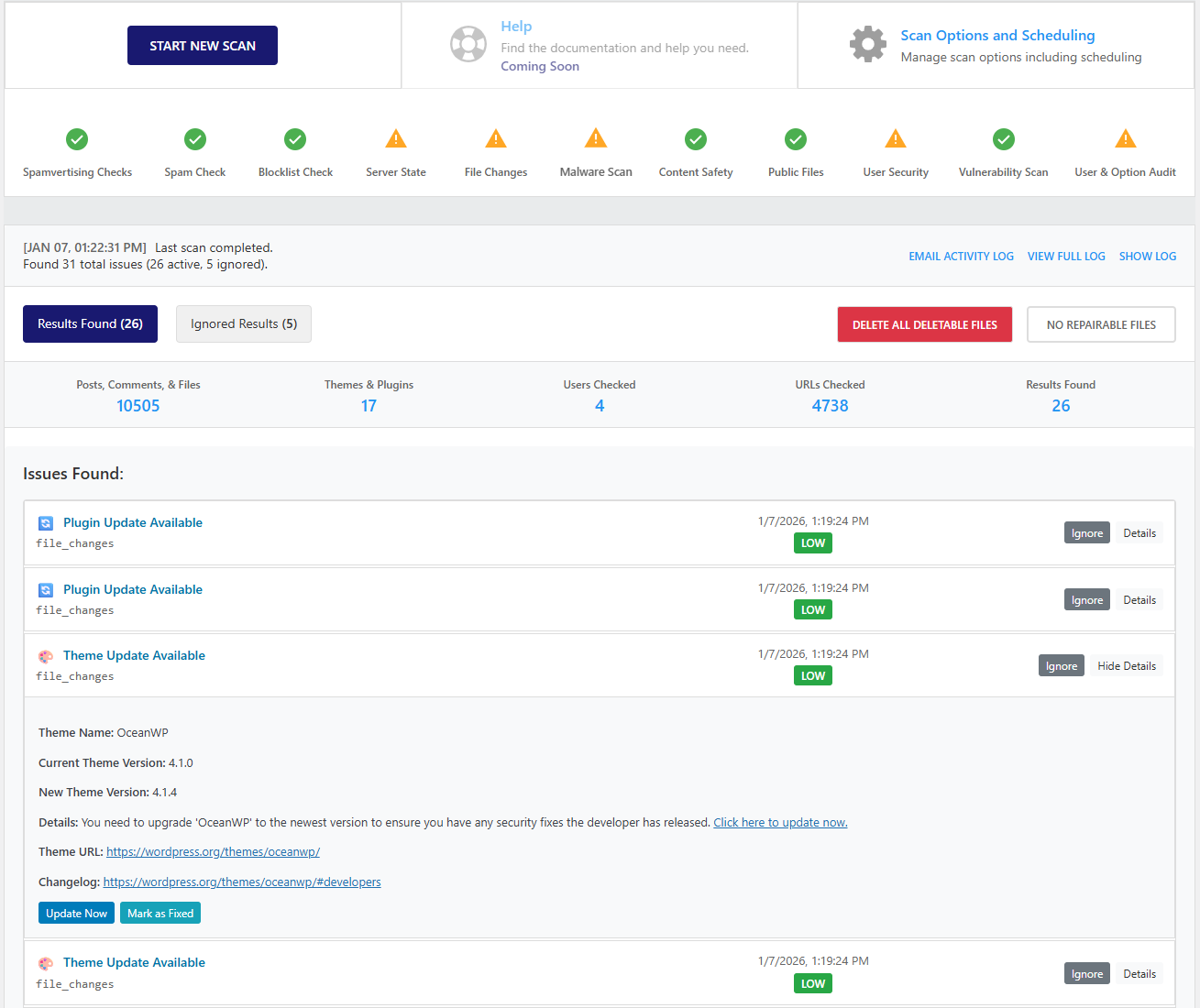
- Scan results: The results list and counts now appear as soon as a scan finishes or is cancelled. Before, the page showed “0 issues” right after a scan, and a cancelled scan’s results stayed hidden. The scan page also no longer loses track of a running scan during the file check.
- Scan results: Ignoring an issue now sticks. It no longer comes back on the next scan because a number in its text changed, such as a file’s age or a line number, and domain and IP reputation issues can now be ignored too. Ignored issues that a full scan no longer finds, such as one for a file that has since been deleted, are removed from the Ignored list.
- Scan results: Each scanner’s status dot now counts only open issues, so it turns green once they are ignored or fixed. Mark as Fixed now also works for reputation issues and for older ignored issues.
- Scan results: A scan that is cancelled, stops at the time limit or fails now shows its own time and counts, marked as stopped, instead of the previous scan’s.
- Scan results: Malware, server, content and option findings keep their own severity instead of one level for everything, so a modified plugin file is no longer marked critical like a webshell.
- Scan results: “URLs Checked” and the other scan counts now show what the enabled scans actually checked. The URL count no longer adds estimated pages that were never checked.
- Scan results: Domain and IP blocklist checks no longer report a listing when the blocklist refuses the query or answers with an error code.
- Malware scanner: A minified CSS file with a “:root” style block, which many modern themes and plugins ship, is no longer reported as an R57 webshell.
- Scan results: The results list, counts and statistics now show as soon as the Scan page opens, instead of a few seconds later.
- Scan results: Ignore and Unignore now move the issue straight away, and switching between Results Found and Ignored Results is instant. Before, each click waited several seconds for the server, the Ignored Results tab kept showing the other list while it loaded, and the summary at the top lost its scan details. If an ignore cannot be saved, the issue goes back to its place and an error is shown.
- Scan results: Plugin files that differ from their official wordpress.org copy are now listed under File Changes instead of Malware. The Malware list shows only files where malicious code was found, and plugin files are compared once per scan instead of twice.
- Scan results: The Spamvertising, Spam and Blocklist check icons show a lock only on the free plan. On Premium they show their scan status like the other checks, instead of a lock.
- Scan results: “View Malicious Code” opens its tab straight away instead of after a 2-3 second wait, and the button shows a loading state until the file has opened. The page it opens has a readable header again, line numbers stay level with their lines, and very long lines (such as minified files) wrap instead of running off the page.
- Performance: Saved scan data is much smaller (several MB less after a malware scan), and scan debug logs are no longer loaded on every page.
- VMP portal: Scan results sent to the portal now include the scan’s real duration and statistics, and scan stages with open issues are shown as warnings.
- Scan options: A new setting lets you turn off scanning the uploads folder for PHP files (it stays on by default). The uploads scan now also checks .php7, .php8, .pht, .phar and .phps files, and it skips photos and other media much faster.
- File integrity: The core file check now really compares your WordPress core files with the official checksums; before, it checked none. Bundled themes and plugins, the readme, license and sample config files, and differences in line endings only are not reported.
- Scan log: On a clean site the scan log no longer reports malware or a “critical” risk for WordPress core files. Core files that match the official WordPress.org copies are left out of the suspicious-code statistics; files that differ are checked as before.
- File repair: Repair File now works on changed WordPress core files. It downloads the official copy, checks it against the official checksum, keeps a backup of your changed file, and puts the old file back if anything fails. Before, every core file was refused with “File not found in known files database”. Files that are not part of WordPress core are still never overwritten.
- File changes scan: A changed WordPress core file now shows up once, as high severity, instead of twice (in the file-changes results and again in the malware results) and as low. Core, plugin and theme files whose only difference from the official copy is Windows line endings are no longer listed as changed; a change of even one character still is.
- View Differences: No longer double-spaced. It now shows the changed lines with a few lines of context, says plainly when only the line endings differ instead of “Modified” next to “No changes detected”, and no longer fails on large core files.
- Password security: The weak-password check now works on WordPress 6.8 and later, which store passwords in a newer format, and it stops after a short time limit so it cannot slow down a scan. A weak password now shows as its own “Weak Password Found” issue with the right severity (critical for administrators), and the password itself is no longer shown or stored in scan results or logs.
- Firewall: WooCommerce’s “Update cart” button, the checkout’s shipping and totals refresh, and ordinary text containing words such as “from”, “update” or “url” are no longer blocked as SQL injection. Real attacks are still blocked.
- Firewall: Coupon codes, searches and form fields that contain an apostrophe, quote, semicolon or equals sign (for example SUMMER’25 or O’Brien) are no longer blocked because of that character alone. Real attacks are still blocked.
- Two-factor authentication: If the VMP server can’t be reached, users who have 2FA turned on can no longer sign in with only their password. Remembered devices still work, and a site owner can add
define('VMPFENCE_2FA_OFFLINE_BYPASS', true);to wp-config.php to let them in during an outage (each use is recorded in the audit log). Sites that are not connected to VMP Security now explain that 2FA needs the connection and no longer force anyone into a 2FA setup that cannot work. - Required two-factor setup: When a role must use 2FA, the setup screen now unlocks only after the user enters a correct code from their authenticator app, and the code can now be entered from the dashboard setup page as well.
- Two-factor setup for every role: Editors, authors and other users who are not administrators, and whose role must or may use 2FA, now get their own Login Security page with the VMP Security logo to set up, manage or turn off 2FA. Required setup no longer sends them to a screen only administrators can open, and WooCommerce customers are sent to the Manage 2FA page instead. Turning off 2FA and creating new backup codes now ask for confirmation in the plugin’s own dialog instead of a browser pop-up, and while a required setup is pending, background requests from other plugins get a clear refusal instead of a page redirect.
- Prevent username discovery: Signed-in users can read their own account through the REST API again, so WordPress saves screen preferences and the block editor’s author list works for editors and authors. Visitors who are not signed in are still blocked from listing users.
- Fix: Removed an unused sign-in endpoint that returned a server error when called.
- Fix: The plugin’s admin-only REST endpoints now tell signed-in users who lack permission “forbidden” (403) instead of “not signed in” (401). Visitors who are not signed in still get 401.
- Suspicious-path detection: The 2.3.9 notes now describe it correctly: detection is on by default and only records probes; blocking high-confidence probes with a 403 is the opt-in setting.
- Audit log: When a signed-in administrator’s session is used from a different country, the audit log now records the move, with the old and new address. Nothing is blocked, so administrators on a VPN or mobile network keep working.
- Diagnostics: The file permissions check no longer says “File permissions are correct” when it has found a problem; it now says how many paths failed or have looser permissions than recommended.
- Security: The scanner no longer falls back to a shell command when PHP cannot read a very large file’s size (32-bit PHP only); that fallback did not escape the file name safely.
- Docs: The readme now says plainly that the firewall and rate limiting see requests that run WordPress, not images and other files your web server sends directly, and points to hotlink protection at your host or CDN.
- Firewall log: Blocked attacks are now saved with their severity (taken from the rules that matched), so the log can be sorted and filtered by how serious each block was. Older entries keep their previous value.
- Rate limiting: Rate-limit settings now accept only “unlimited” or a whole number from 1 up. An invalid value (for example from an edited settings import) is ignored and the previous setting is kept, instead of silently turning that limit off.
- Login lockouts: When many failed logins arrive at the same moment from one address, the lockout is now saved once instead of once per request, so the blocked list no longer fills with duplicates.
- Block page: The incident ID is shown only when the incident was saved. If it could not be saved (for example during a very large attack), the page asks the visitor to quote the time and IP address instead, so the site owner is never sent an ID that cannot be looked up.
- Scans: A scan no longer sits on one step forever when the server stops it partway, for example because of a short PHP time limit. The scan notices within a minute or two and picks up again at that step. If the same step keeps stopping the scan, it is skipped, the rest of the scan finishes, and the scan page tells you which step was skipped and why. With the default settings each scan step is no longer cut off after 15 seconds, and indexing your plugin and theme files no longer stops the scan after 5 minutes.
- Malware scanner: Code hidden in long runs of hex escapes (such as \x65\x76\x61\x6c) is now recognized as obfuscated when the scanner sorts what it found. A broken detection rule had stopped this from ever matching and filled the PHP error log with warnings during every scan.
- Scan results: Every issue now has a clean line icon instead of an emoji, which could look different or broken from one browser to the next. Suspicious links found in your content (shortened links, links to a bare IP address, free-hosting sites and odd-looking domains) now say what was found instead of “Other Issue”, and each issue’s category reads as plain words, such as “Content Safety”.
- Content safety scan: Links to your own site, such as images in your media library, are no longer reported as suspicious URLs. This was common on sites reached by an IP address, like a local test install, where every image was flagged as an “IP address URL”. Links to other IP addresses, including other devices on a local network, are still reported, and links to your own site that carry a redirect parameter are still checked.
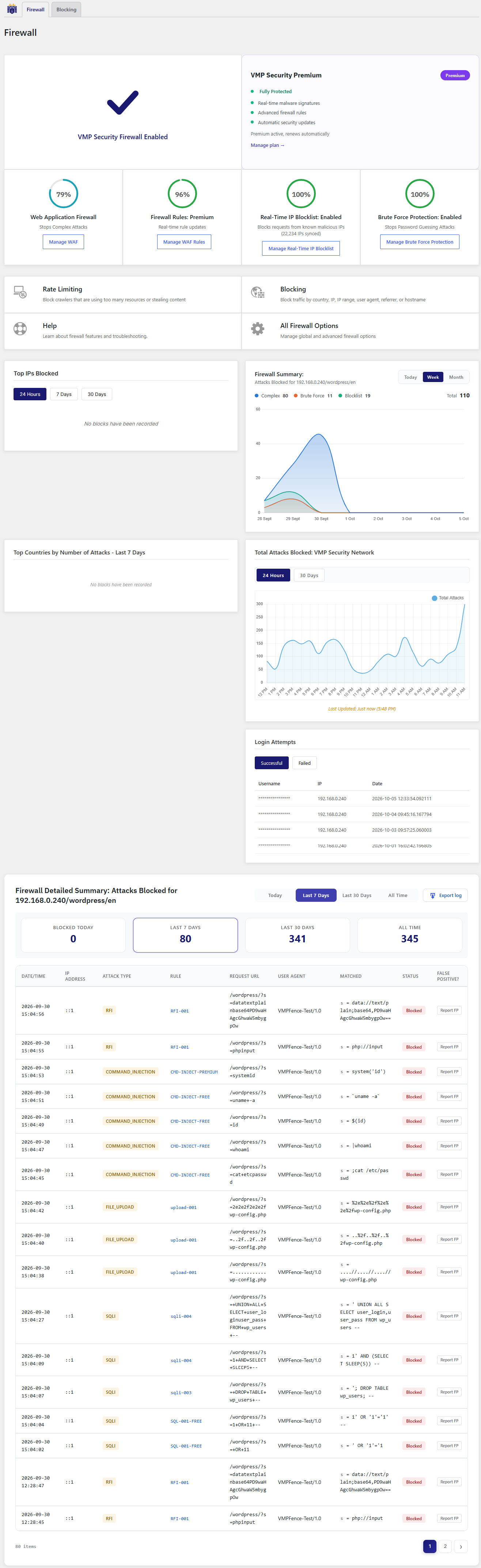
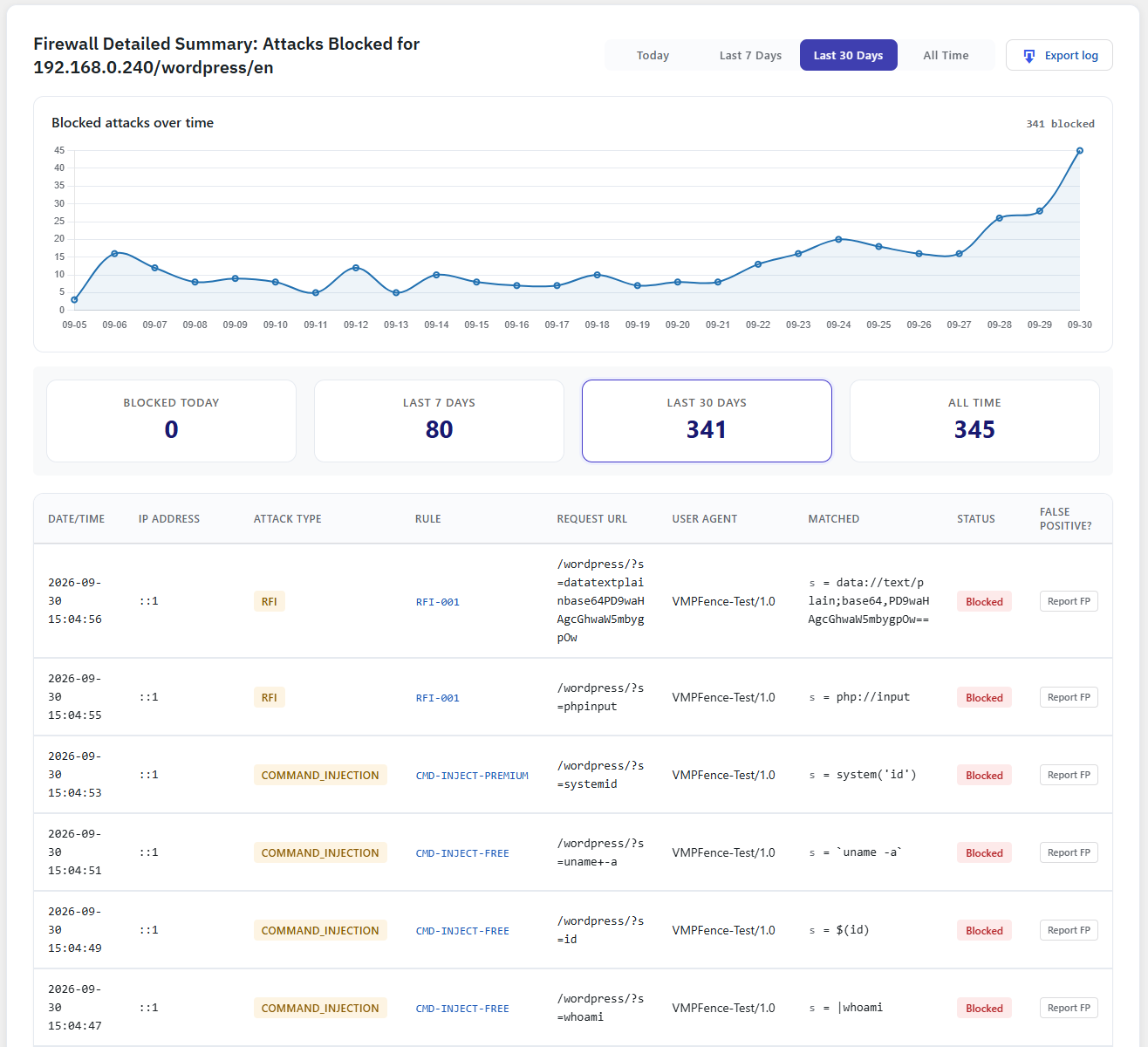
- Firewall page: The Firewall Detailed Summary on the Firewall page now shows the “Blocked attacks over time” chart, as the Dashboard already did. It follows the Today, Last 7 Days, Last 30 Days and All Time buttons.
- Block page: The “Learn about VMP Security” button is now one solid color instead of a gradient.
- Blocking: Visitors blocked because their address is on the VMP IP threat feed now see that reason on the block page, and the incident under Blocking > Incidents records which feed entry matched.
- Security: The early firewall that runs before WordPress, the early protection layer, country blocking, reCAPTCHA checks, user activity logs, block pages and the attack log now all use the same visitor address as the rest of the firewall, following your IP detection and trusted proxy settings. A visitor can no longer change the address these features see by adding a forwarded-IP header. If your site sits behind a proxy or CDN other than the built-in ones (Cloudflare, CloudFront, Sucuri, Incapsula, Quic.cloud, Ezoic), add its addresses under trusted proxies so these features see your visitors’ addresses.
- Security: A forwarded-IP header from your own proxy or load balancer now counts only when that proxy is listed under Trusted proxies, and the visitor address is read from the right end of the proxy chain, so a visitor can no longer choose the address the firewall sees by adding a header. If your site sits behind its own proxy, it is detected on your next admin visit and its private network is added for you.
- Firewall: The built-in firewall rules now also block time-based, blind and error-based SQL injection (for example SLEEP, BENCHMARK, extractvalue and updatexml payloads), not only UNION and OR 1=1 attacks.
- Firewall: The built-in firewall rules now block Windows command-injection attempts (for example powershell, cmd, certutil, bitsadmin, net user and reg commands run after a chaining character), not only the Unix shell commands covered before.
- Forms: Website links in contact-form messages, including links with tracking codes such as utm_source, are no longer blocked as attacks. Links sent as page-address parameters, such as ?file=http://…, are still blocked.
- Login security: The “Disable XML-RPC authentication” switch now closes XML-RPC completely when it is on — the endpoint no longer lists its methods and refuses pingbacks as well as logins. Before, it stopped only password logins. With the switch off, XML-RPC keeps working as normal.
- Security: The allowlist tables on the Firewall and All Options pages now show each entry’s address, parameter name and details as plain text, so a crafted value saved in an entry can no longer run as code in your browser.
- WooCommerce: When the firewall blocks a payment notification from your gateway (for example a Stripe or PayPal webhook), VMP Security now shows a notice on the Security and WooCommerce screens naming the blocked request, with a one-click button to allow it so the gateway can deliver it. Before, a blocked webhook looked like any other attack in the log and could leave an order stuck as pending.
- Firewall: Deactivating or deleting the plugin now also turns off Extended Protection, the part of the firewall that runs before WordPress, so the firewall no longer keeps blocking requests once the plugin is off. If you use Extended Protection, turn it on again after reactivating the plugin.
- Early protection: If the early protection file (wp-content/mu-plugins/vmpfence-early-protection.php) is deleted, for example by another plugin’s clean-up tool or a site migration, VMP Security now puts it back on the next page load and shows administrators a notice. If the folder cannot be written to, the notice says early protection is not running and how to fix it. Before, the file could stay missing for up to a day with no warning.
- Rate limiting: The early protection layer no longer refuses busy visitors on its own built-in limit of 240 requests. It now follows the Rate Limiting settings: with the global limit at unlimited (the default) it never limits, and with a number set it refuses only addresses the rate limiter has already blocked. Before, a shopper adding items to the cart could see “Too many requests” after a few minutes even with every limit set to unlimited.
- Dashboard notifications: The issue count now matches the Scan page — issues you have already fixed or ignored are no longer counted. The updates notification now shows the updates WordPress reports right now, including WordPress itself, instead of what the last scan saw. A dismissed notification stays hidden until a new scan finishes or a new update appears, the notification text can now be translated, and the icons now use WordPress’s own icon set instead of emoji.
- Firewall: Dismissing the optimization banner on the Firewall page now keeps it hidden. Before, it came back on the next page load.
2.4.5 – October 14, 2026
Automatic Blocklist, Incident IDs & Spoofing Fixes
- Automatic Blocklist page: A new Temporary blocks page under Firewall > Blocking lists every block that expires on its own — rate-limit, brute-force and the rest — with how long is left on each and a one-click lift. Active counts now show on the Blocking overview and side rail.
- Incident IDs on block pages: Every block page now shows an incident code, recorded so you can look it up later. A new Incidents page lets you search a visitor’s code, see what triggered the block and mark it resolved. Add a contact email under Firewall Options and locked-out visitors are told how to reach you.
- Security: Visitors who connect straight to your site can no longer pose as an allowlisted IP address by adding a forwarded-IP header to their request. These headers are now trusted only when the request arrives through a local or private-network proxy, a proxy in your trusted proxies list, or one of the CDN address ranges built into the plugin. If your site sits behind another proxy or CDN, add its addresses to the trusted proxies list so visitors keep their real IP.
- Security: Login lockouts — for too many failed logins, invalid usernames or password reset attempts — now use the same visitor address as the rest of the firewall, including your IP detection setting. A visitor connecting directly can no longer escape a lockout, or get someone else’s address locked out, by changing a forwarded-IP header.
- Security: Importing settings with a token now stops and asks you to confirm before it weakens protection on this site — for example turning off the firewall or adding IP addresses to an allowlist — and lists exactly what would change. Nothing is applied until you confirm.
- Fix: Unblocking an IP address now lets it back in straight away. Before, an IP locked out for failed logins stayed blocked until the lockout ran out even though Unblock reported success. Its failed-login count also starts over, so one more typo doesn’t lock it out again.
- Fix: The page shown to a blocked or locked-out address now gives the real reason (for example too many failed logins, not a firewall rule), says when the block ends, and tells the site owner how to get back in.
- Fix: The Unblock button now runs through a single handler that lifts the address from the blocked IP list as before and also clears any rate-limit block on it. Two unused duplicate handlers that could have taken over the button were removed. Duplicate brute-force entries are no longer created for the same address.
Older releases are listed in changelog.txt.