


Description
Get a plain email when a plugin, theme or WordPress on your site has a known security problem, with what to do and by when. No jargon, and no email when all is quiet.
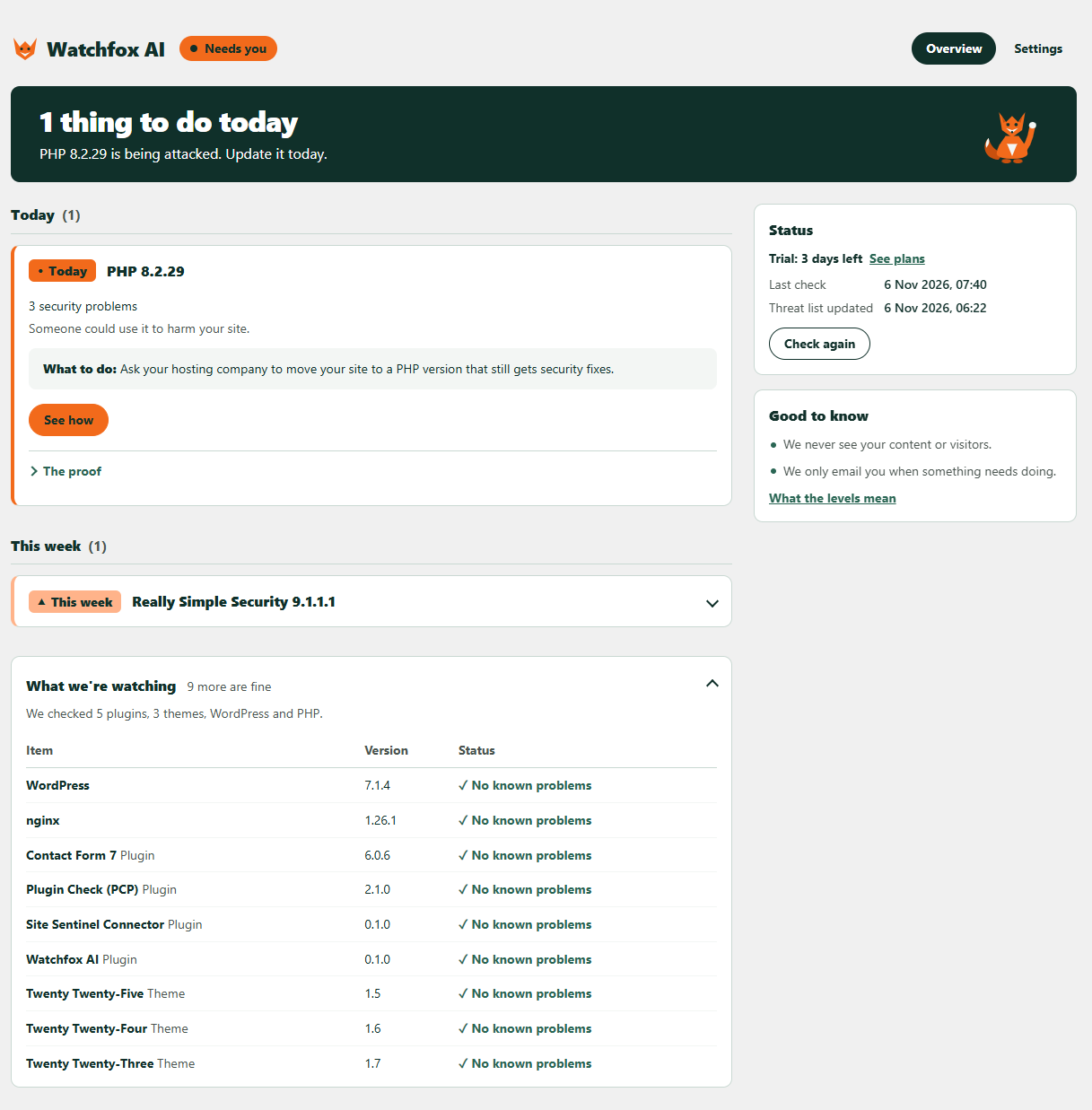
Watchfox AI keeps an eye on the plugins, themes, WordPress and PHP version on your site. When one of them has a known security hole, it tells you how serious it is and what to do: today, this week, or when you can.
Who it’s for
- Site owners who are not developers and want to know, in words they understand, when something needs updating.
- Small businesses and shops that rely on a WordPress site but have nobody watching it.
- Freelancers and agencies who look after client sites and want security alerts by email in one place (Agency plan).
How it works
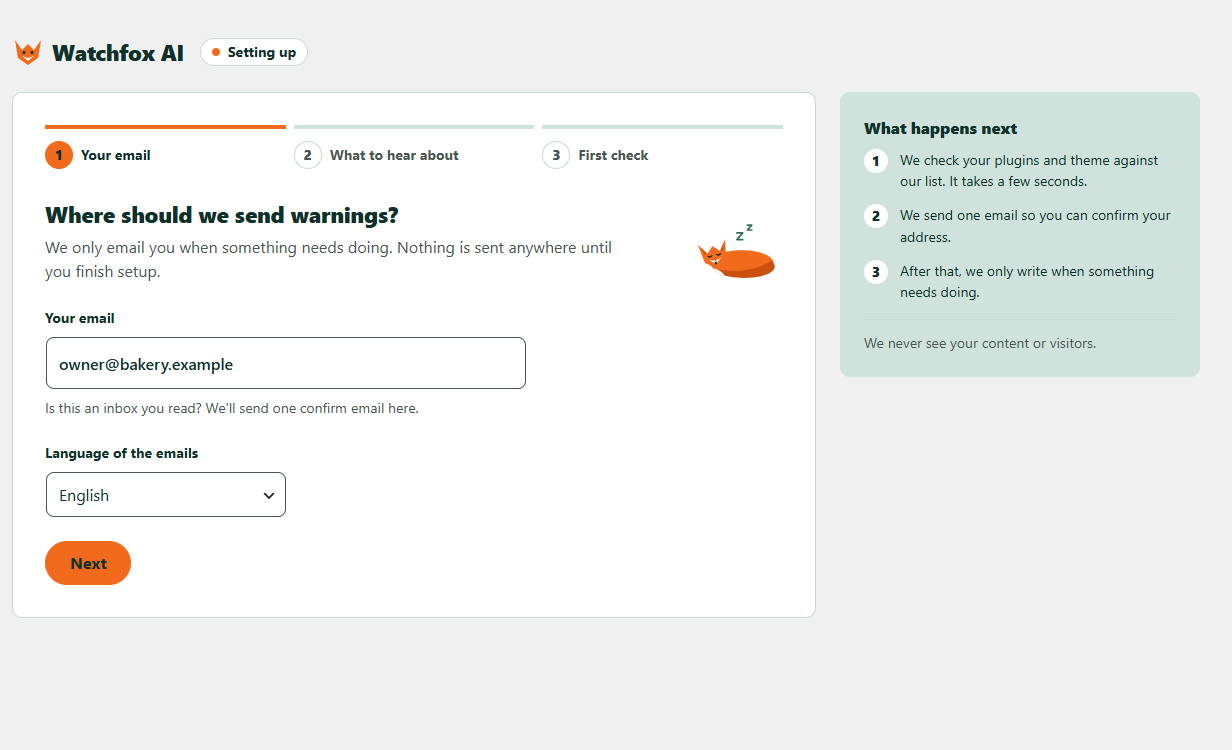
- Install and activate, then enter your email and choose English or Spanish.
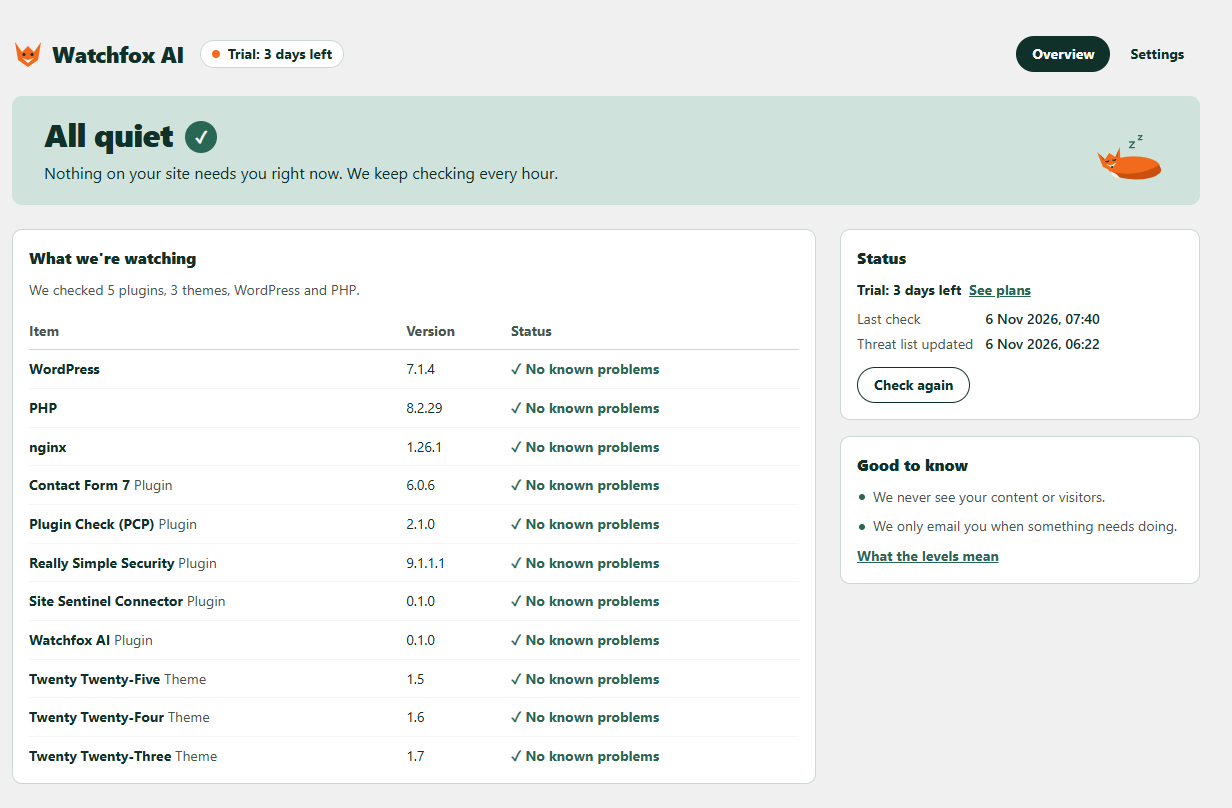
- Every hour your site compares its versions with a public, signed list of known problems. It never changes anything without your OK.
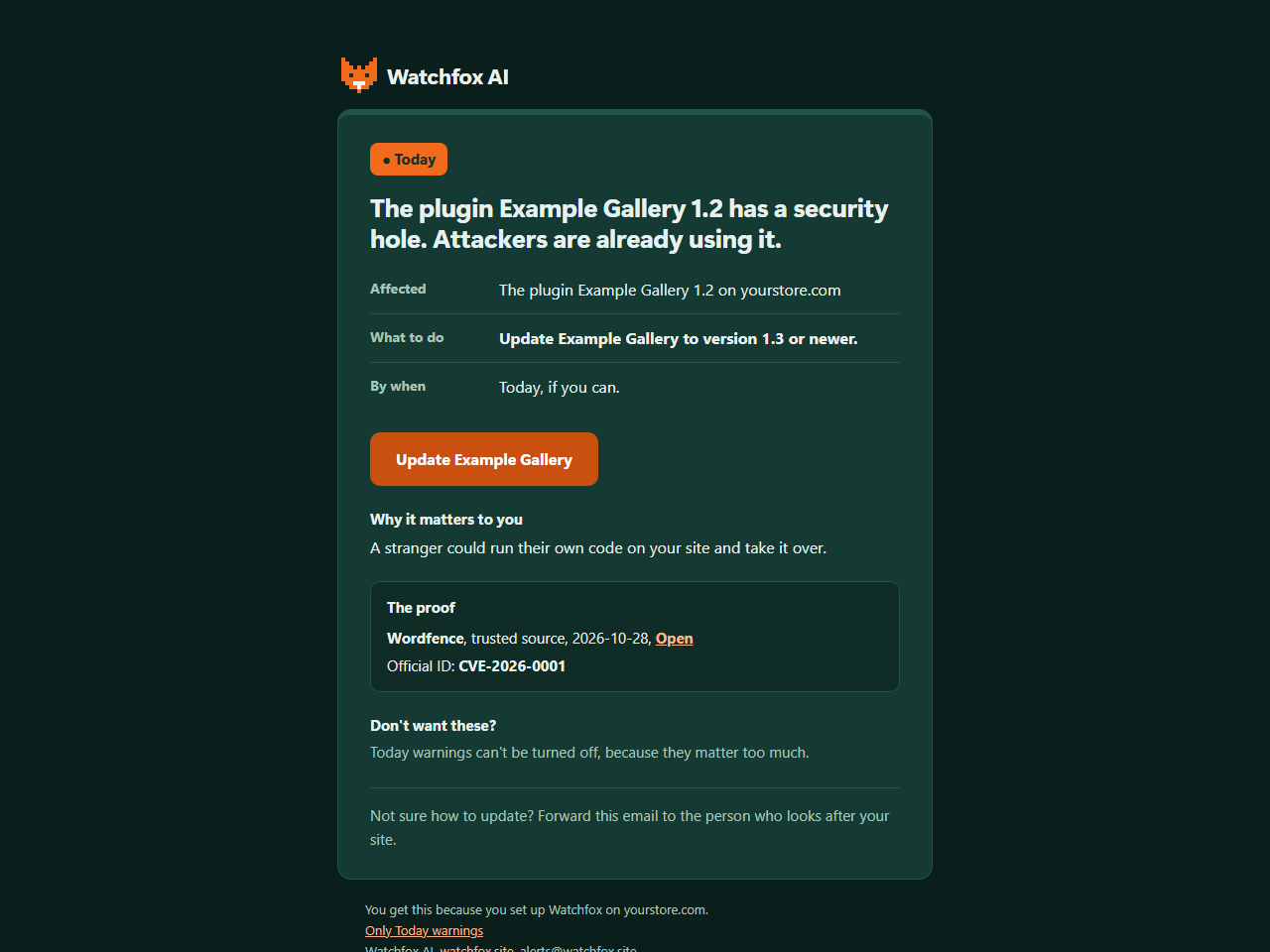
- When something needs you, you get an email with what to do and the proof behind it. You can also see it any time in WordPress.
Free and paid
Every finding shows in WordPress on every plan, free included. The plan changes which emails you get, and whether our service runs Auto-fix for you.
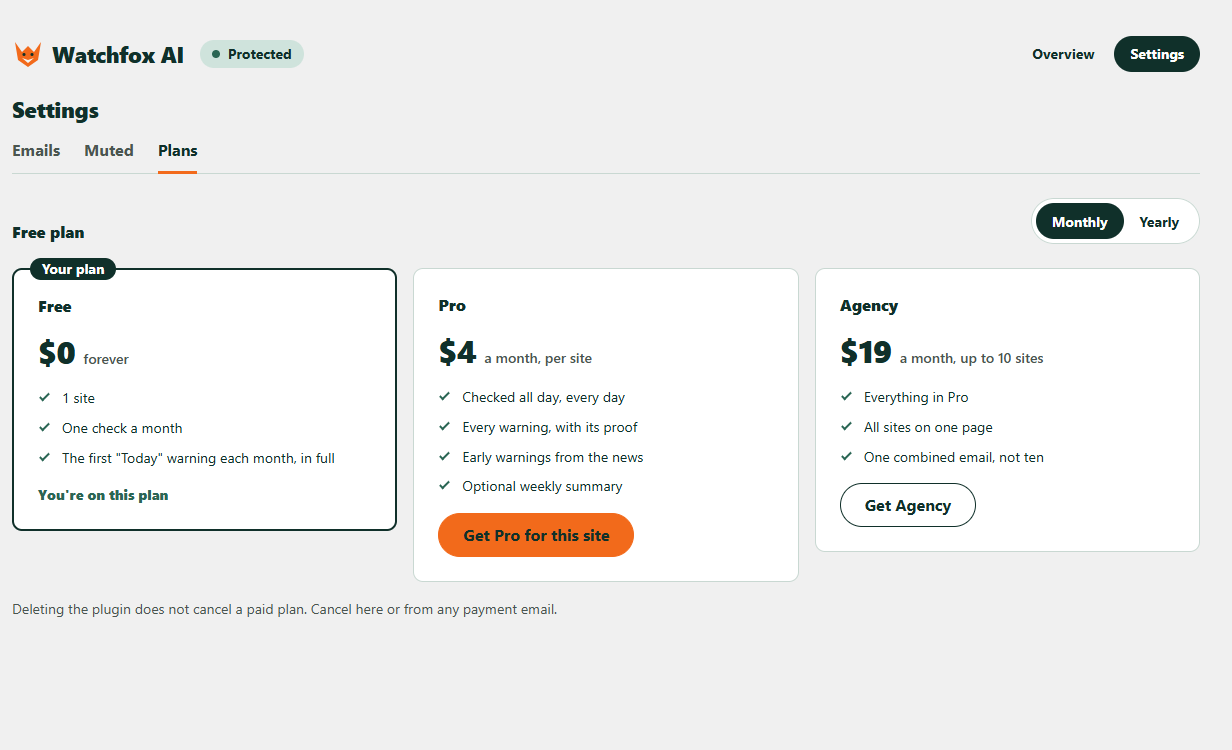
- Free: 1 site for each email address, one safety-check email a month, and the first “Today” warning each month in full by email.
- Paid (Pro, or Agency for up to 10 sites): checked all day, every day, every warning by email in full with its proof, “This week” and “When you can” warnings, optional early warnings from the news, “Sorted” emails when you fix things, an optional weekly summary, Break-in watch emails and a monthly report.
- Auto-fix, run by our service, is part of the trial and the paid plans. Fix it now is free on every plan.
- Break-in watch emails and the monthly report are for the trial and the paid plans. The Recent changes card in WordPress is on every plan.
Why it is different
- Plain words. Each warning says who is at risk, what to do and by when, so you can act or forward it to whoever looks after your site.
- Proof, not scare. Every warning shows where it comes from, such as a trusted security source and an official ID, so you can check it.
- Early warnings. The AI runs on our service to read public security news, so new problems can be added to the list early; the plugin itself only compares versions and runs no AI.
- Quiet by design. You only hear from us when something needs doing.
What you get:
- A plain page in your WordPress admin that lists what needs doing, with the proof behind each warning.
- An email when something needs you, so you do not have to remember to look.
- Warning emails in English or Spanish, your choice.
- A “Fix it now” button that updates a risky plugin or theme in one click, after you confirm. It saves a copy first and puts it back if your site breaks.
- Auto-fix is part of the trial and the paid plans, and is run by our service. It is off until you turn it on, then updates plugins and themes with a known security problem, with a backup and an automatic undo. The Fix it now button stays free on every plan.
- Break-in watch: it notices four changes that often follow a break-in, which are a new administrator, a changed admin email address, Watchfox AI being switched off or removed, and a plugin added or replaced by uploading a zip file. The trial and the paid plans get an email. Every plan sees them on the Recent changes card in WordPress. It is a tripwire: it tells you, and it cannot stop a break-in.
- A monthly report on the trial and the paid plans: one email a month about what Watchfox AI did. You can switch it off in Settings.
- After an update, it checks that your home page, login, cart and checkout still work.
- “Is this update safe?”: how the same update went on other sites, before you press the button.
- It never changes anything without your OK.
How it works in detail: Watchfox AI downloads a public, signed list of known problems and compares it with the versions on your site. If you sign up for emails, your site sends back only the problems it found, so we can write to you.
External services
Watchfox AI uses four outside services. Nothing is sent to any service until you finish setup.
- api.watchfox.site (run by the Watchfox AI team, https://watchfox.site). This is the service behind the plugin. Terms: https://watchfox.site/terms. Privacy policy: https://watchfox.site/privacy.
- Threat list download: your site fetches the public list (an index and small files). Only the files that match what is installed are fetched. The request carries no account or site details, but each file name is a short hash prefix of an installed item, and your server address is visible like in any web request.
- Site registration: when you finish setup, your site sends the email address and language you chose, your site address and wp-admin address, and the Watchfox AI, WordPress and PHP versions, so we can email you.
- Reports: after each check your site sends your site address, a running number for each report (so an old report cannot be sent again), only the problems it found (an ID, the item folder name, its version, a status, how serious it is, what kind of item it is and its display name), the IDs of warnings a trusted source has withdrawn, your email and warning settings (including which warnings you muted, and whether you want the monthly report and the zip upload emails), your wp-admin address (so the “Fix it now” button in an email opens the right page), whether Auto-fix is on or off and which warning levels it covers (so a warning email can mention it when it is off; never which items you excluded), and, for each problem, the version WordPress offers as the fix, if there is one (so our service can decide what Auto-fix covers), whether the Sunday summary may include one line asking for a review on WordPress.org (only yes or no; whether you click it is never sent), and the Watchfox AI, WordPress and PHP versions, and how many checks ran since the last report (for the monthly report). It never sends your full list of plugins and themes. Reports are signed with a secret that belongs to your site.
- Orders: when Auto-fix is ticked, your site asks the service about once an hour whether to fix something, and once more right after a fix, sending your site address, signed like a report. It also tells the service which orders it did not carry out and a short reason code (for example that the item is on your skip list); it never sends the skip list itself. It acts only on an order signed for your site, and never on anything else the service might say.
- Outside look: before and after any fix, on every plan, your site asks the service to look at its home page and up to two more public pages. The service loads them only for sites on a trial or paid plan, to see whether they still work. These requests identify themselves as WatchfoxAI/1.0 (+https://watchfox.site). Your site tells the service whether it is the look before or after a fix, which pages to look at (up to three) and the id of the order it belongs to; the service reads only their public address and answer. Some time after a fix is kept, the service also looks at your home page once more by itself, with no request from your site.
- What Watchfox changed: if you use “Fix it now” or Auto-fix, the next report also says what was done: how many fixes and put-backs there were, and for each one the warning ID, the item folder name and display name, the version before and after, how serious the warning was, whether it worked, could not be checked or was put back (and why), whether Watchfox had to switch the plugin off after a put-back failed, and whether you or Auto-fix did it. On paid plans we use this to email you “Fixed for you” or “We put it back”. No file contents and no backup data are ever sent.
- Break-in watch: when one of these happens on your site, the next report says so, and a new administrator or a changed admin email makes that report go out within minutes: a new administrator (an account created as administrator, made administrator, or made super admin), a change of the site’s admin email address, Watchfox AI being switched off or removed, or a plugin added or replaced by uploading a zip file. For each one it sends what happened, when, the login name of the account it happened to, and the login name of the account that did it, if anyone was logged in; for a zip upload, the plugin’s folder name and display name. It never sends email addresses, passwords or IP addresses, and for an admin email change neither the old nor the new address. When Watchfox AI is switched off, your site sends one last report at once. Our service keeps these for 90 days and deletes them when your site is removed.
- Safety ratings: when an update is ready, your site downloads a small public file to see how that update went on other sites. The request carries no account or site details, but the file name is a short hash prefix of the item, like the threat list files. When you use “Fix it now” or Auto-fix, whether the update was kept or put back is pooled anonymously with the same result from other sites. Only rounded totals (such as “100+ sites”) are published, and only once at least 10 different site owners reported the same update.
- Removal: when you delete the plugin, your site tells the service to stop watching it, with the login name of the account that deleted it.
- Uninstall reason (only if you choose to send it): when you deactivate Watchfox AI on the Plugins screen, a small optional question appears. If you press “Send and deactivate”, your site sends one of five reasons you picked and the short note you typed (at most 200 characters, if any), with your site address, signed like a report. Press “Skip and deactivate” and nothing is sent. We keep the answers for 400 days.
- Emails and payments: when you press “Send it again” or “Send me a sample warning”, or choose a paid plan, your site asks the service to send that email or to prepare a payment link (with the plan you picked and your site ID).
- Brevo (https://www.brevo.com), through api.watchfox.site. Brevo delivers our emails (the confirmation, warnings, a sample warning, a weekly all-quiet note, and on paid plans “Fixed for you” or “We put it back” after a fix, and Break-in watch emails and a monthly report on the trial and paid plans) from alerts@watchfox.site. Your email address and the name and address of your site are passed to Brevo to deliver those emails. Brevo also receives the text of each email. A Break-in watch email contains the login name of the account affected and of the account that did it, if anyone was logged in, and for a zip upload the plugin’s folder name and display name. Terms: https://www.brevo.com/legal/termsofuse/. Privacy policy: https://www.brevo.com/legal/privacypolicy/.
- Dodo Payments (https://dodopayments.com), only if you choose a paid plan. Your browser opens a Dodo Payments page, the merchant of record, which collects the payment and handles taxes. Card details go only to Dodo Payments, never through your site or Watchfox AI. Cancelling also happens on a Dodo Payments page that the plugin links to. Buyer terms: https://dodopayments.com/legal/buyer-terms. Privacy policy: https://dodopayments.com/legal/privacy-policy.
- api.wordpress.org (https://wordpress.org). Once a day, for a few plugins that WordPress.org used to list but no longer does, your site asks the WordPress.org plugin information API whether the plugin was closed. Once a week, for each plugin from WordPress.org, it asks when the plugin was last updated, so a plugin nobody has updated for two years can be pointed out. Each request sends the plugin folder name and your server address. When you press “Fix it now” (or Auto-fix runs), WordPress itself downloads the update from its normal update source, exactly as the Update button on the Plugins screen does; Watchfox AI never downloads or runs code from our service. Terms and privacy: https://wordpress.org/about/privacy/.
After an update made with “Fix it now” or Auto-fix, your site also loads a few of its own pages (home, login, and the WooCommerce cart, checkout and a product page if you use WooCommerce) to check that they still work. These requests go only to your own site.
The plugin contains no tracking, ads or hidden links.
Installation
- In WordPress, go to Plugins, then Add New, and search for “Watchfox AI”. Or upload the watchfox folder to /wp-content/plugins/.
- Activate it and open Watchfox in the admin menu.
- Follow the three setup screens.
FAQ
Does it slow my site?
No. It is a short background check about once an hour. It does not run on your visitors’ page loads.
Can Watchfox change my site?
It never changes anything without your OK. Each warning tells you what to do. For a plugin or theme with a fix out, the “Fix it now” button opens a screen that says exactly what will happen, and nothing changes until you press Update now. Before the update Watchfox saves a copy of the old plugin files, and if your site stops working afterwards it puts the old version back. It saves files, not your database, so keep a full backup too.
You can also turn on Auto-fix. It is part of the trial and the paid plans (Pro and Agency), and it is run by our service. It is off until you read the notice and tick the box. On the Free plan Auto-fix stays paused, and Fix it now still works. Once it is on, our service picks a safe moment, and it only updates plugins and themes that have a known security problem and a fix out, with a backup and an undo; afterwards it checks your site from outside. It never switches a plugin off to deal with a warning; only if an update breaks the site and even the old version no longer works does it switch that plugin off. Everything Auto-fix does is listed under “What Watchfox did”, and the paid plans also email you.
Where are the backups kept?
In wp-content/watchfox-backups, inside a folder with a random name. The plugin and theme code in a backup is renamed so it cannot run, and every folder holds files that tell Apache and IIS not to show it. Nginx ignores those files: if your site runs on nginx, ask your host to add location ^~ /wp-content/watchfox-backups/ { deny all; } to the site’s settings. The last two copies of each item are kept, and old ones go after 30 days once the warning is gone. A plugin or theme over 200 MB is not copied, so Fix it now and Auto-fix leave it for you to update after your own backup.
Does it fix things for me?
Only if you ask it to: press “Fix it now” on a warning, or turn on Auto-fix. Otherwise it tells you what to do, for example “update this plugin to version 1.3”, and links you to the right page.
Do I need Wordfence or another security plugin too?
Watchfox AI complements firewalls and malware scanners; it does not replace them. It does one job: it emails you, in plain words, when something you run has a known security problem. Use it next to whatever else you trust.
Is my data sent anywhere?
Nothing is sent until you finish setup. After that, your site sends your email, language and site address, and only the problems it found, not your full plugin list. See the External services section for every detail.
Is my site hacked?
Watchfox AI is not a malware scanner, so it cannot tell you that. It tells you when software on your site has a known hole that attackers could use, so you can close it.
Break-in watch also tells you about four changes that often follow a break-in: a new administrator, a changed admin email address, Watchfox AI being switched off or removed, and a plugin added or replaced by uploading a zip file. It is a tripwire, not a guard. It tells you, and it cannot stop a break-in. It also cannot see a plugin folder deleted over FTP, or Watchfox AI switched off in the database, because then none of our code runs. If we hear nothing from your site for 3 days, we email you about that.
Is there Spanish?
Yes. The warning emails come in English or Spanish; you choose in setup. The plugin screens follow your WordPress language through translate.wordpress.org, and the Spanish translation is on its way there.
What does the AI do?
The AI works on our side, not on your site. Every day it reads public security news so we can add new problems to the list early, when a story does not say exactly which versions are affected. The plugin itself runs no AI: it only compares the signed list with the versions on your site. Your site, its content and your plugin list are never sent to any AI.
Where does the vulnerability data come from?
From Wordfence Intelligence, by Defiant Inc., which includes CVE® data from The MITRE Corporation. Each warning links to its Wordfence record. The copyright notices and licenses for this data are at https://watchfox.site/data-licenses.
What is free?
Nearly everything, inside WordPress. Every finding, how serious it is, the proof behind it and the steps to fix it show on every plan, free included, and so does the Fix it now button and the Recent changes card. A free plan sends warning emails for one site. Auto-fix is the exception: it is part of the trial and the paid plans, and is run by our service.
What does a paid plan add?
More email warnings, for more sites, Auto-fix, which our service runs for you (it is also on during the trial), Break-in watch emails and a monthly report. The warnings you see in WordPress do not change with the plan.
Does deleting the plugin cancel my plan?
No. If you pay, cancel from the Plans tab (Manage or cancel) or from any payment email. Deleting the plugin only tells Watchfox AI to stop watching the site.
How do I report a problem?
Open a topic in the support forum. Tell us what you expected, what happened instead, and your WordPress and Watchfox AI versions. Please do not post your email address or anything private there.
Screenshots

Changelog
0.4.0
- New: Break-in watch. Watchfox AI notices a new administrator, a changed admin email address, Watchfox AI being switched off or removed, and a plugin added or replaced by uploading a zip file. On the trial and the paid plans you get an email. It cannot stop a break-in.
- New: a Recent changes card on the Watchfox screen, on every plan, with these changes from the last 90 days.
- New: a monthly report on the trial and the paid plans, one email a month about what Watchfox AI did.
- New: two email settings, Monthly report and Zip upload emails.
- Changed: reports now also send how many checks ran since the last report, and the removal request carries the login name of the account that deleted the plugin. The External services section lists every request.
0.3.0
- Changed: Auto-fix is now run by our service. On the Free plan Auto-fix stops, and Fix it now stays free. On the trial and the paid plans (Pro and Agency) our service picks the moment and sends your site a signed order. Your site only acts on an order signed for it.
- New: an outside look. Before and after a fix, our service loads your home page and up to two more public pages from outside, to see that they still work. Fix it now asks for the same look.
- New: if a later look shows your site broken after a fix, our service can order the old version put back. It does this only for a recent fix, and only from the copy saved before the update.
- Changed: Auto-fix makes no update when neither your site nor our service can check the site first. If your site cannot check itself at all (it could not load its own home page before the update either) and our service saw your home page fine before, an update our service cannot see afterwards is kept, marked as not confirmed, and our service looks again later. If your site could check itself before the update and cannot afterwards, or a page shows an error, the old version is put back.
- Changed: the report now also sends the version offered as the fix and the warning levels Auto-fix covers. The External services section lists every request.
- Fixed: when two plugins share one warning, Fix it now updates the plugin you clicked, not the first one.
0.2.5
- Fixed: a home page behind a login wall, a firewall or a rate limit (401, 403 or 429) now counts as “could not check”, not as working. Auto-fix waits, as it does when your host blocks the check; Fix it now still updates and asks you to take a look.
- Fixed: putting the old version back now copies it next to the plugin or theme first, checks the copy, then swaps the two. If anything fails, the installed files stay as they were.
- Fixed: an update that was cut off half-way is finished in the background by WP-Cron, never inside someone’s page load, and without the 30 minute wait.
- Fixed: on multisite, only one update runs at a time for the whole network, and plugins switched on for the whole network are auto-fixed from the main site only.
- Fixed: each backup folder now has its own protection files, more kinds of code are stored disarmed, and copies that never finished are cleaned up. A plugin or theme over 200 MB is not copied, so Fix it now and Auto-fix leave it to you.
- Fixed: deleting the plugin no longer forgets backups it could not remove.
- Fixed: the Watchfox screens no longer wait for our service while your email is not confirmed yet.
- Fixed: the deactivate question and the readme now say that your site address is sent too.
- New: FAQ on where the backups are kept, with the one-line rule for nginx.
0.2.4
- New: each warning links to its Wordfence record.
- New: the Watchfox screen credits the vulnerability data (Wordfence Intelligence by Defiant Inc., and CVE® by The MITRE Corporation) and links to the data licenses.
- New: FAQ on where the vulnerability data comes from.
0.2.3
- New: after Watchfox AI has checked your site on at least 7 days, and at least 14 days after you installed it, a small note on the Dashboard and the Watchfox screens asks for a review on WordPress.org. It never shows while something needs doing today, shows at most three times, and “Don’t ask again” ends it.
- New: the Sunday summary can include one line asking for a review. Turn it off in Settings, Emails.
- New: FAQ on how to report a problem.
0.2.2
- New: when you deactivate Watchfox AI you can tell us why, in one click. It is optional and you can skip it.
- New: if Auto-fix is off, warning emails mention once that you can turn it on. Reports now say whether Auto-fix is on or off.
0.2.1
- Fixed: the Auto-fix screens now say plainly when Auto-fix switches a plugin off (only if an update breaks your site and the old version cannot be put back), and that the email about it is part of Pro.
0.2.0
- New: “Fix it now” updates a risky plugin or theme in one click, after you confirm.
- New: Auto-fix (free, opt-in). Saves a backup first and undoes the update by itself if your site breaks.
- New: “No fix yet” guidance when there is nothing to update.
- New: checks login, cart and checkout after updates.
- New: “Is this update safe?” ratings from other sites.
0.1.0
- First version.