


Description
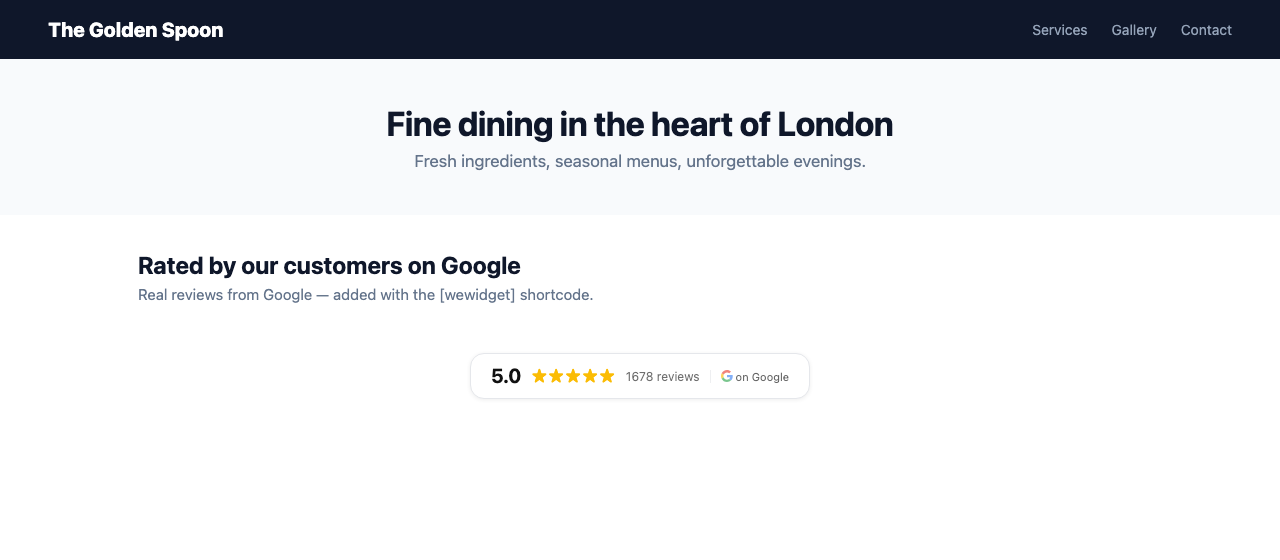
WeWidget shows your real Google reviews on your WordPress site — carousel, grid, list, hero or a compact star-rating badge.
Set-up takes about a minute and doesn’t need a Google login: search for your business by name inside the plugin, enter your email, and pick where the reviews should appear. No copying IDs between tabs, and no shortcode needed unless you want one.
Why WeWidget?
- Unlimited page views on every plan — your widget never gets deactivated for traffic
- Free forever review widget — your top 5 Google reviews as a carousel, plus the star-rating badge, no card required
- Fast — one small under 20 KB script, no external fonts, Shadow DOM isolation (your theme’s CSS stays untouched), lazy-loads below the fold
- SEO rich snippets — schema.org AggregateRating markup, eligible for gold stars under your site in Google search results
- Native block editor support — add the “WeWidget – Google Reviews” block, or use the
[wewidget]shortcode anywhere - Auto-sync — new reviews appear automatically every day
- No Google login needed — connect by business name; optionally connect Google later for your full review history
- UK-based support
- Great for agencies & freelancers — manage review widgets across multiple client sites from one WeWidget account
How it works
- Go to Settings → WeWidget and search for your business by name
- Pick it from the results and enter your email — your account, widget and reviews are set up for you
- Choose where your reviews should appear: your homepage, every page, or place it yourself
- That’s it — unless you chose to place it yourself, in which case add the WeWidget – Google Reviews block or the
[wewidget]shortcode wherever you want it
Your placement choice is saved in WordPress straight away, and is also sent to WeWidget so your account knows your widget has somewhere to appear — see External services below.
Prefer to do it manually? You can still paste a widget ID from your WeWidget dashboard into Settings → WeWidget and place the widget with the block or the [wewidget] shortcode. Use [wewidget id="your-widget-id"] to show a specific widget on a specific page.
For a floating badge on every page, choose “On every page” and pick the floating style in your WeWidget dashboard.
External services
This plugin is the WordPress front end for WeWidget (wewidget.app), a review-widget service. It cannot show your Google reviews without it, so the plugin communicates with WeWidget in the four situations below — and in no others.
1. Showing the widget on your site (front end)
- When: only when a page that contains your widget is viewed by a visitor.
- Sent: the widget ID you configured, plus the standard web request data any browser sends (IP address, user agent, and the page’s origin domain). Anonymous view and click counts are recorded for your widget analytics.
- Received: your widget’s review data.
- Endpoints:
https://app.wewidget.app/widget.js,https://app.wewidget.app/api/widget-mock/{your-widget-id}, andhttps://app.wewidget.app/api/widget-eventsfor the anonymous counts. - Why: to render your reviews and show you how often the widget was seen.
- No personal data about your visitors is stored.
2. Searching for your business (WordPress admin)
- When: only when you type a business name and press Search on the WeWidget setup screen. Never automatically.
- Sent: the search text you typed.
- Endpoint:
POST https://wewidget.app/api/demo/search - Why: to find your business on Google so it can be connected to your widget.
3. Creating your account and widget (WordPress admin)
- When: only when you submit the WeWidget setup form. Never automatically.
- Sent: the email address you entered, the Google Place ID of the business you picked, that business’s name, your site address (
home_url()), and a number identifying which version of the placement feature this plugin supports. - Endpoint:
POST https://wewidget.app/api/wordpress/onboard/provision - Why: to create or link your WeWidget account, create your widget, and give this installation a credential so it can identify itself later.
4. Keeping your placement in sync (WordPress admin, new in 1.3.0)
- When: only after you choose or change where your widget should appear — the buttons shown after setup, or the “Show automatically” setting. Nothing is sent when the plugin is installed, activated, updated, or when you simply open your WordPress admin. Delivery happens shortly afterwards in the background via WP-Cron, and is retried if WeWidget cannot be reached.
- Sent: your widget ID, the placement you chose (homepage, every page, or manual/shortcode), and this installation’s credential, which authenticates the request as coming from your site. Nothing else — not the plugin version, and not which screen you chose it on.
- Endpoint:
POST https://wewidget.app/api/wordpress/placement - Why: so your WeWidget account can keep the placement you selected in WordPress in sync with the widget it holds for you.
- Not sent: the contents of your pages or posts, page URLs, visitor browsing activity, WordPress usernames or passwords, Google credentials, or review text.
- If this cannot be delivered, nothing breaks: your placement is saved in WordPress first and the widget works exactly the same.
Installations that were set up with an older version of this plugin, or where the widget ID was entered by hand, have no credential and never send anything under point 4.
Service provider: WeWidget — wewidget.app · Terms of Service · Privacy Policy
A free WeWidget account is required to obtain a widget ID. You can create one from inside this plugin, or at wewidget.app.
FAQ
Is it free?
The free plan is free forever, no card required: your top 5 Google reviews as a carousel plus the star-rating badge. The full widget — all your reviews, reviewer photos, more layouts, colours and review curation — comes with a paid plan from £5/month, and you can try it free for 30 days (a card is needed to start the trial; nothing is charged for 30 days, and the plan then continues automatically unless you cancel before then). There are no page-view caps on any plan.
How do I get back into my WeWidget dashboard?
In your WordPress admin, go to Settings → WeWidget and click Open WeWidget Dashboard. If you are not signed in, choose “Email me a sign-in link” on the sign-in page and we’ll email you a link. It works once and expires after 1 hour. For security, you can ask for a new link once every 15 minutes, up to three times a day. No password is needed.
Do I need a Google API key or Google login?
No. Search for your business by name on wewidget.app and you’re connected. You can optionally connect your Google account later to sync your full review history.
Will it slow my site down?
No. The widget is a single under 20 KB (gzipped) script with no external fonts or CSS frameworks, renders in an isolated Shadow DOM, and lazy-loads when scrolled into view.
Can I show more than one widget?
Yes — use [wewidget id="your-widget-id"] with different IDs on different pages.
Do new reviews appear automatically?
Yes. Reviews sync automatically every day.
Is it GDPR compliant?
The widget is designed to be GDPR-friendly: it sets no cookies, does not track your website visitors, and stores no personal data about them — only anonymous aggregate view and click counts per widget. The widget loads from app.wewidget.app (a standard web request, like any CDN); technical details such as IP addresses are seen transiently to serve the request but are not stored or profiled. Reviews shown are your business’s public Google reviews.
Separately from your visitors, the plugin sends information from your WordPress admin to WeWidget when you act: when you search for your business, when you complete setup, and when you choose where the widget should appear. Those are listed in full under External services above. Full plain-English explanation: https://wewidget.app/gdpr
Does it work with page builders?
Yes — the shortcode works in Elementor, Divi, Beaver Builder and other builders. In the block editor there’s a native WeWidget – Google Reviews block (search “WeWidget” in the block inserter), and the Shortcode block works too. The widget also re-initialises automatically on sites that render content client-side.
Screenshots


Changelog
1.3.3
- Changed: setup now creates your widget on the free plan — free forever, no card needed. The free plan shows your top 5 Google reviews as a carousel, plus the star-rating badge.
- Changed: the 30-day free trial of a paid plan is started from your WeWidget dashboard and needs a card. Nothing is charged for 30 days, and the plan then continues automatically unless you cancel before then.
- Existing installations keep their saved settings, and nothing new is sent to WeWidget.
1.3.2
- Fixed: pressing “Save Changes” on the settings page straight after creating your widget no longer clears your widget ID and disconnects your site. The Widget ID box is filled in as soon as setup finishes, and an empty or out-of-date box can no longer remove a working connection. To disconnect on purpose, tick the new “Disconnect this site from WeWidget” box and save.
- Fixed: once your widget is created, the setup controls are removed, and the plugin will not run setup again on a site that is already connected. Setup also runs one request at a time, so two browser tabs pressing “Create my widget” together can no longer create two WeWidget accounts.
- New: an “Open WeWidget Dashboard” button on the setup success screen and on the settings page whenever your site is connected. If you are not signed in, choose “Email me a sign-in link” on the sign-in page. No password is needed.
- Clearer success message: it shows the address the sign-in link was sent to, that the link works once and expires after 1 hour, and how to get a new one (a new link can be requested once every 15 minutes). If the sign-in e-mail could not be sent, it says so.
- Setup now reports success only once WordPress has actually saved your new widget. If your site’s database is busy or read-only, setup stops before contacting WeWidget and asks you to try again; if WeWidget created your widget but WordPress could not save it, or WeWidget’s answer was lost, the message says so, shows your Widget ID where known, and asks you not to press “Create my widget” again. After a connection problem, the “Create my widget” button can be used again.
- Nothing new is sent to WeWidget, and existing installations keep their saved settings.
1.3.1
- Fixed: pasting a Google Maps or Google Search link whose address contains encoded characters — an accent in your business name, or a space written as %20 — no longer loses those characters on the way to WeWidget, so the search finds your business.
1.3.0
- Clearer last step after setup: “Your widget is ready — choose where it should appear”, with homepage, every page and place it myself as plain choices.
- Choosing a placement now confirms with “Placement saved” and tells you exactly what happens next — including that the
[wewidget]shortcode still needs adding if you chose to place it yourself. - Fixed: choosing “I’ll place it myself” previously just reloaded the page, so it was never recorded as a decision.
- Fixed: the very first placement you saved from the settings dropdown could be missed.
- Your placement choice is now kept in sync with your WeWidget account, so setup problems can be spotted and helped with. It is sent only when you choose or change a placement — never on install, activation, update or when you open your admin — and it is delivered in the background, so your site never waits for WeWidget. If it cannot be delivered, your placement still works normally.
- The External services section of this readme now documents every call the plugin makes to WeWidget, including the setup calls that have existed since 1.1.0.
- Installations set up with an older version, or where the widget ID was entered by hand, are unaffected and send nothing new.
1.2.2
- The “Connect Google” link on the setup success screen now signs you straight into your new dashboard’s connect page — no login step between you and showing your complete review history.
1.2.1
- The setup success screen now shows how many of your Google reviews the widget displays (top 5 is Google’s public limit) with a one-click link to connect your Google account and show your complete review history.
1.2.0
- NEW: customer review photos (Pro) — photos your customers attach to their Google reviews now show on the review card, with a pop-up gallery. Connect your Google Business Profile in the WeWidget dashboard to enable.
- One-click placement: after setup, choose “homepage” or “every page” and your reviews appear automatically — no shortcode hunting.
- New “Show automatically” setting (off / homepage / every page) replaces the site-wide checkbox (existing choice carries over).
- The free plan now includes your top 5 written Google reviews.
1.1.0
- New: one-step setup — search your business and enter your email right in the plugin settings; your account, widget and 30-day free trial are created automatically and your reviews go live without leaving WordPress.
- If you already have a WeWidget account, the plugin emails you a login link instead so you can copy your widget ID as before.
1.0.2
- New: bundled translations for German, French, Spanish, Italian, Dutch and Portuguese.
- New: a small optional review reminder on the plugin’s settings page (shown once after 14 days, dismissible forever).
1.0.1
- New: native block editor block — “WeWidget – Google Reviews” (wewidget/reviews) with an optional per-block widget ID.
- Improved: fully internationalisation-ready — all strings translatable, editor script translations wired up.
1.0.0
- Initial release: shortcode embed, settings page, site-wide floating badge option.