


Description
Coupon Affiliates is a powerful affiliate plugin for WooCommerce, that is designed to help you grow traffic and increase sales.
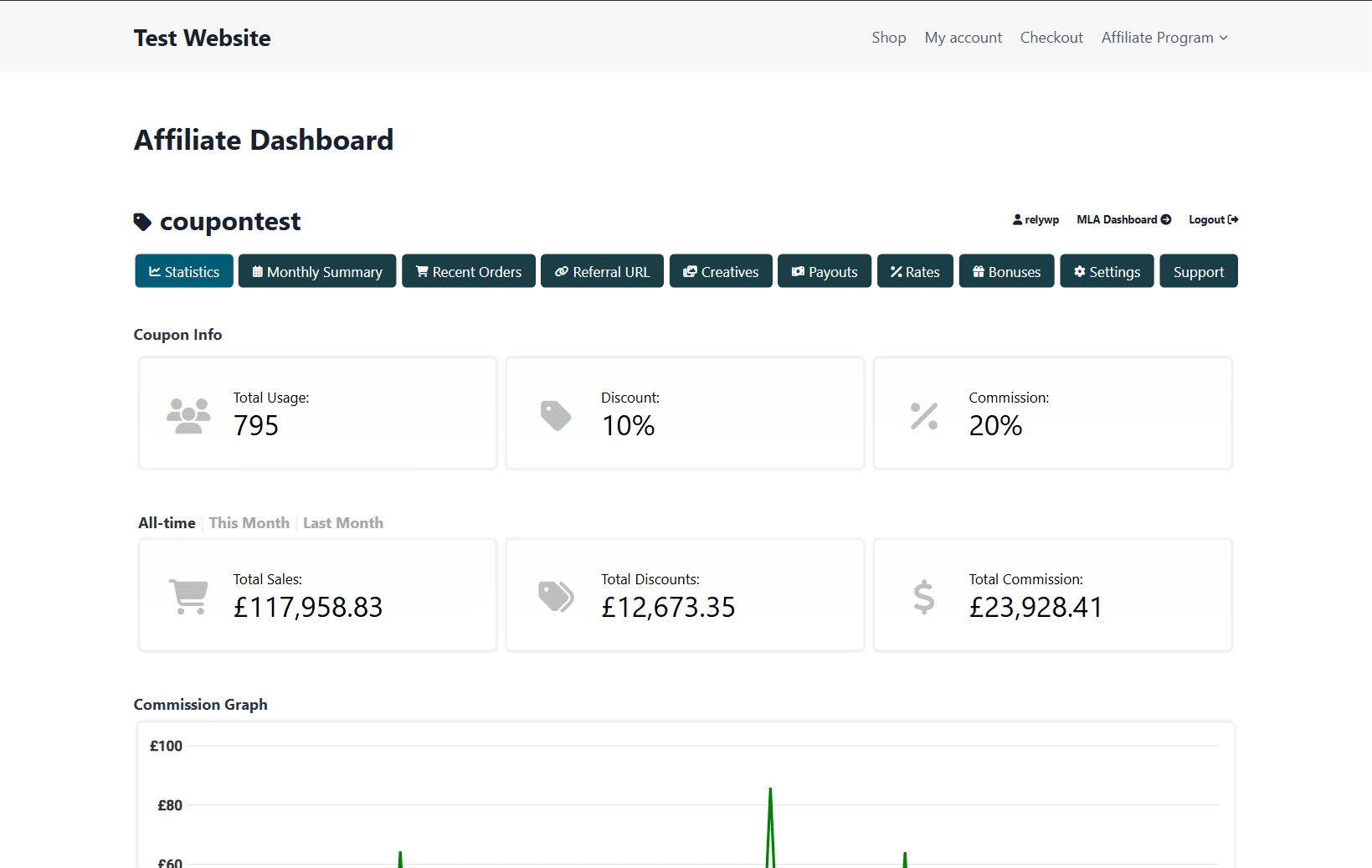
Give your affiliates access to a user-friendly affiliate dashboard for their coupons, to view coupon usage statistics, recent orders, commission earned, referral URLs and more.
Why is Coupon Affiliates the best WooCommerce affiliate plugin?
- Unique & Effective – The only plugin that is built specifically for creating a “coupon based” affiliate program for WooCommerce.
- Quick & Easy to Use – Get your affiliate program setup quickly and easily! The plugin is easy to use for you and your affiliates.
- User Friendly – The affiliate dashboard is user friendly, visually pleasing, and includes lots of features your affiliates will love.
- Transparency – Build trust with your affiliates, by giving them transparent access to the important statistics they want to see, in real-time, directly on their WooCommerce affiliate dashboard.
- Lots of Customisations – The plugin comes with plenty of useful settings to make the affiliate program work exactly how you want.
- Friendly Support – UK-based support is available to both our free and paid users, regarding setup, customisations and more.
- Built for WooCommerce – The plugin is developed exclusively for WooCommerce, the best eCommerce platform.
- Easy Migration – Switching from another affiliate plugin is simple: the built-in Migration Tool imports your affiliates, coupons, referral history and more from AffiliateWP, SliceWP, YITH, and other popular affiliate plugins. The plugin also displays the full order history for each affiliate coupon (even orders created before installing the plugin).
- Frequent Updates – We are always working on adding new awesome features to Coupon Affiliates. Got a suggestion? Let us know!
🎉 Plugin Features
— Affiliate Dashboard —
- On the affiliate dashboard, you and your affiliates can view detailed statistics for their referral coupon, including total usage, recent order details, referral URL generator, conversions statistics, and lots more.
— Modern Affiliate Portal —
-
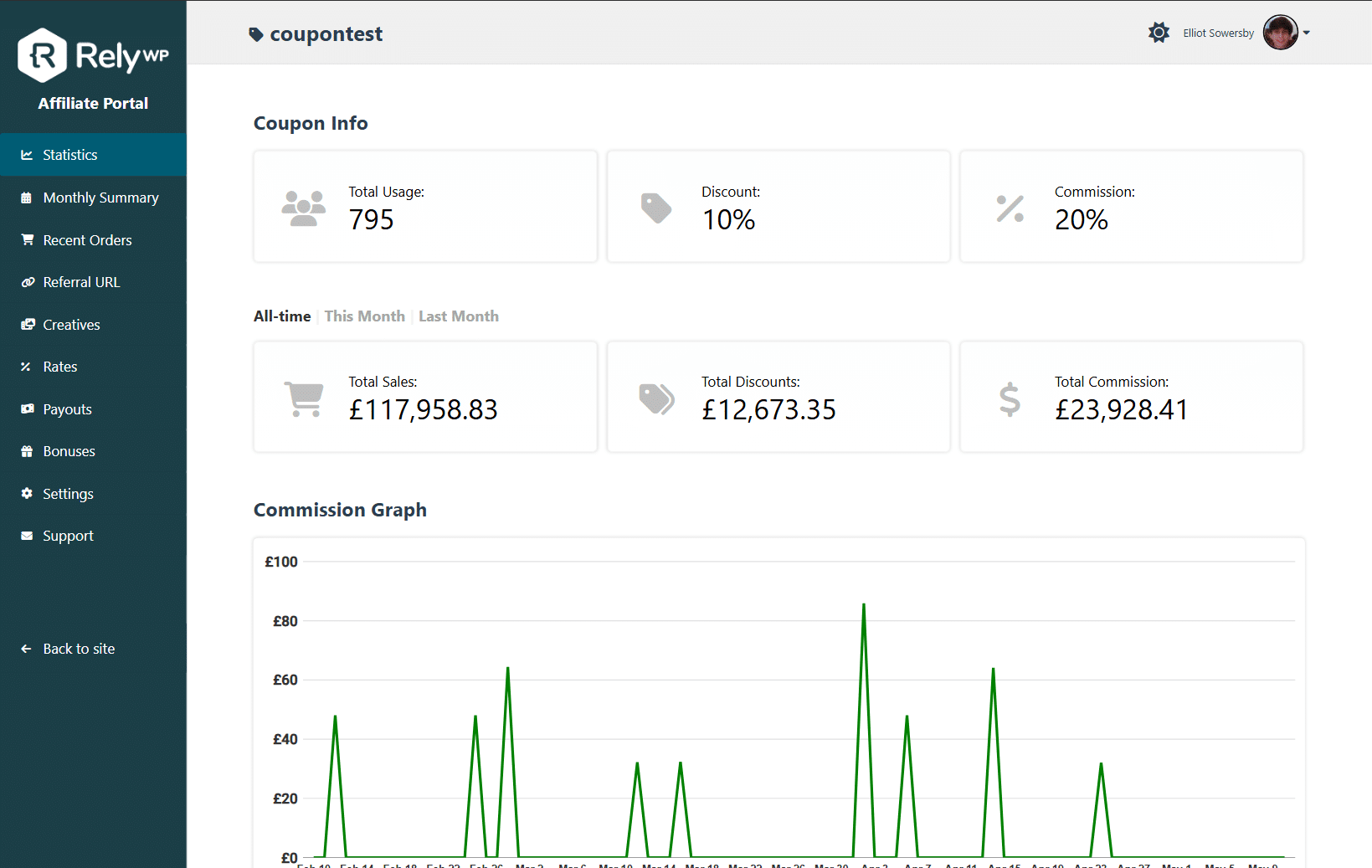
The affiliate portal is a modern alternative to the normal affiliate dashboard. It offers a sleek, standalone, full-screen interface that seamlessly aligns with your brand.
-
The affiliate portal offers a better user-experience for your affiliates and can be easily customised with your own custom brand colors and logo.
-
It includes all the same features as the normal affiliate dashboard page, but within its own more modern interface.
— Floating Affiliate Widget —
-
The floating affiliate widget is allows you to display a floating affiliate dashboard widget on your website. Learn More.
-
For existing affiliates, when they click the button, it provides instant access to a compact version of their affiliate dashboard. It will display some of the most important dashboard statistics and features, including their referral coupon and links, referral statistics, recently referred orders, payout details, and creatives.
-
For potential affiliates, it’s an invitation to join your program. When they click the button, it gives them quick access to the registration form. You can also display a customisable “benefits” section on the widget explaining what your affiliate program has to offer.
— Accurate Commission Tracking —
-
Affiliates can see the total commission earned via their coupon, and for each individual order they referred.
-
There are 3 types of commission amounts, including fixed commission “per product”, “per order”, and a “percentage” of the total order. You can even set all 3 for more flexible commission calculations!
— Recent Orders List —
-
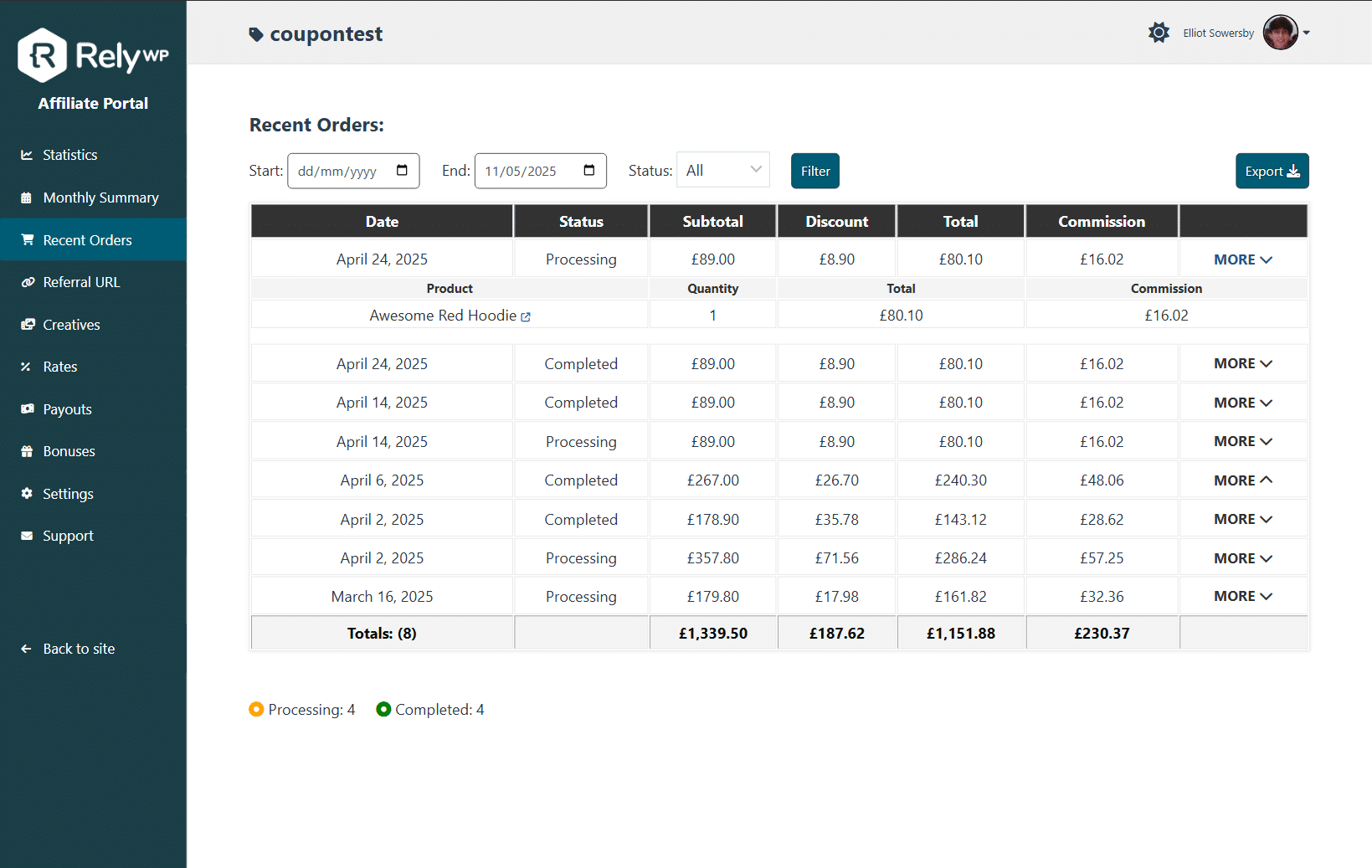
Affiliates can view a recent order list for their coupon, with general info such as date, order subtotal, discount, total, products purchased, commission earned etc. A monthly orders/commission summary is also included in the PRO version.
-
This can be filtered by date or order status, and also shows combined totals for all orders within the date range selected.
— Affiliate Referral URLs —
-
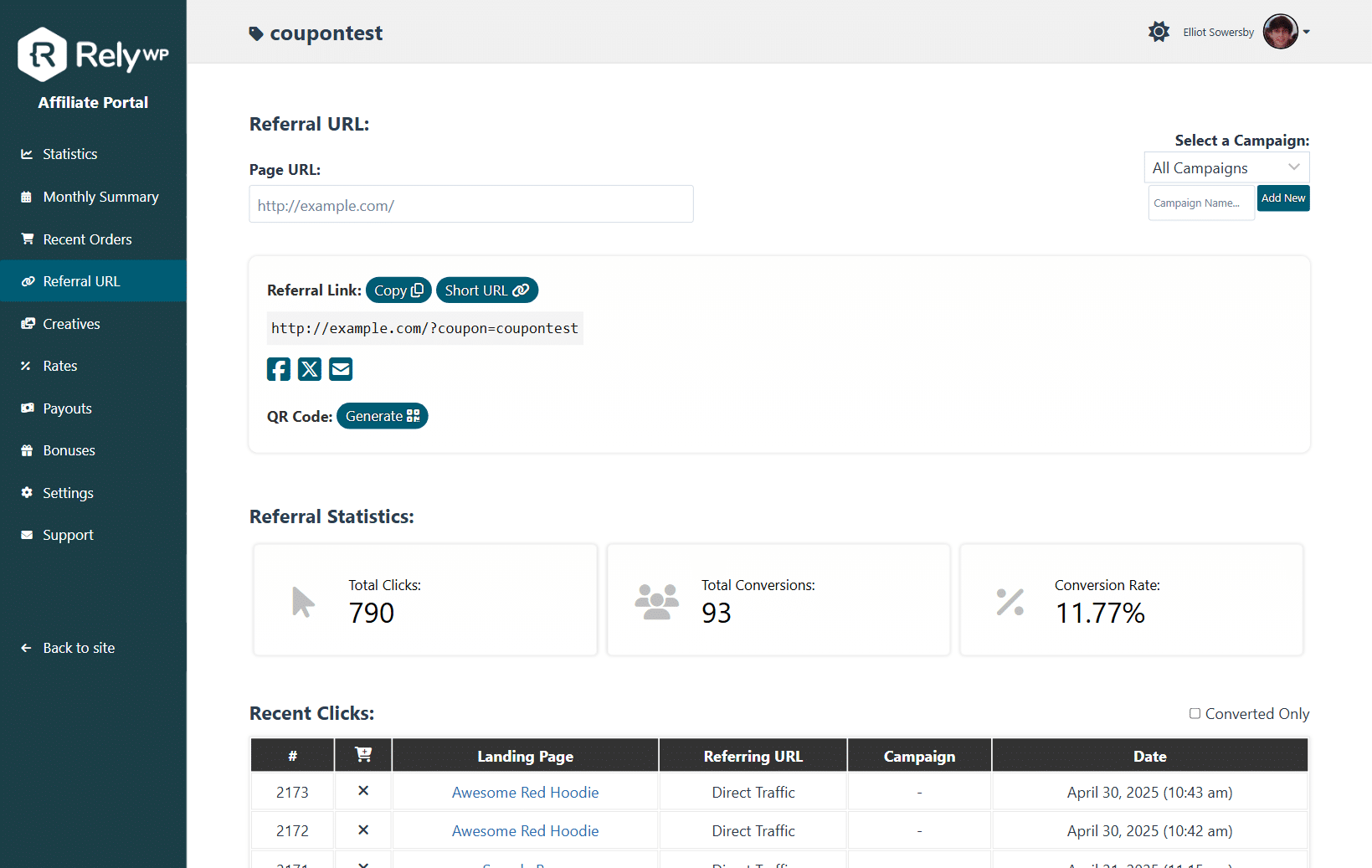
Affiliates can generate a referral URL via the affiliate tool which automatically applies the coupon at checkout for visitors using their link.
-
They can also view total clicks, usage, and conversion rate for their referral URL on the affiliate dashboard, along with a detailed log of all of their individual clicks.
-
If required, you can enable an option to track conversions via the referral URL even if coupon was not used. If enabled, if someone visits the site via the referral URL and places an order without using the coupon code, it will still be tracked and award the affiliate.
— Assign Users to Coupons —
-
Assign/link user accounts to coupon codes, to give them direct private access to their affiliate dashboard for each coupon.
-
A login form will be displayed on the affiliate dashboard page for logged out users, along with the affiliate registration form.
— Affiliate Registration System —
-
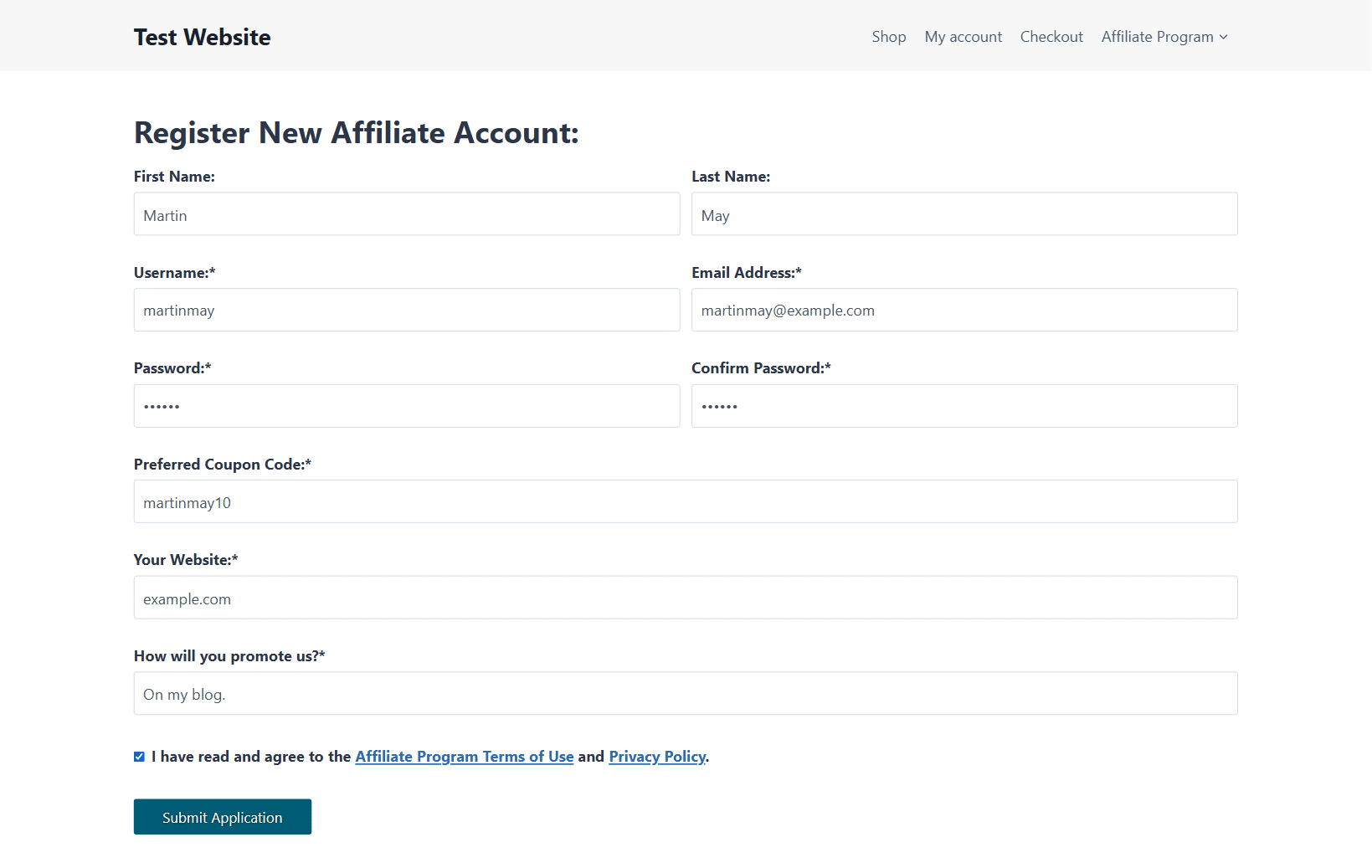
Display a customisable affiliate registration form on your website to allow users to apply as an affiliate. Learn More.
-
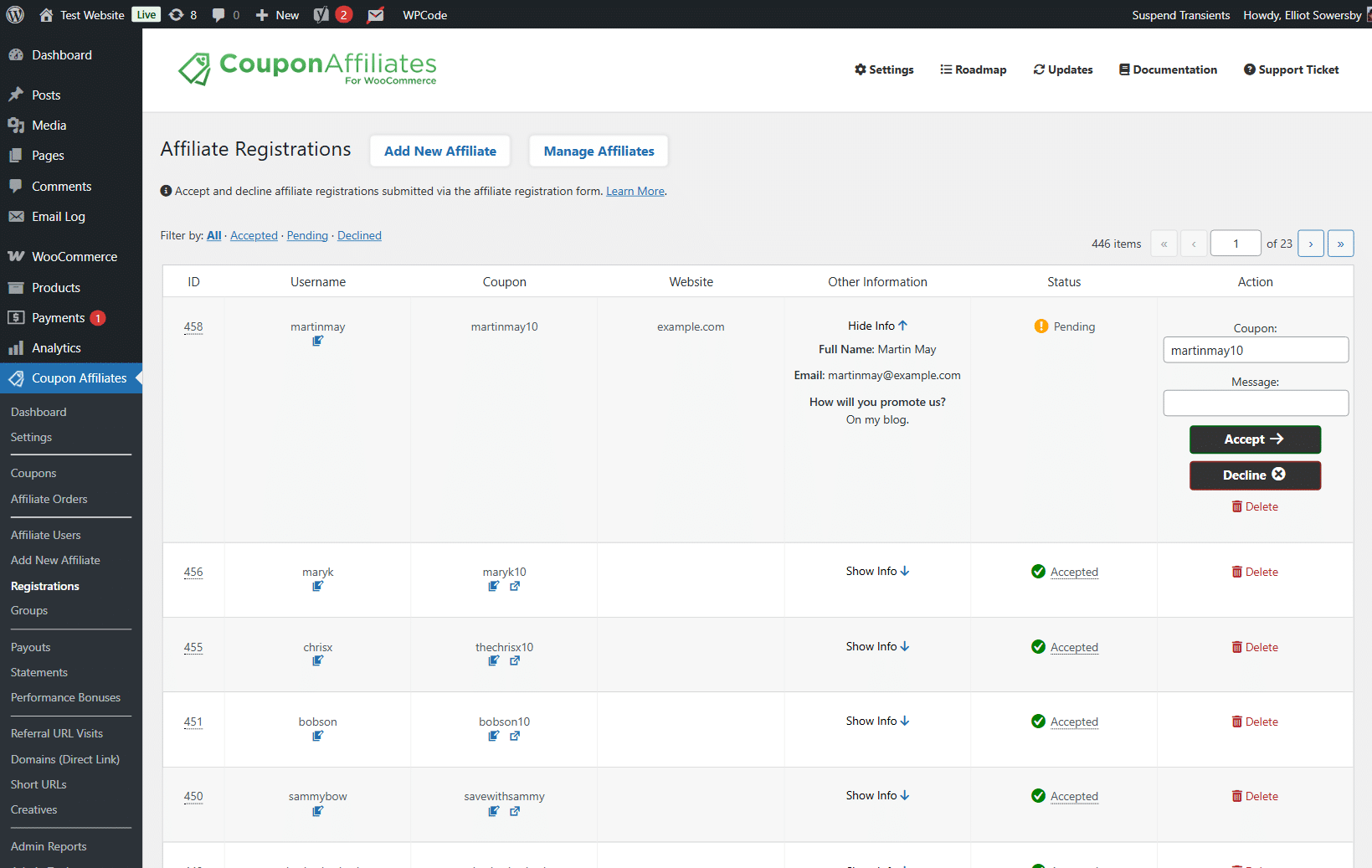
You can easily manage and approve all your affiliate applications in the WordPress admin area.
-
The system will automatically generate the affiliate coupons, assign the users to it, and send them a customisable welcome email.
— Email Notifications —
- Automatically send email notifications to affiliates when their coupon code is used, to let them know they have earned new commission. You can also customise the emails with your own message.
— Fraud Prevention —
- Fraud prevention is an important part of any affiliate program. We have implemented several powerful features and options to help stop fraudulent sales! Learn more.
— WooCommerce Subscriptions —
- The Coupon Affiliates plugin for WooCommerce includes free integration with the official “WooCommerce Subscriptions” plugin.
— Multi-Currency Support —
- With Coupon Affiliates, you can enable multi-currency support and easily set conversion rates for all your store currencies to be used when calculating commissions and statistics.
🎨 Admin Management & Customisation
Coupon Affiliates for WooCommerce makes it easy to manage and customise your affiliate program, with a large variety of useful features and tools.
— Admin Dashboard —
- The admin dashboard shows a summary of statistics for your affiliate program, including a 7 day report of the total referrals, and commission earned by affiliates. It will also show the 5 latest referrals, activity logs, url clicks, newest coupons, and more.
— Admin Tools —
- A variety of admin tools are available to make manging your affiliate program even easier. This includes tools to bulk generate new coupons, assign users to coupons, bulk edit coupons, bulk assign affiliates to orders, and more.
— Admin Reports & Analytics —
-
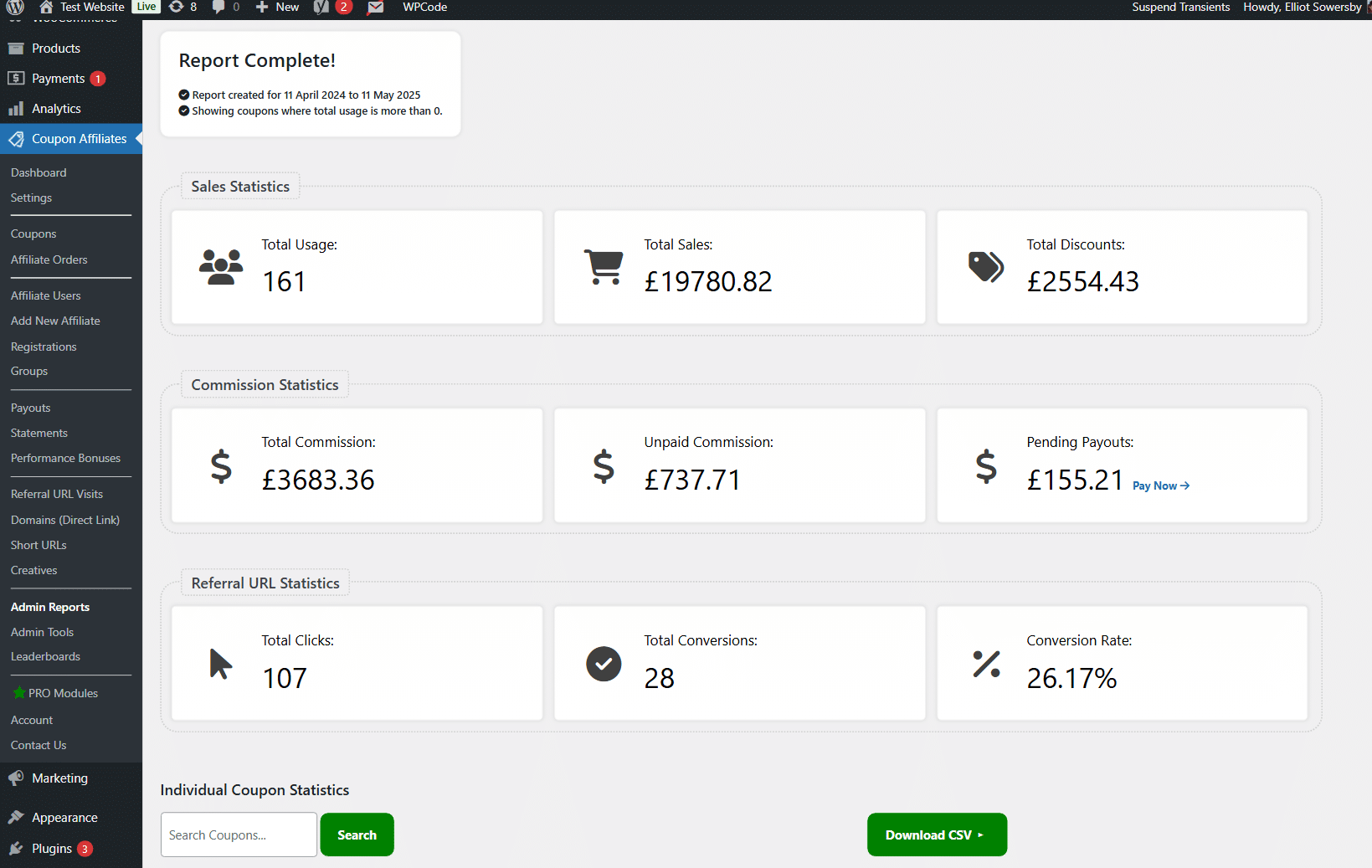
Get access to admin reports for the past 2 weeks. Reports allow you to see the overall WooCommerce coupon usage stats, and sales for all coupons, and each individual coupon, on a single page.
-
With the Pro version get access to unlimited date range on the admin reports, export to CSV, and access to date comparison features, to compare analytics between 2 sets of dates.
— Coupons List & Dashboard Links —
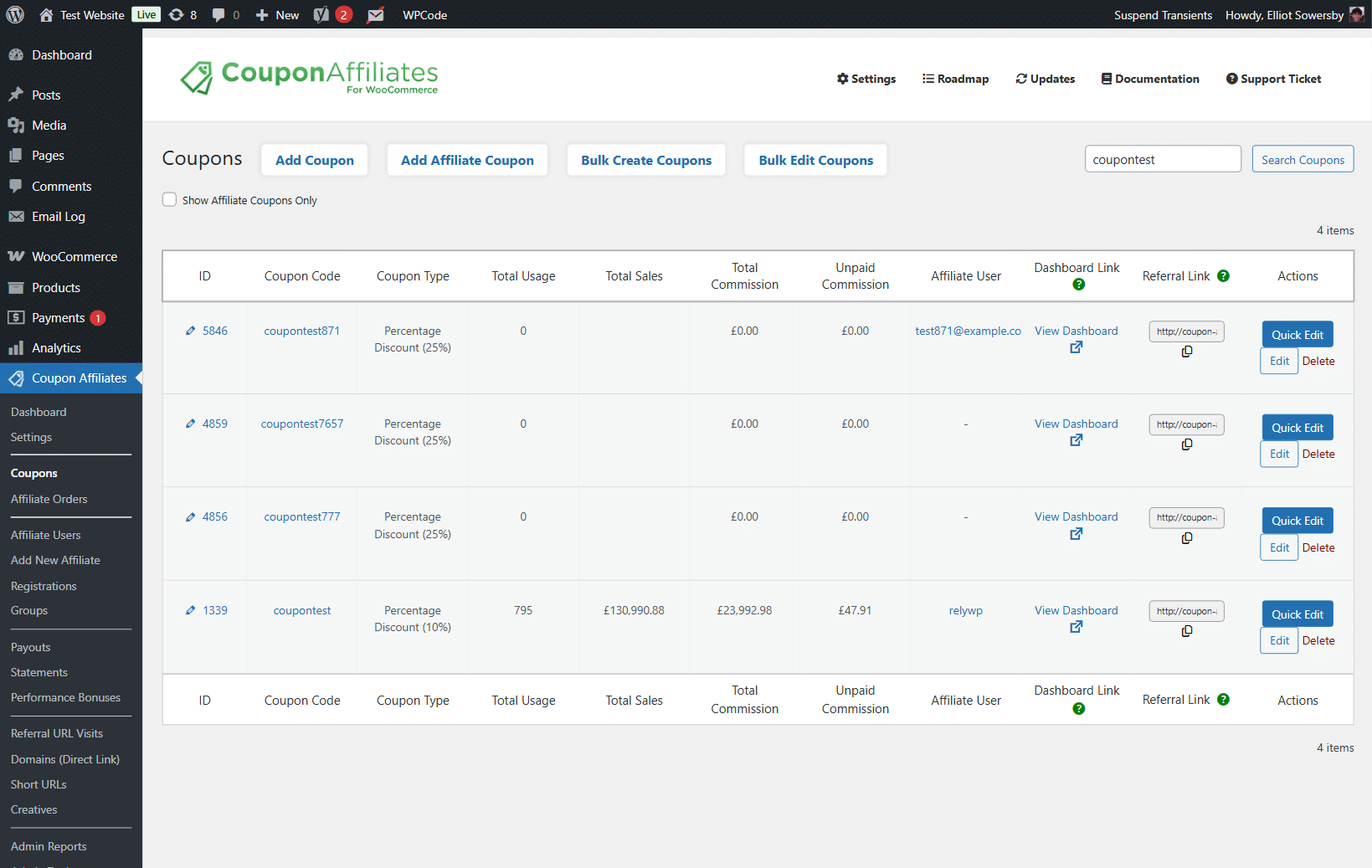
- In the WooCommerce coupons list, a new column will show a unique link to view the affiliate dashboard for that coupon yourself, or you can share this link with a user. Here you can also see a brief affiliate overview for each coupon, including the assigned affiliate.
— Plugin Customisation & Settings —
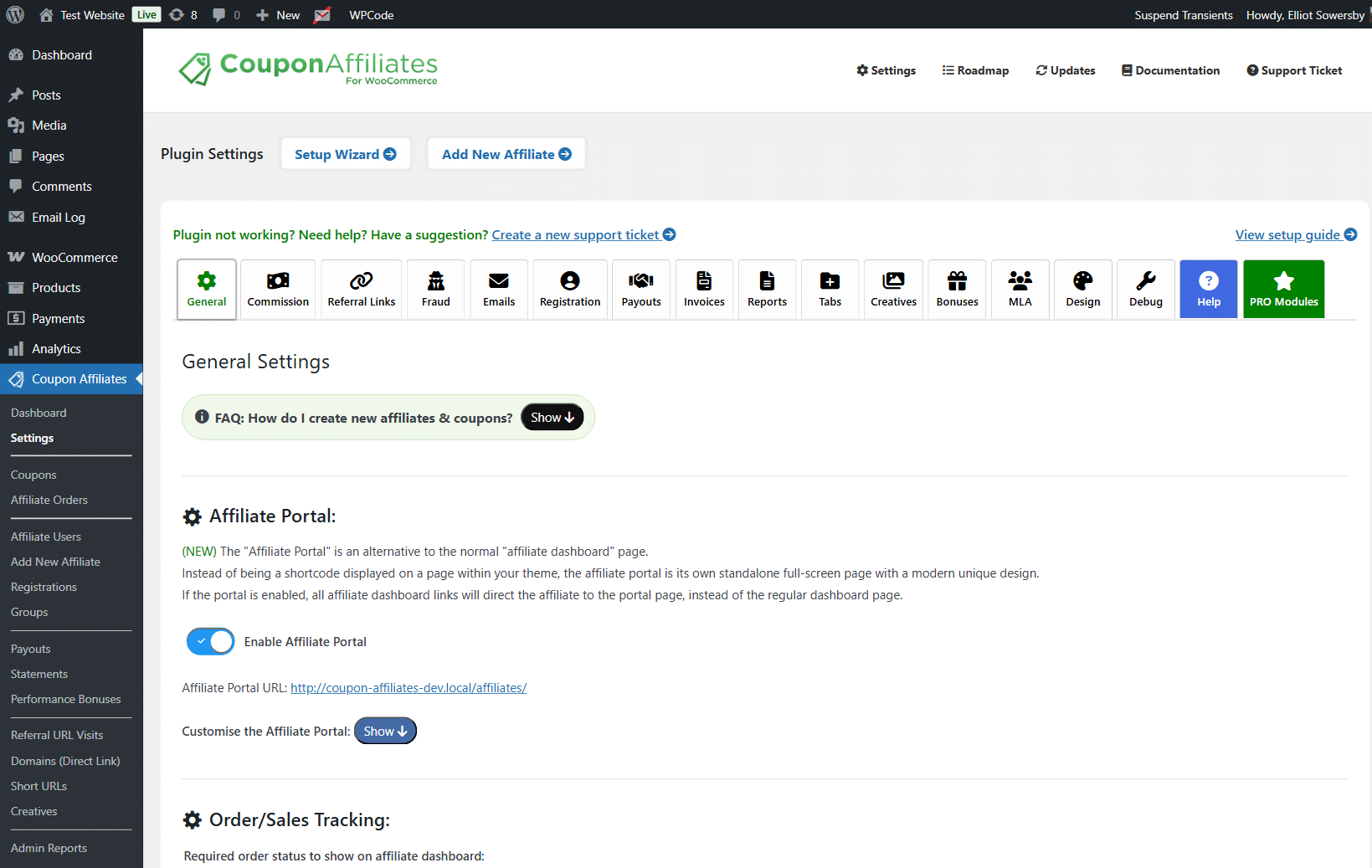
- A large variety of settings are available to modify all the plugins features, and affiliate dashboard, to meet your specific requirements.
— Orders Affiliate Info —
- A new column will be added to the orders list, as well as a meta box widget in single orders. This will show coupon code used, affiliate user, commission for that order, and a link to the affiliate dashboard.
— Coupon Marketing Campaigns & More —
- The plugin can also be used for your coupon marketing campaigns, so you can view sales, usage statistics, etc for each of your coupons. Will also work great for influencer marketing, a refer a friend program, or managing an ambassador program.
🔥 Getting Started
— Ready to increase sales with your new affiliate program? —
Setup your own affiliate WooCommerce system in minutes. Then launch your coupon affiliate marketing program to help increase your sales!
Upon installation, a small setup wizard will help you get started and automatically generate the affiliate dashboard page for you.
— Migrating from another Affiliates Plugin? —
Migration of affiliate data to Coupon Affiliates is super simple, since for the most part it uses the existing data that’s stored by WooCommerce.
Once you install the affiliate plugin on your website, it will look back at the full order history for each coupon, even those created before the installation, and display the stats & commission for these on the coupon affiliate dashboard. All you’ll need to do is assign your affiliate users to coupon codes, configure the settings, then you’re good to go!
⚡ Want more advanced features?
Coupon Affiliates PRO is a paid upgrade which provides a whole bunch of exciting addons and extra features to take your coupon affiliate system to the next level. This includes:
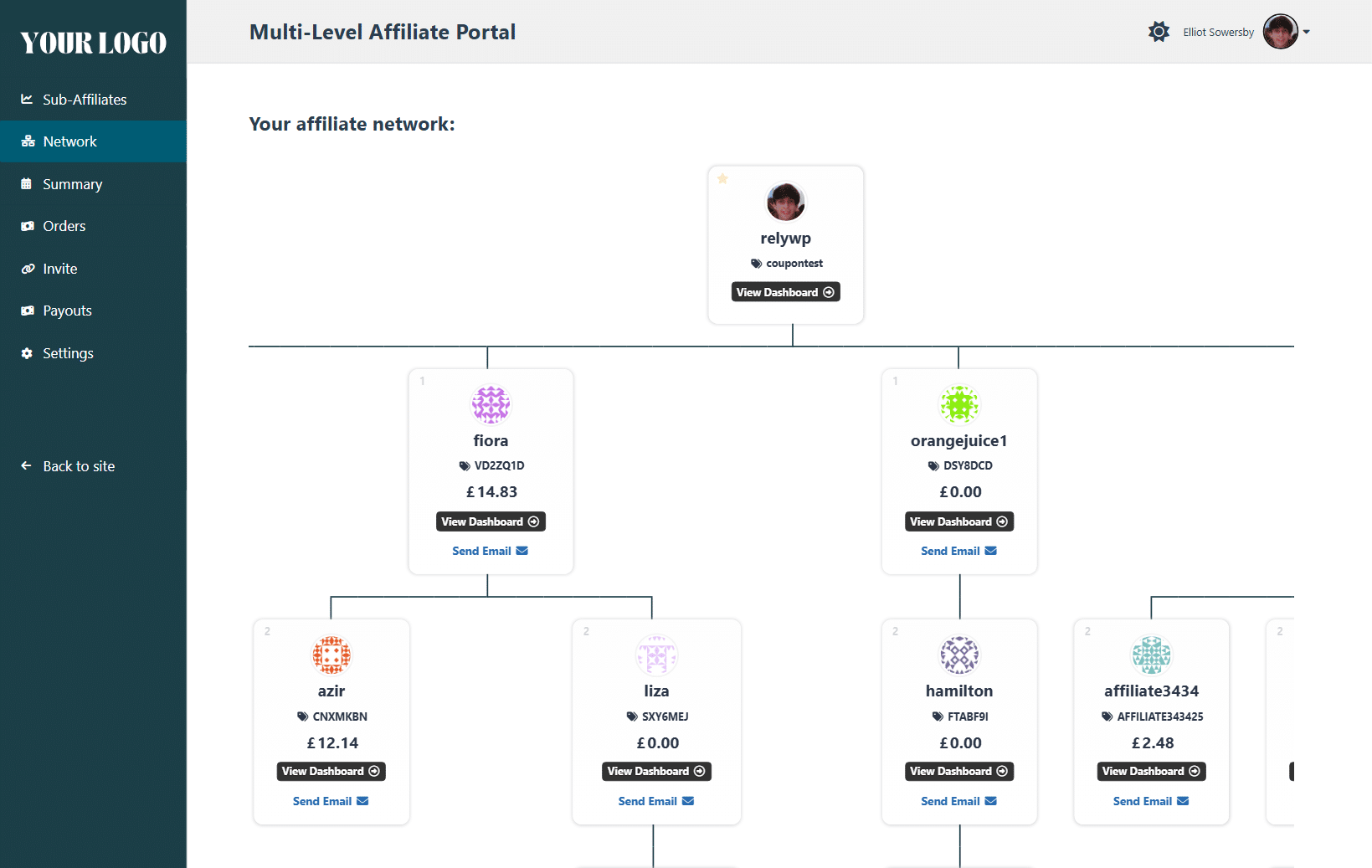
- Multi-Level Affiliates (MLM) – Your users can become super-affiliates and invite other affiliates to be a part of their multi-level affiliate network. They will then earn extra commission from all their referrals.
- Admin Reports & Analytics (Advanced Filters) – Access to the advanced filter options (unlimited date range & comparisons) for the Admin Reports & Analytics.
- Affiliate Email Reports – Automatically send an email report (and PDF) to affiliates every week/month with a summary of their recent commission and referral stats.
- Advanced Registration Features – Enable some more advanced affiliate registration features such as custom form fields, dynamic code generator, auto accept, auto registration, and more.
- Affiliate Groups – ASsign affiliates to groups, and customise several options for that group such as their unique commission rates, or access to certain features.
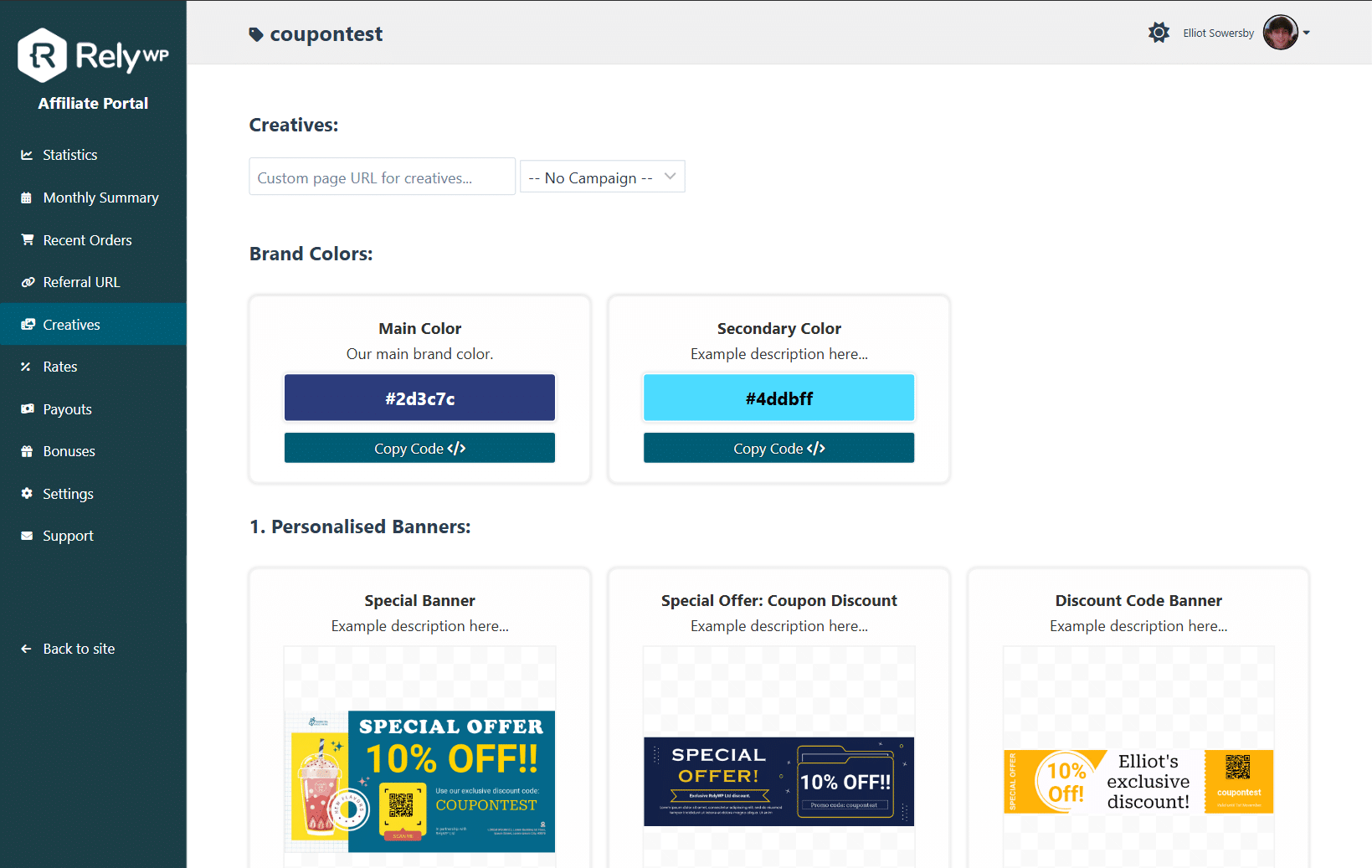
- Creatives – Display a creatives section with downloadable banners. Includes preview, download, and copy code buttons.
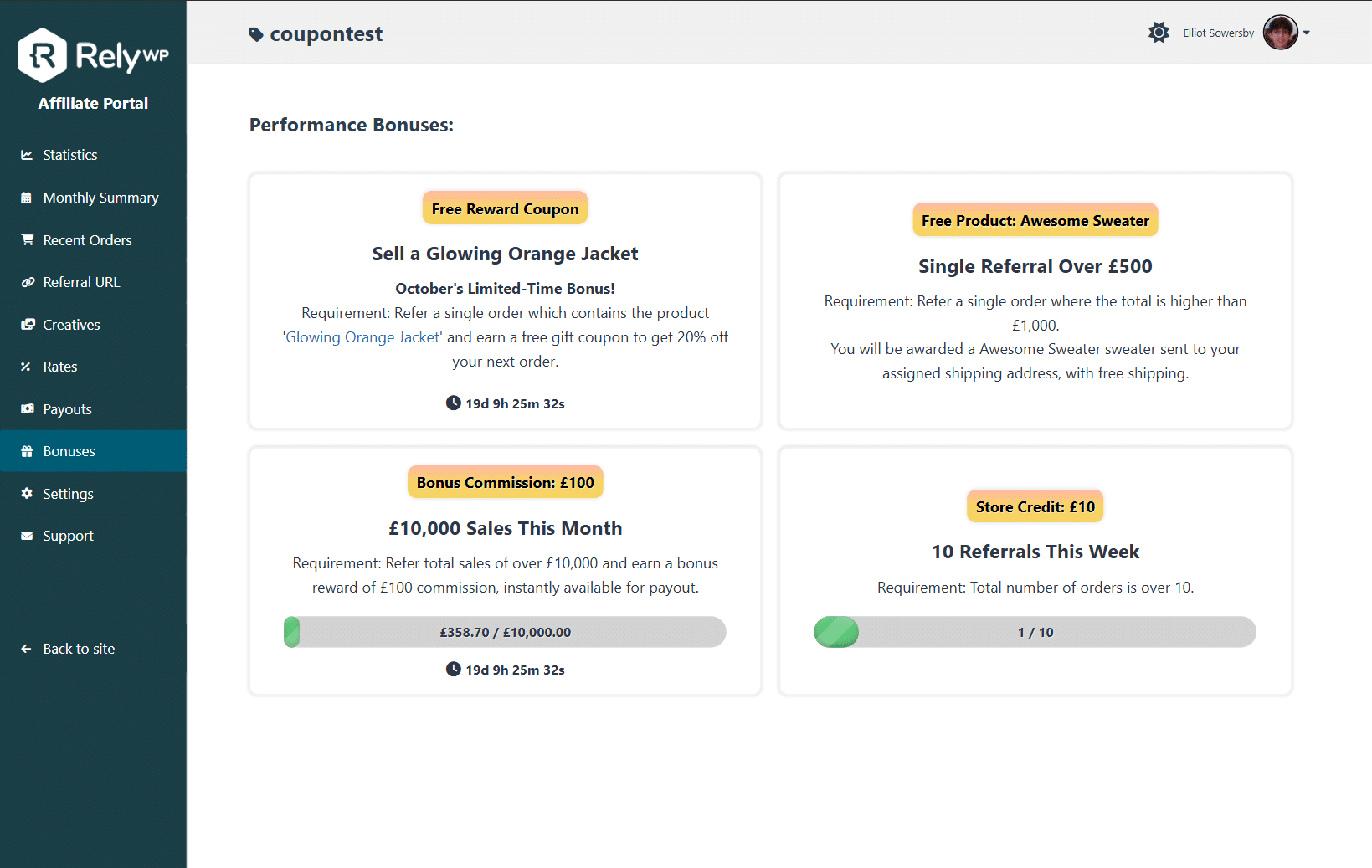
- Performance Bonuses – Give your affiliates bonuses when they reach certain goals, such as some bonus commission once they reach a certain amount of sales.
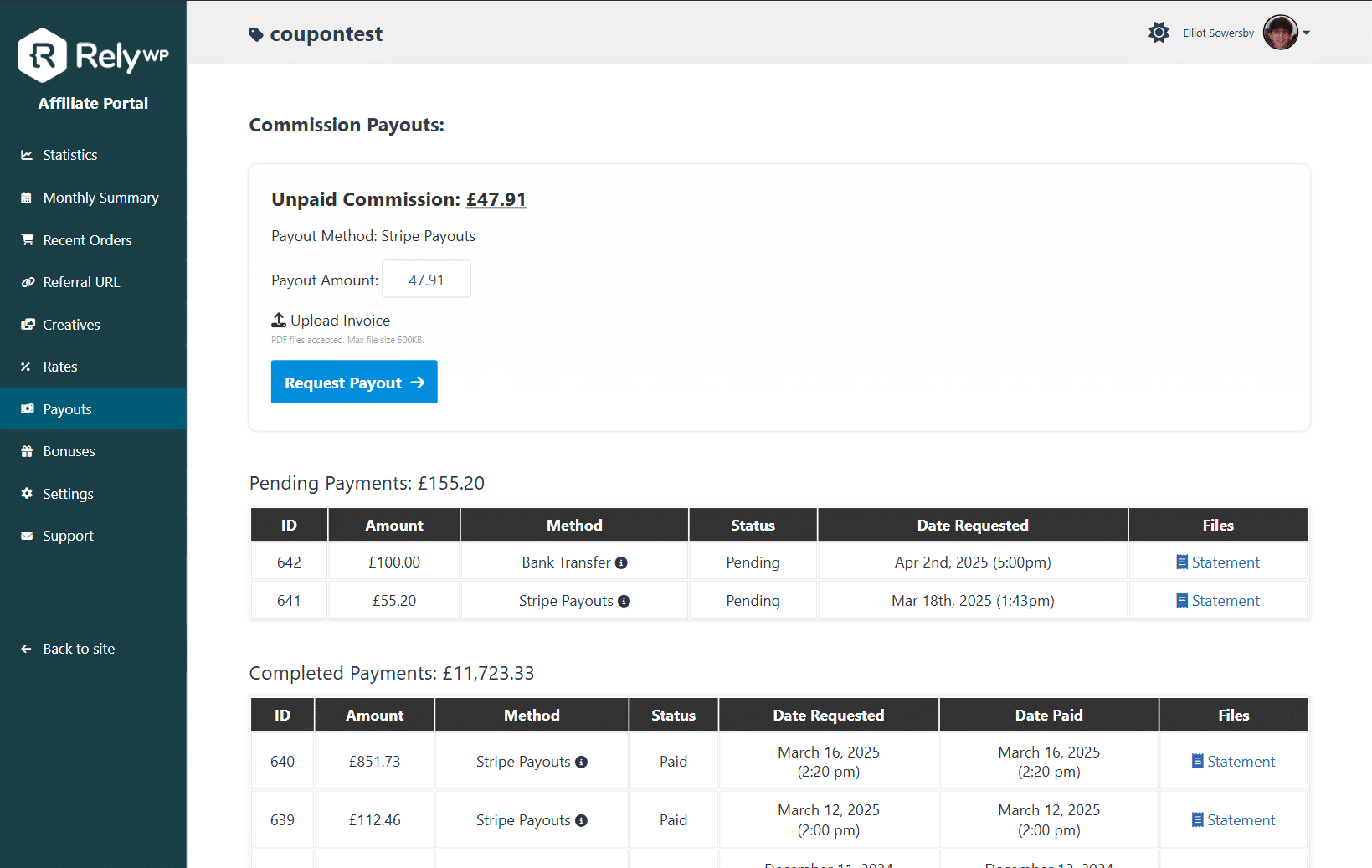
- Commission Payout Tracking – Affiliates can keep track of total UNPAID commission. Admins can view requested commission payouts from affiliates, and track/manage pending, complete and cancelled payouts.
- Commission Payout Requests – Affiliates can request payouts for their pending commission. You can set a payment threshold for commission, and set a delay before commission can be claimed.
- Stripe Payouts – Automatically pay your affiliates in one-click with Stripe!
- PayPal Payouts – Automatically pay your affiliates in one-click with PayPal Payouts!
- Wise Bank Transfer Payouts – Automatically pay your affiliates in one-click with Wise Bank Transfer Payouts!
- Store Credit Payouts – Automatically pay your affiliates into a wallet, in one-click, with Store Credit Payouts! Includes a built-in integration for the recommended “Simple Store Credit” plugin by RelyWP, plus addons for wallet plugins such as TeraWallet or YITH Account Funds.
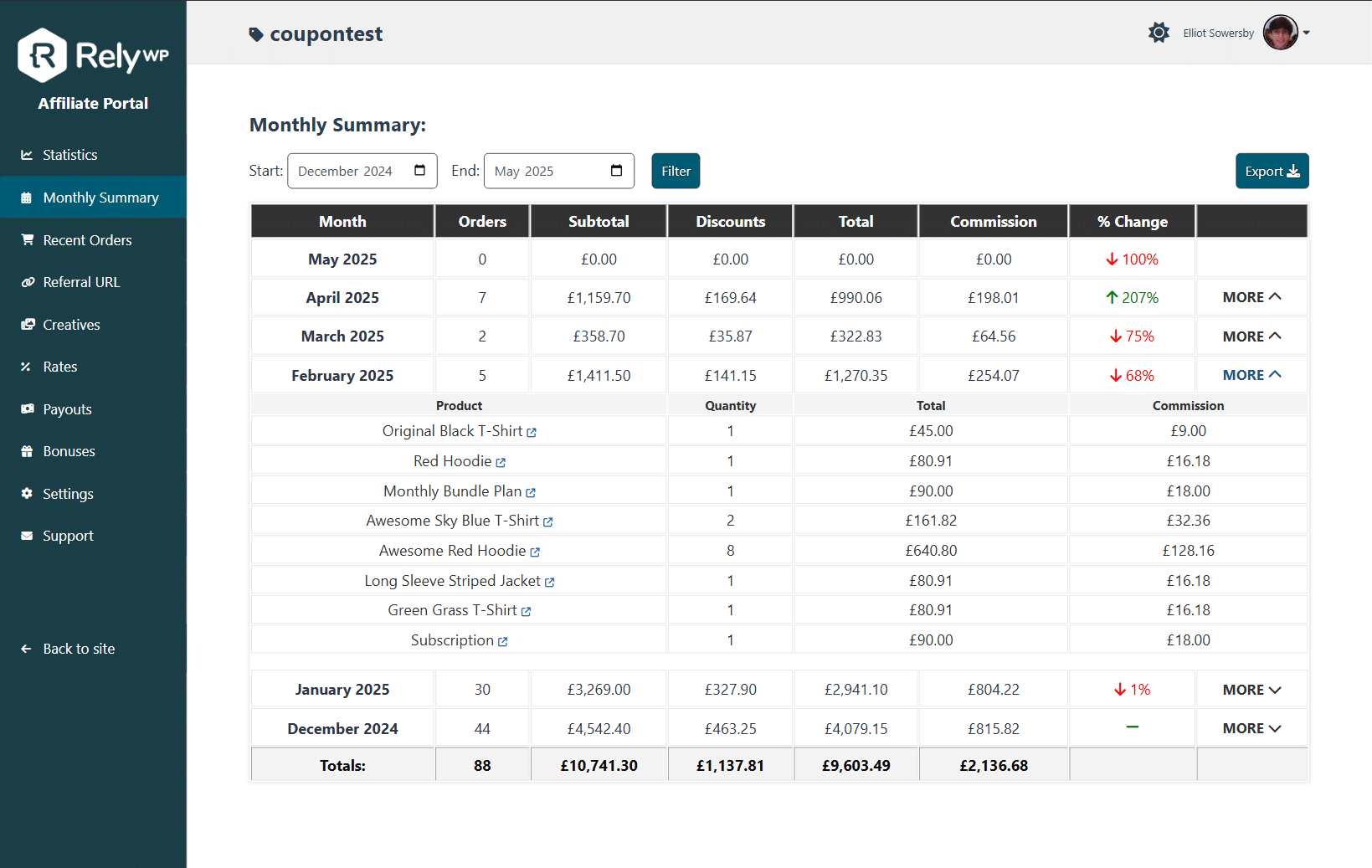
- Monthly Summary Table – Show a table with a summary of monthly orders, and total statistics for that coupon for each month in the past 12 months (can be filtered to other months / previous years).
- Line Graphs – Line graphs on the “Statistics” tab to show commission earned, on a day by day bases, for past 90 days, 30 days, or 7 days.
- Export to Excel – Enable a button on coupon pages to export an Excel (CSV) file with a 12 months summary of the individual coupons usage statistics for each month, or the recent orders table.
- Custom Coupon Commission – Set custom flexible commission amounts for individual coupons.
- Custom Product Commission – Set custom flexible commission amounts for individual products.
- Custom User Role Commission – Set custom flexible commission amounts for individual user roles.
- Product Rates Table – Show a table with all the products and their commission rates, so affiliates can see which products earn them the most commission.
- Referral Welcome Popups – Show a referral welcome popup to customers that have been referred by an affiliate, to welcome them and encourage them to use the coupon code.
- Campaigns (Referral URL) – Allow your affiliates to create referral “campaigns” and then create custom URLs to track clicks/conversions per campaign.
- Direct Link Tracking (Referral URL) – Affiliates can link directly to your website via their website without needing an affiliate link.
- Social Sharing (Referral URL) – Add social sharing buttons to the referral URL tab, so affiliates can instantly share their generated referral link.
- Short URL Generator (Referral URL) – Add a button to the referral URL tab, to allow affiliate users to generate a short URL for their referral link automatically.
- QR Code Generator (Referral URL) – Add a button to the referral URL tab, to allow affiliate users to automatically generate a QR code for their referral link.
- Monthly Summary Table – Show a table with a summary of monthly orders, and total statistics for that coupon for each month in the past 12 months (can be filtered to other months / previous years).
- Lifetime Commission – Option to enable “Lifetime Commission” functionality for affiliate referrals, so your affiliates get commission for every future sale by the customers they refer, even if they don’t use the coupon again.
- Affiliate Landing Pages – Ability to link a landing page to an affiliate coupon, which will then work the same as a referral URL.
- Subscriptions: Renewal Limit – With the WooCommerce subscriptions plugin installed, optionally set a “limit” on how many renewals are rewarded. For example, you can set this to reward commission on the first 3 months.
- Automated Conversion Rates – Automatically update the multi-currency conversion rates every 12 hours via the Exchangerates API.
- Custom Dashboard Tabs – Create your own tabs, to display custom sections and content on the affiliate dashboard.
- and more great features coming soon…
Learn more about Pro and upgrade at www.couponaffiliates.com
⚙️ Integrations
Coupon Affiliates was built exclusively as a WooCommerce Affiliate Plugin, however it can also be integrated with other popular eCommerce plugins such as LifterLMS, LearnDash, TutorLMS, MemberPress, and Paid Memberships Pro. Click here to learn more. It also integrates well with other coupon plugins such as Smart Coupons, and Advanced Coupons.
👍 Suggestions and Support
If you have any suggestions for additional functionality, need any help, or have found a bug, please get in touch!
Installation
- Upload the ‘woo-coupon-usage’ plugin to the ‘/wp-content/plugins/’ directory.
- Activate the affiliate plugin through the ‘Plugins’ menu in WordPress.
- Follow the setup wizard to generate the affiliate dashboard page, affiliate registration page, and configure the basic settings including your commission rates.
- Modify additional plugin settings further if needed, found in WordPress admin under menu item “Coupon Affiliates”. View the “How To Use” tab for more instructions.
- Optional: Upgrade to the Pro version via “Coupon Affiliates” > “Upgrade” on the admin menu for more advanced features.
FAQ
What is a “coupon-based” affiliate plugin for WooCommerce?
Coupon Affiliates enhances affiliate marketing by integrating coupons as a core feature. Unlike traditional affiliate plugins that rely primarily on referral links, this plugin allows affiliates to share their unique coupon codes. These codes not only track sales for commission purposes but also offer customers immediate discounts or special offers, enriching the purchasing experience. However, the Coupon Affiliates system still maintains the flexibility of referral links; affiliates can share URLs that automatically apply their coupon at checkout, and even if a coupon isnt used, you can still make the link alone track referrals, ensuring affiliates receive credit for every sale referred.
Why is this the best affiliate plugin for WooCommerce?
Coupon Affiliates is the only affiliate plugin that is built specifically for creating a “coupon based” affiliate program for WooCommerce.
It is designed to be quick and easy to use, with a user-friendly affiliate dashboard that includes all the features your affiliates will need.
The plugin is also highly customisable, allowing you to tailor it to your specific requirements.
With accurate commission tracking, detailed statistics, and a variety of useful features, Coupon Affiliates is the best choice for anyone looking to create a successful affiliate program for their WooCommerce store.
Exploring your options? Take a look at this article: Best WooCommerce Affiliate Plugins
What is the difference between the free and pro versions?
The free version of Coupon Affiliates includes all the basic features you need to create a coupon-based affiliate program for WooCommerce, including an affiliate dashboard, referral URLs, commission tracking, and more. The Pro version adds many advanced features such as multi-level affiliates (MLM), advanced reports and analytics, performance bonuses, commission payouts, custom tabs, and more. You can view the full list of features on our website.
What is the difference between the “Affiliate Dashboard” and “Affiliate Portal”?
The “Affiliate Dashboard” is the original dashboard page that is generated by the plugin, which includes all the features and statistics for affiliates. The “Affiliate Portal” is a new, modern alternative to the affiliate dashboard, which offers a full-screen interface that aligns with your brand. It includes all the same features as the affiliate dashboard, but with a more user-friendly design and layout.
Will this work with my existing coupons and orders?
Yes, once you install the plugin it will look back at the full order history for each coupon, even those created before the installation, and display the stats for these on the coupon affiliate dashboard too.
Can I migrate from another affiliate plugin?
Yes! The built-in Migration Tool (Beta), found on the “Migration” page under “Admin Tools”, moves your affiliate program over from:
- AffiliateWP
- Affiliate For WooCommerce
- SliceWP
- YITH WooCommerce Affiliates
- Solid Affiliate
- Ultimate Affiliate Pro
- Affiliates (itthinx)
- AffiliatePress
- Affiliates Manager
It imports your affiliates and their user accounts, coupons (including AffiliateWP dynamic coupons), affiliate applications, referral history with the commission recorded, visits and settings, and keeps your affiliates’ old referral links working. With the Pro version, it also imports commission balances, payouts, payout details, custom commission rates, affiliate groups and creatives.
You can choose what to import, preview the migration before it runs, and see a list of anything that cannot be migrated, with where to set it up again in Coupon Affiliates. Your old plugin’s data is never changed, and every migration can be undone in full. Migrations can also be run with WP-CLI (“wp wcusage-migrate”).
How do the affiliate referral URLs work?
A referral URL is automatically generated for the affiliate, and can be found on their dashboard. This link can then be shared by the affiliate. Anyone that visits the website using that link, will have the coupon code automatically applied to their account on checkout. Clicks are also tracked, and any sales made via the coupon are tracked as conversions.
Can I assign affiliate users to coupons?
Yes, you can assign affiliate users to coupons, which will give them direct access to their affiliates dashboard page, without needing to use a unique link. Click here to learn more.
What kind of coupon usage statistics are shown?
On the coupon affiliate dashboard, you (and your affiliates) will be able to see a variety of statistics including total uses, discount type, orders total, amount saved, commission earned, and more. You will also be able to see a recent order table (with general info such as date, order total, discount, products, commission etc), and with the pro version you can see a monthly orders/commission summary table for the past 12 months.
Is there an API and webhooks available?
Yes! The plugin includes a REST API for connecting external tools, dashboards and AI assistants to your affiliate program, with API keys, scopes and an OpenAPI document, and it can connect AI apps through MCP. See “Coupon Affiliates > API, Webhooks & AI”.
Click here to learn more about the API.
There is also built-in AI & MCP support for connecting AI applications to your affiliate program.
Click here to learn more about the AI & MCP integration.
GDPR & Privacy
All data used and created by the Coupon Affiliates plugin is stored on your own website. We don’t track or collect ANY of your affiliate program data ourselves. You can optionally opt-in to share some basic usage data which helps us with providing support, fixing bugs, and improving the plugin, and can also opt-out at any time.
Will there be more features added in the future?
Yes! New features are added frequently, most of which are based on feedback. So if you have any suggestions to help improve the coupon affiliates plugin, please get in touch!
Do you provide support?
Yes. If you need any help setting up the affiliate plugin, please free to get in touch and we’ll be happy to help!
How can I report issues/bugs with the plugin?
You can report feature bugs by creating a support ticket. Please provide as much information as possible to make it easier for us to find a solution for you.
Where do I report security bugs found in this plugin?
Please report security bugs found in the source code of the plugin through the Patchstack Vulnerability Disclosure Program. The Patchstack team will assist you with verification, CVE assignment, and notify the developers of this plugin.
Screenshots

Changelog
View the full changelog. Older versions are also in changelog.txt.
Version 8.7.2 – 12th November 2026
- New: Email Notifications > New “Only send when the order earns the affiliate commission” option for the “New Order Referral” email, so affiliates are not emailed about orders that earn them nothing. The affiliate’s (PRO) new order SMS follows it too.
- New: Email Notifications > New “Only list products that earn commission” option for the “New Order Referral” email’s {listproducts} list.
- New: (PRO) Multi-Level Affiliates > New “Only pay parent affiliates when the sub-affiliate earns commission on the order” option. Fixed and “% of order” tier rates then pay nothing on orders that earn the sub-affiliate no commission.
- New: (PRO) Email Notifications > New “Only send when the sub-affiliate earns commission on the order” option for the “New Sub-Affiliate Referral” email.
- New: Email Notifications > The “Affiliate Application Accepted” email now supports the {passwordurl} merge tag: a link for the affiliate to set their password, so it can be sent when their application is approved instead of relying on the default WordPress new user email. Before, the tag was left in the email as plain text. When an application is auto-accepted and the “New Account” email also has the tag, both emails get the same working link.
- New: (PRO) Performance Bonuses > The “Increase all future commission earnings by percentage” action is now available, and works: the affiliate’s commission on orders placed after the bonus is earned is increased by that percentage. Their current increase is shown, and can be changed or removed, as “Bonus Commission Percentage” on their user profile. An increase an affiliate already had saved applies to their orders placed from this update on. With (PRO) Multi-Level Affiliates set to take the parents’ share out of the sub-affiliate’s commission, the share is taken out of the increased commission. The increase applies while Performance Bonuses is switched on, and never takes an order above the “Maximum commission per order”.
- Tweak: (PRO) Corrected the “New Sub-Affiliate Referral” email’s description: it is sent when the parent earns commission, and never while the order is still pending payment.
- Tweak: Fraud Prevention > The “own coupon” settings now explain which of an affiliate’s own orders they cover.
- Tweak: (PRO) Performance Bonuses > The bonus editor now explains that the commission rate actions only apply to orders placed after the bonus is earned, and notes that with a “Single Order” requirement, one qualifying order changes the rates for all of the affiliate’s later orders. This replaces the old warning about statistics refreshes.
- Fix: Suspending an affiliate now also stops orders (including subscription renewals) being credited to them through their referral link or (PRO) lifetime commission, and their referral links no longer set a cookie. A customer’s lifetime link is kept, so it resumes once the suspension is lifted. (PRO) With the lifetime “coupon priority” option on, a suspended affiliate’s coupon on an order no longer takes the customer over from their lifetime affiliate.
- Fix: Registration > The “New Account” email’s {passwordurl} link no longer stops working when the affiliate is logged in automatically after registering through the registration form.
- Fix: The “order cancelled” affiliate email ignored the coupon’s notification setting, and gave a PHP warning for coupons with no affiliate.
- Fix: The “New Order Referral” email, and the affiliate details in the admin’s WooCommerce “New Order” email, no longer give a PHP warning when the coupon’s affiliate user has been deleted.
- Fix: With “Include custom discounts in % commission calculations & order totals” switched on, store credit from WebToffee Smart Coupons (or from plugins using the “wcusage_order_store_credit” filter) was still deducted from the affiliate’s commission, shown as “Store Credit” in the order’s Commission Breakdown. Store credit now follows that setting, the same as negative fees and other custom discounts. Existing orders can be updated with “Recalculate” in the order’s “Coupon Affiliate” box.
- Fix: Affiliates’ own orders: with “Allow affiliate user to apply their own coupon code” off, or “Do not give the affiliate commission when they use their own coupon code” on, an affiliate no longer earns commission on orders placed from their account or with their email address however the order reaches them – including orders another plugin creates, such as funnel upsell orders. Their own orders are no longer credited to them through their referral link (a guest checkout with their email was), and (PRO) they are no longer linked to themselves for lifetime commission, including through “Replace Lifetime Referrer”, which no longer lets their own coupon take them over from the affiliate who referred them. Orders placed before this update keep the commission they earned under the earlier rules, even when they are recalculated.
- Fix: (PRO) Performance Bonuses > “Set new commission rates” no longer changes the commission of orders placed before the bonus was earned when the statistics are refreshed or an order is recalculated: those keep the rates they were placed under, and only later orders get the new ones.
- Fix: (PRO) Performance Bonuses > The “Single Order: Referred Order Total” requirement now compares the order’s referred total, as the affiliate’s order list shows it, instead of its grand total with tax and shipping.
- Fix: (PRO) Performance Bonuses > The record of an order having earned a bonus, and the payment method of a “Free Product Order” reward, are now saved through the order itself, so they are kept with High-Performance Order Storage.
- Fix: (PRO) Security > Performance Bonuses > The bonus fields on a user’s profile are now only shown to, and saved for, users who can edit other users. Before, a user with access to their own WordPress profile could change which bonuses they had received.
- Fix: Affiliate Portal > The portal (and the PRO Multi-Level portal) no longer renders in “quirks mode”, which distorted tables and could stop pages scrolling properly, on phones especially. This also fixes a script error when the portal’s statistics needed refreshing.
- Fix: Affiliate Portal > The site theme’s stylesheets are now kept out of the portal (and the PRO Multi-Level portal) as intended. They were only removed when enqueued early, which most themes do not do, so the theme’s fonts, colours and page rules could distort the portal’s layout. Other plugins’ stylesheets are left alone, apart from WooCommerce’s and the theme’s companion plugin’s: before, any whose address contained “global” or the theme’s name was removed too.
- Fix: Affiliate Portal > Pages no longer run wider than the screen on phones (the hidden coupon switcher widened them), the (PRO) Bonuses log scrolls on phones instead of being cut off, and the Settings tab stacks its two columns until there is room for both.
- Fix: Affiliate Dashboard & Portal > Wide tables (Referred Orders, Referral URL clicks, and (PRO) Monthly Summary, Product Rates and Payouts) now scroll sideways on tablets and phones held sideways instead of being cut off (only when a table is wider than the screen, and tooltips in their top rows open downwards so they are not cut off either), and (PRO) YouTube and video creatives fit their box instead of being cropped.
- Fix: (PRO) Security > Payouts > The custom amount on a payout request must now be a valid number, and is only used when custom payout amounts are enabled.
- Fix: (PRO) Security > Payouts > The PayPal Payouts email must now be a valid email address, both when it is saved and when a payout is sent.
- Fix: (PRO) Security > Payouts > A payout that is accepted automatically is now only paid through the affiliate’s saved payout method.
- Fix: Security > Registration > Coupon codes chosen by applicants can now only contain letters, numbers, spaces and – _ . @ % +, and are escaped more strictly on the Registrations page and in the affiliate portal.
- Fix: (PRO) Security > Registration > The checkout checkbox and “register all new users” can no longer create a second coupon with a code that is already in use.
- Fix: (PRO) Security > Affiliate Groups > The groups on a user’s profile are now only shown to, and saved for, users who can edit other users.
- Fix: (PRO) Security > Multi-Level Affiliates > A parent can now only approve or decline sub-affiliate registrations when they are an affiliate themselves, with MLA access and not suspended.
- Dev: New filters: “wcusage_affiliate_earns_on_own_orders” and (PRO) “wcusage_bonus_commission_increase”.
- Dev: New filters: “wcusage_should_track_referral”, “wcusage_referral_cookie_days”, “wcusage_should_record_click”, “wcusage_order_referral_coupon”, “wcusage_commission_order_statuses”, “wcusage_product_commission_rates”, “wcusage_order_item_commission”, “wcusage_send_email”, “wcusage_email_args” and (PRO) “wcusage_lifetime_link_customer” and “wcusage_mla_tier_rates”.
- Dev: New actions: “wcusage_click_converted”, “wcusage_order_referral_attributed”, “wcusage_referral_added”, “wcusage_referral_removed”, “wcusage_coupon_affiliate_changed” and (PRO) “wcusage_lifetime_customer_linked” and “wcusage_payout_status_changed”. “wcusage_click_recorded” now fires for every click.
- Dev: (PRO) The “New Sub-Affiliate Referral” email now gives the “wcusage_send_email” and “wcusage_email_args” filters the order ID, coupon code, the sub-affiliate’s commission and the parent’s tier.
Version 8.7.1 – 23rd October 2026
- Tweak: Security hardening: nonce check on the “update notice” dismissal, escaped order statuses in SQL, and removed unused order meta code.
- Tweak: The admin Reports PDF libraries and the coupon screen’s jQuery UI styles now load locally instead of from CDNs.
- Tweak: “Requires at least” raised to WordPress 5.3, which the plugin already needed.
- Fix: Security > Refreshing dashboard statistics no longer accepts totals sent by the browser, so affiliates cannot change their own all-time stats.
- Fix: Security > Users given “Admin Permissions” (e.g. Shop Manager) can no longer edit or delete administrators.
- Fix: (PRO) Security > “Add New Affiliate” now only accepts affiliate group roles, so it cannot create admin-level accounts.
- Fix: Registration > The AJAX registration form now follows the “enable registration” settings and checks required fields.
- Fix: Referrals > Bulk “Trash” now works with HPOS and only trashes orders.
- Fix: URL Clicks > Removing an IP from the blacklist no longer edits other IPs that contain it.
- Fix: (PRO) Floating Widget > QR codes now load from the plugin, instead of a CDN library that did not work with the widget.
- Fix: Removed a stray hidden character printed on the admin “View Affiliate” page.
Version 8.7.0 – 23rd October 2026
- New: Migration Tool (Beta) > A new “Migration” page (under “Admin Tools”) moves your program over from AffiliateWP, Affiliate For WooCommerce, SliceWP, YITH WooCommerce Affiliates, Solid Affiliate, Ultimate Affiliate Pro, Affiliates (itthinx), AffiliatePress or Affiliates Manager. Imports affiliates, coupons, applications, referral history, visits and settings, and keeps old referral links working. (PRO) Also imports balances, payouts, custom rates, groups and creatives. Includes a preview, never changes the old plugin’s data, can be fully undone, and is available through WP-CLI (“wp wcusage-migrate”).
- New: Affiliate Portal > New “Portal Theme” setting with four new themes alongside “Classic”: “Sleek”, “Modern”, “Canvas” and “Spotlight”. Each restyles the whole portal (including dark mode and mobile) and adds status badges, a Payouts balance card and a Referral URL share card with QR code.
- New: Settings > A “Live Preview” button on the “General” tab previews the affiliate dashboard or portal with example data, updating as you change settings, with desktop/mobile and light/dark views.
- New: Setup Wizard > Now starts by asking what kind of program you are setting up: “Advanced” (the full wizard), “Essentials” (a quicker setup for small programs) or “I’ll set it up myself”. Essentials asks only for commission rate, customer discount and public sign-ups, creates the dashboard page and template coupon, then helps you add your first affiliate.
- New: Settings > An “Essentials / All settings” switch at the top of the settings tabs. Essentials shows only the main tabs, with a link to show the rest. The choice is remembered for each admin.
- New: A “Getting started” checklist on the Coupon Affiliates dashboard, shown until your first affiliate is added.
- New: Add New Affiliate > A “Create Template Coupon For Me” button creates and selects a template coupon (10% off) when none is set or the set one does not exist.
- Tweak: Settings > Redesigned settings page: tabs split into cards with icon headings, a new left menu card with tab icons, one green accent colour, tidier fields and buttons, clearer text sizes, unit labels in number fields, compact colour pickers everywhere, and a tidier dashboard tabs list. The setup wizard is redesigned to match.
- Tweak: Settings > Portal colour and font settings are now under “General > Customise Affiliate Portal Design”, beside the live preview. When the portal is disabled, the “Design” tab shows the dashboard colour settings instead.
- Tweak: Setup Wizard > The “Commission” step now suggests 10% instead of 0% the first time it is shown.
- Tweak: AI & MCP > WPVibe is now suggested as a connector plugin for claude.ai, ChatGPT and other web connectors, and its ability calls show as “MCP” in recent activity.
- Tweak: (PRO) Payouts > The “Delay Commission (Number of Days)” description now correctly says days are counted from when the order is completed.
- Tweak: (PRO) The order screen’s commission breakdown now shows an “Adjustments” row when needed, so the rows add up to the total.
- Tweak: Affiliate Portal > Referral URL > The “Select a Campaign” section now lines up with “Page URL”.
- Fix: (PRO) Multi-Level Affiliates > “Remove MLA commission from sub-affiliate’s commission” has had no effect since 6.0.0. It now works for orders placed after updating.
- Fix: (PRO) Multi-Level Affiliates > Parents are now paid MLA commission when “Delay Commission” is set, are never paid twice for an order or after their account is deleted, and lose exactly what they were paid when commission is taken back (including partial refunds and “Deduct”). The “(MLA) New Sub-Affiliate Referral” email is no longer sent for pending orders or when commission is taken back.
- Fix: (PRO) Multi-Level Affiliates > MLA earnings totals on the dashboard, admin MLA pages and order screen now show the commission actually paid, instead of often-wrong estimates at current rates.
- Fix: (PRO) Multi-Level Affiliates > On PHP 8, filtering the MLA dashboard’s “Orders” tab by date could hide its Commission column.
- Fix: (PRO) Payouts > A saved pending commission of 0 on an order was recalculated, which could wrongly change the coupon’s pending commission.
- Fix: (PRO) Payouts > “Create Payout Request” did nothing on the admin “Create Payouts” page for affiliates whose payout method has no details field.
- Fix: (PRO) Payouts > The “Payment Threshold” was not checked when a payout request was sent through the REST API or posted to the dashboard directly.
- Fix: (PRO) Admin header menu > “Manage Creatives”, “View Short URLs” and “PDF Invoices” now open the correct pages, and “PDF Invoices” follows the “Payout Statements” setting.
- Fix: (PRO) Lifetime Commission > Fixed an “Undefined variable $coupon_code” PHP warning when a lifetime affiliate’s order was refunded, cancelled or changed status.
- Fix: Settings > The affiliate portal “Primary Font” was not saved.
- Fix: The “subscription renewals” commission toggle could be switched off in the free version but never saved. It is now shown as a PRO option.
- Fix: Affiliate Portal > With exactly three coupons the portal footer was pushed out of place, and on mobile the “Recent Clicks” labels showed against the wrong values.
- Fix: (PRO) Monthly Summary > Mobile labels no longer shift when a column is hidden, “Quantity” now reads “Orders”, and empty product rows are hidden.
- Fix: Fixed a “Translation loading … triggered too early” notice on referral link visits, and a “strtotime(): Passing null” notice (PHP 8.1+) and “Nov 30th, -0001” tooltip on the admin “Registrations” list.
- Fix: Setup Wizard > Two “Create Your First Affiliate” buttons on the last step did not show as buttons.
- Dev: (PRO) Multi-Level Affiliates > MLA commission paid to each parent is now saved in a “wcu_mla_granted” order meta, and “wcusage_mla_ledger_since” records when 8.7.0 was first run. New functions “wcusage_mla_calculate_order_breakdown()”, “wcusage_mla_calculate_tier_commission()” and “wcusage_mla_get_parent_earnings()”, and new “wcusage_mla_parent_earnings” and “wcusage_mla_remove_parent_commission_applies” filters.
- Dev: New “wcusage_portal_theme” and “wcusage_essential_settings_tabs” filters, and a “wcusage_setup_mode” option (“quick”, “full” or “manual”).
- Dev: The “wcusage_calculate_edit_commission” filter now passes the figure being filtered and the order totals. New “wcusage_filter_zero_order_commission” filter to apply it to orders with no commission.
- Dev: (PRO) New “wcusage_hook_after_adjust_commission” action for partial refunds and “Deduct”. “wcusage_hook_after_update_commission” now also fires when delayed commission is added.
- Other: Updated the Freemius SDK.