

Description
The plugin acts as a regular WooCommerce shipping method. For setting up the plugin, please follow the instructions:
- Install and activate the plugin.
- Go to WooCommerce => Settings ⇒ Shipping ⇒ Shipping Zones.
- Assign Free Shipping Per Product to one or more of the shipping zones.
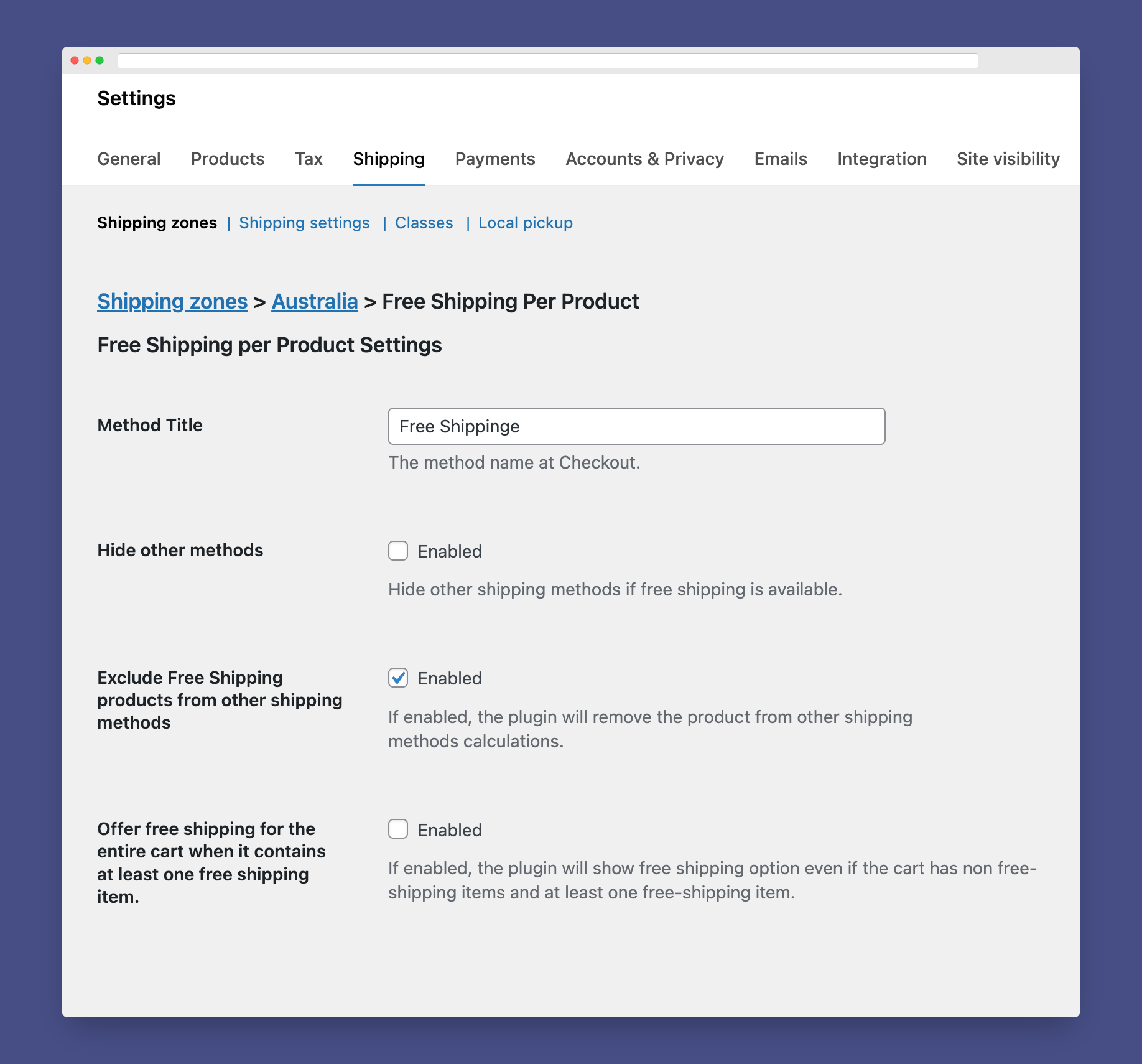
- At the method’s settings, you can choose if you want to hide other shipping methods at Checkout if the free shipping was available.
- To make a product eligible for free shipping, you can create a shipping class and name it free-shipping then, assign the class to any product you need.
Looking For More Flexibility?
Installation
Using The WordPress Dashboard
- Navigate to the ‘Add New’ in the plugins dashboard
- Search for ‘Free Shipping Per Product for WooCommerce’
- Click ‘Install Now’
- Activate the plugin on the Plugin dashboard
Uploading in WordPress Dashboard
- Navigate to the ‘Add New’ in the plugins dashboard
- Navigate to the ‘Upload’ area
- Select
free-shipping-per-product-for-woocommerce.zipfrom your computer - Click ‘Install Now’
- Activate the plugin in the Plugin dashboard
Using FTP
- Download
free-shipping-per-product-for-woocommerce.zip - Extract the
free-shipping-per-product-for-woocommercedirectory to your computer - Upload the
free-shipping-per-product-for-woocommercedirectory to the/wp-content/plugins/directory - Activate the plugin in the Plugin dashboard
FAQ
How does it work?
The plugin acts as a regular WooCommerce shipping method. For setting up the plugin, please follow the instructions:
- Install and activate the plugin.
- Go to WooCommerce ⇒ Settings ⇒ Shipping ⇒ Shipping Zones.
- Assign Free Shipping Per Product to one or more of the shipping zones.
- At the method’s settings, you can choose if you want to hide other shipping methods at Checkout if the free shipping was available.
- To make a product eligible for free shipping, you can create a shipping class and name it free-shipping then, assign the class to any product you need.
Screenshots
Changelog
1.3.5
- Declaring WordPress 7.1 support.
- Declaring WooCommerce 11.0 support.
1.3.4
- Declaring WordPress 6.9 support.
1.3.3
- Declaring WordPress 6.8 support.
- Declaring WooCommerce 10.1 support.
1.3.2
- Fixed: Offer free shipping for the entire cart when it contains at least one free shipping item.
1.3.1
- Fixed: detecting free-shipping class in shipping method availability.
1.3.0
- Added: Offer free shipping for the entire cart when it contains at least one free shipping item.
- Declaring WordPress 6.7 support.
- Declaring WooCommerce 9.4 support.
1.2.6
- Declaring WordPress 6.5 support.
- Declaring WooCommerce 9.1 support.
- Fixed: PHP 8.0+ deprecation notice.
1.2.5
- Declaring WordPress 6.4 support.
- Declaring WooCommerce 8.4 support.
- Declaring WooCommerce HPOS compatibility.
1.2.4
- Declaring WordPress 6.3 support.
- Declaring WooCommerce 8.0 support.
1.2.3
- declare WooCommerce 7.0 support.
1.2.2
- declare WordPress 6.0 support.
1.2.1
- declare WordPress 5.9 support.
1.2.0
- Added: Now, you can disable removing free shipping products from other shipping methods calculations
1.1.0
- The product will be also excluded from other shipping methods calculations.
1.0.0
- Initial release.