
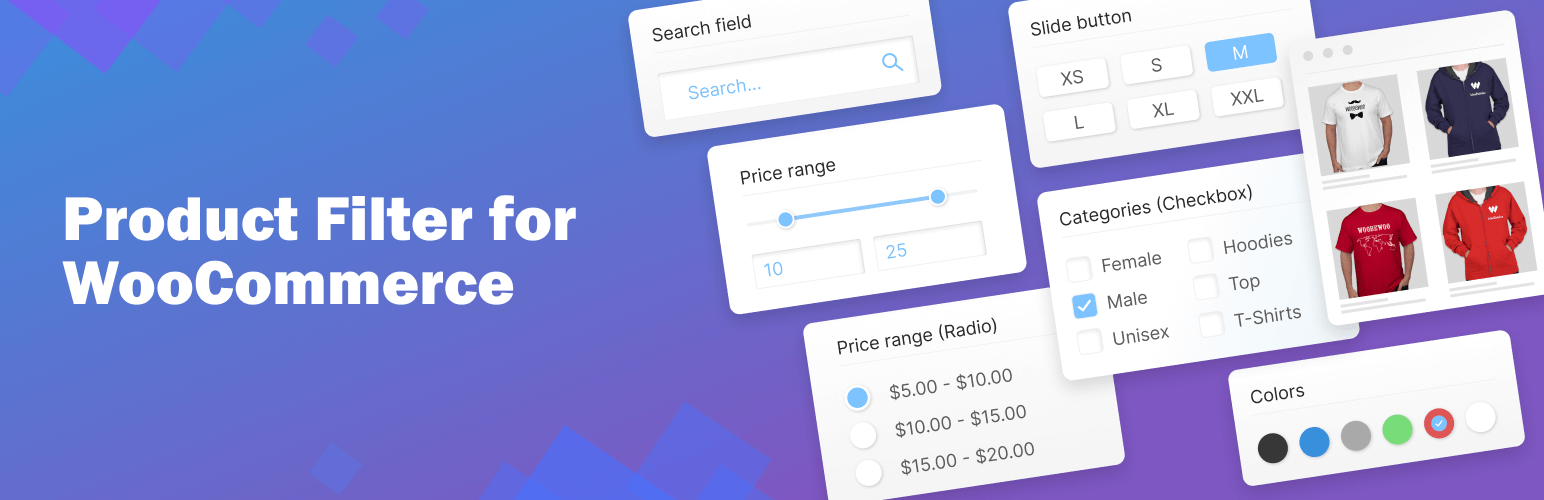

Description
The free core block is the floor. We are the ceiling.
What is new in 4.0
- One click smart setup. The plugin looks at your products (counts, attributes, fill rates, prices, stock, ratings, brands), guesses your kind of store, and suggests the filters stores like yours use, with a plain “why”, a “watch out” and a benchmark percent for each. You see the draft on your real shop page, desktop and phone, before you publish.
- Mobile drawer. Under 768px the filter opens as a bottom sheet from a sticky “Filters (3)” button, with the picked choices as chips, a “Show 128 results” button, focus trap, Escape to close, and a “Use your last filters again?” chip. Off for existing filters until you turn it on in the Phone group.
- Fast at 100,000 products. A facet index (one row per product and per variation, prices per currency) answers every result and every count. Filters combine with AND between blocks and OR or AND inside a block, know which variation matches (size 42 and red only when one variation has both), see stock per variation, and are cached by index version. No temporary tables, no sessions, full page caches work. Real numbers from the build machine are in
benchmarks/RESULTS.md. - Storefront rebuilt. Plain JavaScript (no jQuery, no jQuery UI, no Font Awesome), semantic markup, keyboard swatches and squares, a price slider on native range inputs, live counts, chips, pretty links with a Back button that never reloads, page numbers, “Show more” or infinite scroll, look presets and an accent colour. Checked with axe-core; a
[wpf-a11y-badge]shortcode shows “Filter tested to WCAG 2.2 AA” when the built in report passes. - Step by step finder. One question per step (“Which size do you wear?”, “How much do you want to spend?”) with counts per answer, progress segments, back and “skip to all products”.
- Variations as products. Result cards show the matching variation’s picture, price and stock, open at that variation and say “Only 2 left in 42”.
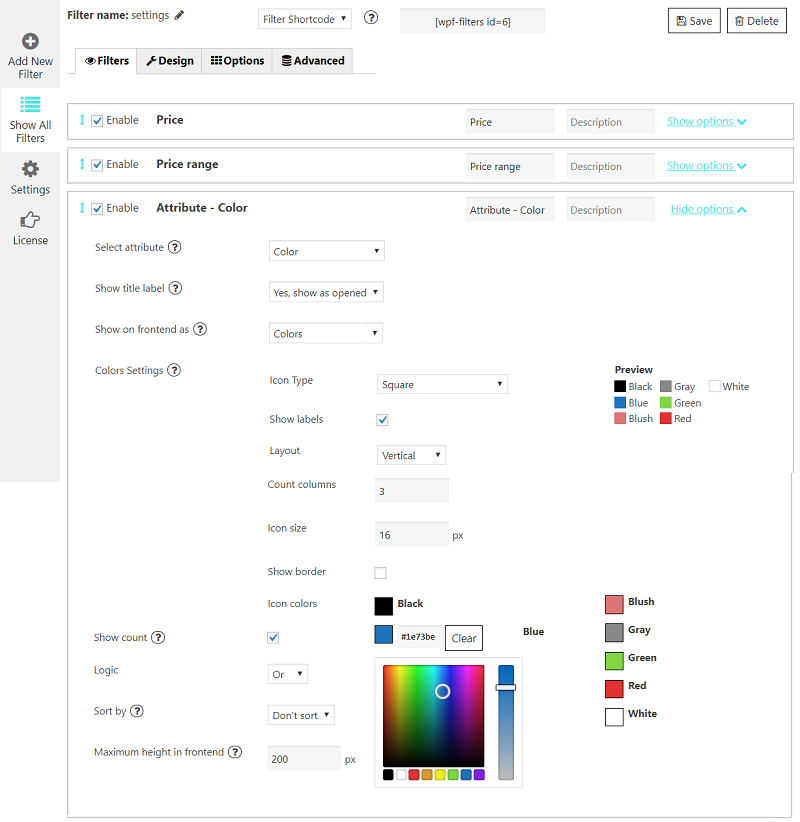
- Swatches in Free. A colour or a picture per term on the term screens, found automatically from the name (English, German, French, Spanish, Italian) or from the first product picture, and squares for sizes.
- Version history and undo. Every save keeps a copy (the last 30 per filter). Restore any version with one click from the Filters screen or the builder.
- Plain words. The most confusing labels now say what they do: “Where the filter shows”, “Update results without reloading”, “Shoppers can pick more than one”.
- New admin. Filters as cards, a builder in three columns (blocks, plain word groups, live preview), picture cards for display modes, and a calmer look.
- Speed and SEO screen. Index health with one click rebuild, a counts cache, clean links, canonical and noindex on filtered pages, a bot speed limit with an allow list for AI shoppers, and robots.txt rules.
- Help screen. Diagnostics export (JSON), a compatibility self test, docs and support.
- Pretty links and short links. Filtered pages get readable addresses such as
/shop/size-42,43/colour-red/price-50-120/on the shop, category, tag and brand pages; old query string links redirect to them when “Clean links” is on. A Share button copies a short link (/shop/f/red-shoes-42/) and shows a QR code. - Found by Google, quoted by AI. Filtered pages print CollectionPage, ItemList, Product offers and BreadcrumbList structured data, send Last-Modified and ETag headers from the index, and an AI shopping readiness score (
wpf/v1/readiness) tells you what to fix, with a one click llms.txt. - Used by AI shoppers. The abilities
woobewoo/facets-listandwoobewoo/products-filterare registered with the WordPress Abilities API and mirrored as RESTwpf/v1/facetsandwpf/v1/products, documented by an OpenAPI 3.1 file (wpf/v1/openapi). The WooCommerce Store API products endpoint honours the samewpf_*parameters and carries the facets with counts. - Works with your builder. A
woobewoo/product-filterblock with a filter picker and a block theme mode, plus elements for Bricks, Breakdance, Oxygen, Divi, WPBakery, Avada and Beaver Builder (Elementor as before). - Brands in Free. The WooCommerce Brands block (with logos as a list or as tiles) no longer needs Pro.
- For developers.
wp wpfWP-CLI commands,docs/HOOKS.md,docs/REST.md,docs/JS-EVENTS.md,docs/CLI.mdand a Postman collection; settings stored as JSON; utf8mb4 tables; full clean up on uninstall when you switch it on.
The WooCommerce Product Filter plugin enhances your store by allowing customers to refine their searches by price, categories, tags, taxonomy, attributes and more.
It’s fully customizable and 100% compatible with Elementor, giving you full control over filtering options.
WooCommerce Product Filter Key Features
Comprehensive Filtering
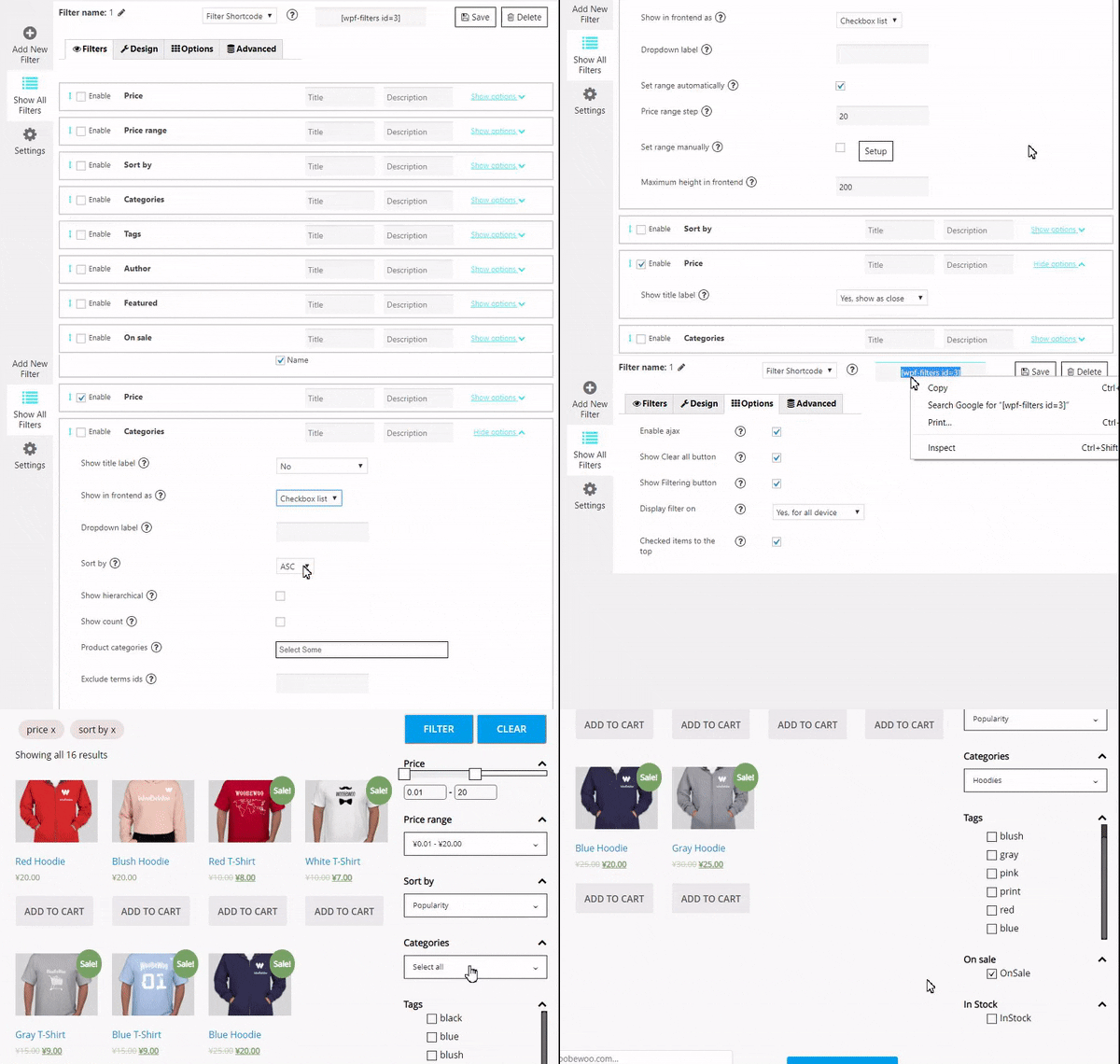
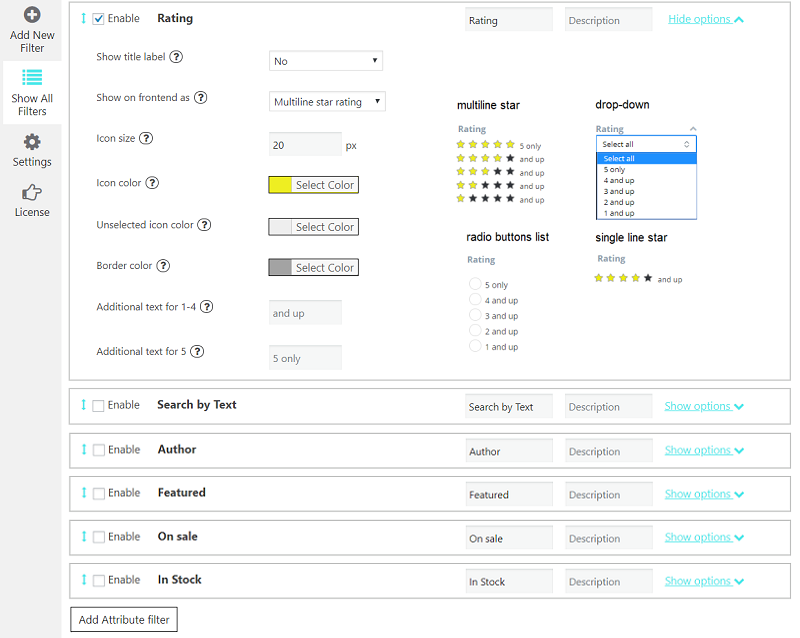
let customers filter products by: Price, Price range, Categories, Tags, Author, Featured, On Sale, In Stock, Rating, Search by text**, Attribute filters.
Flexible Display Options
present the filters in various formats to suit your storefront’s design and user preferences. Options include: radio button list (single select) dropdown (single select), checkbox list (multi-select)** and icons** for attribute filters (colour, size, rating).
AJAX live search
Enable instant results without page reloads for a faster shopping with AJAX live search. AJAX search provides instant filtering results without the need to reload the page. This feature can be configured to activate immediately after a user selects their desired filter options and clicks the filter button, making product searches faster and more intuitive.
Elementor Integration
WooCommerce Product Filter compatible with Elementor. Seamlessly create and customize filters using Elementor’s interface.
All features of the WooCommerce Product Filter by WBW are accessible within the Elementor tab, providing a streamlined workflow for page building.
To help you get started, there’s a comprehensive video tutorial available that guides you through the process of setting up the WooCommerce Product Filter by WBW, ensuring you can make the most of its features to improve your online store’s functionality and user experience.
Product filters are the key things that allow your customers to view the products in a particular way and easily find the necessary items.
Statistics
Product Filter by WBW comes with a detailed filter statistics section to make it easier to collect, analyze data and subsequently support global business growth. Gather information about filtering and searching for products by your buyer and convert them into business solutions.
Live preview
With Live Preview, the results will appear in the panel right at the moment you make changes to settings.
Variety of options for sorting products
The product search plugin for WooCommerce allows sorting your products by popularity, rating, price, newness, alphabetical ascender, or descender.
Create new product filters in a few clicks
Easy to customize and set up. Just add a filter to every page using a widget or shortcodes.
Price filter design
Variation of skins: default, flat, big, modern, sharp, round, square. Custom setting for its design: color, symbol position, currency code or symbol, input fields.
Automatic price range settings with fixed step values
Adjust them manually and specify the exact value of every step as well.
Show Count and Recount products by selected filter
Recount the products by selected filters and display the exact number of products matching the filter results.
Fully responsive
The filter looks and works properly on different devices particularly mobile phones and tablets as well as desktops and laptops.
Support and suggestions for WooCommerce Product Filter Plugin
Ask your questions in the support forum, or contact us directly
Usage data (opt-in)
Product Filter asks you once, on its own screens, whether you want to share anonymous feature usage with WooBeWoo. Nothing is sent unless you click “Yes, share usage”. When you agree, the plugin sends a short report once a week to https://woobewoo.com: plugin, WordPress, WooCommerce and PHP versions, the theme name, a product count range, how many filters use each feature, block type and look, which store-wide switches and Pro modules are on, and how often shoppers pick each block type (sampled). It never sends products, orders, customers, e-mail addresses or your site address; the store is identified by a one-way hash. You can turn it off any time from the Plugins screen (“Usage sharing: on (turn off)”).
Installation
a) VIA FTP
A download zip archive with WooCommerce Product Filter by WBW plugin
Extract files
Copy the folder with the plugin
Open via FTP folder \wp-content\plugins\
Paste plugin folder into here
Go to admin panel => Plugins => WooCommerce Product Filter by WBW press activate
B) DIRECT UPLOAD VIA ADMIN AREA
A download zip archive with plugin
Go to admin panel => Plugins => Add new
Choose the archive with a plugin and upload it
Wait until you get the notification installation went successfully
Press Activate button
C) VIA WORDPRESS REPOSITORY
Navigate to admin panel => Plugins => Add new
Type \” WooCommerce Filter Plugin by WBW”\ in the search field
Choose our plugin from the list and click \”Install\”
Wait until you get the notification installation went successfully
Press Activate button
FAQ
How does the one click setup choose my filters?
It scans your catalogue: how many products have a value for each attribute (the fill rate), how many choices each one has, prices, stock, ratings, brands and sale. A filter is suggested when more than 60% of your products have a value and there are at least two choices. The order follows what stores of your kind usually use (starting values from Baymard’s essential filters and category norms). Every card tells you why, what to watch out for, and how many products would disappear when shoppers use it.
Does the mobile drawer change my existing filters?
No. The drawer is off for filters that existed before 4.0. Turn it on per filter in the builder, in the Phone group. Filters created by the one click setup have it on.
Can I undo a change to a filter?
Yes. Every save keeps a copy of the filter (the last 30). Open History on the Filters screen or in the builder and click Restore. Your current state is saved as a new version first, so you can always go back.
How to create a product filter for my website?
We have all the necessary options in one plugin. You can start to try them now, following this clarification. It’s really easy to make the required settings and add Filter Plugin to your online store.
To manage with an installation and plugin settings, check the tutorial Main Settings
What are the criteria I can sort by
Now there is an ability to sort results by popularity, rating, newness, a price low to high and vice versa, randomly, by name, or by default order.
What are the settings available for each filter?
Depending on the type and specificity of the filter, you can configure:
- Filter title and description.
- Way to display a filter label on the page: no label, show as close/opened.
- Type: checkbox list/drop-down, multiple drop-down or icons.
- Drop-down label. Set a drop-down first option text.
- Show search and more.
How to add product filter to the store?
After creating the filter you can add a filer it in 2 ways: with shortcode and PHP code ( you can find them under the settings tab) or add WBW Product Filter widget.
-
Input shortcode
Copy Shortcode and paste it to your website content. Product Filter plugin will display the filter you created on the appropriate post/page using settings you tuned in this filter. -
Filter PHP code
PHP code can be inserted at any place of the page code to display exactly in this place, for example in the header or footer of the page. -
Display Widget
In case you are utilizing Product Filter in your internet store sidebar, Product Filter Widget can also be included.
To display the Product Filter on a sidebar, move to the WP Admin > Appearance > Widgets. Expand the sidebar dropdown option then drag and drop the Filter widget. Select the filter you need to display and Save.
Is the Product filter plugin responsive?
WooCommerce Product Filter is fully compatible and responsive! A plugin is working and displaying perfectly on tablets or phones, making it easy and convenient for customers to enjoy their shopping time and make purchases on all devices.
Why do I need a product filter?
On the standard site, customers have to scroll a lot of pages and links to find a product. It is an exhausted and time-consuming process, and there is where the product filtering comes. This feature allows users to find their route to a product, tuning different characteristics.
You can read about How to make the filtering works in the best way
and find the tips Where to place a filter bar, how to display filters, how to present the most relative filters and not overload, customers.
My WooCommerce Product Filter plugin is not working?
If you have problems with the work of plugin or something is not working as it should follow these steps:
* Test the plugin with a WordPress default theme, to be sure that the error is not caused by the theme you are currently using.
* Deactivate all plugins you are using and check if the problem is still occurring.
* Ensure that plugin version, theme version, and WordPress are updated and the problem has not already been solved in a later plugin update.
If none of this advice helps you, contact us via support form on our websiteand describe your problem.
WooCommerce Product Filter plugin is not available in my language. What shall I do?
You may help us translate the plugin into your language and get the PRO version of the plugin for free as soon as it is released. If this method seems to be too complicated, please send us a request and we will let you know as soon as the WBW Filter plugin will be available in your localization.
Where do I report security bugs found in this plugin?
Please report security bugs found in the source code of the plugin through the Patchstack Vulnerability Disclosure Program. The Patchstack team will assist you with verification, CVE assignment, and notify the developers of this plugin.
External Services
This plugin connects to an external server provided by WooBewoo (woobewoo.com) to handle the following admin-side forms. No data is ever sent automatically. These requests only occur when an administrator explicitly submits one of the forms below from within the WordPress admin panel.
Contact Us form: Sends the administrator’s name, email address, subject, message, site URL, and plugin version to woobewoo.com.
Subscribe form: Sends the administrator’s email address and site URL to woobewoo.com.
Rating form: Sends the administrator’s email address, rating score, feedback message, and site URL to woobewoo.com.
Terms of Service | Privacy Policy
This plugin may communicate with the following third-party services:
- Google Fonts (https://fonts.googleapis.com): loaded only when a Google Font is explicitly selected in the plugin’s design settings. No data is sent to Google; the request is a standard CSS font-stylesheet fetch. Google Privacy Policy.
Screenshots
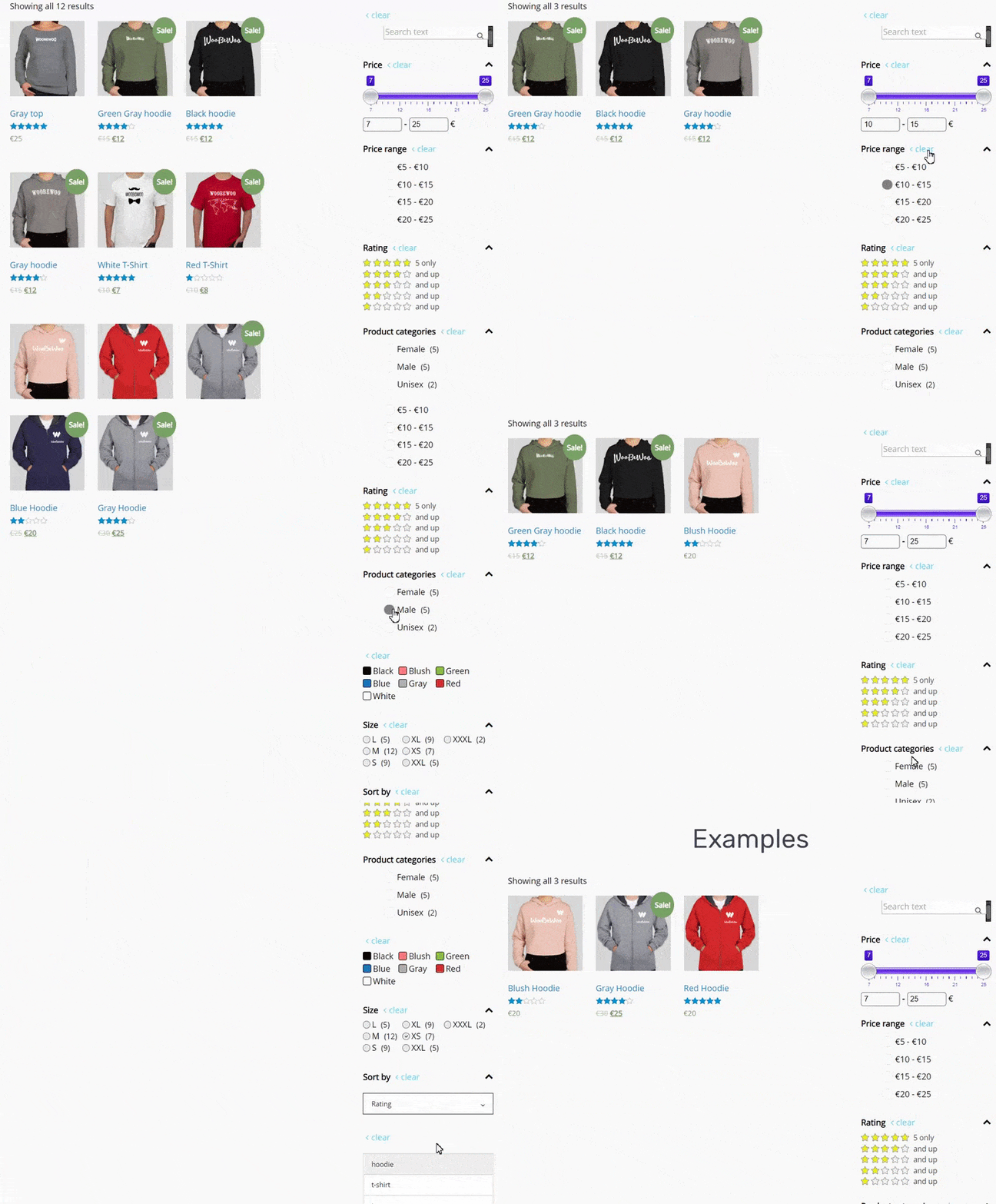
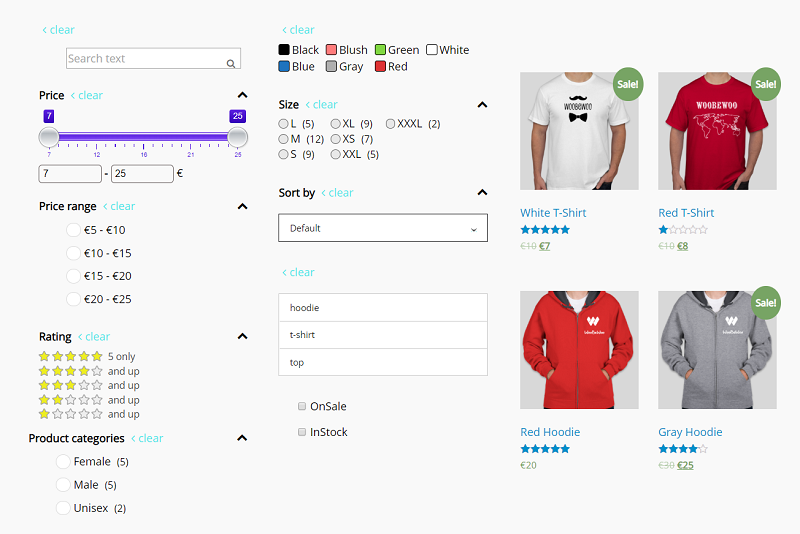
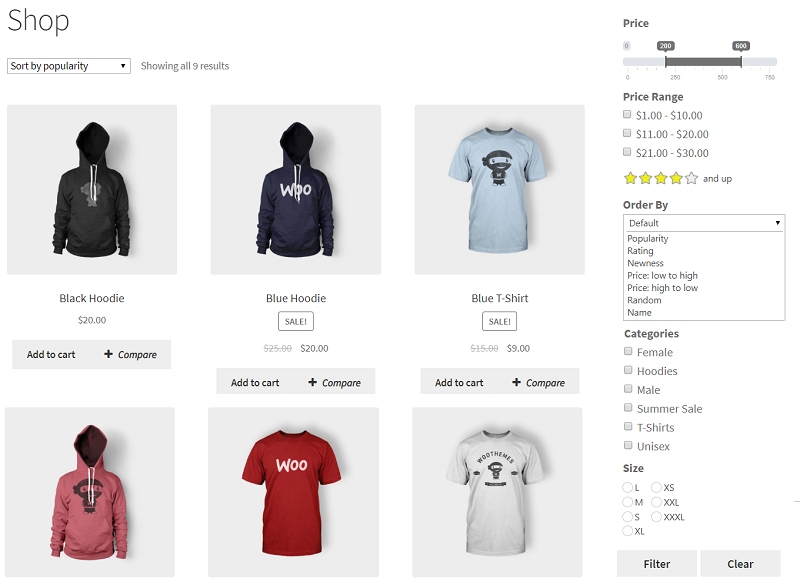
Changelog
4.0.0 – 17/11/2026
- Add – Builder: a “Filter engine” stripe at the top says in plain words which engine runs the filter (New 4.0 or Classic 3.x), switches it in one click and explains which one to pick. The engine choice moved there from Advanced.
- Add – Admin menu (free version): “Upgrade” is a filled button at the end of the WBW Product Filter menu, in the open menu and the fly-out. It does not show when Pro is active.
- Fix – Builder: settings only the other engine reads are folded into one closed “Only for the Classic engine” section at the end of Advanced instead of hundreds of greyed rows.
- Fix – 4.0 storefront: a filter with a Sort by block hides the shop’s own “Default sorting” dropdown, so shoppers see one sort menu.
- Add – Admin menu: “WBW Product Filter” uses the WooBeWoo logo as its icon and always sits directly under WooCommerce in the sidebar (links stay admin.php?page=wpf-filters).
- Add – Builder: dimmed settings and the greyed “Added” / Pro block cards explain why on mouse over (tooltip).
- Fix – Builder: “Ways to sort” (Sort by block) is a tidy grid of choices with a round tick and an “x of y on” count instead of cramped black pills.
- Fix – Builder and setup wizard preview: on themes whose shop page is built from their own template (no WooCommerce shop hooks), the draft was missing from the preview, so new blocks and changes never showed. The preview now places the draft above the products itself and says so; a failed preview update shows a message instead of an old preview.
- Fix – Draft preview pages are sent with no-cache headers (DONOTCACHEPAGE), so a page cache never shows an older draft.
- Add – Setup wizard: “View on my shop” opens the draft on your real shop in a new tab, and that tab updates by itself after every change in the wizard (or in the builder with “Preview on shop”), keeping its scroll and the picks made in it. After publishing it shows the live filter. A small note in the tab says only you can see the draft.
- Fix – Setup wizard, Speed and SEO step: long help texts no longer run out of the card and push the switches over the preview on narrower screens or with browser zoom; help text is no longer bold.
- Fix – Setup wizard and builder preview: on themes with a sticky or fixed header, the preview scrolls the filter to just below the header instead of under it.
- Fix – Filter bar (Above placement): no empty space under the bar while nothing is picked.
- Add – Price slider shows little bars of where the prices sit, the picked part in colour; the bars follow the other picks live (block switch “Show where most prices are”, on by default).
- Add – Long value lists start short: the five values with the most products show first, then “Show more (N)” (new block setting “Show the most popular values first”; the setup wizard and new builder blocks use 5). Picked values always stay visible; sizes, numbers and category trees keep their own order.
- Add – Two to four short choices show as one row of tabs (block switch “Two to four choices become tabs”, on by default).
- Tweak – Rating is one short line of five boxes (“1+ ★” to “5 ★”), also in a narrow sidebar and on phones; the product count is in the tooltip.
- Tweak – Chips, size squares, “Show more” and “Clear” fit their text: long names widen the chip instead of being cut, and the pills keep their inner space on themes that zero button padding.
- Tweak – Setup wizard: colour attributes use colour swatches in every look except Compact; squares only for sizes, chips for other names such as brands.
- Add – Setup wizard: “New arrivals” and “Weight” are real filter cards with a switch and a live preview (they were information only); new filter
woobewoo_pf_setup_itemsfor other modules. - Add – Builder: “Open this block on desktop” switch (start a block folded under its title).
- Fix – Setup wizard and builder preview: switching a filter on or off no longer makes the sidebar column grow across the products (the preview now keeps the column the page already sized).
- Tweak – Setup wizard and builder preview zoom in on the filter: the filter column and about one and a half product cards, readable text, a taller pane on tall screens; a block you switch on scrolls into view and flashes.
- Fix – Themes that paint every button (Twenty Twenty-One) no longer turn the fold arrows, “Show more”, Apply, Clear and the drawer buttons into dark pills.
- Fix – Rating choices no longer run past a narrow sidebar.
- Dev – Free: filter
woobewoo_pf_text_search_idsin the engine text search (array of ids wins, null = built in). - Add – Show a block only after a pick in another block (dependent filters).
- Add – Show a block only on some categories, brands, the shop page or search results.
- Add – Hide a block when fewer than N products match, or when it has only one choice.
- Add – “Size and weight”, “Stock quantity” and “New arrivals” blocks (Free, 4.0 engine): sliders or range lists over weight, length, width, height and stock quantity, and “Added in the last N days” with counts. URL keys wpf_weight, wpf_length, wpf_width, wpf_height, wpf_qty, wpf_added.
- Add – Setup wizard suggests “New arrivals” and “Size and weight” when the store has recent products or weights.
- Add – “Send shoppers to another page”: a filter on a landing page opens the shop, a category or any address with its picks.
- Add – Products per page block (wpf_per_page); new filter woobewoo_pf_per_page.
- Add – [wpf-found-count] shortcode and a “Show how many products match” switch, updated live.
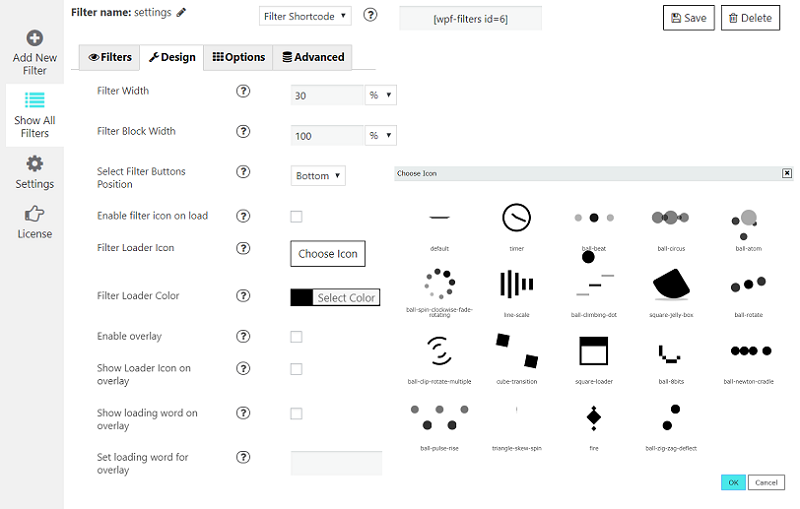
- Add – Skeleton loader option: grey placeholder cards while results load, reduced-motion aware.
- Fix – Shipped builds no longer show raw database errors to admins (
WPF_TEST_MODEis off). - Fix – Upgrade screen: the cards only list what Pro really adds. One colour or picture swatches and the AI shopping readiness score are Free; Pro adds up to four colours per value and the AI and agents screen.
- Fix – Smart setup: the percent on a filter card now reads “Typical for shoe stores (97%)” with a note that it is a starting value, not a measurement of your store.
- Fix – Speed and SEO: the “Allow AI shoppers” help text says what the switch does (robots.txt
Allow: /for the AI shoppers and no crawler speed limit for them). - Fix – Shortcode
[wpf-selected-filters]was empty in Free: for a 4.0 engine filter it now prints a second chips bar anywhere on the page, kept in step with the filter (newfrontend-4/chips-external.js). - Fix – Developer docs (
docs/REST.md,docs/openapi.json,docs/postman_collection.json) named a local development address; it ishttps://example.com/now. - Add – Export filters as JSON in Free (Filters home, “Export all” and “Pick filters to export”): the same
wpf-filters/1file Pro writes and reads, so files move between Free and Pro stores unchanged. New admin AJAX handlerwoobewoo_pf_export_filters(nonce + manage_options). Pro’s own export keeps working when Pro is active. - Add – Speed and SEO: an “AI shopping readiness” card with the score out of 100, a fix line per failed check, “Check again” and a one click “Create llms.txt” (Free readiness model,
woobewoo_pf_readiness). - Dev – Smart setup fires
woobewoo_pf_setup_ai_suggest( $suggestions, $scan, $storeType )once the rule based suggestions are final, so the Pro AI layer can refine the why / watch out lines and propose extra attribute filters. - Fix – Updating from 3.x: pretty URL rules are only registered when clean links are on or a 4.0 engine filter exists, and a real product, page or sub-category at the same address always wins. Stores with a “/shop/” product base lost product pages (/shop/sale-hoodie/ showed the shop) and sub-categories showed the parent category.
- Fix – Updating from 3.x: with several shoppers on the site in the first second after the update, one of them could get “No products found” (the upgrade markers were read from a stale option cache). One request at a time runs the upgrade now (MySQL lock); the others serve the page with what exists.
- Fix – Updating from 3.x: the utf8mb4 conversion no longer copies the meta index table (no text columns, instant change), a refused ALTER leaves that table as it was and converts the rest, and duplicate module rows from two concurrent first requests are no longer logged.
- Fix – Bot page cache: only for 4.0 engine filters (stores updated from 3.x store nothing), never for a crawler with a cart or session cookie, no public Cache-Control, and at most 300 stored copies without a persistent object cache.
- Fix – A URL meta key the filter has no block for is ignored by the 4.0 engine (it allowed probing any numeric product meta with an unindexed scan).
- Fix – Free 4.0 with Pro 3.x: Licence and Statistics are back in the rail and submenu, and new filters use the classic engine Pro 3.x extends.
- Pro Fix – The headless API key only switches off the cookie nonce check for wpf/v1 routes (read from the REST route) and the request runs as nobody; the key is accepted in the X-WPF-Key header only.
- Pro Fix – Saved searches and Notify me: the digest link is always on this store, at most 10 new subscriptions per email address per day, and only published, visible products are watched or mailed about. Web push uses wp_safe_remote_post().
- Fix – Bot speed limit counted per clock minute, so a crawler could send nearly twice the limit across a minute boundary; it now counts a 60 second window from the crawler’s first request.
- Fix – Two filters with a phone drawer on one page put their floating “Filters” buttons on top of each other, so only one could be tapped. The buttons now stack.
- Add – Speed and SEO: “Clear saved counts” button next to “Rebuild the index” (clears the classic counts cache and the 4.0 results and counts).
- Fix – Builder live preview and “Preview on shop” showed the filter title with no blocks: the draft endpoint unslashed the settings JSON a second time, so the block list failed to decode. JSON fields are now read once through
WooBeWoo_PF_Req::getJson()(raw POST, unslashed once, decoded, each value sanitized), and the storefront script starts any filter swapped into the preview (wpfPreviewUpdated). - Dev – New action
woobewoo_pf_frontend4_enqueuefires after the 4.0 storefront assets are queued, so add-ons can queue their own storefront scripts on 4.0 filter pages. - Add – Admin polish: the seven step pills of the smart setup sit on a 2 px line (ink up to the current step, hairline after it), the rail has a hairline on its right edge, the question column is its own white card with paper boxes inside, the preview card sits beside it 24 px apart; the “Switch from another filter” cards get 16 px between them. Builder controls for the new storefront settings: “Width of the filter column” (filter, Look) and “Show more after this many rows” + “Show more pill text” (per block, Look).
- Add – One page, one filter: when the smart setup publishes, every other filter the wizard placed on the same pages (above, sidebar or drawer) is switched to “shortcode only” and tagged Paused on the Filters list (
wbw_paused_by,wbw_paused_place); the Publish step says which ones. Each change is a normal save, so History can undo it. Filters placed by hand are left alone. - Add – Storefront polish: the desktop filter column beside the products can no longer grow (row, side and main get their sizes inline as well as from the stylesheet; main column = the theme’s content column beside the placement, else the nearest ancestor of the product grid that is the real content column; a placement that lands inside the grid is moved out; Elementor loop grids (
.e-loop-container), block themes and.woocommerce-loopare found; the two stack when the row is narrower than 612px). New filter settingside_width(220 to 400 px, default 280). New block settingsshow_more_rows(default 2) andshow_more_label(default “Show more”): chips, squares, swatches and tick box lists fold after N rendered rows behind a “Show more (12)” / “Show less” pill (measured from the real rows, recomputed on resize and after each update, picked values stay visible, folded values leave the tab order, focus stays on the pill). The rating block is one row of five star pills (inline SVG stars, the picked pill in ink with white stars, counts inside, empty values dimmed or hidden, “Clear” only once something is picked, a radio group with arrow keys, sideways scroll on phones). Values with no products are dimmed, never struck through. Block title and chevron share one line with the chevron at the right edge, 16px between blocks, 8px from a title to its values, chips keep an even 8px gap, the price inputs stay inside the column. - Add – One click smart setup wizard (Setup screen), seven steps on one frame: Welcome (real scan numbers, theme, builder and product grid tags), Filters (cards with a switch, why, watch out, benchmark percent, fill rate and speed tags), Look (four picture cards, theme colours), Phone (five switch rows, phone frame), Place (four option cards and the product grid self test), Speed and SEO (six rows), Publish (checklist, shortcode and block copy boxes, first week card). Every step shows the real shop page in an iframe with a desktop / phone toggle; the draft updates in place without a reload where possible. The scan runs by itself when the wizard opens without a fresh scan.
- Add – Live preview of any draft on the real shop page (
?wpf_preview=<draft>, admins only, admin bar hidden), used by the wizard and the builder (woobewoo_pf_setup_draft_settings,woobewoo_pf_setup_preview_html). - Add – Storefront mobile drawer settings (
mobile_drawer,mobile_drawer_text,mobile_drawer_chips,mobile_drawer_results,mobile_drawer_always,remember_filters) written by the wizard and the builder. - Add – Version history and undo:
wpf_filter_versionstable, a copy on every save (last 30 per filter), numbered versions with a plain words summary of what changed (“switched On sale on”, “changed Chips to Squares”), History card on the Filters home and History dialog in the builder, one click Restore. - Add – Filters home as cards: Live / Draft tag, where it shows, blocks as chips, edited / versions / products line, Edit, Duplicate, History, Delete; search, Import, New filter; the first week card (ink) when due.
- Add – Builder built new from the design canvas: top bar (back, name, Live / saved tag, History (n), Preview on shop, Save), blocks list with native drag to reorder and “Add a block” picture cards (every Free block, one card per attribute, Pro cards through
woobewoo_pf_builder_block_cards/woobewoo_pf_builder_block_cards_html), plain words groups Basics / Look (picture cards per block display mode) / Phone (open on phones, different look on phones writingmobile_overrides) / Where it shows / Step by step finder (finder) / Advanced (every remaining 3.x setting with a plain label, grouped), live preview of the real shop with the unsaved settings and a “N products match” line.modules/woofilters/admin-schema.phpmaps every control to the real keys (display_type,logic,variations_as_products,open_matching_variation,sizes_left_badge,sizes_left_threshold,pagination_mode,frontend_engineand all 3.x keys); extend it withwoobewoo_pf_admin_schema, enqueue Pro builder assets withwoobewoo_pf_builder_assets. - Add – Speed and SEO + Help on one screen: Index health (meter, products indexed, since last update, last count query, rebuild with live progress from
WooBeWoo_PF_Index::health()when present), Speed, Found by Google and Calm bots cards with switches that save as you change them, robots.txt preview, Help card (store check with a result banner, diagnostics download), Support card with an in plugin ticket form (wp_mail to the support address, diagnostics attached, copies kept inwpf_support_tickets), accessibility card per filter (woobewoo_pf_a11y_reportor a markup check), and the old Settings options as “Advanced settings”. - Add – Upgrade screen (Free only): plain cards of what Pro adds, prices from the theme facts when present, one button.
- Add – New admin skin and shell: paper ground, 200px rail with pill items and inline SVG icons, IBM Plex Sans Arabic, focus rings, reduced motion; the WordPress submenu mirrors the rail (Setup, Filters, Speed and SEO, Help, Upgrade, then Pro items); WordPress notices from other plugins sit above the frame. Components are documented in
modules/templates/css/README-components.md. - Add – Plain words everywhere:
modules/woofilters/plain-labels.phpcovers every legacy label and help line still rendered. - Tweak – Plugin admin pages no longer load Bootstrap, jqGrid, Font Awesome, tom-select, icheck, tooltipster or the 3.x admin stylesheets; only jQuery, the core glue and the 4.0 skin.
- Tweak – Removed the Google Plus share link from the plugin action links.
- Dev – Pro 4.0 requires Free 4.0 (
WPF_PRO_REQUIRES4.0.0). New modules: setup, speed, help, upgrade (screen class). Filterwoobewoo_pf_setup_suggestionsadds suggestion cards to the wizard. - Add – Pretty links on every product archive:
/shop/size-42,43/colour-red/price-50-120/,/product-category/<cat>/size-42/,/product-tag/<tag>/...,/brand/<brand>/...(WooCommerce Brands and Perfect Brands). Rules register on init and flush on activation, version change and when attributes change;parse_requestmaps the segments to the canonicalwpf_*query vars (and the 3.x names);woobewoo_pf_pretty_url( $base, $params )builds them; segment words are translatable and filterable (woobewoo_pf_link_segments); legacy query string links 301 to the pretty form when “Clean links” is on; the engine’swoobewoo_pf_filter_urlfilter returns pretty paths. Canonical and noindex keep pointing at the clean archive. - Add – Short shareable links: table
wpf_short_links(slug, filter_id, params JSON, base, hits, created),/shop/f/<slug>/302s to the pretty URL, readable slugs (“red-shoes-42”) with a collision suffix, a Share button in the storefront (wpf-share, throughwoobewoo_pf_after_filter_html/addHtmlAfterFilter) that copies the link and shows a QR code drawn server side by a bundled QR encoder (SVG, no external calls). RESTwpf/v1/short-links(POST creates, GET reads,/qrserves the SVG; 20 a minute per IP, admins unlimited). - Add – Structured data and freshness on filtered pages: CollectionPage + ItemList (products of the current page) + Product / Offer with price and availability (from the index when present, else WooCommerce) + BreadcrumbList, printed only on filtered archive pages (never on single products, so Yoast and Rank Math schema is not duplicated);
Last-ModifiedandETagheaders from the index version with 304 answers;woobewoo_pf_index_versionfilter andwoobewoo_pf_index_version()helper for sitemap lastmod. - Add – AI shopping abilities in Free:
woobewoo/facets-listandwoobewoo/products-filterregistered with the WordPress Abilities API (wp_register_abilityonwp_abilities_api_init, strict input and output schemas, public read with a 120 a minute per IP limit) and mirrored as RESTwpf/v1/facetsandwpf/v1/products;wpf/v1/openapiserves an OpenAPI 3.1 document built fromWooBeWoo_PF_Abilities::registry()(Pro extends it throughwoobewoo_pf_abilities_registry);wpf/v1/readinessreturns the AI shopping readiness score (attribute fill rates, product structured data, abilities, robots.txt for GPTBot / ClaudeBot / PerplexityBot / Google-Extended, llms.txt, clean links, canonical) with a plain fix line per failed check; one click llms.txt creator (woobewoo_pf_create_llms, RESTwpf/v1/llms) writes a file or serves it through a rewrite;woobewoo_pf_free_abilitiesfilter andWOOBEWOO_PF_ABILITIESconstant for Pro;WooBeWoo_PF_Abilities::mcp_endpoint(). - Add – WP-CLI:
wp wpf filter list|get|create|update|delete|export|import,wp wpf index rebuild|status,wp wpf cache clear,wp wpf diagnostics,wp wpf links flush. The plugin now also boots under WP-CLI. - Add – WooCommerce Store API:
/wc/store/v1/productshonours the canonicalwpf_*parameters (and the 3.x names) and carriesextensions.woobewoo.facetswith counts for the current query (woocommerce_store_api_register_endpoint_data). - Add – Developer docs generated from the code:
docs/HOOKS.md,docs/REST.mdanddocs/postman_collection.json(fromdocs/openapi.json),docs/JS-EVENTS.md,docs/CLI.md. The generator scripts live in the source repository (dev-tools/docs/), not in the plugin. - Add – Builders and blocks (modules/builders, one file per integration, each guarded): Gutenberg block
woobewoo/product-filter(block.json, server render, plain JS editor script with a filter picker fed bywpf/v1/filters-list, “Block theme mode” wrapper compatible with Product Collection and the core Product Filters block), Bricks element, Breakdance element, Oxygen element, Divi module (Divi 4 and the Divi 5 shortcode module list), WPBakery element, Avada (Fusion Builder) element, Beaver Builder module. Self test rows “builder modules registered” throughwoobewoo_pf_selftest_rows. - Add – Switch from another filter: a three step wizard (Review, Map, Switch) brings over the filters of YITH WooCommerce Ajax Product Filter, HUSKY (WOOF), BeRocket AJAX Product Filters, Filter Everything, annasta Filters and the WooCommerce filter widgets and blocks, active or inactive. Their filter sets are listed with counts and previewed next to ours on the real shop page; the owner confirms each mapping, look and name, and the mapped and unmapped settings are reported. After import, Switch can swap their widgets, shortcodes, blocks, Elementor widgets, automatic shop placement and product grid for ours, deactivate the old plugin and 301 its old filter links to ours (
wpf_switch_live); one click Undo restores every placement, setting and the old plugin from a snapshot (wpf_switch_log). - Fix – 4.0 engine: a filter placed on a single page by shortcode or block now filters that page’s product grid, price slider ends sit on the step grid, and WP-CLI
filter create|updatekeeps theshow_more_rows,display_typeandlogicblock keys. - Add – WooCommerce Brands block in Free (modules/brands): list, dropdown and checkbox displays, logos from the term image (
wpf_term_imagemeta, the WooCommerce brand thumbnail or Perfect Brands) as a list or as tiles, brand archive pages. Perfect Brands keeps its own block. - Add –
uninstall.php: removes every plugin table, option, transient, cron hook and term meta when “Delete all plugin data on uninstall” (wbw_delete_on_uninstall) is on. - Tweak – Filter settings are stored as JSON (
WooBeWoo_PF_Settings_Model::decode_settings()/encode_settings(),woobewoo_pf_decode_settings()), reading the old serialized rows transparently. - Tweak – Every old
wpf_table is converted to utf8mb4 on upgrade (row counts checked before and after, report inwpf_utf8mb4_report); new installs create utf8mb4 tables. - Tweak – Every admin AJAX handler verifies the nonce and the capability (
verifyRequest()), including the Overview notices, rating, subscribe and contact handlers and the builder preview and attribute term handlers. - Tweak – Removed dead files: the GeoIP database (
files/SxGeo.dat), progressmeter, wp.tabs.js, jquery-dialog.css, woobewoo-ui.css, woobewoo-ui-wc.css, admin.options.js and four unused images. - Fix – Upgrade from 3.x: every 4.0 save stores the storefront engine and a row without one (written by 3.x, for example during a rollback to 3.4.7) keeps the classic engine; the builder shows and saves the engine a filter really runs (its option key was “classic”, which the storefront read as 4.0); a duplicate keeps its source’s engine; classic filters get no Share button and no links script; classic pages get no ETag / 304 and no shopper with a cart ever gets a 304; 3.x “Products per page” also applies on engine 4 pages; 3.x only links on a page without an engine 4 filter stay with the classic engine; index batches stop at 60% of memory_limit or 20 s and free the in-memory cache every 50 products (188 MB to 36 MB per batch on 1,000 variable products); the settings helpers live in functions.php so a stale opcode cache of the main file right after a folder swap cannot fatal; a full uninstall also removes the widget ids from sidebars_widgets; Help store check row “Filters from before 4.0”.
- Fix – Upgrade in real store setups (multisite, Polylang, page builders, block themes, page and JS optimisers, currency switchers): classic filter links keep their query string after the smart setup turns “Clean links” on (no 301 to a pretty URL, no address rewrite while a classic filter is on the page, so “Clear” and reloads work); a wizard filter placed with the shortcode no longer drives shop, category and tag pages where it is not placed (classic hidden preselects and counts stay); the counts cache is keyed by page; no setup redirect after an update; filter links on a subdirectory network site or a WordPress in a folder no longer double the folder; 4.0 filters on ordinary pages keep query string links (no 404 on reload); “Above the products” and “In the shop sidebar” placements only on the shop and product archives (not inside every
[products paginate="true"]); 4.0 requests send the shopper’s cookies and the page language and carry currency, language and index version in the URL, browsers no longer reuse an answer (shared caches 60 s, logged in private); a currency the index has no prices for is converted with the switcher’s own rate (slider was 0 to 0); Polylang and WPML stores count and list only the current language’s products; the 3.x “Products per page” also applies to 4.0 AJAX pages. - Add – Facet index (storefront engine 4): four utf8mb4 tables (
wpf_index_products,wpf_index_terms,wpf_index_meta,wpf_index_prices) with one row per product and per variation, kept fresh on product save, trash, stock change, term edit, import and completed orders, rebuilt in batches of 500 through Action Scheduler (WP-Cron fallback) with a lock, progress and health data (WooBeWoo_PF_Index::health()). Prices per currency throughwoobewoo_pf_index_currencies(WOOCS, WPML, Aelia, CURCY supported). - Add – Every result set and every count of the 4.0 storefront comes from index queries: AND between blocks, OR or AND inside a block (
logic), variation aware (size 42 and red match only when one variation has both), stock at variation level, price in the shopper’s currency, cached in the object cache and transients keyed by filter, params, index version, currency and language. No temporary tables, no PHP session, full page caches work. - Add – Query plans for large catalogues: the narrowed product id set is computed once per request and every count reads from it (one GROUP BY for all unselected taxonomies, one pass over the product rows for stock, sale, featured, rating and price bounds), the most selective term joins the query first, parent rows carry
root_idandprice_maxso price ranges and variation rows are reached without scans, wide pages walk the sort index, whole catalogue counts are cached per index version. - Add – Canonical filter URLs (
wpf_size=42,43,wpf_price=50-120,wpf_stock=in,wpf_sale=1,wpf_featured=1,wpf_rating=4,wpf_sort=price,wpf_page=2,wpf_q=text,wpf_<meta_key>=min-max) withWooBeWoo_PF_Query::from_request()/::to_params(); the 3.x parameters keep working. - Add – Storefront engine 4 (vanilla JS, no jQuery, no jQuery UI, no ion.rangeSlider, no Font Awesome): JSON endpoint
woobewoo_pf_query, live counts and greyed values, chips, clear all, pushState with pretty links and Back without a reload, scroll position kept, live region, focus kept on the changed control, keyboard swatches and squares, price slider on two native range inputs with number inputs, look presets and accent colour, pagination as pages, “Show more” or infinite scroll with the page in the URL. Events on document:wpf:change,wpf:request,wpf:results,wpf:error. New filters use engine 4; filters created before 4.0 keep the legacy engine until the owner switches (frontend_engine). On desktop, a sidebar placement on a theme without a real sidebar column gets its own 280px filter column next to the products (.wpf4-layout). - Add – Phone drawer rebuilt: sticky “Filters (N)” pill above theme bars, bottom sheet dialog, chips, “Show N results”, “Use your last filters again?”, focus trap, Escape, focus return.
- Add – Step by step finder (
findersetting): one question per step, progress segments, chips of answers, counts per option, budget steps, back, skip to all products. - Add – Variations as products (
variations_as_products): result cards show the matching variation’s picture, price and stock, open at that variation (?attribute_pa_size=42) and carry an “Only 2 left in 42” badge from the index (sizes_left_badge,sizes_left_threshold). - Add – Crawlers get filtered pages from a one hour cache (
Cache-Control: public, max-age=3600); people never do. - Add – Swatches in Free: one colour and one picture per term on the term screens under Products > Attributes, automatic colour from the term name (CSS names plus 300 fashion and home words in English, German, French, Spanish and Italian) or from the first product picture (GD), cached in term meta with “Detect again”. Squares display for sizes.
- Add – Accessibility report:
woobewoo_pf_a11y_report(admin, nonce) runs structural checks (labels, names, legends, roles, live region, dialogs, ids, alt text, contrast of the configured colours, focus ring, 44px targets, reduced motion) and the[wpf-a11y-badge]shortcode shows “Filter tested to WCAG 2.2 AA” with the date when every check passes. The storefront was checked with axe-core on desktop, in the drawer and in the finder. - Add –
benchmarks/RESULTS.md: real numbers from the build machine for 10,000, 50,000 and 100,000 variable products, measured with the benchmark script that lives in the source repository (dev-tools/benchmarks/run.php, wp eval-file), not in the plugin. - Add –
modules/woofilters/settings-schema.php: every setting key the engine reads, with type and default. - Dev – Pro probes
woobewoo_pf_has_variation_stock_index(true) andwoobewoo_pf_variation_stock_lookup(variation id, stock status, quantity, price from the index). - Fix – The admin skin (
woobewoo-pf-wbw-admin) can no longer go missing: the handle is registered onadmin_init(priority 1) so Pro finds it whatever the plugin load order, enqueued directly onadmin_enqueue_scripts(priority 1) on every plugin screen (top level menu, WooCommerce submenu, builder), printed inline in<style id="wpf-skin-inline">when it still is not in the page atadmin_print_styles, and taggeddata-noptimize/data-no-minify/data-no-optimizeplus excluded throughautoptimize_filter_css_exclude/autoptimize_filter_js_excludeso CSS and JS optimizers leave it alone. Every asset URL now carries the file time in?ver=(WooBeWoo_PF_Frame::assetVer()), so a new build is never served from a browser, CDN or host cache that kept the previous build under the same?ver=4.0.0URL (the cause of a half styled admin page after an update). If the frame still does not apply 300 ms after load, a diagnostic card lists every stylesheet and script URL with its HTTP status, the active plugins and the environment, with “Copy this box and send it to support”. - Fix – Plugin paths …