


Description
Japanized for WooCommerce is the essential toolkit for running a WooCommerce store in Japan. This plugin bridges the gap between WooCommerce’s global features and Japan’s unique e-commerce requirements.
Why You Need This Plugin
Running an online store in Japan requires specific features that standard WooCommerce doesn’t provide out of the box:
* Japanese address formats with proper field ordering (postal code, prefecture, city, address lines)
* Name reading fields (Yomigana/Furigana) for accurate customer identification
* Delivery date and time selection that customers expect
* Popular Japanese payment methods like bank transfer and COD
* Legal compliance with Japan’s Specified Commercial Transaction Act (特定商取引法)
Who Should Use This
This plugin is designed for:
* Japanese e-commerce businesses using WooCommerce
* International stores shipping to Japanese customers
* Anyone who needs Japanese address handling and payment methods
* Stores requiring delivery date/time selection functionality
Seamless Integration
Works smoothly with WooCommerce core features and popular extensions. Fully compatible with the new WooCommerce Blocks checkout experience. All features are optional – enable only what you need for your store.
Key Features
Address & Name Management
* Name reading (Yomigana/Furigana) input fields for billing and shipping addresses
* Honorific title (様/sama) automatically added after customer names
* Japanese-style address format with proper field ordering
* Auto-fill address from postal code using Yahoo! API integration
* Company name field support
Shipping & Delivery
* Delivery date and time selection at checkout
* Delivery time slot management
* Holiday and non-delivery day settings
* Weekend and specific date exclusions
* Delivery-related fields hidden when free shipping is applied
Payment Methods
* Bank Transfer (Japanese banks)
* Japan Post Bank Transfer
* Cash on Delivery (COD) with fee calculation
* COD subscription support
* Pay at Store (over-the-counter payment)
* Paidy (Buy Now, Pay Later) – Official Japanese payment gateway
Legal & Compliance
* Specified Commercial Transaction Act (特定商取引法) page creator
* Shortcode support for legal information display
* Customizable legal notice templates
Security Check
* Checks the installed plugins, themes and WordPress against known vulnerabilities once a day (data from Wordfence Intelligence, delivered by wc.artws.info)
* 18 checks in all, including HTTPS on the checkout and My Account pages, two-factor authentication, file editing in the admin, and backups or logs left in public directories
* A score for each of the four requirements of Japan’s Credit Card Security Guidelines (クレジットカード・セキュリティガイドライン), with the items that need action and how to fix them; it shows what needs attention and does not guarantee compliance
* “Re-check now” on the Security tab; on by default and can be turned off there
* Login attempt limiter (off by default): counts failed logins per IP address and per user name on the WordPress and WooCommerce login forms, and stays out of the way when a security plugin, Jetpack or the server already protects the login page
* More hardening options (off by default): hide the user list of the REST API from visitors who are not logged in; keep user names from those visitors (author pages, ?author= links included, answer “not found”, author links lead to the home page, and the users sitemap, comment classes and oEmbed leave the names out) and answer failed logins on the WordPress and WooCommerce forms, lost password requests and wrong REST API application passwords the same whether the user exists or not (a display name that is the same as the user name still shows it); forbid file editing in the admin screens (DISALLOW_FILE_EDIT); and turn XML-RPC off except for the methods you allow (Jetpack keeps working)
* Free security check by wc.artws.info (optional, only after you agree on the Security tab): sends the list of plugins and themes and the results of the checks, shows a report with the items that need action and how to fix them, and its data can be deleted from the same tab
* A record of the XML-RPC calls of the last 30 days, kept on the site, that shows which methods are used, by which client and whether they log in, so that you can tell integrations from password guessing before turning XML-RPC off
Additional Features
* Email template optimization for Japanese format
* Address validation for Japanese postal codes
* Affiliate integration (A8.net, Access Trade, Value Commerce)
* WooCommerce Blocks compatibility
Note: Paidy Checkout is also available as a standalone payment plugin.
External Services
This plugin connects to the following third-party services:
- Yahoo! Japan Web API (yahoo.co.jp) — used by the postal-code auto-fill feature to look up a Japanese address from a postal code entered at checkout. The postal code is sent to Yahoo! Japan’s address lookup API whenever a customer uses this feature; it uses a merchant-configured Application ID (Japan Settings → Address Form) if one is set, and a bundled shared ID otherwise, so it is active whenever the postal-code auto-fill feature itself is used, not only once an ID is configured. See Yahoo! Japan’s own site for their terms of service and privacy policy.
- Paidy payment API (api.paidy.com) — used by the Paidy (Buy Now, Pay Later) payment gateway to process and verify payments. Only active when the Paidy gateway is enabled. See Paidy’s own site for their terms of service and privacy policy.
- Artisan Workshop Paidy onboarding intermediary (paidy.artws.info) — used only while applying for a Paidy merchant account through this plugin’s setup wizard (available even before the gateway is enabled, since onboarding is how it becomes eligible to be enabled). Submitting the application form sends the store’s site name and URL, the merchant’s contact details (email, phone), the representative’s name and date of birth, the submitted screening survey answers, and a site-specific verification hash, to this Artisan Workshop-operated intermediary, which relays the application to Paidy and later delivers the issued API credentials back to the site.
- Artisan Workshop promotion service (wc.artws.info) — the plugin’s own first-party service. It is contacted automatically (no setting to disable it) to fetch promotional notice content shown in the WordPress admin dashboard to users who can manage WooCommerce, on stores with at least one order placed in the last 5 days. No order, customer, or site-configuration data is sent or received beyond the request itself.
- Artisan Workshop vulnerability feed (wc.artws.info) — used by the security check (WooCommerce → JP4WC Settings → Security), which is on by default, including on sites updated from an earlier version. Shortly after the plugin is installed or updated, and then once a day, WP-Cron downloads the list of known vulnerabilities in WordPress plugins, themes and core from
https://wc.artws.info/feed/v1/(data from Wordfence Intelligence) and compares it with the installed software on the site itself; “Re-check now” on the Security tab also downloads it at once when no list is stored yet. The requests are plain downloads: they carry only a User-Agent header with the versions of this plugin, WordPress, WooCommerce and PHP, and like any request they reveal the server’s IP address. These downloads do not send the site URL, the list of installed plugins and themes or the results of the check (only the free security check below sends them, after consent); the other checks on the Security tab run on the site and send requests only to the site’s own address. Turning the security check off on the Security tab stops the requests and deletes the downloaded data and the results. Terms of use: https://wc.artws.info/security-assessment-term/ Privacy policy: https://wc.artws.info/privacy-policy/ - Artisan Workshop free security check (wc.artws.info, operated by 職人工房 合同会社) — optional, and nothing is sent until it is used. Only when a store manager agrees to the terms of use and the privacy policy on the Security tab and clicks “Agree and run the check” (later “Run the check again”), the plugin sends
POST https://wc.artws.info/wp-json/artws-sec/v1/scanwith:schema_version,site_url(the site address),wp_ver,wc_ver,php_verandjp4wc_ver(the versions of WordPress, WooCommerce, PHP and this plugin),locale,software(thetype,slug,versionandactivestate of every installed plugin and theme),local_findings(thecheck_idandstatusof each check on the Security tab, never the settings behind them),consent_versionand, only when a separate box is ticked (off by default, offered only to stores in Japanese yen),revenue_bandandorder_band(the revenue and the number of paid orders of the last 12 months as band codes, never the amounts). The consent screen shows every value before it is sent. The administrator’s e-mail address, customer data, order amounts, API keys, the contents of wp-config.php and server paths are not sent. The response is a report shown on the Security tab and, on the first check, a site identification token issued by wc.artws.info, which the plugin keeps without showing it and sends with later checks and with the deletion. wc.artws.info keeps the data for 180 days. It uses the data to make the report, to improve the service, for security information on wc.artws.info (aggregated so that no site can be identified) and, through staff of 職人工房 合同会社 looking at each registration, to answer inquiries, investigate problems, confirm deletion requests and review the priority of measures for the size of the store. The bands are used only to show that priority in the report, to improve the service, for the aggregated security information and for the staff check. The data and the reports are never used for sales or advertising. “Delete check data” on the Security tab removes the consent, the token and the report from the site and, when the site holds a token issued for its current address, sendsDELETE https://wc.artws.info/wp-json/artws-sec/v1/sitewith it; deleting the plugin from the Plugins screen does the same. Nothing is sent by WP-Cron. Terms of use: https://wc.artws.info/security-assessment-term/ Privacy policy: https://wc.artws.info/privacy-policy/
Installation
Minimum Requirements
- WordPress 6.0 or greater
- WooCommerce 8.0 or greater
- PHP version 8.3 or greater
- MySQL version 5.6 or greater
- WP Memory limit of 64 MB or greater (128 MB or higher is preferred)
Automatic installation
Automatic installation is the easiest option as WordPress handles the file transfers itself and you don’t need to leave your web browser. To do an automatic install of Japanized For WooCommerce, log in to your WordPress dashboard, navigate to the Plugins menu and click Add New.
In the search field type “Japanized For WooCommerce” and click Search Plugins. Once you’ve found our eCommerce plugin you can view details about it such as the the point release, rating and description. Most importantly of course, you can install it by simply clicking “Install Now”.
Manual installation
The manual installation method involves downloading and uploading our plugin to your webserver via your favorite FTP application.
FAQ
Do I need this plugin to use WooCommerce in Japan?
While WooCommerce can work in Japan without this plugin, Japanized for WooCommerce provides essential features that Japanese customers expect, such as delivery date selection, name reading fields (Yomigana), and local payment methods. It significantly improves the user experience for Japanese e-commerce.
Does this plugin work with WooCommerce Blocks?
Yes! Version 2.8.0 and later fully supports the new WooCommerce Blocks checkout experience, including delivery date selection and custom address fields.
How do I enable the postal code auto-fill feature?
You need to obtain a free Yahoo! Japan Application ID from the Yahoo! Developer Network. Once you have the ID, enter it in the WooCommerce → Settings → Japan Settings → Address Form section.(Classic Checkout only)
Which payment methods are included?
The plugin includes: Bank Transfer (Japanese banks), Japan Post Bank Transfer, Cash on Delivery (COD) with fee calculation, Pay at Store, and Paidy (Buy Now, Pay Later). Paidy is also available as a standalone plugin.
Can I use only specific features and disable others?
Yes, absolutely! All features are modular and can be enabled or disabled individually from the plugin settings. You only need to activate the features your store requires.
Is the plugin compatible with multilingual sites?
Yes, the plugin is compatible with WPML and other multilingual plugins. It automatically detects the language and adjusts features accordingly. Japanese-specific features are only applied when the site language is set to Japanese.
How do I set up delivery date and time selection?
Go to WooCommerce → Settings → Japan Settings → Delivery Date. You can configure available delivery times, set holidays, exclude specific days of the week, and customize the delivery date display format.
Does this plugin modify WooCommerce core files?
No, the plugin uses WordPress and WooCommerce hooks and filters. It doesn’t modify any core files, making it safe to use and easy to update.
Where can I get support?
For support, please visit the plugin support forum on WordPress.org or check the official documentation.
Is this plugin free?
Yes, Japanized for WooCommerce is completely free and open source under the GPLv3 license.
Screenshots
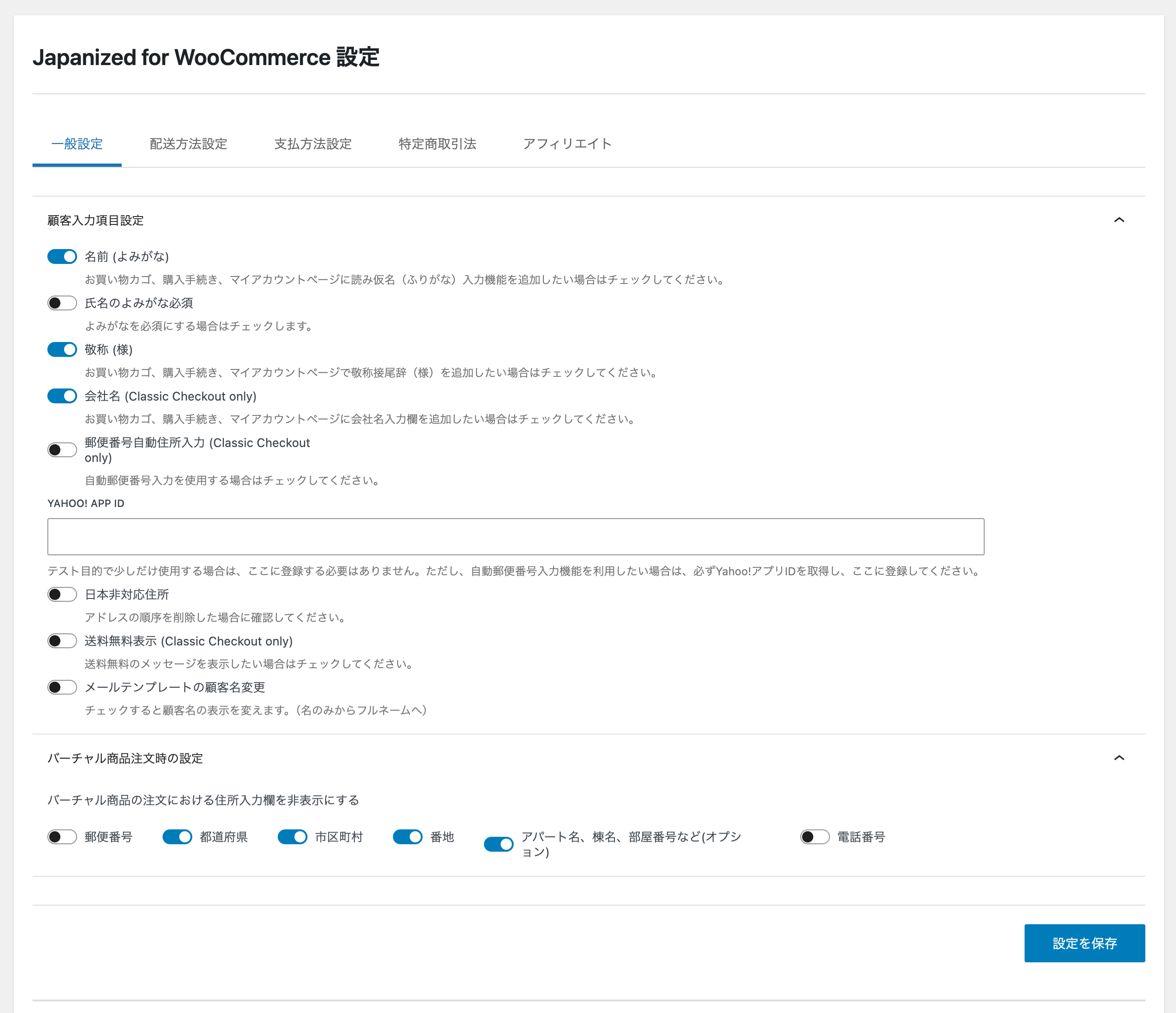


Changelog
3.1.1 – 2026-11-17
- Fixed – With the honorific “様” turned on, an address in Japan without a name no longer gets “様” on a line of its own. WooCommerce formats the store address that way, so “様” ended the footer of every WooCommerce e-mail when the footer text has
{store_address}(the default since WooCommerce 9.9), and it also followed the store address of the e-mail editor’s Store Address tag and the default store address of the point of sale, and came before the address of local pickup locations saved with Checkout block orders. Addresses with a name, including a last name only, keep “様” (#333)
3.1.0 – 2026-11-16
- Added – A hardening option on the Security tab, “Hide user names from visitors” (off by default), so that visitors cannot collect the user names to try passwords against. For visitors who are not logged in, author pages (
?author=links,/author/<name>/and their feeds) answer “not found” instead of redirecting to an address with the user name, author links lead to the home page, and the users sitemap, thecomment-author-<name>class of comments and reviews and the author in oEmbed data leave user names out. For everyone, a failed login on the WordPress login page and the WooCommerce My account and checkout forms, a lost password request on the WordPress and WooCommerce forms, and a REST API request with a wrong application password get the same answer whether the user exists or not. Logged-in users see the site as before; theme author pages are not shown to visitors while the option is on, and a display name that is the same as the user name still shows it (#318) - Added – An 18th check of the security check, “User names found from author IDs” (Admin access control, low): it requests the
?author=link of an administrator on the site’s own address and fails when the answer redirects to an address that contains that administrator’s user name. The free security check by wc.artws.info reports it as well (#318) - Changed – Tested up to WordPress 7.1 and WooCommerce 11.3.0
- Fixed – On a multisite where WooCommerce is network-activated and Japanized for WooCommerce is activated per site, the Checkout block now shows this plugin’s payment methods (Postal transfer, bank payment in Japan, Pay At Store and Cash on Delivery for Subscriptions) and the delivery date and time and yomigana fields. WooCommerce was loaded first there, and the plugin missed the moment to register them, so they were missing without any error; the classic checkout was not affected (#320)
- Fixed – Deleting Japanized for WooCommerce together with the standalone Paidy for WooCommerce plugin in one go (a bulk delete without JavaScript, or
wp plugin uninstallwith both) stopped with a fatal error (“Cannot redeclare wc_paidy_delete_plugin()”), and the clean-up of the plugin deleted second did not run, including this plugin’s request to delete the free security check data on wc.artws.info (#321) - Fixed – The consent to the free security check now counts only on the site address it was given on. A staging site made from a copy of the production database took over the production site’s consent, so “Run the check again” sent the staging site’s information without asking; the copy now shows “Get the free check” and asks for consent, and the choice for the revenue and order bands is not carried over. This also holds when a search-replace tool changed the URLs in the copy, for copies made after the production site is updated to this version. A consent given before this update keeps counting on the address its check was registered for; a site whose check never reached wc.artws.info agrees again (#319)
- Fixed – On a site that holds no registration of the free security check for its current address, such as a staging site, “Delete check data” said it would delete the data on wc.artws.info although it sends nothing there; the confirmation and the notice now say that only the data kept on the site is deleted (#319)
3.0.2 – 2026-11-05
- Added – Two hooks for the scheduled updates of Japanized for WooCommerce Pro and similar plugins: the filter
jp4wc_security_check_updates_automaticallylets a plugin that updates other plugins on its own schedule have them counted as updated automatically by the security check, and the actionjp4wc_security_findings_updatedfires with the results each time the security check saves them (#300) - Changed – The free security check by wc.artws.info asks for consent again under its revised terms of use and privacy policy (revised on 2026-10-29, in force from 2026-11-05): staff of 職人工房 合同会社 may look at the information sent and the reports of each registration to answer inquiries, investigate problems, confirm deletion requests and review the priority of measures for the size of the store, and they are never used for sales or advertising. Stores that agreed to the earlier text see a notice on the Security tab and agree again from “Get the free check”; they keep their registration, and the revenue and order bands are sent again only when the box is ticked again. A Security tab opened before the update asks for a reload instead of recording a consent to a text it did not show (#311)
- Fixed – Bundled Japanese translation: 19 strings had no translation (among them the settings of Cash on Delivery for Subscriptions and some Paidy error messages), and six strings of the COD fee settings on the settings screen showed in English on every Japanese site, because WordPress uses the bundled translation of the settings screen instead of the language pack’s and it lacked them. Translation files that no page loads are no longer shipped (#308)
- Fixed – The security check no longer reports two items as passed while they are still open. The user list of the REST API is also checked at
?rest_route=/wp/v2/users, which WordPress answers whatever the permalinks, so a site that blocks only/wp-json/wp/v2/usersnow fails the check, and the item is shown as unconfirmed when only one of the two addresses can be checked; anX-WP-Totalheader sent twice no longer causes a PHP warning. The check for backups and database dumps in public directories also finds UpdraftPlus database backups (-db.gz),.sqland.tarfiles compressed with bzip2, xz or zstd,.tbz2,.txzand All-in-One WP Migration’s.wpress, while public files such assitemap.xml.gzare still left alone (#315) - Fixed – The free security check could send the revenue and order bands when the information shown before sending said they were not sent: when the checks above finished again while a check without the bands was running, the box for the bands could turn itself on while the list of the information sent still said “Not sent”, and “Run the check again” then sent the bands. The box now always matches the information shown (#317)
- Fixed – The Security tab no longer says the vulnerability data has not been downloaded yet while downloading it fails. It shows when the last download failed and why (this server could not connect to wc.artws.info, wc.artws.info returned an error, the data was damaged, the PHP zlib extension is missing, or the data could not be saved in the uploads directory), and whether the vulnerability data downloaded earlier is still used meanwhile. A server without the zlib extension no longer downloads the vulnerability data every day only to fail, and the notice shown when no vulnerability data could be downloaded for three days names the “Security check” setting on the Security tab (#316)
- Security – The login attempt limiter counts an IPv6 address together with the rest of its /64 network, so a client cannot get past the per-address limit by taking a new address for every attempt; an IPv4 address, including one that reaches the site as an IPv4-mapped IPv6 address, is still counted on its own. The new filter
jp4wc_login_limit_ipv6_prefixchanges the network length (32 to 128). Failures already counted for IPv6 addresses start over with this update (#314)
3.0.1 – 2026-10-31
- Added – The report of the free security check starts with a comparison with the checks on the Security tab: what only the free check found, what only the checks on the tab found and which checks on the tab could not be confirmed, or that the result is the same. The comparison is not included when the report is saved as a PDF (#305)
- Changed – The free security check opens from a “Get the free check” button: the information to be sent and the consent appear only when it is clicked, and nothing is sent until a store manager agrees and clicks “Agree and run the check”. Once the site has agreed, the box for the revenue and order bands stays next to “Run the check again”, and the information sent opens from a link (#305)
3.0.0 – 2026-10-30
- Added – A security check for the site, on a new Security tab (WooCommerce → JP4WC Settings → Security). Once a day it downloads a list of known vulnerabilities from wc.artws.info (data from Wordfence Intelligence) and checks the installed plugins, themes and WordPress against it; only the versions of this plugin, WordPress, WooCommerce and PHP are sent, in the User-Agent header. Users who can manage WooCommerce see an admin notice when an installed version is affected, and dismissing it hides it until the findings change. The check is on by default, including on sites updated from an earlier version; turning it off on the Security tab stops the downloads and deletes the downloaded data and the results (#257)
- Added – The security check also runs the other 16 of its 17 checks on the site’s own setup, such as HTTPS on the checkout and My account pages, two-factor authentication, a user named “admin”, file editing in the admin, and backups, database dumps or logs left in public directories, and scores each of the four requirements of Japan’s Credit Card Security Guidelines (クレジットカード・セキュリティガイドライン) out of 100; the checks that request the site’s own pages send those requests only to the site’s own address, and a check that cannot tell is shown as unconfirmed instead of being counted as a failure (#258)
- Added – The Security tab shows the total score (the lowest of the four requirements) and a card for each requirement, the items that need action with the fixed version and how to fix each one, a list of all checks, and “Re-check now”, which runs the check again in the background (WP-Cron) and shows the results when it finishes; it shows what needs attention and does not guarantee compliance with the guidelines (#259)
- Added – The Security tab links to the terms of use of wc.artws.info, which apply to the vulnerability data (#286)
- Added – A login attempt limiter on the Security tab (off by default): failed logins are counted per IP address and per user name on the WordPress login page, the WooCommerce My account and checkout login forms and XML-RPC, and once the limit is reached further attempts for that address or name are refused for a while, even with the right password (default 10 per address, 5 per name, 15 minutes; all adjustable). It stays out of the way when a known security plugin, Jetpack’s brute force protection (with Jetpack connected) or the server already protects the login page, and
define( 'JP4WC_LOGIN_LIMIT_DISABLE', true )in wp-config.php turns it off from outside (#289) - Added – Two hardening options on the Security tab (off by default) for the items the security check finds open: hide the user list of the REST API (
/wp-json/wp/v2/users) from visitors who are not logged in, and forbid file editing in the admin screens (DISALLOW_FILE_EDIT, unless wp-config.php already defines it) (#291) - Added – XML-RPC on the Security tab: a record of the XML-RPC calls of the last 30 days, kept on the site whatever the setting (which methods were called, how often, by which client and whether their logins worked), and an option (off by default) that refuses every XML-RPC method except the ones you allow, so that no password can be tried and no pingback sent through XML-RPC. Requests handled by Jetpack’s connection are left alone, so Jetpack keeps working (#293)
- Added – A free security check by wc.artws.info on the Security tab, optional: nothing is sent until a store manager agrees to the terms of use and the privacy policy and clicks the button. It sends the site address, the versions of WordPress, WooCommerce, PHP and this plugin, the language, the installed plugins and themes, and the results of the checks on the tab (and, only when a separate box is ticked, which is offered only to stores in Japanese yen, the revenue and order bands of the last 12 months, never the amounts), and shows the report that comes back: the installed software checked against the latest vulnerability data, a score for each requirement and what to do first. The consent screen shows every value before it is sent; “Delete check data” deletes the data on wc.artws.info and on the site, and deleting the plugin sends the same request (#260)