

Description
Payments made simple, with no monthly fees – designed exclusively for WooCommerce stores.
Securely accept major credit and debit cards, and allow customers to pay you directly without leaving your WooCommerce store. View and manage transactions from one convenient place – your WordPress dashboard.
See payments, track cash flow into your bank account, manage refunds, and stay on top of disputes without the hassle of having to log into a separate payment processor.
Manage transactions from the comfort of your store
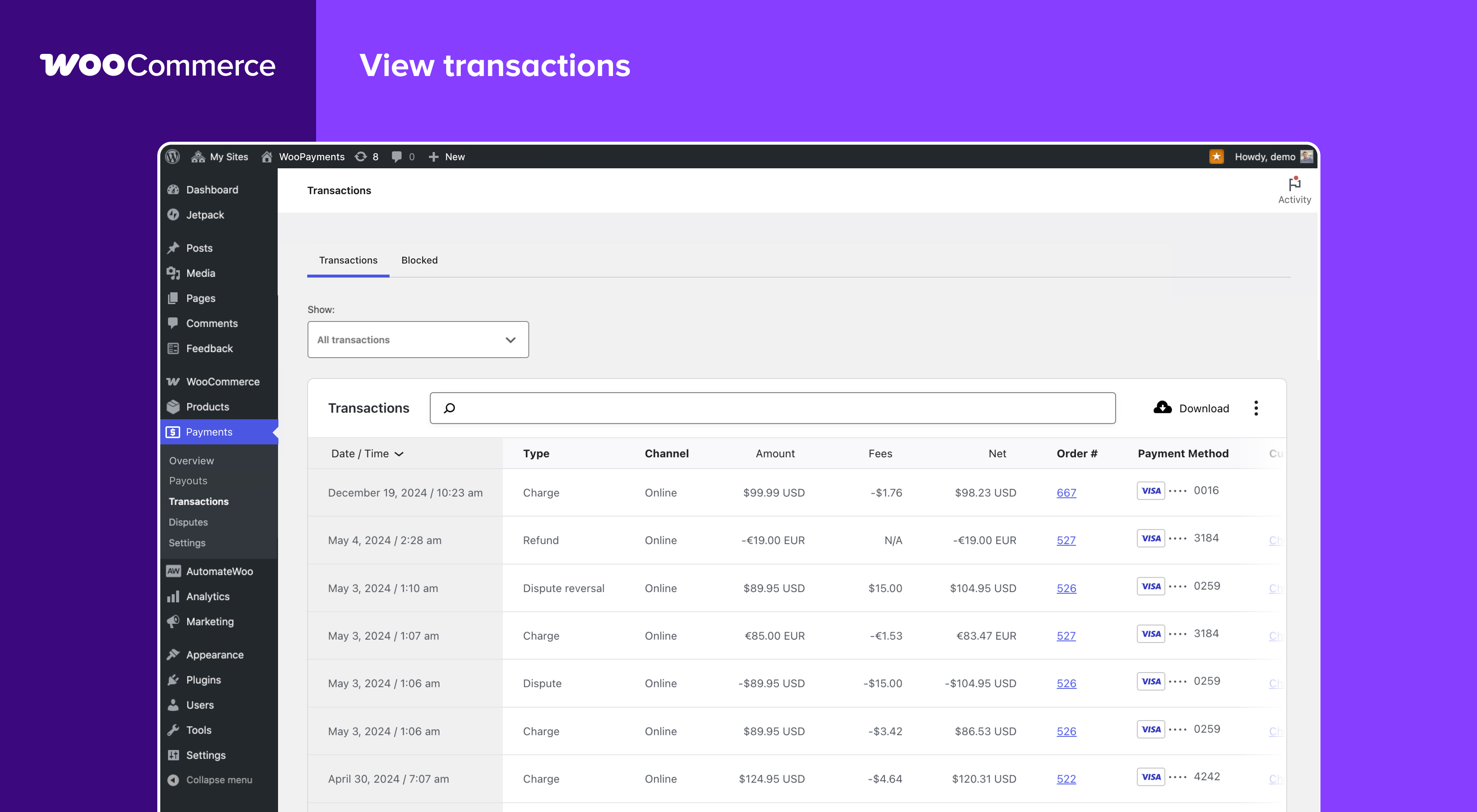
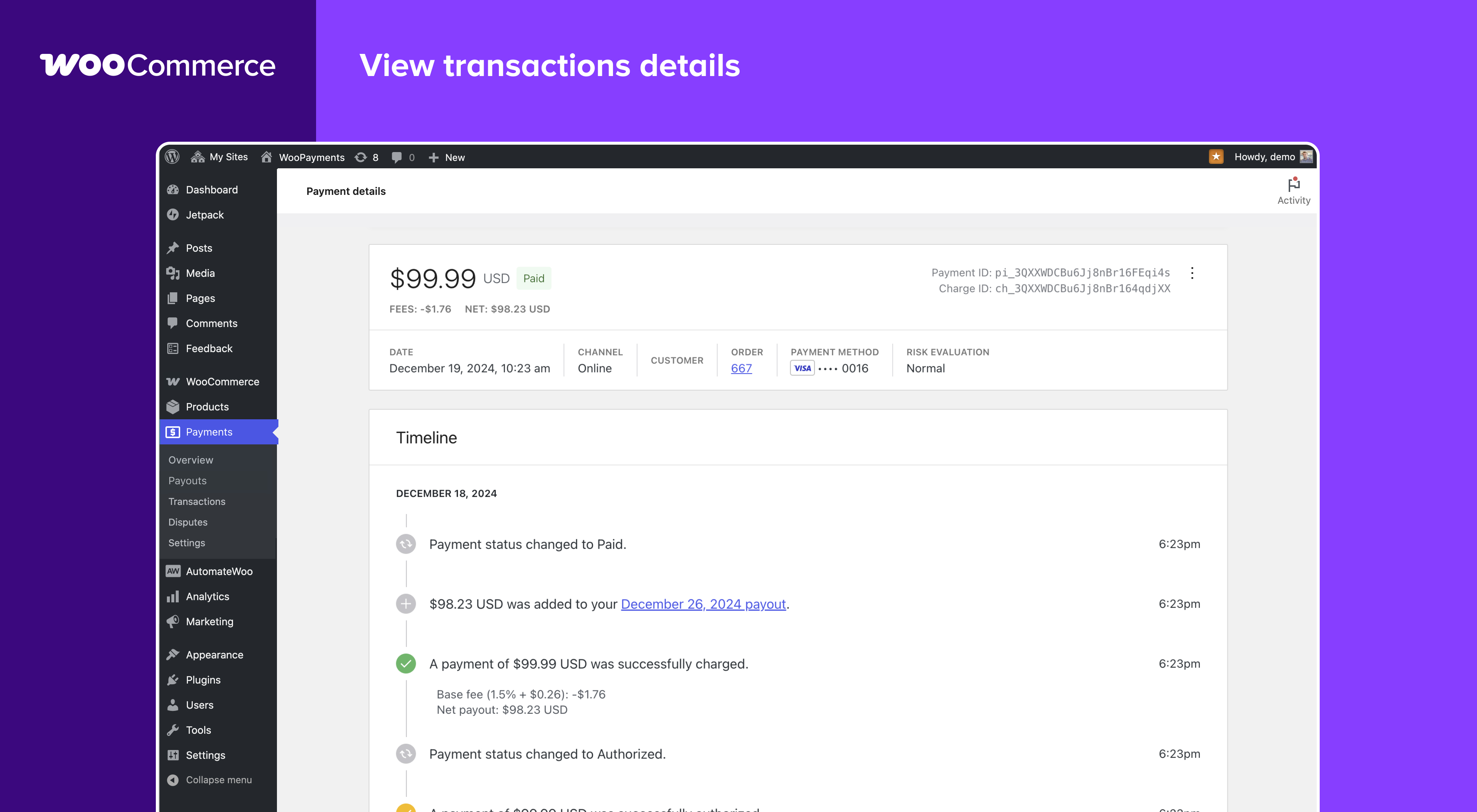
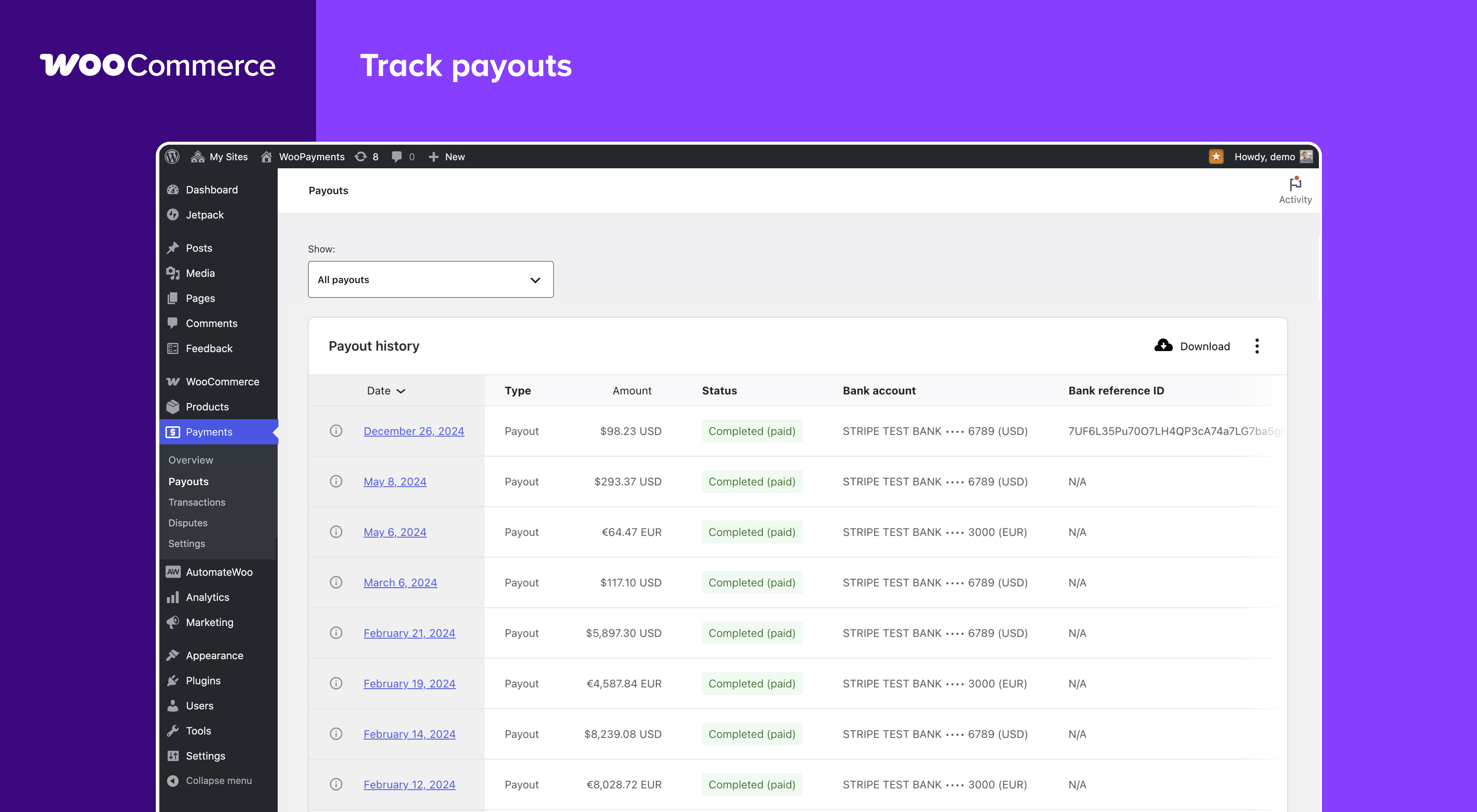
Features previously only available on your payment provider’s website are now part of your store’s integrated payments dashboard. This enables you to:
- View the details of payments, refunds, and other transactions.
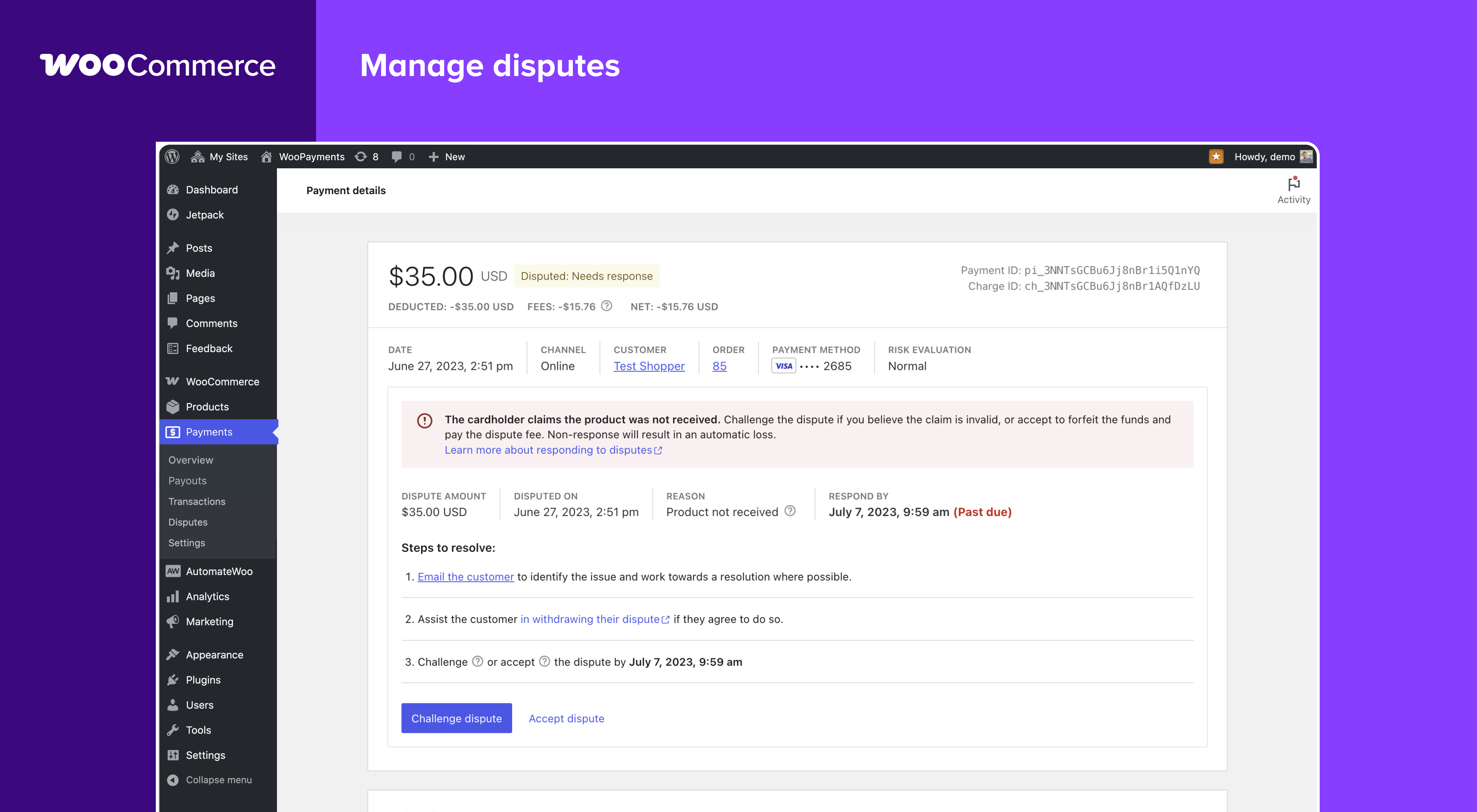
- View and respond to disputes and chargebacks.
- Track payouts into your bank account or debit card.
Sell in person
Take payments in person with WooCommerce POS, built into the free WooCommerce mobile app. Use Tap to Pay on iPhone or Android, or a card reader, and see in-person and online payments together in your WooPayments dashboard. Read the in-person payments documentation for supported countries and hardware.
Pay as you go
WooPayments is free to install, with no setup fees or monthly fees. Our pay-as-you-go pricing model means we’re incentivized to help you succeed! Read more about transaction fees.
Supported by the WooCommerce team
Our global support team is available to answer questions you may have about WooPayments installation, setup, or use. For assistance, open a ticket on woocommerce.com.
Getting Started
Requirements
- WordPress 6.0 or newer.
- WooCommerce 7.6 or newer.
- PHP 7.3 or newer.
Try it now
To try WooPayments (previously WooCommerce Payments) on your store, simply install it and follow the prompts. Please see our Startup Guide for a full walkthrough of the process.
Installation
Install and activate the WooCommerce and WooPayments plugins, if you haven’t already done so, then go to “Payments” in the WordPress admin menu and follow the instructions there.
FAQ
What countries and currencies are supported?
If you are an individual or business based in one of these countries, you can sign-up with WooPayments. After completing sign up, you can accept payments from customers anywhere in the world, as long as they are paying with a supported currency.
We are actively planning to expand into additional countries based on your interest. Let us know where you would like to see WooPayments launch next.
Can I take payments in person?
Yes. WooCommerce POS in the free WooCommerce mobile app takes in-person payments through WooPayments with Tap to Pay or a card reader. Check the requirements for availability in your country, then learn more about WooCommerce POS and in-person payments.
Why is a WordPress.com account and connection required?
WooPayments uses the WordPress.com connection to securely communicate with our payments server. This is necessary for WooPayments to function correctly, so it’s not possible to use WooPayments without connecting. Please see this document for more information.
Note that you do not need to host your site itself on WordPress.com, nor do you need to host any site on WordPress.com at all. You only need an account.
Note that you do not need to host your site itself on WordPress.com. You only need an account on WordPress.com to establish the connection. You can create a WordPress.com account at this link.
How do I set up a store for a client?
If you are a developer or agency setting up a site for a client, please see this page of our documentation for some tips on how to install WooPayments on client sites.
How is WooPayments related to Stripe?
WooPayments is built in partnership with Stripe Stripe. When you sign up for WooPayments, your personal and business information is verified with Stripe and stored in an account connected to the WooPayments service. This account is then used in the background for managing your business account information and activity via WooPayments. Learn more.
Are there Terms of Service and data usage policies?
You can read our Terms of Service and other policies here.
Screenshots
Changelog
11.3.0 – 2026-11-11
- Add – Add a Payments Overview task for payments flagged by an early fraud warning
- Add – Log which filter to use when the server rejects an express checkout payment because its confirmation token and the payment disagree about saving the card.
- Fix – Always attempt WordPress.com registration when a merchant clicks Connect, even after a recent failed attempt.
- Fix – Check that the intent on a redirect return belongs to the order for zero-amount orders too, including setup intents.
- Fix – Convert a fixed-amount coupon that WooCommerce re-applies to an existing order with the order’s currency, not the shopper’s selected currency.
- Fix – Correctly distinguish manual deposits from instant payouts by checking for non-zero service fees.
- Fix – fix: Make Level 3 data add up to the order total, or skip it, so Apple Pay, Google Pay and Amazon Pay payments no longer fail on rounding.
- Fix – Fix a PHP error when a payout export download is requested with an ID containing a % character.
- Fix – Fix a subscription’s failed renewal order being marked as paid, without a charge, when the customer changes the payment method to a card that needs 3D Secure.
- Fix – Fix classic checkout staying blocked when the cart updates while the Google Pay window is open.
- Fix – Fixed a client error on the add payment method page that replaced the Stripe card error message with a ‘Cannot destructure property’ error when the card data was rejected.
- Fix – Fixed Apple Pay and Google Pay on classic variable product pages sometimes showing an outdated price after a variation is selected.
- Fix – Fixed missing live shipping rates in the Apple Pay and Google Pay sheets for Canadian and UK addresses, by filling the redacted postcode in a valid format.
- Fix – Fixed saved card payments on classic checkout and order-pay when card testing protection is enabled
- Fix – Fixed the Currency Switcher block’s currency list being unreadable on Windows and Linux when the block uses light text on its default transparent background.
- Fix – Fix orders being marked as failed when a Klarna or other BNPL payment is declined: the order now stays pending so the customer can retry with a different payment method, and a detailed order note records the payment provider’s error. Abandoned BNPL payments, such as an expired payment session, are now also recorded in an order note.
- Fix – Fix payments and subscriptions failing with a division by zero error when an order item has a quantity of 0.
- Fix – Fix text overflow in Active loan overview table on mobile viewports.
- Fix – Fix the buy now, pay later message overlapping the Proceed to checkout button on the classic cart page.
- Fix – Fix the _load_textdomain_just_in_time notice on fresh installs by deferring gateway settings-field translations
- Fix – Harden customer and payment details kept in checkout sessions.
- Fix – Honor the manual capture setting for every payment method, not only cards.
- Fix – Improve how WooPay checkout handles session and preflight requests.
- Fix – Improve order status handling after payments and subscription renewals.
- Fix – Improve subscription handling during payment method changes.
- Fix – Improve the accuracy of Multi-Currency cart, order and renewal totals.
- Fix – Keep a connected store in its current test or live mode during onboarding.
- Fix – Keep a manual capture authorization from an earlier attempt from replacing the payment an order is waiting on.
- Fix – Keep Apple Pay and Google Pay working on product pages served from a full-page cache after their nonces expired, and after a new account was created but the payment failed.
- Fix – Keep Google Pay and Apple Pay showing on the Cart and Checkout blocks after the cart switches to a currency Amazon Pay doesn’t support.
- Fix – Keep manual capture orders paid with 3DS from being cancelled when the shopper leaves before checkout finishes.
- Fix – Keep text typed into the dispute challenge form from being replaced by saved values while the page finishes loading.
- Fix – Keep the dispute cover letter empty when a merchant clears it, and add a button to restore the generated letter.
- Fix – Keep the saved account details when they can’t be refreshed after a plugin update.
- Fix – Load right-to-left styles for lazy-loaded admin pages on right-to-left sites.
- Fix – Make capital loan table columns configurable via column visibility menu
- Fix – Make sure the WooCommerce session is loaded when a shopper adds a payment method from My Account.
- Fix – Multi-Currency: convert coupons re-applied to an existing order with the merchant’s manual exchange rate, not the automatic rate.
- Fix – Only accept a saved payment method at checkout when it belongs to the logged-in customer paying with it.
- Fix – Only add payment methods from My Account while WooPayments and saved cards are enabled.
- Fix – Only save a card from My Account when it was set up for the signed-in customer.
- Fix – Only use the order from a Pay for order link to pick payment methods when the link is valid.
- Fix – Prevented payment method errors from splitting log entries or causing checkout errors.
- Fix – Put a failed order on hold when a retried manual capture payment is authorized after 3DS and the shopper leaves before checkout finishes.
- Fix – Recognize returning Link customers from the checkout email field.
- Fix – Record only shopper events from the browser’s Tracks requests, and stop a batch of events once the Tracks service is unavailable.
- Fix – Recreate the customer during a payment only when the error names the customer itself as the missing object.
- Fix – Remove WooPayments payment details from orders paid with another payment method.
- Fix – Rename the Link payment method display title from “Stripe Link” to “Link” to align with current branding.
- Fix – Restore vertical spacing in Payments Overview task list rows.
- Fix – Send Level 3 data when marking an authorized order completed captures it, so a total edited after authorization can still be captured.
- Fix – Send shopper Tracks events in a single request per page to reduce server load.
- Fix – Show Amazon Pay on the Cart and Checkout blocks when the shopper switches to a currency it supports, without a page reload.
- Fix – Show Apple Pay, Google Pay, and Amazon Pay on the block cart and checkout when the first product is added to an empty cart, without a page reload.
- Fix – Show Link as the payment method on the order success page and in the order title for one-off Link and 3DS card payments.
- Fix – Show Onelink branding for UK accounts in the transaction list logo and the Link and WooPay settings notices.
- Fix – Show Onelink consistently as the Link payment method name on UK accounts, and use Link elsewhere.
- Fix – Show the local currency notice to shoppers on cached pages when Multi-Currency is optimized for caching.
- Fix – Show the real error message when saving or submitting dispute evidence fails.
- Fix – Skip the Name Your Price multi-currency compatibility shim on Name Your Price 4.0.0+.
- Fix – Stop a subscription renewal from being marked paid with a payment that belongs to another order.
- Fix – Stop express checkout buttons on product pages from giving shoppers a session cookie, which kept them off cached pages.
- Fix – Stop extra re-renders on the Payments Overview, payouts, disputes and payment details pages.
- Fix – Stop requiring auto-generated usernames and passwords for Express Checkout
- Fix – Stop rounding an order’s total to the selected currency’s decimals on the order received, view order and pay for order pages, which also made paying for an order charge the rounded amount
- Fix – Stop the block checkout from spinning forever when a shopper places an order before the payment details finish loading.
- Fix – Translate strings in lazy-loaded admin pages, such as Overview, Payouts, Reports and Disputes, and in multi-currency scripts on non-English sites.
- Fix – Update helper text for Stripe Billing fee setting.
- Fix – Update how the nonce on a redirect payment’s return URL is built.
- Fix – Update validation rules for transaction, dispute and card reader IDs used in admin REST requests.
- Fix – Use the order quantity for fraud prevention checks when paying an existing order.
- Fix – Validate order IP addresses before prefilling dispute evidence.
- Update – Include less request and customer detail in WooPayments logs.
- Update – Remove the fraud protection welcome tour from the WooPayments settings page.
- Update – Retire post-KYC first-sale reminder emails.
- Update – Retire the post-KYC and test-to-live global notices.
- Update – Show Afterpay instead of Cash App Afterpay for US stores at checkout and in settings.
- Update – Show one development mode notice that names what turned development mode on across the Payments Overview, Connect, Settings, onboarding, transactions, payouts, disputes, documents and loans pages, and stop showing an empty notice on Overview for live accounts in development mode.
- Update – Stop rebuilding the Express Checkout block button’s Stripe options on renders that don’t change them.
- Update – Update the Jetpack Connection package to 9.13.0, which lets the connection owner hand it to another administrator from Settings > Connectors on WordPress 7.0 or later.
- Update – Update the Klarna logo and clarify the available ways to pay in the payment method description.
- Dev – Add a browse command for checking changes by hand in a browser on the local dev site.
- Dev – Bump Jetpack Connection to 9.11.0 and Jetpack Sync to 5.4.1.
- Dev – Bump PHPStan to 2.3.1.
- Dev – Bump stylelint to 13.13.1.
- Dev – Bump the Jetpack Autoloader package to 6.0.2.
- Dev – Bump the Jetpack Config package to 4.0.1.
- Dev – Bump WC tested up to version to 11.3.0
- Dev – Bump
sirbrillig/phpcs-variable-analysisto version 3.0.0. - Dev – Check every ability’s registration settings in one data-driven test.
- Dev – Check that ordinary account reads use the cache instead of forcing a refresh.
- Dev – chore: keep CI tests compatible with Ubuntu 26.04.
- Dev – Declare react-day-picker as a dependency of @wordpress/dataviews so builds don’t rely on pnpm hoisting.
- Dev – Deploy the release zip that QIT tested to WordPress.org instead of building it again.
- Dev – Describe the deploy workflow’s single build in the test matrix.
- Dev – Document compact PHPStan and PHPCS commands for AI agents in the agent development reference.
- Dev – Fix disputes and documents filter tests that fail when only some of their tests run.
- Dev – Fix E2E test filters and the snapshot update script, which were ignored when run through pnpm 11.
- Dev – Fix gateway, payment and subscription unit tests that could not fail, and remove duplicate tests.
- Dev – Fix PHPStan 2.2.16 errors ahead of the dependency bump.
- Dev – Fix PHP unit tests that depend on state from other tests or pin the order of internal calls.
- Dev – Fix service, admin, WooPay and other unit tests that could not fail, and remove duplicate and unhelpful tests.
- Dev – Fix the dispute challenge page crashing after submitting an edited cover letter on WooCommerce versions before 9.5.
- Dev – Focus E2E verification guidance on affected flows and preserve existing environments.
- Dev – Make subscriptions disabler tests fail instead of skipping when the WC_Subscription test helper is missing.
- Dev – Make zero-call request mocks in unit tests fail when the request is sent.
- Dev – Modernize PHPStan configuration with WordPress-aware analysis and a scoped baseline
- Dev – Move the local and E2E Docker images to PHP 8.4 to match the Transact server, pull a fresh base image on each build, and run each E2E job on the PHP version it names.
- Dev – Name the security contact address in SECURITY.md.
- Dev – Pin Plugin Check to 2.1.0 in CI by installing its release zip, because wp-env dropped the version flag.
- Dev – Point the E2E phpMyAdmin image at the official
phpmyadminimage instead of the deprecatedphpmyadmin/phpmyadminone. - Dev – Prepare React mounts and ref callbacks for React 19.
- Dev – Remove the connect incentive from the Connect page, which merchants no longer reach from the admin.
- Dev – Remove the unused direct react-day-picker dependency.
- Dev – Remove unreachable subscriptions empty-state screen code.
- Dev – Replace the deprecated WooCommerce List component in HorizontalList.
- Dev – Reuse the local PHP unit test environment between runs, print its WordPress, WooCommerce and Gutenberg versions, and detect setup problems before running tests.
- Dev – Run unit tests that were never collected or always skipped, and remove dead test code.
- Dev – Run WordPress.org Plugin Check on pull requests, and fix the readme PHP requirement it flagged.
- Dev – Split agent guidance into task-specific references.
- Dev – Stop unit tests leaking shared state into later tests.
- Dev – Style WooPayments admin cards through our own class names instead of the internal @wordpress/components ones.
- Dev – Update Jetpack Changelogger to 7.0.5.
- Dev – Upgrade wp-prettier to 3.9.6 and eslint-plugin-prettier to 5.5.6, and reformat the codebase.
- Dev – Wait for the Klarna page to load in the Klarna E2E spec so its cleanup no longer fails on Atomic.
11.2.1 – 2026-11-03
- Update – Security update.
11.2.0 – 2026-10-08
- Add – Add support for Onelink in Great Britain
- Add – Flag payments with an active early fraud warning in the Payments Transactions list
- Add – Show Klarna’s stated reason for a lost dispute on the transaction’s dispute details and timeline.
- Fix – Avoid deadlock when both Stripe Link and WooPay are enabled by keeping both checkboxes editable until one is turned off.
- Fix – Decode currency and onboarding URL entities consistently across supported PHP versions.
- Fix – Exclude failed and canceled refunds from transaction totals and refund status calculations.
- Fix – fix: account tests failing with WP nightly
- Fix – fix: check the order key before adding order details to the pay-for-order checkout config
- Fix – fix: check the order key before preparing pay-for-order customer data
- Fix – Fixed the test mode notice on payment, payout and dispute details pages, which wrongly said a live record was created in test mode.
- Fix – Fix express checkout buttons opening or crashing on stale cart data while the cart is being refreshed on classic pages.
- Fix – Fix express checkout payments failing when the payment method will be saved for a subscription the page cannot see, such as one from a subscriptions plugin other than WooCommerce Subscriptions, or a subscription order paid from the order-pay page
- Fix – Fix guest 3-D Secure payments getting stuck on the “Verify email” form when paying an older order via a payment link, by loading the checkout scripts on the Pay for Order endpoint even when the pay-for-order form is not rendered.
- Fix – Fix outdated admin page styles showing after a plugin update, such as misaligned icons on the Dispute readiness card.
- Fix – Fix the Payments Overview page crashing when the settings request fails.
- Fix – Fix the TypeError possible with the “Subscription-like” plugins.
- Fix – Multi-Currency: in cache-optimized rendering mode, read the price-range screen-reader label of WooCommerce blocks in the customer’s currency instead of the store currency.
- Fix – Prevent a fatal error during checkout when the session points at a WooPay direct checkout draft order that no longer exists.
- Fix – Prevented an admin fraud tracker warning when other plugins fire admin hooks on frontend pages.
- Fix – Prevented canceled refunds from showing an undefined failure reason.
- Fix – Proper default sort params for the
payments/depositsandpayments/documentsREST API paths. - Fix – Record the shopper’s own IP address on orders placed through WooPay, instead of the address of the server that proxied the checkout
- Fix – Reduce ActionScheduler churn from wcpay_track_new_order / wcpay_track_update_order by keeping an already-pending action instead of canceling and re-creating it
- Fix – Remove a deprecated inbox note during the plugin update process.
- Fix – Remove the unused inbox last-read tracking on the Payments Overview screen, which could break the inbox panel.
- Fix – Restore spacing in the dispute readiness checklist.
- Fix – Retry subscription renewals that carry a deleted Stripe customer with the shopper’s current customer, instead of creating an empty one.
- Fix – Return a 400 instead of a fatal error when the fraud outcome transactions REST routes are called without a status.
- Fix – Send shopper Tracks events from the browser on stores with WooPay disabled.
- Fix – Show complete dispute counts, currency totals, and response deadlines in the Payments Overview task.
- Fix – Skip the intention retrieval for completed orders if known intent status is final.
- Fix – Stop Multi-Currency from overriding the currency selected by a third-party currency switcher while it has nothing to switch, and keep the module inert when the feature is disabled
- Fix – Stop Multi-Currency from recording an exchange rate on orders placed in a third-party currency switcher’s currency, which made Analytics convert those orders twice
- Fix – Tell the customer when a new default payment method fails to save on the server, instead of failing the request.
- Fix – Tighten validation of the checkout payment-authentication request.
- Fix – Use server-side prices once the WooCommerce session exists, even when Multi-Currency was initialized before it in cache-optimized mode. In that mode, a repeated Multi-Currency initialization now re-registers the server-side price and currency hooks.
- Fix – Validate saved exchange rates before converting Analytics totals and report figures.
- Update – Authorize WooPay requests on the Cart-Token and a sealed attestation instead of a Jetpack blog token signature, and remove the
wcpay_woopay_is_signed_with_blog_tokenandwcpay_is_woopay_store_api_requestfilters. - Update – Mention in-person payments and WooCommerce POS in the plugin readme.
- Update – Remove the in-app review prompt from the Payments settings page.
- Dev – Add release-package QIT checks and a workflow for deploying the plugin to WordPress.org with the Woo Product Deploy Action.
- Dev – Bump react-day-picker from 9.14.0 to 10.0.1.
- Dev – Bump ts-loader from 9.5.7 to 9.6.2.
- Dev – Bump WC tested up to version to 11.2.0
- Dev – Bump woocommerce/action-scheduler from 3.9.3 to 4.2.0.
- Dev – Bump woocommerce/qit-cli from 1.3.1 to 1.3.2.
- Dev – Clarify general agent guidance for implementation, verification, and documentation.
- Dev – Declare uuid as a direct build dependency.
- Dev – Disable Xdebug in PHP unit test jobs that do not collect coverage.
- Dev – Document when a feature-only symbol may be removed without a deprecation shim.
- Dev – Fail the release build when the client bundle fails, and fix the bundle-size CI comparison.
- Dev – Make QIT and E2E order status assertions wait for the selected option.
- Dev – Reuse Jest transform caches across CI test runs.
- Dev – Shard the wcpay shopper E2E group in PR runs, add job timeouts, and cache the Basic-Auth test plugin zip.
- Dev – Share the client build across pull request E2E jobs.
- Dev – Stop shipping webpack source maps in the released plugin package.
- Dev – Update the Jetpack packages: connection to 9.1.2, sync to 5.1.0, config to 4.0.0, autoloader to 6.0.0, constants to 4.0.0.
- Dev – Update WooCommerce coding standards to 2.0.0.
- Dev – Upgrade Jest to 30 and adapt the JS test suite to jsdom 26, which makes
window.locationunforgeable. - Dev – Use the editor toolbar inserter in the currency switcher E2E test.
- Dev – Wait for Blocks checkout readiness instead of classic checkout AJAX in E2E tests.
11.1.0 – 2026-09-02
- Add – Show which risk filters fired when a payment is blocked or held for review, in the order note and the Fraud & Risk meta box.
- Add – Surface Stripe Radar early fraud warnings in order notes and the Fraud & Risk order metabox.
- Add – Surface Stripe Radar early fraud warnings in the transaction timeline.
- Fix – Add an accessible label to the Multi-Currency switcher so screen readers announce it correctly
- Fix – Avoid a PHP 8 “Undefined array key” warning when computing the cache TTL for a legacy cache entry stored before the errored field existed.
- Fix – fix: inline notices rendering with a cut-off left border on WordPress 7.1
- Fix – Fixed merchant-facing documentation links that landed on the wrong page or section, and relabelled two links to match their new destinations.
- Fix – Fixed the payment details summary labelling a disputed amount as refunded: the withdrawn balance line now reads “Deducted” whenever a dispute moved the money, including when the dispute fee was zero or reversed.
- Fix – Linked the payment method fee tooltip to the fee section for the WooPayments account’s country rather than the store’s base country, which differ for Puerto Rico stores and for any store that changes its base country after onboarding.
- Fix – Link the “View more details” in a fraud-blocked order note to the specific payment intent that was blocked, so repeated blocks on the same order each point to their own transaction.
- Fix – Prevent a second charge when payment is resubmitted for an order that has already been paid.
- Fix – Prevent long refund reasons from interrupting refunds.
- Fix – Re-run the sofort cleanup on stores where the payment method registry re-enabled it.
- Fix – Recover onboarding within minutes instead of a week after a transient error, by backing off errored business-types and onboarding-fields cache entries instead of caching the failure for the full week.
- Fix – Send a WooPayments user agent on ExPlat assignment requests so experiment assignments are not filtered out as bot traffic.
- Fix – Show the evidence response deadline on the order screen when a charge has a dispute that still needs a response alongside one that is under review or lost.
- Fix – Stop a closing dispute from marking an order completed when the charge still has another dispute open, or when the payment has already been fully refunded
- Fix – Stop charging the additional Stripe Billing fee on subscription renewals that are not billed through Stripe Billing
- Fix – Stop counting test-mode WooPayments usage – a test-drive account or test-mode orders – when determining WooPayments incentives eligibility, so trialing WooPayments no longer disqualifies a store from incentives. Stores already disqualified this way get their eligibility re-determined once.
- Fix – Stopped the dispute details from naming a fee that was never charged: a zero or reversed dispute fee now drops the fee wording instead of showing a $0.00 amount or a dash.
- Update – Clarify where the support phone number appears, mark the field as required, and use one plain validation message.
- Dev – Add a payment method lifecycle reference doc covering Stripe capability state vs. checkout enablement
- Dev – Bump WP tested up to version to 7.1 and WC tested up to version to 11.1.0
- Dev – Fix E2E assertions that could not fail: missing awaits, an assertion-free filter test, and swallowed add-payment-method outcomes.
- Dev – Fix react-hooks/immutability ESLint violations
- Dev – Fix react-hooks/set-state-in-effect ESLint violations.
- Dev – Fix the E2E Action Scheduler helper so it finds the Run link on WordPress 7.1.
- Dev – Make the subscriptions manage-payments E2E test locate the “Change payment” action by its URL contract instead of its ARIA role.
- Dev – Make the subscriptions renewal E2E test resilient to Action Scheduler search-box copy changes (fixes the 4.1.0 relabel).
- Dev – Remove skipped tests for the capital loan notice that was removed from the deposits overview.
- Dev – Run the PHP test suite against WordPress nightly in the compatibility workflow.
- Dev – Use a named permission callback for the public multi-currency config REST endpoint.
11.0.1 – 2026-08-20
- Fix – Fix the currency switcher not rendering on WordPress 7.1 in Storefront breadcrumbs and the wc_get_currency_switcher_markup() template tag.
11.0.0 – 2026-08-05
- Add – Add A/B/C design variants to the in-app review prompt, assigned per-store via ExPlat (prompt remains disabled pending eligibility criteria)
- Add – Multi-Currency: add the
wcpay_multi_currency_should_output_explicit_pricefilter so merchants can force the currency code suffix on totals (e.g. “765 Kč CZK”) on or off. - Add – Multi-Currency: auto-detect page caching to enable or recommend the cache-optimized rendering mode
- Fix – Add direct file access protection to PHP files flagged by Plugin Check.
- Fix – Attach WooPayments subscription tokens when webhook payment completion runs without checkout AJAX finalization.
- Fix – Avoid a fatal when a dispute webhook references an unknown charge.
- Fix – Avoid invalidating multi-currency rate cache for visitor-filtered currencies
- Fix – Balance report: display amounts using the standard WooPayments currency formatting.
- Fix – Balance report: export CSV amounts in major units instead of cents.
- Fix – Balance report: export the Payouts CSV amount with the same negative sign shown on screen.
- Fix – Display transaction detail timeline dates in the site timezone.
- Fix – Fix “Create Account” failing with a nonce error on the order confirmation page after paying with a non-card method (e.g. Affirm).
- Fix – fix: adding scope to checkout style extraction
- Fix – fix: ensure file purpose cache key value is consistent
- Fix – fix: ensure order note is recorded for multi-dispute refund
- Fix – fix: record a dispute updated order note for every dispute on a charge
- Fix – fix: redact the address autocomplete token from API response logs.
- Fix – Fix Affirm BNPL name validation checking wrong field path, which caused billing address to be stripped on order-pay pages
- Fix – Fix changelog formatter PCRE JIT stack exhaustion causing changelogger –amend to wipe all existing entries
- Fix – Fix doubled spacing between express checkout buttons on the Cart block with WooCommerce 10.8+
- Fix – Fixed broken payment intent link in test mode order notes.
- Fix – Fixed Express Checkout (Apple Pay / Google Pay) buttons not appearing on pages that use the [product_page] shortcode with SKU, unquoted, single-quoted, or multi-attribute syntax.
- Fix – Fixed the one-and-done and test-to-live notice eligibility checks running a slow, unbounded order query that could block admin order pages on large stores.
- Fix – Fixed the WooPayments settings tabs background.
- Fix – Fix ExPlat assignment for the in-app review prompt experiment, and stop re-requesting it on every page load
- Fix – Fix inconsistent card brand SVG styling: add missing rounded corners to Mastercard, correct Discover rendered width from 61px to 64px, and add explicit white background fill to Discover.
- Fix – Fix PHP 8.5 deprecation notice when selecting a currency before any currency is stored for the user or session
- Fix – Fix redelivered payment webhooks re-attaching the original checkout card to subscriptions that have since been changed to a different payment method.
- Fix – Fix REST API routes not being registered for internal REST requests made from admin pages
- Fix – Fix subscription renewals failing with “Invalid IP address” when cron runs without an HTTP request
- Fix – Fix the dispute notification “View and respond to dispute” link intermittently landing on an error or broken page by redirecting to the disputes list when the dispute’s transaction details cannot be resolved.
- Fix – Fix WooPay express checkout button showing an infinite spinner on classic variable product pages
- Fix – Forward structured error details (error code, type, and HTTP status) in the test drive account init REST error response, so consumers can distinguish non-recoverable errors.
- Fix – Hide optional business structure selection during onboarding
- Fix – Hide WooPay and Apple Pay / Google Pay express checkout buttons on the product page when the product cannot be added to the cart
- Fix – Match the Fees report default column order to the design, placing Transaction ID after Order ID
- Fix – Preserve decimal product quantities when adding to cart via Express Checkout
- Fix – Preserve the express checkouts a merchant enabled in a sandbox account (such as Link by Stripe) when transitioning to a live account, instead of resetting them, while keeping Link and WooPay mutually exclusive.
- Fix – Record the correct failure reason and avoid a PHP warning when a refund fails because of insufficient account balance.
- Fix – Redact data from GET request URL in API log context
- Fix – Reflect all of a charge’s disputes in order notes and the order dispute notice when a charge has more than one, and align the ‘Dispute N of M’ label on the transaction details page.
- Fix – Remove giropay and sofort from payment method registry to prevent incompatible block checkout warnings
- Fix – Reports: keep the page header background white.
- Fix – Request unrequested payment method capabilities (e.g. BNPL) on settings save when the capability is absent from cached account data
- Fix – Reuse the React root for the WooPay …