


Description
Display Facebook Page Reviews, Recommendations & X (Twitter) Posts on Your WordPress Site — Fast, Local & Official API Powered.
WP Review Slider turns your Facebook Page reviews, Facebook Recommendations, and positive X (formerly Twitter) posts into high-converting on-site testimonials and social proof. Instead of slowing down your website with third-party embeds on every page load, this plugin downloads your reviews once, stores them in your WordPress database (utf8mb4 emoji-ready), and serves them locally from your own server.
Best of all, WP Review Slider connects through the official Facebook Graph API and the X API v2 — never risky scraping methods that violate platform terms.
Why Choose WP Review Slider?
- Official Facebook API & X API v2: Connect your Facebook Page in a couple of clicks and search X (Twitter) posts using OAuth 1.0a (or Bearer Token fallback) for reliable, compliant imports.
- Show Facebook Recommendations as 5-Star Reviews: Facebook switched many business pages from 1–5 stars to Positive/Negative recommendations. WP Review Slider converts positive recommendations into 5-star ratings so your review slider and badges look consistent and trustworthy.
- Combine Facebook & X (Twitter) Testimonials: Showcase Facebook reviews alone, X posts alone, or mix both together in a single responsive review slider, carousel, or grid.
- Built-In Review Analytics Dashboard: Visualize your average star rating, 1-to-5 star breakdown, review volume timeline, rating trends, and positive/negative keyword word clouds right inside WordPress.
- Stored Locally for Peak Performance: Zero external API calls on front-end page loads — built for fast Core Web Vitals, SEO, and page caching.
Here’s a quick video demonstration of adding Facebook reviews in less than 2 minutes!
How Facebook Reviews & Recommendations Work
- Connect to our official Facebook app with a couple of clicks on the Facebook admin tab.
- Click Retrieve Reviews to download your Facebook Page reviews and recommendations into your WordPress database.
- Create a review template on the Templates tab, then insert the WP Review Slider block or paste the shortcode into any post, page, or widget area.
How X (formerly Twitter) Posts & Testimonials Work
Search X for posts mentioning your brand, product, or event, save the best posts to your database, and display them with the X logo, linked @handles, and hashtags.
- Enter your X Developer OAuth 1.0a credentials (Consumer Key, Consumer Key Secret, Access Token, Access Token Secret) or Bearer Token on the X (Twitter) tab.
- Search posts using the X API v2 (Recent Search covers the last 7 days; Full-Archive Search is supported if your X API tier includes it).
- Click the download icon next to the posts you want to keep.
- In your template Filter settings, set Review Type to Facebook, X (Twitter), or Both, and optionally filter by source page.
Note on X API Access: X’s Free developer tier does not include post search. A paid X API plan (such as Pay-Per-Use / Basic with Recent Search access) is required by X. Spaces in search queries act as AND; use OR (for example BrandName OR City) when matching either term.
Key Features (Free Version)
- Responsive Review Slider, Carousel, Grid & List: Display customer reviews in an animated horizontal slider or a multi-row, multi-column grid.
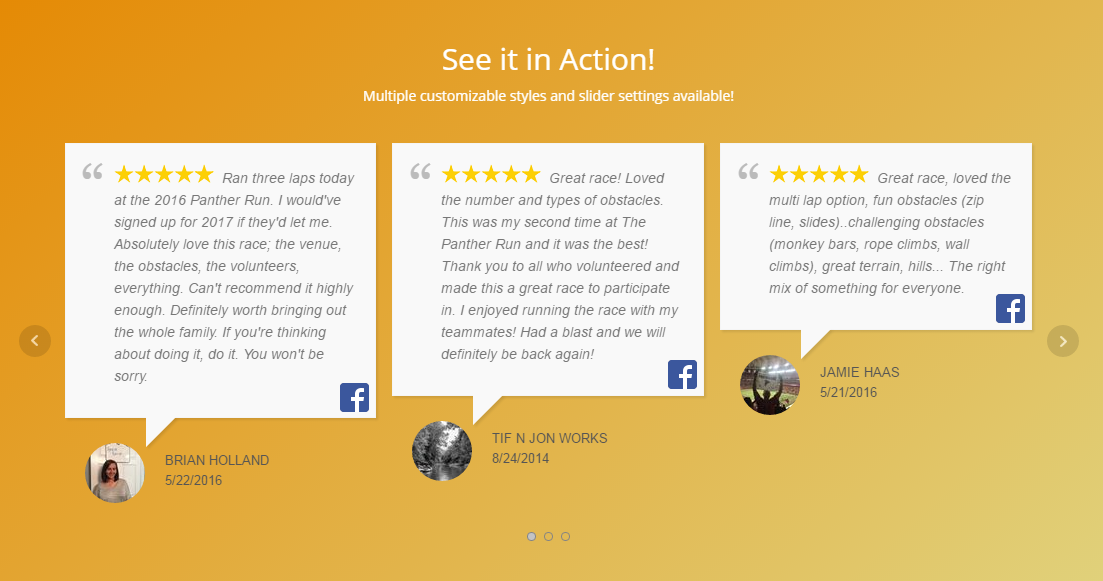
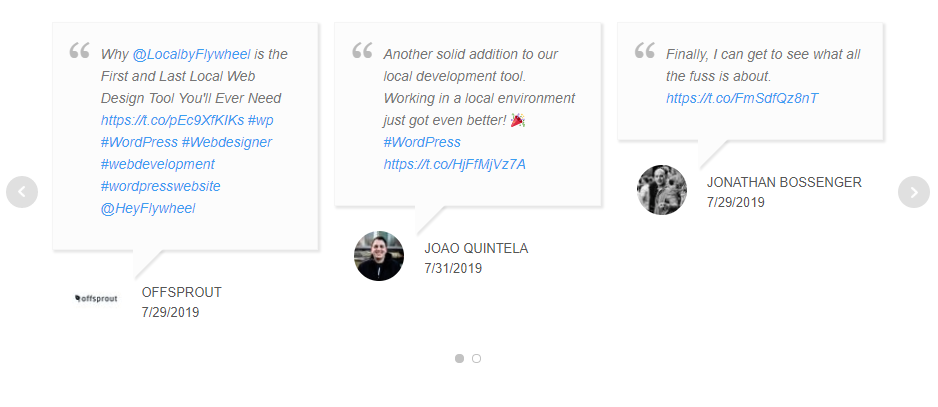
- Two Modern Template Styles + Live Preview: Choose Style 1 (classic speech bubble) or Style 6 (modern review card layout) in the tabbed template editor (Style, General, Filter, Badge) with live AJAX preview.
- Summary Rating Badge: Add a customizable rating badge on the left, right, or above your reviews (or display the badge standalone) with custom business photo, name, colors, border, and text overrides.
- Review Photos & Lightbox: Display review images in your templates with a click-to-enlarge image lightbox on the front end.
- Review List Management: Inspect all saved reviews and posts in one table. Instantly hide/show, edit reviewer photo/date via AJAX, or delete individual entries.
- Smart Template Filters: Filter by Review Type (Facebook, X, or Both), filter by specific Facebook page or X search source, set a minimum star rating, hide reviews without text, and sort by newest or random order.
- Full Visual Customization: Control star colors, verified badge icons, reviewer last name formatting (full name, hidden, or initial), avatar style (photo, mystery, initials, or hidden), source icons (Facebook & X logos), font sizes, colors, border radius, and custom CSS.
- Slider & Layout Controls: Adjust autoplay, slide speed, navigation arrows/dots, mobile one-per-slide mode, equal-height review cards (
Reviews Same Height), and expandable Read More links. - Display Anywhere: Embed via the WP Review Slider block, a shortcode, a PHP template function, or a WordPress widget.
Check Out Our Other Free Review Slider Plugins
- Google Reviews
- Yelp Reviews
- TripAdvisor Reviews
- Airbnb Reviews
- Thumbtack Reviews
- Zillow Reviews
- WooCommerce Product Reviews
Upgrade to WP Review Slider Pro for More Features
Need reviews from Google, Yelp, TripAdvisor, and 150+ platforms alongside your Facebook reviews? Upgrade to WP Review Slider Pro:
- 150+ Review Sites & Platforms: Automatically import reviews from Google, Facebook, Yelp, TripAdvisor, Airbnb, VRBO, WooCommerce, Trustpilot, Zillow, Thumbtack, Amazon, Etsy, Fiverr, Houzz, Nextdoor, Booking.com, Expedia, Angi, HomeAdvisor, BBB, Capterra, G2, Glassdoor, Healthgrades, Zocdoc, Avvo, DealerRater, CarGurus, OpenTable, DoorDash, Uber Eats, Fresha, Reviews.io, Yotpo, Birdeye, Clutch, and 110+ more!
- Custom Review Sources & AI Import: Add any unlisted review site with a custom name and logo, and use AI to extract and import reviews automatically.
- AI Review Summaries & Deep AI Analysis: Display an AI-generated “Customers Say” summary in your template header or badge, run full AI Sentiment & SWOT Analysis reports (themes, pain points, customer personas, and action items), and draft AI Owner Responses.
- 15 Review Template Styles & Masonry Grids: Unlock 15 pre-built template styles, Masonry grids, continuous-scroll carousels, custom responsive breakpoints, and child-theme template overrides.
- Interactive Front-End Header, Search & Pagination: Add a front-end search bar, sort dropdown, rating/source filter, tag filter pills, Load More button, Endless Scroll, or numbered pagination.
- 7 Summary Badge Styles, Floating Badges & Slide-Out Drawers: Choose from 7 standalone badge designs, pin floating badges or review pop-ins to the corner of your site, and open a slide-out or pop-up review drawer on click.
- Front-End Review Submission Forms & Smart Review Gate: Collect customer reviews directly on your site with stars, thumbs, or smileys, custom fields, photo/video uploads, and reCAPTCHA. Route happy customers to public review sites while catching low ratings privately.
- Automated Review Request Emails (Autoresponders): Automatically send branded review request emails after WooCommerce orders complete (or via custom triggers) with open/click tracking.
- Shareable Social Media Review Cards: Convert reviews into high-resolution PNG social graphics for Instagram, Facebook, X, LinkedIn, or print — with Google Fonts, size presets, and Unsplash photo search.
- Live Review Email Signatures: Build HTML or dynamic image email signatures for Gmail, Outlook, and Apple Mail showcasing your live star rating and review count.
- Google Rich Snippet Schema (JSON-LD) & Product XML Feeds: Output valid JSON-LD
AggregateRatingschema markup for Google Search results and generate Google Shopping Product Ratings XML feeds. - Auto-Translate, Webhooks, CSV Import/Export & White-Label: Translate reviews automatically via Google Translate API, send new reviews to Zapier, Make, or n8n via webhooks, receive low-review email alerts, sync with TrustGuide, bulk-edit tags/categories/post IDs, import/export CSVs, and enable Agency White-Label Mode.
Installation
- Upload the
wp-facebook-reviewsfolder to the/wp-content/plugins/directory, or install WP Review Slider from Plugins → Add New in WordPress. - Activate the plugin through the Plugins menu in WordPress.
- Open the WP Reviews menu in your WordPress admin.
- Connect your Facebook Page on the Facebook tab and/or search posts on the X (Twitter) tab.
- Check the Review List and Analytics tabs to manage and analyze your imported feedback.
- Create a template on the Templates tab, then insert the WP Review Slider block or paste the shortcode into any page, post, or widget area.
FAQ
Are Facebook reviews and X posts stored on my server?
Yes. After you download reviews from Facebook or posts from X, they are saved in your WordPress database on your own server. Your site serves those stored reviews locally instead of calling Facebook or X on every page view, which keeps pages fast and reliable.
Does this plugin use the official Facebook API?
Yes. WP Review Slider connects through the official Facebook Graph API. It does not use unauthorized scraping or crawling methods that can break or violate Facebook’s terms.
Can I show Facebook recommendations as 5-star ratings?
Yes! Facebook replaced 1–5 star ratings with Positive and Negative recommendations on many pages. This plugin converts positive recommendations into a 5-star rating value so you can display them with stars in your review slider, grid, and summary badge.
Can I display X (formerly Twitter) posts as testimonials?
Yes. Add your X Developer OAuth 1.0a keys (Consumer Key, Consumer Key Secret, Access Token, Access Token Secret) or Bearer Token on the X (Twitter) tab, search for posts mentioning your business, and click download on the posts you want to showcase. In your template Filter settings, set Review Type to X (Twitter) or Facebook & X (Twitter). Note: X requires a paid API plan with Recent Search access (last 7 days) or Full-Archive Search access.
Why don’t my X search results match what I expect?
X search treats spaces as AND (all words must appear in the same post). Try a single keyword, an OR query (for example BrandName OR City), or an exact phrase in quotes. Recent search covers the last 7 days.
Can I put Facebook reviews and X posts in the same review slider?
Yes. In your template Filter settings, set Review Type to Facebook & X (Twitter) to mix both in one slider or grid, or filter by a single platform and source.
Can I hide specific reviews or filter out low ratings?
Yes. On the Review List page you can click the visibility icon to hide any individual review or post. In your template Filter settings, you can also filter by minimum rating, hide items without text, and choose newest or random sorting.
How do I request a new feature?
We are always looking for features to add! Post on the support forum or contact us on the WP Review Slider website.
Screenshots




Changelog
15.4
- Added a WP Review Slider block so a saved template can be inserted in the block editor.
- The block shows the selected template in the editor.
- Edit Template in the block toolbar opens that template in a new tab.
- Refresh in the block toolbar reloads the template preview.
- Open Templates opens in a new tab and reminds you to refresh the editor after creating a template.
15.3
- Checks the reviews table encoding on update and converts legacy utf8 (3-byte) tables to utf8mb4 so reviews containing emojis can be saved.
- Updated Freemius SDK.
15.2
- Fix badge branding when a Facebook slider and a Google slider are used on the same page.
15.1
- Added a new Analytics page for review insights and charts.
- Added Pro feature highlights and upgrade nudges throughout the admin.
15.0
- Major X (formerly Twitter) update: search and download posts with X API v2 using OAuth 1.0a (Consumer Key, Consumer Key Secret, Access Token, Access Token Secret), with Bearer Token as an optional fallback.
- Bundled TwitterOAuth library upgraded to 4.0.1 for native X API v2 support (PHP 7.4+).
- Template Filter settings now support Review Type: Facebook, X (Twitter), or both, plus per-source filtering for X download sources.
- Front-end shortcodes and widgets display Twitter/X posts alongside Facebook reviews; X logo icon, @handles, and hashtag links included.
- Improved X search help text (AND vs OR queries, 7-day recent search window) and more reliable post saving.
- Rebranded Twitter UI/copy to X and updated profile/post links to x.com.
14.7
- X (Twitter) search can authenticate with OAuth 1.0a user-context keys, with Bearer Token kept as an optional fallback.
14.6
- Updated the bundled TwitterOAuth library to 4.0.1 (native X API v2 support and a current CA certificate bundle). Requires PHP 7.4+.
- X (Twitter) search Bearer Token (OAuth 2.0 app-only) auth option.
14.5
- Updated X (formerly Twitter) downloading to use the X API v2 (recent search and optional full-archive search), replacing the retired v1.1 endpoints.
- X search now requires your own X Developer credentials; removed the old shared/default keys.
- Rebranded the Twitter areas of the plugin to X and switched profile/post links to x.com.
- Fixed a database notice on activation for the X (Twitter) sources table.
14.4
- New Review List tools: edit a reviewer photo/date, hide/show or delete a review instantly (AJAX), and view review photos in a pop-up lightbox.
- Rebuilt the Templates editor with Style / General / Filter / Badge tabs and a live preview.
- Added Style 6 (card layout) and a live style preview that updates as you change stars, verified badge, avatar, icon, colors, and font sizes.
- Added review photo display in templates with click-to-enlarge lightbox on the front end.
- Added a review badge you can place beside your reviews (location, business image, colors, and text overrides), off by default on new templates.
- Filter a template by Facebook page, choose grid or slider with per-slider options, add a Read More link, and set equal review heights.
14.3
- duplicate review fix
14.2
- bug fix
14.1
- Updated admin styling for WordPress 7.0.
- Improved README for clarity and search.
14.0
- Fixed security issue.
- Fixed: Date handling for Facebook reviews now properly converts to MySQL datetime format
- Fixed: Improved efficiency by reusing calculated timestamp values
13.9
- freemius sdk update
13.8
- small bug fix
13.7
- added ability to hide or initial Last Name of reviewer.
- added feature to hide certain reviews
13.6
*compatible with new Google version
13.4
- small bug fix
13.3
- updated Freemius SDK
13.2
- PHP 8.2 warning notice fixed.
13.1
- download review fix
13.0
- bug fix
12.8
- bug fix
12.7
- update database tables. smoother read more.
12.6
- updated Freemius SDK
12.5
- small bug fix with transparent color not being saved sometimes.
12.4
- Freemius SDK update
12.3
- Freemius SDK update
12.2
- Freemius SDK update
12.1
- Freemius SDK update
12.0
- Freemius SDK update
11.9
- Freemius SDK update
11.8
- Freemius SDK update
11.7
- Freemius SDK update
11.6
- Freemius SDK update
11.5
- Freemius SDK update
11.4
- Freemius SDK update
11.3
- Freemius SDK update
11.2
- Freemius SDK update
11.1
- Freemius SDK update
11.0
- Freemius SDK update
10.9
- Freemius SDK update
10.8
- Freemius SDK update
10.7
- Freemius SDK update
10.6
- Freemius SDK update
10.5
- Freemius SDK update
10.4
- Freemius SDK update
10.3
- Freemius SDK update
10.2
- Freemius SDK update
10.1
- Freemius SDK update
10.0
- Freemius SDK update
9.9
- Freemius SDK update
9.8
- Freemius SDK update
9.7
- Freemius SDK update
9.6
- Freemius SDK update
9.5
- Freemius SDK update
9.4
- Freemius SDK update
9.3
- Freemius SDK update
9.2
- Freemius SDK update
9.1
- Freemius SDK update
9.0
- Freemius SDK update
8.9
- Freemius SDK update
8.8
- Freemius SDK update
8.7
- Freemius SDK update
8.6
- Freemius SDK update
8.5
- Freemius SDK update
8.4
- Freemius SDK update
8.3
- Freemius SDK update
8.2
- Freemius SDK update
8.1
- Freemius SDK update
8.0
- Freemius SDK update
7.9
- Freemius SDK update
7.8
- Freemius SDK update
7.7
- Freemius SDK update
7.6
- Freemius SDK update
7.5
- Freemius SDK update
7.4
- Freemius SDK update
7.3
- Freemius SDK update
7.2
- Freemius SDK update
7.1
- Freemius SDK update
7.0
- Freemius SDK update
6.9
- Freemius SDK update
6.8
- Freemius SDK update
6.7
- Freemius SDK update
6.6
- Freemius SDK update
6.5
- Freemius SDK update
6.4
- Freemius SDK update
6.3
- Freemius SDK update
6.2
- Freemius SDK update
6.1
- Freemius SDK update
6.0
- Freemius SDK update
5.9
- Freemius SDK update
5.8
- Freemius SDK update
5.7
- Freemius SDK update
5.6
- Freemius SDK update
5.5
- Freemius SDK update
5.4
- Freemius SDK update
5.3
- Freemius SDK update
5.2
- Freemius SDK update
5.1
- Freemius SDK update
5.0
- Freemius SDK update
4.9
- Freemius SDK update
4.8
- Freemius SDK update
4.7
- Freemius SDK update
4.6
- Freemius SDK update
4.5
- Freemius SDK update
4.4
- Freemius SDK update
4.3
- Freemius SDK update
4.2
- Freemius SDK update
4.1
- Freemius SDK update
4.0
- Freemius SDK update
3.9
- Freemius SDK update
3.8
- Freemius SDK update
3.7
- Freemius SDK update
3.6
- Freemius SDK update
3.5
- Freemius SDK update
3.4
- Freemius SDK update
3.3
- Freemius SDK update
3.2
- Freemius SDK update
3.1
- Freemius SDK update
3.0
- Freemius SDK update
2.9
- Freemius SDK update
2.8
- Freemius SDK update
2.7
- Freemius SDK update
2.6
- Freemius SDK update
2.5
- Freemius SDK update
2.4
- Freemius SDK update
2.3
- Freemius SDK update
2.2
- Freemius SDK update
2.1
- Freemius SDK update
2.0
- Freemius SDK update
1.9
- Freemius SDK update
1.8
- Freemius SDK update
1.7
- Freemius SDK update
1.6
- Freemius SDK update
1.5
- Freemius SDK update
1.4
- Freemius SDK update
1.3
- Freemius SDK update
1.2
- Freemius SDK update
1.1
- Freemius SDK update
1.0
- Initial release