


Description
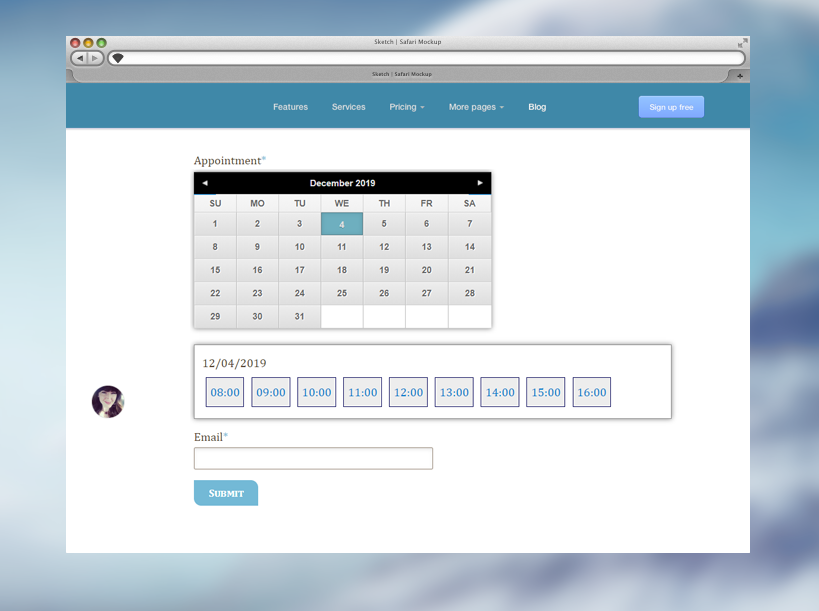
WP Time Slots Booking Form is a powerful, easy-to-use booking calendar solution that enables you to create customized booking forms for appointment booking and time slot reservations on specific calendar dates. With its intuitive visual builder, you can design a responsive form featuring an interactive calendar where customers can easily select available time slots and complete their bookings.
Upon booking completion, notification emails are automatically sent to the administrator, ensuring you stay informed of every calendar booking. Additionally, a customizable confirmation email can be dispatched to the customer, enhancing their overall booking experience.
✨ NEW: Free AI-Assisted Booking Replies (No API Key Required!)
Save hours on customer communication! You can now reply directly to any booking from the Booking Orders list using our built-in AI Reply Assistant—completely free, with no API key or external account setup required. Simply enter optional instructions (e.g., “Confirm the booking for Tuesday at 10 AM and remind them to arrive 10 minutes early”), click Generate with AI, review the automatically drafted reply in your customer’s language, and send it with one click. Every sent reply is automatically logged inside the booking record for easy tracking.
Who Is This Booking Calendar For?
This versatile booking calendar system is ideal for a wide variety of businesses and services, including:
- Medical & Healthcare: Doctor consultations, dental visits, therapy sessions, and clinic scheduling
- Education & Coaching: Classroom reservations, tutoring, driving lessons, and personal coaching
- Events & Entertainment: Escape rooms, event ticket sales, tours, and studio rentals
- Fitness & Wellness: Gym classes, personal training, yoga studios, and spa appointments
- Home & Professional Services: Cleaning services, equipment rentals, legal consultations, and maintenance
It is perfect for any business that requires customers to select specific date-times or multiple time slots from a set of available options, making it an essential tool for streamlined appointment booking.
Key Calendar & Availability Settings
In the booking calendar, you can easily set up:
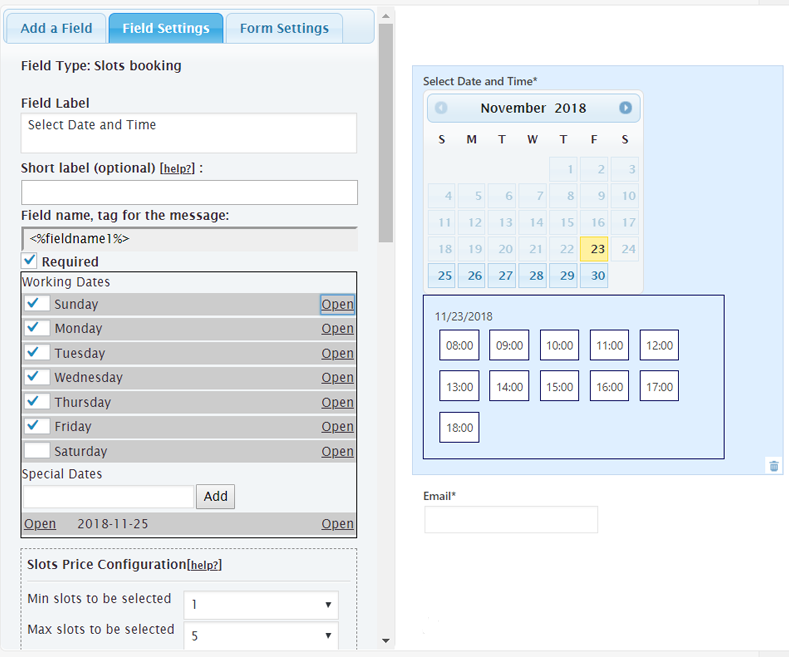
- Available time slots for each day of the week
- Special time slots on specific dates
- Slot capacity (the number of people who can book each time slot)
- Multiple slot selection (how many different time slots a customer can select in a single booking)
- Minimum and maximum available booking dates
- Holidays, blackout dates, or closed dates
- Custom price for each time slot
- Tiered pricing based on the number of selected slots
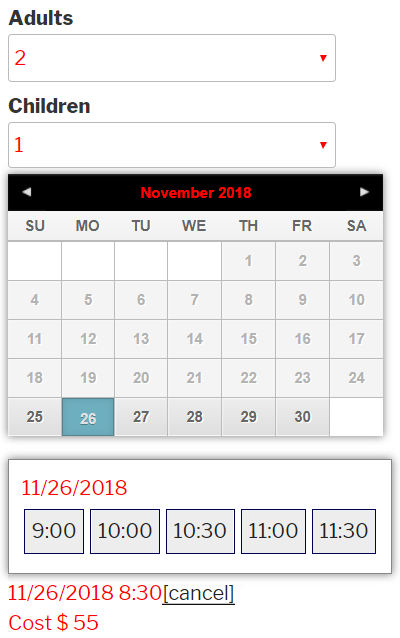
- Flexible group pricing (e.g., separate quantities and prices for Adults, Children, and Infants)
- Number of calendar months to display at once
- 10+ pre-built calendar design templates included, featuring both classic and modern views
Core Plugin Features
In addition to these calendar booking capabilities, the plugin includes:
- NEW! AI-Assisted Email Replies: Draft and send personalized replies to customer bookings directly from the dashboard using free, keyless AI
- Visual Styles Editor: Customize 10+ calendar templates with a sleek, modern aesthetic in just a few clicks
- A modern, mobile-friendly, and fully responsive booking form design
- A drag-and-drop visual form builder for effortless customization
- Multi-language support for global accessibility
- Automated notification and confirmation emails
- Built-in anti-spam protection (Captcha) to block unwanted submissions
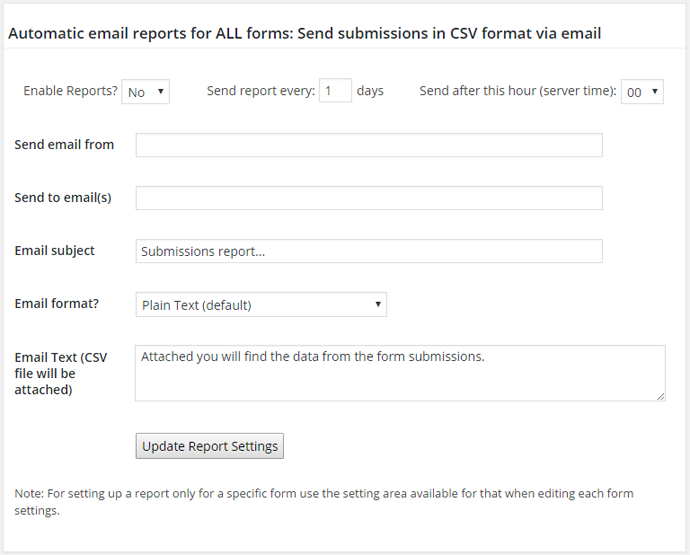
- Automated email reports and CSV exports for data analysis
- A usage and statistics dashboard for booking insights
- A centralized Booking Orders management list with one-click status updates, email resending, and direct replies
- A printable schedule list for offline reference
- A visual multi-view schedule calendar for viewing daily, weekly, and monthly bookings
- Native integration with Gutenberg, Elementor, and classic WordPress editors
- Support for add-ons, including the free iCal Export add-on
The plugin automatically manages the real-time availability of each time slot, allowing you to define a maximum capacity per slot and limit the maximum number of time slots a customer can select per booking.
You can optionally allow multiple customers to book the same time slot until its capacity is reached. Combined with multi-quantity pricing (such as Adults and Children), it works seamlessly for both 1-on-1 appointments and group ticket reservations.
Features in Commercial Versions
While the free version of the plugin is fully functional, the commercial versions offer advanced features and integrations, including:
- Online Payment Integration: Support for PayPal, Stripe, Skrill, Authorize.net, iDEAL (Mollie / TargetPay), SagePay, WorldPay, and Redsys.
- SCA-Ready Payments: Fully compliant with Strong Customer Authentication (SCA) and PSD2 regulations in the EU.
- Two-Way iCal Synchronization: Easily sync calendar events with iCal Import and iCal Export.
- Third-Party Integrations: Seamless integration with Google Calendar API, Zoom.us Meetings, WooCommerce, Mailchimp, Salesforce, reCAPTCHA, Cloudflare Turnstile, and WebHooks/Zapier.
- SMS Notifications & Reminders: Automated SMS confirmations and appointment reminders via Twilio or Clickatell.
- Automated Email Reminders: Reduce no-shows with scheduled email reminders before appointments and follow-up messages afterward.
- Advanced Form Builder: Create rich forms with conditional logic, multi-page steps, file uploads, signature fields, and coupon codes.
- Additional Services & Items Fields: Let customers select extra add-on services that dynamically update the booking price.
- Status Update Emails: Automatically notify customers by email when their booking status is updated (e.g., Approved, Cancelled).
For a complete list of commercial features, please visit the plugin download page.
The Troubleshooting Area
Use the General Settings >> Troubleshoot Area if you encounter issues with special or non-Latin characters. In most cases, changing the character encoding to UTF-8 using the built-in option in the troubleshooting area will resolve the issue immediately.
You can also use this area to change the JavaScript loading method if a third-party caching or script-optimization plugin prevents the booking calendar from appearing on the public website.
Installation
To install WP Time Slots Booking Form, follow these steps:
- Download and unzip the WP Time Slots Booking Form plugin.
- Upload the entire
wp-time-slots-booking-form/directory to the/wp-content/plugins/directory. - Activate the WP Time Slots Booking Form plugin through the Plugins menu in WordPress.
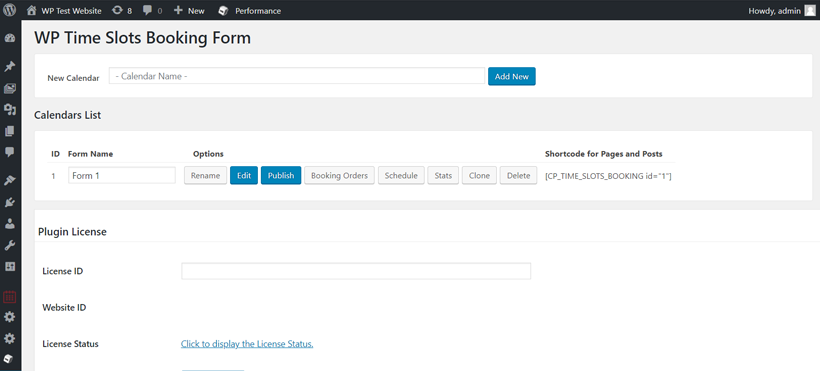
- Configure your calendar and form settings under WP Time Slots Booking Form in your WordPress admin menu.
- Publish the booking form on any page or post using the built-in Publish Wizard, the Gutenberg block, the Elementor widget, or the shortcode
[CP_TIME_SLOTS_BOOKING id="1"].
FAQ
Q: How does the new AI-assisted reply feature work? Do I need an OpenAI API key?
A: No API key or paid account is required! In the Booking Orders list, click the Reply link next to any booking to open the reply modal. You can type a manual message or enter brief instructions (for example, “Confirm the appointment and ask them to bring their ID”) and click Generate with AI. The assistant will draft a polite, context-aware email reply in the customer’s language that you can edit and send immediately.
Q: Where can I find the complete WP Time Slots Booking Form plugin documentation?
A: The product page contains detailed documentation and support: https://wptimeslot.dwbooster.com/support
Q: How can I customize the calendar styles?
A: You can use the built-in Styles Editor menu in the plugin settings, or check the complete custom CSS instructions on this page: Customizing Styles
Q: Can I display a frontend list of appointments?
A: Yes, you can display a list of appointments on the frontend by placing the following shortcode on any page or post:
[CP_TIME_SLOTS_BOOKING_LIST]
For additional details, refer to this FAQ Entry and our guide on Grouped Frontend Lists.
Q: I’m not receiving the emails with the appointment data.
A: First, make sure you are using a “From” email address that belongs to your website’s domain (e.g., info@yourdomain.com), as this is the most common requirement enforced by web hosting providers.
If that doesn’t resolve the issue, check whether your hosting provider requires custom SMTP authentication to send emails from WordPress. The plugin uses the standard WordPress mail delivery system (wp_mail), so any SMTP plugin configured on your WordPress site will work seamlessly with WP Time Slots Booking Form.
Q: How can I change the styles of the dates based on the number of booked/available slots?
A: You can set different colors or styles for calendar dates depending on the number of booked or remaining slots, allowing customers to see availability at a glance. This is especially useful for highlighting dates with limited availability.
Detailed instructions are available on this page: Booked Date Colors
Q: Can I export the bookings to external calendars like Google Calendar, Apple Calendar, or Outlook?
A: Yes, you can export bookings using the iCal Export add-on included in all versions of the plugin. The setup process is described in detail on this page: Adding Google, iPhone, Outlook
Q: I’m getting API errors while using the Zoom integration.
A: Zoom retired legacy JWT apps in favor of OAuth apps. Please ensure that your Zoom integration is set to OAuth in the add-on settings, that you have entered your Zoom OAuth Client ID and Client Secret, and that you have clicked the authorization button to connect your account.
Q: How can I align the form fields into multiple columns?
A: The solution is described in the following FAQ entry: Multi-Column Form Alignment
Q: How can I add specific form fields to the notification email message?
A: Please refer to this FAQ entry for the available field tags to customize your emails: Email Customization Tags
Q: How do I make the calendar 100% width / full-width responsive?
A: Add the following CSS rule to make the WP Time Slots Booking Form calendar span 100% of its container width:
fbuilder .ui-datepicker-inline { max-width: none !important; }
You can paste this rule in the WP Time Slots Booking Form >> General Settings >> Edit Styles area.
Q: What additional add-ons are available for this booking calendar plugin?
The following is a list of add-ons available for the WP Time Slots Booking Form plugin. Some add-ons are included in the free version, while others are part of the commercial versions:
- reCAPTCHA & Cloudflare Turnstile: Protect your booking forms against spam bots.
- Set Order of Payment Options: Control the order in which payment options appear when multiple payment gateways are enabled.
- Email Blacklist: Prevent bookings from specific blacklisted email addresses or domains.
- Dashboard Widget – Upcoming Appointments: Add a widget to the WordPress dashboard displaying upcoming appointments for quick access.
- Follow-Up Notifications for Bookings: Automatically send follow-up emails after completed appointment bookings.
- Clickatell & Twilio SMS: Send SMS notifications and reminders to customers and admins after form submission.
- Additional Booking Statuses: Define custom statuses for your bookings for better workflow management.
- Import Raw Bookings (CSV Format): Bulk import bookings in raw CSV format.
- Signature Fields: Convert form fields into digital “Signature” pads for customer sign-off.
- File Uploads: Allow users to upload files with their booking, automatically stored in the WordPress Media Library.
- WebHook: Send submitted booking data to external webhook URLs to connect with Zapier, Make, or custom APIs.
- Authorize.net Server Integration Method: Accept secure credit card payments via Authorize.net.
- Automatically Cancel Pending Bookings: Automatically cancel unpaid or pending bookings after a specified expiration time to free up slots.
- Cancellation Link for Bookings: Include a self-service cancellation link in customer confirmation emails.
- Coupons / Discount Codes: Offer promotional discount codes on bookings.
- Deposit Payments: Accept partial deposit payments as a fixed amount or a percentage of the total booking cost.
- Double Opt-In Email Verification: Require customers to verify their email address via a confirmation link to approve their booking.
- Frontend List – Grouped by Date Add-on: Display a public or private list of bookings grouped by date on the frontend.
- Google Calendar API: Two-way synchronization with Google Calendar.
- iCal Export Add-on: Export bookings as iCal feeds for external calendar applications.
- iCal Automatic Import: Automatically import iCal feeds from external calendars to block busy times.
- Mailchimp: Automatically subscribe customers to a Mailchimp mailing list upon booking.
- iDEAL Mollie & TargetPay: Accept iDEAL payments via Mollie or TargetPay.
- PayPal Standard & PayPal Pro: Accept PayPal and direct credit card payments on your website.
- QRCode Image – Barcode: Generate a unique QR code for each booking for fast check-in and ticket verification.
- Redsys TPV: Support for Redsys bank card payments (popular in Spain).
- Reminder Notifications for Bookings: Send automated email and SMS reminders prior to scheduled appointments.
- Remove or Ignore Old Bookings: Automatically clean up or ignore past bookings to keep your booking form fast.
- SagePay & SagePayments Gateways: Accept secure online payments via SagePay or SagePayments.
- Salesforce: Automatically create Salesforce leads from submitted booking forms.
- Server-Side Price Verification: Verify calculated booking prices on the server side for enhanced security.
- Shared Availability Between Calendars: Share time slot availability across multiple calendars to prevent double bookings.
- Skrill Payments Integration: Accept online payments via Skrill.
- Status Modification Emails: Automatically send customized emails whenever a booking status changes.
- Schedule & Status Contents Customization: Customize the details and status colors displayed on the admin schedule calendar.
- Stripe: Accept credit cards, Apple Pay, and Google Pay securely via Stripe.
- Zoom.us Meetings Integration: Automatically generate a unique Zoom meeting link and ID for booked time slots.
- User Calendar Creation: Automatically create and assign a dedicated booking calendar for each newly registered WordPress user.
- WorldPay Payment Gateway: Accept secure online payments via WorldPay.
- WooCommerce Integration: Connect your booking forms with WooCommerce products and checkout.
- Waiting List: Allow customers to join a waiting list when a time slot is fully booked.
- Activity Logs: Track administrative actions and changes made to bookings and settings.
- Limit the Number of Appointments per User: Set limits on the number of appointments a single user or email address can book within a given period.
Screenshots




Changelog
1.0.03
- First version published
1.0.04
- Improved CSV export character encoding
1.0.05
- Fixed issue in quantity management
1.0.06
- Fixed special dates editing bug
- Improved bookings schedule
- Redirect / confirmation page now supports booking parameters
1.0.07
- Fixed bug in availability editing
1.0.08
- Fixed bug in special dates editing
1.0.09
- Improved translations
1.0.10
- Fixed bug in form editing
1.0.11
- Support for booking statuses
1.0.12
- Better CSS customization options
1.0.14
- Clone calendar feature
1.0.15
- Removed use of cURL
1.0.16
- Integration with Elementor
- New visual calendar for the schedule view
- Feature for adding bookings from dashboard
1.0.17
- Removed min/max date restriction for admin bookings
- Fixed available dates definition bug
1.0.18
- Increased limit of max slots
- Improved language translations support
1.0.19
- New feature for min available date in hours
- Improved form builder styles
- Added SSL detection
1.0.20
- Fixed conflict with Visual Composer
1.0.21
- Fixed bug in special dates
1.0.22
- Improvements to user permissions section
1.0.23
- Date format fix
1.0.24
- Fixed compatibility issue with PHP 7.2+
1.0.25
- Fixed conflict with lazy loading feature of Jetpack
1.0.26
- Fixed conflict with Yoast SEO
1.0.27
- Fixed captcha bug
1.0.28
- Compatible with WordPress 5.2
1.0.29
- Added feature for adding custom colors to slots depending on booked spaces
1.0.30
- Language support improvements
1.0.31
- Date format improvements
1.0.32
- Fixed bug in iconv function
1.0.33
- Compatible with Google Translate
1.0.34
- Update for compatibility with WordPress 5.2
1.0.35
- iCal end time correction
1.0.36
- Code improvements
1.0.37
- Added nonce validation to settings options
1.0.38
- iCal link improvement
1.0.39
- Multiple code improvements
1.0.40
- Fix to captcha image and table encoding
1.0.41
- Update to reports
1.0.42
- Fixed bug in date filters
1.0.43
- Fixed bug in max date filter
1.0.44
- Fixed conflict with Autoptimize
1.0.45
- Fixed conflict with Elementor add-ons
1.0.46
- New dashboard list add-on
1.0.47
- New feature for using 12/24-hour format (military / non-military time)
1.0.48
- Fix to 12-hour time format
1.0.49
- Feature for highlighting specific dates
1.0.50
- Compatible with WordPress 5.3
1.0.53
- Fixed conflict with JavaScript minify plugins
1.0.54
- Fixed bug in exported CSV filenames
1.0.55
- New feature for handling capacity in booking form
1.0.56
- Fixed bug in reply-to email header
1.0.57
- Fixed bug in times pre-fill
1.0.58
- Fixed bugs in date formatting
1.0.59
- New tags for emails
1.0.60
- Fixed conflict with Bootstrap datepicker
1.0.61
- Improved translations
1.0.62
- Improved iCal add-on
- Better price number formatting for selected times
1.0.63
- Support for multiple lists on the same page
1.0.64
- Multiple improvements and bug fixes
1.0.65
- Interface improvements
1.0.66
- iCal export and .ics files improvements
1.0.67
- Fixed bug in invalid dates
1.0.68
- Fixed bug in working dates
1.0.69
- New hooks for conversion tracking and improved CSV
1.0.70
- Added new time intervals
1.0.71
- PHP 7.x compatibility update
1.0.72
- Fixed bug in price calculation
1.0.73
- Compatible with WordPress 5.4
1.0.74
- Improved translations
- Fixed optimization / cache conflicts
1.0.75
- Improvement to avoid conflicts with third-party themes
1.0.76
- Update for Gutenberg integration
1.0.77
- Fixed bug in max-date restriction
1.0.78
- Improved load speed
- Automatic compatibility with most script optimizers
1.0.79
- Better visualization speed
1.0.80
- New translations and language improvements
1.0.81
- Automatic translation of date format
1.0.82
- Fixed bug in min-date settings
1.0.83
- Added support for up to 4 different quantity fields, for example, for selecting different numbers of “Adults”, “Children”, and “Infants” for the booking
1.0.84
- Fixed bug in special dates
1.0.85
- Interface improvements, translations, and new quantity feature
1.0.86
- Multiple interface improvements
1.0.87
- Optimizations
1.0.88
- Fixed bug in slots selection
1.0.89
- New feature for supporting quantity 0 in first quantity field
- Improved multi-language support
1.0.90
- Fixed bug when no quantity is used
1.0.91
- Fixed calendar initialization bug
1.0.92
- Optional 0 quantity for first quantity fields
1.0.93
- Fix to the schedule CSV export
1.0.94
- Add multiple appointment times w/ price structure
1.0.95
- Removed console log debug line
1.0.96
- Fixed backward compatibility bug
1.0.97
- Compatible with WordPress 5.5
1.0.98
- Fixed bug in show used slots feature
1.0.99
- Translation and interface improvements
1.1.05
- Fixed bug related to the current selection
1.1.06
- Fixed availability verification bug
1.1.07
- jQuery compatibility update
1.1.08
- jQuery deprecated code update
1.1.09
- Add-ons update
1.1.10
- Fixed issue with multiple forms on the same page
1.1.11
- Improvements to min and max date settings
1.1.12
- Enhanced Max-date rule
1.1.14
- Fixed conflict with optimization plugins
- New tag %final_price_short% for the emails
1.1.15
- Improved time slot price calculation
1.1.16
- New design theme: Modern responsive with times aligned to the right side of the calendar
1.1.17
- Fix to min-date time formats
1.1.18
- Fixed bug related to the min date and max date features
1.1.19
- Non-military time settings: 12 / 24-hour formatting for %app_slot_N% tags
1.1.20
- Improvement for multiple calendars in the same booking form
1.1.21
- Fixed price calculation issues
1.1.22
- Compatibility update for WordPress 5.6
1.1.23
- Modern theme update
1.1.24
- Improved time slot selection behavior
1.1.25
- Better responsive layout for iPhone
1.1.26
- Calendar visualization improvements
1.1.27
- CSV Export update for special chars
1.1.28
- New calendar design theme
1.1.29
- Event management improved
1.1.30
- Improvement to the cost calculations
1.1.31
- Improved styles
1.1.32
- Schedule Calendar View improvements
1.1.33
- Compatibility with WordPress 5.7
1.1.34
- Option to ignore field validation in backend
1.1.35
- Improved script initialization
1.1.36
- New translations
1.1.37
- Fixed validation issue
1.1.38
- CSS fixes
1.1.39
- Visualization improvements
1.1.40
- PHP 8.x and language updates
1.1.41
- PHP 8.x compatibility fix
1.1.42
- CSS improvements
1.1.43
- Corrected styles
1.1.44
- Translation updates
1.1.45
- Support for additional translations
1.1.46
- Fixed conflict with some translations
1.1.47
- Improved email validation
1.1.48
- Translations update
1.1.49
- Better WPML integration
1.1.50
- Compatible with WordPress 5.8
1.1.51
- Schedule calendar update
1.1.52
- Accessibility improvements
1.1.53
- Min/max date settings defaults for admin
1.1.54
- Time selection interface improvement
1.1.55
- Events updated
1.1.56
- Fix to CSV export
1.1.57
- Fixed form setup conflict
1.1.58
- CSV/Excel Export feature update
1.1.59
- Support for new script events
1.1.60
- Translation updates
1.1.61
- New form layout
1.1.62
- Compatible with WordPress 5.9
1.1.63
- Multiple data sanitizations
1.1.64
- Code improvements
1.1.65
- Removal of code blocks no longer used
1.1.66
- CSV Export fix
1.1.67
- Database update
1.1.68
- iCal add-on update
1.1.69
- Misc improvements
1.1.70
- Compatible with WordPress 6.0
1.1.71
- Validation fix
1.1.72
- Fixed status update action
1.1.73
- Avoid conflict with 3rd-party calendar scripts
1.1.74
- Improved admin area
1.1.75
- Code improvements
1.1.76
- Fix to list shortcode
1.1.77
- Feedback panel update
1.1.78
- Better captcha
1.1.79
- Compatible with WP 6.1
1.1.80
- Language and interface updates
1.1.81
- PHP 8 updates
1.1.82
- Form builder updates
1.1.83
- Permissions adjustments
1.1.84
- PHP 8 update
1.1.85
- PHP 8 update
1.1.86
- iCal add-on update
1.1.87
- iCal export update
1.1.88
- Compatible with WordPress 6.2
1.1.89
- Fix to app field tags
1.1.90
- Price calculation update
1.1.91
- WP 6.2 update
1.1.92
- PHP 8 fix
1.1.93
- Export CSV fix
1.1.94
- Price calculation update
1.1.95
- Compatible with WordPress 6.3
1.1.96
- CSV fix
1.1.97
- Booking list improved
1.1.98
- Compatible with WordPress 6.4
1.1.99
- Fixed pagination
1.2.01
- Dashboard add-on update
1.2.02
- New tags supported
1.2.03
- Edition interface improved
1.2.04
- Reports update
1.2.05
- Tags updated
1.2.06
- Server-side price calculation
1.2.07
- Compatible with WP 6.5
- Updated server-side price calculation
1.2.08
- CSV Export fix
1.2.09
- CSV Export schedule fix
1.2.10
- Fixed Schedule Calendar View CSS
1.2.11
- Improved sanitization
1.2.12
- Fix to Schedule calendar data load
1.2.13
- New translations
1.2.15
- PHP 8 update
1.2.16
- Improved add-ons interface
1.2.17
- Improved messages list
1.2.18
- Internationalization
1.2.19
- Language updates
1.2.20
- Price calculation fix
1.2.21
- Typos / translation fixes
1.2.22
- Captcha update
1.2.23
- Fix JS conflict
1.2.24
- Translations and compatibility with older WP
1.2.25
- Compatible with WP 6.8
1.2.26
- WP 6.8 reload issue fix
1.2.27
- iCal export
1.2.28
- New add-ons and improved interface
1.2.29
- WP 6.8 fix
1.2.30
- Closing / previous output fix
1.2.31
- Admin actions improvements
1.2.32
- Documentation updates
1.2.33
- Cloudflare Turnstile add-on
1.2.34
- New visual styles editor
1.2.35
- Improvements to visual styles editor
1.2.36
- Better CSS customization
1.2.37
- Additional CSS Editor features
1.2.38
- Compatible with WP 6.9
1.2.39
- Fixed script conflict
1.2.40
- List shortcode restrictions for non-admins
1.2.41
- SiteGround Speed Optimizer compatibility
1.2.42
- New captcha and stats section
1.2.43
- Access rules update
1.2.44
- New modern admin messages list
1.2.45
- Send email feature fix
1.2.46
- Email diagnostic tool
1.2.47
- Additional sanitization
1.2.48
- New modern design theme
1.2.49
- Form builder improvements
1.2.50
- Compatible with WordPress 7.0
1.2.51
- Additional sanitization
1.2.52
- Code improvements
1.2.53
- Date time slots validation fix
1.2.54
- Compatible with WordPress 7.1
1.2.55
- Support for Waiting List add-on
- Support for Activity Logs add-on
- Improved publishing wizard
1.2.56
- New AI-assisted email reply feature in the Booking Orders list (free, no API key required)
- Interface and booking list action improvements
1.2.57
- Admin interface modernized
1.2.58
- Schedule calendar modernized