


Description
Display TripAdvisor Reviews on Your WordPress Site in Under 2 Minutes — Fast, Local & Built for Hospitality, Travel, and Restaurants.
WP TripAdvisor Review Slider downloads your TripAdvisor (Trip Advisor) hotel, restaurant, vacation rental, attraction, tour, and activity reviews and stores them directly in your WordPress database (utf8mb4 emoji-ready) on your own server. Because reviews are served locally instead of calling TripAdvisor on every page view, your website stays fast, cache-friendly, and optimized for Core Web Vitals.
Travelers and diners check TripAdvisor before they book or reserve a table. Showcasing verified TripAdvisor guest reviews, user-uploaded review photos, and a TripAdvisor rating summary badge (with official-style rating bubbles and total review counts) next to your booking engine, menu, or tour checkout builds immediate social proof and boosts direct conversions.
Here’s a quick video demonstration of adding TripAdvisor reviews in less than 2 minutes!
Why Choose WP TripAdvisor Review Slider?
- Works With Hotels, Restaurants, Attractions, Tours & Vacation Rentals: Paste any TripAdvisor business listing URL and import your latest guest reviews, titles, avatars, and photos.
- Multi-Source / Multi-Location Support: Add multiple TripAdvisor business URLs on the Get TripAdvisor Reviews page, download reviews for each property or tour, and assign each template to display its matching TripAdvisor source.
- TripAdvisor Summary Rating Badge: Place a customizable TripAdvisor summary badge on the left, right, or above your reviews — or display the badge standalone — showing the saved source average rating, rating bubbles, and total review count.
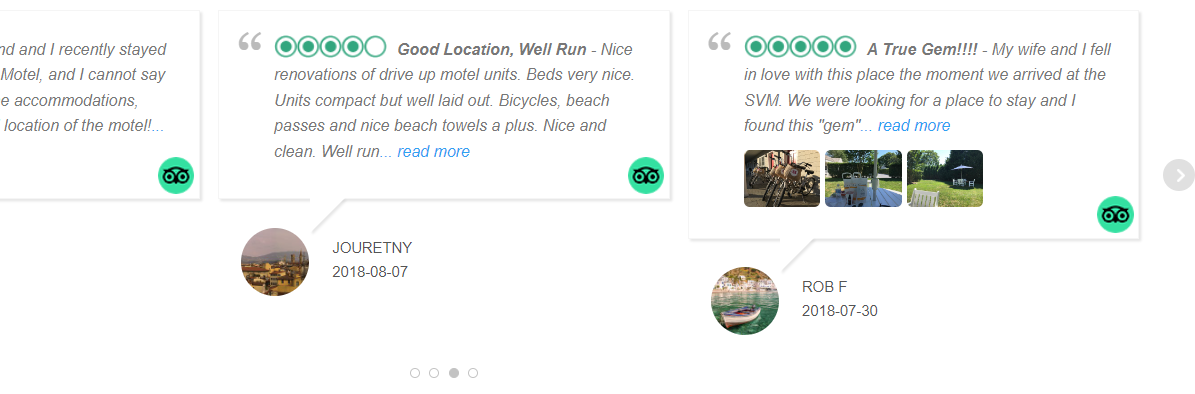
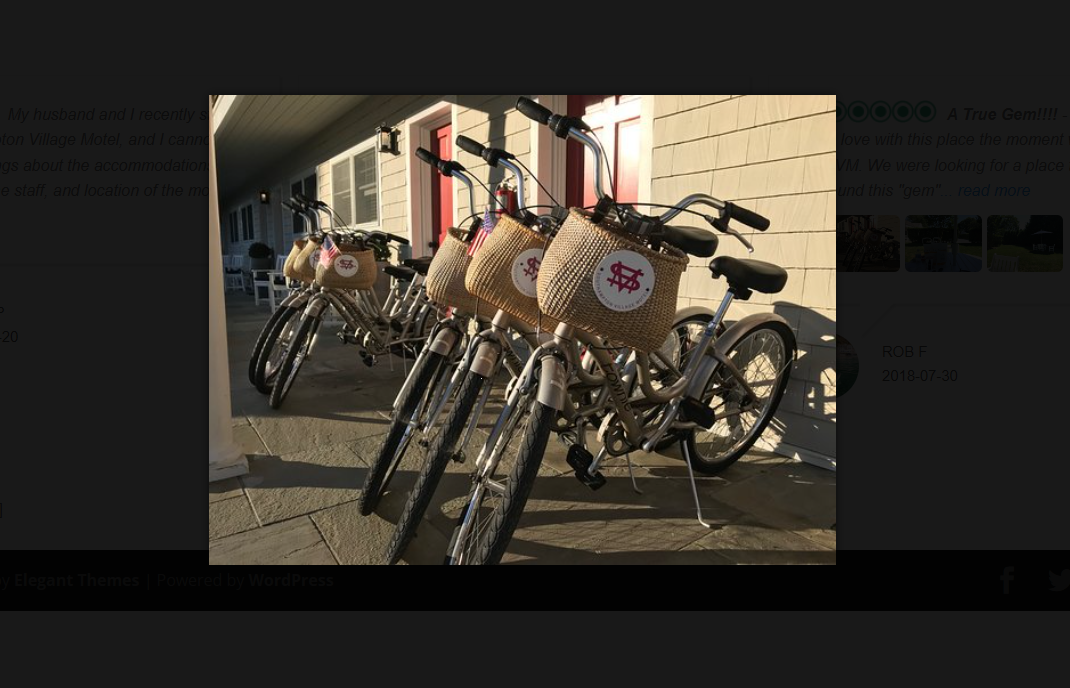
- Guest Review Photos & Lightbox: Download traveler-uploaded photos attached to TripAdvisor reviews and display them with a click-to-enlarge image lightbox.
- Built-In Review Analytics Dashboard: Visualize your average rating, 1-to-5 rating distribution, review volume timeline, rating trends over time, and positive/negative keyword word clouds inside wp-admin.
Key Features (Free Version)
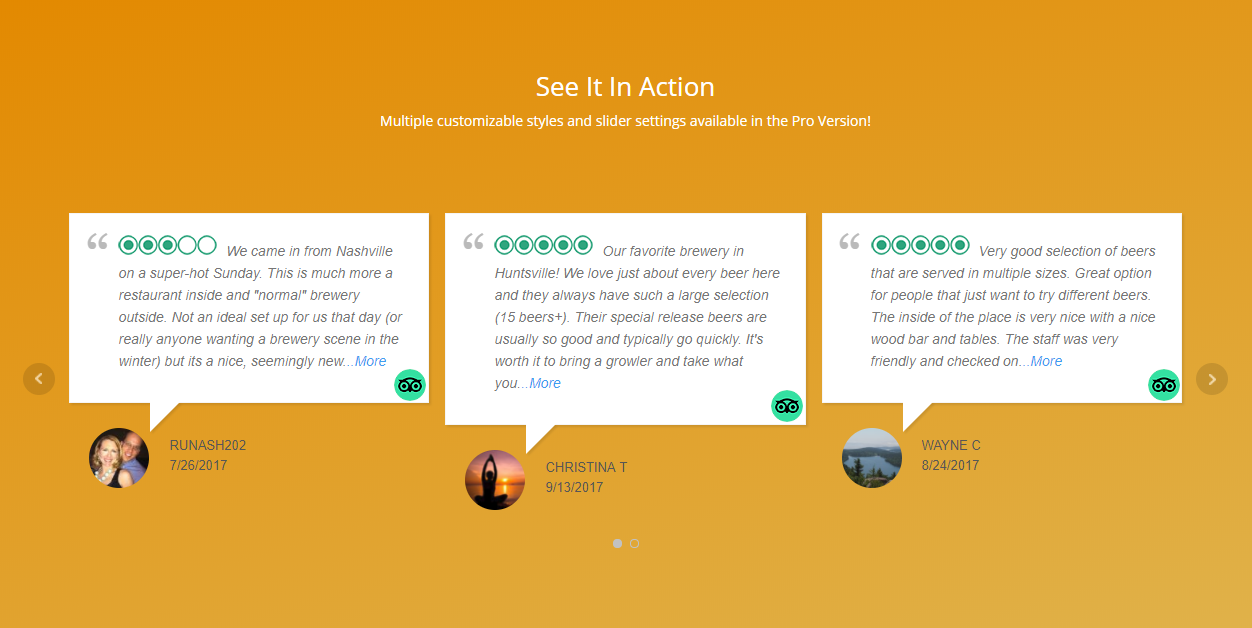
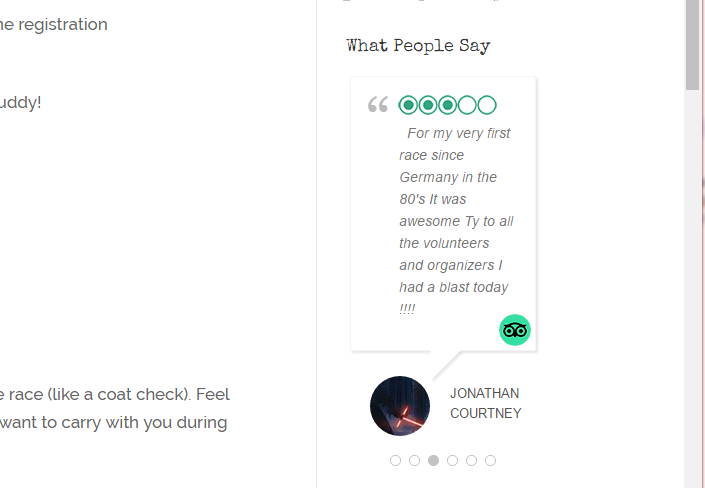
- Responsive Review Slider, Carousel, Grid & List: Display TripAdvisor reviews in an animated horizontal slider or a multi-row, multi-column responsive grid.
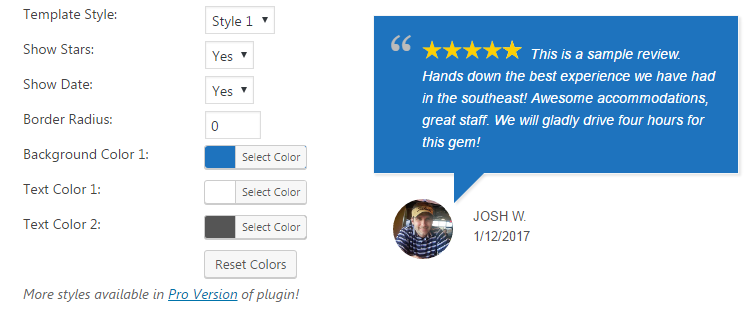
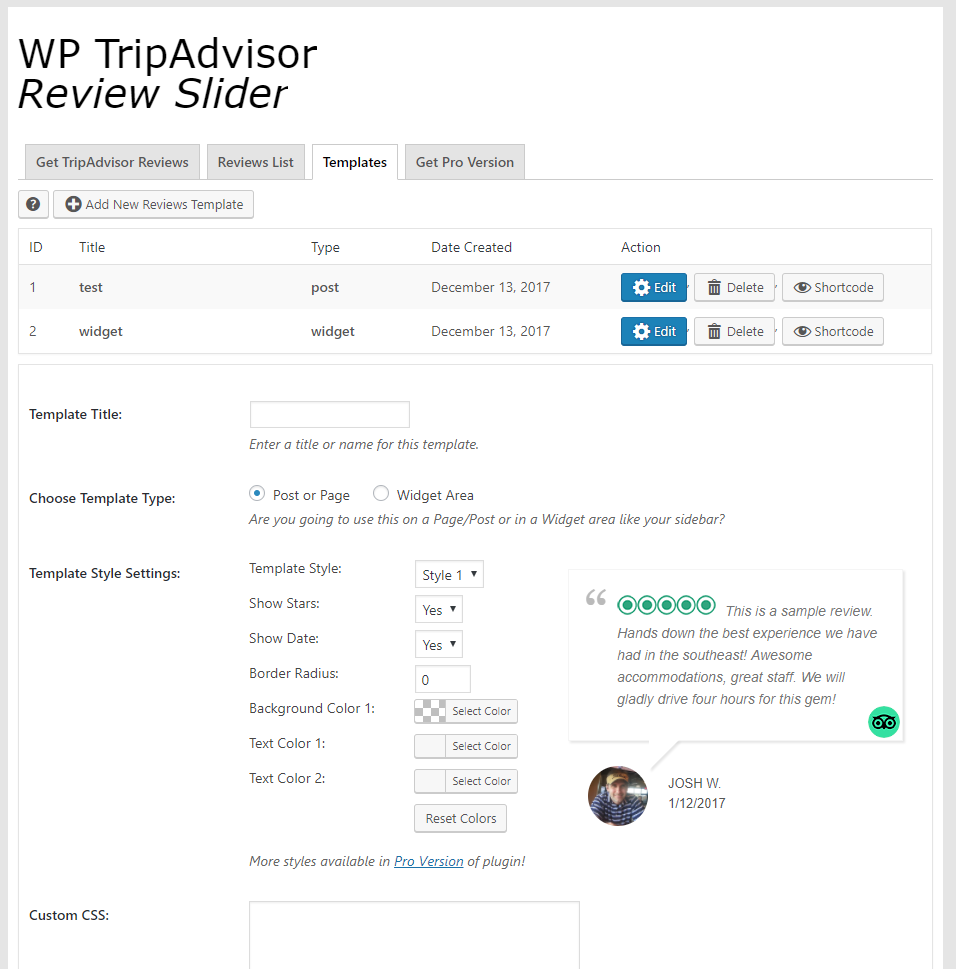
- Two Modern Template Styles + Live Preview: Choose between Style 1 (classic speech bubble) and Style 6 (modern review card layout) in a tabbed template editor (Style, General, Filter, Badge) with live AJAX preview and save.
- TripAdvisor Rating Summary Badge: Customize badge placement, business photo/logo, colors, border, drop shadow, and “Based on…” / “Review us on…” text.
- Review List & Popup Editing: Manage all downloaded TripAdvisor reviews in one place. Easily hide/show individual reviews, edit reviewer avatars and dates in an AJAX popup without losing your place, or delete reviews.
- Smart Template Filtering: Filter reviews by minimum rating (e.g., only 4- and 5-bubble reviews), hide reviews without text, sort by newest or random order, and select which TripAdvisor location a template displays.
- Full Design Customization: Customize rating colors, verified review badges, reviewer last name format (full name, hidden, or initial), avatar style (traveler photo, mystery icon, initials, or hidden), TripAdvisor icon link, font sizes, background/text colors, border radius, and custom CSS.
- Advanced Slider & Layout Controls: Configure autoplay, slide speed and delay, show/hide navigation arrows and dots, mobile swipe support, one-review-per-slide mobile mode, equal-height review cards (
Reviews Same Height), and expandable Read More links. - Display Anywhere: Embed unlimited review templates on any page, post, sidebar, or footer using the WP TripAdvisor Review Slider block, a shortcode, a WordPress widget, or a PHP template function.
- WordPress Dashboard Widget: View your latest TripAdvisor reviews right on your WordPress admin dashboard.
Check Out Our Other Free Review Slider Plugins
- Google Reviews
- Facebook & X (Twitter) Reviews
- Yelp Reviews
- Airbnb Reviews
- Thumbtack Reviews
- Zillow Reviews
- WooCommerce Product Reviews
Upgrade to WP Review Slider Pro for More Features
Want to download up to 100+ TripAdvisor reviews automatically every day and combine them with Google, Booking.com, Airbnb, VRBO, Expedia, OpenTable, and Yelp reviews? Upgrade to WP Review Slider Pro:
- Download More TripAdvisor Reviews & Daily Auto-Sync: Download up to 100+ TripAdvisor reviews with media per source (or even more via Review Funnels) and set a daily cron job to automatically import new reviews.
- 150+ Review Sites for Travel, Hospitality & Dining: Import and combine reviews from TripAdvisor, Google, Booking.com, Airbnb, VRBO, Expedia, Hotels.com, Kayak, Priceline, Orbitz, Travelocity, Agoda, MakeMyTrip, Rakuten Travel, Hostelworld, GetYourGuide, InnStyle, OpenTable, TheFork, DesignMyNight, Yelp, Facebook, DoorDash, Uber Eats, Grubhub, Zomato, OpenRice, and 120+ more platforms!
- Combine Multiple Locations & Platforms in One Template: Mix TripAdvisor, Google, Booking.com, and Facebook reviews into a single all-in-one slider or grid, or filter dynamically by Post ID, Category, language, or custom tags.
- Custom Review Sources & AI Import: Add any custom travel or booking platform with your own logo, and use AI to extract and import reviews automatically.
- AI Review Summaries & Deep AI Analysis: Display an AI-generated “Guests Say” or “Travelers Say” summary in your template header or badge, run full AI Sentiment & SWOT Analysis reports (themes, pain points, traveler personas, and action items), and draft AI Management Responses.
- 15 Review Template Styles & Masonry Grids: Unlock 15 pre-built template styles (including media-focused card layouts), Masonry grids, continuous-scroll carousels, custom responsive breakpoints, and child-theme template overrides.
- Interactive Front-End Header, Search & Pagination: Add a front-end search bar, sort dropdown, rating/source filter, tag filter pills, Load More button, Endless Scroll, or numbered pagination.
- 7 Summary Badge Styles, Floating Badges & Slide-Out Drawers: Choose from 7 standalone badge designs, pin floating badges or review pop-ins to the corner of your site, and open a slide-out or pop-up review drawer on click.
- Front-End Guest Review Forms & Smart Review Gate: Collect direct guest feedback on your site with custom fields, photo/video uploads, and reCAPTCHA. Route happy guests to TripAdvisor or Google while capturing low ratings privately.
- Automated Review Request Emails (Autoresponders): Send automatic post-stay or post-booking review request emails with open/click tracking.
- Shareable Social Media Review Cards & Email Signatures: Turn 5-star traveler reviews into high-resolution PNG social graphics (with Google Fonts & Unsplash backgrounds) and build live-rating email signatures.
- Google Rich Snippet Schema (JSON-LD), Auto-Translate, Webhooks & White-Label: Output valid JSON-LD
AggregateRatingschema markup, auto-translate multi-language traveler reviews via Google Translate API (with WPML support), send new reviews to Zapier, Make, or n8n via webhooks, sync with TrustGuide, import/export CSVs, and enable Agency White-Label Mode.
Installation
- Upload the
wp-tripadvisor-review-sliderfolder to the/wp-content/plugins/directory, or install WP TripAdvisor Review Slider from Plugins → Add New in WordPress. - Activate the plugin through the Plugins menu in WordPress.
- Open WP TripAdvisor in your WordPress admin menu.
- Go to Get TripAdvisor Reviews, paste your TripAdvisor business URL(s), and click Download Reviews.
- Check Review List and Analytics to inspect your imported reviews, traveler photos, and rating charts.
- Create a template on the Templates page, then insert the WP TripAdvisor Review Slider block or add the shortcode to any page, post, or widget area.
FAQ
Are TripAdvisor reviews stored on my server?
Yes. After you download reviews from TripAdvisor, they are saved in your WordPress database on your own server. Your site displays those stored reviews locally instead of calling TripAdvisor on every page view, keeping your pages fast and cache-friendly.
Can I download reviews from multiple TripAdvisor locations or listings?
Yes. On the Get TripAdvisor Reviews page you can add multiple TripAdvisor business URLs (hotels, restaurants, attractions, tours, or vacation rentals) and download reviews for each source. In the free version, each review template can display one chosen TripAdvisor source. In WP Review Slider Pro, you can also combine multiple locations and 150+ review platforms into a single template.
How do I find my TripAdvisor URL?
Go to TripAdvisor, open your hotel, restaurant, attraction, or tour page, and copy the URL from your browser’s address bar. Paste that URL into the Get TripAdvisor Reviews page.
Does this plugin update TripAdvisor reviews automatically?
In the free version, you click Download Reviews manually whenever you want to import new reviews. WP Review Slider Pro includes a daily cron job that automatically checks for new TripAdvisor reviews every day.
Can I display TripAdvisor review photos?
Yes. Traveler-uploaded photos attached to TripAdvisor reviews are downloaded and displayed in your slider or grid, and open in a responsive lightbox popup when clicked.
Can I add a TripAdvisor review summary badge?
Yes. Each template includes a Badge tab so you can place a TripAdvisor summary badge (with your saved source average rating, rating bubbles, and total review count) on the left, top, or right of your reviews — or display the badge standalone.
Can I hide or edit individual reviews?
Yes. On the Review List page you can hide, edit (in an AJAX popup), or delete individual reviews at any time.
Can I filter out low-star reviews?
Yes. In your template Filter settings, you can set a minimum rating so only high-rated reviews are displayed.
How do I request a new feature?
We are always looking for features to add! Post on the support forum or contact us on the WP Review Slider website.
Screenshots



Changelog
15.3
- Added a WP TripAdvisor Review Slider block so a saved template can be inserted in the block editor.
- The block shows the selected template in the editor.
- Edit Template in the block toolbar opens that template in a new tab.
- Refresh in the block toolbar reloads the template preview.
- Open Templates opens in a new tab and reminds you to refresh the editor after creating a template.
15.2
- Template style dropdown previews udpated.
- Sample AI Analysis page updated.
- Updated Freemius SDK.
15.1
- Checks the reviews table encoding on update and converts legacy utf8 (3-byte) tables to utf8mb4 so reviews containing emojis can be saved.
15.0
- Badge shows the TripAdvisor source average, star bubbles, and total review count stored for each location.
14.9
- Added a new Analytics page for review insights and charts.
- Added Pro feature highlights and upgrade nudges throughout the admin.
- Template Filter limited to one source location in free (multi-source is Pro).
14.8
- small bug fix with png naming
14.7
- Security fix: crawler requests now verify TLS certificates (previously disabled), preventing a network man-in-the-middle from injecting forged review data.
- Security fix: review data from the crawler is sanitized on ingestion and storage, and escaped on output in the admin dashboard widget (stored XSS hardening).
- Security fix: the template “Filter by Source” value is no longer concatenated into SQL; it is now a bound query parameter, and is restricted to a safe charset at save time (SQL injection fix).
- Fixed a stray invisible character appearing at the top of Template Style 6 output.
- Review List: editing a review now opens in a popup and saves via AJAX instead of reloading the page, so your place in a long review list is preserved.
14.6
- Added multi-source TripAdvisor support: add multiple business URLs, download each source separately, and filter templates by source.
- Badge average rating and total review counts are now stored per TripAdvisor source for more accurate badge display.
- Review List improvements: hide, edit, and delete reviews, plus a Source Name column.
- Safer review download deduplication to reduce duplicate imports.
- Template polish for Style 6, side badges, verified icons, and admin help text toggles.
- Existing single-source setups remain backward compatible and default to the available TripAdvisor source.
14.5
- Added full Review Template settings parity with the Google free plugin: Style 6, badge settings, advanced slider controls, avatar/name/icon options, location filter, AJAX save/preview, and more. Existing templates remain backward compatible.
14.4
- Security fix for SQL injection in admin review search.
14.3
- Updated admin styling for WordPress 7.0.
14.2
- Small security fix.
14.1
- bug fix for linking to source url in review icon
14.0
- small fix for attraction download.
13.8
- Fix for restaurant review download
13.7
- yet another bug fix with download on certain sites
13.6
- bug fix with download on certain sites
13.5
- bug fix
13.4
- update Freemius SDK
13.3
- small bug fix with some sites being blocked
13.2
- added feature to delete reviews
13.1
- small bug fix with review download
13.0
- small bug fix
12.7
- small bug fix
12.6
- review download fix
12.5
- review download fix
12.4
- php 8.2 warning fix
12.3
- review download fix
12.2
- review download fix
12.1
- PHP 8.2 warning notice fixed.
12.0
- Fixed attraction review download.
11.9
- small bug fix
11.8
- small bug fix
11.7
- Fixed attraction product review download. Added image download and view on front end.
11.6
- Fixed hotel review download.
11.5
- Updated color picker js.
11.4
- Fixed date tranlsation bug for tripadvisor.co.id
11.3
- Update Freemius SDK
11.2
- Fixed small bug with review download. Increased database table column width for template settings.
11.1
- Update Freemius SDK to 2.5.8
11.0
- Small bug fix when non-admin can see menu.
10.9
- Fixed review download issue.
10.8
- small bug fix
10.7
- Fixed review download issue.
10.6
- Updated welcome page.
10.5
- Added function to also download titles of reviews.
10.4
- Updated style. Added Freemius.
10.3
- fix where sometimes latest reviews are not downloaded.
10.2
- fix where review text gets duplicated in certain cases.
10.1
- small bug fixes with review download.
10.0
- bug fix with TripAdvisor Attraction Product review download.
9.9
- added read more text option. other small bug fixes.
9.8
- small html bug fix. CSS margins for slider changed.
9.7
- Added swipe functionality to slider.
9.6
- small bug fix
9.5
- TripAdvisor Attraction review date download fix.
9.4
- TripAdvisor review download fix.
9.3
- more reliable slider creation. Filter by review rating. Fix Attraction review download.
9.2
- minor style changes
9.1
- Will now download 10 Attraction reviews.
9.0
- fixed activities download again
8.9
- fixed Activities download
8.8
- fixed date bug for FR
8.7
- date now uses WordPress setting > general
8.6
- fixed date bug for FR
8.5
- Added translation file.
8.4
- french date fix for activities reviews.
8.3
- german date fix.
8.2
- fixed Activities download again.
8.1
- optimizations of download. fixed Activities download.
7.9
- added lazy loading
7.8
- updated go pro links
7.7
*duplicate review fix or attraction reviews
7.6
- small bug fix, conflict with another plugin
7.5
- small bug fix, conflict with another plugin
7.4
- small bug fix
7.3
- small bug fix when downloading 1 review
7.2
- alt tag added to star image
7.1
- bug fix with duplicates, add dashboard widget
7.0
- added primary key to database table.
6.9
- fixed Greek date.
6.8
- small bug fix with CSS for tripadvisor logo
6.7
- small bug fix when updating to pro.
6.6
- fixed Attraction review download.
6.5
- updated to use TripAdvisor new logo
6.4
*small bug fix
6.3
- added alt tag to icon
6.2
- date conversion fix
6.1
- bug fix with downloading attraction reviews.
6.0
*small bug fix when downloading less than 5 reviews
5.9
*small bug fix
5.8
- bug fix with downloading attraction reviews.
5.7
- another fix when first reviews has owner response.
5.6
- bug fix with downloading attraction reviews.
5.4
- removed review template select from edit post page.
5.3
- Small bug fix with Vacation tripadvisor page not returning date.
5.2
- added check to make sure slider js gets loaded before trying to create slider
5.1
- Small bug fix with Russian tripadvisor page not returning date.
5.0
- added getting started instructions.
4.9
- fixed bug with vacation rental review download.
4.8
- small change with Attraction review downloads
4.7
- admin notice update
4.6
- fixed bug with avatar url being shown.
4.5
- user image will now be hidden if it isn’t downloaded.
4.4
- fixed bug with some urls not downloading user images.
4.3
- fixed bug with Hotel Reviews not being downloaded.
4.2
- fixed bug with date translation import.
4.1
- fixed bug with Hotel Reviews.
3.9
- Small bug fix.
3.8
- Small bug fix with Dutch language.
3.7
- Updated to work with PHP v7.3
3.6
- Better TripAdvisor logo.
3.5
- Small bug fix.
3.4
- Small bug fix.
3.3
- Small bug fix.
3.2
- Small bug fix.
3.1
- Small bug fix with logo size.
3.0
- Small bug fix.
2.9
- Small bug fix.
2.8
- Small bug fix.
2.7
- Small bug fix.
2.6
- Small bug fix.
2.5
- Small bug fix.
2.4
- Small bug fix.
2.3
- Fix for same reviews being downloaded multiple times.
2.2
- Small bug fix.
2.1
- Small bug fix.
2.0
- fixed memory issue
1.9
- delay jquery load
1.8
- fix date with other languages
1.7
- Small bug fix. Conflict with pro version.
1.6
- Changed method of download.
1.5
- Small bug fix.
1.4
- Fixed date.
1.3
- Small bug fix.
1.2
- Small bug fix.
1.1
- Small bug fix.
1.0
- First Version