


Description
WP Event Manager REST API lets apps and outside tools work with the events on your WordPress site. Once it’s active, events, venues, organizers and attendee check-ins in WP Event Manager can be read or changed through API requests, with no extra code in your theme.
Most organizers use it for one job, which is running our Event App at the entrance on event day. Developers have another use in mind. If you’re building a custom app or a headless site, the events API is already here, so there’s no need to write your own. There’s no charge for the plugin, and your data stays on your server the whole time. Every key gets its own limits. A door volunteer, for example, could see only one event and lose access after that weekend.
Why Organizers Pick the WP Event Manager REST API
A printed guest list works fine until the queue gets long. With two doors open, the staff on one side can’t tell who already came in through the other. A separate check-in service solves this, but somebody then has to export attendees and make sure both lists match. With this plugin the app reads straight from your website instead.
- Same data everywhere: The app shows what’s in your WordPress admin, updated as people arrive
- Nothing to export: Someone registers on your site and appears on the app’s list a moment later
- Keys you control: Permissions, events, and the end date are set individually for each key
- No platform fees: We don’t sit in the middle because the data stays on your own hosting
- Made by our team: WP Event Manager itself runs on more than 30,000 websites
Event Check-in App for iOS and Android
This plugin is how your site connects to the free WP Event Manager app from the App Store and Google Play. Here’s what staff at the door got with it:
- QR scanning: Each ticket has a code to scan, or staff can swipe a name on the list instead
- Offline mode: If the venue Wi-Fi drops, check-ins are saved on the phone and sent once it’s back
- Multiple devices: Use as many phones as you have entrances, and each one sees the others’ check-ins
- Attendee search: Type a name to find someone, open their order, or leave a note
- Dashboard: Registration numbers (new, confirmed, waiting, cancelled) are shown next to how many people actually showed up
- Branding: Your logo and color, in light or dark mode
To use the app, you will need the Event App add-on. It comes with all four WP Event Manager bundles. Information about tickets and attendees is pulled from the Sell Tickets, Registrations, and Guest List add-ons.
Control Who Can Access Your Event Data
Every app or person connects with a separate API key. These are the settings on each key:
- Permissions: Read only, write only, or both
- Expiry date: Handy for temporary staff, since the key simply stops working on that day
- Events: Pick specific ones, or limit the key to events its owner created
- App screens: Hide or show Dashboard, Attendees, Guest List, and Arrivals
- Check-in restriction: Turn check-in on or off for whoever uses that key
- Last access: The list shows the date each key was used last, with a revoke link next to it
Site admins also choose which user roles may create keys, and one setting switches the whole API off. Organizers don’t need wp-admin for any of this because key management is in the front-end event dashboard too.
Events API Endpoints for Developers
Every endpoint is found at /wp-json/wpem/. They build on the WordPress REST API that’s already on your site, and return JSON, so you can call them from React, Next.js, Flutter, a CRM sync script, or any tool that makes HTTP calls.
- Events: List, create, edit, delete, batch requests, custom event fields
- Organizers and venues: The same full set of actions, batch included
- Filtering: Keyword and date range search, with pagination and sorting
- Registered events: Returns what a logged-in attendee has signed up for
- Ecosystem: Tells your app which WP Event Manager add-ons are switched on
- Branding and settings: Logo, colors and app options
- Authentication: A consumer key and secret over HTTPS, OAuth 1.0a signing, or a username and password login that hands back a token
Attendee Networking and Matchmaking API
If you run conferences or expos with the Registrations add-on, there are networking endpoints too. They cover:
- Attendee profiles with photo and company logo Searchable by other attendees at the event
- One-to-one meeting requests in open time slots
- Messaging between attendees
- A saved contacts list
- Matchmaking, profile visibility, and meeting settings for each attendee
Who Uses the WP Event Manager REST API
- Event organizers: QR check-in at the entrance, in an app with their branding
- Conference and Expo Teams: Mobile Networking and Meeting Scheduling for Attendees
- Developers and agencies: A base for custom apps, check-in kiosks, or headless event sites
- Venues and multi-event sites: Each organizer gets access to their own events and no one else’s
Requirements
- WP Event Manager (free) must be installed and active
- Server on WordPress version 6.7+ with PHP 8.0+
- We suggest an SSL certificate (HTTPS) as API keys are part of each request
- Event App mobile check-in add-on (and Sell Tickets, Registrations, and Guest List for ticket and attendee data)
How to Set It Up
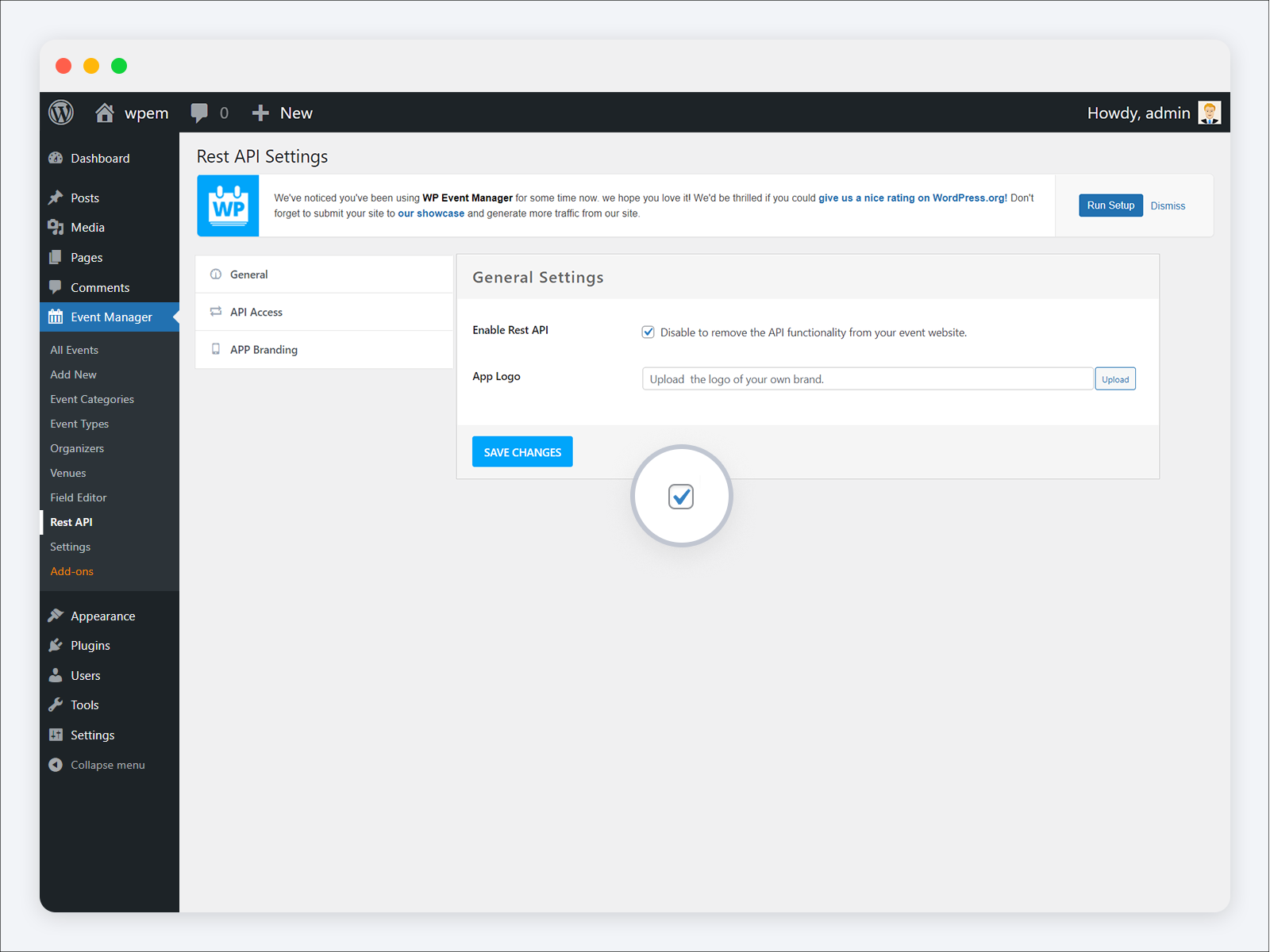
- Event Manager > Rest API: Check that Enable Rest API is on
- API Access tab > Add Key: Pick a user and access level (expiry date and events optional)
- Generate API key: Copy the consumer key and secret (the secret will only be shown once)
- App Branding (Optional): App logo and branding colors
- Use the key to connect your app, or the WP Event Manager app, to the site.
Documentation and Support
- Documentation: Setup guides for this plugin and every add-on
- Support forum: Questions about the free plugin
- Premium support: For add-ons and the Event App
- Certified developers: If you’d like someone to build it for you
- GitHub: Bug reports and pull requests are welcome
- Translate: Help bring the plugin to your language
Reviews on WordPress.org help other organizers find the plugin, so if it has worked well for you, please leave one.
External Services
To check whether a WP Event Manager license has expired, the plugin contacts wp-eventmanager.com and sends the license key. Nothing else is sent. Event details, attendee records, and personal data stay on your site, and the mobile app talks to your website directly rather than going through our servers. Please read our Terms of Use and Privacy Policy for more information.
FAQ
Is the WP Event Manager REST API free?
The plugin is a free download from WordPress.org, and so is the mobile app. Connecting the app to your site does need the Event App add-on, which you get with any WP Event Manager bundle.
Does WP Event Manager have a REST API?
It does, through this plugin. After activation you’ll find endpoints for events, organizers, venues, registered attendees, app branding and matchmaking under /wp-json/wpem/.
How do I connect the WP Event Manager app to my website?
Create a key in Event Manager > Rest API > API Access, then type it into the app. Logging in with a WordPress username and password works too, for staff who don’t want to use a key.
How does QR code check-in work?
A unique QR code is printed on each ticket. When staff scan it in the Event App, that attendee is marked as arrived, and the same code won’t work a second time for somebody else.
Does check-in work without the Internet?
Yes. If there is no connection, the app stores the searches and check-ins on the phone and then forwards them to your site when it is back online.
Can a key be restricted to certain events?
Yes, either to events you pick or to the events the key owner created. An expiry date and a choice of visible app screens can be added on top of that.
Can I build a headless events website or my own mobile app?
Yes. Responses are plain JSON over the WordPress REST API, so any framework works, whether that’s React, Vue, Next.js, Flutter or React Native.
How is this different from the WordPress core REST API?
WordPress core handles posts and pages but knows nothing about events. This plugin adds event endpoints along with things core doesn’t have, such as keys with their own expiry, access per event, check-in rules and app branding.
How does this compare with other WordPress event plugins?
The Events Calendar includes REST API endpoints in its free plugin, though QR check-in sits in the paid Event Tickets Plus. Events Manager sells its iPhone and iPad app on a separate subscription, and Android is still marked as coming soon. WP Event Manager REST API plugin costs nothing. The app works on iOS as well as Android, and you’ll find the Event App add-on in every bundle. On top of that, attendees at conferences can match, book meetings, and message each other through the API.
Is the API secure?
Before answering a request, the plugin checks the key’s permissions and the user’s role. You can set an end date on a key or revoke it at any time. There’s also a setting that shuts the API off for the whole site. With HTTPS on your site, keys are encrypted every time they’re sent.
How can I report security bugs?
Send them to us through the Patchstack Vulnerability Disclosure Program.
Screenshots


Changelog
1.4.5 [ 29th October 2026 ]
Fixed : User unable to login when registration plugin not activate.
Fixed : Enable/Disable Rest API functionality isn’t working.
Fixed : App name and logo aren’t being saved.
Fixed : Admin : Event selection dropdown not shows properly during share API access to users.
Fixed : In allocated API keys listing section, user should able to search API keys details via user details and API key.
Fixed : Attendee checkout not worked.
Fixed : Add Event Type Field to Attendee Events API.
Fixed : General setting Enable/Disable Rest API feature is not working.
Fixed : For Any API key the Last access datetime not showing.
Fixed : In API listing section the selected event is not showing.
Fixed : Ecosystem API Not Reflecting Plugin Activation Status.
Fixed : Book mark plugin has to add in Eco system.
Fixed : Application name should be default as WP Event Manager.
Fixed : Past event is not working.
Fixed : Non Organiser user or volunteer login with app not working.
Fixed : When the ‘Disable Mobile App Check-in’ feature is enabled, the ‘Restrict Check-in’ setting is hidden during API key generation.
Fixed : Code Improvements and Bug Fixes
1.4.4 [ 27th August 2026 ]
Fixed : Fixed an image retrieval issue across event, organizer, and venue API endpoints
Fixed : Code Improvements and Bug Fixes
1.4.3 [ 17th August 2026 ]
Fixed : WordPress Plugin Check warnings and errors.
Fixed : Text domain issues across the plugin.
Fixed : Naming convention issues by adding the wpem_ prefix to all classes and functions.
Fixed : Various WordPress.org Plugin Review issues.
Fixed : Various code standards and compatibility issues.
Fixed : Various Code Improvements and Bug Fixes.
1.4.2 [ 10th July 2026 ]
Fixed : Authentication data securities
Fixed : Permission-check issues
Fixed : Data Sanitization
1.4.1 [ 5th June 2026 ]
Fixed : WordPress.org security problems.
Fixed : Meeting list API status not correctly worked.
Fixed : Update matchmaking profile photo & organization logo.
Fixed : WordPress org problem
Fixed : Access to API always open to everyone everytime
Fixed : Event Overview API venue data missing.
Fixed : Token Addition Issue in Local Only in ecosystem.
Fixed : Crash Issue on Attendee Selection in Event.
Fixed : Ecosystem Issue After Version Update.
Fixed : REST API Access Users Not Displaying.
Fixed : All event not show in app.
Fixed : Various Code Improvements and Bug Fixes.
1.4.0 [ 2nd March 2026 ]
Fixed : Securities Issues fixed.
Added : Match making profile and other new features.
1.3.0 [ 29th January 2026 ]
Fixed : On home page past event is not showing
Added : Need to improve apis for meeting with new endpoints
Fixed : Need to improve match-making setting api
Fixed : Need to create profile api with proper code
Added : Need to repair message apis
Added : Need to combine Filter user api with profile api
Fixed : Get Meetings API provides incomplete information.
Added : QR code API is required( For my Ticket QR code)
Added : QR code API is required ( For Scan QR code)
Added : QR code API is required ( For venue QR code)
Added : My Contact API is required
Added : Need to remove endpoints of old api
Fixed : Various bug fixes and code Improvements
1.2.0 [ 10th September 2025 ]
Fixed : Validation while app key generate
Fixed : App Branding API should be accessible to Attendee
Fixed : Issue in get registered event list for selected user
Fixed : Send name-badge addon details in ecosystem API
Fixed : Add user friendly words and messages
Fixed : Add message-notification flag in get-conversation-list & get-messages API
Fixed : Non Organizer user or volunteer login with app not working
Fixed : Add search by Username in Rest API
Fixed : Meeting create email template design same like web
Fixed : Various Bug Fixes and Code Improvements
1.1.2 [ 27th August 2025 ]
Fixed : Not able to create rest API access key
Fixed : Taxonomy API Not working
Fixed : When Passing empty profile photo then set to default User Image
Fixed : Access to API always open to everyone everytime
Fixed : Add API for matchmaking setting GET and POST
Fixed : Add API related to visibility setting
Fixed : Add API for meeting setting
Fixed : Password change then user will auto logout from mobile application
Fixed : Various bug fixes and code Improvements
1.1.1 [ 25th August 2025 ]
Fixed : Warnings of undefined variables
1.1.1 [ 25th August 2025 ]
Fixed : Warnings of undefined variables
1.1.0 [ 19th August 2025 ]
Fixed : Change the Plugin name
Fixed : After password change the user will auto logout from mobile app
Fixed : Without Active license some section of the app will not work
Added : Match making functionality
1.0.10 [ 09th May 2025 ]
Fixed: All events are shown even from other organizers
1.0.9 [ 02nd May 2025 ]
Fixed: API response time is improved to make APIs faster
Fixed: API requests are now protected with authorization
Fixed: The data loading time in the attendee section became faster
Fixed: The manual check-in process of attendees became faster
Fixed: Initiated multiple bug fixes and code improvements
1.0.8 [ 27th March 2025 ]
Fixed : Password with some special character, user not able to loggedin in app.
1.0.7 [ 12th March 2025 ]
Fixed : Centralize response of Rest Api.
Fixed : Without active license, APP will not work and show message that renew your license.
Fixed : Checkin restriction based on app logged in user and web settings.
Added : Create API for login with username and password instead of app key.
Added : Checkin restriction API added.
1.0.6 [ 26th September 2024 ]
Fixed : Change light mode to dark mode is not save.
Fixed : Generates multiple API keys.
Fixed : Deprecated code error is fixed.
1.0.5 [ 9th Feb 2023 ]
Fixed : Remove a message from the App branding page.
Added : API key expiry status is added.
1.0.4 [ 17th Oct 2023 ]
Fixed : Description is added for REST API addon.
Fixed : Repeated Ajax requests sending while selecting a color issue is fixed.
Fixed : Display the save message while saving App Branding.
Fixed : Show the notice in proper alignment.
Added : A copied key button is added on the key generate page.
Added : Application name feature added to the add-on.
1.0.3 [ 22nd Dec 2022 ]
Fixed – Event Ticket scanning issue with mobile app.
Fixed – Order tab option not working in mobile app.
Fixed – Event organizer user permission issue.
Fixed – Organizer add note feature not working correctly.
Fixed – Ticket sales report visibility issue.
Fixed – Removed licence key for Rest API addon.
1.0.2 [ May 18th, 2022 ]
Fixed – Ecosystem Controller file.
1.0.1 [ May 17th, 2022 ]
Fixed – Past events search.
Fixed – Message and status code improvements.
Fixed – Data improvements.
1.0.0 [ 9th Apr 2021 ]
- Initial release.