


Description
GiveWP Square plugin for WordPress adds Square as a payment gateway for GiveWP donation forms, allowing you to accept credit card donations directly from your WordPress website.
With Square for GiveWP, donors can make payments through the Square payment gateway without being redirected away from your donation form. The integration provides a convenient way for nonprofits, organizations, charities, and fundraising websites to accept online donations through Square.
The online process is quick and easy – simply add the Square payment option to your GiveWP donation form.
With GiveWP Square plugin for WordPress, you have the choice to create a legacy (simple) donation form or a custom donation form with features such as multi-level donations, selectable donation levels, fixed donation amounts, and custom donation amounts.
The plugin also provides Square Sandbox support, allowing you to test your GiveWP donation forms and Square payment integration before processing live donations.
Whether you need a simple Square donation gateway or a more configurable payment solution for GiveWP, this plugin provides multiple options for configuring Square payments across your donation forms.
Features
- Integrate Square payments with GiveWP donation forms.
- Accept credit card donations through the Square payment gateway.
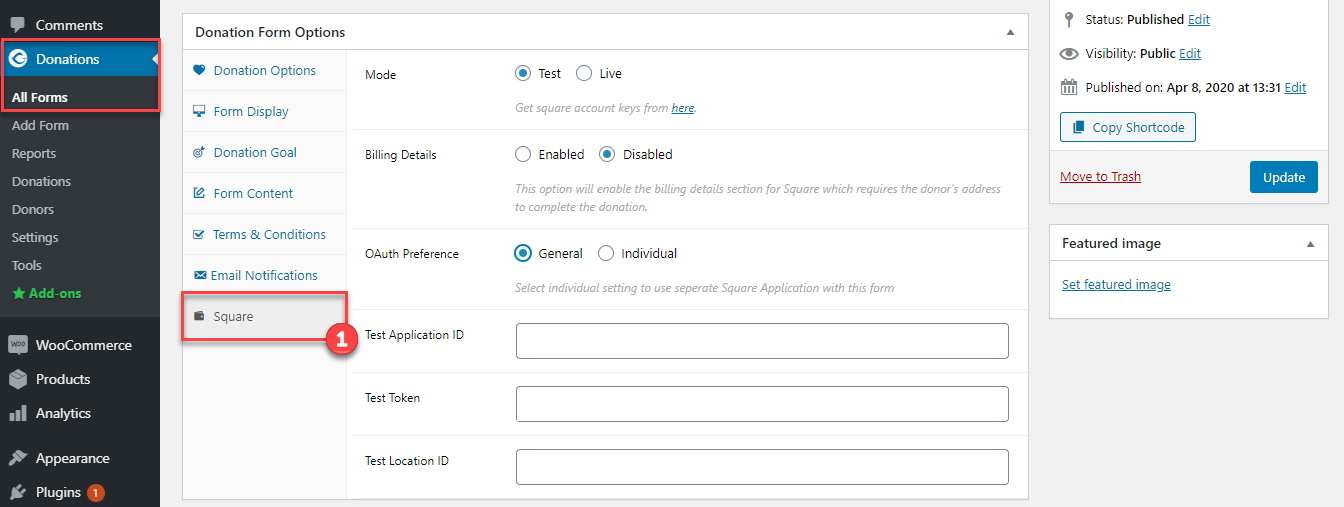
- Add different Square payment settings for each GiveWP donation form.
- Automatically apply global Square payment settings when individual form settings are not configured.
- Display the GiveWP donation form in a modal box or pop-up window.
- Display the donation form as a multi-step form.
- Display donation levels using radio buttons or dropdown menus.
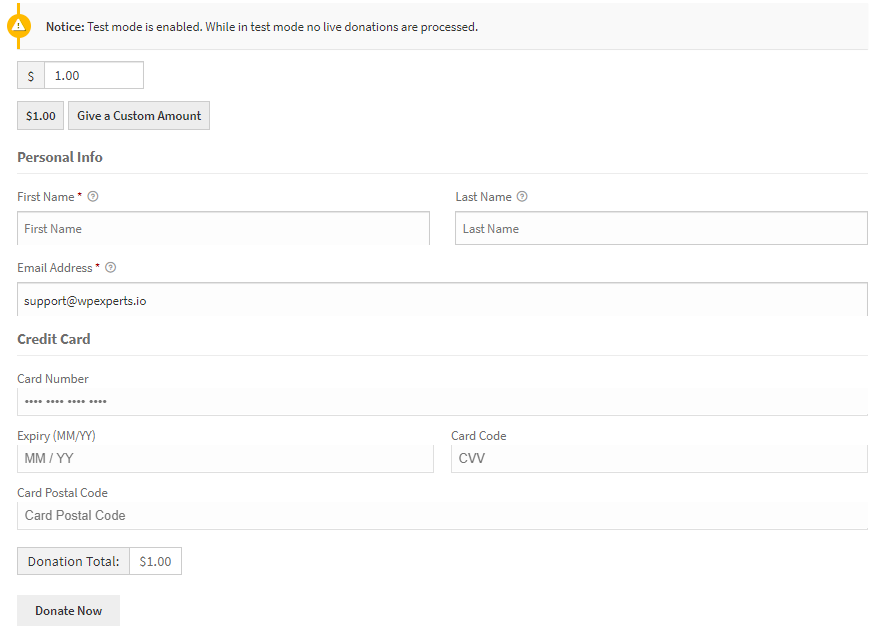
- Add a Square credit card payment field to selected donation forms.
- Configure multi-level donation options using a custom dropdown menu.
- Set minimum and maximum donation amount limits.
- Test Square donation payments using the integrated Square Sandbox environment.
- Allow donors to enter a custom donation amount.
- Configure fixed donation amounts.
- Connect and authorize a Square account through the payment gateway settings.
- Configure Square payment settings globally or individually for donation forms.
- Support Square payment processing through GiveWP’s donation forms.
- Fully documented and supported.
- Secure payment processing through Square.
GiveWP Square Premium
GiveWP Square Premium has enhanced new features that will give you the power to add recurring donation settings to your GiveWP donation forms.
Create your own recurring subscription model and allow donors to configure recurring billing intervals and subscription periods exactly as they want.
Set default donation amount options for donors who do not want to subscribe to a recurring donation schedule.
Premium Features
- Add a recurring donation module – Users will be able to pay their donation amount on a recurring basis.
- Donors can enable or disable their recurring donation subscriptions according to the available configuration.
- Donors can choose the period of their subscription freely or select from a predefined schedule.
- Create your recurring module’s billing interval by setting a period (day/week/month/year) and length of time (ongoing/2~24 months).
- Set a default donation amount for donors who disable recurring donations or choose a recurring donation option.
- Enable or disable the recurring module for each donation level.
Documentation
Click here to view the detailed technical documentation. The documentation includes a step-by-step configuration guide, Square payment setup instructions, and troubleshooting information.
Requirements
- GiveWP – Donation Plugin
- Square Account
- WordPress 6.9 or greater
- PHP 7.4 or greater
- An SSL-enabled website.
- GiveWP Recurring is required for recurring donations in the Premium version.
Installation
- Install and activate GiveWP.
- Upload the GiveWP Square plugin to the
/wp-content/plugins/directory or install it through the WordPress Plugins screen. - Activate the plugin through the Plugins menu in WordPress.
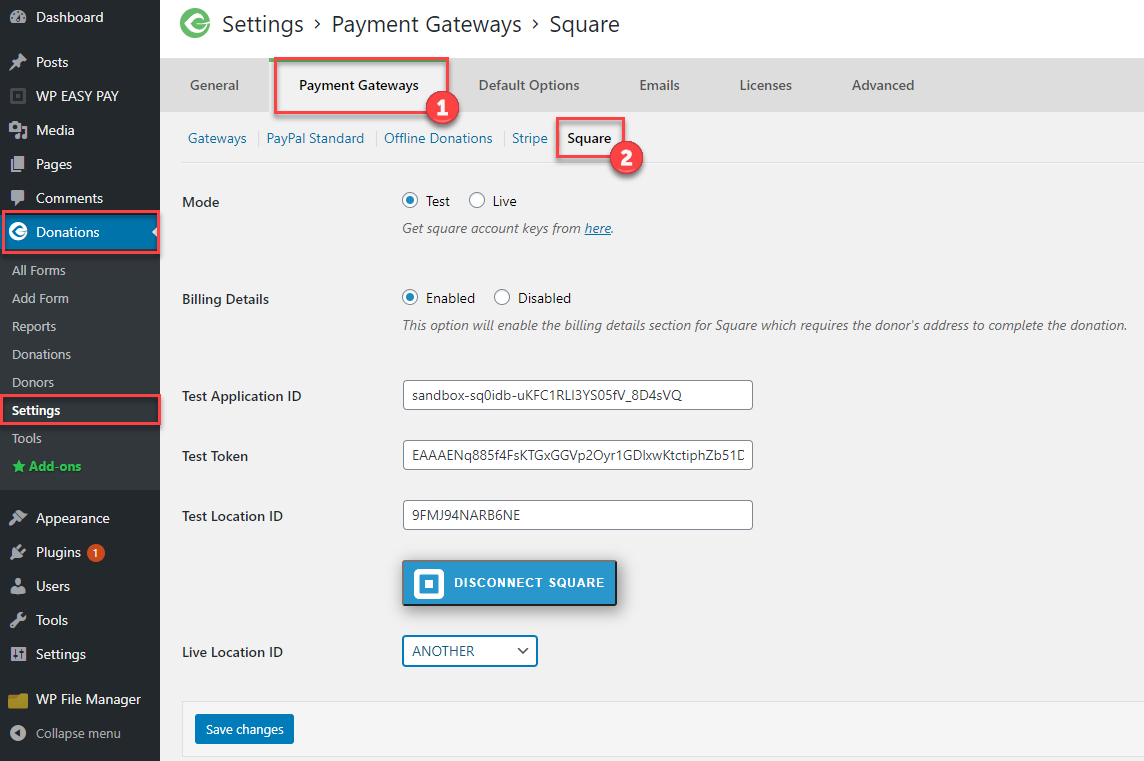
- Go to Donations > Settings > Payment Gateways in your WordPress admin dashboard.
- Select Square and click the Square connection/authorization option.
- Connect your Square account and select the appropriate Square location.
- Save your Square payment gateway settings.
- Configure the Square payment gateway for your GiveWP donation form.
- Your GiveWP donation form is now ready to accept payments through Square.
Square Sandbox Testing
The plugin includes support for the Square Sandbox, allowing you to test the Square payment gateway and donation payment flow before processing live transactions.
To test the integration:
- Enable Test/Sandbox mode in the Square settings.
- Connect the appropriate Square test account.
- Select a test location.
- Use Square’s supported Sandbox payment credentials to test the donation process.
- Switch to Live mode and connect your live Square account when testing is complete.
Payment and Currency Support
The plugin supports Square payment processing for the following currencies:
- USD
- CAD
- AUD
- JPY
- EUR
- GBP
Availability of Square payment services may vary depending on your Square account, location, and Square’s current service availability.
Other Plugins by WPExperts
-
Post SMTP – Reliable WordPress email delivery plugin with detailed email logs and multiple SMTP integrations.
-
Gutena Forms – Create modern, responsive contact forms directly in the Gutenberg block editor. Add advanced fields, protect against spam with reCAPTCHA and Cloudflare Turnstile, manage form entries, and more.
-
Password Protected – Secure your WordPress site, posts, pages, and categories with simple password protection.
-
WP EasyPay – Accept Square payments and donations easily on your WordPress site.
-
WC Shop Sync – Add Square payments and sync WooCommerce products, customers, and orders with your Square POS.
-
Advanced File Manager – Easily manage and organize your WordPress files directly from the dashboard.
-
CF7 Apps – Add honeypot, hCaptcha, and database entries to Contact Form 7. New extensions are continuously added.
-
myCred – Add gamification, rewards, ranks, badges, and points management systems to your WordPress website.
-
New User Approve – Control user registrations by manually approving or denying new signups.
-
All In One Login – Secure your WordPress login page, change the wp-login.php URL, and add social logins like Google, Facebook, Microsoft, LINE, and more.
External Services
This plugin connects to external services to provide Square payment processing and Square merchant account authorization. These services are used when an administrator connects a Square account, when a donor uses Square to make a payment, and when payment-related operations such as refunds or token renewal are performed.
Square
This plugin uses Square to process donations through the Square payment gateway.
The plugin loads Square’s hosted Web Payments SDK on donation forms where Square is configured. The SDK is loaded from the following URLs, depending on the selected payment mode:
- Live:
https://web.squarecdn.com/v1/square.js - Sandbox:
https://sandbox.web.squarecdn.com/v1/square.js
Square’s Web Payments SDK handles payment card details in the donor’s browser and generates a payment source token. The plugin sends this token to Square’s Payments API along with the donation amount, currency, merchant location ID, and idempotency key to process the payment.
The plugin also communicates with Square’s APIs to retrieve merchant locations and process refunds. These requests use the connected merchant account’s access token. Refund requests include the original payment ID, refund amount, and currency.
Square is contacted when a donor submits a payment, when the payment form loads the Square SDK, when merchant locations are retrieved, and when a refund is processed.
The plugin supports both Square Live and Sandbox environments.
- Service: https://squareup.com/
- Square Web Payments SDK: https://developer.squareup.com/docs/web-payments/overview
- Square API documentation: https://developer.squareup.com/reference/square
- Square Privacy Policy: https://squareup.com/legal/general/privacy
- Square Terms of Service: https://squareup.com/legal/general/ua
WPExperts Connection Service
This plugin uses the WPExperts connection service at https://connect.apiexperts.io to facilitate Square merchant account authorization, access-token renewal, and token revocation.
The service is contacted when a site administrator initiates the Square account connection process, when an existing Square access token needs renewal, and when the administrator disconnects the Square account.
During authorization, the plugin sends the site administrator’s redirect URL, requested Square OAuth permissions, plugin identifier, application name, OAuth version, and relevant donation form or post identifier.
During token renewal, the plugin sends the stored Square refresh token, application name, OAuth version, and request type to obtain renewed authentication tokens.
During account disconnection, the plugin sends the site redirect URL, OAuth version, and request type to facilitate token revocation.
The service facilitates the connection between the WordPress website and Square. Payment processing is performed directly through Square’s services.
- Service URL: https://connect.apiexperts.io
- WPExperts Privacy Policy: https://wpexperts.io/privacy-policy/
- WPExperts Terms and Conditions: https://wpexperts.io/terms-and-conditions/
Privacy
This plugin integrates with Square to process donations and uses the WPExperts connection service to authorize and manage the connection between your WordPress website and your Square merchant account.
When a donor selects Square as the payment method, payment card details are handled through Square’s hosted Web Payments SDK. The SDK generates a payment source token, which the plugin uses to submit the donation payment to Square. Payment information required to complete the transaction, including the payment amount and currency, is transmitted to Square’s APIs.
When applicable, the plugin also communicates with Square to retrieve merchant locations and process refunds.
To facilitate Square account authorization and payment processing, the plugin stores the required Square authentication credentials and configuration details in your WordPress database. These may include access tokens, refresh tokens, token expiration information, application IDs, and merchant location IDs. Depending on the configuration, these settings may be stored in WordPress site settings or individual donation form settings.
The WPExperts connection service processes the information required to facilitate Square account authorization, token renewal, and token revocation. This may include authentication tokens and website or plugin configuration information required for these operations.
The handling of payment information and personal information by Square is governed by Square’s privacy policy: https://squareup.com/legal/general/privacy
For information about how WPExperts handles information through its connection service, please review:
https://wpexperts.io/privacy-policy/
By configuring and using the Square payment gateway, the site administrator chooses to connect the website to these external services.
FAQ
How do I add Square to GiveWP?
Install and activate the Square payment gateway plugin, then go to Donations > Settings > Payment Gateways in your WordPress dashboard. Select Square, connect your Square account, select your Square location, and save the settings. You can then configure Square as a payment method for your GiveWP donation forms.
Can I accept credit card donations with GiveWP and Square?
Yes. Square for GiveWP allows you to add Square as a payment gateway and accept supported credit card donations through your GiveWP donation forms.
Does this plugin work with GiveWP?
Yes. The plugin is designed to integrate Square payment processing with GiveWP donation forms and supports both legacy and newer GiveWP donation form configurations.
Does Square for GiveWP support Sandbox mode?
Yes. The plugin includes Square Sandbox support, allowing you to test your Square payment gateway and donation forms before switching to live payment processing.
Can I use different Square settings for different GiveWP donation forms?
Yes. You can configure Square payment settings individually for different GiveWP donation forms. When individual settings are not configured, the global Square settings can be used.
Can I set different donation amounts?
Yes. You can configure fixed donation amounts, custom donation amounts, minimum and maximum donation limits, and multiple donation levels using the available GiveWP form configuration options.
Does Square for GiveWP support recurring donations?
Recurring donation functionality is available through the GiveWP Square Premium version. The Premium version adds recurring donation settings and configurable recurring billing options.
Can donors choose their recurring donation interval?
The Premium version provides configurable recurring donation options, allowing site administrators to offer predefined or configurable billing intervals according to the available settings.
Which currencies are supported?
The plugin currently supports USD, CAD, AUD, JPY, EUR, and GBP. Square payment availability may vary depending on your Square account and location.
Do I need a Square account to use the plugin?
Yes. A Square account is required to connect the Square payment gateway and process donations through Square.
Do I need an SSL certificate?
An SSL-enabled website is recommended for secure payment processing and is required according to the payment configuration and payment services being used.
Can I test Square payments before accepting real donations?
Yes. You can use Square Sandbox to test the GiveWP Square integration and donation payment flow before switching to your live Square account.
Where can I find the GiveWP Square documentation?
Detailed configuration instructions, setup information, and troubleshooting documentation are available in the GiveWP Square documentation.
Where can I get the Premium version?
You can learn more about GiveWP Square Premium and its recurring donation features on the official product page.
Where do I report security bugs found in this plugin?
Please report security vulnerabilities found in the source code of Square Gateway for GiveWP through the Patchstack Vulnerability Disclosure Program. The Patchstack team will assist with vulnerability verification and CVE assignment and notify the plugin developers.
Support
For documentation, configuration instructions, and troubleshooting information, visit:
For information about the Premium version and its additional recurring donation features, visit:
Screenshots
Changelog
1.3.3
- Fixed compatibility issues with GiveWP 2.x, 3.x, and 4.x, including payment gateway API registration, enabled gateway settings, and Visual Form Builder card fields.
- Fixed compatibility issues affecting legacy donation forms.
- Fixed an issue involving Campaigns REST requests and WordPress 6.7+ translation notices in the admin area.
- Improved security for Square access token handling in admin AJAX requests.
- Improved WordPress.org compliance: text domain, license header, and readme documentation for external services.
1.3.2
- Fixed an issue where the source ID could be empty on the donation form.
- Fixed an issue where the form could submit without validating required details in some cases.
- Improved global and individual settings for donation forms.
1.3.1
- Improved SQL query sanitization following security recommendations from Patchstack.
1.3
- Added support for the new Web Payments SDK.
- Fixed various bugs.
1.2
- Updated the location endpoint.
- Added France currency support.
- Fixed various bugs.
1.1
- Added Ireland currency support.
1.0
- Initial release.