

Schedule and automate changes to your WordPress posts. Unpublish, expire, change status or categories, and build workflows with multiple steps.
★ 4.5/5 (173)100,000+ active installations
- Version
- 4.12.0
- WordPress
- 6.8+
- PHP
- 8.2+
- Updated
- 24 Nov 2026
WORDPRESS RESOURCES
Explore public plugin information from the official WordPress.org directory. Compare what a plugin does, its requirements and update history before adding it to your website.
Explore WordPress hosting →1,689 matching plugins reported by WordPress.org · Page 1 of 50
Source: WordPress.org
Data refreshed 24 Nov 2026 21:07 UTC
Schedule and automate changes to your WordPress posts. Unpublish, expire, change status or categories, and build workflows with multiple steps.
By Felix W.
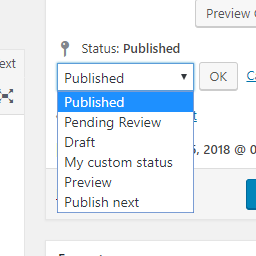
Add new statuses to all post types (posts, pages, products, ...).

By Timo Reith
Notify on every post change: Flexible rules, custom placeholders and support for all post types and taxonomies.

By Nexcess
The Events Calendar: #1 calendar plugin for WordPress. Create/manage events (virtual too!) on your site with the free plugin.

By tildapublishing
Export html page from Tilda.cc for import to your WordPress site into post or page.

By Automattic
The best anti-spam protection to block spam comments and spam in a contact form. The most trusted antispam solution for WordPress and WooCommerce.

Enable users to submit posts and manage profiles from the front-end. Ideal for news, magazines, and creative platforms.

By Md Abul Bashar
Publish and manage student exam results for schools, colleges, and universities with an easy-to-use WordPress result management system.

By PublishPress
The PublishPress Statuses plugin allows you to create additional statuses for your posts. You can use each status to create publishing workflows.
The permissions plugin for posts, pages, categories, tags and more. You can control permissions for roles, individual users, and even custom groups.

By hansjan
Connect WordPress to Adaptify so scheduled SEO content can be published through the WordPress REST API.
PublishPress Planner has all the tools you need to plan WordPress content including a Content Calendar, Content Overview, and Kanban Board.
CHOOSE WHAT YOUR WEBSITE NEEDS
Start with the task you need to solve. Compare features, WordPress and PHP requirements, update history and the author’s documentation. Test changes on a private copy and avoid adding several plugins for the same job.
This independent directory displays plugin information on WebFulHost and links to the official source. Packages are not mirrored or installed here. A plugin can include paid extensions or services with separate terms from its author.

