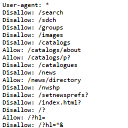
Virtual Robots.txt automatically creates a robots.txt file for your site. Your robots.txt file can be easily edited from the plugin settings page.
★ 4.3/5 (10)40,000+ active installations
- Version
- 1.10
- WordPress
- 5.0+
- Updated
- 20 Aug 2026
View plugin details ↗Get WordPress vulnerability alerts from the WPVulnerability Database API.
★ 5.0/5 (20)10,000+ active installations
- Version
- 5.1.6
- WordPress
- 4.7+
- PHP
- 7.0+
- Updated
- 23 Aug 2026
View plugin details ↗Adds Yoast SEO generated XML Sitemap to the virtual robots.txt file.
★ 5.0/5 (2)2,000+ active installations
- Version
- 2.1
- WordPress
- 5.1+
- PHP
- 7.4+
- Updated
- 27 Mar 2026
View plugin details ↗Control search engine indexing with robots directives using HTML meta tags or HTTP headers.
★ 5.0/5 (2)3,000+ active installations
- Version
- 3.1.3
- WordPress
- 4.0+
- PHP
- 5.6+
- Updated
- 17 Aug 2026
View plugin details ↗An easy-to-use plugin that generates and configures a proper robots.txt file, essential for effective search engine optimization (SEO).
★ 5.0/5 (4)400+ active installations
- Version
- 4.0.3
- WordPress
- 4.6+
- PHP
- 7.0+
- Updated
- 19 Dec 2025
View plugin details ↗Configure different "Reply-To" addresses by email context with validation, modern tabbed UI, and automatic migration.
★ 5.0/5 (1)100+ active installations
- Version
- 2.0.3
- WordPress
- 4.7+
- PHP
- 5.6+
- Updated
- 18 Aug 2026
View plugin details ↗A lightweight file integrity checker, hardening toggles and opt-in known-vulnerability alerts — built to never slow your site down.
★ 5.0/5 (1)10+ active installations
- Version
- 1.1.1
- WordPress
- 6.2+
- PHP
- 7.4+
- Updated
- 5 Sep 2026
View plugin details ↗Ultra lightweight WordPress plugin to monitor your website's performance, health, and security.
0+ active installations
- Version
- 0.1.3
- WordPress
- 6.5+
- PHP
- 7.4+
- Updated
- 18 Oct 2026
View plugin details ↗Monitor installed plugins for known vulnerabilities, update gaps, compatibility signals, and security risk indicators.
0+ active installations
- Version
- 1.0.1
- WordPress
- 6.0+
- PHP
- 7.4+
- Updated
- 20 Jun 2026
View plugin details ↗Active security for WordPress: vulnerability scanning, file integrity, hardening checklist, two-factor authentication, and a tamper-evident audit log.
0+ active installations
- Version
- 0.1.6
- WordPress
- 6.0+
- PHP
- 7.4+
- Updated
- 23 Jun 2026
View plugin details ↗PHP and database end-of-life countdowns, opt-in vulnerability alerts for core, plugins and themes, and abandoned-plugin detection.
0+ active installations
- Version
- 1.0.0
- WordPress
- 6.0+
- PHP
- 7.4+
- Updated
- 12 Nov 2026
View plugin details ↗Customize your site's robots.txt and include remote content to it
★ 3.3/5 (3)1,000+ active installations
- Version
- 0.4.0
- WordPress
- 4.7+
- Updated
- 17 Feb 2018
View plugin details ↗