By Octolize Shipping Plugins
Display real-time DHL Express shipping live rates in your WooCommerce store. Connect with DHL Express API for accurate shipping costs.
★ 4.2/5 (5)600+ active installations
- Version
- 4.2.2
- WordPress
- 6.4+
- PHP
- 7.4+
- Updated
- 27 Oct 2026
View plugin details ↗Boost your site's accessibility with our toggleable widget and dashboard—effortless adjustments fully compatible with WordPress.
★ 5.0/5 (2)10+ active installations
- Version
- 1.0.1
- WordPress
- 5.0+
- Updated
- 26 Feb 2026
View plugin details ↗
By Octolize Shipping Plugins
Offer Royal Mail shipping methods in WooCommerce with real-time rates. Show dynamic prices at cart and checkout based on weight and addresses.
★ 5.0/5 (2)400+ active installations
- Version
- 2.1.4
- WordPress
- 6.4+
- PHP
- 7.4+
- Updated
- 27 Oct 2026
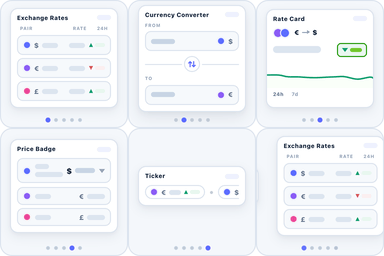
View plugin details ↗Free: ✨ 5 beautiful currency blocks — 📈 live rates, converter, ticker, card, price badge. 173 currencies, 🔌 15 sources, custom rates. No API key.
20+ active installations
- Version
- 1.0.6
- WordPress
- 6.3+
- PHP
- 7.4+
- Updated
- 20 Aug 2026
View plugin details ↗Create stunning responsive sliders in minutes. Drag-and-drop builder, unlimited sliders, mobile-friendly & SEO optimized!
★ 4.5/5 (248)20,000+ active installations
- Version
- 3.5.20
- WordPress
- 4.9+
- PHP
- 7.0+
- Updated
- 29 Oct 2026
View plugin details ↗Accessibility preferences toolbar: text size and spacing, contrast, reading guide, read aloud. No third-party scripts, no cookies, no tracking.
★ 5.0/5 (1)0+ active installations
- Version
- 0.2.1
- WordPress
- 5.8+
- PHP
- 7.4+
- Updated
- 13 Nov 2026
View plugin details ↗Free accessibility widget with text resize, contrast modes, reading guides, big cursor, dictionary lookup, and an accessibility statement generator.
10+ active installations
- Version
- 1.0.0
- WordPress
- 5.0+
- PHP
- 7.4+
- Updated
- 28 Jun 2026
View plugin details ↗
By Octolize Shipping Plugins
Offer FedEx shipping for WooCommerce with real-time rates via FedEx API. Show live rates at checkout based on weight and addresses.
★ 4.4/5 (27)2,000+ active installations
- Version
- 4.6.1
- WordPress
- 6.4+
- PHP
- 7.4+
- Updated
- 27 Oct 2026
View plugin details ↗A modern, lightweight Gutenberg-first WordPress Portfolio Plugin with case studies, dynamic blocks, AJAX filters, WooCommerce, and AI tools.
10+ active installations
- Version
- 2.0.0
- WordPress
- 6.8+
- PHP
- 8.1+
- Updated
- 3 Aug 2026
View plugin details ↗An accessibility-first portfolio and case-study post type — categories, tags and project details, built to WCAG. No lightboxes, no lock-ins.
★ 5.0/5 (1)0+ active installations
- Version
- 1.6.11
- WordPress
- 6.4+
- PHP
- 7.4+
- Updated
- 19 Oct 2026
View plugin details ↗The ultimate WordPress PDF Viewer and 3D Flipbook plugin. Embed interactive PDFs with 4 Elementor widgets, 8 flipbook styles, secure watermarking, and …
10+ active installations
- Version
- 1.1.3
- WordPress
- 5.0+
- PHP
- 7.0+
- Updated
- 23 Nov 2026
View plugin details ↗Production-grade field survey, GPS geotracking, on-site photographic evidence, and offline data collection management system for WordPress.
0+ active installations
- Version
- 1.0.1
- WordPress
- 5.8+
- PHP
- 7.4+
- Updated
- 12 Oct 2026
View plugin details ↗