

The easiest and most useful plugin to display blog posts, pages, or custom posts in beautiful post layouts like post grid, post carousel & post slider
★ 4.5/5 (8)1,000+ active installations
- Version
- 1.8.1
- WordPress
- 4.0+
- Updated
- 19 Aug 2026
WORDPRESS RESOURCES
Explore public plugin information from the official WordPress.org directory. Compare what a plugin does, its requirements and update history before adding it to your website.
Explore WordPress hosting →2,589 matching plugins reported by WordPress.org · Page 10 of 50
Source: WordPress.org
Data refreshed 23 Nov 2026 22:23 UTC
The easiest and most useful plugin to display blog posts, pages, or custom posts in beautiful post layouts like post grid, post carousel & post slider

By WPMU DEV - Your All-in-One WordPress Platform
Broken Link Checker helps you catch broken links & images fast, before they hurt your SEO or UX. Scan and bulk-fix issues from one easy dashboard.
The permissions plugin for posts, pages, categories, tags and more. You can control permissions for roles, individual users, and even custom groups.
By miabou
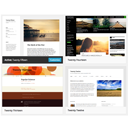
Select different Themes for one or more WordPress Pages, Posts or other non-Admin pages. Or Site Home.

By richplugins
Google Reviews plugin for WordPress. Set up in a minute. No API keys or sign-in. Free, GDPR, review updates, multiple places, widgets and shortcodes.

By Rolf Allard van Hagen
Take control of your WordPress core XML Sitemap and add a Google News Sitemap.

By spicethemes
Display your blog posts with a responsive, customizable slider that works smoothly on all devices.

By Tom
A small collection of lightweight WordPress blocks that can accomplish nearly anything.

Define checklist tasks to complete before publishing posts. Make sure your content meets your requirements.
Create an AI-powered frontend post form, user registration form, user profile page, membership site, user directory, and content restriction.

By Vladimir Garagulya
User Role Editor WordPress plugin makes user roles and capabilities changing easy. Edit/add/delete WordPress user roles and capabilities.

By Fahad Mahmood
This plugin will split your post and pages into multiple pages with a tag. A button to split the pages and posts is available in text editor icons.
CHOOSE WHAT YOUR WEBSITE NEEDS
Start with the task you need to solve. Compare features, WordPress and PHP requirements, update history and the author’s documentation. Test changes on a private copy and avoid adding several plugins for the same job.
This independent directory displays plugin information on WebFulHost and links to the official source. Packages are not mirrored or installed here. A plugin can include paid extensions or services with separate terms from its author.

