

WP Rollback – Rollback Plugins and Themes
By Devin Walker
Roll back (or forward) any WordPress.org plugin, theme, or block like a boss.
★ 4.9/5 (215)200,000+ active installations
- Version
- 3.4.0
- WordPress
- 6.5+
- PHP
- 7.4+
- Updated
- 11 Nov 2026
WORDPRESS RESOURCES
Explore public plugin information from the official WordPress.org directory. Compare what a plugin does, its requirements and update history before adding it to your website.
Explore WordPress hosting →434 matching plugins reported by WordPress.org · Page 10 of 37
Source: WordPress.org
Data refreshed 19 Nov 2026 21:15 UTC
By Devin Walker
Roll back (or forward) any WordPress.org plugin, theme, or block like a boss.

By Joe Dolson
Accessible WordPress event calendar plugin. Manage single or recurring events, event venues, and display your calendar anywhere on your site.

By averta
Build Stunning Slider and Popup. Exit intent Popup, Image slider carousel, video slider carousel, post slider carousel, product slider, promote popup

By dFactory
Count and display post views, track site-wide visits, and see what content works – inside WordPress. Fast, easy to use and privacy-first.
Generate WooCommerce product feeds for 200+ marketplaces. Sell on Google Shopping, Facebook, Instagram, Amazon, eBay, TikTok and more.

By WooCommerce
We’re here to help with tax rates: collect accurate sales tax, automatically.

By Vereniging van Registrars
With a security.txt file, ethical hackers can easily send you a notification when they have found a vulnerability on your website.

By salubrio
Add custom JavaScript/HTML/CSS codes to the page head without editing the template.

By WordPress.org
Posting images, links, and cat gifs will never be the same.
By Denis Botić
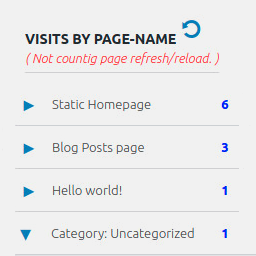
Display number of visits for each page in admin dashboard and browser developer-tool/console. Doesn't count page refresh as a new visit...

By Seraphinite Solutions
Turns on site high speed to be attractive for people and search engines.
By Rai Ansar
Enhanced Autoload Manager - A sleek plugin to manage and optimize autoloaded data in your WordPress database, with a modern and intuitive interface.
CHOOSE WHAT YOUR WEBSITE NEEDS
Start with the task you need to solve. Compare features, WordPress and PHP requirements, update history and the author’s documentation. Test changes on a private copy and avoid adding several plugins for the same job.
This independent directory displays plugin information on WebFulHost and links to the official source. Packages are not mirrored or installed here. A plugin can include paid extensions or services with separate terms from its author.
