

FancyPost provides advanced post blocks, grids, layouts, carousels, and sliders for Block Editor & Elementor. Includes featured posts and sliders.
★ 5.0/5 (6)500+ active installations
- Version
- 6.0.6
- WordPress
- 4.5+
- Updated
- 12 Apr 2026
WORDPRESS RESOURCES
Explore public plugin information from the official WordPress.org directory. Compare what a plugin does, its requirements and update history before adding it to your website.
Explore WordPress hosting →10,000 matching plugins reported by WordPress.org · Page 10 of 50
Source: WordPress.org
Data refreshed 20 Nov 2026 22:47 UTC
FancyPost provides advanced post blocks, grids, layouts, carousels, and sliders for Block Editor & Elementor. Includes featured posts and sliders.

By YellowPencil
Style your WordPress site visually. Discover the most popular front-end design plugin! Try live demo.
By Felix W.
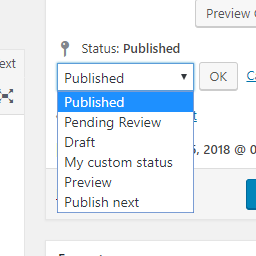
Add new statuses to all post types (posts, pages, products, ...).

By Bastien Ho
The only WordPress plugin using native posts as full calendar events with begin and end date, geolocation, color and weather.

By Nexcess
Turbo charge your posts admin for any custom post type with sortable filters and columns, and auto-registration of metaboxes.

By solverwp
A beautiful, easy to use post slider widget for Elementor to display your recent posts.
Elementor templates, Header footer builder, Elementor Post Grid, Woocommerce Grid builder, Slider, Forms, Gallery, Nav menu addons, Elementor widgets.

By badasswp
Search and Replace text within the WordPress Block Editor just like Microsoft Word or Google Docs. It's super fast, easy & just works!

By Kamlesh Parmar
Allows user to sync Posts, Pages and Custom Post Type with multiple websites.

By codepeople
CodePeople Post Map lets you geotag posts and seamlessly integrate your blog with Google Maps for a smooth, location-aware experience.

By wpazleen
Export and import WordPress posts, pages, users, widgets, menus, themes & settings - real media files, no broken links or missing thumbnails.

By madalin.ungureanu
A must have tool for creating custom fields, custom post types and taxonomies, fast and without any programming knowledge.
CHOOSE WHAT YOUR WEBSITE NEEDS
Start with the task you need to solve. Compare features, WordPress and PHP requirements, update history and the author’s documentation. Test changes on a private copy and avoid adding several plugins for the same job.
This independent directory displays plugin information on WebFulHost and links to the official source. Packages are not mirrored or installed here. A plugin can include paid extensions or services with separate terms from its author.
