Share buttons for WordPress including the AddToAny button, Facebook, Bluesky, Mastodon, WhatsApp, Pinterest, Reddit, many more, and follow icons too.
★ 4.7/5 (1,114)300,000+ active installations
- Version
- 1.8.18
- WordPress
- 4.5+
- PHP
- 5.6+
- Updated
- 22 May 2026
View plugin details ↗Social media icons and share buttons: 2,400+ icons, block, widget & Elementor. Plus a Click to Chat button for WhatsApp, Telegram & Messenger.
★ 4.9/5 (144)90,000+ active installations
- Version
- 5.0.2
- WordPress
- 6.5+
- PHP
- 7.4+
- Updated
- 21 Nov 2026
View plugin details ↗The Word Counter plugin offers a dedicated dashboard view that tracks the word count, post count, pages wordcount, and custom post types across your e …
★ 4.5/5 (2)200+ active installations
- Version
- 2.2
- WordPress
- 5.4+
- Updated
- 17 Mar 2026
View plugin details ↗This plugin allows you to add a search function as a block to narrow down your search by category, tag, custom post type, keyword, etc.
★ 5.0/5 (3)6,000+ active installations
- Version
- 2.22.2
- WordPress
- 5.7+
- PHP
- 7.4+
- Updated
- 12 Nov 2026
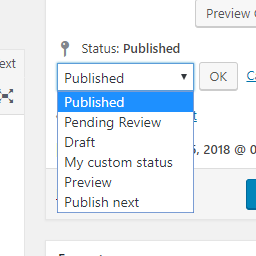
View plugin details ↗Add new statuses to all post types (posts, pages, products, ...).
★ 4.5/5 (11)1,000+ active installations
- Version
- 1.1.1
- WordPress
- 5.0+
- PHP
- 7.2+
- Updated
- 1 Sep 2026
View plugin details ↗
By mra13 / Team Tips and Tricks HQ
Easily manage downloadable files and monitor downloads of your digital files from your WordPress site.
★ 4.7/5 (158)20,000+ active installations
- Version
- 4.1.5
- WordPress
- 6.0+
- Updated
- 22 Nov 2026
View plugin details ↗Delete posts, pages, comments, users, taxonomy terms and meta fields in bulk with different powerful filters and conditions.
★ 4.6/5 (131)90,000+ active installations
- Version
- 1.4.5
- WordPress
- 4.9+
- PHP
- 5.3+
- Updated
- 16 Nov 2026
View plugin details ↗Facebook Feed Widgets. Display your Facebook feed on your website to increase engagement, sales and SEO.
★ 5.0/5 (2)600+ active installations
- Version
- 1.8.4
- WordPress
- 6.2+
- PHP
- 7.2+
- Updated
- 19 Nov 2026
View plugin details ↗Add AJAX likes/dislikes, star ratings, views, reactions, favorites, sharing, and copy content for posts or WooCommerce products.
★ 5.0/5 (3)40+ active installations
- Version
- 3.0
- WordPress
- 4.7+
- PHP
- 7.0+
- Updated
- 23 May 2026
View plugin details ↗Simple plugin that allow you to notes on pages and posts
★ 4.4/5 (14)1,000+ active installations
- Version
- 1.3.5
- WordPress
- 5.0+
- PHP
- 5.2.4+
- Updated
- 13 Aug 2026
View plugin details ↗120+ Elementor widgets, AI tools, Mega Menu, WooCommerce, Header Footer & Popup Builder, Blog Builder & 1000+ templates. Connect any MCP AI agent.
★ 4.6/5 (388)100,000+ active installations
- Version
- 6.6.1
- WordPress
- 6.0+
- PHP
- 7.4+
- Updated
- 16 Nov 2026
View plugin details ↗Redirect manager for 301, 302 and 307 redirection. Monitor and fix 404 errors, log every broken link and protect your SEO after a migration.
★ 4.7/5 (321)100,000+ active installations
- Version
- 4.0.5
- WordPress
- 6.6+
- PHP
- 7.4+
- Updated
- 30 Sep 2026
View plugin details ↗