WP SVG Images
By ShortPixel
Add SVG support to your WP website. Securely upload SVG files, automatic sanitization, Media Library preview.
★ 5.0/5 (13)30,000+ active installations
- Version
- 4.6
- WordPress
- 5.0+
- PHP
- 7.4+
- Updated
- 20 Nov 2026
WORDPRESS RESOURCES
Explore public plugin information from the official WordPress.org directory. Compare what a plugin does, its requirements and update history before adding it to your website.
Explore WordPress hosting →6,778 matching plugins reported by WordPress.org · Page 10 of 50
Source: WordPress.org
Data refreshed 24 Nov 2026 02:55 UTC
By ShortPixel
Add SVG support to your WP website. Securely upload SVG files, automatic sanitization, Media Library preview.

By Dynamic.ooo
Show or hide Elementor widgets, containers, columns, and pages based on user role, date, device, and many other powerful conditions.
Supercharge your WordPress email notifications using a WYSIWYG editor and shortcodes. Default and new notifications available. Add-ons available.
Modern Bulk Editor for Users and Profiles, create and edit hundreds of users in a spreadsheet inside wp-admin. Quick edits.

By add-ons.org
Create custom user registration forms with Elementor Pro Forms, including advanced field validation.

By Infinite Uploads
Enable large file uploads in the built-in WordPress media uploader via file chunking, and set maximum upload file size to any value based on user role …

Restrict content based on login status, user roles, device type & more. Monetize your content with a paywall or members-only content.

By Melapress
The complete WordPress user roles plugin for everyone

PublishPress Authors is the best plugin for adding authors, co-authors, multiple authors and guest authors to WordPress posts.

By Shamim Rajani
Create customized registration forms, Invite through email, Email Notification, User Roles assignment, and more.
Filter, bulk delete, bulk email, change roles, and export WordPress users to CSV — with built-in WooCommerce customer & order filters.
By WP Darko
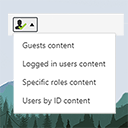
The simplest way of controlling who sees what in your posts/pages. Restrict content to logged in users only (or guests, or by roles) with simple short …
CHOOSE WHAT YOUR WEBSITE NEEDS
Start with the task you need to solve. Compare features, WordPress and PHP requirements, update history and the author’s documentation. Test changes on a private copy and avoid adding several plugins for the same job.
This independent directory displays plugin information on WebFulHost and links to the official source. Packages are not mirrored or installed here. A plugin can include paid extensions or services with separate terms from its author.