WP Chat App
By Ninja Team
Integrate WhatsApp experience directly into your WordPress website.
★ 4.9/5 (222)100,000+ active installations
- Version
- 3.8.2
- WordPress
- 3.0+
- Updated
- 23 Aug 2026
WORDPRESS RESOURCES
Explore public plugin information from the official WordPress.org directory. Compare what a plugin does, its requirements and update history before adding it to your website.
Explore WordPress hosting →1,283 matching plugins reported by WordPress.org · Page 11 of 50
Source: WordPress.org
Data refreshed 22 Nov 2026 22:42 UTC
By Ninja Team
Integrate WhatsApp experience directly into your WordPress website.
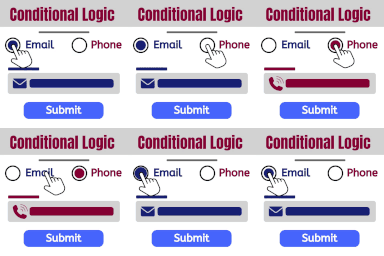
Show and hide fields. Send certain email, don't send others. Redirect to one of many pages. The possibilities are endless!

By Web Builder 143
Create unlimited WooCommerce tabs and assign them in bulk by category, tag, brand, or product. Also disable WooCommerce’s default product tabs.
Build responsive sliders and carousels in the block editor - image, video, post, testimonial, logo and before-after slider blocks.
The fastest drag & drop photo gallery plugin. Create stunning image galleries, albums, video galleries & lightbox displays in minutes — no coding!

By NiteoThemes
Beautiful Coming soon, Maintenance or Landing page on your website, packed with premium features for free.

Powered Cache is the most powerful caching and performance suite for WordPress. Easily Improve PageSpeed & Web Vitals Score.

By Mateusz Gbiorczyk
Speed up your website by using our WebP & AVIF Converter. Optimize images and serve WebP and AVIF images instead of standard formats!

By ShapedPlugin LLC
AI-Powered FAQ Generator. Gutenberg FAQ & Accordion Blocks, Image Accordion, Accordion Slider, WooCommerce Product FAQ – Elementor & Shortcode Ready.

By jetmonsters
40+ Gutenberg Blocks, plus multiple pre-made free block templates for the WordPress block editor.
Shorten, cloak, redirect & track every link in WordPress. Branded short URLs, click analytics, affiliate links & MCP access for AI assistants.
GutenKit – Ultimate no-code Gutenberg blocks to design stunning web pages and visually stunning posts in WordPress block editor.
CHOOSE WHAT YOUR WEBSITE NEEDS
Start with the task you need to solve. Compare features, WordPress and PHP requirements, update history and the author’s documentation. Test changes on a private copy and avoid adding several plugins for the same job.
This independent directory displays plugin information on WebFulHost and links to the official source. Packages are not mirrored or installed here. A plugin can include paid extensions or services with separate terms from its author.