
Cryptocoin Live Ticker
By coinalyze
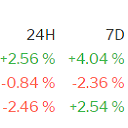
Display cryptocoins current price, 24 hours price change and 7 days price change on your website. You can select which coins/pairs to display.
10+ active installations
- Version
- 1.5.2
- Updated
- 4 May 2018
WORDPRESS RESOURCES
Explore public plugin information from the official WordPress.org directory. Compare what a plugin does, its requirements and update history before adding it to your website.
Explore WordPress hosting →130 matching plugins reported by WordPress.org · Page 11 of 11
Source: WordPress.org
Data refreshed 26 Nov 2026 15:02 UTC
By coinalyze
Display cryptocoins current price, 24 hours price change and 7 days price change on your website. You can select which coins/pairs to display.

By xgenious
Coincap Widget plugin allow you to easily create realtime cryptocurrency price and history char shortcode and show up anywhere on your site.

By Poco
Defines a shortcode for embeddeding the standard coinwidget button on your Wordpress blog.

By btcmerch
Bitcoin/Litecoin Payments with WooCommerce plugin for WordPress.

By EXNCE EXCHANGE
Döviz hesaplama ve kripto para çevirici servisi ile istediğiniz elektronik kripto para birimini, canlı döviz kuruna, bugüne ait döviz kurları üzerinde …

By KAZApocrypha
Defines a shortcode for embeddeding the standard donation button on your WordPress blog.

By shibyville
Send a Wow sets a donation button for cryptocoins like dogecoin, bitcoin and litecoin under every article in your blog.

By Mitch Canter
This plugin allows you to add your Dogecoin donation address to the bottom of your blog posts - automatically!

By Scott Herbert
This Plugin displays simple site stats in the admin toolbar as opposed to from the main admin menu, this allows all users (all who see the toolbar) to …

By John M
A simple widget for placing a quarkcoin donation button on your website!
CHOOSE WHAT YOUR WEBSITE NEEDS
Start with the task you need to solve. Compare features, WordPress and PHP requirements, update history and the author’s documentation. Test changes on a private copy and avoid adding several plugins for the same job.
This independent directory displays plugin information on WebFulHost and links to the official source. Packages are not mirrored or installed here. A plugin can include paid extensions or services with separate terms from its author.