

Custom Product Tabs for WooCommerce
By Sharaz Shahid
Discover the easy way to add extra tabs to your WooCommerce product pages.
0+ active installations
- Version
- 1.2.3
- WordPress
- 6.0+
- PHP
- 7.4+
- Updated
- 23 May 2026
WORDPRESS RESOURCES
Explore public plugin information from the official WordPress.org directory. Compare what a plugin does, its requirements and update history before adding it to your website.
Explore WordPress hosting →267 matching plugins reported by WordPress.org · Page 11 of 23
Source: WordPress.org
Data refreshed 26 Nov 2026 09:55 UTC
By Sharaz Shahid
Discover the easy way to add extra tabs to your WooCommerce product pages.

By Pluginorbit
Add a WooCommerce product selectors for Contact Form 7 with AJAX search, multi-select, and advanced filters. Pro support for WPForms & Gravity Forms.

By WP Travel Engine
The Travel Booking Toolkit plugin works with the WP Travel Engine. It adds special widgets to the Travel Booking theme, making creating travel website …

By Suhas Surse
Custom Buttons for WooCommerce is a simple plugin to customize your store’s add to cart, place order, sale buttons. It makes it easy to change the ‘Ad …

By sheetlink
Send Contact Form 7, WPForms, Gravity Forms, Elementor and 8 more form plugins' submissions to Google Sheets and Excel. Free and unlimited.

By xmoneypayments
xMoney enables new and existing store owners to quickly and effortlessly accept online credit card payments over their WooCommerce shop
By ProPluginsLab
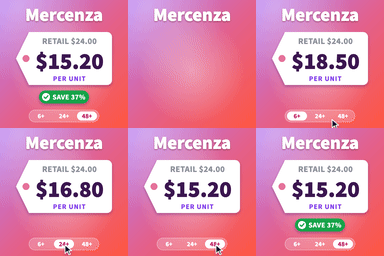
Sell wholesale from your WooCommerce store: customer groups, wholesale prices, quantity breaks, B2B only products, and trade sign up approval.

By Pulse Software Solutions LLC
Qualify leads, boost ecommerce conversions, and cut support costs with an AI chatbot that answers instantly. Setup and training handled for you.

By Alexandre Froger
One-Time Password Authentication for WordPress

By Markas Studio
Add a floating WhatsApp chat button to your site. Visitors click — WhatsApp opens. That's it.

By demfilz
Customers add products to a quote list and request a quote. Price it as a WooCommerce order, send it, and they accept and pay online.

By CCDesign.gr
WordPress traffic attribution and conversion tracking for forms and contact clicks, with UTM, lead source and campaign reporting.
CHOOSE WHAT YOUR WEBSITE NEEDS
Start with the task you need to solve. Compare features, WordPress and PHP requirements, update history and the author’s documentation. Test changes on a private copy and avoid adding several plugins for the same job.
This independent directory displays plugin information on WebFulHost and links to the official source. Packages are not mirrored or installed here. A plugin can include paid extensions or services with separate terms from its author.