

Advanced Elementor addons plugin with widgets, WooCommerce builder, mega menu, popup builder and Elementor template kits for faster website design.
★ 4.8/5 (4)6,000+ active installations
- Version
- 1.0.38
- WordPress
- 5.0+
- PHP
- 7.4+
- Updated
- 18 Jul 2026
WORDPRESS RESOURCES
Explore public plugin information from the official WordPress.org directory. Compare what a plugin does, its requirements and update history before adding it to your website.
Explore WordPress hosting →6,776 matching plugins reported by WordPress.org · Page 11 of 50
Source: WordPress.org
Data refreshed 23 Nov 2026 22:19 UTC
Advanced Elementor addons plugin with widgets, WooCommerce builder, mega menu, popup builder and Elementor template kits for faster website design.

By WP Table Builder
Drag and Drop Table Builder Plugin. Build Responsive Tables Easily.
Create beautiful, responsive team member sections with grid, slider, list, popup, and carousel layouts. Perfect for companies, agencies, startups, sch …
20+ Gutenberg Blocks with endless options, enabling top-notch efficiency for high-performance dynamic website creation.

By Greg - SiteOrigin
Build responsive page layouts using the widgets you know and love using this simple drag and drop page builder.
Build photo galleries in a visual editor. Free MCP support lets Claude, ChatGPT or Cursor create galleries and write your image alt text.
By Realwebcare
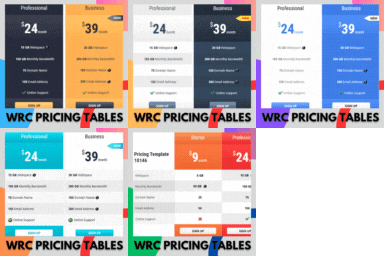
Responsive CSS3 pricing tables design to present features and prices of different products. Display pricing tables or comparison table by shortcode.

By freetobook
Add the freetobook responsive widget to your WordPress blog.

By Mubashir Taqi
Smart login/logout menus for classic and block themes, with conditional redirects for roles, courses, memberships, and purchases.

By wp.insider
Simple membership plugin adds membership functionality to your site. Protect members only content using content protection easily.

By Dream Theme
Better Block Editor (BBE) — responsive layout controls, on-scroll animations, and pre-made site templates for Block Editor.
Organize thousands of WordPress media files in folders / categories with ease.
CHOOSE WHAT YOUR WEBSITE NEEDS
Start with the task you need to solve. Compare features, WordPress and PHP requirements, update history and the author’s documentation. Test changes on a private copy and avoid adding several plugins for the same job.
This independent directory displays plugin information on WebFulHost and links to the official source. Packages are not mirrored or installed here. A plugin can include paid extensions or services with separate terms from its author.



