Disable comments site-wide or by post type, delete existing comments in bulk, and block comment spam via REST API and XML-RPC. Multisite ready.
★ 4.7/5 (282)1,000,000+ active installations
- Version
- 2.9.2
- WordPress
- 5.0+
- PHP
- 7.0+
- Updated
- 19 Nov 2026
View plugin details ↗The RSS Feed checker looks through your blogroll for links with rss feeds and captures the details to be shown in a widget.
★ 5.0/5 (1)20+ active installations
- Version
- 2.0
- WordPress
- 6.9+
- Updated
- 1 Feb 2026
View plugin details ↗Social sharing plugin adding social buttons.
★ 4.9/5 (1,911)10,000+ active installations
- Version
- 3.7.6
- WordPress
- 3.0+
- Updated
- 10 Oct 2026
View plugin details ↗Use external image URLs for WordPress featured images and WooCommerce product images. No uploads required. FIFU PRO adds videos and galleries.
★ 4.6/5 (265)60,000+ active installations
- Version
- 6.1.8
- WordPress
- 5.6+
- PHP
- 8.1+
- Updated
- 18 Nov 2026
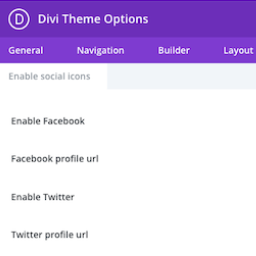
View plugin details ↗This plugin adds the ability to add more social icons to your website when using the Divi theme.
★ 5.0/5 (4)1,000+ active installations
- Version
- 1.8.1
- WordPress
- 5.1+
- PHP
- 5.4+
- Updated
- 7 May 2026
View plugin details ↗Remove RSS Feed is the best plugin to remove RSS feed from your website.
★ 5.0/5 (4)1,000+ active installations
- Version
- 1.2.1
- WordPress
- 4.3+
- PHP
- 5.2.4+
- Updated
- 31 Jul 2024
View plugin details ↗Patch wp2shell instantly by Disabling REST API access.
★ 5.0/5 (6)30,000+ active installations
- Version
- 0.4.2
- WordPress
- 3.9+
- Updated
- 27 Oct 2026
View plugin details ↗Republish old posts automatically by resetting the date to the current date. Promote old posts to users that haven't seen them.
★ 4.3/5 (12)2,000+ active installations
- Version
- 1.27
- WordPress
- 5.0+
- Updated
- 20 Aug 2026
View plugin details ↗This plugin will generate a valid SmartFormat Feed. SmartFormat is an extension of the RSS spec that provides feed elements to specify a publisher� …
★ 4.0/5 (1)1,000+ active installations
- Version
- 1.5.0
- WordPress
- 6.1+
- PHP
- 8.2+
- Updated
- 22 Oct 2026
View plugin details ↗Automatically post contents, create news feeds, import and display unlimited RSS feeds from various sources in a few clicks!
★ 3.6/5 (36)700+ active installations
- Version
- 2.2.5
- WordPress
- 5.9+
- PHP
- 8.0+
- Updated
- 18 Oct 2026
View plugin details ↗With the "User Access Manager"-plugin you can manage the access to your posts, pages and files.
★ 4.4/5 (112)10,000+ active installations
- Version
- 2.3.20
- WordPress
- 4.7+
- PHP
- 8.0+
- Updated
- 10 Sep 2026
View plugin details ↗Social feed plugin: show Instagram, Facebook and X (Twitter) feeds in one responsive social media wall, grid or widget.
★ 3.3/5 (100)7,000+ active installations
- Version
- 5.0.8
- WordPress
- 5.0+
- PHP
- 5.6+
- Updated
- 11 Nov 2026
View plugin details ↗