
Generate AI blog posts with images in one click. Auto-pilot mode writes and publishes SEO-optimized articles with WooCommerce support.
30+ active installations
- Version
- 3.2.4
- WordPress
- 5.9+
- PHP
- 7.4+
- Updated
- 4 Jul 2026
WORDPRESS RESOURCES
Explore public plugin information from the official WordPress.org directory. Compare what a plugin does, its requirements and update history before adding it to your website.
Explore WordPress hosting →547 matching plugins reported by WordPress.org · Page 12 of 46
Source: WordPress.org
Data refreshed 25 Nov 2026 18:29 UTC
Generate AI blog posts with images in one click. Auto-pilot mode writes and publishes SEO-optimized articles with WooCommerce support.
Design pixel-perfect Headers, Footers, Mega Menus, Popups, Archive, Single, and 404 templates visually with Elementor - no coding needed.
Easily create a professional staff directory or team showcase. Display meet the team profiles fast using Elementor widgets, Gutenberg, or shortcodes.
Show coaches, trainers and consultants with photos, profession, experience and education in a grid or slider. No coding needed.
Gamified user engine with EXP levels, Coin/Cash wallet, check-in, VIP, inbox, and referral – powered by REST API and Vanilla JS.

By vkwebdesign
Self-hosted link-in-bio page for a profile you share from Instagram, TikTok, or your own site.

By Brecht
The easy and user-friendly recipe plugin for everyone. Automatic JSON-LD metadata for food AND how-to recipes will improve your SEO!

By Renzo Tejada
Utils para WooCommerce y WordPress - Support functions - Utilities, essential functions.

By Let A Pro Do IT!
Author's Note allows you to add author's notes and after-thoughts to your blog posts and pages.
Effortlessly design stunning websites for authors, writers, publishers, and bloggers with Elementor using Author Website Templates.

By iworks (Marcin Pietrzak)
The simple method to add Open Graph metadata to your entries so that they look great when shared on sites.
By RS WP THEMES
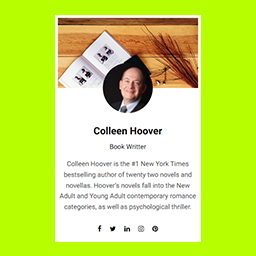
A simple and lightweight widget to display an author's name, profile image, short description, and social media links in any sidebar or widget area.
CHOOSE WHAT YOUR WEBSITE NEEDS
Start with the task you need to solve. Compare features, WordPress and PHP requirements, update history and the author’s documentation. Test changes on a private copy and avoid adding several plugins for the same job.
This independent directory displays plugin information on WebFulHost and links to the official source. Packages are not mirrored or installed here. A plugin can include paid extensions or services with separate terms from its author.