
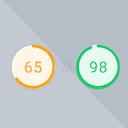
Preload Featured Images
By WPZOOM
Preload Featured Images automatically in posts to increase the PageSpeed Score.
★ 5.0/5 (3)1,000+ active installations
- Version
- 1.1.0
- WordPress
- 6.3+
- PHP
- 7.4+
- Updated
- 20 Aug 2026
WORDPRESS RESOURCES
Explore public plugin information from the official WordPress.org directory. Compare what a plugin does, its requirements and update history before adding it to your website.
Explore WordPress hosting →257 matching plugins reported by WordPress.org · Page 12 of 22
Source: WordPress.org
Data refreshed 19 Nov 2026 21:54 UTC
By WPZOOM
Preload Featured Images automatically in posts to increase the PageSpeed Score.

By ShapedPlugin LLC
AI-Powered FAQ Generator. Gutenberg FAQ & Accordion Blocks, Image Accordion, Accordion Slider, WooCommerce Product FAQ – Elementor & Shortcode Ready.

By Gemini Labs
Site Reviews is the best free reviews plugin. It integrates with WooCommerce & SureCart and works just like reviews on Amazon, Tripadvisor, and Yelp.

By averta
Build Stunning Slider and Popup. Exit intent Popup, Image slider carousel, video slider carousel, post slider carousel, product slider, promote popup

By Rynald0s
The ultimate WooCommerce performance plugin with intelligent caching, media optimization, database cleanup, and CDN integration.

By Ravikumar Patel
Preload or prefetch images, site-wide or per page, for a faster page loading experience.

By Raul P.
Maximize GTmetrix, PageSpeed and enhance Web Vitals by minifying CSS/JS, lazy loading scripts, optimizing images, and improving load speed overall.
Powerful and comprehensive plugin that extends the functionality of Phlox Elementor theme.

By critiqueplus
Build responsive product comparisons with rich editing, templates, Gutenberg blocks, SEO schema, privacy-friendly analytics and affiliate tools.

By Awais Altaf
Show your logo anywhere: theme header, login screen, admin bar, and emails. Retina, dark mode, mobile, sticky, and per-page logos.

By dFactory
The most popular lightbox plugin and responsive gallery builder for WordPress.
Show a second product image on hover in your WooCommerce shop: fade, slide or zoom, gallery rotation, arrows and a lightbox.
CHOOSE WHAT YOUR WEBSITE NEEDS
Start with the task you need to solve. Compare features, WordPress and PHP requirements, update history and the author’s documentation. Test changes on a private copy and avoid adding several plugins for the same job.
This independent directory displays plugin information on WebFulHost and links to the official source. Packages are not mirrored or installed here. A plugin can include paid extensions or services with separate terms from its author.

