
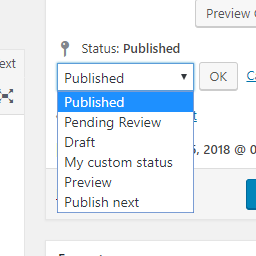
Extended Post Status
By Felix W.
Add new statuses to all post types (posts, pages, products, ...).
★ 4.5/5 (11)1,000+ active installations
- Version
- 1.1.1
- WordPress
- 5.0+
- PHP
- 7.2+
- Updated
- 1 Sep 2026
WORDPRESS RESOURCES
Explore public plugin information from the official WordPress.org directory. Compare what a plugin does, its requirements and update history before adding it to your website.
Explore WordPress hosting →10,000 matching plugins reported by WordPress.org · Page 12 of 50
Source: WordPress.org
Data refreshed 26 Nov 2026 13:10 UTC
By Felix W.
Add new statuses to all post types (posts, pages, products, ...).

By Younes JFR.
The ultimate search & replace plugin for WordPress. Safely update text, URLs, and serialized data across your entire database with confidence.

By WP Smart Widgets
The only free pro-grade Elementor filtering system for posts, taxonomies, custom fields, ACF, WooCommerce, WPML & more. Ditch paid limits!

By solverwp
A beautiful, easy to use post slider widget for Elementor to display your recent posts.
Formerly "Custom Facebook Feed". Display completely customizable Facebook feeds of a Facebook page. Supports Facebook oEmbeds.

By dsky
Precise and fast search, autocompletion, and search suggestions for your WordPress page.

By WebEquipe
Search inside your PDF documents. Index text-based PDFs in WordPress search. Pro adds OCR, private search, and analytics.
The most flexible filters for WooCommerce products & WordPress content. Includes everything needed, supports Elementor & builders, AJAX, quick setup.
Add advanced custom search to your WordPress site. Search custom post types, taxonomies, and custom fields with full control over results.

By ZephyrWest
Shows a list of recent posts from a category - with thumbnails, excerpt and a load more button. For posts, pages and the Site Editor.

By ShapedPlugin LLC
Widget Post Slider to display post images in a slider from one or more categories.

By Sybre Waaijer
The fastest feature-complete SEO plugin for professional WordPress websites. Secure, fast, unbranded, and automated SEO. Do less; get better results.
CHOOSE WHAT YOUR WEBSITE NEEDS
Start with the task you need to solve. Compare features, WordPress and PHP requirements, update history and the author’s documentation. Test changes on a private copy and avoid adding several plugins for the same job.
This independent directory displays plugin information on WebFulHost and links to the official source. Packages are not mirrored or installed here. A plugin can include paid extensions or services with separate terms from its author.


