
Product Category Dropdowns
By Pektsekye
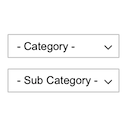
Displays product categories as dependent drop-down selects.
★ 4.7/5 (12)800+ active installations
- Version
- 1.0.0
- WordPress
- 4.7+
- Updated
- 16 Nov 2026
WORDPRESS RESOURCES
Explore public plugin information from the official WordPress.org directory. Compare what a plugin does, its requirements and update history before adding it to your website.
Explore WordPress hosting →10,000 matching plugins reported by WordPress.org · Page 13 of 50
Source: WordPress.org
Data refreshed 29 Nov 2026 07:35 UTC
By Pektsekye
Displays product categories as dependent drop-down selects.

By nasir179125
A collection of customizable elements for WPBakery Page Builder.

By Benjamin Denis
WordPress SEO plugin with AI SEO metadata, schema, XML sitemap, redirections & Search Console. Privacy-first, white-label SEO. Now AI-ready.
Most popular WooCommerce product feed plugin supporting Google shopping feed, meta/facebook feed, bing product feed & more.
Free WooCommerce dashboard & sales report: recover abandoned carts, order export, Google Sheets sync, ROAS, bulk edit & inventory management

By Fernando Tellado
Page cache, browser cache, defer JS, critical CSS, lazy load and WordPress cleanup. Speed up your site and disable the bloat you do not need.
WordPress blocks, page builder, and website builder for the Block Editor and Site Editor with templates, popups, and block themes.

By GoDaddy
CoBlocks is a suite of page builder WordPress blocks for Gutenberg, with 10+ new blocks and a true page builder experience with rows and columns.

By Anzar Ahmed
Show WooCommerce variation dropdowns on the shop and category pages so customers can pick options and add variable products to cart faster.
Create thousands of targeted landing pages in bulk, boost your search visibility, and save countless hours of manual work with MPG.🚀

By Riaan K.
Replace the default WooCommerce Thank You page (order received page) with a custom Thank You page.

By George Stephanis
This widget will let you display a list of the most recent posts in a single category in your sidebar.
CHOOSE WHAT YOUR WEBSITE NEEDS
Start with the task you need to solve. Compare features, WordPress and PHP requirements, update history and the author’s documentation. Test changes on a private copy and avoid adding several plugins for the same job.
This independent directory displays plugin information on WebFulHost and links to the official source. Packages are not mirrored or installed here. A plugin can include paid extensions or services with separate terms from its author.



