
Collapsing Pages
By robfelty
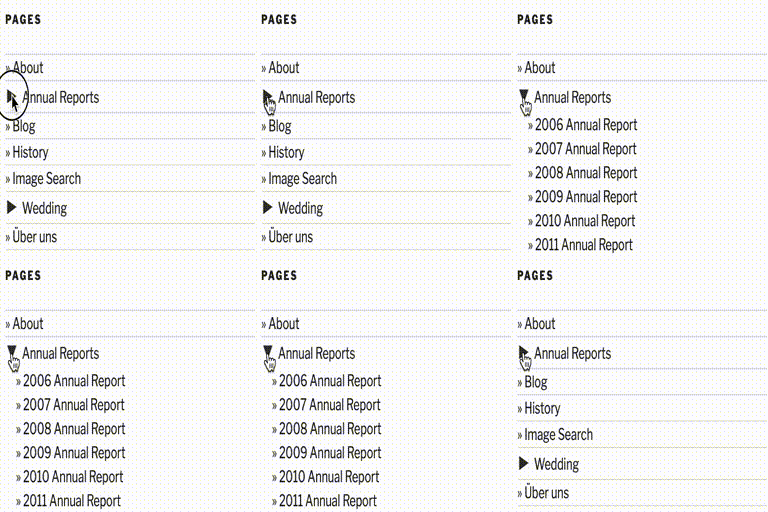
This plugin uses Javascript to dynamically expand or collapsable the set of pages for each parent page.
200+ active installations
- Version
- 2.0.3
- WordPress
- 5.0+
- Updated
- 1 Jan 2024
WORDPRESS RESOURCES
Explore public plugin information from the official WordPress.org directory. Compare what a plugin does, its requirements and update history before adding it to your website.
Explore WordPress hosting →754 matching plugins reported by WordPress.org · Page 13 of 50
Source: WordPress.org
Data refreshed 23 Nov 2026 09:14 UTC
By robfelty
This plugin uses Javascript to dynamically expand or collapsable the set of pages for each parent page.

By megamenu
An easy to use mega menu plugin. Written the WordPress way.

By chitvan
Free reading time, reading progress, and reader controls, with shortcodes and a WordPress block.
One-click like buttons your visitors actually use, plus a built-in analytics dashboard that shows what your audience loves. No vote limits.

By Progress Planner
Find and fix bloated autoloaded options slowing down your WordPress database

By Samuel Nwaokoro
Load only essential plugins per page for 65-75% faster WordPress sites through intelligent filtering.

By colorlibplugins
Seamlessly integrates FancyBox lightbox into your WordPress blog: Upload, activate, and you're done. Additional configuration optional.

By Mickaël Larguier
Adds a "Reverse on Mobile" option to the Columns, Row, Stack and Media & Text blocks in Gutenberg.

Offload WordPress media to Amazon S3, Cloudflare R2, DigitalOcean Spaces & more. Save server space, serve files via CDN, speed up your site.
WooCommerce wholesale plugin for serving wholesale & B2B customers. Adds wholesale pricing, user roles, dynamic pricing & more.

By Janis Elsts
Adds a Dashboard widget that displays the latest messages from your PHP error log. It can also send logged errors to email.
HUSKY - WooCommerce Products Filter (former WOOF) – filter by categories, attributes, price and meta fields, with a built-in MCP server
CHOOSE WHAT YOUR WEBSITE NEEDS
Start with the task you need to solve. Compare features, WordPress and PHP requirements, update history and the author’s documentation. Test changes on a private copy and avoid adding several plugins for the same job.
This independent directory displays plugin information on WebFulHost and links to the official source. Packages are not mirrored or installed here. A plugin can include paid extensions or services with separate terms from its author.


