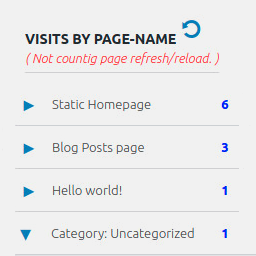
Display number of visits for each page in admin dashboard and browser developer-tool/console. Doesn't count page refresh as a new visit...
★ 4.0/5 (7)5,000+ active installations
- Version
- 2.0.5
- WordPress
- 6.5+
- PHP
- 5.6.40+
- Updated
- 14 Sep 2026
View plugin details ↗Access Governance for WordPress. Understand, control, and continuously govern who and what can access your WordPress website.
★ 4.2/5 (421)100,000+ active installations
- Version
- 8.0.2
- WordPress
- 6.2+
- PHP
- 8.0+
- Updated
- 19 Oct 2026
View plugin details ↗PublishPress Authors is the best plugin for adding authors, co-authors, multiple authors and guest authors to WordPress posts.
★ 4.9/5 (114)20,000+ active installations
- Version
- 4.20.1
- WordPress
- 5.5+
- PHP
- 8.2+
- Updated
- 18 Nov 2026
View plugin details ↗All-in-One Authorship Solution: Seamless Author Box, Guest Authors, and Co-Authors to enhance your site's authority, credibility, engagement, and SEO.
★ 4.7/5 (158)10,000+ active installations
- Version
- 5.3.2
- WordPress
- 5.2+
- PHP
- 5.6.20+
- Updated
- 8 Oct 2026
View plugin details ↗Join millions who empower their websites with ElementsKit Elementor Addons. Get templates, & 100+ widgets like header-footer, mega menu, custom widget
★ 4.9/5 (2,052)1,000,000+ active installations
- Version
- 4.2.0
- WordPress
- 6.0+
- PHP
- 7.4+
- Updated
- 17 Nov 2026
View plugin details ↗Edit WordPress posts and pages directly from the frontend using a clean modal editor. Simple, fast, and secure frontend post editing for all roles.
★ 4.5/5 (2)40+ active installations
- Version
- 1.0
- WordPress
- 5.0+
- PHP
- 7.4+
- Updated
- 12 Nov 2025
View plugin details ↗Switch to any WordPress user account in one click for testing, support, and WooCommerce customer troubleshooting.
★ 5.0/5 (2)10+ active installations
- Version
- 1.0.13
- WordPress
- 6.0+
- PHP
- 7.4+
- Updated
- 8 Jun 2026
View plugin details ↗Harden your site security with Login Security, Two-Factor Authentication (2FA), Vulnerability Scanner, Firewall, and more. Formerly iThemes Security.
★ 4.6/5 (3,992)700,000+ active installations
- Version
- 10.0.6.1
- WordPress
- 6.5+
- PHP
- 7.4+
- Updated
- 16 Nov 2026
View plugin details ↗Build responsive Swiper carousels with images, media, and nested WordPress blocks.
★ 5.0/5 (24)4,000+ active installations
- Version
- 1.5.0
- WordPress
- 6.3+
- PHP
- 7.4+
- Updated
- 4 Aug 2026
View plugin details ↗Organize thousands of WordPress media files in folders / categories with ease.
★ 4.7/5 (1,126)200,000+ active installations
- Version
- 6.5.9
- WordPress
- 3.0+
- PHP
- 7.4+
- Updated
- 13 Oct 2026
View plugin details ↗A full-featured and entirely free Google Analytics Dashboard plugin for WordPress. Displays stats to help you to better understand your site content.
★ 4.6/5 (34)10,000+ active installations
- Version
- 6.4
- WordPress
- 3.5+
- PHP
- 5.6+
- Updated
- 19 Oct 2026
View plugin details ↗
By WordPress Performance Team
Prioritizes the loading of images and videos based on how they appear to actual visitors: adds fetchpriority, preloads, lazy-loads, and sets sizes.
★ 5.0/5 (1)40,000+ active installations
- Version
- 1.0.0-beta4
- WordPress
- 6.9+
- PHP
- 7.4+
- Updated
- 26 Aug 2026
View plugin details ↗